Page 241 of 268
04
239
The MP3 format, an abbreviation of MPEG 1.2 & 2.5 Audio Layer 3, is an audio compression standard which permits the recording of several tens of music fi les on a single disc.
In order to be able to play a recorded CDR or CDRW, when recording, the ISO 9660 level 1.2 or Joliet fi le format is recommended.
If the disc is recorded in another format, it may not be played correctly.
It is recommended that the same recording format is always used for an individual disc, with as low a speed as possible (4x maximum) for optimum sound quality.
In the particular case of a multi-session CD, the Joliet format is recommended.
The audio system will only play fi les with the extension ".mp3" with a sampling rate of 22.05 KHz or 44.1 KHz. No other type of fi le (.wma, .mp4, .m3u...) can be played.
It is advisable to restrict fi le names to 20 characters without using special characters (e.g. " ? ; ù) to avoid any playing or displayin\
g problems.
MP3 CD
Information and advice
AUDIO
Empty CDs are not recognised and may damage the system.
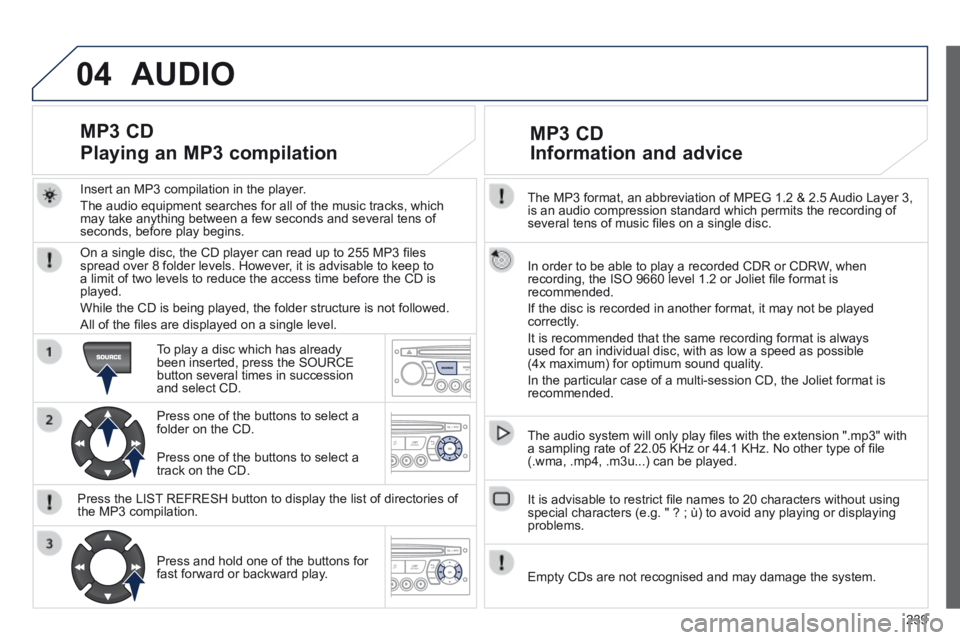
Insert an MP3 compilation in the player.
The audio equipment searches for all of the music tracks, which may take anything between a few seconds and several tens of seconds, before play begins.
MP3 CD
Playing an MP3 compilation
On a single disc, the CD player can read up to 255 MP3 fi les spread over 8 folder levels. However, it is advisable to keep to a limit of two levels to reduce the access time before the CD is played.
While the CD is being played, the folder structure is not followed.
All of the fi les are displayed on a single level.
To play a disc which has already been inserted, press the SOURCE button several times in succession and select CD.
Press one of the buttons to select a folder on the CD.
Press the LIST REFRESH button to display the list of directories of the MP3 compilation.
Press and hold one of the buttons for fast forward or backward play.
Press one of the buttons to select a track on the CD.
Page 244 of 268

05
242
Using the PEUGEOT CONNECT USB
Press LIST briefl y to display the previously selected classifi cation.
Navigate through the list using the left/right and up/down buttons.
Confi rm the selection by pressing OK.
The lists available are Artist, Genre and Playlist (as defi ned in the Apple ® player). ® player). ®
Selection and Navigation are described in steps 1 to 4 above.
Do not connect a hard disk or USB connection device other than audio equipment to the USB port. This could damage your installation.
Connecting an Apple ® Connecting an Apple ® Connecting an Apple player via the USB port ® player via the USB port ®
Press one of these buttons to gain access to the previous / next track on the classifi cation list currently being played.
Press and hold one of the buttons for fast forward or backward play.
Press one of these buttons to gain access to the previous / next Genre, Folder, Artist or Playlist on the classifi cation list currently being played.
Press and hold LIST to display the different classifi cations.
Select by Folder / Artist / Genre / Playlist, press OK to select the classifi cation required, then press OK again to confi rm.
- by Folder: all folders containing audio fi les recognised on the peripheral device.
- by Artist: all of the artist names defi ned in the ID3 Tags, classifi ed in alphabetical order.
- by Genre: all of the genres defi ned in the ID3 Tags.
- by Playlist: in accordance with the playlists recorded on the USB device.
PEUGEOT CONNECT USB
Page 246 of 268

06
244
Receiving a call
An incoming call is announced by a ring and a superimposed display in the vehicle's screen.
Select the YES tab on the display using the buttons and confi rm by pressing OK.
Press this button to accept the call.
Making a call
From the Bluetooth telephone function Audio menu, select Manage the telephone call then Call, Call list or Directory.
Press this button for more than two seconds for access to your directory, then navigate with the thumb wheel.
Or
To dial a number, use your telephone's keypad, with the vehicle stationary.
BLUETOOTH
The system accesses the telephone's contacts directory, depending on compatibility, and while the Bluetooth connection with it is maintained.
With certain telephones connected by Bluetooth you can send a contact to the directory of the audio system.
Contacts imported in this way are saved in a permanent directory visible to all, whatever the telephone connected.
The menu for the directory is not accessible if it is empty.
Page 247 of 268
06
245
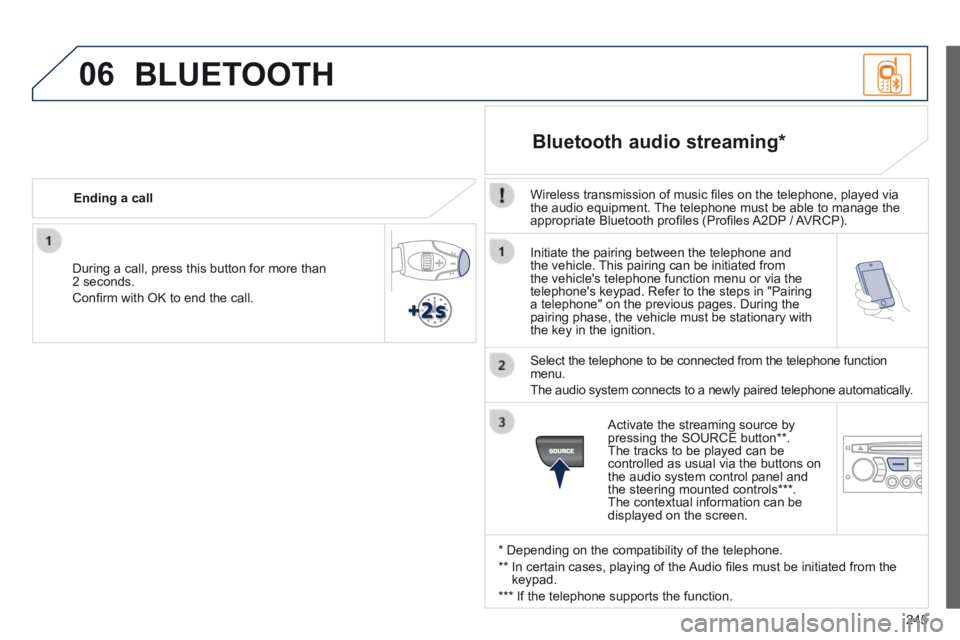
Initiate the pairing between the telephone and the vehicle. This pairing can be initiated from the vehicle's telephone function menu or via the telephone's keypad. Refer to the steps in "Pairing a telephone" on the previous pages. During the pairing phase, the vehicle must be stationary with the key in the ignition.
Select the telephone to be connected from the telephone function menu.
The audio system connects to a newly paired telephone automatically.
Bluetooth audio streaming *
Wireless transmission of music fi les on the telephone, played via the audio equipment. The telephone must be able to manage the appropriate Bluetooth profi les (Profi les A2DP / AVRCP).
* Depending on the compatibility of the telephone.
** In certain cases, playing of the Audio fi les must be initiated from the keypad.
*** If the telephone supports the function.
Activate the streaming source by pressing the SOURCE button ** . The tracks to be played can be controlled as usual via the buttons on the audio system control panel and the steering mounted controls *** . The contextual information can be displayed on the screen.
During a call, press this button for more than 2 seconds.
Confi rm with OK to end the call.
Ending a call
BLUETOOTH
Page 256 of 268

254
VISUAL SEARCH
INSTRUMENTS AND CONTROLS
Instrument panels ..................21-22
Warning lamps ....................... 23-30
Indicators ............................... 31-34
Buttons .................................. 35-36
- Check / service indicator / trip distance recorder
- lighting dimmer
Courtesy lamps
........................... 84
Seat belt / passenger's front airbag warning lamps display ... 97
Rear view mirror ......................... 60
Sun visor ..................................... 87
Lighting controls .................... 76-80
Ventilation .............................. 45-46
Digital air conditioning ........... 48-49
Demisting - Defrosting the rear screen ......................... 47
PEUGEOT
Connect
Navigation (RT6) ............. 179-232
Setting the date/time ...................43
PEUGEOT Connect
Sound .............................. 233-251
Setting the date/time ...................41
Dashboard fuses ...............
155-157
Opening the bonnet .................. 131
Speed limiter
...................... 124-125
Cruise control .................... 126-127 Multifunction screens .............
39-44
Hazard warning lamps ................ 93
Switch panel ............................... 15
Emergency or assistance call .................................... 94, 177
Wiper controls........................ 82-84
Trip computer ........................ 37-38
Headlamp height adjustment ... 80-81
Stop & Start ....................... 119-121
Door mirrors ........................... 58-59
Electric windows .................... 68-69
"AIRWAVE" system controls ....... 56
Retractable roof control ............. 6-7
Control for all four windows ........ 69
Parking brake ...........................
114
Manual gearbox ........................ 114
Gear shift indicator ................... 115
Automatic gearbox .............116-118 Steering wheel adjustment .........
60
Horn ............................................ 93
Page:
< prev 1-8 9-16 17-24