Page 236 of 352
234
04
NAV2ABC3DEF5JKL4GHI6MNO8TUV7PQRS9WXYZ0*#
1RADIO MEDIANAV TRAFFIC
SETUPADDR
BOOK
2ABC3DEF5JKL4GHI6MNO8TUV7PQRS9WXYZ0*#
1RADIO MEDIANAV TRAFFIC
SETUPADDR
BOOK
2ABC3DEF5JKL4GHI6MNO8TUV7PQRS9WXYZ0*#
1RADIO MEDIANAV TRAFFIC
SETUPADDR
BOOK
2ABC3DEF5JKL4GHI6MNO8TUV7PQRS9WXYZ0*#
1RADIO MEDIANAV TRAFFIC
SETUPADDR
BOOK
2ABC3DEF5JKL4GHI6MNO8TUV7PQRS9WXYZ0*#
1RADIO MEDIANAV TRAFFIC
SETUPADDR
BOOK
2ABC3DEF5JKL4GHI6MNO8TUV7PQRS9WXYZ0*#
1RADIO MEDIANAV TRAFFIC
SETUPADDR
BOOK
2ABC3DEF5JKL4GHI6MNO8TUV7PQRS9WXYZ0*#
1RADIO MEDIANAV TRAFFIC
SETUPADDR
BOOK
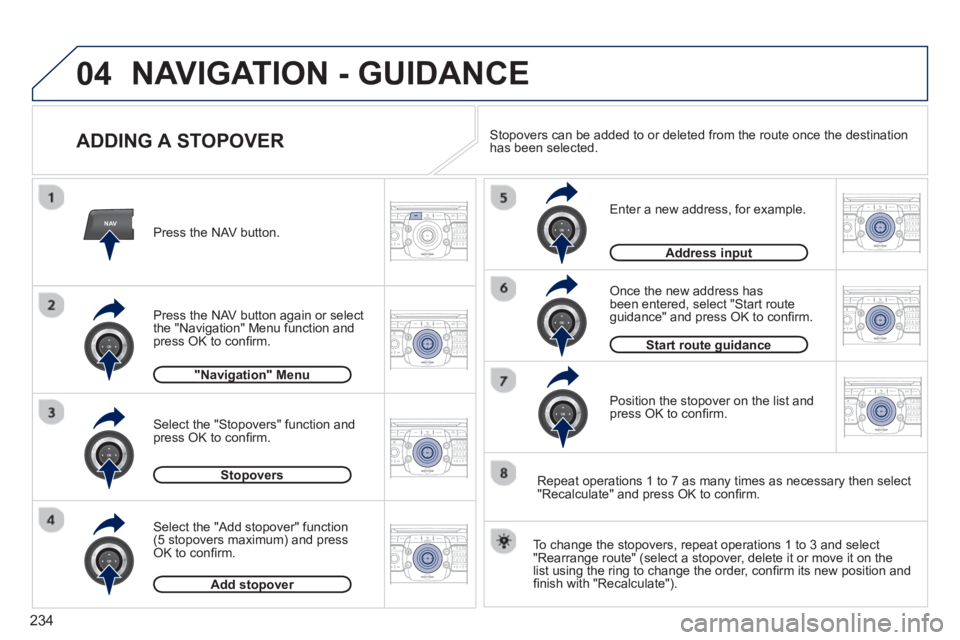
ADDING A STOPOVER
Enter a new address, for example.
Once the new address has
been entered, select "Start route guidance" and press OK to confi rm.
Position the stopover on the list and
press OK to confi rm. Pr
ess the NAV button.
Press the NAV button a
gain or select
the "Navigation" Menu function and
press OK to confi rm.
Select the "Add stopover" function(5 stopovers maximum) and pressOK to confi rm. Select the "Sto
povers" function and
press OK to confi rm.
Add stopoverp
Stopoversp
Address inputp
"Navigation" Menug
Start route guidanceg
To change the stopovers, repeat operations 1 to 3 and select
"Rearrange route" (select a stopover, delete it or move it on the
list using the ring to change the order, confi rm its new position and
fi nish with "Recalculate").
Stopovers can be added to or deleted from the route once the destinationhas been selected.
Repeat operations 1 to 7 as man
y times as necessary then select"Recalculate" and press OK to confi rm.
NAVIGATION - GUIDANCE
Page 261 of 352
259
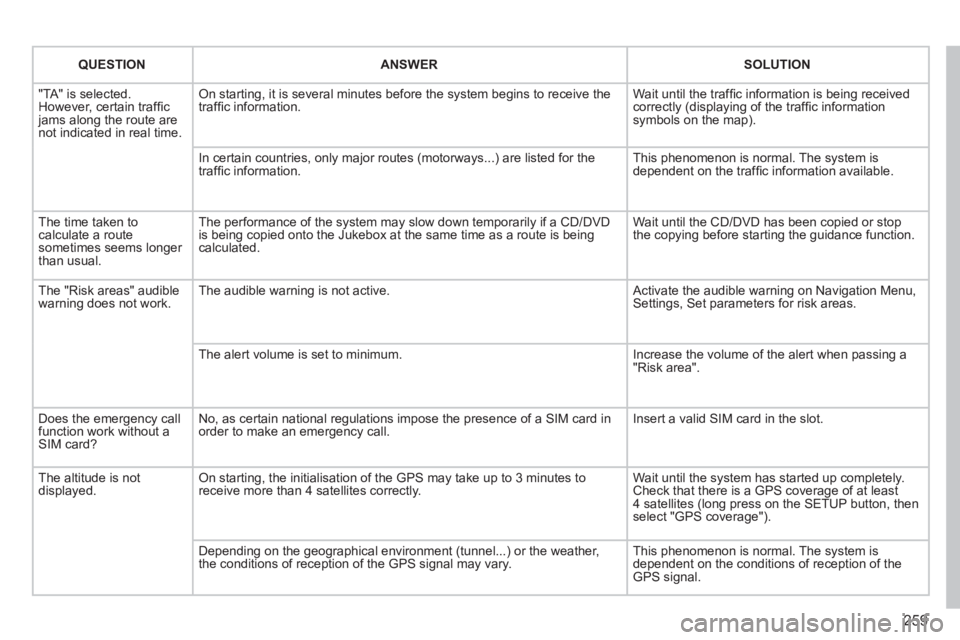
QUESTIONANSWERSOLUTION
"TA" is selected. However, certain traffi c jams along the route arenot indicated in real time.
On starting, it is several minutes before the system begins to receive thetraffi c information.
Wait until the traffi c information is being received correctly (displaying of the traffi c information symbols on the map).
In certain countries, only major routes (motorways...) are listed for thetraffi c information. This phenomenon is normal. The system isdependent on the traffi c information available.
The time taken to calculate a route sometimes seems longer than usual.
The performance of the system may slow down temporarily if a CD/DVDis being copied onto the Jukebox at the same time as a route is being calculated.
Wait until the CD/DVD has been copied or stop the copying before starting the guidance function.
The "Risk areas" audiblewarning does not work. The audible warning is not active. Activate the audible warning on Navigation Menu,Settings, Set parameters for risk areas.
The alert volume is set to minimum.
Increase the volume of the alert when passing a"Risk area".
Does the emergency call function work without a SIM card?
No, as certain national regulations impose the presence of a SIM card inorder to make an emergency call.
Insert a valid SIM card in the slot.
The altitude is not displayed. On starting, the initialisation of the GPS may take up to 3 minutes toreceive more than 4 satellites correctly.
Wait until the system has started up completely. Check that there is a GPS coverage of at least4 satellites (long press on the SETUP button, then select "GPS coverage").
Depending on the geographical environment (tunnel...) or the weather, the conditions of reception of the GPS signal may vary.
This phenomenon is normal. The system isdependent on the conditions of reception of the GPS signal.
Page 338 of 352
336
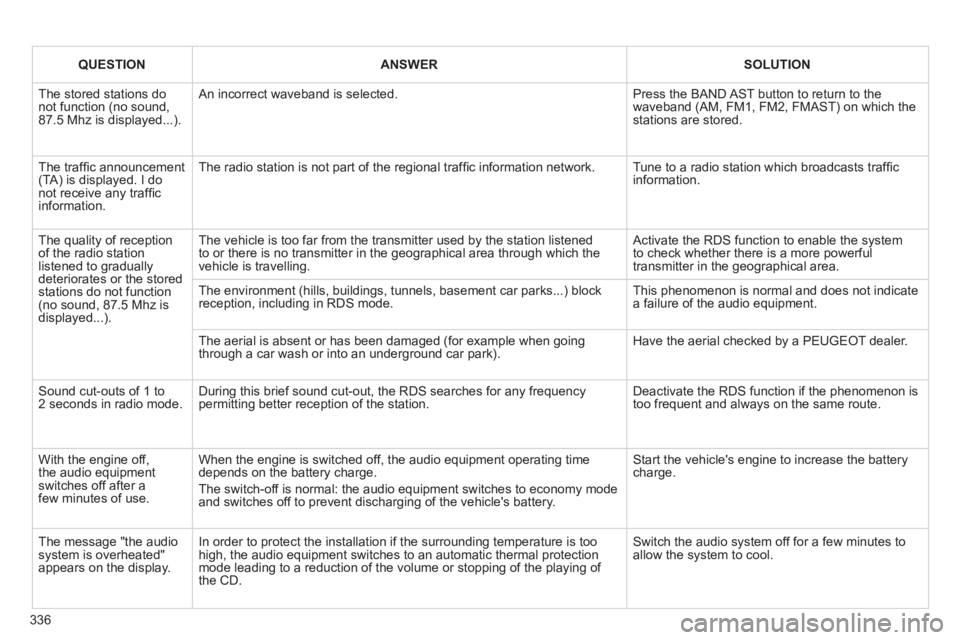
QUESTIONANSWERSOLUTION
The stored stations donot function (no sound, 87.5 Mhz is displayed...).
An incorrect waveband is selected.
Press the BAND AST button to return to the waveband (AM, FM1, FM2, FMAST) on which thestations are stored.
The traffi c announcement(TA) is displayed. I donot receive any traffi c information.
The radio station is not part of the regional traffi c information network.
Tune to a radio station which broadcasts traffi c information.
The quality of receptionof the radio station listened to graduallydeteriorates or the stored stations do not function(no sound, 87.5 Mhz is displayed...).
The vehicle is too far from the transmitter used by the station listenedto or there is no transmitter in the geographical area through which the vehicle is travelling.
Activate the RDS function to enable the system to check whether there is a more powerful transmitter in the geographical area.
The environment (hills, buildings, tunnels, basement car parks...) block reception, including in RDS mode. This phenomenon is normal and does not indicate a failure of the audio equipment.
The aerial is absent or has been damaged (for example when goingthrough a car wash or into an underground car park).
Have the aerial checked by a PEUGEOT dealer.
Sound cut-outs of 1 to2 seconds in radio mode.During this brief sound cut-out, the RDS searches for any frequency permitting better reception of the station.
Deactivate the RDS function if the phenomenon is too frequent and always on the same route.
With the engine off, the audio equipment switches off after a few minutes of use.
When the engine is switched off, the audio equipment operating timedepends on the battery charge.
The switch-off is normal: the audio equipment switches to economy mode and switches off to prevent discharging of the vehicle's battery.
Start the vehicle's engine to increase the batterycharge.
The message "the audio system is overheated" appears on the display.
In order to protect the installation if the surrounding temperature is toohigh, the audio equipment switches to an automatic thermal protectionmode leading to a reduction of the volume or stopping of the playing of the CD.
Switch the audio system off for a few minutes toallow the system to cool.
Page 347 of 352
345
VISUAL SEARCH
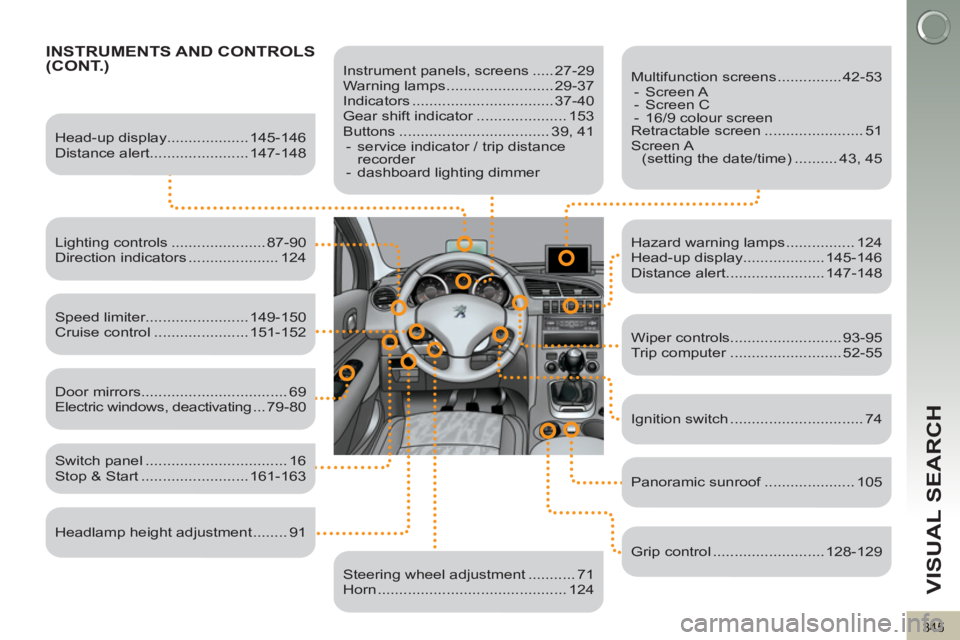
INSTRUMENTS AND CONTROLS(CONT.)
Instrument panels, screens ..... 27-29
Warning lamps ......................... 29-37
Indicators ................................. 37-40
Gear shift indicator ..................... 153
Buttons ................................... 39, 41
- service indicator / trip distance
recorder
- dashboard lighting dimmer
Head-up display................... 145-146
Distance alert....................... 147-148
Lighting controls ...................... 87-90
Direction indicators ..................... 124
Speed limiter........................ 149-150
Cruise control ...................... 151-152
Switch panel ................................. 16
Stop & Start ......................... 161-163
Door mirrors .................................. 69
Electric windows, deactivating ...79-80
Headlamp height adjustment ........ 91
Steering wheel adjustment ........... 71
Horn ............................................ 124
Multifunction screens ............... 42-53
- Screen A
- Screen C
- 16/9 colour screen
Retractable screen ....................... 51
Screen A
(setting the date/time) .......... 43, 45
Hazard warning lamps ................ 124
Head-up display................... 145-146
Distance alert....................... 147-148
Wiper controls.......................... 93-95
Trip computer .......................... 52-55
Ignition switch ............................... 74
Panoramic sunroof ..................... 105
Grip control .......................... 128-129