Page 205 of 324

9
203
Technical data
The GTW and towed load values indicated are valid up to a maximum altitude of 1 000 metres; the towed load mentioned must be reduced by 10 % for
each additional 1 000 metres of altitude.
The speed of a towing vehicle must not exceed 60 mph (10 0 km/h) (comply with the legislation in force in your country).
High ambient temperatures may result in a reduction in the per formance of the vehicle to protect the engine; if the ambient temperature is above 37 °C,
limit the towed load.
* The kerb wei
ght is equal to the unladen weight + driver (75 kg).
* The weight of the braked trailer can be increased, within the GTW limit, if the GV W of the towing vehicle is reduced by an equal amount; warning,
towing using a lightly loaded towing vehicle may have an adverse effect on its road holding.
Engines1.6 litre e-HDi92 hp1.6 litre e- HDi 92 hp
Gearboxes
Manual(5-speed)
Electronic(6-speed)
Model codes: CU...9HP0/S
9HP8/PS
- Unladen wei
ght 1 160
1 170
- Kerb wei
ght *1 235 1 245
- Gross vehicle wei
ght (GV W)
1 684
1 692
- Gross train wei
ght (GTW)
on a 12% gradient 2 634 2 262
- Braked trailer
(within GTW limit) on a 10% or 12% gradient
1 275
895
- Braked trailer **
(with load transfer with theGTW limit)
950570
- Unbraked trailer 610
500
- Recommended nose wei
ght 38
25
Diesel weights and towed loads (in kg)
Page 206 of 324

204
Technical data
* The kerb weight is equal to the unladen weight + driver (75 kg).
* The weight of the braked trailer can be increased, within the GTW limit, if the GV W of the towing vehicle is reduced by an equal amount; warning,
towing using a lightly loaded towing vehicle may have an adverse effect on its road holding.
Diesel weights and towed loads (in kg)
The GTW and towed load values indicated are valid up to a maximum altitude of 1 000 metres; the towed load mentioned must be reduced by 10 % for
each additional 1 000 metres of altitude.
The speed of a towing vehicle must not exceed 60 mph (10 0 km/h) (comply with the legislation in force in your country).
High ambient temperatures may result in a reduction in the performance of the vehicle to protect the engine; if the ambient temperature is above 37 °C,
limit the towed load.
Engines1.6 litre e- HDi 115 hp
Gearboxes
Manual(6-speed)
Model codes: CU...
9HD8/S
- Unladen wei
ght
1 18 0
- Kerb wei
ght *
1 255
- Gross vehicle wei
ght (GV W)
1 708
- Gross train wei
ght (GT W)
on a 12% gradient2 688
- Braked trailer (within GTW limit) on a 10% or 12% gradient 980
- Braked trailer **
(with load transfer with the GTW limit)
1 305
-
Unbraked trailer
620
- Recommended nose weight 39
Page 211 of 324
209
The system is protected in such a way that it will onlyoperate in your vehicle.
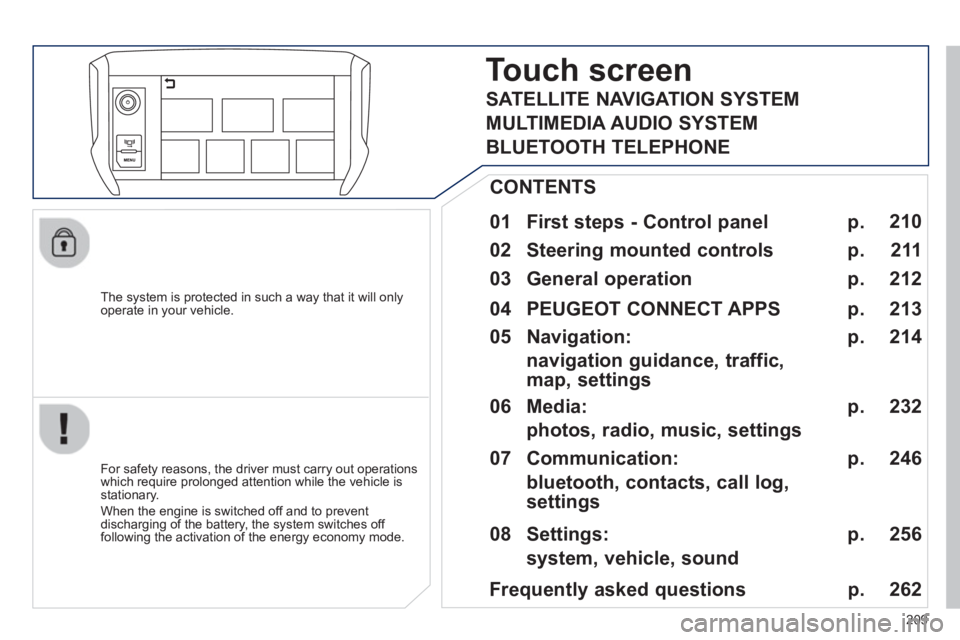
Touch screen
01 First steps - Control panel
For safety reasons, the driver must carry out operations
which require prolonged attention while the vehicle is stationary.
When the en
gine is switched off and to prevent
discharging of the battery, the system switches off following the activation of the energy economy mode.
CONTENTS
02 Steering mounted controls
04 PEUGEOT CONNECT APPS
05 Navigation:
navigation guidance, traffic,
map, settings
06 Media:
photos, radio, music, settings
07 Communication:
bluetooth, contacts, call log,
settings
08 Settings:
system, vehicle, sound p.
p.
p.
p.
p.
p.
p.
Frequently asked questions p.
SATELLITE NAVIGATION SYSTEM
MULTIMEDIA AUDIO SYSTEM
BLUETOOTH TELEPHONE
2
10
211
214
213
232
246
256
262
03 General operation p. 212
Page 242 of 324

06
240
CD, MP3 CD, USB PLAYER, AUXILIARY
Insert the CD in the player, insert the USBmemory stick in the USB player or connect theUSB peripheral to the USB port using a suitablecable (not supplied).
The s
ystem builds playlists (in temporarymemory), an operation which can take froma few seconds to several minutes at the fi rstconnection.
R
educe the number of non-music fi les and the number of folders to reduce the waiting time.
The pla
ylists are updated every time the ignition
is switched off or connection of a USB memory stick. However, the system memorises these
lists and if they are not modifi ed, the loadingtime will be shorter.
Pla
y starts automatically after a period which
depends on the capacity of the USB memory stick.SELECTION OF SOURCE
The steering mounted SRC(source) button can be used to go to thenext media source, available if the source is active.
"CD / CD MP
3"
"
USB, iPod
"
"
Bluetooth (streaming)
"
"Auxiliary
"
"Radio"
Select changing source then choose thesource. Pr
ess the MODE button
until the RADIO / MEDIA
display is obtained.
It is also possible to chan
ge source from the
top bar.
MUSIC
Page 243 of 324

06
241
CD, MP3 CD / USB PLAYER
The audio equipment will only play audio fi les with ".wma, .aac, .fl ac, .ogg and .mp3" fi le extensions and with a bit rate of between32 Kbps and 320 Kbps.
It also supports VBR
(Variable Bit Rate) mode.
No other t
ype of fi le (.mp4, .m3u...) can be played.
WMA fi les must be of the standard wma 9 t
ype.
The samplin
g rates supported are 11, 22, 44 and 48 KHz.
It is advisable to restrict fi le names to 20 characters, without usin
g of special characters (e.g.: " " ? ; ù) to avoid any playing and displayingproblems.
In order to be able to play a recorded
CDR or CDRW, whenrecording it is preferable to select the ISO 9660 level 1, 2 or Jolietstandard.
If the disc is recorded in another format it ma
y not be playedcorrectly.
It is recommended that the same recordin
g standard is always used
for an individual disc, with as low a speed as possible (4x maximum)for optimum sound quality.
In the particular case o
f a multi-session CD, the Joliet standard isrecommended.
INFORMATION AND ADVICE
The s
ystem supports USB mass storage or
iPod devices via the USB port (suitable cable not supplied).
Control of the peripheral device is with the
audio system controls.
Other peripherals, not recognised onconnection, must be connected to the auxiliary socket using a Jack cable (not supplied).
In order to be read, a U
SB memory stick must be formatted FAT 16or 32.
MUSIC
The system does not support the operation of an Apple®
player and®
a USB memory stick connected at the same time.
It is recommended that o
ffi cial AppleÆ
USB cables are used toÆ
ensure correct operation.
Page 245 of 324

06
243
AUDIO STREAMING
Streaming allows audio fi les on your telephone to be played via the
vehicle's speakers.
Connect the telephone: see the "Communications" section, then "Bluetooth
".
Choose the " Audio
" or " All" profi le.
I
f play does not start automatically, it may be necessary to start the audio playback from the telephone.
Control is from the peripheral device or b
y using the audio system buttons.
Once connected in streaming mode, the telephone is considered tobe a media source.
It is recommended that you activate "
Repeat" on the Bluetooth
peripheral.
CONNECTING APPLE ®
PLAYERS
Connect the Apple ®player to the USB port using a suitable cable (not supplied).
Play starts automatically.
Control is via the audio system.
The classifi cations available are those of the
portable deviceconnected (artists / albums / genres / playlists / audiobooks / podcasts).
The de
fault classifi cation used is by artist. To modify theclassifi cation used, return to the fi rst level of the menu then select
the desired classifi cation (playlists for example) and confi rm to go
down through the menu to the desired track.
Copies of photos and album artwork are not compatible with the
audio system. These appear only with a USB memory stick.
MUSIC
The version of software in the audio system may not be compatible
with the generation of your Apple ®player.
The list of devices com
patible with software versions is available
from PEUGEOT dealers.
Page 249 of 324
247
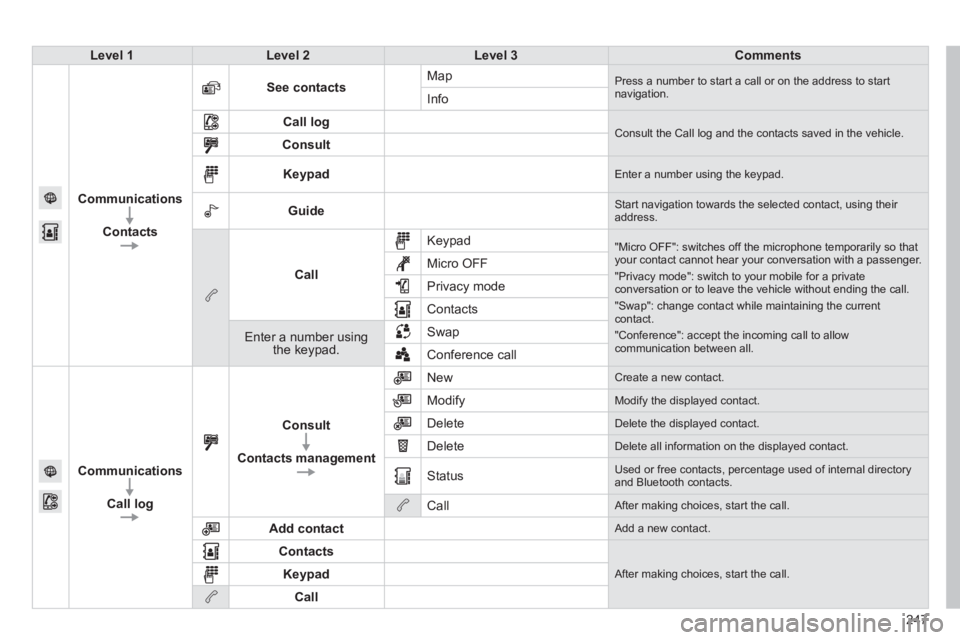
Level 1Level 2Level 3Comments
Communications
Contacts
See contactsMap Press a number to start a call or on the address to startnavigation.Info
Call log Consult the Call log and the contacts saved in the vehicle. Consult
Keypad Enter a number using the keypad.
Guide Start navigation towards the selected contact, using their address.
Call
Keypad
"Micro OFF": switches off the microphone temporarily so thatyour contact cannot hear your conversation with a passenger.
"Privacy mode": switch to your mobile for a privateconversation or to leave the vehicle without ending the call.
"Swap": change contact while maintaining the currentcontact.
"Conference": accept the incoming call to allow communication between all.
Micro OFF
Privac
y mode
Contacts
Enter a number using the keypad.SwapConference call
Communications
Call lo
g
Consult
Contacts management
New Create a new contact.
Modify
Modify the displayed contact.
Delete
Delete the displayed contact.
Delete
Delete all information on the displayed contact.
Status
Used or free contacts, percentage used of internal directory and Bluetooth contacts.
Call
After making choices, start the call.
Add contact
Add a new contact.
Contacts
After making choices, start the call. Keypad
Call
Page 253 of 324
07
251
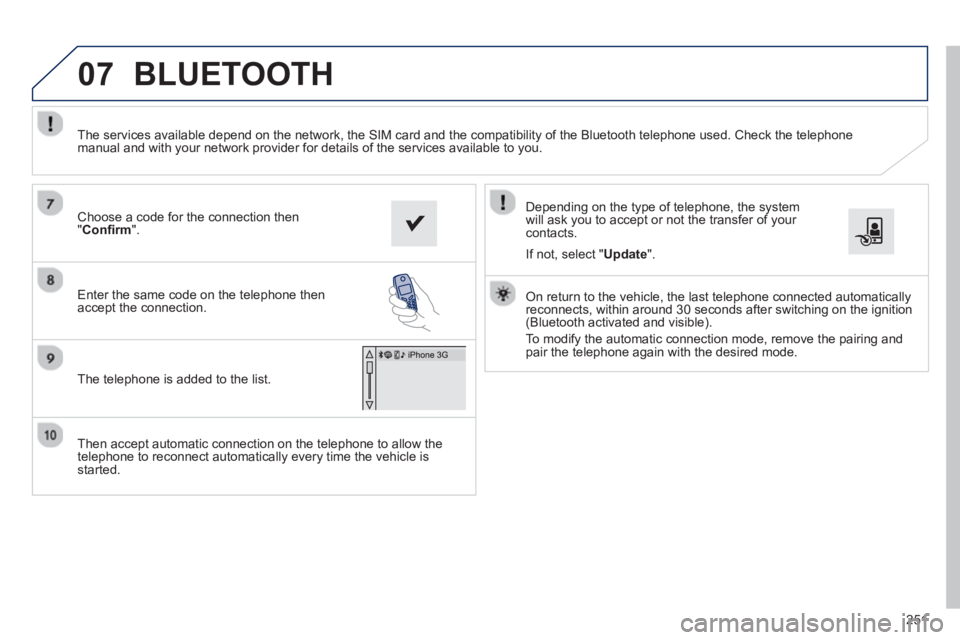
Then accept automatic connection on the telephone to allow the
telephone to reconnect automatically every time the vehicle is started.
Dependin
g on the type of telephone, the system
will ask you to accept or not the transfer of your contacts.
The services available depend on the network, the
SIM card and the compatibility of the Bluetooth telephone used. Check the telephone
manual and with your network provider for details of the services available to you.
On return to the vehicle, the last telephone connected automaticallyreconnects, within around 30 seconds after switching on the ignition (Bluetooth activated and visible).
To modif
y the automatic connection mode, remove the pairing and
pair the telephone again with the desired mode.
Choose a code for the connection then
"Confi rm".
Enter the same code on the telephone then
accept the connection.
The telephone is added to the list.
BLUETOOTH
If not, select " Update".