2013 NISSAN MAXIMA USB
[x] Cancel search: USBPage 261 of 444
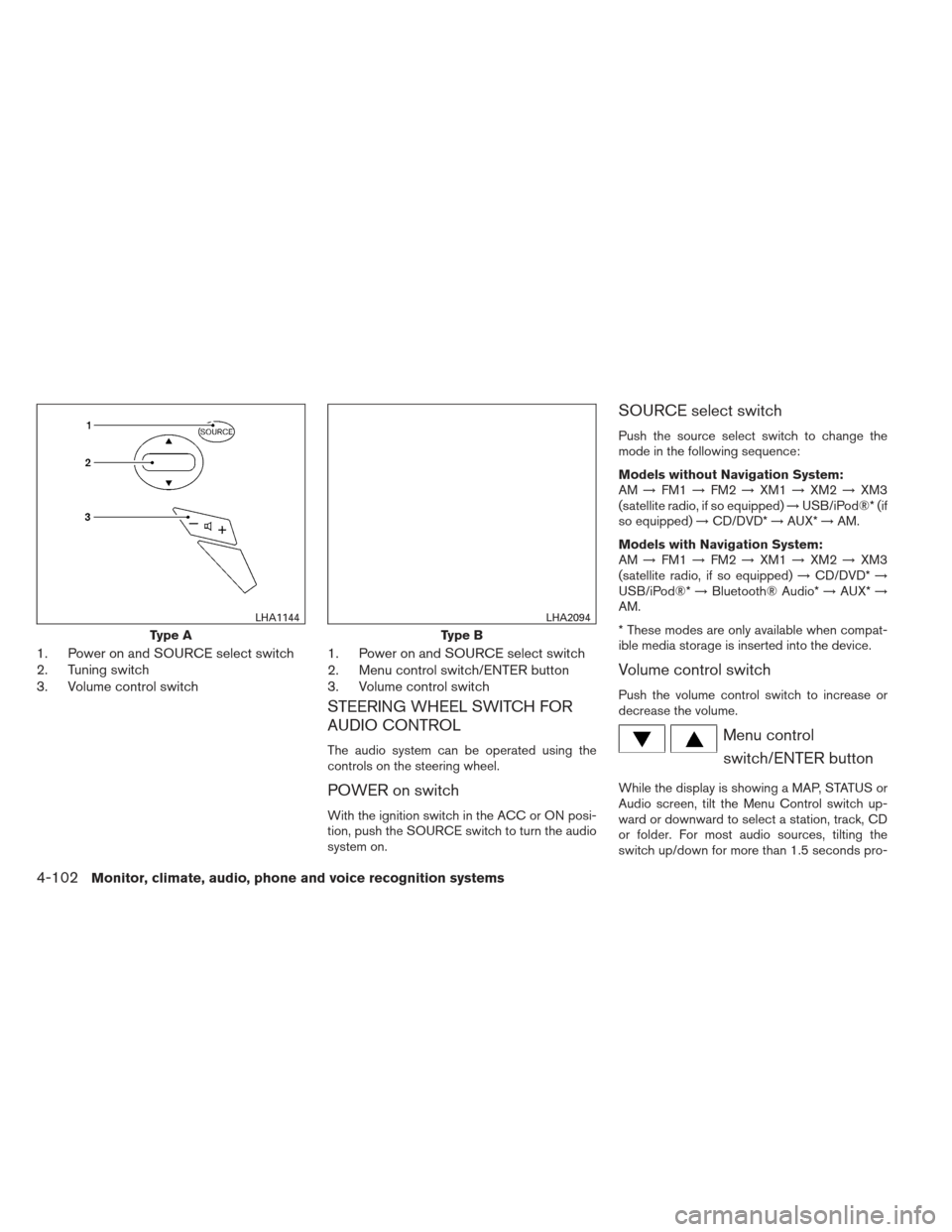
1. Power on and SOURCE select switch
2. Tuning switch
3. Volume control switch1. Power on and SOURCE select switch
2. Menu control switch/ENTER button
3. Volume control switch
STEERING WHEEL SWITCH FOR
AUDIO CONTROL
The audio system can be operated using the
controls on the steering wheel.
POWER on switch
With the ignition switch in the ACC or ON posi-
tion, push the SOURCE switch to turn the audio
system on.
SOURCE select switch
Push the source select switch to change the
mode in the following sequence:
Models without Navigation System:
AM
→FM1 →FM2 →XM1 →XM2 →XM3
(satellite radio, if so equipped) →USB/iPod®* (if
so equipped) →CD/DVD* →AUX* →AM.
Models with Navigation System:
AM →FM1 →FM2 →XM1 →XM2 →XM3
(satellite radio, if so equipped) →CD/DVD* →
USB/iPod®* →Bluetooth® Audio* →AUX* →
AM.
* These modes are only available when compat-
ible media storage is inserted into the device.
Volume control switch
Push the volume control switch to increase or
decrease the volume.
Menu control
switch/ENTER button
While the display is showing a MAP, STATUS or
Audio screen, tilt the Menu Control switch up-
ward or downward to select a station, track, CD
or folder. For most audio sources, tilting the
switch up/down for more than 1.5 seconds pro-
Type A
LHA1144
Type B
LHA2094
4-102Monitor, climate, audio, phone and voice recognition systems
Page 262 of 444
vides a different function than a tilting up/down
for less than 1.5 seconds.
AM and FM:● Tilt up/down for less than 1.5 seconds to
increase or decrease the preset station.
● Tilt up/down for more than 1.5 seconds to
seek up or down to the next station.
● Press the ENTER button to show the list of
preset stations.
XM (if so equipped): ● Tilt up/down for less than 1.5 seconds to
increase or decrease the preset station.
● Tilt up/down for more than 1.5 seconds to
go to the next or previous category.
● Press the ENTER button to show the XM
Menu.
iPod® (if so equipped): ● Tilt up/down for less than 1.5 seconds to
increase or decrease the track number.
● Press the ENTER button to show the iPod
Menu.
CD: ● Tilt up/down for less than 1.5 seconds to
increase or decrease the track number. ●
Tilt up/down for more than 1.5 seconds to
increase or decrease the folder number (if
playing compressed audio files) .
● Press the ENTER button to show the CD
Menu.
DVD (if so equipped): ● Tilt up/down for less than 1.5 seconds to
increase or decrease the track number.
● Tilt up/down for more than 1.5 seconds to
increase or decrease the title number.
● Press the ENTER button to select an item
from the DVD display.
● When the transparent operation menu ap-
pears, the switch will control the menu.
USB (if so equipped): ● Tilt up/down for less than 1.5 seconds to
increase or decrease the track number.
● Tilt up/down for more than 1.5 seconds to
increase or decrease the folder number.
● Press the ENTER button to show the USB
Menu.
Bluetooth® Audio (if so equipped): ● Tilt up/down for less than 1.5 seconds to
increase or decrease the track number. AUX:
● Press the ENTER button to show the AUX
Menu.
ANTENNA
Window antenna
The antenna pattern is printed inside the rear
window.
CAUTION
● Do not place metalized film near the
rear window glass or attach any metal
parts to it. This may cause poor recep-
tion or noise.
● When cleaning the inside of the rear
window, be careful not to scratch or
damage the rear window antenna.
Lightly wipe along the antenna with a
dampened soft cloth.
Monitor, climate, audio, phone and voice recognition systems4-103
Page 305 of 444
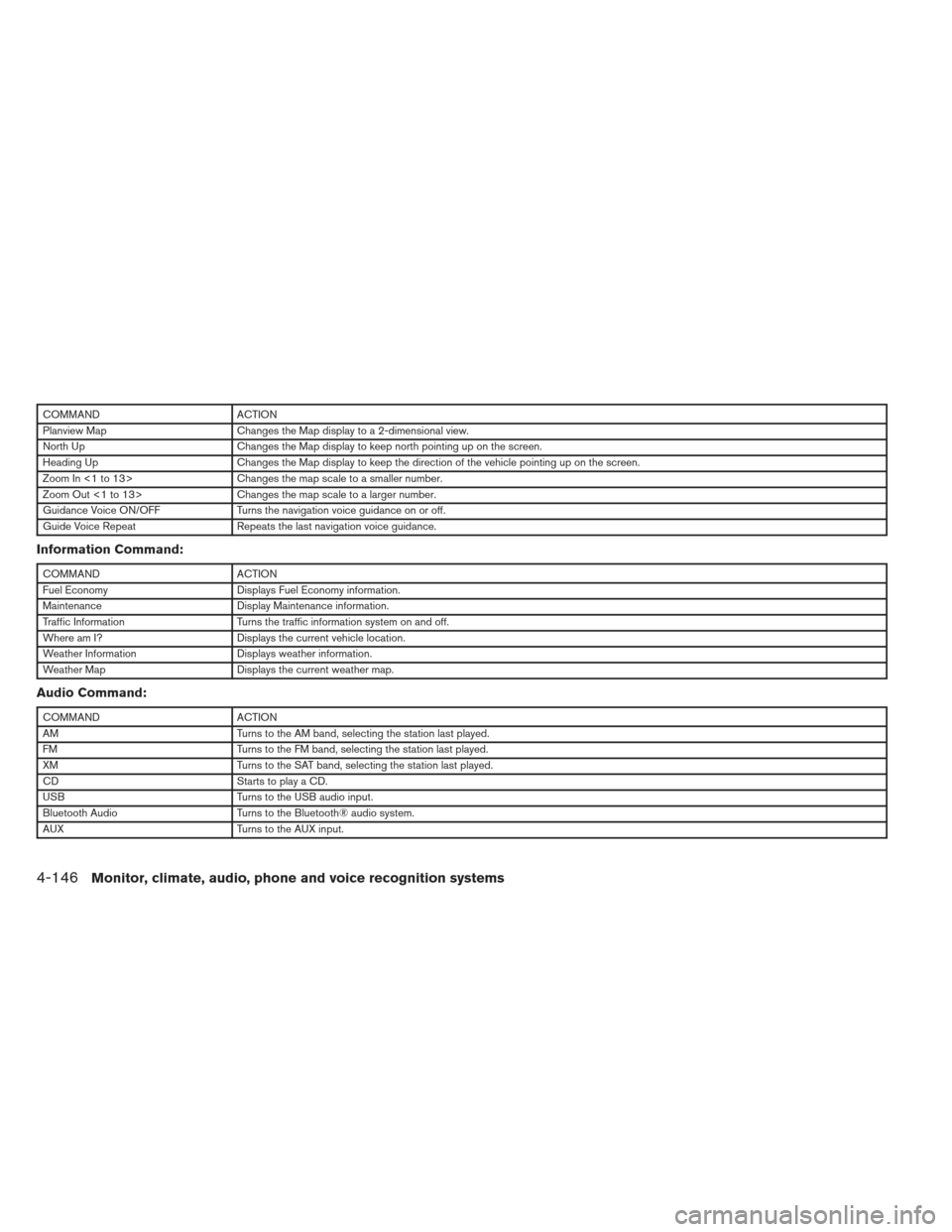
COMMANDACTION
Planview Map Changes the Map display to a 2-dimensional view.
North Up Changes the Map display to keep north pointing up on the screen.
Heading Up Changes the Map display to keep the direction of the vehicle pointing up on the screen.
Zoom In <1 to 13> Changes the map scale to a smaller number.
Zoom Out <1 to 13> Changes the map scale to a larger number.
Guidance Voice ON/OFF Turns the navigation voice guidance on or off.
Guide Voice Repeat Repeats the last navigation voice guidance.
Information Command:
COMMANDACTION
Fuel Economy Displays Fuel Economy information.
Maintenance Display Maintenance information.
Traffic Information Turns the traffic information system on and off.
Where am I? Displays the current vehicle location.
Weather Information Displays weather information.
Weather Map Displays the current weather map.
Audio Command:
COMMANDACTION
AM Turns to the AM band, selecting the station last played.
FM Turns to the FM band, selecting the station last played.
XM Turns to the SAT band, selecting the station last played.
CD Starts to play a CD.
USB Turns to the USB audio input.
Bluetooth Audio Turns to the Bluetooth® audio system.
AUX Turns to the AUX input.
4-146Monitor, climate, audio, phone and voice recognition systems
Page 436 of 444
10 Index
A
Air bag (See supplemental restraint
system) .....................1-37
Air bag system Front (See supplemental front impact
air bag system) ...............1-44
Airbagwarninglight...........1-51,2-14
Air cleaner housing filter ............8-19
Air conditioner Air conditioner service ...........4-47
Air conditioner specification label .....9-11
Air conditioner system refrigerant and
oil recommendations .............9-6
Heater and air conditioner
controls................4-42,4-45
Servicing air conditioner ..........4-47
Alarm system
(See vehicle security system) .........2-26
Anchor point locations .............1-24
Antenna....................4-103
Anti-lock brake warning light ......2-10,2-11
Anti-lock Braking System (ABS) ........5-25
Armrests .....................1-7
Audible reminders ...............2-16
Audio system ..................4-47
Bluetooth®audio..............4-98
Compact Disc (CD) changer .......4-66
Compact disc (CD) player .....4-72,4-80
FM-AM radio with compact disc
(CD) changer ................4-64
FM/AM/SAT radio with CD/DVD player . .4-76 FM/AM/SAT radio with compact disc (CD)
player ....................4-69
Audio System iPod®Player.............4-92,4-94
Audio system Radio ....................4-47
Audio System Settings ...............4-70,4-76
Audio system Steering wheel audio control switch . . .4-102
USB interface ............4-87,4-88
Autolight switch .................2-31
Automatic Automatic drive positioner .........3-28
Automatic power window switch .....2-45
Automatic transmission position indicator
light .....................2-14
Transmission shift selector lock release . .5-17
Automatic anti-glare inside mirror .......3-25
Automatic door locks ..............3-6
AUXjack ....................4-68
B
Battery ......................8-15
Chargewarninglight............2-11
Before starting the engine ...........5-11
Belt (See drive belt) ..............8-17
Block heater Engine ....................5-29
Bluetooth®audio................4-98 Bluetooth® hands-free phone
system
.................4- 104, 4-118
Boosterseats..................1-34
Brake Anti-lock Braking System (ABS) ......5-25
Brakefluid..................8-13
Brakelight(Seestoplight).........8-28
Brake system ................5-24
Brake warning light .............2-11
Brake wear indicators ........2-16,8-21
Parking brake operation ..........5-18
Self-adjusting brakes ............8-21
Brakes ......................8-21
Break-inschedule ...............5-21
Brightness/contrast button .......4-15,4-31
Brightness control Instrument panel ..............2-33
Bulb check/instrument panel ..........2-10
Bulbreplacement................8-28
C
Capacities and recommended
fuel/lubricants ...................9-2
C
argonet....................2-42
Cargo (See vehicle loading information) . . .9-12
CarphoneorCBradio............4-104
CDcareandcleaning.............4-101
CD changer (See audio system) .......4-66
CD player (See audio system) .....4-72,4-80
Check tire pressure ...............2-25
Child restraints .......1-18,1-19,1-20,1-22
Page 441 of 444
Supplemental front impact air bag system . . .1-44
Supplemental restraint systemInformation and warning labels .......1-51
Precautions on supplemental restraint
system ....................1-37
Supplemental restraint system
(Supplemental air bag system) .........1-37
Switch Autolightswitch...............2-31
Automatic power window switch ......2-45
Foglightswitch ...............2-34
Hazard warning flasher switch ........6-2
Headlight and turn signal switch ......2-30
Headlightcontrolswitch ..........2-31
Power door lock switch ............3-5
Rear window and outside mirror defroster
switch.....................2-29
Turnsignalswitch..............2-34
Vehicle dynamic control (VDC) off
switch.....................2-37
Windshield wiper and washer switch . . .2-28
T
Tachometer ....................2-5
Temperature gauge Engine coolant temperature gauge .....2-5
Theft (NISSAN vehicle immobilizer system) ,
engine start .............2-27,3-3,5-10
Three-way catalyst ................5-2
Tire Flat tire .....................6-3
Spare tire ................6-4,8-43
Tire and Loading Information label .....9-11
Tire chains ..................8-40 Tireplacard..................9-11
Tire pressure
.................8-32
Tire rotation..................8-40
Types of tires .................8-39
Uniform tire quality grading .........9-24
Wheels and tires ...............8-32
Wheel/tire size .................9-8
Tire pressure Low tire pressure warning light .......2-12
Tire Pressure Monitoring System (TPMS) ....5-3
Towing Flattowing..................9-23
Towing load/specification ..........9-19
Towtrucktowing...............6-11
Trailer towing .................9-16
Transceiver HomeLink® Universal Transceiver .....2-53
Transmission Continuously Variable Transmission
(CVT) fluid ..................8-12
Driving with Continuously Variable
Transmission (CVT) .............5-12
Shiftselectorlockrelease..........5-17
Travel (See registering your vehicle in another
country) ......................9-9
Trip odometer ...................2-4
Trunk access through the rear seat .....1-5,1-6
Trunk lid lock opener lever ............3-18
Trunklight ....................2-53
Turn signal switch ................2-34 U
Uniform tire quality grading ...........9-24
USB interface Audio file operation ..........4-87,4-89
Video file operation .............4-90
V
Vanity mirror ...................3-24
Variable voltage control system .........8-17
Vehicledimensionsandweights.........9-8
Vehicle dynamic control (VDC) off switch . . .2-37
Vehicle dynamic control (VDC) system .....5-26
Vehicle identification ...............9-9
Vehicle identification number (VIN)
(Chassis number) .................9-9
Vehicle identification number (VIN) plate ....9-9
Vehicleloadinginformation...........9-12
Vehicle recovery .................
6-13
Vehicle security system .............2-26
Vehicle security system (NISSAN vehicle immobi-
lizer system) , engine start ......2-27,3-3,5-10
Ventilators ....................4-40
Visors.......................3-24
Voice recognition system ...........4-130
W
Warning Airbagwarninglight.........1-51, 2-14
Anti-lock brake warning light .....2-10,2-11
Battery charge warning light ........2-11
Brake warning light .............2-11
10-6