Page 72 of 402
![NISSAN LEAF 2013 1.G Owners Manual 7. The [Timer 1] indicator illuminates after thecharging timer is set. Use the same procedure
to set the Timer 2 setting.
8. Place the power switch in the OFF position, and then connect the charge con](/manual-img/5/325/w960_325-71.png "NISSAN LEAF 2013 1.G Owners Manual 7. The [Timer 1] indicator illuminates after thecharging timer is set. Use the same procedure
to set the Timer 2 setting.
8. Place the power switch in the OFF position, and then connect the charge con")
7. The [Timer 1] indicator illuminates after thecharging timer is set. Use the same procedure
to set the Timer 2 setting.
8. Place the power switch in the OFF position, and then connect the charge connector to the
vehicle.
NOTE:
Always place the power switch in the OFF
position after setting the charging timers.
When the power switch is in the ON posi-
tion, the Li-ion battery will not start charg-
ing.
The Li-ion battery may not be charged to
the expected level if the charging timer start time and end time are set so there is
not enough time to charge the Li-ion bat-
tery.
When either the charge start time or
charge end time is set, the charging timer
function is activated.
When only the charging timer end time is
set, the system automatically determines
when to begin charging based on the Li-
ion battery charge level. The Li-ion battery
may not be charged to the expected level
in the following conditions: – The Li-ion battery is charged in cold weather.
– The charge connector is connected to the vehicle too close to the scheduled
charging end time.
When only the charging timer end time is
set, the system automatically stops charg-
ing when the Li-ion battery charges to the
selected level. Charging may stop before
the scheduled end time.
Touch [Timer 1] or [Timer 2] to turn off the
charging timer function. Touch [Yes] if the
settings shown on the screen are correct.
After this operation has been performed,
the indicator disappears and the charging timer function is turned off. The start and
stop time settings are not deleted, even if
the charging timer function is turned off.
If charging timer and the Climate Ctrl.
Timer are operating at the same time due
to an overlap of the timer settings, you can
prioritize which function receives electri-
cal power first. See LEAF Navigation Sys-
tem Owner’s Manual.
When charging is set as the first priority,
the Climate Ctrl. Timer does not start until
10 segments of the Li-ion battery avail-
able charge gauge are illuminated.
When the climate control is set as the first
priority, the climate control system will be
turned on as scheduled by the Climate
Ctrl. Timer regardless of the remaining
battery energy.
Even when the climate control is set as
the first priority, the climate control sys-
tem will be turned off when the electric
demands of the climate control system is
more than can be provided to the Li-ion
battery for charging.
Some charging stations used to perform
normal charge are equipped with timer
functions. If the charger timer function
ChargingCH-23
Page 73 of 402
and the vehicle timer are both set, and the
two timers are not set to operate at the
same time, it is possible that the charger
will not start or the battery will not be
charged to the level expected.
If the Li-ion battery warmer is operating
while the Climate Ctrl. Timer or Remote
Climate Control is being used, perfor-
mance of the Climate Control will be re-
duced.
The Li-ion battery may not charge to the
expected level using the Charging Timer
When a Start time and End time are set
while the Li-ion battery warmer operates.
Set only the Charging Timer End time
when charging in cold weather. The ve-
hicle automatically determines when to
start charging to fully charge the Li-ion
battery, even if the Li-ion battery warmer
operates. Charging ends before the set
End time if the Li-ion battery is fully
charged.
The 12-volt battery can become dis-
charged if the charging timer is operated
repeatedly between the Li-ion battery
charges while the vehicle is not used for
an extended period of time.
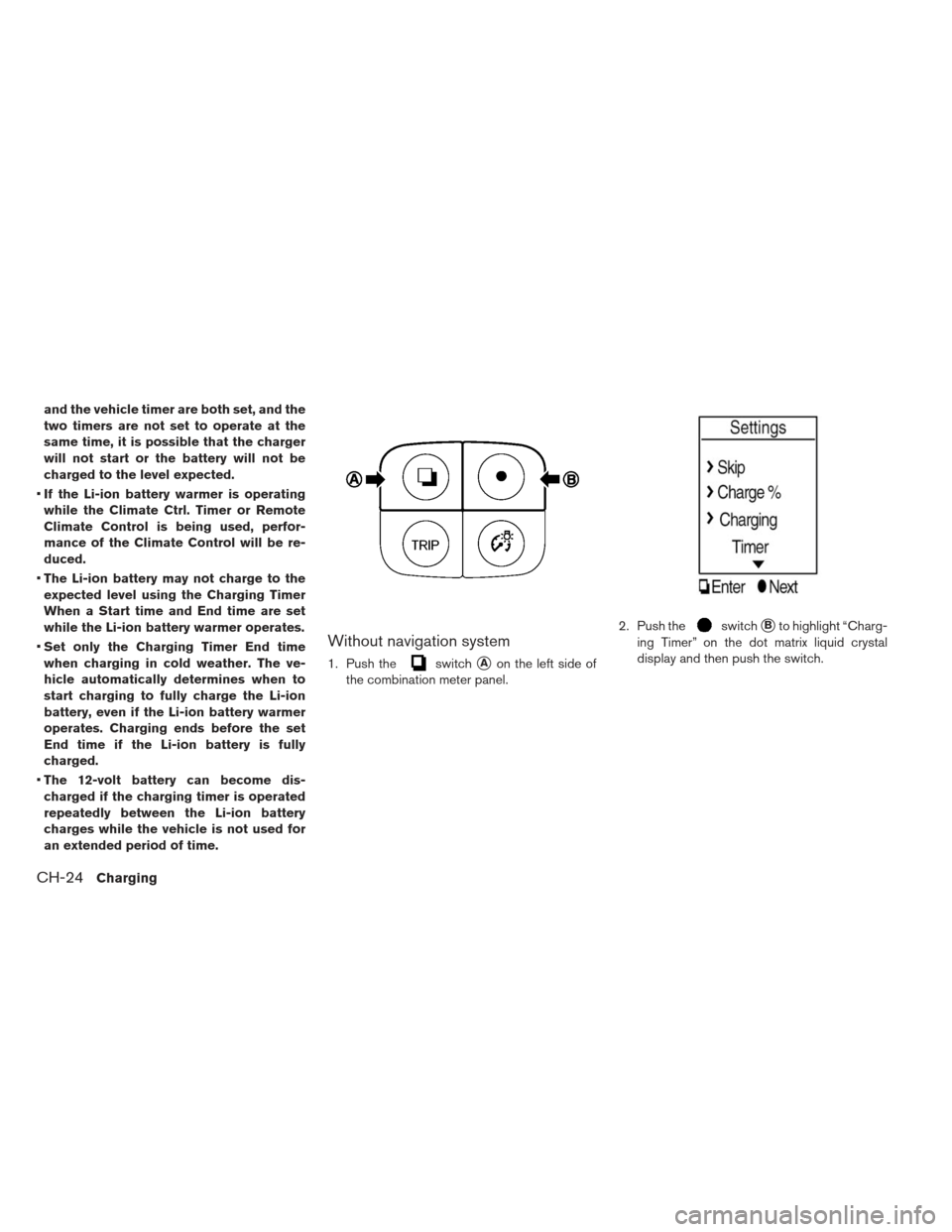
Without navigation system
1. Push theswitch�Aon the left side of
the combination meter panel. 2. Push the
switch�Bto highlight “Charg-
ing Timer” on the dot matrix liquid crystal
display and then push the switch.
CH-24Charging
Page 74 of 402
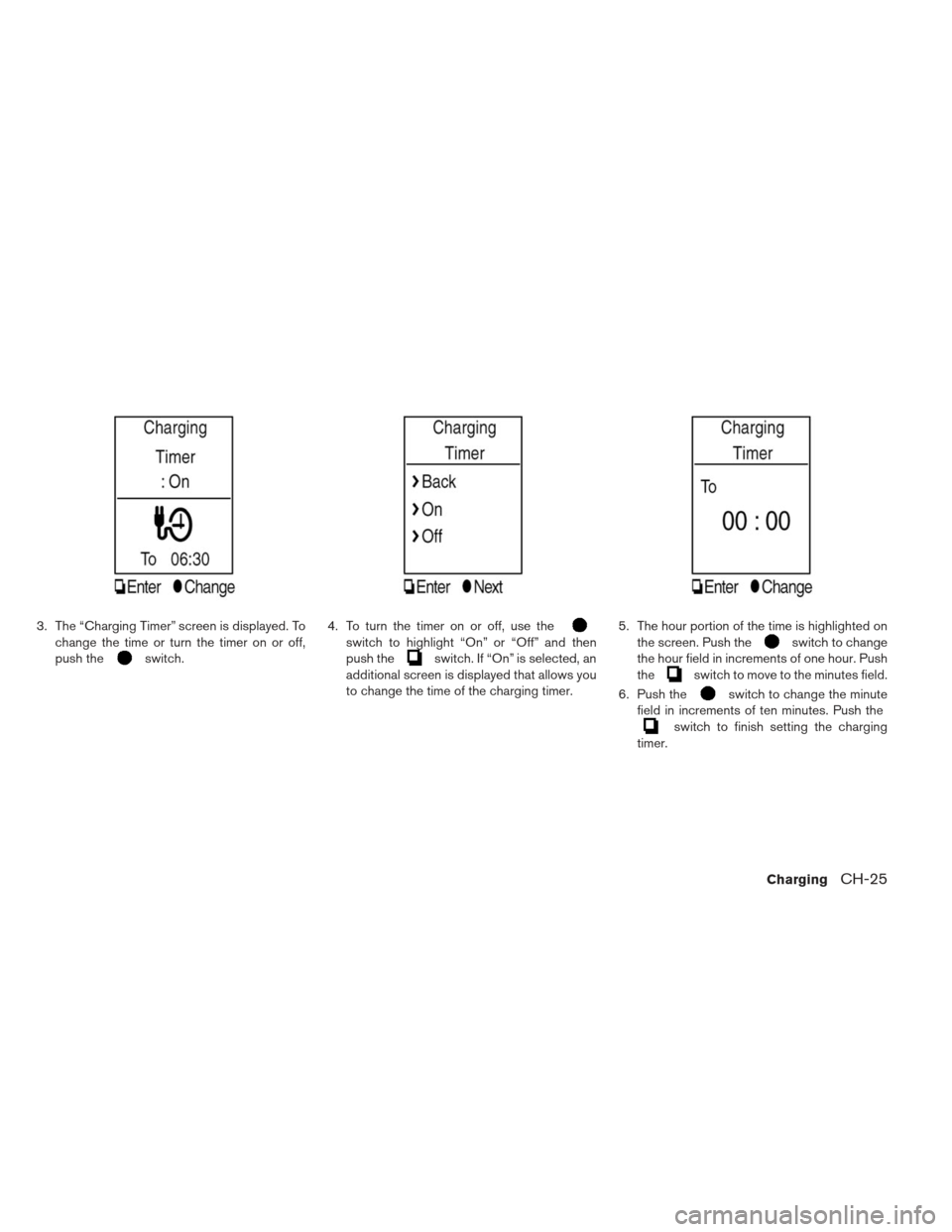
3. The “Charging Timer” screen is displayed. Tochange the time or turn the timer on or off,
push the
switch. 4. To turn the timer on or off, use the
switch to highlight “On” or “Off” and then
push the
switch. If “On” is selected, an
additional screen is displayed that allows you
to change the time of the charging timer. 5. The hour portion of the time is highlighted on
the screen. Push the
switch to change
the hour field in increments of one hour. Push
the
switch to move to the minutes field.
6. Push the
switch to change the minute
field in increments of ten minutes. Push the
switch to finish setting the charging
timer.
ChargingCH-25
Page 75 of 402
LONG LIFE MODE
Use the default setting, long distance mode
(100% charge) to maximize vehicle range. Use
the long life mode to help maximize the Li-ion
battery useful life.
The long life mode is set by changing the [%
Charge] to [80% Charge (Improves Battery Lon-
gevity)] using the following procedure.
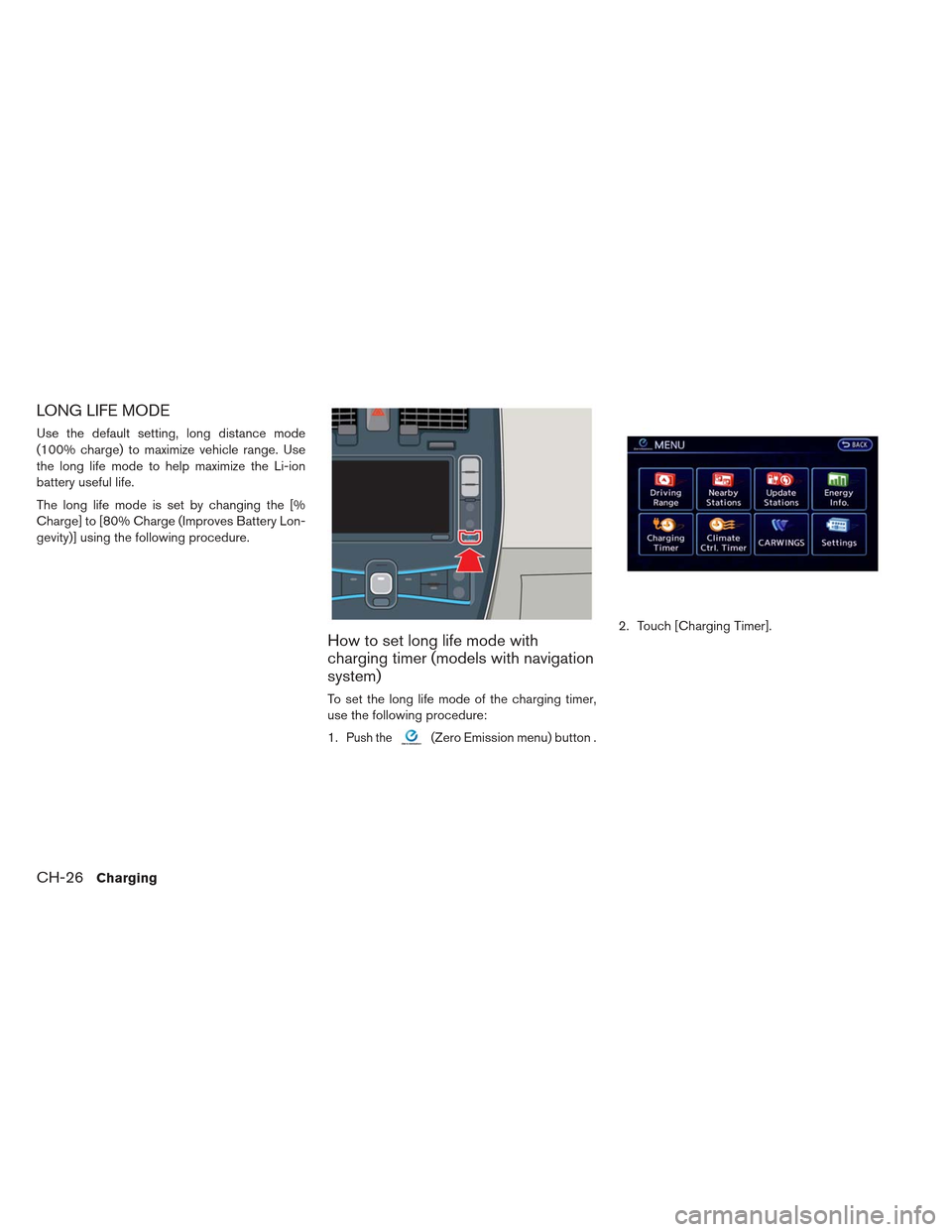
How to set long life mode with
charging timer (models with navigation
system)
To set the long life mode of the charging timer,
use the following procedure:
1.
Push the(Zero Emission menu) button .2. Touch [Charging Timer].
CH-26Charging
Page 76 of 402
3. Touch [Set Timer 1] or [Set Timer 2].4. Touch [% Charge].5. Touch [80% Charging (Improves Battery Lon-
gevity)]. The indicator light illuminates when
the long life mode is set to on.
6. Touch [BACK] to return to the previous screen.
7. Touch [Save Timer] when the settings are complete and a settings confirmation screen
is displayed.
ChargingCH-27
Page 77 of 402
8. Touch [Yes] if the settings shown on thescreen are correct. 9. The [Timer 1] or [Timer 2] indicator illuminates
after the charging timer is set.
How to set long life mode without
charging timer (models with navigation
system)
Long life mode can be set using the following
charging method:
remote charge
immediate charge
quick charge
CH-28Charging
Page 78 of 402
1.Push the(Zero Emission menu) button .2. Touch [Settings].
3. Touch [Long life mode (80% Charge)] The
indicator light illuminates when long life mode
is set to on.
ChargingCH-29
Page 79 of 402
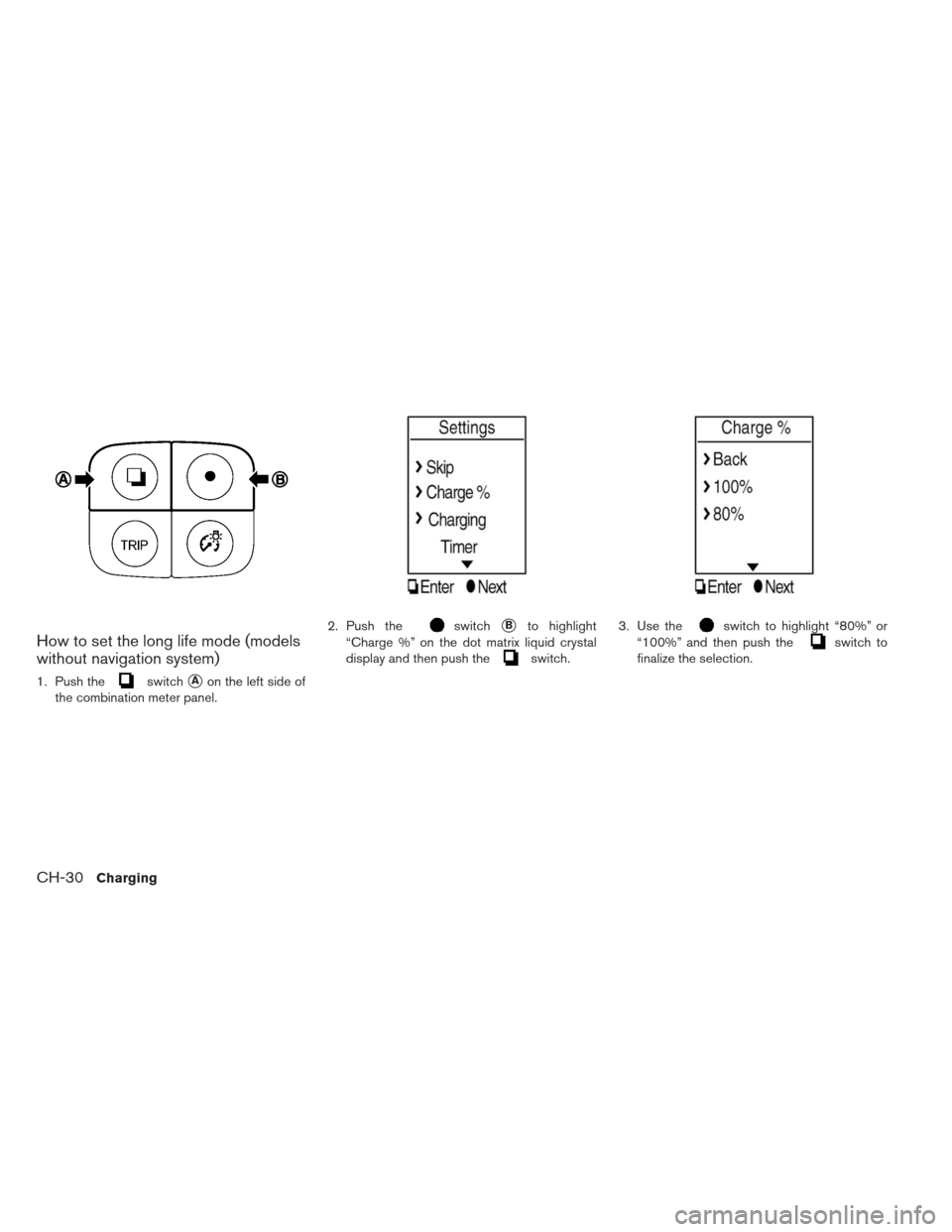
How to set the long life mode (models
without navigation system)
1. Push theswitch�Aon the left side of
the combination meter panel. 2. Push the
switch�Bto highlight
“Charge %” on the dot matrix liquid crystal
display and then push the
switch. 3. Use the
switch to highlight “80%” or
“100%” and then push the
switch to
finalize the selection.
CH-30Charging
![NISSAN LEAF 2013 1.G Owners Manual 3. Touch [Set Timer 1] or [Set Timer 2].4. Touch [% Charge].5. Touch [80% Charging (Improves Battery Lon-
gevity)]. The indicator light illuminates when
the long life mode is set to on.
6. Touch [BACK](/manual-img/5/325/w960_325-75.png "NISSAN LEAF 2013 1.G Owners Manual 3. Touch [Set Timer 1] or [Set Timer 2].4. Touch [% Charge].5. Touch [80% Charging (Improves Battery Lon-
gevity)]. The indicator light illuminates when
the long life mode is set to on.
6. Touch [BACK")
![NISSAN LEAF 2013 1.G Owners Manual 8. Touch [Yes] if the settings shown on thescreen are correct. 9. The [Timer 1] or [Timer 2] indicator illuminates
after the charging timer is set.
How to set long life mode without
charging timer (mo](/manual-img/5/325/w960_325-76.png "NISSAN LEAF 2013 1.G Owners Manual 8. Touch [Yes] if the settings shown on thescreen are correct. 9. The [Timer 1] or [Timer 2] indicator illuminates
after the charging timer is set.
How to set long life mode without
charging timer (mo")
![NISSAN LEAF 2013 1.G Owners Manual 1.Push the(Zero Emission menu) button .2. Touch [Settings].
3. Touch [Long life mode (80% Charge)] The
indicator light illuminates when long life mode
is set to on.
ChargingCH-29](/manual-img/5/325/w960_325-77.png "NISSAN LEAF 2013 1.G Owners Manual 1.Push the(Zero Emission menu) button .2. Touch [Settings].
3. Touch [Long life mode (80% Charge)] The
indicator light illuminates when long life mode
is set to on.
ChargingCH-29")