Page 229 of 402
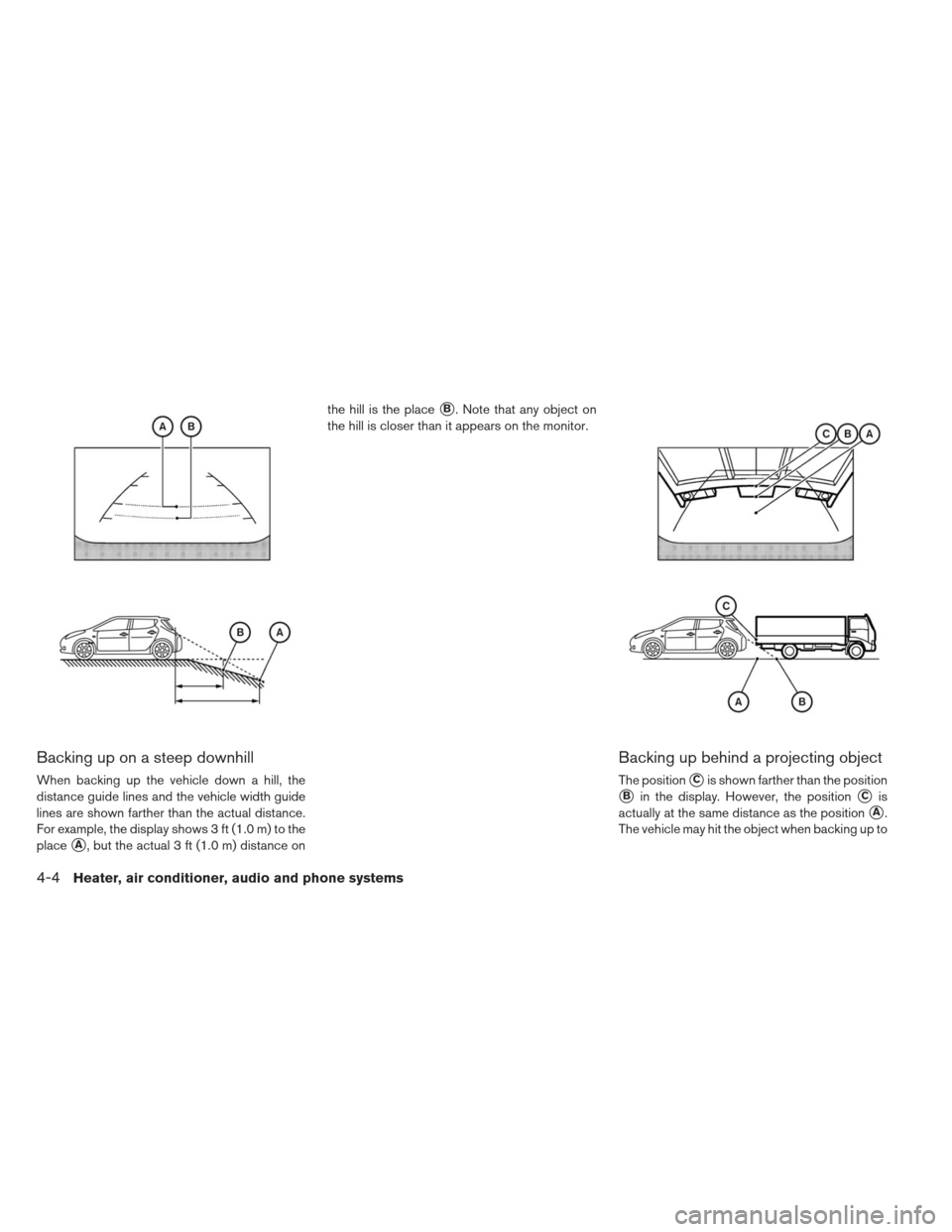
Backing up on a steep downhill
When backing up the vehicle down a hill, the
distance guide lines and the vehicle width guide
lines are shown farther than the actual distance.
For example, the display shows 3 ft (1.0 m) to the
place
�A, but the actual 3 ft (1.0 m) distance onthe hill is the place
�B. Note that any object on
the hill is closer than it appears on the monitor.
Backing up behind a projecting object
The position�Cis shown farther than the position
�Bin the display. However, the position�Cis
actually at the same distance as the position
�A.
The vehicle may hit the object when backing up to
4-4Heater, air conditioner, audio and phone systems
Page 230 of 402
the position�Aif the object projects over the
actual backing up course.
ADJUSTING THE SCREEN
The procedure for adjusting the quality of the
screen differs depending on the type of screen
present on the vehicle.
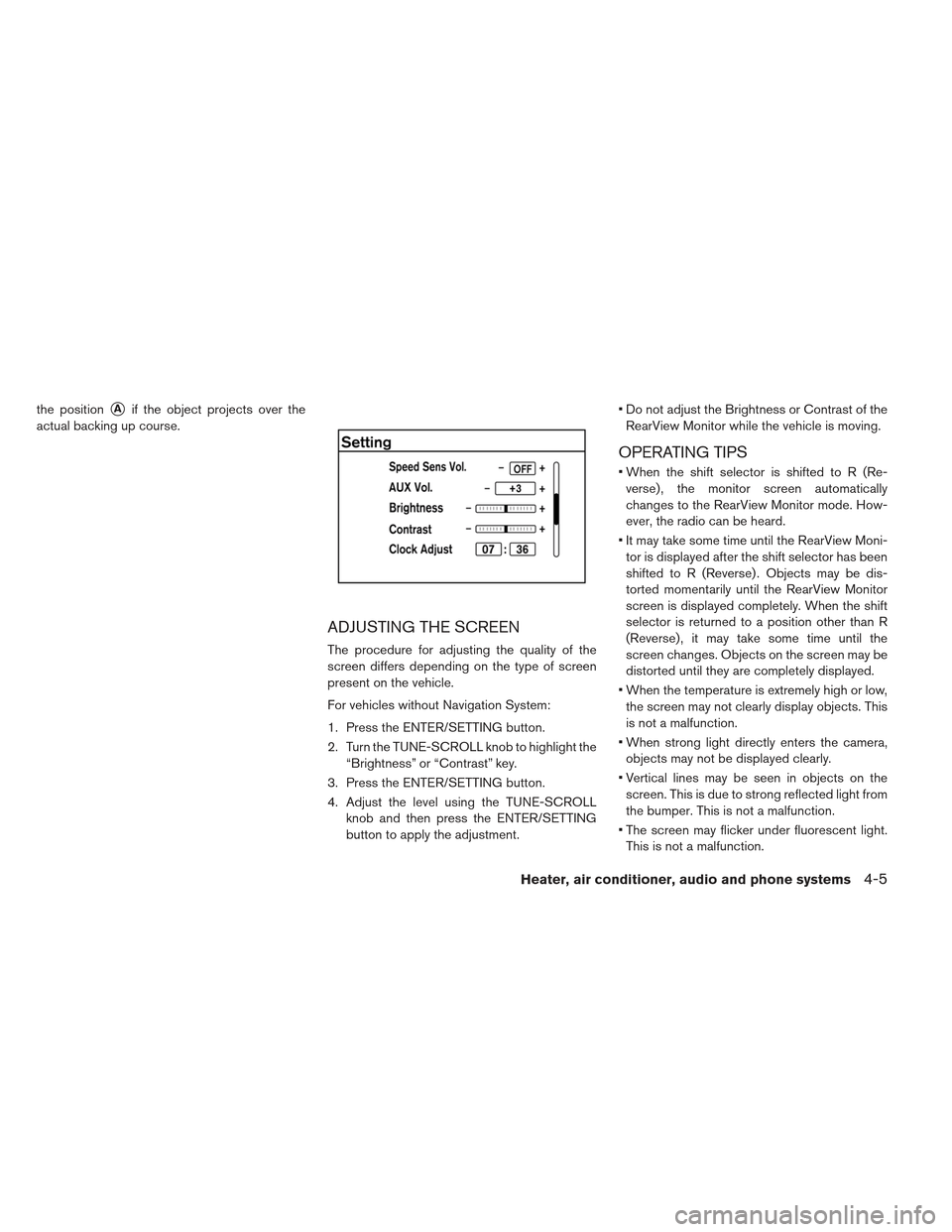
For vehicles without Navigation System:
1. Press the ENTER/SETTING button.
2. Turn the TUNE-SCROLL knob to highlight the “Brightness” or “Contrast” key.
3. Press the ENTER/SETTING button.
4. Adjust the level using the TUNE-SCROLL knob and then press the ENTER/SETTING
button to apply the adjustment. Do not adjust the Brightness or Contrast of the
RearView Monitor while the vehicle is moving.
OPERATING TIPS
When the shift selector is shifted to R (Re-verse) , the monitor screen automatically
changes to the RearView Monitor mode. How-
ever, the radio can be heard.
It may take some time until the RearView Moni- tor is displayed after the shift selector has been
shifted to R (Reverse) . Objects may be dis-
torted momentarily until the RearView Monitor
screen is displayed completely. When the shift
selector is returned to a position other than R
(Reverse) , it may take some time until the
screen changes. Objects on the screen may be
distorted until they are completely displayed.
When the temperature is extremely high or low, the screen may not clearly display objects. This
is not a malfunction.
When strong light directly enters the camera, objects may not be displayed clearly.
Vertical lines may be seen in objects on the screen. This is due to strong reflected light from
the bumper. This is not a malfunction.
The screen may flicker under fluorescent light. This is not a malfunction.
Heater, air conditioner, audio and phone systems4-5
Page 231 of 402
The colors of objects on the RearView Monitormay differ somewhat from those of the actual
object.
When the contrast of objects is low at night, pressing the SETTING button may not change
the brightness.
Objects on the monitor may not be clear in a dark place or at night.
If dirt, rain or snow attaches to the camera, the RearView Monitor may not display objects.
Clean the camera.
Do not use body wax on the camera window. If body wax does get on the camera window, wipe
off the wax with a clean cloth dampened with
mild detergent diluted with water.
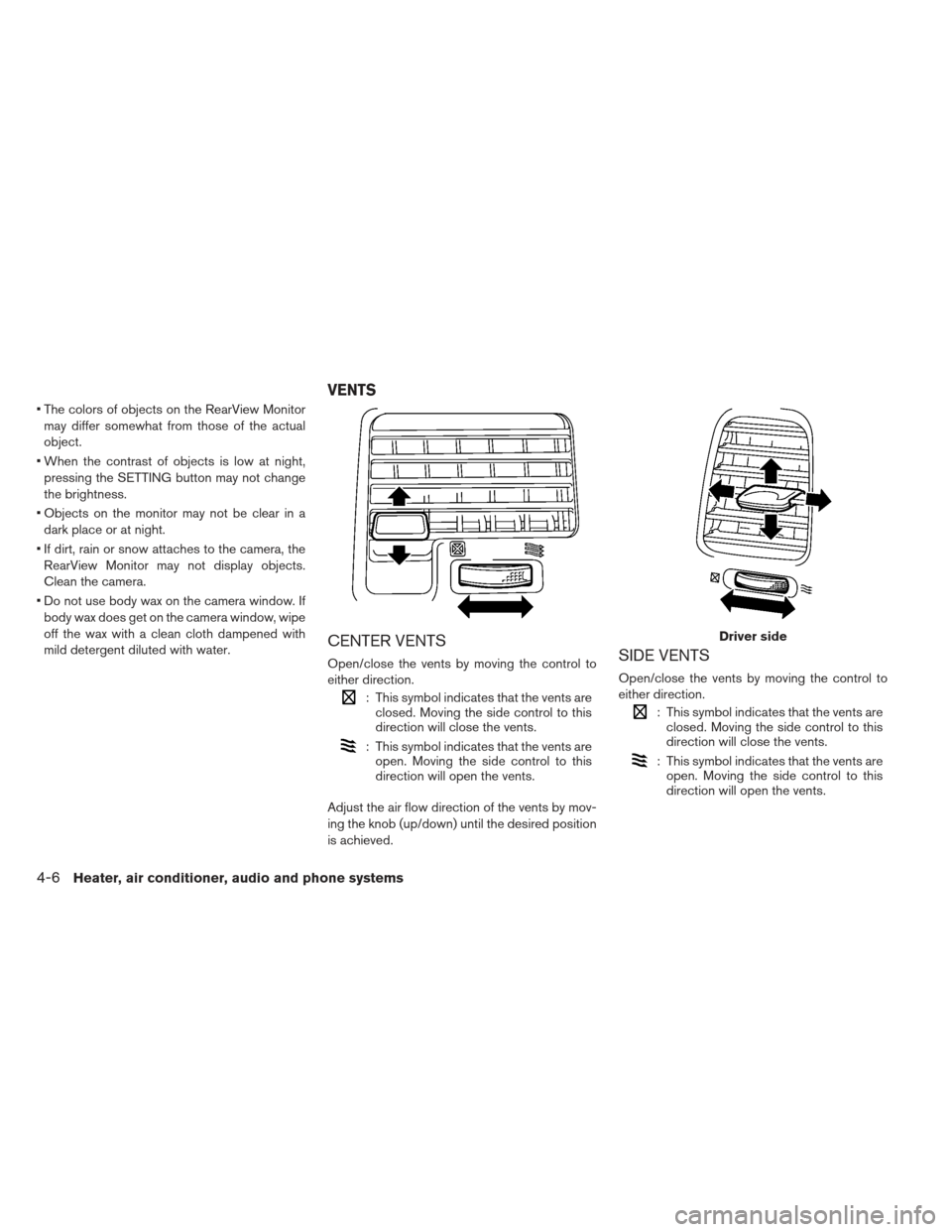
CENTER VENTS
Open/close the vents by moving the control to
either direction.
: This symbol indicates that the vents are closed. Moving the side control to this
direction will close the vents.
: This symbol indicates that the vents areopen. Moving the side control to this
direction will open the vents.
Adjust the air flow direction of the vents by mov-
ing the knob (up/down) until the desired position
is achieved.
SIDE VENTS
Open/close the vents by moving the control to
either direction.
: This symbol indicates that the vents are closed. Moving the side control to this
direction will close the vents.
: This symbol indicates that the vents areopen. Moving the side control to this
direction will open the vents.
Driver side
VENTS
4-6Heater, air conditioner, audio and phone systems
Page 232 of 402
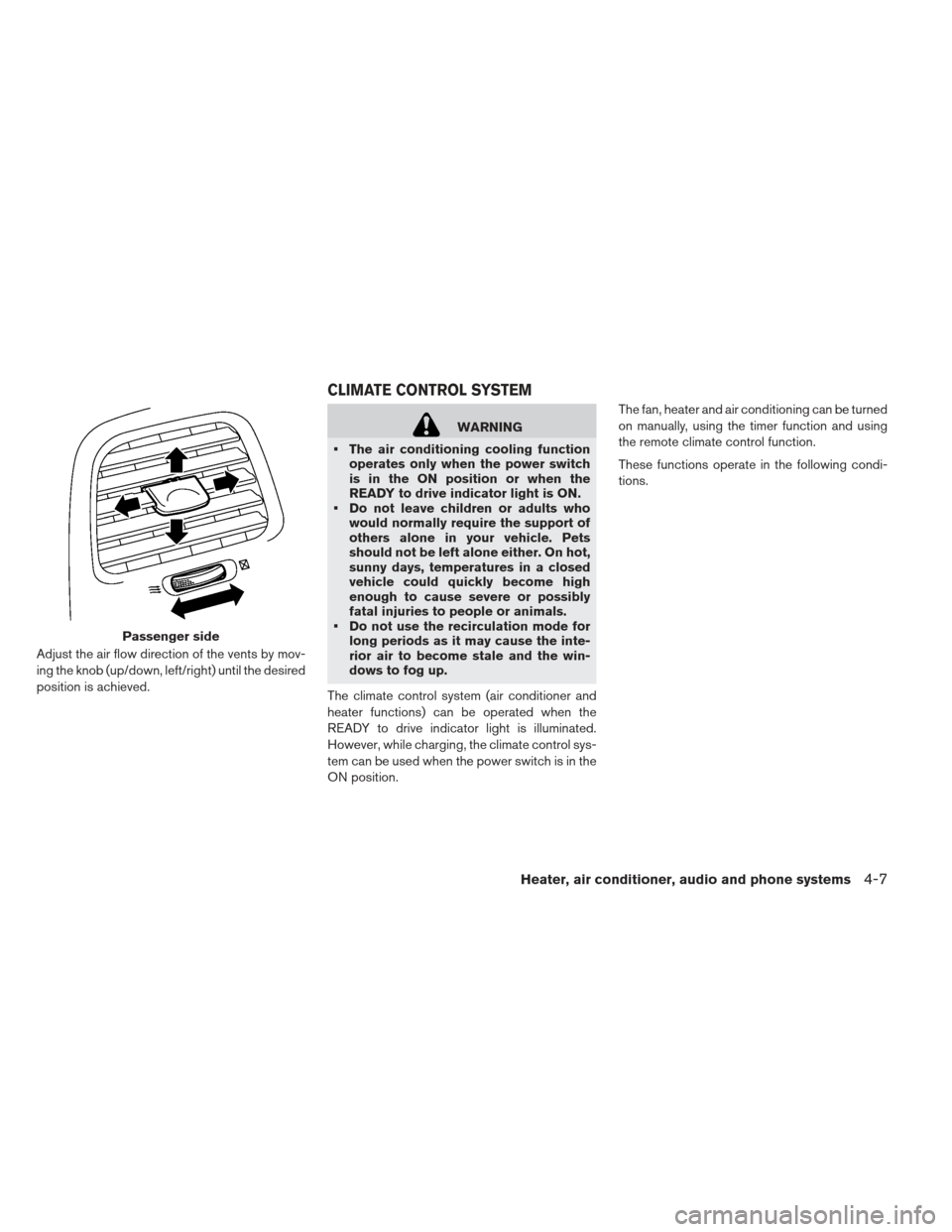
Adjust the air flow direction of the vents by mov-
ing the knob (up/down, left/right) until the desired
position is achieved.
WARNING
The air conditioning cooling function operates only when the power switch
is in the ON position or when the
READY to drive indicator light is ON.
Do not leave children or adults who would normally require the support of
others alone in your vehicle. Pets
should not be left alone either. On hot,
sunny days, temperatures in a closed
vehicle could quickly become high
enough to cause severe or possibly
fatal injuries to people or animals.
Do not use the recirculation mode for long periods as it may cause the inte-
rior air to become stale and the win-
dows to fog up.
The climate control system (air conditioner and
heater functions) can be operated when the
READY to drive indicator light is illuminated.
However, while charging, the climate control sys-
tem can be used when the power switch is in the
ON position. The fan, heater and air conditioning can be turned
on manually, using the timer function and using
the remote climate control function.
These functions operate in the following condi-
tions.
Passenger side
CLIMATE CONTROL SYSTEM
Heater, air conditioner, audio and phone systems4-7
Page 233 of 402
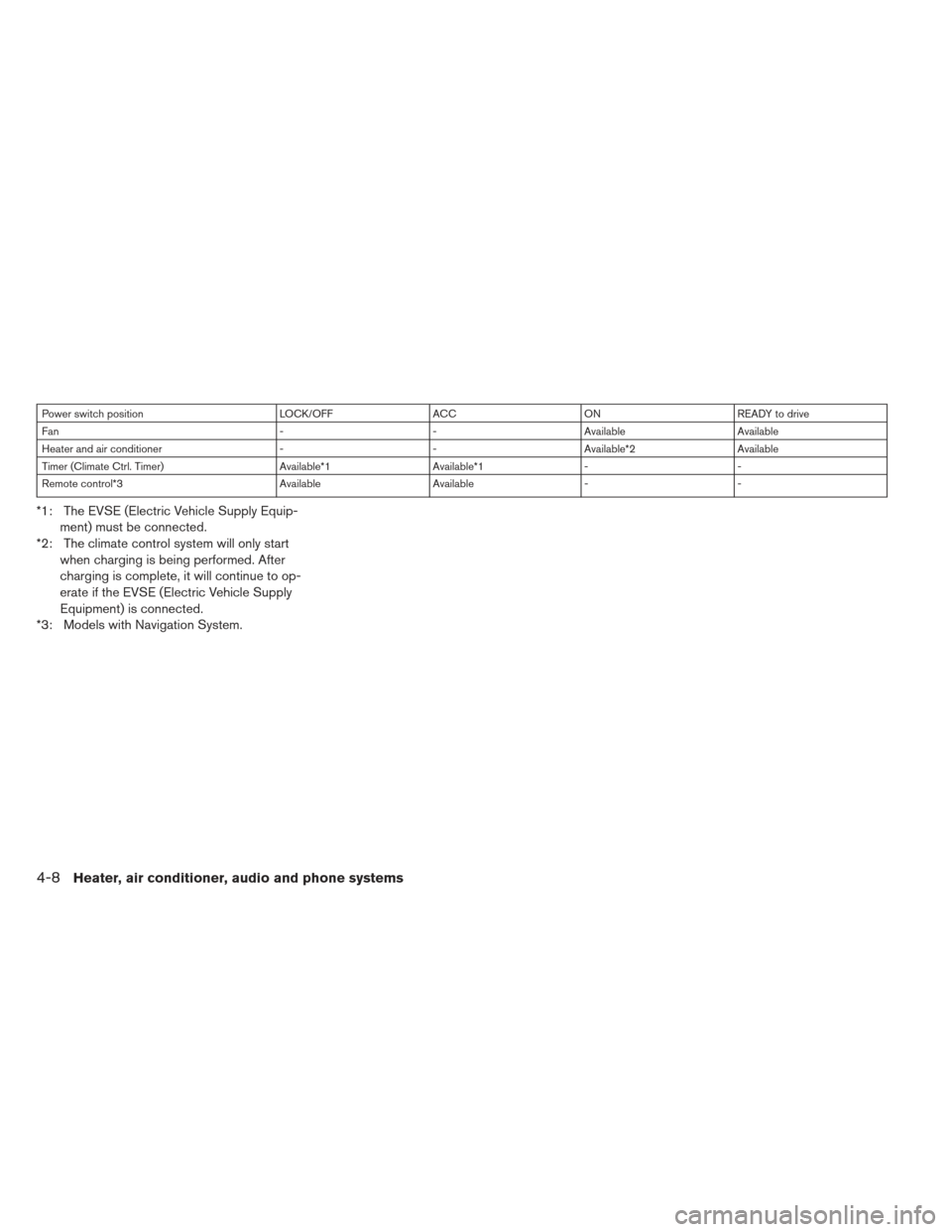
Power switch positionLOCK/OFFACCON READY to drive
Fan --Available Available
Heater and air conditioner --Available*2 Available
Timer (Climate Ctrl. Timer) Available*1Available*1- -
Remote control*3 AvailableAvailable- -
*1: The EVSE (Electric Vehicle Supply Equip-
ment) must be connected.
*2: The climate control system will only start when charging is being performed. After
charging is complete, it will continue to op-
erate if the EVSE (Electric Vehicle Supply
Equipment) is connected.
*3: Models with Navigation System.
4-8Heater, air conditioner, audio and phone systems
Page 234 of 402
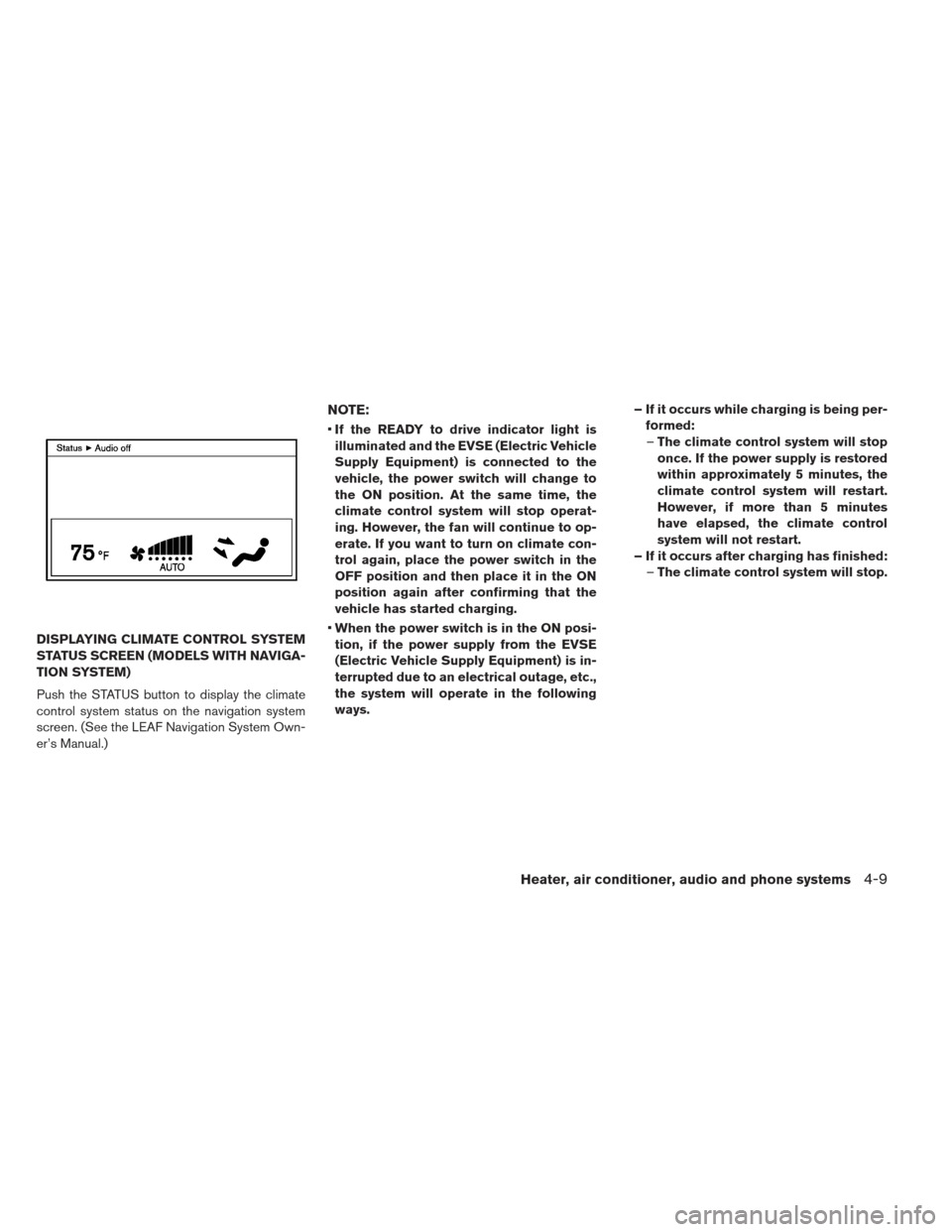
DISPLAYING CLIMATE CONTROL SYSTEM
STATUS SCREEN (MODELS WITH NAVIGA-
TION SYSTEM)
Push the STATUS button to display the climate
control system status on the navigation system
screen. (See the LEAF Navigation System Own-
er’s Manual.)
NOTE:
If the READY to drive indicator light is
illuminated and the EVSE (Electric Vehicle
Supply Equipment) is connected to the
vehicle, the power switch will change to
the ON position. At the same time, the
climate control system will stop operat-
ing. However, the fan will continue to op-
erate. If you want to turn on climate con-
trol again, place the power switch in the
OFF position and then place it in the ON
position again after confirming that the
vehicle has started charging.
When the power switch is in the ON posi-
tion, if the power supply from the EVSE
(Electric Vehicle Supply Equipment) is in-
terrupted due to an electrical outage, etc.,
the system will operate in the following
ways. – If it occurs while charging is being per-
formed:– The climate control system will stop
once. If the power supply is restored
within approximately 5 minutes, the
climate control system will restart.
However, if more than 5 minutes
have elapsed, the climate control
system will not restart.
– If it occurs after charging has finished: –The climate control system will stop.
Heater, air conditioner, audio and phone systems4-9
Page 235 of 402
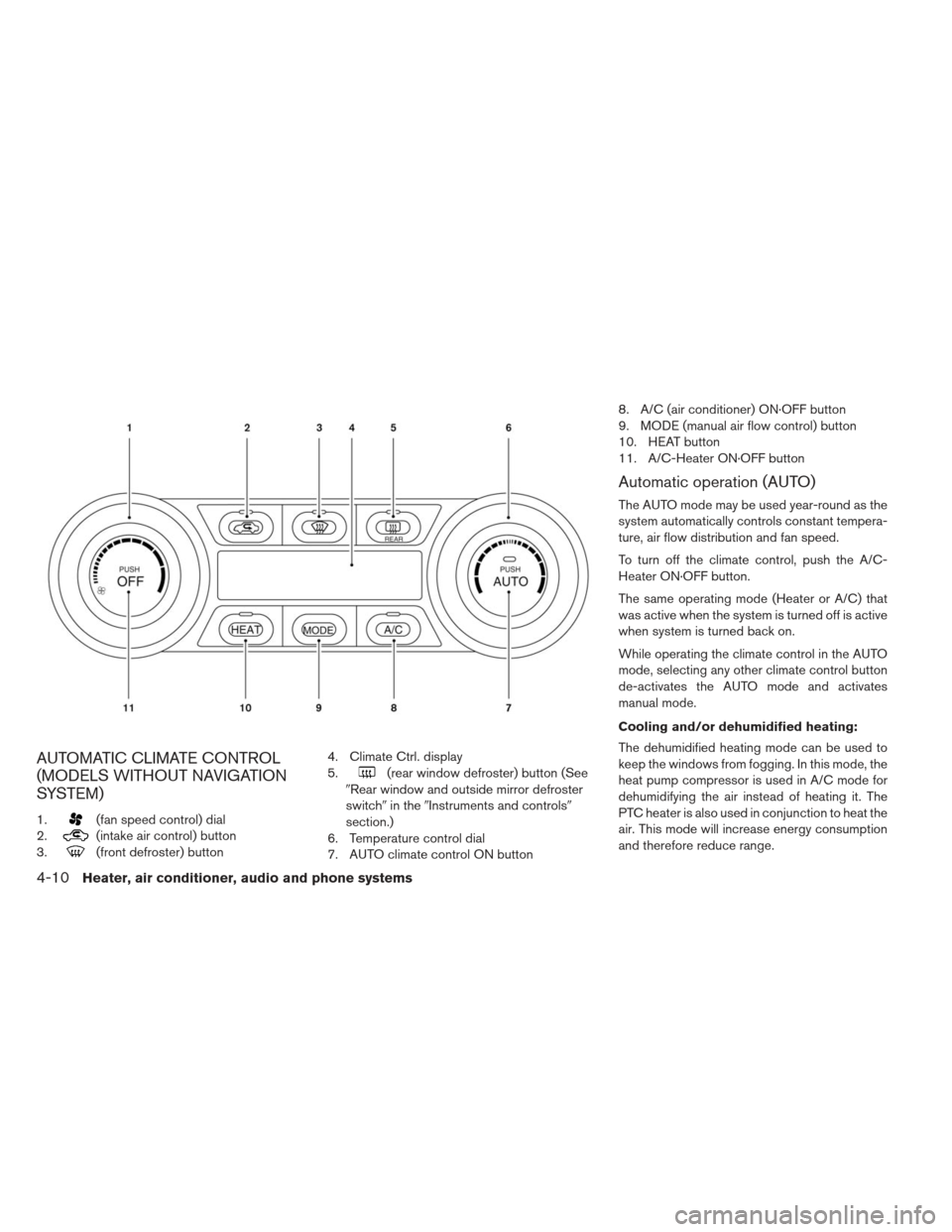
AUTOMATIC CLIMATE CONTROL
(MODELS WITHOUT NAVIGATION
SYSTEM)
1.(fan speed control) dial
2.
(intake air control) button
3.
(front defroster) button 4. Climate Ctrl. display
5.
(rear window defroster) button (See
�Rear window and outside mirror defroster
switch� in the�Instruments and controls�
section.)
6. Temperature control dial
7. AUTO climate control ON button 8. A/C (air conditioner) ON·OFF button
9. MODE (manual air flow control) button
10. HEAT button
11. A/C-Heater ON·OFF button
Automatic operation (AUTO)
The AUTO mode may be used year-round as the
system automatically controls constant tempera-
ture, air flow distribution and fan speed.
To turn off the climate control, push the A/C-
Heater ON·OFF button.
The same operating mode (Heater or A/C) that
was active when the system is turned off is active
when system is turned back on.
While operating the climate control in the AUTO
mode, selecting any other climate control button
de-activates the AUTO mode and activates
manual mode.
Cooling and/or dehumidified heating:
The dehumidified heating mode can be used to
keep the windows from fogging. In this mode, the
heat pump compressor is used in A/C mode for
dehumidifying the air instead of heating it. The
PTC heater is also used in conjunction to heat the
air. This mode will increase energy consumption
and therefore reduce range.
4-10Heater, air conditioner, audio and phone systems
Page 236 of 402
1. Push the AUTO button. The AUTO indicatorwill illuminate.
2. If the A/C indicator light does not illuminate, push the A/C button. The A/C indicator light
will illuminate.
3. If the HEAT indicator light does not illuminate, press the HEAT button. The HEAT indicator
light will illuminate.
4. Turn the temperature control dial to set the desired temperature. The temperature range
is between 60°F (18°C) and 90°F (32°C) .
5. To set the automatic control mode, press and hold the
(intake air control) button. The
indicator will blink twice and inside/outside
circulation will switch automatically.
A visible mist may be seen coming from the
ventilators in hot, humid conditions as the air is
cooled rapidly. This does not indicate a malfunc-
tion.
Heating (A/C off):
1. Push the AUTO button. The AUTO indicator will illuminate.
2. Press the HEAT button. The indicator light on the HEAT button will come on. If the indicator
light on the A/C button remains on, press the
A/C button so that the indicator light turns off. 3. If the A/C indicator light illuminates, push the
A/C button. The A/C indicator light will turn
off.
4. Turn the temperature control dial to set the desired temperature. The temperature range
is between 60°F (16°C) and 90°F (32°C) .
Do not set the temperature lower than the outside air temperature. Doing so may pre-
vent the temperature from being controlled
properly.
If the windows fog up, use dehumidified heating instead of the A/C off heating.
Dehumidified defrosting/defogging:
1. Push the front defroster
button. (The
indicator light will illuminate.)
2. Turn the temperature control dial to set the desired temperature.
To remove moisture or fog on the front win- dow quickly, set the temperature to the high
temperature and the fan speed to their maxi-
mum level.
After the windshield is cleared, push the front defroster
button again. (The indicator
light will turn off.)
When the front defroster
button is
pushed, the air conditioner will automatically turn on to defog the windshield. The outside
air circulation mode will be selected to im-
prove the defogging performance.
Manual operation
The manual mode can be used to control the
heater and air conditioner to your desired set-
tings.
To turn off the heater and air conditioner, push the
A/C-Heater ON·OFF button.
Fan speed control:
Turn the fan speed control dial
clockwise
to increase the fan speed.
Turn the fan speed control dial
counter-
clockwise to decrease the fan speed.
Push the AUTO button to change the fan speed
to the automatic mode.
Heater, air conditioner, audio and phone systems4-11