Page 3 of 16

1
thank you for buying a m itsubishi o utlander s port. ther e’s no doubt you’ve
already realized how well your car drives on the open road. w
ha
t you may not
know is all the great features that help your car perform the way it does.
i n the
pages ahead we’re going to run through the basics and prepare you for the
road.
we’
d also love to hear from you about your overall m itsubishi experience. i f you
haven’t already, please log on to www.MitsubishiSSIsurvey.com and tell us how
we did.
t
his will help us mak
e sure your next visit is that much better.
we hope y
ou will visit the m itsubishi o wner’s site where we store the latest
m
itsubishi news and special offers. h ere you can also keep track of your car’s
warranty and servicing needs, get Roadside
a ssistance i nformation and tap into
other owner-centric details. Just log on to www.
m itsubishicars.com/owners only. Driver’s View ......................P age 2-3
contr
ols................................ Page 4-5
o
wn the Road ...................Page 6
audio
s
y
stem ....................Page 7
n
avigation s
y
stem.......... Page 8-9
technology
........................Page 10
f
U se h ands- f ree
l
ink s
y
stem™ .....................Page 11
faQ
’s
..................................... Page 12-13
Table of Contents
“How-To” Videos
scan this QR code with your smartphone or key in to your internet enabled
de vice mitsubishicars.com/howtoqr to access brief “ h ow-
to” videos r
egarding
specific features on your new
o utlander
s
port.
h
ere you will find simple
instructions to help make your ownership experience more enjoyable.
Page 10 of 16
1 Press the [MENU] key to display.
2 Touch [Point of Interest].
6 Touch [All POIs]
3 Input the “S
tate” and “City”
7 Input the POI name
4 Touch [All Categories]
8 Touch [Set]
5 Touch the category of the desired POI
and category type to select.
Point of Interest (POI) Name
8NAVIGATION SYSTEM
6
4
2
Way Points – Once you have set a destination, you can enter additional stops along the
way called Way Points. For details on how to set Way Points refer to your Navigation
Owner’s Manual.
Saving Addresses - To save an address, first enter the address into the system. Then
touch [Address Book] and confirm location to be stored. Touch [Set to Address Book]
to complete.
Page 11 of 16
9NAVIGATION SYSTEM
1 Press the [MENU] key to display.
2 Touch [Address/Intersection].
6 Input the street name
3 Touch the “State” and “City” button
7 Touch [List] to select a street from the list
4 Input the “S
tate” and “City” name
8 Touch House # or intersection 9 Touch [Set]
5 Touch [All Streets]
5
8
8
2 3
3
Searching for a Location by Address / Location
Page 12 of 16
10
Multi-information Meter Switch (INFO Button)Changing the Operation Mode
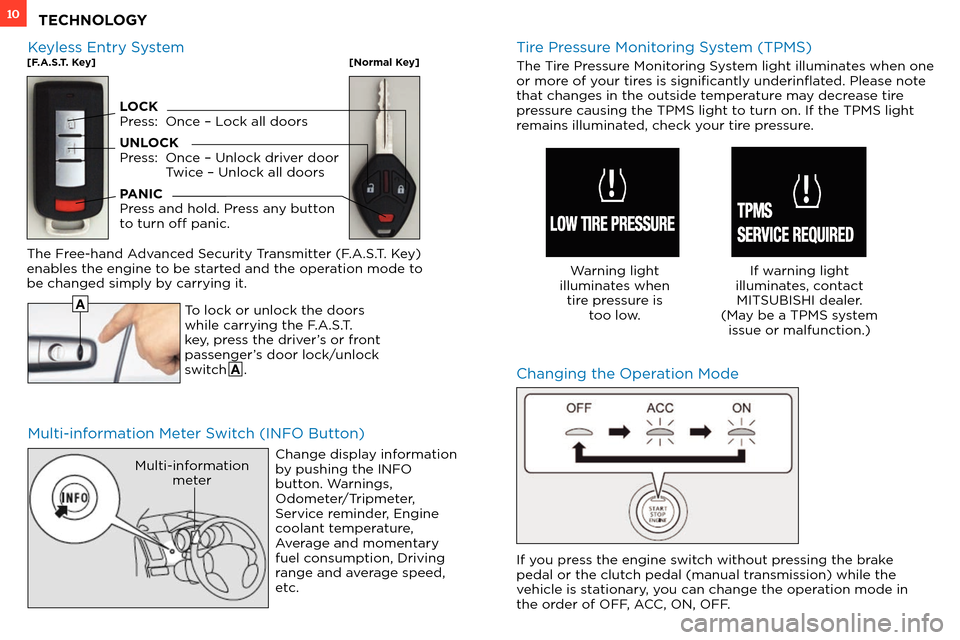
To lock or unlock the doors
while carrying the F.A.S.T.
key, press the driver’s or front
passenger’s door lock/unlock
switch A .
The Free-hand Advanced Security Transmitter (F.A.S.T. Key)
enables the engine to be started and the operation mode to
be changed simply by carrying it.
Change display information
by pushing the INFO
button. Warnings,
Odometer/Tripmeter,
Service reminder, Engine
coolant temperature,
Average and momentary
fuel consumption, Driving
range and average speed,
etc.
Multi-informationmeter
A
Tire Pressure Monitoring System (TPMS)
The Tire Pressure Monitoring System light illuminates when one
or more of your tires is significantly underinflated. Please note
tha
t changes in the outside temperature may decrease tire
pressure causing the TPMS light to turn on. If the TPMS light
remains illuminated, check your tire pressure.
Warning light
illuminates when tire pressure is too low. If warning light
illuminates, contact MITSUBISHI dealer.
(May be a TPMS system issue or malfunction.)
Keyless Entry System[F.A.S.T. Key][Normal Key]
LOCK
Press: Onc e – Lock all doors
UNLOCK
Press:
Onc
e – Unlock driver door
T
wice – Unlock all doors
PANIC
Press and hold. Press any button
to turn off panic.
If you press the engine switch without pressing the brake
pedal or the clutch pedal (manual transmission) while the
vehicle is stationary, you can change the operation mode in
the order of OFF, ACC, ON, OFF.
TECHNOLOGY
Page 15 of 16
13
Q: I only have one remote for the remote start system on my Outlander Sport. Can I get a second one?
A: No . Only one remote can be programmed per vehicle for security reasons.
Q:
Ho
w can I get the MPG stated on the window sticker?
A: Vehicle
driving styles will greatly affect MPG. Avoid sudden abrupt starts from a stop and let the vehicle coast to the traffic light.
Both of these s
tyles will increase mileage and reduce brake lining wear.
• Vehicles
are designed to achieve the best fuel mileage when they are driven at the speed limits on the freeway. Avoid driving
o
ver 65 mph.
• Under
inflated tires will increase rolling resistance and will reduce fuel mileage. Check tire pressure frequently to increase miles
per gallon. Pr
oper tire pressure also ensures optimum tire performance (including tire wear.)
Q:
Ho
w does the Navigation System choose a certain route?
A:
T
he system takes into account traffic conditions, road types, distance and road width to recommend the route.
Q:
W
hy does my Anti-Lock Braking System (ABS) make a noise?
A:
Each time y
our vehicle is started and driven a short distance, you will hear the sound of the ABS motor operating from the right front
engine compartment. This is the normal sound the Anti-Lock Braking System makes when performing a self check.
Q:
W
hy do my Rain Sensing Windshield Wipers operate on their own when it’s not raining?
A: • When
the lever is in the AUTO position, the rain sensor detects rain or snow and automatically turns on the wipers.
• The
wipers may automatically operate when things such as insects or foreign objects are affixed to the windshield on top of the
r
ain sensor or when the windshield is frosted over.
• To
stop the wipers, place the lever in the OFF position.
Q:
W
hy does my check engine light come on after I put gas in my car?
A:
T
here are many reasons why your check engine light may illuminate. Before calling your dealership, make sure the
fuel cap is fully engaged and y
ou have heard three clicks when tightening it. If after checking and hearing three clicks and driving for
awhile the light is still on, contact your dealership.
Q:
Ho
w do I use the emergency key when the F.A.S.T. key battery or vehicle battery is run down?
A:
R
emove the emergency key from the F.A.S.T key fob and manually unlock the door. Once inside the vehicle insert the F.A.S.T.
k
ey fob into the key slot in the glove box. Starting the engine and changing the operation mode should now be possible.
R
emove the F.A.S.T. key from the slot after starting the engine or changing the operation mode.
FAQ ’ s
![MITSUBISHI OUTLANDER SPORT 2013 3.G Owners Handbook 1 Press the [MENU] key to display.
2 Touch [Point of Interest].
6 Touch [All POIs]
3 Input the “S
tate” and “City”
7 Input the POI name
4 Touch [All Categories]
8 Touch [Set](/manual-img/19/7543/w960_7543-9.png "MITSUBISHI OUTLANDER SPORT 2013 3.G Owners Handbook 1 Press the [MENU] key to display.
2 Touch [Point of Interest].
6 Touch [All POIs]
3 Input the “S
tate” and “City”
7 Input the POI name
4 Touch [All Categories]
8 Touch [Set")
![MITSUBISHI OUTLANDER SPORT 2013 3.G Owners Handbook 9NAVIGATION SYSTEM
1 Press the [MENU] key to display.
2 Touch [Address/Intersection].
6 Input the street name
3 Touch the “State” and “City” button
7 Touch [List] to select a stre](/manual-img/19/7543/w960_7543-10.png "MITSUBISHI OUTLANDER SPORT 2013 3.G Owners Handbook 9NAVIGATION SYSTEM
1 Press the [MENU] key to display.
2 Touch [Address/Intersection].
6 Input the street name
3 Touch the “State” and “City” button
7 Touch [List] to select a stre")