2013 MITSUBISHI OUTLANDER SPORT ad blue
[x] Cancel search: ad bluePage 6 of 16

4CONTROLS
Regular Headlights Automatic Headlights
Headlights and other lights on.
Parking, tail, front and rear sidemarker lights,
license plate and instrument panel lights on.
Headlights and other lights turn on and off
automatically in accordance with outside light level.
All lights off
AUTOOFF
Fog Lights (if equipped)
Engine Switch
Fog Lights will illuminate only
when headlights are on low
beam. Turning the knob in the
direction of the ON position
turns on the fog lights. Turning
the knob in the direction of
the OFF position turns off the
fog lights. The knob will return
to the neutral position when
released.
High/Low Beam Switch
To change the headlights from
high beam to low beam and
vice versa, pull the turn signal
lever fully towards you (1). An
illuminated blue light in the
instrument cluster indicates when
the headlights are on high beam.
• Headlight flasher
You
can flash the high beams
b
y pulling the lever gently
towards you (2).
Telescopic Steering
Telescopic Steering Wheel - located on
the underside of the steering column
is a lever that unlocks the steering
column and allows adjustment of the
height and distance of the steering
wheel to the driver. When adjustments
are complete, push the lever back to
its original position to lock the steering
wheel in place. Adjust the steering
wheel only when the vehicle is at a
complete stop.
LOCK
UNLOCK
Starting the Engine
Stopping the Engine
1. Stop the vehicle.
2. Fully engage the parking br ake while depressing the brake pedal.
3.
On v
ehicles with a manual transaxle, press the engine switch to stop the engine, and then
move the gearshift lever to the 1st (on a uphill) or “R” (Reverse) (on a downhill) position.
On v
ehicles equipped with continuously variable transmission (CVT), move the selector
lever to the “P” (Park) position, and then press the engine switch to stop the engine. 1.
Mak
e sure the parking brake is applied.
2.
Pr
ess and hold the brake pedal down with your right foot.
3.
Pr
ess and hold the clutch pedal all the way down (manual transaxle).
On v
ehicles equipped with manual transaxle, place the gearshift lever
in the “N” (Neutral) position.
On v
ehicles equipped with continuously variable transmission (CVT),
make sure the selector lever is in the “P” (Park) position.
4.
Pr
ess the engine switch.
Page 9 of 16
7AUDIO SYSTEM
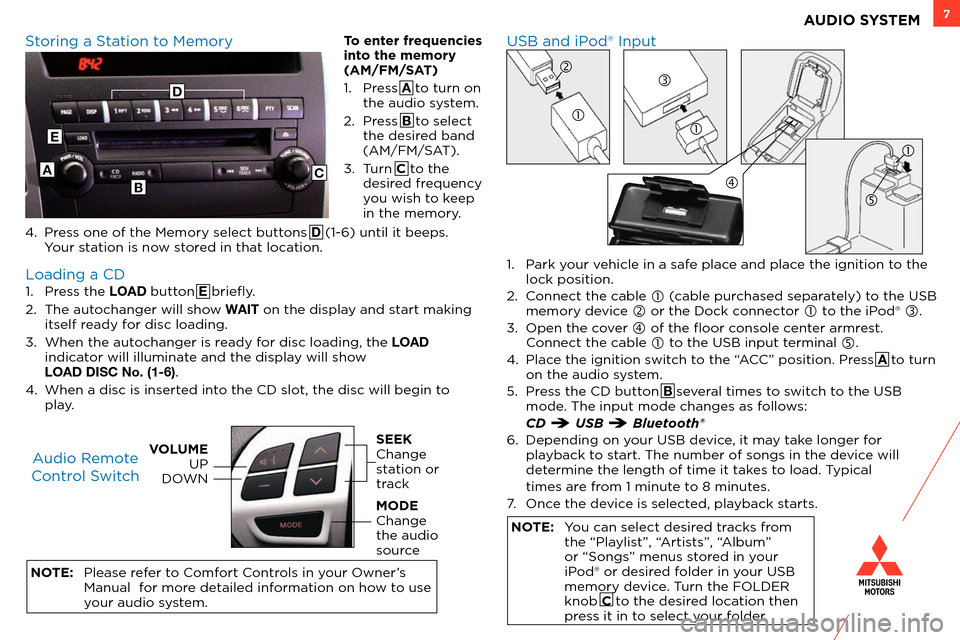
1. Press the LOAD button E briefly.
2.
T
he autochanger will show WAIT on the display and start making
itself ready for disc loading.
3.
W
hen the autochanger is ready for disc loading, the LOAD
indicator will illuminate and the display will show
LOAD DISC No. (1-6)
.
4.
W
hen a disc is inserted into the CD slot, the disc will begin to
play.
NOTE:
Please r
efer to Comfort Controls in your Owner’s
Manual for more detailed information on how to use
your audio system.
USB and iPod® Input
Storing a Station to Memory
Loading a CD Audio Remote
Control Switch
VOLUME UP
DOWNSEEK
Change
station or
track
MODE
Change
the audio
source
1. Park your vehicle in a safe place and place the ignition to the lock position.
2.
C
onnect the cable
(cable purchased separately) to the USB
memory device
or the Dock connector to the iPod® .
3.
Open the c
over
of the floor console center armrest. C
onnect the cable
to the USB input terminal .
4.
Plac
e the ignition switch to the “ACC” position. Press A to turn
on the audio system.
5.
Pr
ess the CD button B several times to switch to the USB
mode. The input mode changes as follows:
CD USB Bluetooth®
6.
Depending on y
our USB device, it may take longer for
playback to start. The number of songs in the device will
determine the length of time it takes to load. Typical
times ar
e from 1 minute to 8 minutes.
7.
Onc
e the device is selected, playback starts.
NOTE: You can select desired tracks from the “Playlist”, “Artists”, “Album”
or “Songs” menus stored in your
iPod® or desired folder in your USB
memory device. Turn the FOLDER
knob C to the desired location then
press it in to select your folder.
A
E
BC
To enter frequencies
into the memory
(AM/FM/SAT)
1.
Pr
ess A to turn on
the audio system.
2.
Pr
ess B to select
the desired band
(AM/FM/SAT).
3.
T
urn C to the
desired frequency
you wish to keep
in the memory.
4.
Pr
ess one of the Memory select buttons D (1-6) until it beeps.
Your station is now stored in that location.
D
Page 13 of 16
11Bluetooth® Operation with FUSE Hands-free Link System™
Making a call by using the telephone number:
1. Pr ess A button and Say “Dial.”
2.
T
he voice guide says “Number please.”
3.
Sa
y the telephone number “XXX•••••••.”
4.
T
he voice guide says “Dialing
Making a call using a phonebook:
1.
Pr
ess A button and Say “Call.”
2.
A
fter the voice guide says “Name please.”
Sa
y the name you want to call “XXX•••••••.”
3.
If ther
e is only 1 match, the voice guide says “Calling
number.
Receiving calls:
1.
If an inc
oming phone call is received while the ignition
switch is in the “ACC” or “ON” position, with the audio
system OFF, the audio system automatically turns ON.
2.
Pr
ess B button.
Hanging up a call:
1.
Pr
ess C button.
To import a devices phonebook:
1.
Pr
ess A button and Say “Phonebook.”
2.
T
he voice guide will say “Select one of the following: new
entry, edit number, edit name, list names, delete, erase all,
or import contact.” Say “Import contact.”
3.
T
he voice guide will say “Would you like to import a single
entry or all contact?” Say “All contacts.”
4.
T
he voice guide will say “Importing the contact list
fr
om the mobile phonebook. This may take several
minutes to complete. Would you like to continue?”
Answer “Yes.”
5.
W
hen the import is complete, the voice guide
will sa
y “Import complete.”
Tip on Getting Started:
Before using FUSE for the first time, press the SPEECH button and
say “Help”. This will walk you through some tips and help set-up your
recognition profile.
For a list of compatible Bluetooth® devices please go to
http://www.mitsubishicars.com/MMNA/jsp/owners-site/technology-
features.do
If you are having difficulties operating your
phone or connecting to the system, please call
Mitsubishi Handsfree at (888) 702-4100.
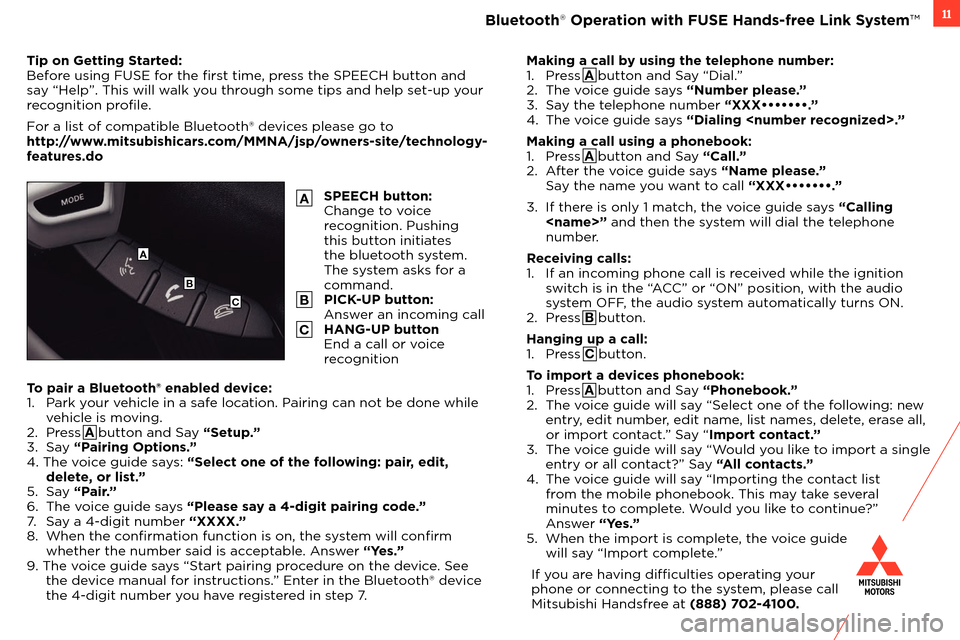
SPEECH button:
Change to voice
recognition. Pushing
this button initiates
the bluetooth system.
The system asks for a
command.
PICK-UP button:
Answer an incoming call
HANG-UP button
End a call or voice
recognition
A
B
C
A
B
C
To pair a Bluetooth® enabled device:
1.
P ark your vehicle in a safe location. Pairing can not be done while
vehicle is moving.
2.
Press A button and Say “Setup.”
3.
Say “Pairing Options.”
4. The voice guide says: “Select one of the following: pair, edit, delete, or list.”
5.
Say “Pair.”
6.
T
he voice guide says “Please say a 4-digit pairing code.”
7.
Sa
y a 4-digit number “XXXX.”
8.
W
hen the confirmation function is on, the system will confirm
whether the number said is acceptable. Answer “Yes.”
9. The voice guide says “Start pairing procedure on the device. See the device manual for instructions.” Enter in the Bluetooth® device
the 4-digit number you have registered in step 7.
Page 14 of 16
12FAQ ’ s
Q: What should I do when my engine is hard to start?
A: Pr essing on the accelerator pedal about half way down while cranking the engine may make it easier to start. When the engine
starts, release your foot from the accelerator pedal.
Q:
Is m
y phone compatible with the factory Mitsubishi Bluetooth® Hands Free System?
A:
Check the phone appr
oval list, www.mitsubishicars.com/owners to see if the phone is Bluetooth® approved.
Q.
W
hy doesn’t my device (USB, iPhone, Bluetooth® Audio, etc.) work?
A:
Y
ou need to press the Mode button to select the appropriate device you want to use.
Q:
Ho
w do I use Bluetooth® Audio (if equipped)?
A:
T
urn the Audio System power on. Press the CD button several times until BT Audio (Bluetooth®) is shown. Make sure your Bluetooth®
device is paired and set to Bluetooth On mode. Playback will start automatically.
Q:
Ho
w do I transfer calls from Bluetooth® back to my mobile phone’s handset?
A:
W
hile on the call, press the speech button on your steering wheel and, once prompted, say “Transfer Call.”
Q:
W
hy does the FUSE Hands-free Link System™ take so long to upload my music from my audio music device?
A:
T
he Mitsubishi system can read multiple device structures in order to catalog the music files for easy playing and listening.
Depending on the amount of music you have on your device, this may take a few minutes.
Q:
W
hat are the different ways of playing music from my portable music player through the stereo system in my vehicle, when
equipped with the FUSE Hands-free Link System™?
A:
T
here are two ways of playing music through your vehicle’s sound system.
• USB
port - The FUSE system will find the songs in your device and categorize them according to Artist, Album, and Genre. Then
y
ou can have the FUSE system find and play the song in your device that you prefer without physically searching your device.
This is done via voice commands. Note: In this mode the storage device will also be charged.
• Bluetooth® Streaming - Once your device is paired to the FUSE system, you can stream music from your device through the FUSE system to your vehicle’s sound system. No wires or cords. Your music stops and restarts at the same song when you exit
and when you re-enter the vehicle. Voice commands are not available.
Q:
W
hy can’t I control the music track selection via voice commands while Bluetooth® streaming?
A:
T
he Mitsubishi system is not configured to support this functionality.
Q:
My Outlander Sport is equipped with “Micr
on Air Filtration”. Where is the filter located and does it need servicing?
A:
T
he micron air filter is a small filter element which is located in the HVAC box just behind the glove box. The filter should be
inspected frequently for debris. The filter works well at filtering incoming air however the filter will clog and lead to reduced outlet
air volume if not serviced on a regular basis.
Q:
My Outlander Sport has tw
o 12V accessory outlets. What devices can be plugged into these outlets?
A:
Both of these outlets ar
e protected with 15 amp fuses. Always check the current draw rating of any device prior to use in the vehicle.
If
the device is rated above 12 amps, this could lead to circuit overload and the electrical fuse opening (no current flow).