Page 453 of 626

5-80 Comfort controls
5
Random playback for all folders on a disc (MP3 CDs only)
Press the RDM button (9) for 2 seconds or longer (until you
hear a beep). “D-RDM” will appear on the display. Tracks
from all the folders on the currently selected disc will be
played in a random sequence. To exit the random mode, briefly
press the RDM button again.NOTE�In the all discs random mode, if an MP3 CD has been
loaded in the autochanger, the autochanger will skip over
it to the next music CD.
�With a disc that contains both CD-DA and MP3 files, the
random mode causes only files of the same format (CD-
DA only or MP3 files only) to be played in a random
sequence.
To find the start of each track on a disc for playbackPress the SCAN button (14). “SCAN” will appear on the dis-
play and the autochanger will play back the first 10 seconds of
each track on the selected disc.
The track number will blink while the scan mode is selected.
To stop the scan mode, press the SCAN button again.NOTE�Once all tracks on the disc have been scanned, playback
of the disc will restart from the beginning of the track that
was playing when scanning started.
�The scan mode will be canceled when radio or CD opera-
tion is selected.
�With a disc that contains both CD-DA and MP3 files, the
scan mode causes only files of the same format (CD-DA
only or MP3 files only) to be played.CD text and MP3 title display
N00752100094
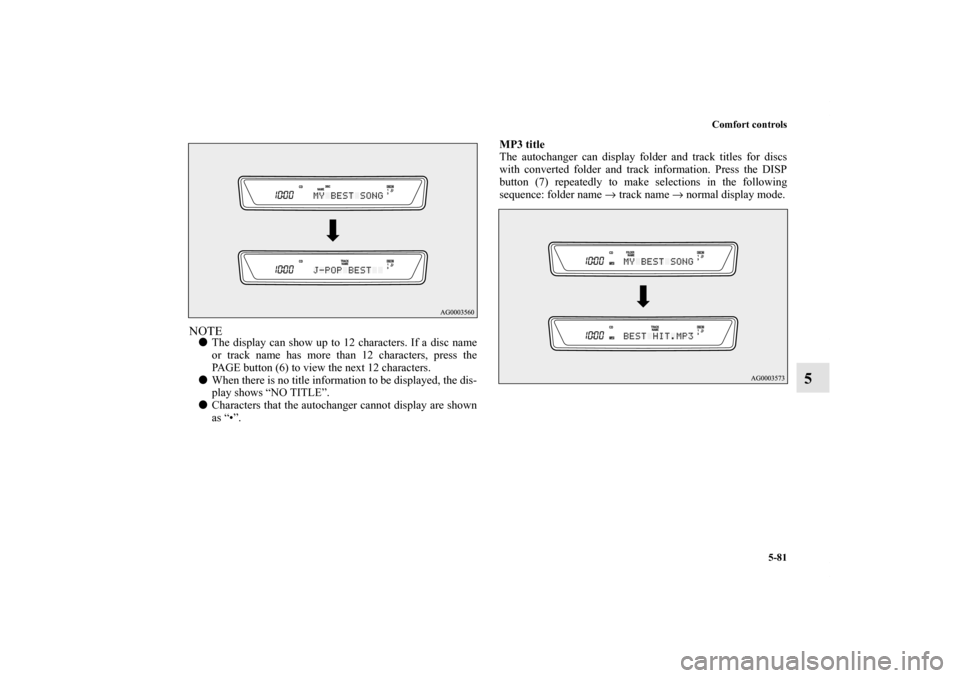
This autochanger can display CD text and MP3 titles including
ID3 tag information.
CD text
The autochanger can display disc and track titles for discs with
converted disc and track title information. Press the DISP but-
ton (7) repeatedly to make selections in the following
sequence: disc name → track name → normal display mode.
BK0150900US.book 80 ページ 2012年5月7日 月曜日 午後12時9分
Page 454 of 626
Comfort controls
5-81
5
NOTE�The display can show up to 12 characters. If a disc name
or track name has more than 12 characters, press the
PAGE button (6) to view the next 12 characters.
�When there is no title information to be displayed, the dis-
play shows “NO TITLE”.
�Characters that the autochanger cannot display are shown
as “•”.MP3 title
The autochanger can display folder and track titles for discs
with converted folder and track information. Press the DISP
button (7) repeatedly to make selections in the following
sequence: folder name → track name → normal display mode.
BK0150900US.book 81 ページ 2012年5月7日 月曜日 午後12時9分
Page 455 of 626

5-82 Comfort controls
5
ID3 tag information
The autochanger can display ID3 tag information for files that
have been recorded with ID3 tag information.
1. Press the DISP button (7) for 2 seconds or longer to
switch to the ID3 tag information. “TAG” indicator will
appear on the display.
2. Press the DISP button repeatedly to make selections in the
following sequence: album name → track name → artist
name → normal display mode.NOTE�To return from ID3 tag information to the folder name,
press the DISP button (7) again for 2 seconds or longer.
�When there is no title information to be displayed, the dis-
play shows “NO TITLE”.
�The display can show up to 12 characters. If a folder
name, track name, or item of ID3 tag information has
more than 12 characters, press the PAGE button (6) to
view the next 12 characters.
�Folder names and track names can each be displayed up to
a length of 32 characters. Items of ID3 tag information
can each be displayed up to a length of 30 characters.
�Characters that the autochanger cannot display are shown
as “•”.
To play tracks from USB device
(if so equipped)
N00762200030
You can connect your iPod or USB memory device to the USB
input terminal and play music files stored in the iPod or USB
memory device.
See the following section for the types of connectable devices
and supported files.
Refer to “Types of connectable devices and supported file
specifications” on page 3-254.
See the following sections for the connecting methods, “How
to connect an iPod” on page 3-252 and “How to connect a USB
memory device” on page 3-250.
If your vehicle is equipped with a Bluetooth
® 2.0 interface,
you can play music files in your iPod or USB memory device
via voice operation.
Refer to “To play iPod tracks via voice operation” on page 5-87
and “To play USB memory device tracks via voice operation”
on page 5-98.
NOTE�A file protected by copyright might not be able to start
playback.
�It is recommended to leave the equalizer of the connected
device flat.
BK0150900US.book 82 ページ 2012年5月7日 月曜日 午後12時9分
Page 616 of 626

Alphabetical index
1
A
Accessory (installation) 1-7
ACD (Active center differential system) 3-121
Active stability control (ASC) 3-130
ASC OFF indicator 3-133
ASC operation display 3-133
ASC warning display 3-133
Air cleaner filter 7-12
Air conditioning
Automatic air conditioning 5-12
,5-22
Important air conditioning operating tips 5-32
Air purifier 5-33
All-wheel drive system 3-118
Aluminum wheels 7-77
Antenna
Roof antenna 5-119
Anti-lock braking system 3-126
Warning light / display 3-127
,3-128
Arm rest 2-8
ASC 3-130
Ashtray 3-257
Assist grip 3-270
Audio
AM/FM electronically tuned radio with CD player 5-33
AM/FM electronically tuned radio with 6 CD autochanger 5-
52
Error codes 5-108
,5-110
Steering wheel audio remote control switch 5-105Audio system
Handling of compact discs 5-116
Auxiliary audio connector (RCA) 5-103
Auxiliary video connector (RCA) 5-103
AWC Control fluid
Fluid 9-9
AWC control fluid 7-15
AYC fluid
Fluid 9-9
AYC (Active yaw control system) 3-121
B
Back-up lights
Bulb capacity 7-46
Replacement 7-64
Ball joint, steering linkage seals and drive shaft boots 7-34
Battery 7-18
Charging system warning light 3-200
Disconection and connection 7-18
During cold weather 7-18
Specification 9-8
Bluetooth 2.0 interface 3-224
Bottle holder 3-269
BK0150900US.book 1 ページ 2012年5月7日 月曜日 午後12時9分
Page 621 of 626

Alphabetical index
6Power outlet 3-258
Power steering
Fluid 7-17
,9-9
System 3-137
Power windows 3-69
Lock switch 3-72
Main switch 3-70
Safety mechanism 3-71
Sub switch 3-71
Timer function 3-71
Puncture (Tire changing) 6-9
R
Radio
AM/FM electronically tuned radio with CD player 5-33
AM/FM electronically tuned radio with 6 CD autochanger 5-
52
General information about your radio 5-120
Rain sensor 3-217
Reading light
Bulb capacity 7-48
Replacement 7-67
Rear axle oil 7-15
Rear side-marker lights
Bulb capacity 7-46
Replacement 7-62
Rear turn signal lights
Bulb capacity 7-46
Replacement 7-62Rearview mirror
Inside 3-79
Outside 3-81
Refrigerant (air conditioning) 9-9
Replacement of light bulbs 7-45
Replacing tires and wheels 7-24
Reporting Safety Defects 8-3
Rheostat 3-153
S
Safe driving techniques 4-6
S-AWC (Super-All Wheel Control) 3-120
ACD (Active center differential system) 3-121
AYC (Active yaw control system) 3-121
Seat 2-2
Arm rest 2-8
Front seats 2-3
Head restraints 2-8
Heated seats 2-6
Rear seats 2-8
Seats and restraint systems 2-3
BK0150900US.book 6 ページ 2012年5月7日 月曜日 午後12時9分