2013 MITSUBISHI L200 CD player
[x] Cancel search: CD playerPage 181 of 362

Ventilators.................................................................................... 5-02
Heater/Manual air conditioning* ..................................................5-03
Automatic air conditioning* ......................................................... 5-08
Important operation tips for the air conditioning..........................5-12
Air purifier* .................................................................................. 5-12
LW/MW/FM electronic tuning radio with CD player* ................5-13
To play tracks from USB device* ................................................5-27
To play tracks from a Bluetooth ®
device (vehicles with
Bluetooth ®
2.0 interface)..........................................................5-36
To use the external audio input function* ....................................5-39
Steering wheel remote control switch* ........................................5-40
Error codes .................................................................................... 5-42
Error codes (iPod) ......................................................................... 5-44
Error codes (USB memory device) ..............................................5-46
Audio system anti-theft feature .................................................... 5-48
Handling of compact discs ........................................................... 5-48
Antenna ......................................................................................... 5-50
Link System* ................................................................................ 5-51
Bluetooth ®
2.0 interface ............................................................... 5-51
USB input terminal* ..................................................................... 5-67
Sun visors ..................................................................................... 5-69
Vanity mirror* .............................................................................. 5-70
Ashtray..........................................................................................5-70
Cigarette lighter ............................................................................ 5-71
Accessory socket* ........................................................................ 5-72
Digital clock* ............................................................................... 5-73
Interior lamps ................................................................................ 5-73
Storage spaces...............................................................................5-75
Cup holder* .................................................................................. 5-78
Bottle holder ................................................................................. 5-79Convenient hook
........................................................................... 5-79
Coat hook* .................................................................................... 5-80
First-aid kit and warning triangle securing bands* ......................5-80For pleasant driving
OKTE13E1
5
Page 193 of 362

LW/MW/FM electronic tuning radio with CD player*E00708501745
The audio system can be used when the ignition switch is in the “ON” or “ACC” position.A- Display windowB- Audio system
NOTE
l To listen to the audio system while the engine is stopped, turn the ignition key to the “ACC” position.
l If a cellular phone is used inside the vehicle, it may create noise from the audio equipment. This does not mean that anything is wrong with your audio
equipment. In such a case, use the cellular phone at a place as far away as possible from the audio equipment.
l If foreign objects or water get into the audio equipment, or if smoke or a strange odour comes from it, immediately turn off the audio system. We recom-
mend your to have it checked. Never try to repair it by yourself. Avoid continuous usage without inspection by a qualified person.
l The audio system’s control knob can be removed to deter thieves. For details, refer to “Audio system anti-theft feature” on page 5-48.
l The audio amplifier (if so equipped) is located under the front right seat.
Do not subject the amplifier to a strong impact.
It could damage the amplifier or malfunctioning could result.
For pleasant driving
5-13
OKTE13E1
5
Page 204 of 362

To listen to a CDE00709602290
1. Insert a disc with the label facing up, and the
CD player will begin playing even if another
mode is being used. The CD indicator (18),
the track number (16), the playing time (17)
will appear on the display.
2. When the CD mode is selected by pressing
the CD (12) button several times with the
disc in the player, the CD player will start
playback.
3. To stop the CD, turn off the power by press-
ing the PWR switch (11) or change over to
the another mode by pressing the RADIO but-
ton or CD button, or eject the disc by press-
ing the eject button (1).
NOTE l To adjust the volume and tone, refer to
“To
adjust the volume” on page 5-15 and “To ad-
just the tone” on page 5-15.
l An 8 cm compact disc cannot be played on
this CD player.
l For information concerning the handling of
compact discs, refer to “Handling of compact
discs” on page 5-48.
To fast-forward/fast-reverse the disc
Fast-forward
You can fast-forward the disc by pressing the
button (9). While the button is kept pressed, the
disc will be fast-forwarded.
Fast-reverse
You can fast-reverse the disc by pressing the
but-
ton (10). While the button is kept pressed, the disc
will be fast-reversed.
NOTE
l When you have fast-forwarded/fast-reversed
the disc, the playing-time may be shown
with deviation.
To listen to an MP3 CD
This CD player allows you to play MP3 (MPEG Au-
dio Layer-3) files recorded on CD-ROMs, CD-Rs
(recordable CDs), and CD-RWs (rewritable CDs)
in ISO9660 Level 1/Level 2, Joliet, and Romeo for-
mats. Each disc may have a maximum of 16 trees,
100 folders, and 255 files per disc. During MP3
playback, the unit can display ID3 tag information.
For information concerning ID3 tag, refer to “CD
text and MP3 title display” on page 5-26.
1. Insert a disc containing MP3 files into the slot.
2. The display shows the folder number and the
file number, then playback will begin.
NOTE
l While listening to a disc on which
CD-DA
(CD-Digital Audio) and MP3 files have both
been recorded, you can switch between read-
ing of the CD-DA, reading of the MP3 files,
and the external audio input mode (AUX) by
pressing the CD button for 2 seconds or longer.
l With a disc that contains both
CD-DA and
MP3 files, the CD-DA files are automatical-
ly played first.
l The playback sound quality differs depend-
ing on the encoding software and the bit rate.
For details, refer to the user manual of your
encoding software.
l Depending on file/folder configurations on a
disc, it may take some time before playback
starts.
l MP3 encoding software and writing software
are not supplied with this unit.
l You may encounter trouble in playing an
MP3 or displaying the information of MP3
files recorded with certain writing software
or CD recorders (CD-R/RW drivers).
l If you record too many folders or files other
than MP3 onto a disc, it may take some time
before playback starts.
l This unit does not record MP3 files.
l For information concerning CD-Rs/RWs, re-
fer to “Notes on CD-Rs/RWs” on page 5-49.CAUTIONl Attempting to play a file not in the MP3
format which has a “.mp3” file name may
produce noise from the speakers and
speaker damage, and can damage your
hearing.
For pleasant driving
5-24 OKTE13E1
5
Page 205 of 362

Folder selection order/MP3 file playback order
(Example)Root folder (root directory)Tree 4Tree 3Tree 2Tree 1Folder selectionIn the orderFile selectionIn the order
To select a desired folder (MP3 CDs only)
Folder up
Press the FOLDER button (4) until the desired fold-
er number appears on the display.
Folder down
Press the FOLDER button (3) until the desired fold-
er number appears on the display.
To select a desired track
Track up
Press the
button (9) repeatedly until the desired
track number appears on the display.
Track down
Press the
button (10) repeatedly until the de-
sired track number appears on the display.
NOTE l Pressing the
button (10) once during the
song will cause the CD player to restart play-
back from the beginning of the song.
To find a file (MP3 CDs only)
Press the following buttons to select desired file.
The selected folder or file is shown in the display.
but-
ton (14):To start this mode or cancel the se-
lection. but-
ton (9)
or
button
(10)
:To show the folder or file. but-
ton (15):To select the folder or file.NOTE
l If no operation is performed for 10 seconds
or more or another button is operated after
the
button or button has been pressed,
searching of the desired file is cancelled.
l If no operation is performed for
5 seconds or
more after the file is displayed, playback
starts.
To repeat a track
Press the RPT button (7) briefly while the track is
playing. “RPT” will appear on the display.
To exit the repeat mode, press the RPT button.
To repeat a folder (MP3 CDs only)
Press the RPT button (7) for 1 second or longer (un-
til you hear a beep). “F-RPT” will appear on the dis-
play. You can listen to all the files in the currently
selected folder repeatedly.
NOTE l With a disc that contains both
CD-DA and
MP3 files, the repeat mode causes only files
of the same format ( CD-DA only or MP3
files only) to be repeated.
To play tracks in random order
Random playback for a disc (music CDs only)
Press the RDM button (8) briefly. “RDM” will ap-
pear on the display. Tracks on the currently selec-
ted disc will be played in a random sequence.
To exit the random mode, press the RDM button
again.
Random playback for a folder (MP3 CDs only)
Press the RDM button (8) briefly. “F-RDM” will ap-
pear on the display. Files on the currently selected
folder will be played in a random sequence.For pleasant driving
5-25
OKTE13E1
5
Page 206 of 362

To exit the random mode, press the RDM button
again.
Random playback for all folders on a disc (MP3
CDs only)
Press the RDM button (8) for 1 second or longer
(until you hear a beep). “RDM” will appear on the
display. Files from all the folders on the currently
selected disc will be played in a random sequence.
To exit the random mode, briefly press the RDM
button again.
NOTE l With a disc that contains both
CD-DA and
MP3 files, the random mode causes only
files of the same format ( CD-DA only or
MP3 files only) to be played in a random se-
quence.
To eject a disc
When the CD eject button (1) is pressed, the disc
automatically stops and is ejected.
NOTE l If you do not remove the disc before
15 seconds have elapsed, the CD player will
automatically reload the disc and stop.CD text and MP3 title display E00725000676
This CD player can display CD text and MP3 titles
including ID3 tag information.
CD text
The CD player can display disc and track titles for
discs encoded with disc and track title information.
Press the TEXT button (5) repeatedly to make se-
lections in the following sequence: disc name
track name normal display mode.
ExampleDisc
nameTrack
name
NOTE
l The display can show up to 16 characters. If
a disc name or track name has more than 16
characters, press the PAGE button (6) to
view the next 16 characters.
l When there is no title information to be dis-
played, the display shows “NO TITLE”.
l Characters that the CD player cannot display
are shown as “ ”.
MP3 title
The CD player can display folder and file titles for
discs encoded with folder and file information.
Press the TEXT button (5) for less than 1 second re-
peatedly to make selections in the following se-
quence: folder name
file name normal dis-
play mode.
ExampleFolder
nameFile
name
ID3 tag information
The CD player can display ID3 tag information for
files that have been recorded with ID3 tag informa-
tion. 1.Press the TEXT button (5) for 2 seconds or
longer to switch to the ID3 tag information.
2. Then press the TEXT button for less than 1
second repeatedly to make selections in the
following sequence: album name
title
name artist name normal display mode.
NOTE l To return from ID3 tag information to the
folder name, press the TEXT button (5)
again for 2 seconds or longer.
l When there is no title information to be dis-
played, the display shows “NO TITLE”.
For pleasant driving
5-26 OKTE13E1
5
Page 207 of 362
lThe display can show up to 16 characters. If
a folder name, track name, or item of ID3 tag
information has more than 16 characters,
press the PAGE button (6) to view the next
16 characters.
l Folder names and track names can each be
displayed up to a length of 32 characters.
Items of ID3 tag information can each be dis-
played up to a length of 30 characters.
l Characters that the CD player cannot display
are shown as “ ”.To play tracks from USB device* E00756100149
You can connect your iPod or USB memory device
to the USB input terminal and play music files stor-
ed in the iPod or USB memory device.
See the following section for the types of connecta-
ble devices and supported files.
Refer to “ Types of connectable devices and suppor-
ted file specifications” on page 5-68.
See the following sections for the connecting meth-
ods, “How to connect an iPod” on page 5-67 and
“ How to connect a USB memory device” on page
5-67.
If your vehicle is equipped with a Bluetooth ®
2.0
interface, you can play music files in your iPod or
USB memory device via voice operation.
Refer to “To play iPod tracks via voice operation”
on page 5-30 and “To play USB memory device
tracks via voice operation” on page 5-35.
NOTE l The protected file by copyright might not be
able to start playback.
l It is recommended to adjust the equalizer of
the connected device is flat.
For pleasant driving
5-27
OKTE13E1
5
Page 216 of 362
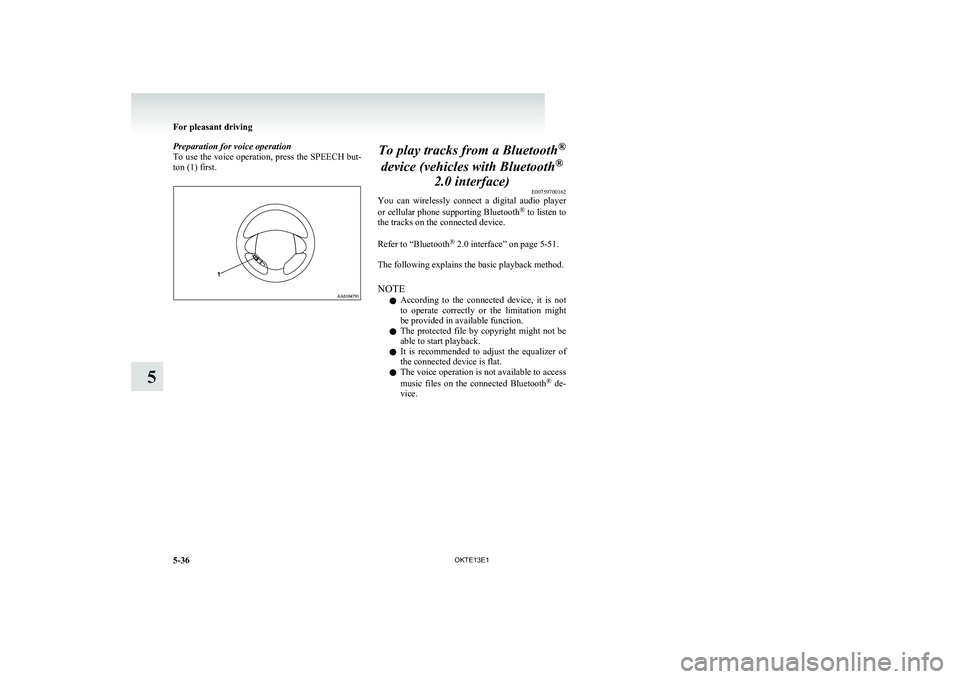
Preparation for voice operation
To use the voice operation, press the SPEECH but-
ton (1) first.To play tracks from a Bluetooth ®
device (vehicles with Bluetooth ®
2.0 interface) E00759700162
You can wirelessly connect a digital audio player
or cellular phone supporting Bluetooth ®
to listen to
the tracks on the connected device.
Refer to “Bluetooth ®
2.0 interface” on page 5-51.
The following explains the basic playback method.
NOTE l According to the connected device, it is not
to operate correctly or the limitation might
be provided in available function.
l The protected file by copyright might not be
able to start playback.
l It is recommended to adjust the equalizer of
the connected device is flat.
l The voice operation is not available to access
music files on the connected Bluetooth ®
de-
vice.
For pleasant driving
5-36 OKTE13E1
5
Page 223 of 362

Error displayProblemDescriptionRepairNO DISCNo disc insertedDisc is not in CD player.Insert disc.ERROR 01Focus errorDisc is not loaded correctly, or condensation on
disc.Insert disc with label facing up. Remove
moisture from disc.ERROR 02Disc errorDisc is dirty, scratched, or deformed; or exces-
sive vehicle vibration.Clean or replace disc. Retry when vibra-
tions stop.ERROR 03Mechanism errorLoading or eject error. Pick-up is out of position.Eject disc and reload. If disc will not eject,
have the equipment inspected.ERROR HOTHigh temperatureInternal protection against high temperatures.Allow CD player to cool by waiting about
30 minutes.ERRORCommunication or power supply
errorCommunication error between external device
and audio equipment.
Power supply error of external device.Consult a MITSUBISHI MOTORS Author-
ized Service Point.
For pleasant driving
5-43
OKTE13E1
5