2013 MITSUBISHI L200 light
[x] Cancel search: lightPage 53 of 362

CAUTIONlSwitch off seat heaters when not in use.
l Operate in the high position for quick heat-
ing. Once the seat is warm, set the heater
to low to keep it warm. Slight variations
in seat temperature may be felt while us-
ing the heated seats. This is caused by the
operation of the heater’s internal thermo-
stat and does not indicate a malfunction.
l If the following types of persons use the
heated seats, they might become too hot
or receive minor burns (red skin, heat blis-
ters, etc.): • Children, elderly or ill people
• People with sensitive skin
• Excessively tired people
• People under the influence of alcohol
or sleep inducing medication (cold
medicine, etc.)
l Do not place heavy objects on the seat or
stick pins, needles, or other pointed ob-
jects into it.
l Do not use a blanket, cushion, or other ma-
terial with high heat insulation properties
on the seat while using the heater; this
might cause the heater element to overheat
l When cleaning the seat, do not use ben-
zene, kerosene, petrol, alcohol, or other or-
ganic solvents; these might damage the
surface of the seat and also the heater ele-
ment.
l If water or any other liquid is spilled on
the seat, allow it to dry thoroughly before
attempting to use the heater.
l Turn the heater off immediately if it ap-
pears to be malfunctioning during use.Rear seat* E00401300148
When a person is sitting in the middle seating posi-
tion of the rear seat, adjust the head restraint to
height at which it lock in position. Refer to “Head
restraints” on page 2-08.Folding the seatback forward (Double
cab) E00401600242
Pull up the band on the top of the seatback and fold
it forward.
Confirm that the seatback locks securely when it is
returned.
Folding up the seat cushion (Club cab)* E00411300024
The right and left seat cushions can be folded up
separately.
To fold the seat cushions up, raise the seat cushions.
Securely retain the seat cushion by hooking the re-
taining band (A) onto the head restraint (B) of the
rear seat.Armrest (Double cab) E00401700605
To use the armrest, fold it down.
To return to the original position, push it backward
(into the seatback) until it is level with the seat.
Seat and seat belts
2-07
OKTE13E1
2
Page 56 of 362

WARNINGlNo modifications or additions should be
made by the user which will either pre-
vent the seat belt adjusting devices from
operating to remove slack, or prevent the
seat belt assembly from being adjusted to
remove slack.
l To reduce risk of serious or fatal injury
in an accident, including the deploying
driver’s airbag, adjust the driver’s seat
as far back as possible while maintaining
a position that still allows good visibility
and good control of the steering wheel,
the brake and accelerator, and vehicle con-
trols.
l Never hold a child in your arms or on
your lap when riding in this vehicle, even
if you are wearing your seat belt. To do
so risks severe or fatal injury to the child
in a collision or sudden stop.
l Always adjust the seat belt to a snug fit.3-point type seat belt (with emergency
locking mechanism) E00404901126
This type of belt requires no length adjustment.
Once worn, the belt adjusts itself to the movement
of the wearer, but in the event of a sudden or strong
shock, the belt automatically locks to hold the wear-
er’s body.
NOTE l You can check if the belt locks by pulling it
forward quickly.
To fasten 1.Pull the seat belt out slowly while holding
the latch plate.
NOTE l When the seat belts cannot be pulled out in a
locked condition, pull the belts once forceful-
ly and then return them. After that, pull the
belts out slowly once again.
2. Insert the latch plate into the buckle until a
“click” is heard.WARNINGl Never wear the lap portion of the belt
across your abdomen. During accidents it
can press sharply against the abdomen
and increase the risk of injury.
l The seat belts must not be twisted when
worn.
3. Pull the belt slightly to adjust slackness as de-
sired.
To unfasten
Hold the latch plate and push the button on the buck-
le.
NOTE
l As the belt retracts automatically, keep hold-
ing the latch plate while retracting so that the
belt stows slowly. Failure to do this could
damage the vehicle.
Seat and seat belts
2-10 OKTE13E1
2
Page 76 of 362
How the Supplemental Restraint Sys-
tem works E00407301352
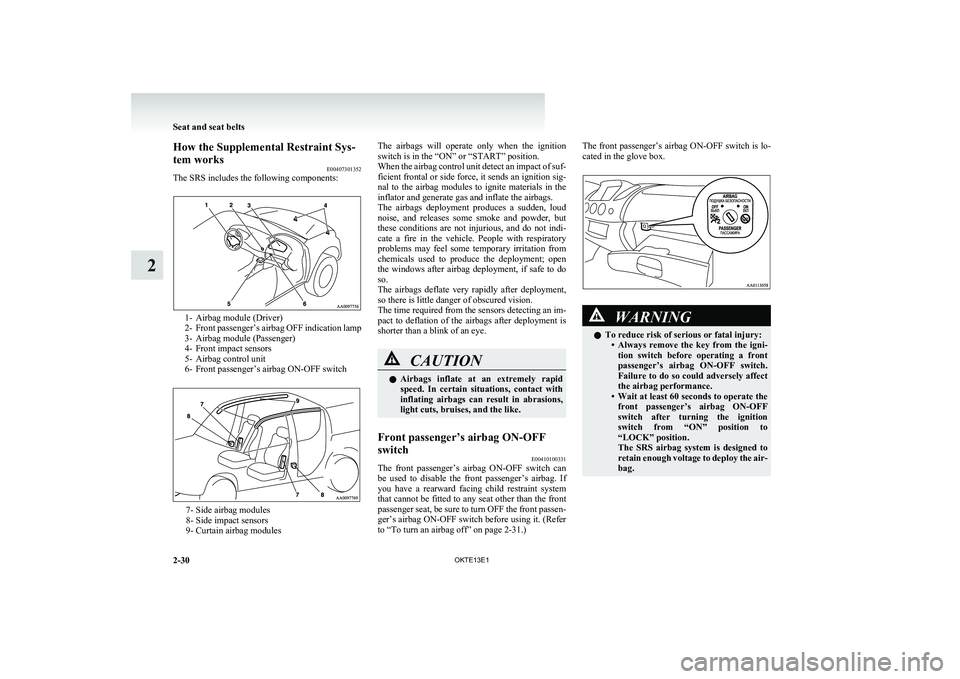
The SRS includes the following components:
1- Airbag module (Driver)
2- Front passenger’s airbag OFF indication lamp
3- Airbag module (Passenger)
4- Front impact sensors
5- Airbag control unit
6- Front passenger’s airbag ON-OFF switch
7- Side airbag modules
8- Side impact sensors
9- Curtain airbag modules
The airbags will operate only when the ignition
switch is in the “ON” or “START” position.
When the airbag control unit detect an impact of suf-
ficient frontal or side force, it sends an ignition sig-
nal to the airbag modules to ignite materials in the
inflator and generate gas and inflate the airbags.
The airbags deployment produces a sudden, loud
noise, and releases some smoke and powder, but
these conditions are not injurious, and do not indi-
cate a fire in the vehicle. People with respiratory
problems may feel some temporary irritation from
chemicals used to produce the deployment; open
the windows after airbag deployment, if safe to do
so.
The airbags deflate very rapidly after deployment,
so there is little danger of obscured vision.
The time required from the sensors detecting an im-
pact to deflation of the airbags after deployment is
shorter than a blink of an eye.CAUTIONl Airbags inflate at an extremely rapid
speed. In certain situations, contact with
inflating airbags can result in abrasions,
light cuts, bruises, and the like.Front passenger’s airbag ON-OFF
switch E00410100331
The front passenger’s airbag ON-OFF switch can
be used to disable the front passenger’s airbag. If
you have a rearward facing child restraint system
that cannot be fitted to any seat other than the front
passenger seat, be sure to turn OFF the front passen-
ger’s airbag ON-OFF switch before using it. (Refer
to “To turn an airbag off” on page 2-31.)
The front passenger’s airbag ON-OFF switch is lo-
cated in the glove box.WARNINGl To reduce risk of serious or fatal injury:
•Always remove the key from the igni-
tion switch before operating a front
passenger’s airbag ON-OFF switch.
Failure to do so could adversely affect
the airbag performance.
• Wait at least 60 seconds to operate the
front passenger’s airbag ON-OFF
switch after turning the ignition
switch from “ON” position to
“LOCK” position.
The SRS airbag system is designed to
retain enough voltage to deploy the air-
bag.
Seat and seat belts
2-30 OKTE13E1
2
Page 90 of 362
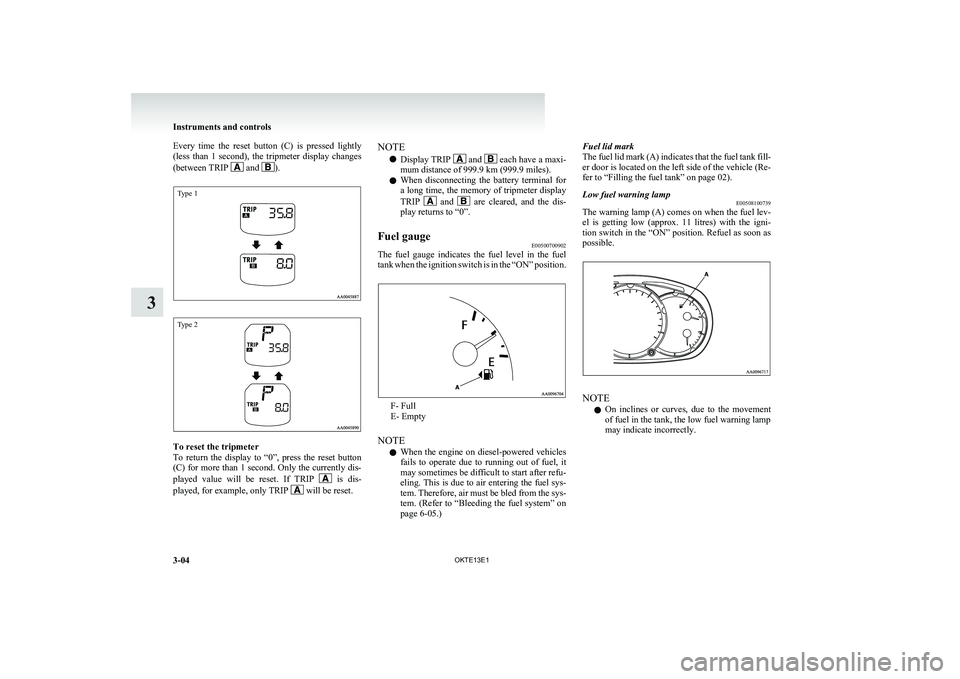
Every time the reset button (C) is pressed lightly
(less than 1 second), the tripmeter display changes
(between TRIP
and ).
Type 1Type 2
To reset the tripmeter
To return the display to “0”, press the reset button
(C) for more than 1 second. Only the currently dis-
played value will be reset. If TRIP
is dis-
played, for example, only TRIP will be reset.
NOTE
l Display TRIP
and each have a maxi-
mum distance of 999.9 km (999.9 miles).
l When disconnecting the battery terminal for
a long time, the memory of tripmeter display
TRIP
and are cleared, and the dis-
play returns to “0”.
Fuel gauge E00500700902
The fuel gauge indicates the fuel level in the fuel
tank when the ignition switch is in the “ON” position.
F- Full
E- Empty
NOTE l When the engine on diesel-powered vehicles
fails to operate due to running out of fuel, it
may sometimes be difficult to start after refu-
eling. This is due to air entering the fuel sys-
tem. Therefore, air must be bled from the sys-
tem. (Refer to “Bleeding the fuel system” on
page 6-05.)
Fuel lid mark
The fuel lid mark (A) indicates that the fuel tank fill-
er door is located on the left side of the vehicle (Re-
fer to “Filling the fuel tank” on page 02).Low fuel warning lamp E00508100739
The warning lamp (A) comes on when the fuel lev-
el is getting low (approx. 11 litres) with the igni-
tion switch in the “ON” position. Refuel as soon as
possible.
NOTE
l On inclines or curves, due to the movement
of fuel in the tank, the low fuel warning lamp
may indicate incorrectly.
Instruments and controls
3-04 OKTE13E1
3
Page 93 of 362

Indication lampsE00501600012Turn-signal indication lamps/
Hazard warning indication
lamps E00501700185
These indication lamps blink on and off
when a turn-signal lamp is operating.
NOTE l If the blinking is too fast, the
cause may be a blown lamp bulb
or a faulty turn-signal connection.
When the hazard warning lamp switch is
pressed, all turn-signal lamps will flash
on and off continuously.High-beam indication lamp E00501800115
This indication lamp illuminates when
the high-beam is used.Front fog lamp indication
lamp* E00501900347
This indication lamp illuminates while
the front fog lamps are on.Rear fog lamp indication lamp E00502000114
This indication lamp illuminates while
the rear fog lamp is on.Diesel preheat indication lamp E00502300250
This indication lamp illuminates when
the ignition switch is placed in the “ON”
position. As the glow plug becomes hot,
the lamp goes out and the engine can be
started.CAUTIONl If the diesel preheat indication
lamp comes on after the engine
is started, the engine speed may
not rise above the idling speed
because of fuel freezing. In this
case, keep the engine idling for
about ten minutes, then turn
off the ignition switch and im-
mediately turn it on again to
confirm that the diesel preheat
indication lamp is off.
NOTE
l If the engine is cold, the diesel pre-
heat indication lamp is on for a lon-
ger time.
l When the engine has not been star-
ted within about 5 seconds after
the diesel preheat indication lamp
went out, return the ignition
switch to the “LOCK” position.
Then, turn the switch to the “ON”
position to preheat the engine
again.
l When the engine is warm, the die-
sel preheat indication lamp does
not come on even if the ignition
switch is placed in the “ON” posi-
tion.Fuel filter indication lamp E00509900170
This indication lamp illuminates when
the ignition switch is turned to the “ON”
position and goes off after the engine
has started. If it lights up while the en-
gine is running, it indicates that water
has accumulated inside the fuel filter; if
this happens, remove the water from the
fuel filter.
Refer to “Removal of water from the
fuel filter” on page 6-06.
When the lamp goes out, you can re-
sume driving. If it either does not go out
or comes on from time to time, we rec-
ommend you to have the vehicle inspec-
ted.
Instruments and controls
3-07
OKTE13E1
3
Page 98 of 362

Adjusting the timeE00518000063
Following modes are available for clock adjustment:
l For vehicles with
MITSUBISHI genuine au-
dio:
“Automatic mode” and “Manual mode”
l Except for vehicles with
MITSUBISHI genu-
ine audio:
“Manual mode” only
Automatic mode (MITSUBISHI genuine audio)
The automatic adjustment mode can set the local
time automatically by using the signal from the lo-
cal RDS stations. In this mode, “CT” (A) (Clock
Time: sent with the RDS signal) is shown in the au-
dio display.
NOTE l Automatic clock adjustment does not take
place while a settings display is shown.
Manual mode
The manual mode is also available in case the auto-
matic mode shows the incorrect time when the ad-
jacent local RDS stations are located in a different
time zone. Refer to “Radio data system (RDS)” on
page 5-18.
It is possible to manually adjust the time.
Refer to “Changing the clock settings” on page
3-19.Changing the information display E00517900270
Every time the “INFO” button is pressed lightly,
the display can be changed to the following:
Instruments and controls
3-12 OKTE13E1
3
Page 103 of 362

To adjust the elevation
It is possible to adjust the currently indicated eleva-
tion using the following function buttons:“+”-Adjustment of elevation
The elevation increases by 100 m
(400 ft) every time you lightly push
the “+” button.
If you continue pressing the button
for about 2 seconds or more, the ele-
vation indication is fast-forwarded.
Then the setting is changed to the el-
evation selected.“-”-Adjustment of elevation
The elevation decreases by 100 m
(400 ft) every time you lightly push
the “-” button.
If you continue pressing the button
for about 2 seconds or more, the ele-
vation indication is fast-forwarded.
Then the setting is changed to the el-
evation selected.NOTE
l The elevation is determined from changes in
atmospheric pressure. Depending on weather
conditions, the indicated elevation may differ
from the actual elevation. Variations in atmos-
pheric pressure can cause different elevations
to be shown even in the same location. This
behavior does not indicate a fault. Use the in-
dication as a guide only.
Resetting the elevation
Press the “RESET” function button to reset the ele-
vation plotted in graph.
NOTE
l Pressing the “RESET” function button will
not reset the indication (C).
l It is possible to set the display unit to m or ft.
Refer to “User customization” on page 3-24.
Barometer E00518700044
This display shows the atmospheric pressure at the
present location in (A). The atmospheric pressure
values are graphed every 5 minutes and the data for
up to 4 hours are shown in (B).
Resetting the atmospheric pressure
Press the “RESET” function button to reset the at-
mospheric pressure plotted in graph.
Instruments and controls
3-17
OKTE13E1
3
Page 104 of 362

NOTEl Pressing the “RESET” function button will
not reset the indication (C).
l It is possible to set the display unit to hPa,
mb, kPa, or inHg.
Refer to “User customization” on page 3-24.Calendar E00518800032
The date is shown. The calendar pattern can be
changed to your desired setting.
Refer to “Changing the calendar setting” on page
3-23.
Clock-only E00518900033
Only the clock is shown. The time notation can be
changed to your desired setting. (12 hour/24 hour)
Refer to “User customization” on page 3-24.Blank E00519000015
The whole display can be turned into blank. In this
case, buttons remain illuminated.
NOTE
l If you operate the audio system, the audio dis-
play pops up.
Selecting settings displays E00519100090
Every time the “ADJ” button is pressed lightly, the
display can be changed to the following:CAUTIONl The driver should not operate the display
while the vehicle is in motion.
l When operating the system, stop the vehi-
cle in a safe area.
1- Changing the clock settings ® p. 3-19
2- Adjusting the display brightness ® p. 3-20
3- Correcting the compass ® p. 3-21
4- Changing the calendar setting ® p. 3-23
5- User customization ® p. 3-24
6- Adjusting the barometer ® p. 3-28
Instruments and controls
3-18 OKTE13E1
3 TA0024955