2013 MINI Countryman fuel system
[x] Cancel search: fuel systemPage 201 of 275

MOBILITYRefueling
200
Refueling
Vehicle equipment
In this chapter, all production, country, and
optional equipment that is offered in the model
range is described. Equipment is also described
that is not available because of, for example,
selected options or coun try version. This also
applies to safety relate d functions and systems.
General information
Switch off the engine before refueling;
otherwise, fuel cannot be added to the
tank and a message will be displayed. <
Take all precautionary measures and
observe all applicable regulations when
handling fuel. Do not carry any spare fuel con-
tainers in your vehicle. They can develop a leak
and cause an explosion or cause a fire in the
event of an accident. <
Fuel filler flap
Opening
MINI Countryman: MINI Paceman:
1.
Open the fuel filler flap.
2. Turn the fuel cap counterclockwise.
3. Place the fuel cap in the bracket attached to
the fuel filler flap.
Closing
Fit the cap and turn it clockwise until you clearly
hear a click.
Do not pinch the band attached to the
cap; otherwise, the ca p cannot be closed
properly and fuel vapors can escape. A message
will be displayed if the fuel cap is loose or miss-
ing. <
Manually releasing the fuel filler flap
In the event of an electrical malfunction, you can
manually release the fuel filler flap:
MINI Countryman:
00320051004F004C00510048000300280047004C0057004C005200510003
Page 202 of 275

RefuelingMOBILITY
201
MINI Paceman:
1.Open cargo area trim panel, arrow 1.
2. Pull on the green knob with the fuel pump
symbol.
The fuel filler flap opens.
Observe the following when refueling
Take all precautionary measures and
observe all applicable regulations when
handling fuel; otherwise, there is a danger of
personal injury and property damage. <
When refueling, insert the filler nozzle com-
pletely into the filler pipe. Avoid lifting the filler
nozzle while filling the tank, as that would lead
to
> premature pump shutoff
> reduced efficiency of the fuel-vapor recov-
ery system.
The fuel tank is full when you top off twice after
the first time that the fuel pump nozzle clicks off.
Do not overfill the fuel tank; otherwise,
overflowing fuel can cause damage to the
environment and the vehicle.<
Fuel tank capacity
If the range displayed is less than
30 miles/50 km, be sure to refuel; other-
wise, engine functions are not guaranteed and
damage may occur. <
Approx. 12.3USgal/47liters, including the
reserve capacity of 2.1 US gal/8 liters.
If the engine can no longer be started because
of an empty fuel tank, add at least 1.3 US gal/ 5 liters of fuel. If the vehicle is at an angle, a
larger amount of fuel may be necessary.
Fuel specifications
Gasoline
For optimum fuel efficiency, the gasoline should
be free of sulfur or as low in sulfur as possible.
Fuels that are labeled at
the pump as containing
metal may not be used.
Do not fill the tank with leaded gasoline or
gasoline that contai ns metal additives,
such as manganese or iron; otherwise, long term
damage to the catalytic converter or other com-
ponents may result. <
Fuels with a maximum ethanol content of up to
10 %, that is, E10, can be used.
The ethanol should meet the following quality
standards:
US: ASTM 4806-xx
CAN: CGSB-3.511-xx
xx: Always observe currently valid standards. Do not fill the tank with E85, i.e. fuel con-
taining 85 % ethanol, nor with FlexFuel.
Otherwise, the engine and fuel supply system
will be damaged. <
The engine is knocking regulated. Therefore, dif-
ferent grades of gasoline can be used for refuel-
ing.
Recommended gasoline grades
The manufacturer of your MINI recommends:
> AKI 91.
> John Cooper Works: AKI 93.
Minimum quality
The manufacturer of your MINI recommends
AKI 89.
Do not use any gasoline below the speci-
fied minimum fuel grade. Otherwise, the
engine could be damaged. <
00320051004F004C00510048000300280047004C0057004C005200510003
Page 216 of 275
Engine compartmentMOBILITY
215
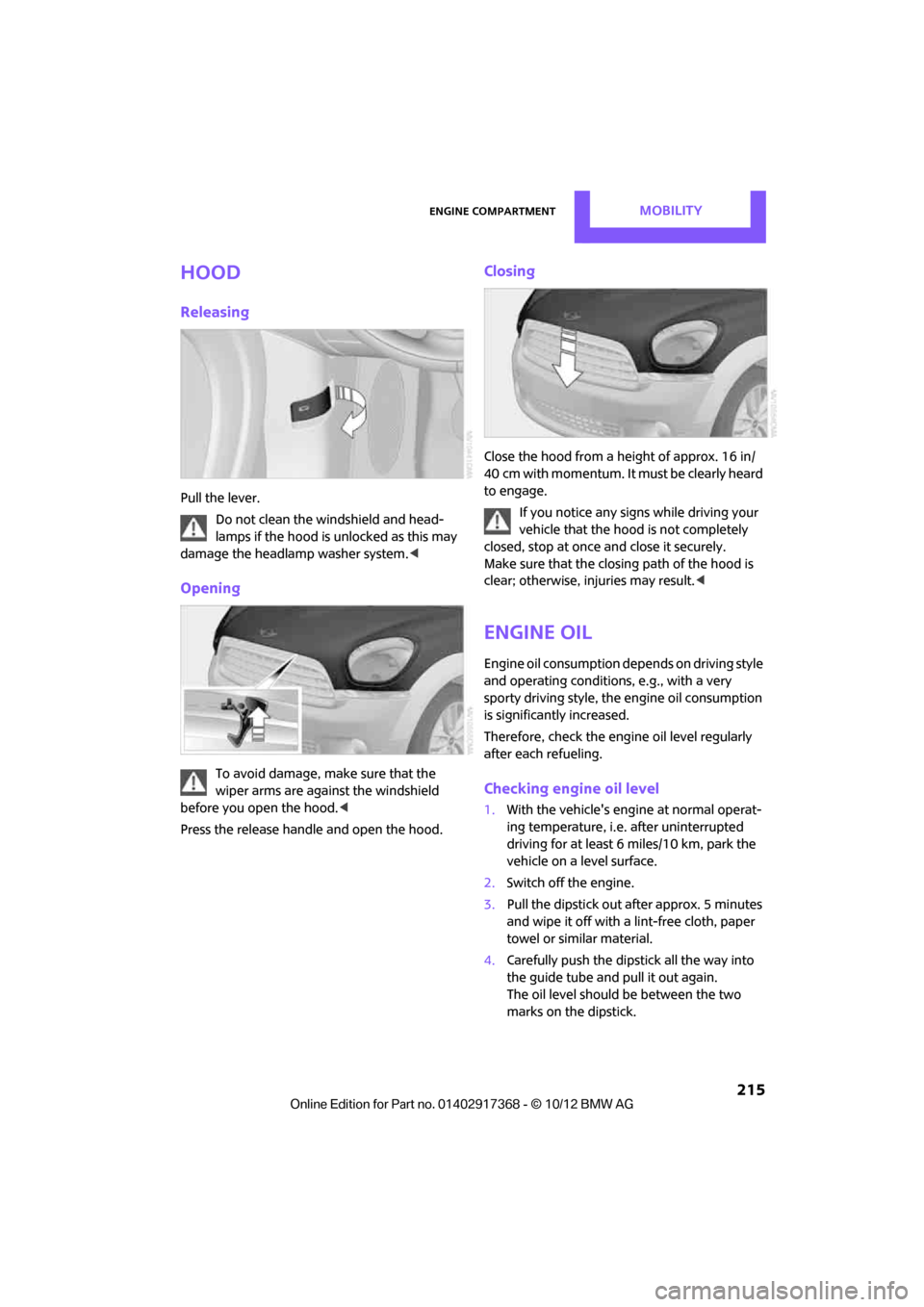
Hood
Releasing
Pull the lever.Do not clean the windshield and head-
lamps if the hood is unlocked as this may
damage the headlamp washer system. <
Opening
To avoid damage, make sure that the
wiper arms are against the windshield
before you open the hood. <
Press the release handle and open the hood.
Closing
Close the hood from a height of approx. 16 in/
40 cm with momentum. It must be clearly heard
to engage. If you notice any signs while driving your
vehicle that the hood is not completely
closed, stop at once and close it securely.
Make sure that the closing path of the hood is
clear; otherwise, injuries may result. <
Engine oil
Engine oil consumption depends on driving style
and operating conditions, e.g., with a very
sporty driving style, the engine oil consumption
is significantly increased.
Therefore, check the engine oil level regularly
after each refueling.
Checking engine oil level
1. With the vehicle's engi ne at normal operat-
ing temperature, i.e. after uninterrupted
driving for at least 6 miles/10 km, park the
vehicle on a level surface.
2. Switch off the engine.
3. Pull the dipstick out after approx. 5 minutes
and wipe it off with a lint-free cloth, paper
towel or similar material.
4. Carefully push the dipstick all the way into
the guide tube and pull it out again.
The oil level should be between the two
marks on the dipstick.
00320051004F004C00510048000300280047004C0057004C005200510003
Page 220 of 275

MaintenanceMOBILITY
219
Socket for On-Board
Diagnosis OBD
The primary components that make up the
emissions can be checked by a device via the
OBD socket.
Emissions
The warning lamps come on. The vehicle
is producing higher emissions. You can
continue your journey, but moderate
your speed and exercise due caution.
Have the car checked as soon as possible.
Under certain circumstances, one of the lamps
will flash or light up continuously. This indicates
excessive misfiring or a malfunction in the
engine. If this happens, reduce your speed and
visit the nearest MINI dealer as soon as possible.
Severe misfiring can quickly lead to serious dam-
age of emissions-related components, espe-
cially the catalytic converter. In addition,
mechanical engine components can become
damaged.
If the fuel cap is not properly tightened,
the OBD system may conclude that fuel
vapors are escaping, causing an indica-
tor to light up. If the fuel cap is then tightened,
the indicator should go out within a few days.
00320051004F004C00510048000300280047004C0057004C005200510003
Page 252 of 275

Technical dataREFERENCE
251
MINI Paceman
Never exceed either the approved axle loads or
the gross vehicle weight.
Capacities
CooperCooper SCooper S ALL4
Curb weight, ready for travel, with all optional extras
> Manual transmission lbs/kg 2,940/1,334 3,070/1,393 3,210/1,456
> Automatic transmission lbs/ kg 3,010/1,365 3,110/1,411 3,260/1,479
Approved gross weight
> Manual transmission lbs/kg 3,850/1,746 3,960/1,796 4,100/1,860
> Automatic transmission lbs/ kg 3,920/1,778 4,010/1,819 4,140/1,878
Load lbs/kg 850/386 850/386 850/386
Approved front axle load
> Manual transmission lbs/ kg 2,050/930 2,120/962 2,180/989
> Automatic transmission lbs/ kg 2,120/962 2,170/984 2,220/1,007
Approved rear axle load lbs/kg 1,910/866 1,910/866 2,020/916
Approved roof load capac-
ity lbs/kg165/75 165/75 165/75
Cargo area capacity cu ft/ liters11.6 - 38.1/
330 - 1080 11.6 - 38.1/
330 - 1080 11.6 - 38.1/
330 - 1080
US gal/US quartsLitersNotes
Fuel tank 12.4/– approx. 47 Fuel grade: page 201
including reserve of 2.1/– approx. 8
Window washer system incl.
headlamp washer system –/4.2 approx. 4 For more details: page 57
00320051004F004C00510048000300280047004C0057004C005200510003
Page 261 of 275

260
REFERENCEEverything from A to Z
Everything from A to Z
Index
A
ABS Antilock Brake System72
Accepting a call 167,179
Accessories, see Vehicle equipment 4
Acknowledgment signals for locking/unlocking vehicle 28
Activated-charcoa l filter for
automatic climate control 91
Adaptive Light Control 85
Adding engine oil 216
Additives
– coolant 217
– engine oil 216
Address, entering 126
Address for navigation
– entering 120,126
Adjusting temperature inside the car, refer to Air
conditioner 88
Adjusting temperature inside the car, refer to Automatic
climate control 90
Adjusting the tone during audio operation, refer to
Tone control 141
Airbags 81
– sitting safely 38
– warning lamp 83
Air conditioner 88
Air conditioning mode
– air conditioner 88
– automatic cl imate control90
– ventilation 92
Air distribution
– automatic 90
– individual 89
– manual 89 Air flow rate
88,90
– air conditioning system 88
– automatic climate control 90
– heating, ventilation 88
Airing, refer to Ventilation92
Air pressure, checking, refer to
Tire inflation pressure 203
Air recirculation, refer to Recirculated-air
mode 89,90
Air supply
– air conditioner 88
– automatic climate control 90
– ventilation 92
AKI, refer to Fuel grade 201
Alarm system 32
ALL4 all-wheel drive system 74
All-season tires, refer to Winter
tires 213
A ll-wh
ee
l drive, refer to
ALL4 74
AM, waveband 143
Ambient air, refer to
Recirculated-air
mode 89,90
Ambient lighting 87
Antenna, care 220
Antifreeze
– coolant 217
– washer fluid 57
Antilock Brake System ABS 72
Anti-theft alarm system, refer
to Alarm system 32
Approved axle loads, refer to Weights 249
Approved engine oils 216
Approved gross vehicle weight, refer to Weights 249
Armrest, refer to Center armrest 97 Arrival time
– computer
62
– route guidance 129
Ashtray 100
Assistant systems, refer to
– Dynamic Stability Control
DSC 72
Audio 140
– controls 140
– switching on/off 140
– tone control 141
– volume 141
Audio device, external 97
Automatic
– air distribution 90
– air flow rate 90
– cruise control 58
– headlamp control 84
Automatic climate control 88
– automatic air distribution 90
Automatic transmission with Steptronic 52
– Interlock 53
– overriding selector lever lock 54
– Shiftlock 53
– sport program 54
AUTO program for automatic climate control 90
Auxiliary phone 176
AUX-In, refer to External audio device 97
AUX-In connection 153
Average fuel consumption 61
– setting the units 64
Average speed 62
Avoiding highways for navigation 129
Axle loads, refer to
Weights 249
00320051004F004C00510048000300280047004C0057004C005200510003
Page 263 of 275

REFERENCEEverything from A to Z
262
CD, audio playback151
CD player 151
– controls 140
– fast forward/reverse 152
– random order 152
– selecting a track 151
– switching on/off 140
– tone control 141
– volume 141
Center armrest 97
Center brake lamp 229
Center console, refer to Around the center
console 14
Center Rail 99
Center Rail, refer to Storage
compartments 98
Central locking system 27
– Comfort Access 33
– from inside 30
– from outside 27
– setting unlocking
behavior 27
Changing bulbs 224
Changing the language on the
Control Display 69
Changing the measurement units on the Control
Display 64
Changing wheels 232
Charging the battery 234
Chassis number, refer to Engine compartment 214
Check Control 67
Child restraint fixing system LATCH 47
Child restraint systems 46
Child-safety locks 49
Child seats 46
Chrome parts, care 222
Chrome parts, refer to Care 220
Cigarette lighter 100
Cleaning headlamps 57
– washer fluid 57 Clock
– setting time
66
– 12 h/24 h mode 66
Closing
– from inside 30
– from outside 27
Clothes hooks 100
Cockpit 10
Cold start, refer to Starting the engine 51
Comfort Access 33
– replacing the battery 35
– what to observe before
enteri ng a car wash
34
C o
mfort area, refer to Around
the center console 14
Compartment for remote control, refer to Ignition
lock 50
Compass 95
Computer 61
– displays on Control
Display 62
Condensation, refer to When the vehicle is parked 106
Condition Based Service CBS 218
Configuring settings, refer to
Personal Profile 26
Connecting vacuum cleaner,
refer to Connecting electrical
appliances 101
Consumption, refer to Average
fuel consumption 61
Contacts 171,188
– new contact 189
Continuing route guidance 129
Control Display
– adjusting brightness 70
Control Display, refer to iDrive
– switching on/off 16
Control Display, refer to Onboard computer 16
– adjusting brightness 70
Controls and displays 10Control stick, refer to Onboard
computer 16
Control unit, refer to Onboard computer 16
Convenience operation
– windows 28
Convenient access, refer to
Comfort Access 33
Convenient star t, refer to
Starting the engine 51
Coolant 217
– checking level 217
– filling 217
– temperature 217
Cooling, maximum 91
Cooling fluid, refer to
Coolant 217
Copyright 2
Cornering light, refer to
Adaptive Light Control 85
Criteria for route 129
Cruise control
– indicator lamp 13
Cruising range 61
Cupholders 100
Curb weight, refer to Weights 249
Current fuel consumption 62
Curren t playback
– external d
evices156
D
Dashboard, refer to Cockpit 10
Dashboard instruments, refer to Displays 12
Dashboard lighting, refer to Instrument lighting 86
Data 244
– capacities 251
– dimensions 246
– engine 244
– weights 249
Date
– setting 67
– setting format 67
Daytime running lights 85
00320051004F004C00510048000300280047004C0057004C005200510003
Page 264 of 275

Everything from A to ZREFERENCE
263
DBC Dynamic Brake Control, refer to Brake Assist 72
Deactivating front passenger airbags 82
Deadlocking, refer to Locking 28
Defect
– door lock 29
Defective
– fuel filler flap 200
Defining a home address 189
Defogging windows 89,91
Defrosting windows 89,91
Defrosting windows and removing condensation
– air conditioner 89
– automatic climate control 91
Defrosting windshield, refer to Defrosting windows 89,91
Defrost position, refer to Defrosting windows 89,91
Deleting contacts 173,190
Destination address
– entering 120,126
Destination for navigation
– entering 120
– entering via map 125
Differential, breaking in 104
Digital compass 95
Digital radio, refer to HD
Radio 144
Dimensions 246
Dipstick, engine oil 215
Directional indicators, refer to Turn signals 55
Direction announcements,
refer to Voice
instructions 133
Direction instructions, refer to
Voice instructions 133
Directory for navigation, refer to Address book 122
Displacement, refer to Engine data 244
Display, refer to Onboard
computer controls 16Displaying contact
pictures 190
Displaying contacts 172
Displaying special
destinations 125
Display lighting, refer to Instrument lighting 86
Displays 12
– instrument combination 12
– on the Control Display 16
Displays, care 223
Disp lays and controls
10
Disp osal
– of
coolant 217
– remote control battery 35
– vehicle battery 234
Distance, refe r to Computer 62
Distance remaining to service, refer to Service
requirements 64
Distance to dest ination, refer
to Computer 62
Distance warning, refer to Park Distance Control PDC 71
Door key, refer to Integrated
key/remote control 26
Door lock 29
Door lock, confirmation
signals 28
Doors, manual operation 29
DOT Quality Grades 210
Drinks holders, refer to Cupholders 100
Drive-off assistant, refer to Hill
Assist 74
Driving dynamics control, refer
to Sport button 74
Driving lamps, refer to Parking lamps/low beams 84
Driving notes 104
Driving off on inclines, refer to Hill Assist 74
Driving stability control systems 72
Driving through water 105
Driving tips, refer to Driving notes 104 Dry air, refer to Cooling
function 91
DSC Dynamic Stability Control 72
DTC Dynamic Traction Control 73
Dynamic Brake Control DBC,
refer to Brake Assist 72
Dynamic route guidance 136
Dynamic Stability Control
DSC 72
Dynamic Traction Control DTC 73
E
Editing a contact 172
Eject button, refer to Buttons on the CD player 140
Electrical malfunction
– door lock 29
– fuel filler flap 200
Electronic brake-force distribution 72
Electronic Stability Program
ESP, refer to Dynamic
Stability Control DSC 72
E-mail 191
Emergency operation, refer to Manual operation
– door lock 29
– fuel filler flap 200
– transmission lock, automatic
transmission 54
Emergency services, refer to Roadside Assistance 236
Ending a call 168,180
Engine
– breaking in 104
– data 244
– overheated, refer to Coolant temperature 217
– speed 244
– starting, Comfort Access 33
Engine compartment 214
Engine coolant, refer to Coolant 217
00320051004F004C00510048000300280047004C0057004C005200510003