2013 MINI 3 door instrument cluster
[x] Cancel search: instrument clusterPage 138 of 233

Coasting is automatically activated when
GREEN mode is called via the Driving Dynamics
Control, refer to page 88.
The function is available in a certain speed
range.
A forward-looking driving style helps the driver
to use the function as often as possible and
supports the fuel-conserving effect of coasting.
Safety mode
The function is not available if one of the fol‐
lowing conditions is satisfied.▷DSC OFF or TRACTION activated.▷Driving in the dynamic limit range and on
steep uphill or downhill grades.▷Battery charge status temporarily too low
or vehicle electrical system drawing exces‐
sive current.▷Cruise control activated.
Functional requirements
In GREEN mode, this function is available in a
speed range from approximately 30 mph, ap‐
prox. 50 km/h to 100 mph, approx. 160 km/h,
if the following conditions are satisfied:
▷Accelerator pedal and brake pedal are not
operated.▷The selector lever is in transmission position
D.▷Engine and transmission are at operating
temperature.
Display
Display in the instrument cluster The mark in the bar display be‐
low the tachometer is high‐
lighted green and appears at the
zero point. The tachometer ap‐
proximately indicates idle speed.
Deactivating the system manually
The function can be deactivated via the radio,
e.g., to use the braking effect of the engine
when traveling downhill.1. "Settings"2.If necessary, "Driving mode" or "GREEN
Mode"3."Coasting"
The setting is saved for the profile currently be‐
ing used.
Seite 134Driving tipsSaving fuel134
Online Edition for Part no. 01 40 2 925 116 - X/13
Page 158 of 233

▷Do the control numbers on the mobile
phone and vehicle match? Repeat the pair‐
ing procedure.▷Are too many Bluetooth devices connected
to the mobile phone? Delete connections to
other devices.▷Is the mobile phone in power-save mode or
does it have only a limited remaining bat‐
tery life? Charge the mobile phone.
The mobile phone no longer reacts?
▷Switch the mobile phone off and on again.▷Ambient temperature too high or too low?
Do not subject the mobile phone to ex‐
treme ambient temperatures.
No or not all phone book entries are displayed,
or they are incomplete.
▷Transmission of the entries is not yet com‐
plete.▷It is possible that only the phone book en‐
tries from the mobile phone or from the
SIM card are transmitted.▷It may not be possible to display phone
book entries with special characters.▷The number of phone book entries being
stored is too high.
The phone connection quality is poor.
▷It may be possible to adjust the strength of
the Bluetooth signal on the mobile phone.▷Adjust the volume of the microphone and
loudspeakers separately.
If all points in this list have been checked and
the required function is still not available, con‐
tact BMW Customer Relations or the service
center.
Controls Adjusting the volumeTurn the left button on the radio until the de‐
sired volume is set. The volume can only be set
during an active conversation.
Automatic volume control
The automatic volume control can only be ad‐
justed during an active conversation.1. "Settings"2."Tone"3."Volume settings"4.Select the desired setting: "Microphone" or
"Loudspeak."5.Adjusting: press and turn controller.6.To store: press the controller.
Incoming call
Receiving calls If the number of the caller is stored in the mo‐
bile phone, the name of the contact is shown in
the display of the radio. If the name is not
saved, the number is displayed.
Accepting a call
About the radio
"Accept"
Via the button on the steering wheel
Press the button.
Via the instrument cluster
"Accept"
Rejecting a call
About the radio
"Reject"
Via the instrument cluster
"Reject"
Seite 154CommunicationBluetooth hands-free system154
Online Edition for Part no. 01 40 2 925 116 - X/13
Page 159 of 233

Ending a callAbout the radio
"End call ( )"
Via the button on the steering wheel
Press the button.
Via the instrument cluster
"End call"
Dialing a number
1. "Telephone"2."Dial number"3.Enter numbers using the right rotary knob.4. Select the symbol.
Calls with multiple parties
Accepting a second call
If a second call is received during an ongoing
call, a call waiting signal sounds.
"Accept"
The second call is accepted and the existing call
is put on hold.
Establishing a second call Establish another call during an active call.
The first call is put on hold.
Switching between two calls, hold call You can switch between two calls.
Select line with symbol in order to switch
between the conversations.
Active conversation.
Call on hold.
Establishing a conference call
Two calls can be connected to a single tele‐
phone conference call.1.Establish two calls.2. "Conference call"
When terminating the conference call, both
calls are ended. If one call is terminated by an‐
other party, the other call is continued if neces‐
sary.
Switching the microphone to mute When a call is active, the microphone can be
muted.
1. "Telephone"2."Active calls"3. "Microphone mute"
DTMF suffix dialing
1.Dialing a number, refer to page 155.2."Keypad dialing"3.Enter the desired number.4. Select the symbol.
Favorites
Up to 12 phone numbers can be stored in the
favorites. Only the occupied places of the favor‐
ites list are displayed.
1. "Telephone"2."Favorites"3. "Add favorite"4.Select the list from which the entry is to be
added:▷"Phone book"▷"Outgoing calls"▷"Received calls"5.Select entry from list and desired phone
number.6.Position and select the cursor at the desired
place in the Favorites.Seite 155Bluetooth hands-free systemCommunication155
Online Edition for Part no. 01 40 2 925 116 - X/13
Page 161 of 233

Add phone numbers to favorites1.Select the entry from the list.2.Highlight the desired phone number.3.Press the right button, and select the phone
number.
Or
Press the button and "Add to
favorites".
4.Insert and select the cursor at the desired
place in the Favorites.
Dialing the number via the instrument
cluster
This is possible when there is no active call.
1. Press the button on the steering
wheel.
The last numbers selected are displayed in
the instrument cluster.
2.If necessary, select another number.3. Press the key again to establish the
connection.
Received calls
The list of the 20 last received or missed calls of
the cell phone are displayed.
1. "Telephone"2."Received calls"
Add phone numbers to favorites
1.Select the entry from the list.2.Highlight the desired phone number.3.Press the right button, and select the phone
number.
Or
Press the button and "Add to
favorites".
4.Insert and select the cursor at the desired
place in the Favorites.
Hands-free system
General information
Calls that are being made on the hands-free
system can be continued on the mobile phone
and vice versa.
From the mobile phone to the hands-
free system
Calls that were begun outside of the Bluetooth
range of the vehicle can be continued on the
hands-free system with the ignition switched
on.
Depending on the mobile phone, the system
automatically switches to the hands-free sys‐
tem.
If the system does not switch over automati‐
cally, follow the instructions on the mobile
phone display; refer also to the mobile phone
operating instructions.
From the hands-free system to the
mobile phone
Calls that are made on the hands-free system
can in some cases be continued on the mobile
phone; this depends on the mobile phone.
Follow the instructions on the mobile phone
display; refer also to the mobile phone operat‐
ing instructions.
Seite 157Bluetooth hands-free systemCommunication157
Online Edition for Part no. 01 40 2 925 116 - X/13
Page 185 of 233
If the oil level reaches the minimum level or an
overfilling is detected, a check control message
is displayed.
During the measurement, the idle speed is in‐
creased somewhat.
Requirements▷Vehicle is on level road.▷Manual transmission: shift lever in neutral
position, clutch and accelerator pedals not
depressed.▷Automatic transmission: selector lever in
transmission position N or P and accelera‐
tor pedal not depressed.▷Engine is running and is at operating tem‐
perature.
Performing a detailed measurement
In order to perform a detailed measurement of
the engine oil level:
Confirm message regarding oil level display.
The oil level is checked and displayed via a
scale.
Duration: approx. 1 minute.
Adding engine oil
General information Switch off the ignition and safely park the vehi‐
cle before engine oil is added.
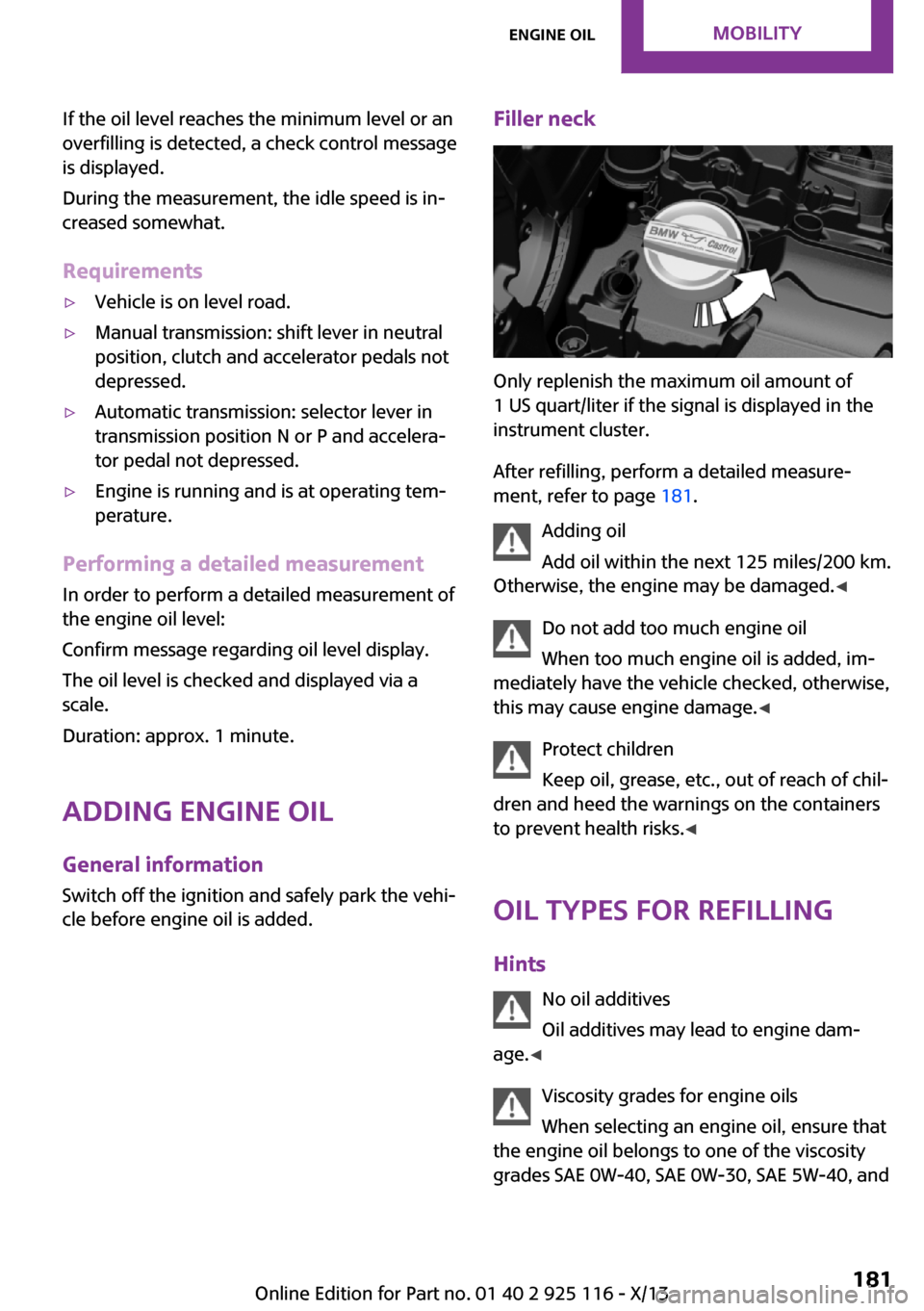
Filler neck
Only replenish the maximum oil amount of
1 US quart/liter if the signal is displayed in the
instrument cluster.
After refilling, perform a detailed measure‐
ment, refer to page 181.
Adding oil
Add oil within the next 125 miles/200 km.
Otherwise, the engine may be damaged. ◀
Do not add too much engine oil
When too much engine oil is added, im‐
mediately have the vehicle checked, otherwise,
this may cause engine damage. ◀
Protect children
Keep oil, grease, etc., out of reach of chil‐
dren and heed the warnings on the containers
to prevent health risks. ◀
Oil types for refilling
Hints No oil additives
Oil additives may lead to engine dam‐
age. ◀
Viscosity grades for engine oils
When selecting an engine oil, ensure that
the engine oil belongs to one of the viscosity
grades SAE 0W-40, SAE 0W-30, SAE 5W-40, and
Seite 181Engine oilMobility181
Online Edition for Part no. 01 40 2 925 116 - X/13
Page 209 of 233

Use leather care products; otherwise, dirt and
grease will gradually break down the protective
layer of the leather surface.
Suitable care products are available from the
service center.
Upholstery material care
Vacuum regularly with a vacuum cleaner.
If they are very dirty, e.g., beverage stains, use
a soft sponge or microfiber cloth with a suitable
interior cleaner.
Clean the upholstery down to the seams using
large sweeping motions. Avoid rubbing the ma‐
terial vigorously.
Damage from Velcro® fasteners
Open Velcro® fasteners on pants or other
articles of clothing can damage the seat covers.
Ensure that any Velcro® fasteners are closed. ◀
Caring for special components Light-alloy wheels
When cleaning the vehicle, use only neutral
wheel cleaners having a pH value from 5 to 9.
Do not use abrasive cleaning agents or steam
jets above 140 ℉/60 ℃. Follow the manufac‐
turer's instructions.
Aggressive, acidic or alkaline cleaning agents
can destroy the protective layer of adjacent
components, such as the brake disk.
Chrome surfaces
Carefully clean components such as the radia‐
tor grille or door handles with an ample supply
of water, possibly with shampoo added, partic‐
ularly when they have been exposed to road
salt.
Rubber components Aside from water, treat only with rubber cleans‐
ers.When cleaning rubber seals, do not use any sili‐
con-containing car care products in order to
avoid damage or reduced noise damping.
Fine wood parts Clean fine wood facing and fine wood compo‐
nents only with a moist rag. Then dry with a
soft cloth.
Plastic components
These include:▷Imitation leather surfaces.▷Headliner.▷Lamp lenses.▷Instrument cluster cover.▷Matte black spray-coated components.▷Painted parts in the interior.
Clean with a microfiber cloth.
Lightly dampen the cloth with water.
Do not soak the headliner.
Do not use cleansers that contain alcohol
or solvents
Do not use cleansers that contain alcohol or
solvents, such as lacquer thinners, heavy-duty
grease removers, fuel, or such; this could lead
to surface damage. ◀
Safety belts
Dirty belt straps impede the reeling action and
thus have a negative impact on safety.
Chemical cleaning
Do not clean chemically; this can destroy
the webbing. ◀
Use only a mild soapy solution, with the safety
belts clipped into their buckles.
Do not allow the reels to retract the safety belts
until they are dry.
Seite 205CareMobility205
Online Edition for Part no. 01 40 2 925 116 - X/13
Page 225 of 233

C
California Proposition 65 Warning 7
Camera-based cruise control, ACC 90
Camera, care 206
Can holder, refer to Cu‐ pholder 119
Car battery 196
Car care products 204
Care, displays 206
Care, vehicle 204
Cargo 127
Cargo area 115
Cargo area, adapting size 120
Cargo area, enlarging 116
Cargo area lid 24
Cargo area, storage compart‐ ments 120
Cargo cover 115
Cargo, securing 128
Cargo straps, securing cargo 128
Car key, refer to Remote con‐ trol 20
Carpet, care 206
Car wash 203
Catalytic converter, refer to Hot exhaust system 125
CBS Condition Based Serv‐ ice 184
Center armrest 119
Center console 14
Changes, technical, refer to Safety 6
Changing parts 186
Changing the station 140
Changing wheels 193
Changing wheels/tires 171
Check Control 57
Children, seating position 40
Children, transporting safely 40
Child restraint fixing sys‐ tem 40 Child restraint fixing system
LATCH 41
Child restraint fixing systems, mounting 40
Child seat, mounting 40
Child seats 40
Chrome parts, care 205
Cigarette lighter 115
Cleaning, displays 206
Climate control 104, 106
Clock 60
Closing/opening via door lock 23
Closing/opening with remote control 22
Clothes hooks 120
Coasting 133
Coasting with engine decou‐ pled, coasting 133
Coasting with idling en‐ gine 133
Cold starting, refer to Starting the engine 45
Collision warning with City Braking function 80
Combination switch, refer to Turn signals 49
Combination switch, refer to Wiper system 49
Comfort Access 25
Compact wheel 194
Compartments in the doors 119
Compass 112
Compressor 173
Computer 63
Condensation on win‐ dows 108
Condensation under the vehi‐ cle 126
Condition Based Service CBS 184
Confirmation signal 27
Control systems, driving stabil‐ ity 86
Convenient opening 22 Coolant 183
Coolant temperature 59
Cooling function 105, 108
Cooling, maximum 107
Cooling system 183
Cornering lamp 68
Corrosion on brake discs 126
Cruise control 96
Cruise control, active 90
Cruise control, refer to cam‐ era-based cruise control 90
Cruising range 60
Cupholder 119
Current fuel consumption 60
D
Damage, tires 171
Damping control, dynamic 87
Data, technical 210
Date 60
Date, radio 65
Date, setting on radio 65
Daytime running lights 67
Defrosting, refer to defrosting the windows 105
Defrosting, refer to Windows, defrosting 108
Defrosting the windows 105
Dehumidifying, air 105, 108
Diesel particulate filter 125
Digital clock 60
Digital compass 112
Digital radio 141
Dimensions 210
Dimmable exterior mirrors 38
Dimmable interior rearview mirror 38
Direction indicator, refer to Turn signals 49
Display, electronic, instrument cluster 57
Display lighting, refer to In‐ strument lighting 70
Displays 56
Displays, cleaning 206 Seite 221Everything from A to ZReference221
Online Edition for Part no. 01 40 2 925 116 - X/13
Page 226 of 233

Disposal, coolant 183
Disposal, vehicle battery 197
Distance control, refer to PDC 98
Distance covered, setting units 65
Door lock, refer to Remote control 20
Drive mode, GREEN mode 131
Drive mode lock, manually unlocking 54
Drive-off assistant 89
Drive-off assistant, refer to DSC 86
Driving Dynamics Control 88
Driving instruction, GREEN mode 133
Driving instructions, breaking in 124
Driving mode 88
Driving notes, general 124
Driving stability control sys‐ tems 86
Driving tips 124
DSC Dynamic Stability Con‐ trol 86
DTC Dynamic Traction Con‐ trol 87
Dynamic Damping Control 87
Dynamic Stability Control DSC 86
Dynamic Traction Control DTC 87
E Electronic displays, instrument cluster 57
Electronic Stability Program ESP, refer to DSC 86
Emergency detection, remote control 21
Emergency release, fuel filler flap 162 Emergency service, refer to
Roadside Assistance 198
Emergency start function, en‐ gine start 21
Emergency unlocking, door lock 24
Energy Control 60
Engine, automatic Start/Stop function 46
Engine, automatic switch- off 46
Engine compartment 178
Engine compartment, working in 178
Engine coolant 183
Engine idling when driving, coasting 133
Engine oil 180
Engine oil, adding 181
Engine oil additives 181
Engine oil change 182
Engine oil filler neck 181
Engine oil temperature 59
Engine oil types, alterna‐ tive 182
Engine oil types, ap‐ proved 182
Engine start during malfunc‐ tion 21
Engine start, jump-start‐ ing 198
Engine start, refer to Starting the engine 45
Engine stop 45
Engine temperature 59
Entering a car wash 203
Equipment, interior 110
ESP Electronic Stability Pro‐ gram, refer to DSC 86
Exchanging wheels/tires 171
Exhaust system 125
Exterior mirror, automatic dimming feature 38
Exterior mirrors 37
External start 198 External temperature dis‐
play 59
External temperature warn‐ ing 59
Eyes for securing cargo 128
F
Fader 138
Failure message, refer to Check Control 57
False alarm, refer to Uninten‐ tional alarm 28
Fan, refer to Air flow 105, 107
Fault displays, refer to Check Control 57
Filler neck for engine oil 181
Fine wood, care 205
First aid kit 198
Fitting for towing, refer to Tow fitting 201
Flat tire, changing wheels 193
Flat Tire Monitor FTM 77
Flat tire, repairing 173
Flat tire, Tire Pressure Monitor TPM 74
Flat tire, warning lamp 75, 78
Flooding 125
Floor carpet, care 206
Floor mats, care 206
Fogged up windows 105
Fold-out position, windshield wipers 51
Foot brake 125
Formats, setting 65
Front airbags 71
Front fog lamps 69
Front passenger airbags, auto‐ matic deactivation 73
Front passenger airbags, indi‐ cator lamp 73
FTM Flat Tire Monitor 77
Fuel 164
Fuel cap 162
Fuel consumption, current 60 Seite 222ReferenceEverything from A to Z222
Online Edition for Part no. 01 40 2 925 116 - X/13