2013 MINI 3 door parking light
[x] Cancel search: parking lightPage 93 of 233

Configuring SPORT
Depending on the equipment version, SPORT
can be individually configured.
Activating SPORT.
Select "Driving mode".
Configure the program.
Operation takes place via the radio.1. Press the button.2. "Settings"3."Driving mode"4."Configure SPORT"5.Make the desired settings.
This configuration is retrieved when SPORT is
activated.
Displays
Program selection When the Driving Dynamics Con‐
trol is turned, a list of programs
that can be selected is displayed.
Selected program The selected program is dis‐
played in the instrument cluster.
Drive-off assistant
This system supports driving away on gradients.
The parking brake is not required.
1.Hold the vehicle in place with the foot
brake.2.Release the foot brake and drive away
without delay.After the foot brake is released, the vehicle is
held in place for approx. 2 seconds.
Depending on the vehicle load or when a trailer
is being used, the vehicle may roll back slightly.
Driving off without delay
After releasing the foot brake, start driv‐
ing without delay, since the drive-off assistant
will not hold the vehicle in place for more than
approx. 2 seconds and the vehicle will begin
rolling back. ◀Seite 89Driving stability control systemsControls89
Online Edition for Part no. 01 40 2 925 116 - X/13
Page 105 of 233
Suitable parking space▷Gap between two objects or behind an in‐
dividual object, each of the objects being at
least 5 ft/1.5 m long.▷Minimum length of the gap: own vehicle's
length plus approx. 3.3 ft/1.0 m.▷Minimum depth: approx. 5 ft/1.5 m.
For parking procedure
▷Doors and tailgate closed.▷Parking brake released.▷When parking in parking spaces on the
driver's side, the corresponding turn signal
must be set.
At a glance
Button in the vehicle
Parking assistant
Ultrasound sensors
The ultrasound sensors for measuring parking
spaces are located on the wheel arches.
To ensure full operability:▷Keep the sensors clean and free of ice.▷When using high-pressure washers, do not
spray the sensors for long periods and
maintain a distance of at least 12 in/30 cm.▷Do not paste over sensors.
Switching on/off
Switching on with the button Press the button.
The LED lights up.
The current status of the parking space search
is indicated on the radio.
Parking assistant is activated automatically.
Switching on with reverse gear
Shift into reverse.
As soon as a suitable parking space is recog‐ nized by the system, the following query is dis‐
played on the radio display: "Start vehicle
parking?"
"OK": activate parking assistant.
"Cancel": cancel parking assistant.
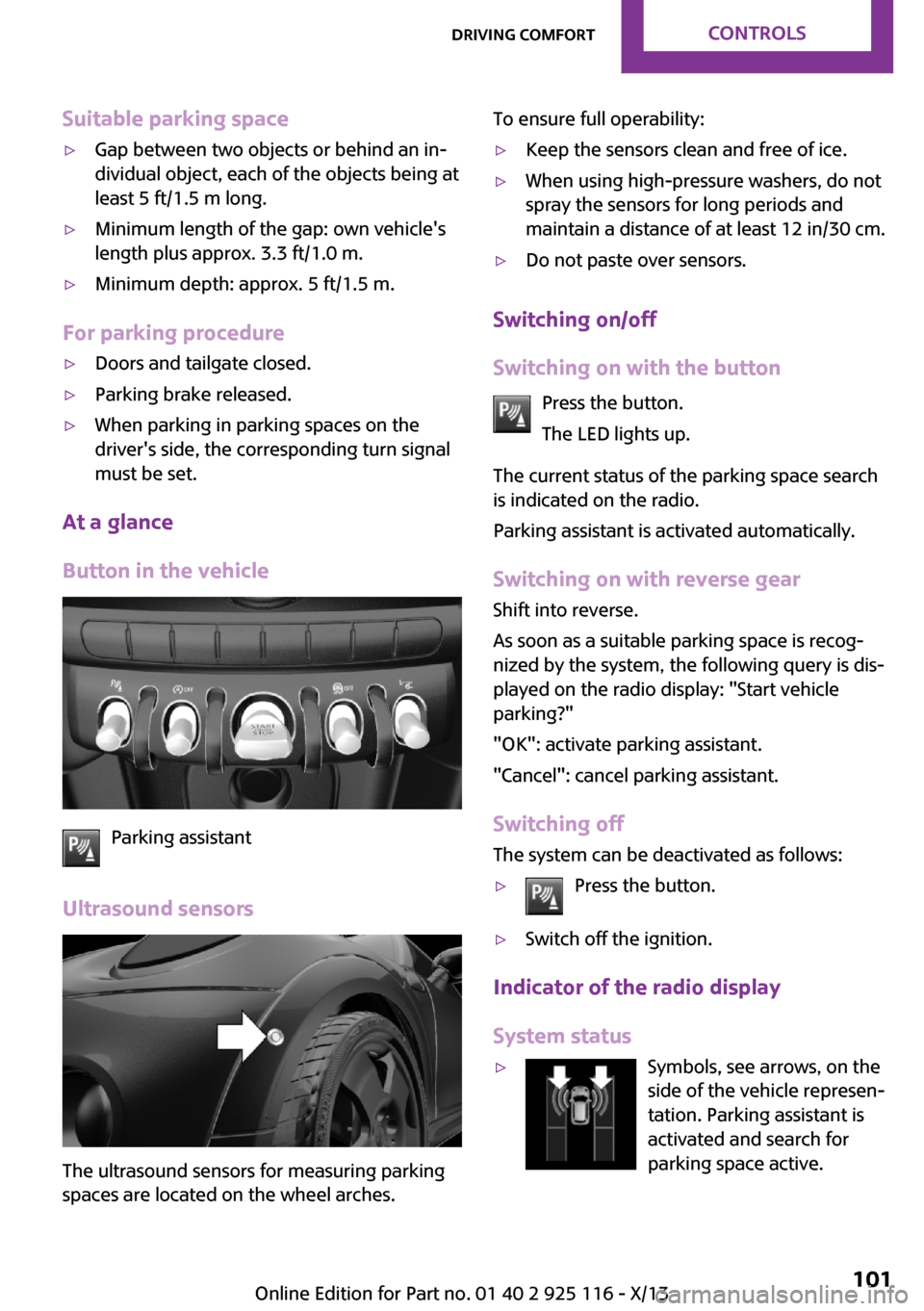
Switching off The system can be deactivated as follows:
▷Press the button.▷Switch off the ignition.
Indicator of the radio display
System status
▷Symbols, see arrows, on the
side of the vehicle represen‐
tation. Parking assistant is
activated and search for
parking space active.Seite 101Driving comfortControls101
Online Edition for Part no. 01 40 2 925 116 - X/13
Page 130 of 233

Objects in the area around the pedalsNo objects in the area around the pedals
Keep floor mats, carpets, and any other
objects out of the area of motion of the pedals;
otherwise, the function of the pedals could be
impeded while driving and create the risk of an
accident.
Do not place additional floor mats over existing
mats or other objects.
Only use floor mats that have been approved for the vehicle and can be properly fixed in
place.
Ensure that the floor mats are securely fastened
again after they were removed for cleaning, for
example. ◀
Driving in wet conditions When roads are wet or there is heavy rain,
briefly exert gentle pressure on the brake pedal
every few miles.
Ensure that this action does not endanger other
road users.
The heat generated in this process helps dry
the brake discs and pads.
In this way braking efficiency will be available
when you need it.
HillsDrive long or steep downhill gradients in the
gear in which the least braking is required. Oth‐
erwise, the brake system may overheat, result‐
ing in a reduction in the brake system effi‐
ciency.
You can increase the engine's braking effect by
shifting down, going all the way to first gear, if
necessary.
Avoid load on the brakes
Avoid placing excessive load on the brake
system. Light but consistent brake pressure can
lead to high temperatures, brake wear and
possibly even brake failure. ◀Do not drive in neutral
Do not drive in neutral or with the engine
stopped, as doing so disables engine braking.
In addition, steering and brake assist are un‐
available with the engine stopped. ◀
Brake disc corrosion Corrosion on the brake discs and contamina‐
tion on the brake pads are furthered by:▷Low mileage.▷Extended periods when the vehicle is not
used at all.▷Infrequent use of the brakes.
Corrosion occurs when the minimum pressure
that must be exerted by the pads during brake
applications to clean the discs is not reached.
Should corrosion form on the brake discs, the
brakes will tend to respond with a pulsating ef‐
fect that generally cannot be corrected.
Condensation under the parked vehicle
When using the automatic climate control, con‐
densation water develops that exits under‐
neath the vehicle.
Traces of water under the vehicle like this are
normal.
Ground clearance Limited ground clearance
Observe the limited ground clearance of
the vehicle, e. g. while entering underground
parking garages or when driving over obsta‐
cles. Otherwise, damages to the vehicle may
result. ◀
Seite 126Driving tipsThings to remember when driving126
Online Edition for Part no. 01 40 2 925 116 - X/13
Page 192 of 233

Front lamps, bulb replacement
At a glance
Halogen headlamps1Low beams/high beams2Turn signal
LED headlamps
1Daytime running lights2Low beams/high beams3Turn signalBug light1Parking lamps2Daytime running lights3Fog lamps
LED bug light
1Parking lamps2Fog lamps
Low beams/high beams Follow the general instructions on Lamps and
bulbs, refer to page 187.
Seite 188MobilityReplacing components188
Online Edition for Part no. 01 40 2 925 116 - X/13
Page 194 of 233

Parking lamps/fog lamps/daytime
running lights
Follow the general instructions on Lamps and
bulbs, refer to page 187.
Bulbs:▷Parking lamps for halogen headlamps:
W5W
Parking lamps for LED headlamps:
W5W NBV▷Daytime running light: PSX24W▷Fog lamp: H81.Turn the steering wheel.2.Turn the lid counterclockwise, arrow 2, and
remove.3.Remove the corresponding connector.4.▷Remove bulb socket of the parking
lamp, arrow 1, by turning it counter‐
clockwise.
Pull the bulb out of the fixture.▷Remove the bulb socket of the daytime
running lights, arrow 2, by pressing to‐
gether the top and bottom latch mech‐
anism.
For better accessibility, if necessary, re‐
move the bulb of the fog lamp before‐
hand.▷Turn the bulb socket of the fog lamp
counterclockwise, arrow 3, and re‐
move.5.Insert the new bulbs and install the cover in
the reverse order.
When installing the daytime running lights,
audibly latch the bulb socket first at the
bottom, then at the top.
Tail lamps, bulb replacement
At a glance
Vehicles with a rear fog lamp
1Side tail lamps2Rear fog lamp3License plate lamp4High brake lightsSeite 190MobilityReplacing components190
Online Edition for Part no. 01 40 2 925 116 - X/13
Page 204 of 233

function of individual systems could result in an
accident. ◀
Switching off Intelligent Safety systems, refer to
page 79.
Automatic transmission: transporting
your vehicle
Note Your vehicle must not be towed if the frontwheels are touching the ground. Therefore,
contact a service center in the event of a break‐ down.
Tow the vehicle only with the front axle
raised
Have the vehicle towed only with the front axle
raised or transported on a loading platform; otherwise, damage may occur. ◀
Tow truck
Have your vehicle transported with a tow truck
with a so-called lift bar or on a flat bed.
Do not lift the vehicle
Do not lift the vehicle by the tow fitting or
body and chassis parts; otherwise, damage
may result. ◀
Use the tow fitting screwed in at the front for
maneuvering the vehicle only.
Manual transmission
Observe before towing your vehicle Gearshift lever in neutral position.
Towing
When the parking brake is blocked
The parking brake cannot be released
manually.
Do not tow the vehicle with the parking brake
blocked, or the vehicle can be damaged.
Contact your service center. ◀
Follow the towing instructions
Follow all towing instructions; otherwise,
vehicle damage or accidents may occur. ◀▷Make sure that the ignition is switched on;
otherwise, the low beams, tail lamps, turn
signals, and windshield wipers may be un‐
available.▷Do not tow the vehicle with the rear axle
tilted, as the front wheels could turn.▷When the engine is stopped, there is no
power assist. Consequently, more force
needs to be applied when braking and
steering.▷Larger steering wheel movements are re‐
quired.▷The towing vehicle must not be lighter than
the vehicle being towed; otherwise, it will
not be possible to control the vehicle re‐
sponse.
Tow truck
Have your vehicle transported with a tow truck
with a so-called lift bar or on a flat bed.
Seite 200MobilityBreakdown assistance200
Online Edition for Part no. 01 40 2 925 116 - X/13
Page 227 of 233

Fuel consumption, refer toAverage fuel consump‐
tion 64
Fuel filler flap 162
Fuel gauge 59
Fuel quality 164
Fuel recommendation 164
Fuel, tank capacity 211
Fuse 197
G Garage door opener, refer to Universal garage door
opener 110
Gasoline 164
Gasoline quality 164
Gear change, automatic trans‐ mission 53
Gear selector lever, automatic transmission 53
Gear shift indicator 61
General driving notes 124
Glass sunroof, refer to Panor‐ amic glass sunroof 30
Glove compartment 118
Gong, volume equaliza‐ tion 138
GREEN mode 131
GREEN mode, bonus range 132
GREEN mode indicator 131
GREEN - program, driving dy‐ namics 88
GREEN tip 133
Gross vehicle weight, ap‐ proved 210
Ground clearance 126
H Halogen headlamps 188
Handbrake, refer to parking brake 48
Hand-held transmitter, alter‐ nating code 111 Hands-free system 152
Hazard warning flashers 198
HD Radio 141
Head airbags 71
Headlamp control, auto‐ matic 67
Headlamp courtesy delay fea‐ ture 67
Headlamp flasher 49
Headlamp glass 187
Headlamps, care 204
Headlamp washer system 49
Headliner 15
Head restraints 32
Head restraints, front 35
Head restraints, rear 36
Heavy cargo, stowing 128
High-beam Assistant 68
High beams 49
High beams/low beams, refer to High-beam Assistant 68
Hills 126
Hill start assistant, refer to Drive-off assistant 89
Hints 6
Holder for beverages 119
Homepage 6
Hood 178
Horn 12
Hot exhaust system 125
Hydroplaning 125
I
Ice warning, refer to External temperature warning 59
Icy roads, refer to External temperature warning 59
Identification marks, tires 169
Identification number, refer to Important features in the en‐
gine compartment 178
Ignition key, refer to Remote control 20
Ignition off 44
Ignition on 44 Illuminated ring, central in‐
strument cluster 65
Indication of a flat tire 75, 78
Individual air distribu‐ tion 105, 107
Individual settings, refer to Personal Profile 21
Inflation pressure, tires 166
Inflation pressure warning, tires 77
Info display, refer to Com‐ puter 63
Initialize, Tire Pressure Moni‐ tor TPM 75
Initializing, Flat Tire Monitor FTM 78
Instrument cluster 56
Instrument cluster, electronic displays 57
Instrument lighting 70
Integrated key 20
Intelligent Safety 79
Intensity, AUTO program 107
Interior equipment 110
Interior lamps 70
Interior lamps via remote con‐ trol 22
Interior motion sensor 28
Interior rearview mirror, auto‐ matic dimming feature 38
Interior rearview mirror, com‐ pass 112
Interior rearview mirror, man‐ ually dimmable 38
Internet site 6
Interval display, service re‐ quirements 60
J Jacking points for the vehicle jack 194
Joystick, automatic transmis‐ sion 53
Jump-starting 198 Seite 223Everything from A to ZReference223
Online Edition for Part no. 01 40 2 925 116 - X/13