2013 MERCEDES-BENZ SPRINTER mirror
[x] Cancel search: mirrorPage 99 of 334

correctly at all times. Have the headlamp
setting checked regularly.
R Always switch off the vehicle's lighting
system before changing a bulb.
This will prevent a short circuit.
R Do not touch the glass tube of new bulbs
with your bare hands. Always use a clean,
lint-free cloth or only touch the base of the
bulb when installing.
Even minor contamination can burn into
the glass surface and reduce the service life
of the bulbs.
R Do not use a bulb that has bee ndropped or
that has scratches on its glass tube.
The bulb could may explode.
R Only use bulbs in closed lamps which have
been designed for this purpose.
R Only use spare bulbs of the same type and
with the prescribed voltage
R Protect the bulbs from moisture when in
use.
If the new bulb still does not light up, consult
a qualified specialist workshop.
R Have the LEDs and bulbs of the following
lamps changed at a qualified specialist
workshop:
- the additional turn signals in the exterior
mirrors
- the high-mounted brake lamp
- the Bi-Xenon bulbs
- front fog lamps
If you require assistance changing bulbs,
consult a qualified specialist workshop. Fron
tbulbs
Overview of bulb types Lights Bulb type
0005
Additional turn signal
lamps in the exterior
mirrors PY 16 W
0006
Turn signal lamps PY 21 W
0026
Halogen headlamps:
low-bea mheadlamps H7 55 W
Bi-Xenon headlamps:
low-beam/high-beam
headlamps D1S–35 W
0025
Halogen headlamps:
high-beam headlamps H7 55 W
Cornering lamps H7 55 W
0023
Fog lamps H11 55 W
0024
Parking lamps/
standing lamps WY 5 WChanging bulbs
97Lights and windshield wipers Z
Page 156 of 334

Obstacles may damage the following parts
of the vehicle:
R
the chassis
R the drive train
R the fuel and supply tanks
For this reason, you should always drive
slowly when driving off-road. If you have to
drive over obstacles, have the co-driver
direct you.
i We recommend that you additionally
carry a shovel and a recovery rope with
shackle in the vehicle.
R Ensure that loads and items of luggage are
securely stowed or lashed down
(Y page 232).
R Before driving off-road, stop the vehicle and
shift to a low gear.
R If the surface demands it, temporarily
deactivate ASR when pulling away
(Y page 58).
R Only drive off-road with the engine running
and a gear engaged.
R Drive slowly and smoothly. Walking pace is
necessary in many situations.
R Avoid spinning the drive wheels.
R Make sure that the wheels always remain
in contact with the ground.
R Drive with extreme care over unknown
terrain where you can only see for a short
distance. As a precaution, get out of the
vehicle to take a look at the route to be
taken in advance.
R Check the water depth before fording.
R Watch out for obstacles (e.g. rocks, holes,
tree stumps and ruts).
R Avoid edges where the surface could
crumble or break away.
Checklist after driving off-road !
If you detect damage to the vehicle after
driving off-road, have the vehicle checked
immediately at a qualified specialist
workshop. Off-road driving places a higher demand on
your vehicle than normal road operation.
Check your vehicle after driving on rough
terrain. By doing so you will notice any
damage in good time and reduce the risk of
an accident for yourselfa
nd otherroad users.
Clean your vehicle thoroughly before driving
on public roads.
Observe the following points after driving off-
road, on construction sites and before driving
on public roads:
X Activate ASR (Y page 58).
X Clean the headlamps and tail lamps and
check them for damage.
X Clean the front and rear license plates.
X Clean the windshield, windows and exterior
mirrors.
X Clean the steps, door sills and grab
handles.
This increases safety of footing.
X Clean the wheels/tires, wheel housings
and the underbody of the vehicle with a
water jet.
This increases road grip, especially on wet
road surfaces.
X Check the wheels/tires and wheel
housings for trapped foreign objects and
remove them.
Trapped foreign objects can damage the
wheels/tires and may be flung out from the
vehicle when you continue driving.
X Check the underbody for trapped branches
or other parts of plants and remove them.
Trapped branches or other parts of plants
increase the risk of fire and can cause
damage to fuel lines, brake hoses and the
rubber bellows of axle jointsa nd drive
shafts.
X Clea nthe brake disks, brake pads and axle
joints, particularly after operation in sand,
mud, grit/gravel, water or similarly dirty
conditions.
X Check the entire floor assembly, the tires,
wheels, bodywork structure, brakes, 154
Driving tipsDriving and parking
Page 161 of 334

Warning displays
Warning display, front area
Warning display for the left-hand rear area in the
left-hand exterior mirror
0005
Warning segments for the left front area
0006 Warning segments for the right front area
0026 Operational readiness symbol for the
front area
0025 Warning display segments
0023 Operational readiness symbol for the rear
area
The warning displays show the distance
between the sensor and the obstacle.
The warning display is divided into five yellow
and two red segments for each side of the
vehicle. PARKTRONIC is operational if yellow
indicator segments 0026and 0023are lit.
There is a malfunction if only the red
segments of the warning display light up
(Y page 161).
The position of the gea rlever determines
whether the front and/or rear area is
monitored. Selector lever
position Monitoring
D
Front area
R
or N Front and rear area
P
No areas activated
One or more segments light up as the vehicle
approaches an obstacle, depending on the
vehicle's distance from the obstacle.
From the:
R
sixth segment, an intermittent warning
tone sounds for approximately
two seconds.
R seventh segment, a continuous warning
tone sounds. This indicates that you have
now reached the minimum distance.
Roll-back warning PARKTRONIC automatically monitors the
area behind the vehicle if the vehicle begins
to roll backwards without reverse gear
engaged, e.g. after stopping on an uphill
gradient.
If PARKTRONIC recognizes an obstacle at a
distance of at most 31 in (80 cm), all the
segments in the warning displays light up. A
continuous warning tone also sounds as the
vehicle approaches the obstacle and for a
further
2seconds after the vehicle has come
to a halt.
Deactivating/activating PARKTRONIC Driving systems
159Driving and parking Z
Page 164 of 334
for safe maneuvering and parking. When
maneuvering and parking, make sure that
there are no persons, animals or objects in
the maneuvering area.
The rear view camera is
avisual parking aid.
It shows you the area behind the vehicle on a
separate monitor on the center console.
The camera is in the middle of the roof above
the high-mounted brake lamp (Y page 259).
The rear view camera may show obstacles in
perspectival distortion, incorrectly or not at
all. The rear view camera cannot display all
objects located very near and/or under the
rear bumper. It does not warn you of a
collision, persons or objects.
The area behind the vehicle is displayed in a
mirrored fashion, as in the rear-view mirror or
the exterior mirrors. The guide lines displayed
assist you in backing up.
The function of the rear view camera may be
partially or completely impaired in the
following circumstances:
R it is raining very heavily or snowing, or it is
foggy.
R the parking space is located in a very dark
place.
R the camera is exposed to very strong white
light .White stripes may appearont he
display.
R the surrounding area is illuminated with
fluorescent light. The displaym ay flicker.
R if the temperature changes very quickly, for
example if you drive int oaheated garage
in the winter.
R ambient temperatures are very high.
R the camera lens is dirty or obstructed.
R the rear of the vehicle is damaged. In this
case, have the position and setting
checked at a specialist workshop.
The rear view camera is switched on when
you engage reverse gear R.
You can find information on cleaning the
camera in the "Maintenance and care"
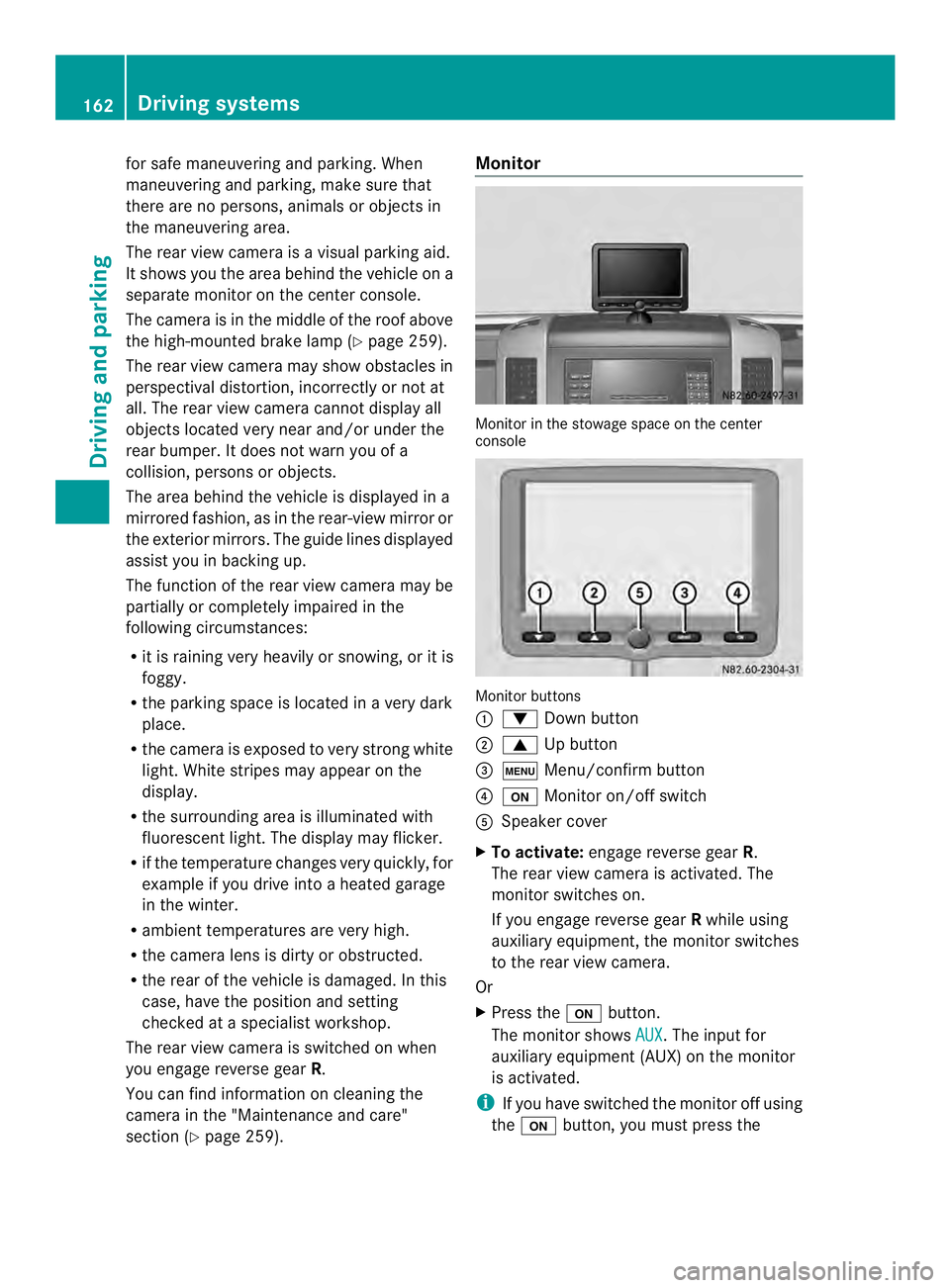
section (Y page 259). Monitor
Monitor in the stowage space on the center
console
Monitor buttons
0005
0008 Down button
0006 0006 Up button
0026 0003 Menu/confirm button
0025 0004 Monitor on/off switch
0023 Speaker cover
X To activate: engage reverse gear R.
The rear view camera is activated. The
monitor switches on.
If you engage reverse gear Rwhile using
auxiliary equipment, the monitor switches
to the rear view camera.
Or
X Press the 0004button.
The monitor shows AUX .T
he input for
auxiliary equipment (AUX) on the monitor
is activated.
i If you have switched the monitor off using
the 0004 button, you must press the 162
Driving systemsDriving and parking
Page 174 of 334

available from the police and local
authorities.
Observe the following when towing a trailer:
R
Practice driving around bends, stopping
and backing up at a place where there is no
traffic. This enables you to gain experience
and get used to the new handling
characteristics.
R Before driving, check:
-that the trailer tow hitch and ball
coupling are secure
- that the safety switch for a braked trailer
is functioning properly
- that the safety chains are secure and not
damaged
- that the electrical connections are
secure
- that the lights are working
- that the wheels are in good order and the
tire pressure is correct
R Adjust the exterior mirrors to provide an
unobstructed view of the rear sectio nofthe
trailer.
R If the trailer has electronically controlled
brakes, pull the vehicle/trailer
combination away carefully. Brake
manually using the brake controller and
check that the brakes are working.
R Secure the load on the trailer according to
the applicable specifications and current
standards on securing loads
(Y page 234).
R When driving with a trailer, check at regular
intervals that the load is secured and that
the brakes and lights are working.
R Bear in mind that the handling will be less
stable when towing a trailer than when
driving without one. Avoid sudden steering
movements.
R The vehicle/trailer combination is heavier,
accelerates more slowly and has a
decreased gradient climbing capability and
a longer braking distance.
It is more susceptible to crosswinds and
requires cautious steering. R
If possible, do not brake suddenly, but
rather moderately at first so that the trailer
can activate its brakes. Then increase the
force on the brake pedal.
R If the automatic transmission repeatedly
shifts between gears when driving on
inclines, restrict the shift range. Select shift
range 4,3,2or 1.
Driving in a low gear and at a low speed
reduces the risk of damaging the engine.
R When driving on a downhill gradient, shift
to a low gear and take advantage of the
engine's braking effect.
Avoid continuous brake application as this
may overheat the vehicle brakes and, if
installed, the trailer brakes.
R If the coolant temperature increases
dramatically while the air-conditioning
system is switched on, switch off the air-
conditioning system.
Coolant heat can also be dissipated by
switching the airflow and the temperature
of the heater/air conditioning to the
maximum level. Open the windows if
necessary.
R When overtaking, pay particular attention
to the extended length of your vehicle/
trailer combination.
Due to the length of your vehicle/trailer
combination you need an additional
distance before you can return to your
original lane. Uncoupling
atrailer G
WARNING
If you uncouple a trailer with the overrun
brake engaged, you could trap your hand
between the vehicle and the trailer drawbar.
There is a risk of injury.
Do not uncouple a trailer if the overru nbrake
is engaged.
! Do not disconnect a trailer with an
engaged overru nbrake. Otherwise, your 172
Towing
atrailerDriving an d parking
Page 258 of 334

H
Environmental note
Only clean your vehicle at specially designed
wash bays. Dispose of empt ycontainers and
used cleaning products in an environmentally
responsible manner. H
Environmental note
Dispose of empty packaging and cleaning
cloths in an environmentally responsible
manner.
Regula rcare of your vehicle is a condition for
retaining the quality in the long term.
Use care products and cleaning agents
recommended and approved for Sprinter
vehicles. Washing the vehicle and cleaning the
paintwork
Automatic car wash G
WARNING
Braking efficiency is reduced after washing
the vehicle .There is a risk of an accident.
After the vehicle has been washed, brake
carefully while paying attention to the traffic
conditions until full braking power is restored.
! Never clean your vehicle in a Touchless
Automatic Car Wash as these use special
cleaning agents. These cleaning agents can
damage the paintwork or plastic parts.
! Make sure that the automatic car wash is
suitable for the size of the vehicle.
Before washing the vehicle in an automatic
car wash, fold in the exterior mirrors and
remove any additional antennas.
Otherwise, the exterior mirror, antenna or
the vehicle itself could be damaged.
Make sure that the exterior mirrors are fully
folded out again and that any additional
antennas are re-installed when you leave
the automatic car wash. !
Make sure that:
R the side windows and the roof are
completely closed
R the climate control blower is switched off
R the windshield wiper switch is at position
0
The vehicle could otherwise be damaged.
You can wash the vehicle in an automatic car
wash from the very start.
Wash off excess dirt before cleaning the
vehicle in an automatic car wash.
After putting the vehicle through an
automatic car wash, wipe off wax from:
R the rear view camera lens (Y page 259)
R the windshield
R the windshield wiper blades
This will prevent smears and reduce wiping
noises caused by residue on the
windshield.
Washing by hand In some countries, washing by hand is only
allowed at specially equipped washing bays.
Observe the legal requirements for each
individual country.
X
Do not use hot water and do not wash the
vehicle in direct sunlight.
X Use a soft car sponge.
X Use a mild cleaning agent, e.g. a car
shampoo approved for use with Sprinter
vehicles.
X Thoroughly hose down the vehicle with a
gentle jet of water.
X Do not point the water jet directly towards
the air inlets.
X Use plenty of water and rinse out the
sponge frequently.
X Rinse the vehicle with clean water and dry
thoroughly with a chamois.
X Do not let the cleaning agents dry on the
paintwork. 256
CareMaintenance and care
Page 261 of 334

cleaning cloths could scratch or damage
the plastic light lenses.
X Clea nthe plastic covers of the exterior
lighting with a damp sponge and a mild
cleaning agent, e.g. car shampoo for
Sprinter vehicles, or with cleaning cloths.
Cleaning the mirror turns ignal!
Only use cleaning agents or cleaning
cloths that are suitable for plastic lenses.
Unsuitable cleaning agents or cleaning
cloths could scratch or damage the plastic
lenses of the mirror turn signals.
X Clean the plastic lenses of the mirror turn
signals in the exterior mirror housing using
a wet sponge and mild cleaning agent, e.g.
car shampoo or cleaning cloths.
Cleaning the sensors !
Do not use dry, coarse or hard cloths and
do not scrub. You will otherwise scratch or
damage the sensors.
If you clean the sensors with a power
washer or steam cleaner, observe the
information provided by the manufacturer
regarding the distance to be maintained
betwee nthe vehicle and the nozzle of the
power washer. PARKTRONIC sensors (example: front bumper, left
side of vehicle)
X Cleana ll sensors 0005in the front and rear
bumpers with water, shampoo and a soft
cloth. Cleaning the rea
rview camera !
Do not use dry, coarse or hard cloths and
do not scrub. Otherwise, you will scratch or
damage the lens of the rear-view camera.
If you clean the vehicle with a high-pressure
or steam cleaner, maintain a distance of at
least 1.650 cm from the rear-view camera.
Do not aim directly at the rear-view camera
or at the microphone opening on the
underside of the rear-view camera. You
could otherwise damage the rear-view
camera. Rear view camera in the middle of the roof above
the high-mounted brake lamp
0005
Camera lens
0006 Microphone openings
X Clean camera lens 0005with clear water and
a soft cloth.
Make sure that you do not apply any wax to
camera lens 0005when waxing the vehicle. If
necessary, remove the wax using water,
shampoo and a soft cloth.
Cleaning the sliding door X
Remove foreign objects from the vicinity of
the contact surfaces and contact pins of
the sliding door.
X Clean the contact surfaces and contact
pins with a mild cleaning agent and a soft
cloth.
Do not oil or grease the contac tplates and
contact pins. Care
259Maintenance and care Z