2013 MERCEDES-BENZ SL-CLASS ROADSTER CD player
[x] Cancel search: CD playerPage 448 of 572

i
Store individual parts in a safe place.
Only use genuine Mercedes-Benz
connection cables.
i iPod ®
and iPhone ®
are registered
trademarks of Apple Inc., Cupertino,
California, USA.
i MP3 players that support MTP ( Media
Transfer Protocol) can be used.
This allows the MP3 player to be easily
connected to the Media Interface and
removed after use. Audio data is played
without problem.
On some
MP3 players, you have to activate
the relevant function (see the MP3 player
operating instructions).
Supported devices
For details and a list of supported devices,
visit http://www.mbusa-mobile.com.
Alternatively, call the Mercedes-Benz
Customer Assistance Center at
1-800-FOR-MERCedes (1-800-367-6372)
(for USA) or Customer Relations at
1-800-387-0100 (for Canada).
Connecting an external device Do not leave external devices in the vehicle.
They may malfunction in extreme
temperatures;
see
the operating instructions
for the respective device. Examples of
extreme temperatures are direct sunlight or
very low outside temperatures.
Mercedes-Benz USA, LLC accepts no liability
for damage to external devices.
i Never connect more than one device at a
time. You will otherwise not be able to play
back from the external device.
USB hubs (devices with several USB
connections) are not supported. :
Four-pin socket for ⅛ inch stereo jack,
e.g. for MP3 players (audio and video)
; iPod ®
plug for connecting an iPod ®
= USB socket for connecting an MP3 player
? Example of device: iPod ®
X Connect the external device with suitable
socket :, ; or =.
COMAND activates the device, a message
appears.
If you remove a device, the No Device
Connected message appears.
i A connected iPod ®
or MP3 player should
not be simultaneously operated via the
Media Interface and the remote control
(e.g. Bluetooth ®
remote control) or directly
via the device itself, as this may cause
unforeseen technical difficulties.
Applications (Apps) that are activated on
the connected device may lead to
malfunctions.
i Connecting a fully discharged iPod ®
or
MP3 player can result in an extended
initialization period.
Malfunction messages appear while the
device is being activated if:
R the connected device is not supported
(External Device Unavailable
message).
R the connected device consumes too much
power.446
Audio
COMAND
Page 449 of 572

R
the Media Interface connection is faulty.
R a mass
storage device (e.g. a USB memory
stick or USB hard drive) is connected to the
Media Interface.
In this case the message Please
connect the device to the other
USB port appears.
i The separate USB connection ensures
quick access and expanded media content
options.
i Consult an authorized Mercedes-Benz
Center if you have further questions.
Switching to Media Interface mode General notes
In extreme cases, starting up individual
functions can take up to several minutes –
this depends on the external device and its
content (e.g. video podcasts).
Only
use
the original software to save files on
iPods ®
or MP3 players. Otherwise, some or
all functions may not be available.
Automatic switching Media Interface mode (iPod
®
mode) when
equipped with a DVD changer
: Cover (if available) or representation of
device
; Track number
= Elapsed track time (also in format
00:00:00 for audio books)
? Track name
A Graphic time display B
Track position in playlist
C Album name (if available)
D Artist (if available)
E Music search
F Position in the media list
G Type of data medium
H Playback options
The type of device connected is indicated by
the corresponding symbol for iPod ®
,
iPhone ®
or MP3 player G.
The current playback option is shown with a
symbol behind
album name C (no display for
Normal Track Sequence) ( Y page 450).
X Connect an external device (Y page 446).
COMAND activates the device. The basic
display then appears.
i If the device connected does not contain
any playable
tracks, a message appears to
this effect.
Switching modes using the function
button
The external device is connected to the Media
Interface ( Y page 446).
X Press the h function button repeatedly
until the Media Interface basic menu
appears (Y
page 447).
By pressing the function button repeatedly,
you can change the operating mode in the
following order:
R audio CD/DVD/MP3 (disc)
R memory card mode
R MUSIC REGISTER
R USB storage device
R Media Interface or audio AUX mode
R Bluetooth ®
audio mode
Switching on using a number key
The external
device is connected to the Media
Interface ( Y page 446). Audio
447
COMAND Z
Page 450 of 572

X
Press the i number key (for a DVD
changer) or the o number key (for a
single DVD drive).
This selects the connected external audio
device directly. The basic menu for Media
Interface appears ( Y page 447).
Switching on via the media list
The external
device is connected to the Media
Interface ( Y page 446).
X Select the entry under position 0 (DVD
changer) or
position 5 (single DVD drive) in
the media list by turning cVd the COMAND
controller and press W to confirm
(Y page 426).
COMAND activates the connected device.
You will see a message to this effect. Then,
the basic menu for the Media Interface
appears ( Y page 447).
If no device is connected, you will see the
Media Interface entry instead of a
device name.
Selecting music files Note
COMAND displays the data stored on the
iPod
®
, iPhone ®
or MP3 player according to
the filing structure used in the respective
medium.
Selecting by skipping to a track
X To skip forwards or back to a track:
turn
cVd
the COMAND controller when the
display/selection window is active.
or
X Press the E or F button.
The skip
forward function skips to the next
track. The skip back function skips to the
beginning of the current track if the track
has been playing for more than eight
seconds. If the track has been playing for
less than eight seconds, it skips to the start
of the previous track. If you have selected
a playback option other than Normal Track Sequence, the track sequence is
random.
Selecting using the number keypad
X To make an entry: press
the l button.
An input menu appears. The number of
characters available for input depends on
the number of stored tracks.
X To enter a track number: press a
number
key, e.g. q.
The digit is entered in the first position in
the input line.
i COMAND will ignore and not display an
invalid digit.
X Enter more numbers if desired.
The track plays after the last possible
number is entered.
i Pressing and holding a number key for
more than two seconds completes the
entry, and the corresponding track is
played.
Fast forwarding/rewinding
X While the display/selection window is
active, slide XVY and hold the COMAND
controller until the desired position has
been reached.
or
X Press and hold the F or E button
until the desired position is reached.
i On an iPod ®
or iPhone ®
, fast rewind only
functions within the current track.
Selecting a category/playlist/folder Overview
For
an
iPod®
, iPhone ®
or certain MP3 players,
you can select tracks using categories or
folders.
Depending on the device connected, the
following categories may be available, for
example:
R Current Tracklist
R Keyword Search
R Playlists (e.g. All)448
Audio
COMAND
Page 452 of 572
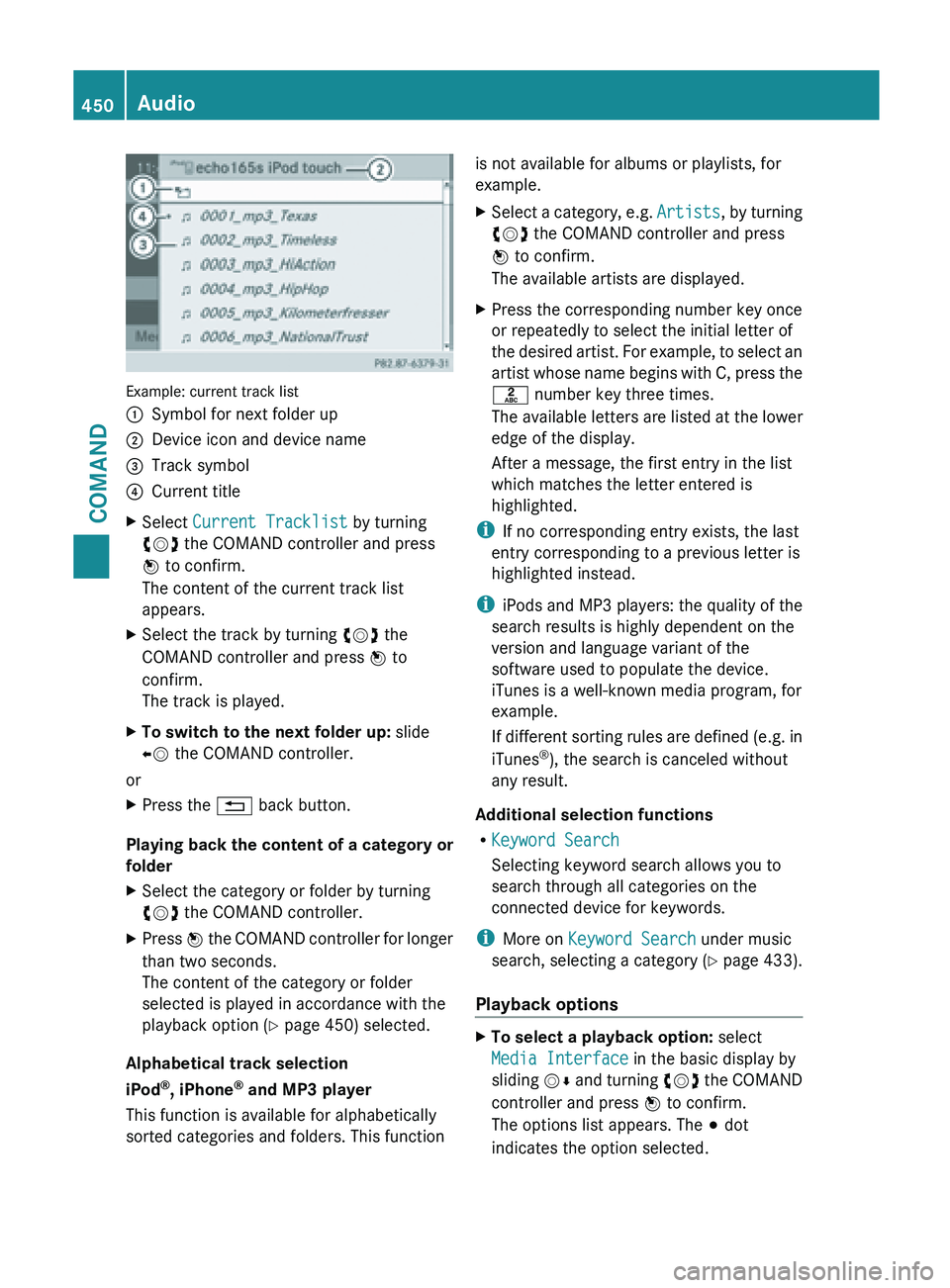
Example: current track list
:
Symbol for next folder up
; Device icon and device name
= Track symbol
? Current title
X Select Current Tracklist by turning
cVd the COMAND controller and press
W to confirm.
The content of the current track list
appears.
X Select the track by turning cVd the
COMAND controller and press W to
confirm.
The track is played.
X To switch to the next folder up: slide
XV the COMAND controller.
or
X Press the % back button.
Playing back the content of a category or
folder
X Select the category or folder by turning
cVd the COMAND controller.
X Press W the COMAND controller for longer
than two seconds.
The content of the category or folder
selected is played in accordance with the
playback option
(Y page 450) selected.
Alphabetical track selection
iPod ®
, iPhone ®
and MP3 player
This function is available for alphabetically
sorted categories and folders. This function is not available for albums or playlists, for
example.
X
Select a category, e.g. Artists, by
turning
cVd the COMAND controller and press
W to confirm.
The available artists are displayed.
X Press the corresponding number key once
or repeatedly to select the initial letter of
the desired
artist. For example, to select an
artist whose name begins with C, press the
l number key three times.
The available letters are listed at the lower
edge of the display.
After a message, the first entry in the list
which matches the letter entered is
highlighted.
i If no corresponding entry exists, the last
entry corresponding to a previous letter is
highlighted instead.
i iPods and
MP3 players: the quality of the
search results is highly dependent on the
version and language variant of the
software used to populate the device.
iTunes is a well-known media program, for
example.
If different sorting rules are defined (e.g. in
iTunes ®
), the search is canceled without
any result.
Additional selection functions
R Keyword Search
Selecting keyword search allows you to
search through all categories on the
connected device for keywords.
i More on Keyword Search under music
search, selecting a category ( Y page 433).
Playback options X
To select a playback option: select
Media Interface in the basic display by
sliding VÆ
and
turning cVd the COMAND
controller and press W to confirm.
The options list appears. The # dot
indicates the option selected. 450
Audio
COMAND
Page 453 of 572

X
Select an option and press W to confirm.
The following options are available:
R Normal Track Sequence
Normal track sequence: you hear the
tracks in
their normal order (e.g. numerical
or alphabetical).
R Random Medium
All the tracks on the medium are played in
random order.
R Random Track List
The tracks in the currently active category
or folder, including any subfolders, are
played in random order.
i For MP3 players, the random playlists
offer a maximum of 300 tracks chosen at
random.
MP3 player instructions General notes
Up to 30,000 tracks per medium are
supported.
You can speed up some functions and
improve the search results by:
R
making sure the names of tracks, albums
and artists, for example, are written the
same way
R labeling albums
featuring various artists as
“compilations”
i Multiple entries of tracks in playlists are
filtered out for some players.
Data formats
MP3 and WMA are supported as data formats
with fixed and variable bit rates (up to
320 kbits/s).
Special notes about MP3 players
Up to eight directory levels with up to 1,000
tracks per directory are supported.
Do not use USB extension leads or adapters.
They can impair functionality. i
DRM (Digital Rights Management)
protected files are not supported by the
Media Interface. Audio AUX mode
Notes on audio AUX mode You can connect an external audio source
(AUX) to COMAND. You will find the
necessary socket in the center console
stowage compartment.
If COMAND is equipped with a Media
Interface, external audio sources are
connected using the cable set provided. An
AUX
socket
is not provided. The connections
for the Media Interface are located in the
stowage compartment in the center console.
i You will find further information online at
http://www.mbusa-mobile.com.
Alternatively, call the Mercedes-Benz
Customer Assistance Center at
1-800-FOR-MERCedes (1-800-367-6372)
(for USA) or Customer Relations at
1-800-387-0100 (for Canada).
Activating audio AUX mode G
WARNING
External audio sources may have different
volumes, which can mean that system
messages such
as traffic announcements and
navigation system announcements are much
louder. If necessary, please deactivate the
system messages or adjust their volume
manually.
When you connect an external audio source,
audio AUX is not selected automatically.
X Select Audio in the main function bar by
sliding ZV and
turning cVd the COMAND
controller and press W to confirm.
If AUX mode was the last mode selected, it
will now be active. Audio
451
COMAND Z
Page 477 of 572
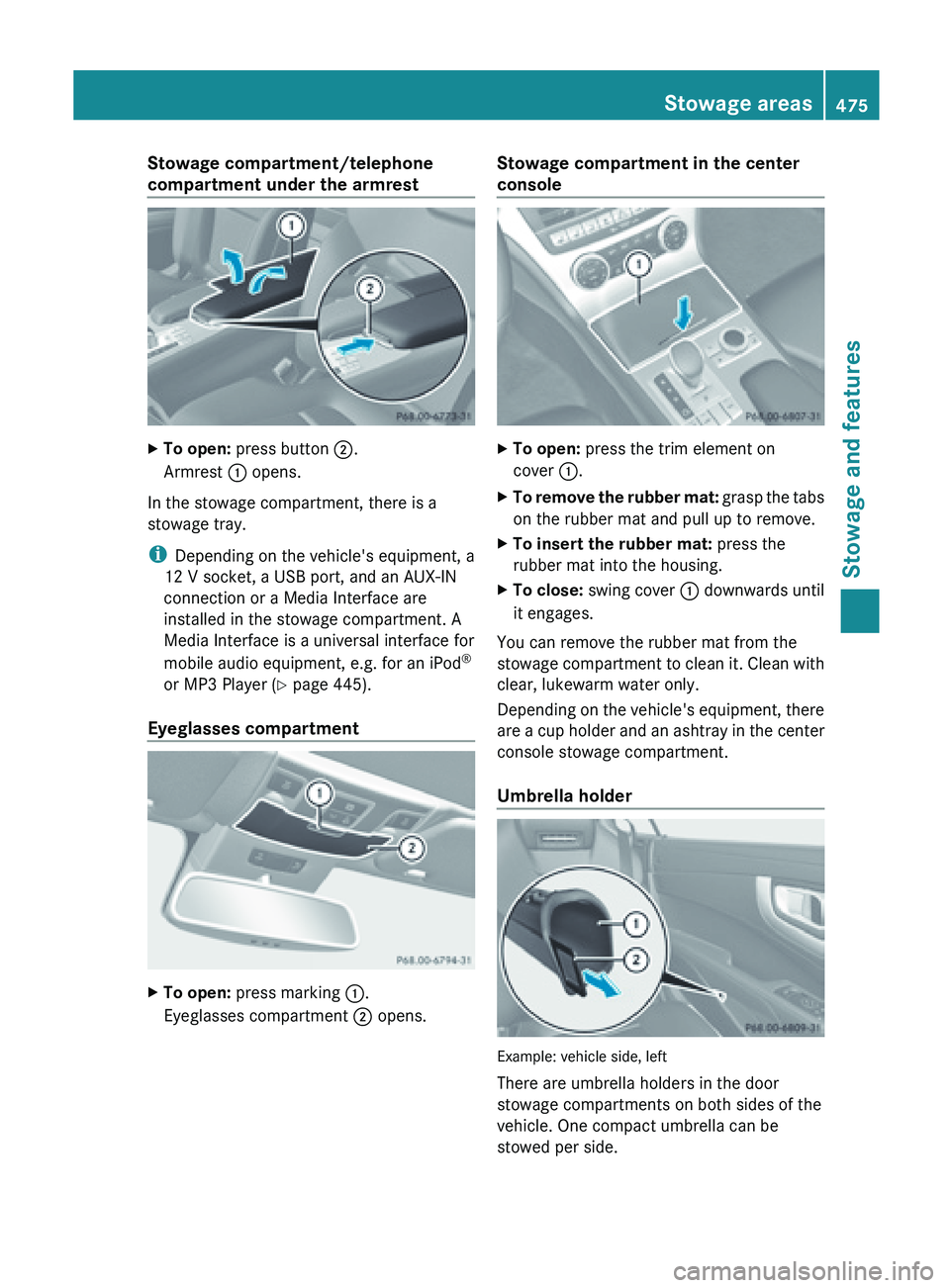
Stowage compartment/telephone
compartment under the armrest
X
To open: press button ;.
Armrest : opens.
In the stowage compartment, there is a
stowage tray.
i Depending on the vehicle's equipment, a
12 V socket, a USB port, and an AUX-IN
connection or a Media Interface are
installed in the stowage compartment. A
Media Interface is a universal interface for
mobile audio equipment, e.g. for an iPod ®
or MP3 Player (
Y
page 445).
Eyeglasses compartment X
To open: press marking :.
Eyeglasses compartment ; opens. Stowage compartment in the center
console
X
To open: press the trim element on
cover :.
X To remove the rubber mat:
grasp the tabs
on the rubber mat and pull up to remove.
X To insert the rubber mat: press the
rubber mat into the housing.
X To close: swing cover : downwards until
it engages.
You can remove the rubber mat from the
stowage compartment
to clean it. Clean with
clear, lukewarm water only.
Depending on the vehicle's equipment, there
are a cup holder and an ashtray in the center
console stowage compartment.
Umbrella holder Example: vehicle side, left
There are umbrella holders in the door
stowage compartments on both sides of the
vehicle. One compact umbrella can be
stowed per side. Stowage areas
475
Stowage and features Z