2013 MERCEDES-BENZ SL-Class belt
[x] Cancel search: beltPage 190 of 590

Cruise control lever
Cruise control lever
0002 To store the curren tspeed or a higher
speed
0003 To set the specified minimum distance
0027 To store the curren tspeed or calling up
the last stored speed
0026 To store the curren tspeed or a lower
speed
0024 To deactivate DISTRONIC PLUS
Activating DISTRONIC PLUS; storing,
maintaining and calling up aspeed Important safety notes
! If DISTRONIC PLUS or the HOLD function
is activated, the vehicle brakes
automatically in certain situations. To
prevent damage to the vehicle, deactivate
DISTRONIC PLUS and the HOLD function in
the following or othe rsimilar situations:
R when towing the vehicle
R in the car wash
In order to activate DISTRONIC PLUS, the
following conditions must be fulfilled:
R the engine must be started. It may take up
to two minutes after pulling away before
DISTRONIC PLUS is operational.
R your vehicle must not be secured by the
electric parking brake.
R ESP ®
must be activated.
R the transmission must be in position D.
R the hood must be closed. R
the driver's door must be closed when you
shift from Pto Dor your seat belt must be
fastened.
R the front-passenger door must be closed.
R the vehicle must not skid.
Activating while driving Cruise control lever
X
Briefly pull the cruise control lever toward
you 0003, up 0002or down 0027.
DISTRONIC PLUS is selected.
X To adjust the set speed in 1 mph
increments (1 km/h increments): briefly
press the cruise control lever up 0002to the
pressure point for a higher speed or down
0027 for a lower speed.
Every time the cruise control lever is
pressed up or down, the last speed stored
is increased or reduced.
or
X To adjust the set speed in 5 mph
increments (10 km/h increments):
briefly press the cruise control lever
up 0002 past the pressure point for a higher
speed or down 0027for a lower speed.
Every time the cruise control lever is
pressed up or down, the last speed stored
is increased or reduced.
X Remove your foot fro mthe accelerator
pedal.
Your vehicle adapts its speed to that of the
vehicle in front, but only up to the desired
stored speed.
If the vehicle in front has been detected and
is shown in the multifunction display, you can 188
Driving systemsDriving and parking
Page 192 of 590

If DISTRONIC PLUS detects that the vehicle
in front has slowed down, it brakes your
vehicle. It maintains the preset distance to
the vehicle in front.
If DISTRONIC PLUS detects that there is a risk
of a collision, you will be warned visually and
acoustically. DISTRONIC PLUS cannot
prevent a collision withou tyour intervention.
An intermittent warning tone will then sound
and the distance warning lamp will light up in
the instrument cluster. Brake immediately in
order to increase the distance from the
vehicle in front, or take evasive action,
provided it is safe to do so.
If DISTRONIC PLUS detects a faster-moving
vehicle in front, it increases the driving speed.
However, the vehicle is only accelerated up
to the speed you have stored.
Changing lanes
If you wish to change to the passing lane (in
countries where traffic drives on the right, the
passing lane is the left-hand lane),
DISTRONIC PLUS supports you if:
R you are driving faster than 40mph
(60 km/h).
R DISTRONIC PLUS is maintaining the
distance to a vehicle in front.
R you have switched on the corresponding
turn signal.
R DISTRONIC PLUS does not detect a danger
of collision.
If these conditions are fulfilled, your vehicle
is accelerated. Acceleration will be
interrupted if changing lanes takes too long
or if the distance between your vehicle and
the vehicle in front becomes too small. Stopping G
WARNING
When leaving the vehicle, even if it is braked
only by DISTRONIC PLUS, it could roll away if:
R there is a malfunction in the system or in
the voltage supply.
R DISTRONIC PLUS has been deactivated
with the cruise control lever, e.g. by a
vehicle occupant or from outside the
vehicle.
R the electrical system in the engine
compartment, the battery or the fuses have
been tampered with.
R the battery is disconnected.
R the accelerator pedal has been depressed,
e.g. by a vehicle occupant.
There is a risk of an accident.
If you wish to exit the vehicle, always turn off
DISTRONIC PLUS and secure the vehicle
against rolling away.
Deactivating DISTRONIC PLUS
(Y page 193).
If DISTRONIC PLUS detects that the vehicle
in front is stopping, it brakes your vehicle until
it is stationary.
Once your vehicle is stationary, it remains
stationary and you do not need to depress the
brake. After a time, the electric parking brake
secures the vehicle and relieves the service
brake.
Depending on the specified minimum
distance, your vehicle will come to a standstill
at a sufficient distance behind the vehicle in
front.T he specified minimum distance is set
using the control on the cruise control lever.
The electric parking brake automatically
secures the vehicle if DISTRONIC PLUS is
activated and:
R the driver's door is open and the driver's
seat belt is unfastened.
R the engine is switched off, unless it is
automatically switched off by the ECO
start/stop function. 190
Driving systemsDriving and parking
Page 198 of 590

Activation conditions
You can activate the HOLD function if:
R
the vehicle is stationary.
R the engine is running or if it has been
automatically switched off by the ECO
start/stop function.
R the driver's door is closed or your seat belt
is fastened.
R the electric parking brak eis released.
R the transmission is in position D,Ror N.
R DISTRONIC PLUS is deactivated.
Activating the HOLD function X
Make sure that the activation conditions
are met.
X Depress the brake pedal.
X Quickly depress the brake pedal further
until HOLD display
0002appears in the
multifunction display.
The HOLD function is activated. You can
release the brake pedal.
i If depressing the brake pedal the first
time does not activate the HOLD function,
wait briefly and then try again.
Deactivating the HOLD function The HOLD function is deactivated
automatically if:
R
you accelerate and the transmission is in
position Dor R.
R you shift the transmission to position P.
R you apply the brakes againw ith a certain
amoun tofpressure until HOLD disappears
from the multifunction display. R
you secure the vehicle using the electric
parking brake.
R you activate DISTRONIC PLUS.
i After a time, the electric parking brake
secures the vehicle and relieves the service
brake.
The electric parking brake automatically
secures the vehicle if the HOLD function is
activated and:
R the driver's door is open and the driver's
seat belti s unfastened.
R the engine is switched off, unless it is
automatically switched off by the ECO
start/stop function.
R a system malfunction occurs.
R the power supply is not sufficient.
If a malfunction occurs, then the transmission
may also be shifted into position P
automatically. RACE START
Important safety notes i
Observe the safety notes for the SPORT
handling mode (Y page 77).
RACE START is intended solely for activation
on dedicated race circuits.
RACE START enables optimal acceleration
from a standing start. The precondition for
this is a suitable high-grip road surface.
i RACE START is only available for the
SL 63 AMG model.
Conditions for activation You can activate RACE START if:
R
the doors are closed.
R the engine is running and it has reached an
operating temperature of approximately
176 ‡ (80 †). This is the case when the
engine oil temperature in the multifunction
display stops flashing. 196
Driving systemsDriving and parking
Page 216 of 590

ATTENTION ASSIST assesses your level of
fatigue or lapses in concentratio nby taking
the following criteria into account:
R your personal driving style, e.g. steering
characteristics
R journey details, e.g. time of day and length
of journey
The functionality of ATTENTION ASSIST is
restricted and warnings may be delayed or
not occur at all:
R if the road condition is poor, e.g. if the
surface is uneven or if there are potholes
R if there is a strong side wind
R if you have adopted a sporty driving style
with high cornering speeds or high rates of
acceleration
R if you are predominantly driving slower
than 50 mph (80 km/h) or faster than
112 mph (180 km/h)
R if you are currently using COMAND or
making a telephone call wit hit
R if the time has been set incorrectly
R in active driving situations, such as when
you change lanes or change your speed
Warning and display messages in the
multifunction display X
Activate ATTENTION ASSIST using the on-
board computer (Y page 231).
Symbol 0002appears in the multifunction
display.
X The Attention Assist: Take a Break! message appears in the
multifunction display. If necessary, take
a break.
X Press the 000For001F button to confirm
the message. If ATTENTION ASSIST is active, you will be
warned no sooner than 20 minutes after your
journey has begun. In additio
nto the message
shown in the multifunction display, you will
then hear an intermittent warning tone twice.
On long journeys, take regular breaks in good
time to allow yourself to rest properly. If you
do not take a break and ATTENTION ASSIST
still detects increasing lapses in
concentration, you will be warned again after
15 minutes at the earliest.
ATTENTION ASSIST is reset when you
continue your journey and starts assessing
your tiredness again if:
R you switch off the engine.
R you take off your seat belt and open the
driver's door, e.g. for a change of drivers or
to take a break. Active Driving Assistance package
General notes The Active Driving Assistance package
consists of DISTRONIC PLUS (Y
page 186),
Active Blind Spot Assist (Y page 214) and
Active Lane Keeping Assist (Y page 218).
Active Blind Spot Assist Important safety notes
Active Blind Spot Assist is only an aid. It may
fail to detect some vehicles and is no
substitute for attentive driving. G
WARNING
Active Blind Spot Assist does not react to:
R vehicles overtaken too closely on the side,
placing them in the blind spot area
R vehicles approaching and driving by with a
speed difference of more than
approximately 6.8 mph (11 km/h)
As a result, Active Blind Spot Assist may
neither give warnings nor intervene in such
situations. There is a risk of an accident. 214
Driving systemsDriving and parking
Page 238 of 590

X
Press 0007or0006 to select the Easy Entry/Exit function.
If the Easy Entry/Exit function is
activated, the vehicle steering wheel is
displayed in red in the multifunction
display.
X Press the 000Fbutton to save the setting.
Further information on the EASY-ENTRY/EXIT
feature (Y page 121).
Switching the belt adjustment on/off
X Press the 0004or0008 button on the
steering wheel to select the Sett. menu.
X Press the 0007or0006 button to select the
Convenience submenu.
X Press the 000Fbutton to confirm.
X Press the 0007or0006 button to select the
Belt Adjustment function.
When the Belt Adjustment function is
activated, the vehicle seat belt is displayed
in red in the multifunction display.
X Press the 000Fbutton to save the setting.
For further information on belt adjustment,
see (Y page 68).
Switching the fold-in mirrors when
locking feature on/off
When you activate the Auto. MirrorFolding function, the exterior mirrors are
folded in when the vehicle is locked. If you
unlock the vehicle and then open a door, the
exterior mirrors fold out again.
X Press the 0004or0008 button on the
steering wheel to select the Sett. menu.
X Press the 0007or0006 button to select the
Convenience submenu.
X Press the 000Fbutton to confirm.
X Press 0007or0006 to select the Auto. Mirror Folding function.
If the Auto. Mirror Folding function is
activated, the vehicle's exterior mirror is
displayed in red in the multifunction
display.
X Press the 000Fbutton to save the setting. 0002
To fold the exterior mirrors in or out
If you have switched on the function and you
fold the exterior mirrors in using button 0002on
the door, they will not fold out automatically
(Y page 122).
You can then only fold out the exterior mirrors
using button 0002. AMG menu in AMG vehicles
AMG displays 0002
Digital speedometer
0003 Gear indicator
0027 Upshift indicator
0026 Engine oil temperature
0024 Coolant temperature
0025 ECO start/stop function status indicator
(Ypage 159)
X Press 0004or0008 on the steering wheel
to select the AMG menu.
Upshift indicator UP 0027
indicates that the
engine has reached the overrevving range
when in the manual gearshift program.
Upshift indicator UP 0027
fades out other
messages until you have shifted up. 236
Menus and submenusOn-board computer and displays
Page 257 of 590

Display messages Possible causes/consequences and
0003 Solutions
000E The battery is no
tbeing charged.
Aw arning tone also sounds.
Possible causes are:
R a defective alternator
R a torn poly-V-belt
R a malfunction in the electronics
X Pull ove rand stop the vehicle safely and switch off the engine,
paying attention to road and traffic conditions.
X Secure the vehicle against rolling away (Y page 175).
X Ope nthe hood.
X Check whether the poly-V-belt is torn.
If the poly-V-belt is torn:
! Do not continue driving. The engine could otherwise overheat.
X Consult a qualified specialist workshop.
If the poly-V-belt is not damaged:
X Visit a qualified specialist workshop. 0016
Check Engine Oil
At Next Refueling The engine oil level has dropped to the minimum level.
Aw
arning tone also sounds.
X Chec kthe oil level when next refueling, at the latest
(Y page 513).
X If necessary, add engine oil (Y page 514).
X Have the engine checked at a qualified specialist workshop if
engine oil needs to be added more often than usual.
! Avoid long journeys with too little engine oil. The engine will
otherwise be damaged.
Information on approved engine oils can be obtained from any
qualified specialist workshop or on the Internet at http://
bevo.mercedes-benz.com. Display messages
255On-board computer and displays Z
Page 261 of 590
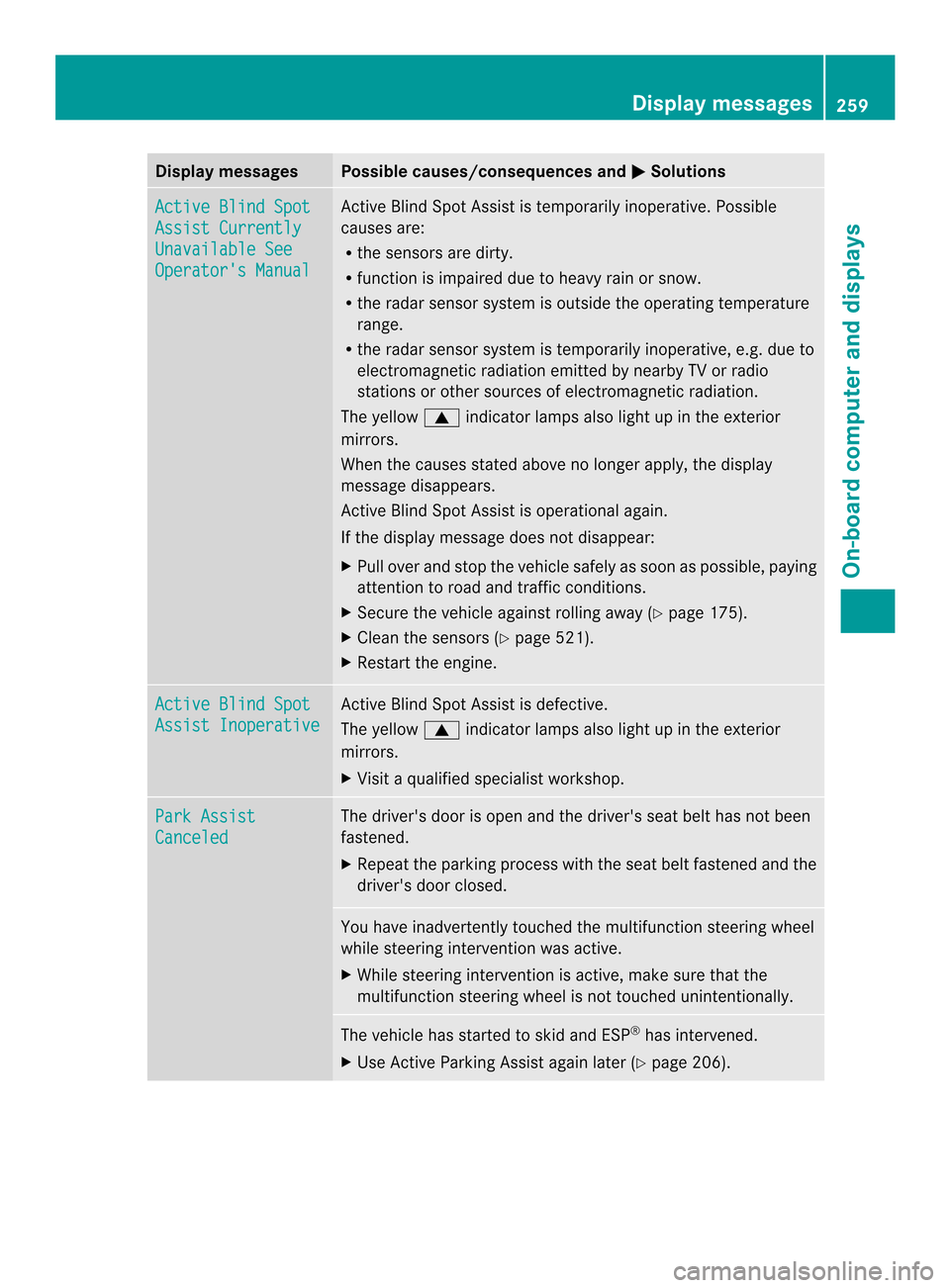
Display messages Possible causes/consequences and
0003 Solutions
Active Blind Spot
Assist Currently
Unavailable See
Operator's Manual Active Blind Spot Assis
tis temporarily inoperative. Possible
causes are:
R the sensors are dirty.
R function is impaired due to heavy rain or snow.
R the radar sensor system is outside the operating temperature
range.
R the radar sensor system is temporarily inoperative, e.g. due to
electromagnetic radiation emitted by nearby TV or radio
stations or other sources of electromagnetic radiation.
The yellow 0006indicator lamps also light up in the exterior
mirrors.
When the causes stated above no longer apply, the display
message disappears.
Active Blind Spot Assist is operational again.
If the display message does not disappear:
X Pull over and stop the vehicle safely as soon as possible, paying
attention to road and traffic conditions.
X Secure the vehicle against rolling away (Y page 175).
X Cleant he sensors (Y page 521).
X Restart the engine. Active Blind Spot
Assist Inoperative Active Blind Spot Assist is defective.
The yellow
0006indicator lamps also light up in the exterior
mirrors.
X Visit a qualified specialist workshop. Park Assist
Canceled The driver's door is open and the driver's seat belt has not been
fastened.
X
Repeatt he parking process with the seat belt fastened and the
driver's door closed. You have inadvertently touched the multifunction steering wheel
while steering intervention was active.
X
While steering intervention is active, make sure that the
multifunction steering wheel is not touched unintentionally. The vehicle has started to skid and ESP
®
has intervened.
X Use Active Parking Assist again later (Y page 206). Display messages
259On-board computer and displays Z
Page 272 of 590

Warning and indicator lamps
Safety
Seat belts Problem Possible causes/consequences and
0003 Solutions
000F
After starting the
engine, the red seat
bel twarning lamp lights
up for 6seconds. The seat belt warning lamp reminds the driver and fron
tpassenger
to fasten their seat belts.
X Faste nyour seat belt (Y page 67). 000F
After starting the
engine, the red seat
belt warning lamp lights
up. In addition, a
warning tone sounds
for up to six seconds.
The driver's seat belt is not fastened.
X
Fasten your seat belt (Y page 67).
The warning tone ceases. 000F
The red seat belt
warning lamp lights up
after the engine starts,
as soon as the driver's
or the front-passenger
door is closed. The driver or front passenger has not fastened their seat belt.
X
Fasten your seat belt (Y page 67).
The warning lamp goes out. There are objects on the front-passenger seat.
X
Remove the objects from the front-passenger seat and stow
them in a secure place.
The warning lamp goes out. 000F
The red seat belt
warning lamp flashes
and an intermittent
audible warning
sounds. The driver or front passenger has not fastened their seat belt. The
car is being driven faster than 15 mph (25 km/h) or has briefly
been driven faster than 15 mph (25 km/h).
X
Fasten your seat belt (Y page 67).
The warning lamp goes out and the intermittent warning tone
ceases. There are objects on the front-passenger seat. The car is being
driven faster than 15 mph (25 km/h) or has briefly been driven
faster than 15 mph (25 km/h).
X
Remove the objects from the front-passenger seat and stow
them in a secure place.
The warning lamp goes out and the intermittent warning tone
ceases. 270
Warning and indicator lampsOn-board computer and displays