2013 MERCEDES-BENZ SL-Class tire pressure
[x] Cancel search: tire pressurePage 209 of 590

R
Snowfall or heavy rai nmay lead to a parking
space being measured inaccurately.
R Pay attentio nto the PARKTRONIC
(Y page 204) warning messages during the
parking procedure.
R You can intervene in the steering procedure
to correct it at any time. Active Parking
Assist will then be canceled.
R When transporting a load which protrudes
from your vehicle, you should not use
Active Parking Assist.
R Never use Active Parking Assist when snow
chains are installed.
R Make sure that the tire pressures are
always correct. This has adirec tinfluence
on the parking characteristics of the
vehicle.
General notes Active Parking Assist is an electronic parking
aid with ultrasound. Ultrasound is used to
measure the road on both sides of the vehicle.
As uitable parking space is indicated by the
parking symbol. Active steering intervention
can assis tyou during parking.
You may also use PARKTRONIC
(Y page 203). When PARKTRONIC is switched
off, Active Parking Assist is also unavailable.
Use Active Parking Assist for parking spaces:
R that are parallel to the direction of travel
R that are on straight roads, not bends
R that are on the same level as the road, e.g.
not on the pavement
Parking Important safety notes
Objects located above the height range of
Active Parking Assist will not be detected
when the parking space is measured. These
are not taken into account when the parking
procedure is calculated, e.g. overhanging
loads, tail sections or loading ramps of goods
vehicles. In some circumstances, Active Parking Assist may therefore guide you into
the parking space too early. G
WARNING
If there are objects above the detection range,
Active Parking Assist may turn prematurely.
You may cause a collision as a result. There is
a risk of an accident.
If there are objects above the detection range,
stop and deactivate Active Parking Assist. G
WARNING
Active Parking Assist merely aids you by
intervening actively in the steering. If you do
not brake there is a risk of an accident.
Always apply the brakes yourself when
maneuvering and parking.
Detecting parking spaces Example: detected parking space
Active Parking Assist is switched on
automatically when driving forwards. The
system is operational at speeds of up to
approximately 22 mph (35 km/h)
.While in
operation, the system independently locates
and measures parking spaces on both sides
of the vehicle. When driving at speeds below
19 mph (30 km/h), you will see parking
symbol 0003as a status indicator in the
instrumentc luster. When a parking space has
been detected, an arrow towards the right
0027 or the left 0002also appears.
By default, Active Parking Assist only displays
parking spaces on the front-passenger side.
Parking spaces on the driver's side are
displayed as soon as the tur nsignal on the
driver's side is activated. If you wish to park
in a space on the driver's side, the indicator
on the driver's side must remain on. The turn
signal must remain switched on until you Driving systems
207Driving and parking Z
Page 219 of 590
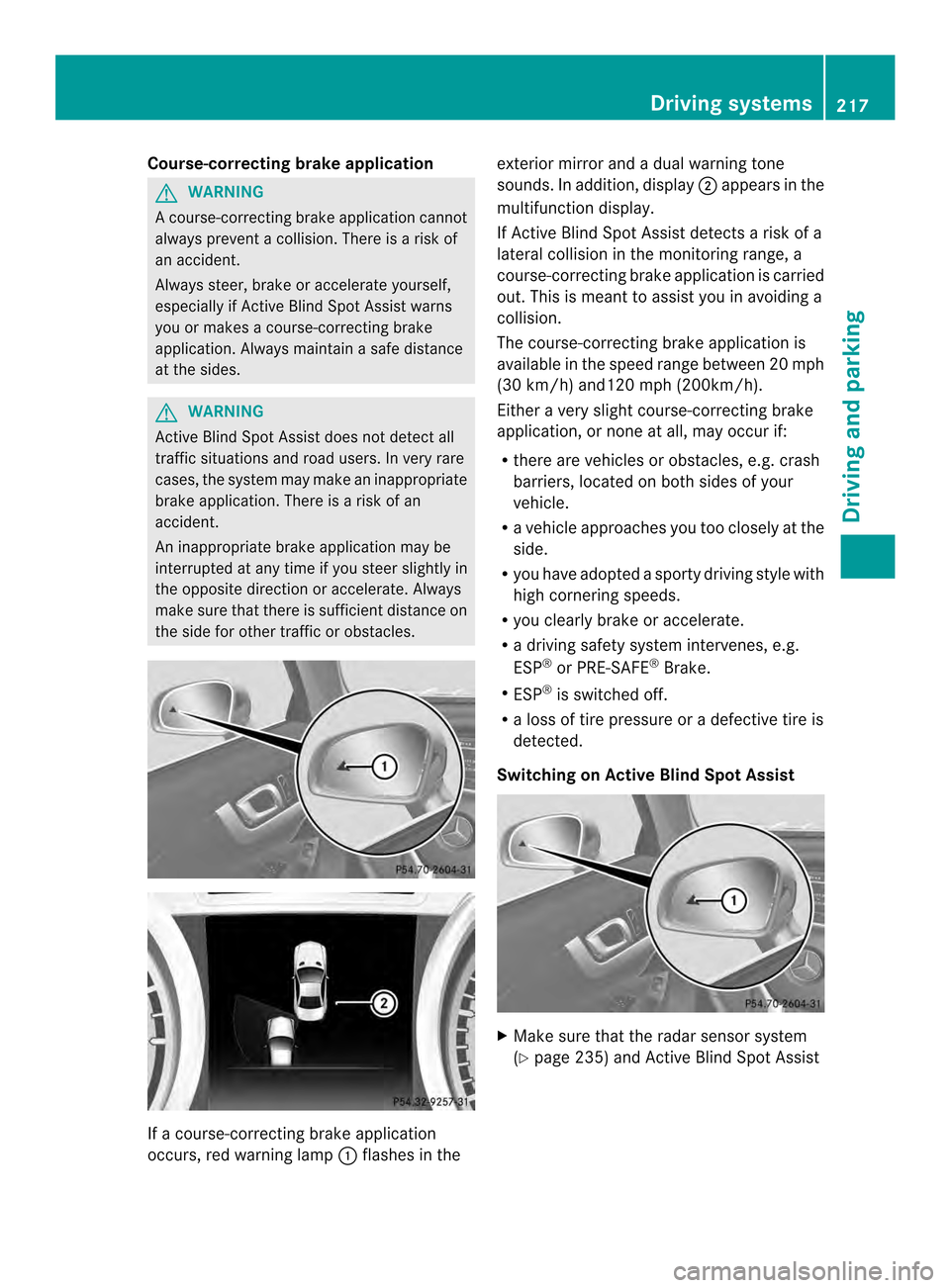
Course-correcting brake application
G
WARNING
Ac ourse-correcting brake application cannot
always prevent a collision. There is a risk of
an accident.
Always steer, brake or accelerate yourself,
especially if Active Blind Spot Assist warns
you or makes a course-correcting brake
application. Always maintain a safe distance
at the sides. G
WARNING
Active Blind Spot Assist does not detect all
traffic situations and road users. In very rare
cases, the system may make an inappropriate
brake application. There is a risk of an
accident.
An inappropriate brake application may be
interrupted at any time if you steer slightly in
the opposite direction or accelerate. Always
make sure that there is sufficient distance on
the side for other traffic or obstacles. If a course-correcting brake application
occurs, red warning lamp
0002flashes in the exterior mirror and a dual warning tone
sounds. In addition, display
0003appears in the
multifunction display.
If Active Blind Spot Assist detects a risk of a
lateral collision in the monitoring range, a
course-correcting brake application is carried
out. This is meant to assist you in avoiding a
collision.
The course-correcting brake application is
available in the speed range between 20 mph
(30 km/h) and120 mph (200km/h).
Either a very slight course-correcting brake
application, or none at all, may occur if:
R there are vehicles or obstacles, e.g. crash
barriers, located on both sides of your
vehicle.
R a vehicle approaches you too closely at the
side.
R you have adopted a sporty driving style with
high cornering speeds.
R you clearly brake or accelerate.
R a driving safety system intervenes, e.g.
ESP ®
or PRE-SAFE ®
Brake.
R ESP ®
is switched off.
R a loss of tire pressure or a defective tire is
detected.
Switching on Active Blind Spot Assist X
Make sure that the radar sensor system
(Y page 235) and Active Blind Spot Assist Driving systems
217Driving and parking Z
Page 222 of 590

No lane-correcting brake application occurs
if:
R
you clearly and actively steer, brake or
accelerate.
R you cut the corner on a sharp bend.
R you have switched on the turn signals.
R a driving safety system intervenes, e.g.
ESP ®
, PRE-SAFE ®
Brake or Active Blind
Spot Assist.
R you have adopted a sporty driving style with
high cornering speeds or high rates of
acceleration.
R ESP ®
is switched off.
R the transmission is not in position D.
R a loss of tire pressure or a defective tire has
been detected and displayed.
Active Lane Keeping Assist does not detect
traffic situations or road users. An
inappropriate brake application may be
interrupted at any time if you:
R steer slightly in the opposite direction
R switch on the turn signal
R clearly brake or accelerate
Al ane-correcting brake applicatio nis
interrupted automatically if:
R a driving safety system intervenes, e.g.
ESP ®
, PRE-SAFE ®
Brake or Active Blind
Spot Assist.
R lane markings can no longer be recognized.
Switching on Active Lane Keeping Assist X
Switch on Active Lane Keeping Assist using
the on-board computer; to do so, select
Standard or
Adaptive (Y
page 231).
Symbol 0002appears in the multifunction
display. If
Standard is selected, no warning
vibration occurs if:
R you have switched on the tur nsignals .In
this event, the warnings are suppressed
for a certain period of time.
R a driving safety syste mintervenes, such
as ABS, BAS or ESP ®
.
If Adaptive is selected, no warning
vibration occurs if:
R you have switched on the tur nsignals .In
this event, the warnings are suppressed
for a certain period of time.
R a driving safety syste mintervenes, e.g.
ABS, BAS or ESP ®
.
R you accelerate hard, e.g .kickdown.
R you brake hard.
R you steer actively, e.g. swerve to avoid
an obstacle or change lanes quickly.
R you cut the corner on a sharp bend. 220
Driving systemsDriving and parking
Page 234 of 590

In the
Serv menu, you have the following
options:
R call up display messages (Y page 240)
R restart the tire pressure loss warning
system (Y page 551)
R check the tire pressure electronically
(Y page 552)
R call up the service due date Settings menu
Introduction In the
Sett. menu, you have the following
options:
R change the instrument cluster settings
(Y page 232)
R change the lights ettings (Ypage 233)
R change the vehicle settings (Y page 235)
R change the convenience settings
(Y page 235)
R restore the factory settings (Y page 232)
Restoring the factory settings X
Press the 0004or0008 button on the
steering wheel to select the Sett. menu.
X Press the 0007or0006 button to select the
Factory Setting submenu.
X Press the 000Fbutton to confirm.
The Reset All Settings? message
appears.
X Press the 0007or0006 button to select
No or
Yes .
X Press the 000Fbutton to confirm the
selection.
If you have selected Yes , the multifunction
display shows a confirmation message. For safety reasons, the
Daytime Running Lights function in the
Lights submenu is
only reset if the vehicle is stationary.
Instrument cluster Selecting the unit of measurement for
distance
The
Display Unit Speed-/Odometer: function allows you to choose whether
certain displays appear in kilometers or miles
in the multifunction display.
You can determine whether the multifunction
display shows some messages in miles or
kilometers.
X Press the 0004or0008 button on the
steering wheel to select the Settings menu.
X Press the 0007or0006 button to select the
Inst. Cluster submenu.
X Press the 000Fbutton to confirm.
X Press the 0007or0006 button to select the
Display Unit Speed-/Odometer: function.
You will see the selected setting:
km or
miles .
X Press the 000Fbutton to save the setting.
The selected unit of measuremen tfor
distance applies to:
R the digital speedometer in the Trip menu
R odometer and the trip odometer
R trip computer
R current consumption and the range
R the navigation instructions in the Navi menu
R cruise control
R DISTRONIC PLUS
R ASSYST PLUS service interval display 232
Menus and submenusOn-board computer and displays
Page 264 of 590

Tires
Display messages Possible causes/consequences and
0003 Solutions
Check
Tire Pressure Soon The tire pressure loss warnin
gsystem has detected a significant
loss in pressure.
Aw arning tone also sounds.
G WARNING
With tire pressures which are too low, there is a ris kofthe
following hazards:
R they may burst, especially as the load and vehicle speed
increase.
R they may wear excessively and/or unevenly, which may greatly
impair tire traction.
R the driving characteristics, as well as steering and braking, may
be greatly impaired.
There is a risk of an accident.
X Stop the vehicle without making any sudden steering or braking
maneuvers. Pay attention to the traffic conditions as you do so.
X Secure the vehicle against rolling away (Y page 175).
X If there is a flat tire, inspect the tires (Y page 527).
X Check the tire pressures and, if necessary, correct the tire
pressure.
X Restart the tire pressure loss warning system when the tire
pressure is correct (Y page 551).Check Tire Pressure
Then Restart Run
Flat Indicator The tire pressure loss warning system generated a display
message and has not been restarted since.
X
Set the correct tire pressure in all four tires.
X Restart the tire pressure loss warning system (Y page 551).Run Flat Indicator
Inoperative The tire pressure loss warning system is faulty.
X
Visit a qualified specialist workshop. Tire pressure
will be displayed
after driving a
few minutes The tire pressure monitor is measuring the tire pressure.
X
Drive on.
The tire pressures appearint he multifunction displayafter you
have bee ndriving for a few minutes. Tire Press. Monitor
Inoperative The tire pressure monitor is faulty.
X
Visi taqualified specialist workshop. 262
Display messagesOn-board computer and displays
Page 265 of 590

Display messages Possible causes/consequences and
0003 Solutions
Tire Pressure
Monitor
Inoperative No
Wheel Sensors The wheels mounted do no
thave a suitable tire pressure sensor.
The tire pressure monito ris deactivated.
X Mount wheels with suitable tire pressure sensors.
The tire pressure monitor is activated automatically after driving
for a few minutes. Check
Tires The tire pressure in one or more tires has dropped significantly.
The wheel position is displayed in the multifunction display.
Aw
arning tone also sounds.
G WARNING
With tire pressures which are too low, there is a ris kofthe
following hazards:
R they may burst, especially as the load and vehicle speed
increase.
R they may wear excessively and/or unevenly, which may greatly
impair tire traction.
R the driving characteristics, as well as steering and braking, may
be greatly impaired.
There is a risk of an accident.
X Stop the vehicle without making any sudden steering or braking
maneuvers. Pay attention to the traffic conditions as you do so.
X Secure the vehicle against rolling away (Y page 175).
X If there is a flat tire, inspect the tires (Y page 527).
X Check the tire pressure (Y page 552).
X If necessary, correct the tire pressure. Warning
Tire Malfunction The tire pressure in one or more tires has dropped suddenly. The
wheel position is shown in the multifunction display.
G WARNING
If you drive with a flat tire, there is a risk of the following hazards:
R A flat tire affects the ability to steer or brake the vehicle.
R You could lose control of the vehicle.
R Continued driving with a flat tire will cause excessive heat build-
up and possibly a fire.
There is a risk of an accident.
X Stop the vehicle without making any sudden steering or braking
maneuvers. Pay attention to the traffic conditions as you do so.
X Secure the vehicle against rolling away (Y page 175).
X If there is a flat tire, inspect the tires (Y page 527). Display messages
263On-board computer and displays Z
Page 266 of 590

Display messages Possible causes/consequences and
0003 Solutions
Correct
Tire Pressure The tire pressure is too low in at leas
tone of the tires, or the tire
pressure difference between the wheels is too great.
X Check the tire pressures at the next opportunity (Y page 552).
X If necessary, correct the tire pressure.
X Restart the tire pressure monitor (Y page 554).TirePress.
Sensor(s) Missing There is no signal from the tire pressure sensor of one or several
wheels
.The pressure of the affected tire is not displayed in the
multifunction display.
X Have the faulty tire pressure sensor replaced at a qualified
specialist workshop. Tire Press. Monitor
Currently
Unavailable Due to a source of radio interference, no signals can be received
from the wheel sensors. The tire pressure monitor is temporarily
malfunctioning.
X
Drive on.
The tire pressure monitor restarts automatically as soon as the
problem has been solved. 0017
Tire Pressure
Warning Tire
Failure The tire pressure in one or more tires has dropped suddenly.
Aw
arning tone also sounds.
G WARNING
If you drive with a flat tire, there is a ris kofthe following hazards:
R A flat tire affects the ability to steer or brake the vehicle.
R You could lose control of the vehicle.
R Continued driving with a flat tire will cause excessive heat build-
up and possibly a fire.
There is a risk of an accident.
X Stop the vehicle without making any sudden steering or braking
maneuvers. Pay attention to the traffic conditions as you do so.
X Secure the vehicle against rolling away (Y page 175).
X If there is a flat tire, inspect the tires (Y page 527).264
Display messagesOn-board computer and displays
Page 267 of 590

Display messages Possible causes/consequences and
0003 Solutions
0017
Check
Tire Pressure The tire pressure in one or more tires has dropped significantly.
G WARNING
With tire pressures which are too low, there is a ris kofthe
following hazards:
R they may burst, especially as the load and vehicle speed
increase.
R they may wear excessively and/or unevenly, which may greatly
impair tire traction.
R the driving characteristics, as well as steering and braking, may
be greatly impaired.
There is a risk of an accident.
X Stop the vehicle without making any sudden steering or braking
maneuvers. Pay attention to the traffic conditions as you do so.
X Secure the vehicle against rolling away (Y page 175).
X If there is a flat tire, inspect the tires (Y page 527).
X Check the tire pressure (Y page 552).
X If necessary, correct the tire pressure. 0017
Correct Tire
Pressure The tire pressure is too low in at least one of the tires, or the tire
pressure difference between the wheels is too great.
X Check the tire pressures at the next opportunity (Y page 552).
X If necessary, correct the tire pressure. Vehicle
Display messages Possible causes/consequences and
0003 Solutions
Shift to 'P' or 'N'
to Start Engine You have attempted to start the engine with the transmission in
position
Ror D.
X Shift the transmission to position Por N. Auxiliary Battery
Malfunction The auxiliary battery for the automatic transmission is no longer
being charged.
X
Visit a qualified specialist workshop at the next opportunity.
X Until then, set the automatic transmission to position Pbefore
you switch off the engine.
X Before leaving the vehicle, apply the electric parking brake.
X Secure the vehicle against rolling away (Y page 175). Display messages
265On-board computer and displays Z