2013 MERCEDES-BENZ R-CLASS FAMILY TOURER oil
[x] Cancel search: oilPage 7 of 364

1, 2, 3 ...
115 Vsocket ...................................... 270
12 Vsocket
see Sockets
4ETS (Electronic Traction System) ....69
4MATIC (permanent four-wheel
drive) .................................................. 185A
ABS (Anti-lock Braking System) Display message ............................ 215
Function/notes ................................ 68
Important safety notes ....................68
Warning lamp ................................. 239
Activating/deactivating cooling
with air dehumidification .................138
Activating/deactivating the
distance warning function ...............211
Active Service System see ASSYST PLUS
Additives (engine oil) ........................354
Adjusting the armrest (2nd row of
seats) ................................................. .106
ADS (Adaptive Damping System) ..... 183
Airb ags
Display message ............................ 220
Front air bag (driver, front
passenger )....................................... 44
Important safety notes ....................43
PASSENGER AIR BAG OFF
indicator lamp .................................. 46
Safety guidelines ............................. 42
Side impact airb ag.......................... 45
Windo wcurtain air bag .................... 46
Air-conditioning system
see Climate control
Airf ilter (display message) ..............227
AIRMATIC (display message) ............ 228
AIRMATIC package ............................183
ADS (Adaptive Damping System) ...183
Level control .................................. 183
Airv ents
Important safet ynotes .................. 144
Rea r............................................... 144
Setting ........................................... 144Setting the center air vents
...........144
Setting the side air vents ...............144
Alarm system
see ATA (Anti-Theft Alarm system)
Anti-loc kbraking system
see ABS (Anti-lock Braking System)
Anti-theft alarm system
see ATA (Anti-Theft Alarm system)
Ashtray ............................................... 267
ASSYST PLUS Displaying a service message ........288
Hiding a service message ..............288
Notes ............................................. 288
Resetting the service interval
display. .......................................... 289
Service message ............................ 288
Special service requirements ......... 289
ATA (Anti-Theft Alarm system)
Activating/deactivating ...................72
Function .......................................... .72
Switching off the alarm ....................72
Audio menu (on-board computer) ....204
Audio system see separate operating instructions
Authorized Centers
see Qualified specialist workshop
Authorized Mercedes-Benz Center
see Qualified specialist workshop
Authorized workshops
see Qualified specialist workshop
AUTO lights
Display message ............................ 224
see Lights
Automatic headlamp mode ..............121
Automatic transmission Automatic drive program ...............158
Changing gear. .............................. 156
DIRECT SELECT leve r..................... 154
Display message ............................ 234
Driving tips .................................... 157
Emergency running mode ..............160
Engaging drive position .................. 155
Engaging neutra l............................ 155
Engaging revers egear ................... 154
Engaging the par kposition ............ 154
Kickdow n....................................... 157
Overview ........................................ 154
Problem (malfunction) ...................1604
Index
Page 12 of 364

EBD (electronic brake force
distribution)
Display message ............................ 217
Function/notes ................................ 70
Electronic Stability Program
see ESP ®
(Electroni cStability Program)
Emergenc yrelease
Driver's door .................................... 84
Fuel filler fla p................................. 162
Vehicle ............................................. 84
Emergency spare wheel
Important safety notes ..................342
Points to remember .......................342
Storage location ............................ 342
Stowing .......................................... 344
Technical data ............................... 346
Emergency Tensioning Devices
Function .......................................... .59
Safety guidelines. ............................ 42
Emissions control
Service and warranty information ....21
Engine
Check Engine warning lamp ........... 245
Display message ............................ 224
Engine number ............................... 350
Irregularr unning............................ 153
Jump-starting ................................. 304
Starting problems ..........................153
Starting the engine with the
SmartKey ....................................... 151
Starting with KEYLESS-GO .............151
Switching off .................................. 167
Tow-starting (vehicle) ..................... 308
Engine electronics
Problem (malfunction) ...................153
Engine emergency stop ....................310
Engine oil Adding ........................................... 286
Additives ........................................ 354
Checking the oil level ..................... 285
Checking the oil level using the
dipstick .......................................... 286
Display message ............................ 226
Filling capacity ............................... 354
Notes about oil grades ................... 354
Notes on oil level/consumption ....285
Viscosity ........................................ 354ESP
®
(Electronic Stability
Program) 4ETS ................................................ 69
Deactivating/activating ...................69
Display message ............................ 215
Function/notes ................................ 69
Important safety information ...........69
Trailer stabilization ........................... 70
Warning lamp ................................. 241
Exhaus tcheck ................................... 169
Exhaus ttail pipe (cleaning
instructions) ...................................... 293
Exterior lighting see Lights
Exterior mirrors
Adjusting ....................................... 114
Dipping (automatic) .......................115
Folding in/out( automatically).......115
Folding in/out( electrically)...........115
Folding in whenl ocking (on-board
computer) ...................................... 210
Out of position (troubleshooting) ...115
Setting ........................................... 115
Storing settings (memory
function) ........................................ 116
Storing the parking position ..........116 F
Fille rcap
see Fuel filler flap
First-aid kit ......................................... 298
Flat tire MOExtended tires ..........................300
Preparing the vehicle .....................299
Floormat ............................................ .280
Fog lamps Switching on/off ........................... 122
Front fog lamps
Display message ............................ 223
Switching on/off ........................... 122
Fuel
Additives ........................................ 352
Calling up the range .......................212
Consumption statistics ..................211
Displaying the current
consumption .................................. 212
Driving tips .................................... 168 Index
9
Page 15 of 364

Low-beam headlamps
Changing bulbs .............................. 127
Display message ............................ 221
Setting for driving abroad
(symmetrical) ................................. 120
Switching on/off ........................... 121
Lumbar support
Adjusting (on the seat) ..................110
Luxury head restraints .....................103 M
M+S tires ............................................ 314
Malfunction message see Display messages
Matte finish (cleaning
instructions) ...................................... 291
mbrace Call priority .................................... 275
Display message ............................ 218
Downloading destinations
(COMAND) ..................................... 275
Emergency call .............................. 272
Important safety notes ..................271
Locating astolen vehicl e............... 277
MB info call button ........................274
Roadside Assistance button ..........274
Search &Send ............................... 276
Self-test ......................................... 272
System .......................................... 272
Vehicle remote unlocking ..............276
Mechanical key
Function/notes ................................ 78
Unlocking the driver's door ..............84
Memory card (audio) .........................204
Memory function ............................... 116
Messages see Display messages
Mirrors
see Exterior mirrors
see Rear-view mirror
see Vanity mirror (in the sun visor)
Mobile phone
Menu (on-board computer) ............212
Modifying the programming
(SmartKey) ........................................... 78
MOExtende dtires .............................. 300 Mounting wheels
Lowerin gthe vehicle ...................... 338
Mounting anew wheel ................... 338
Raising the vehicle .........................336
Removing awheel .......................... 337
Securing the vehicle against
rolling away ................................... 335
MP3
see separate operating instructions
Multifunction display ........................202
Multifunction steering wheel Operating the on-board computer .201
Overview .......................................... 33 N
Navigation Menu (on-board computer) ............205
see separate operating instructions
NECK-PRO head restraints
Operation ........................................ .53
Resetting after being triggered ........53
NECK-PRO luxury head restraints
Operation ........................................ .53
Resetting after being triggered ........54
Notes on breaking-in anew
vehicle ................................................ 148 O
Occupant Classification System
(OCS) Faults ............................................... 51
Operation ........................................ .46
System self-test ............................... 50
Occupant safety
Childrenint he vehicle..................... 60
Important safety notes ....................40
OCS
Faults ............................................... 51
Operation ........................................ .46
System self-test ............................... 50
Odometer ........................................... 203
see Trip odometer
Off-road system
4MATIC .......................................... 185
Oil
see Engine oil 12
Index
Page 18 of 364

Warning lamp ................................. 238
Warning lamp (function) ...................58
Seats
Adjusting (electrically) ...................102
Adjusting the head restraint ..........103
Cleaning the cover .........................295
Correct driver's sea tposition ........100
Entry position (3rd row of seats) ....108
Exit position (3rd row of seats) ......108
Folding downt he 2nd row of
seats .............................................. 256
Folding downt he 3rd row of seats .257
Folding the 2nd row of seats
forward manually ........................... 107
Folding the rear bench seat
forwards/back ............................... 254
Important safety notes ..................101
Overview ........................................ 101
Resetting the 2nd row of seats ......258
Resetting the 3rd row of seats ....... 258
Seat heating problem ....................111
Seat ventilation problem ................111
Storing settings (memory
function) ........................................ 116
Switching sea theating on/off .......110
Switching seat ventilation on/off ..111
Securing hooks .................................. 260
Selector lever Cleaning ......................................... 295
Sensors (cleaning instructions) .......293
Service see ASSYST PLUS
Service products
Brake fluid ..................................... 355
Coolant (engine) ............................ 355
DEF special additive s..................... 353
Engine oil ....................................... 354
Fuel ................................................ 351
Important safety notes ..................350
Washer fluid .................................. .356
Service work
see ASSYST PLUS
Settings
Factory (on-board computer) .........206
On-board computer .......................206
Setting the air distribution ...............141
Setting the airflow ............................141Short journeys (diesel particle
filter)
................................................... 169
Side impact air bag .............................45
Side marker lamp (display
message) ............................................ 223
Side marker lamps (changing
bulbs) ................................................. 128
Side windows Cleaning ......................................... 292
Convenience closing feature ............91
Convenience opening feature ..........90
Hinged sid ewindows ....................... 90
Important safety information ...........89
Opening/closing .............................. 89
Overview .......................................... 89
Problem (malfunction) .....................93
Resetting ......................................... 92
Sliding sunroof
Important safety notes ....................93
Opening/closing .............................. 94
Problem (malfunction) .....................97
Resetting ......................................... 95
see Panorama roof with power
tilt/sliding panel
SmartKey
Changing the battery .......................80
Changing the programming .............78
Checking the battery .......................79
Convenience closing feature ............91
Convenience opening feature ..........90
Display message ............................ 236
Door central locking/unlocking .......77
Important safety notes ....................76
Loss ................................................. 81
Mechanical key ................................ 78
Overview .......................................... 76
Positions (ignition lock) .................149
Problem (malfunction) .....................81
Starting the engine ........................151
Snow chains
Information .................................... 315
Sockets
2nd row of seats ............................ 270
Center console .............................. 269
Front-passenger footwell ...............269
General notes ................................ 269
Luggage compartment ...................270 Index
15
Page 80 of 364
The Product label with FCC ID and IC
certification number can be found in the
battery case of the SmartKey.
R Do not keep the SmartKey:
-with electronic devices, e.g. a mobile
phone or another SmartKey
- with metallic objects, e.g. coins or metal
foil
- inside metallic objects, e.g. a metal case
This can affect the SmartKey's
functionality.
Do not keep the KEYLESS-GO key in the
temperature-controlled cup holder.
Otherwise, the KEYLESS-GO key will not be
recognized.
Keep the SmartKey away from strong
magnetic fields. Otherwise, the remote
control function could be affected. SmartKey functions
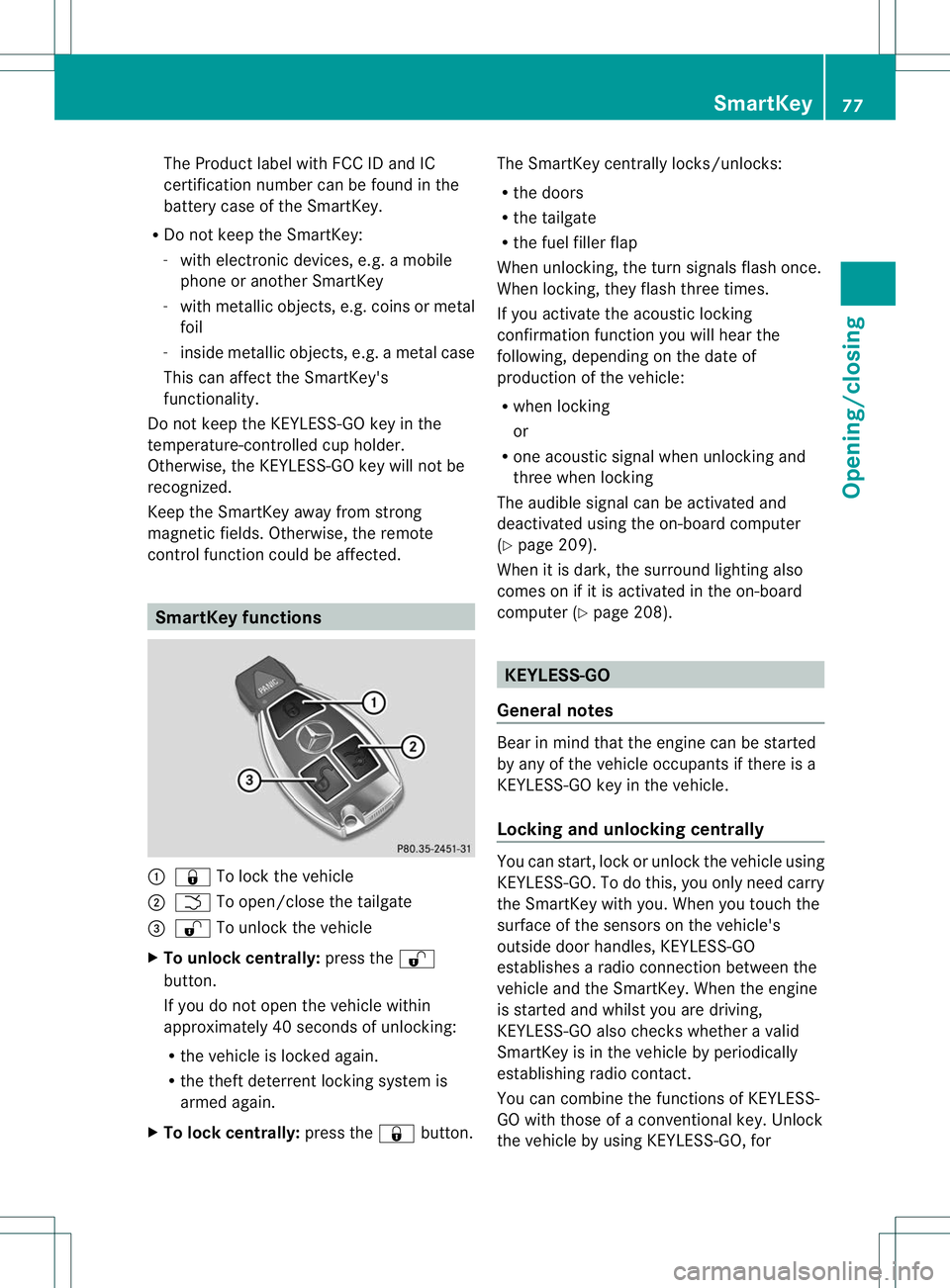
:
& To lock the vehicle
; F To open/close the tailgate
= % To unlock the vehicle
X To unlock centrally: press the%
button.
If you do not open the vehicle within
approximately 40 seconds of unlocking:
R the vehicle is locked again.
R the theft deterrent locking system is
armed again.
X To lock centrally: press the&button. The SmartKey centrally locks/unlocks:
R
the doors
R the tailgate
R the fuel filler flap
When unlocking, the turn signals flash once.
When locking, they flash three times.
If you activate the acoustic locking
confirmation function you will hear the
following, depending on the date of
production of the vehicle:
R when locking
or
R one acoustic signal when unlocking and
three when locking
The audible signal can be activated and
deactivated using the on-board computer
(Y page 209).
When it is dark, the surround lighting also
comes on if it is activated in the on-board
computer (Y page 208). KEYLESS-GO
General notes Bear in mind that the engine can be started
by any of the vehicle occupants if there is a
KEYLESS-GO key in the vehicle.
Locking and unlocking centrally
You can start, lock or unlock the vehicle using
KEYLESS-GO. To do this, you only need carry
the SmartKey with you. When you touch the
surface of the sensors on the vehicle's
outside door handles, KEYLESS-GO
establishes a radio connection between the
vehicle and the SmartKey. When the engine
is started and whilst you are driving,
KEYLESS-GO also check
swhether a valid
SmartKey is in the vehicle by periodically
establishing radio contact.
You can combine the functions of KEYLESS-
GO with those of a conventional key. Unlock
the vehicle by using KEYLESS-GO, for SmartKey
77Opening/closing Z
Page 152 of 364

Do not switch off the ignition while driving.
G
WARNING
If the parking brake has not been fully
released when driving, the parking brake can:
R overheat and cause a fire
R lose its hold function.
There is a ris koffire and an accident .Release
the parking brake fully before driving off.
! Warm up the engine quickly. Do not use
the engine's full performance until it has
reached operating temperature.
Only shift the automatic transmission to
the desired drive position when the vehicle
is stationary.
Where possible, avoid spinning the drive
wheels when pulling away on slippery
roads. You could otherwise damage the
drive train. SmartKey positions
SmartKey g
To remove the SmartKey
1 Power supply for some consumers, such
as the windshield wipers
2 Ignition (power supply for all consumers)
and drive position
3 To start the engine
i The SmartKey can be turned in the
ignition lock even if it is not the correct SmartKey for the vehicle. The ignition is not
switched on. The engine cannot be started.
KEYLESS-GO General notes
R
Do not keep the KEYLESS-GO key:
-with electronic devices, e.g. a mobile
phone or another SmartKey
- with metallic objects, e.g. coins or metal
foil
- inside metallic objects, e.g. a metal case
This can impair the functionality of the
KEYLESS-GO key.
Vehicles with KEYLESS-GO are equipped with
aS martKey featuring an integrated KEYLESS-
GO function and a detachable Start/Stop
button.
The Start/Stop button must be inserted into
the ignitio nlock and the SmartKey must be in
the vehicle.
Pressing the Start/Stop button several times
in succession corresponds to the different
SmartKey positions in the ignition lock. This
is only the case if you are not depressing the
brake pedal.
If you depress the brake pedal and press the
Start/Stop button, the engine starts
immediately.
The Start/Stop button can be removed from
the ignition lock. Then, you can insert the
SmartKey into the ignition lock.
i You do not have to remove the Start/Stop
button from the ignition lock when you
leave the vehicle. You should, however,
always take the SmartKey with you when
leaving the vehicle. As long as the
SmartKey is in the vehicle:
R the vehicle can be started using the
Start/Stop button and
R electrically powered equipment can be
operated.
i The engine can be turned off while the
vehicle is in motion by pressing and holding
the Start/Stop button for approximately Driving
149Driving and parking Z
Page 163 of 364
Problems with the transmission
Problem Possible causes/consequences and
M Solutions
The transmission has
problems shifting gear. The transmission is losing oil.
X
Have the transmission checked at a qualified specialist
workshop immediately. The acceleration ability
is deteriorating.
The transmission no
longer changes gear. The transmission is in emergency mode.
It is only possible to shift into
secondgear and reverse gear.
X Stop the vehicle.
X Shift the transmission to position P.
X Switch off the engine.
X Wait at least ten seconds before restarting the engine.
X Shift the transmission to position Dor R.
If D is selected, the transmission shifts into secondgear; ifRis
selected, the transmission shifts into reverse gear.
X Have the transmission checked at a qualified specialist
workshop immediately. Transfer case
! Performance tests may only be carried
out on a 2-axle dynamometer. The brake
system or transfer case could otherwise be
damaged. Contact a qualified specialist
workshop for a performance test.
! If the parking brake is being tested on a
brake dynamometer, the ignition must be
switched off (SmartKey or Start/Stop
button in position 0or 1), as ESP ®
will
otherwise automatically intervene. The test
must last a maximum of 10 seconds. The
brake system could otherwise be damaged.
! Vehicles with 4MATIC must not be towed
with either the front or the rear axle raised,
as doing so will damage the transmission.
The vehicle has permanent 4-wheel drive
(4MATIC). Power is always transmitted to
both axles. Refueling
Important safety notes
G
WARNING
Gasoline and diesel fuels are highly flammable
and poisonous. They burn violently and can
cause serious injury.
Never allow sparks, flames or smoking
materials near gasoline or diesel fuel!
Turn off the engine before refueling.
Whenever you are around gasoline or diesel
fuel, avoid inhaling fumes and any skin or
clothing contact. Extinguish all smoking
materials.
Direct skin contact with fuels and the
inhalation of fuel vapors are damaging your
health. G
WARNING
Overfilling of the fuel tank may create
pressure in the system which could cause a
gas discharge. This could cause the gasoline
to spray back out when removing the fuel 160
RefuelingDriving and parking
Page 172 of 364

Drinking an
ddriving G
WARNING
Drinking and driving and/or taking drugs and
driving are very dangerous combinations.
Even a small amount of alcohol or drugs can
affec tyour reflexes, perceptions and
judgment.
The possibility of a serious or even fatal
accident are greatly increased when you drink
or take drugs and drive.
Do not drink or take drugs and drive or allow
anyone to drive who has been drinking or
taking drugs.
Exhaust check G
WARNING
Combustion engines emit poisonous exhaust
gases such as carbon monoxide. Inhaling
these exhaust gases leads to poisoning. There
is a risk of fatal injury. Therefore never leave
the engine running in enclosed spaces
without sufficient ventilation.
Certain engine systems are designed to keep
the level of poisonous components in exhaust
fumes within legal limits.
These systems only work at peak efficiency if
they are serviced exactly in accordance with
the manufacturer's specifications. For this
reason, all work on the engine must be carried
out by qualified and authorized Mercedes-
Benz technicians.
The engine settings must not be changed
under any circumstances. Furthermore, all
specific service work must be carried out at
regular intervals and in accordance with the
Mercedes-Benz service requirements. Details
can be found in the Maintenance Booklet. Engine oil
! Vehicles with adiesel particle filter: if
the vehicle is predominantly used to travel
short distances, this can lead to
malfunctions in the automatic cleaning of the diesel particle filter. This can result in
fuel collecting in the engine oil and causing
engine failure. Therefore, if you frequently
drive short distances, make sure to drive
on highways or country roads for 20
minutes at least every 310 miles (500km).
Braking
Important safety notes G
WARNING
If you shift down on a slippery road surface in
an attempt to increase the engine's braking
effect, the drive wheels could lose their grip.
There is an increased danger of skidding and
accidents.
Do not shift down for additional engine
braking on a slippery road surface.
Downhill gradients !
On long and steep gradients, you must
reduce the load on the brakes by shifting
early to a lower gear. This allows you to take
advantage of the engine braking effect and
helps avoid overheating and excessive
wear of the brakes.
When you take advantage of the engine
braking effect, a drive wheel may not turn
for some time, e.g. on a slippery road
surface. This could cause damage to the
drive train. This type of damage is not
covered by the Mercedes-Benzw arranty.
Do no tdepress the brake pedal continuously
while the vehicle is in motion, e.g. never
cause the brakes to rub by applying constant
slight pedal pressure. This results in
excessive and premature wear to the brake
pads.
Heavy and light loads G
WARNING
If you rest your foot on the brake pedal while
driving, the braking system can overheat .This Driving tips
169Driving and parking
Z