2013 MERCEDES-BENZ GLK-CLASS SUV turn signal
[x] Cancel search: turn signalPage 206 of 380

be the case if there are vehicles driving at the
inner edge of their lanes.
Due to the nature of the system:
R
warnings may be issued in error when
driving close to crash barriers or similar
solid lane borders.
R the warning is canceled when
driving for an
extended period next to long vehicles, such
as trucks.
Two Active Blind Spot Assist radar sensors
are integrated into the front and rear bumpers
respectively. An additional radar sensor is
located behind the cover in the radiator grill.
Make sure that the sensors and areas around
them are free of dirt, ice or slush. The rear
sensors must not be covered, for example by
cycle racks or overhanging cargo. Following
a severe impact or in the event of damage to
the bumpers, have the function of the sensors
checked at a qualified specialist workshop.
Blind Spot Assist may otherwise not work
properly.
Indicator and warning display
Active Blind Spot Assist is not active at
speeds below approximately 20 mph
(30 km/h). Vehicles in the monitoring range
are then not indicated. 0043
Yellow indicator lamp/red warning lamp
When Active Blind Spot Assist is activated,
indicator lamp 0043 in the
exterior mirrors lights
up yellow at speeds of up to 20 mph
(30 km/h). At speeds above 20 mph
(30 km/h), the indicator lamp goes out and
Active Blind Spot Assist is operational. If a vehicle is detected within the monitoring
range of Active Blind Spot Assist at speeds
above 20 mph (30 km/h), warning lamp
0043
on the corresponding side lights up red. This
warning is always emitted when a vehicle
enters the blind spot monitoring range from
behind or from the side. When you overtake
a vehicle, the warning only occurs if the
difference in speed is less than 7 mph
(12 km/h ).
The yellow indicator lamp
goes out if reverse
gear is engaged. In this event, Active Blind
Spot Assist is no longer active.
The brightness of the indicator/warning
lamps is adjusted automatically according to
the ambient light.
Visual and acoustic collision warning
When you switch on the turn signals to
change lanes and a vehicle is detected in the
side monitoring range, you receive a visual
and acoustic collision warning. You then hear
a double warning tone and red warning
lamp 0043 flashes. If the turn signal remains on,
detected vehicles are indicated by the
flashing of red warning lamp 0043. There are no
further warning tones.
Course-correcting brake application G
WARNING
A course-correcting brake application cannot
always prevent a collision. There is a risk of
an accident.
Always steer, brake or accelerate yourself,
especially if Active Blind Spot Assist warns
you or makes a course-correcting brake
application. Always maintain a safe distance
at the sides.
In very rare cases, the system may make an
inappropriate brake application. An
inappropriate brake application may be
interrupted at any time if
you steer slightly in
the opposite direction or accelerate.
If Active Blind Spot Assist detects a risk of a
lateral collision in the monitoring range, a
course-correcting brake application is carried 204
Driving systems
Driving and parking
Page 209 of 380
brake application, e.g. after intentionally
driving over a solid lane marking. There is a
risk of an accident.
An inappropriate brake application may be
interrupted at any time if you steer slightly in
the opposite direction. Always
make
sure that
there is sufficient distance on the side for
other traffic or obstacles.
If you leave your lane, under certain
circumstances the vehicle will brake briefly
on one side. This is meant to assist you in
bringing the vehicle back to the original lane.
This function is available in the range between
40 mph and 120 mph (60 km/h and
200 km/h).
A lane-correcting brake application can only
be made after driving over a solid,
recognizable lane marking. Before this, a
warning must be given by means of
intermittent vibration in the steering wheel.
In addition, a lane with lane markings on both
sides must be recognized. The brake
application also slightly reduces vehicle
speed.
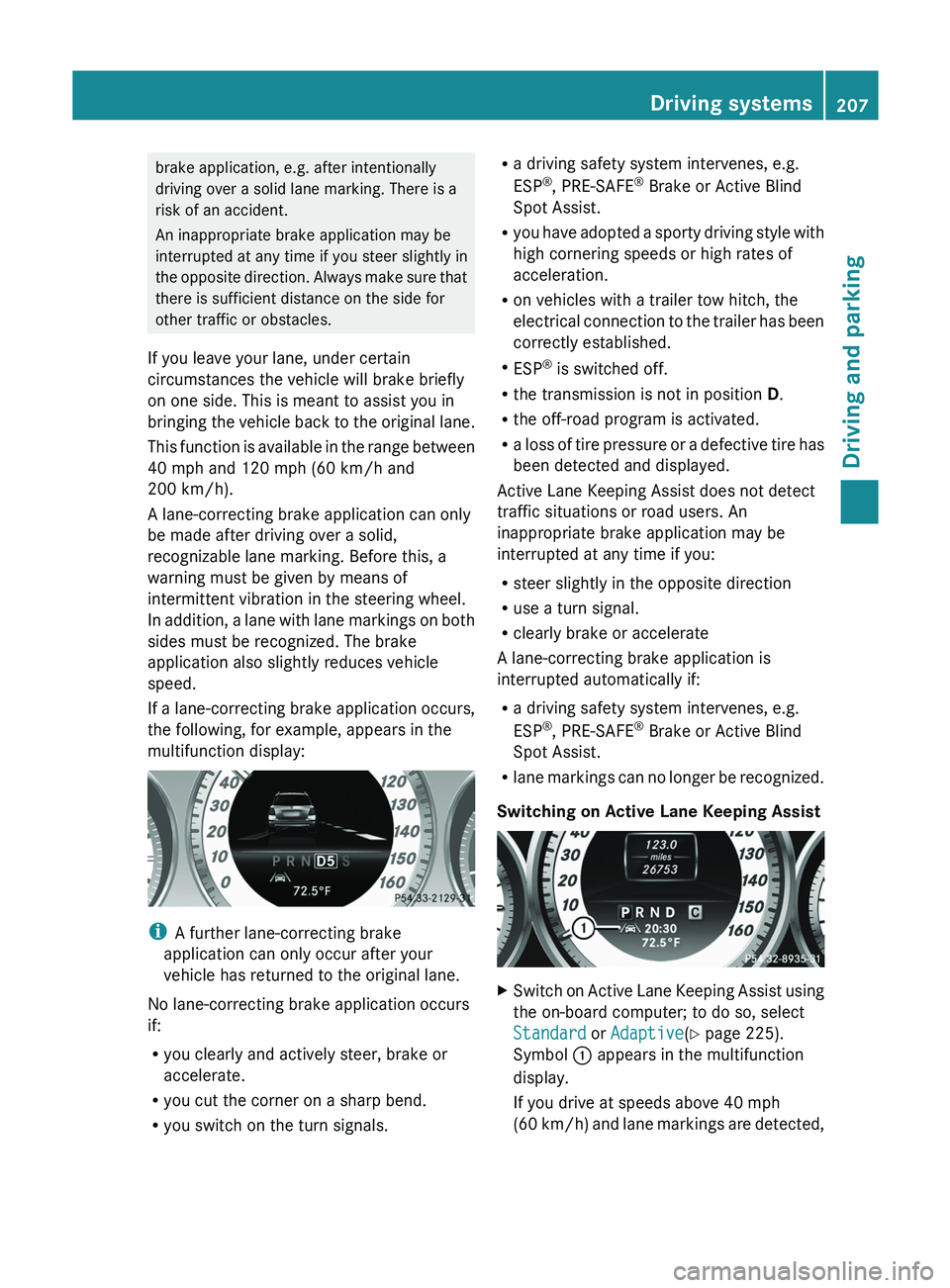
If a lane-correcting brake application occurs,
the following, for example, appears in the
multifunction display: i
A further lane-correcting brake
application can only occur after your
vehicle has returned to the original lane.
No lane-correcting brake application occurs
if:
R you clearly and actively steer, brake or
accelerate.
R you cut the corner on a sharp bend.
R you switch on the turn signals. R
a driving safety system intervenes, e.g.
ESP ®
, PRE-SAFE ®
Brake or Active Blind
Spot Assist.
R you have adopted a sporty
driving style with
high cornering speeds or high rates of
acceleration.
R on vehicles with a trailer tow hitch, the
electrical connection to the trailer has been
correctly established.
R ESP ®
is switched off.
R the transmission is not in position D.
R the off-road program is activated.
R a loss of tire pressure or a defective tire has
been detected and displayed.
Active Lane Keeping Assist does not detect
traffic situations or road users. An
inappropriate brake application may be
interrupted at any time if you:
R steer slightly in the opposite direction
R use a turn signal.
R clearly brake or accelerate
A lane-correcting brake application is
interrupted automatically if:
R a driving safety system intervenes, e.g.
ESP ®
, PRE-SAFE ®
Brake or Active Blind
Spot Assist.
R lane markings can no longer be recognized.
Switching on Active Lane Keeping Assist X
Switch on Active Lane Keeping Assist using
the on-board computer; to do so, select
Standard or Adaptive(Y page 225).
Symbol 0043 appears in the multifunction
display.
If you drive at speeds above 40 mph
(60 km/h) and
lane markings are detected, Driving systems
207
Driving and parking Z
Page 210 of 380
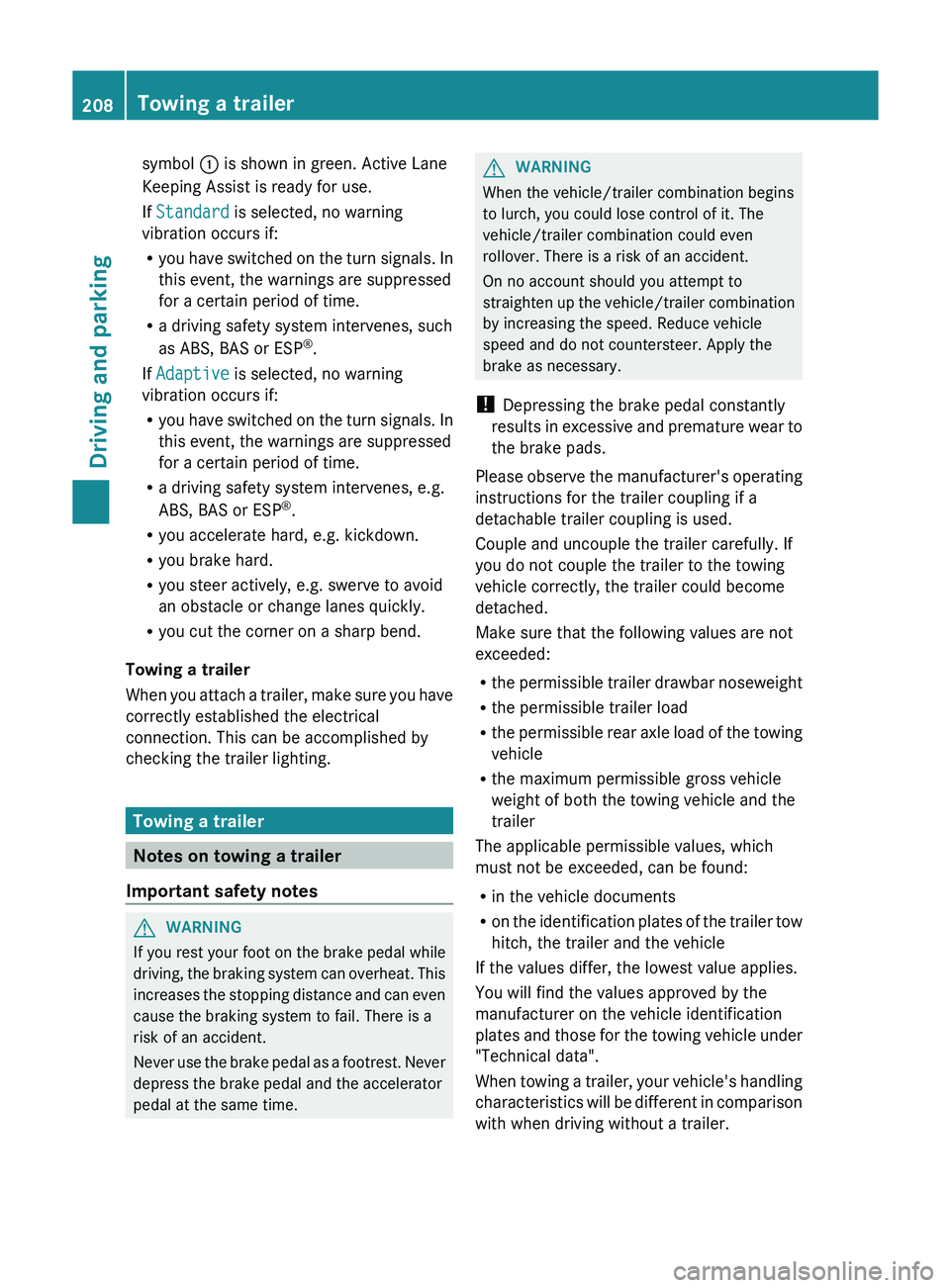
symbol
0043 is shown in green. Active Lane
Keeping Assist is ready for use.
If Standard is selected, no warning
vibration occurs if:
R you have switched on
the
turn signals. In
this event, the warnings are suppressed
for a certain period of time.
R a driving safety system intervenes, such
as ABS, BAS or ESP ®
.
If Adaptive is selected, no warning
vibration occurs if:
R you have switched on the turn signals. In
this event, the warnings are suppressed
for a certain period of time.
R a driving safety system intervenes, e.g.
ABS, BAS or ESP ®
.
R you accelerate hard, e.g. kickdown.
R you brake hard.
R you steer actively, e.g. swerve to avoid
an obstacle or change lanes quickly.
R you cut the corner on a sharp bend.
Towing a trailer
When you attach a trailer,
make sure you have
correctly established the electrical
connection. This can be accomplished by
checking the trailer lighting. Towing a trailer
Notes on towing a trailer
Important safety notes G
WARNING
If you rest your foot on the brake pedal while
driving, the braking system can
overheat. This
increases the stopping distance and can even
cause the braking system to fail. There is a
risk of an accident.
Never use the brake pedal as a footrest. Never
depress the brake pedal and the accelerator
pedal at the same time. G
WARNING
When the vehicle/trailer combination begins
to lurch, you could lose control of it. The
vehicle/trailer combination could even
rollover. There is a risk of an accident.
On no account should you attempt to
straighten up the vehicle/trailer combination
by increasing the speed. Reduce vehicle
speed and do not countersteer. Apply the
brake as necessary.
! Depressing the brake pedal constantly
results
in excessive and premature wear to
the brake pads.
Please observe the manufacturer's operating
instructions for the trailer coupling if a
detachable trailer coupling is used.
Couple and uncouple the trailer carefully. If
you do not couple the trailer to the towing
vehicle correctly, the trailer could become
detached.
Make sure that the following values are not
exceeded:
R the permissible trailer drawbar noseweight
R the permissible trailer load
R the permissible rear axle load of the towing
vehicle
R the maximum permissible gross vehicle
weight of both the towing vehicle and the
trailer
The applicable permissible values, which
must not be exceeded, can be found:
R in the vehicle documents
R on the identification plates of the trailer tow
hitch, the trailer and the vehicle
If the values differ, the lowest value applies.
You will find the values approved by the
manufacturer on the vehicle identification
plates and those for the towing vehicle under
"Technical data".
When towing a trailer, your vehicle's handling
characteristics will be different in comparison
with when driving without a trailer. 208
Towing a trailer
Driving and parking
Page 230 of 380
X
Press the 0064 or 0063 button to select the
Surround Lighting function.
When the Surround Lighting function is
activated, the light cone and the area
around the vehicle are displayed in red in
the multifunction display.
X Press the 0076 button to save the setting.
Deactivating delayed switch-off of the
exterior lighting temporarily:
X Before leaving the vehicle, turn the
SmartKey to position 0 in
the ignition lock.
X Turn the SmartKey to position 2 in the
ignition lock.
The exterior lighting delayed switch-off is
deactivated.
Delayed switch-off of the exterior lighting is
reactivated the next time you start the
engine.
If you have activated the Surround
Lighting function and the
light
switch is set
to 0058, the following functions are activated
when it is dark:
R surround lighting: the exterior lighting
remains lit for 40 seconds after unlocking
with the key. If you start the engine, the
surround lighting is switched off and
automatic headlamp mode is activated
(Y page 111).
R exterior lighting delayed switch-off: the
exterior lighting remains lit for
60 seconds after the engine is switched off.
If you close all the doors and the tailgate,
the exterior lighting goes off after
5 seconds.
i Depending on your vehicle's equipment,
when the surround lighting and delayed
switch-off exterior lighting are on, the
following light up:
R Parking lamps
R Front fog lamps
R Low-beam headlamps
R Daytime running lamps
R Side marker lamps
R Surround lighting in the exterior mirrors Activating/deactivating the interior
lighting delayed switch-off
If you activate the Light. Delay function,
the interior lighting remains on for
20
seconds after
you remove
the key from the
ignition lock.
X Press the 0059 or 0065 button on the
steering wheel to select the Sett. menu.
X Press the 0064 or 0063 button to
select the
Lights submenu.
X Press 0076 to confirm.
X Press the 0064
or 0063
button to
select the
Light. Delay function.
When the Light. Delay function is
activated, the vehicle interior is displayed
in red in the multifunction display.
X Press the 0076 button to save the setting.
Vehicle Activating/deactivating the automatic
door locking mechanism
X
Press the 0059 or 0065 button on the
steering wheel to select the Sett. menu.
X Press the 0064 or 0063 button to
select the
Vehicle submenu.
X Press 0076 to confirm.
X Press the 0064 or 0063 button to
select the
Auto. Door Locks function.
When the Auto. Door Locks function is
activated, the vehicle doors are displayed
in red in the multifunction display.
X Press the 0076 button to save the setting.
If you activate the Auto. Door Locks
function, the vehicle is centrally
locked above
a speed of around 9 mph (15 km/h).
For further information on the automatic
locking feature, see ( Y page 80).
Activating/deactivating the acoustic
locking verification signal
If you switch on the Acoustic Lock function,
an acoustic signal sounds when you lock the
vehicle. 228
Menus and submenus
On-board computer and displays
Page 242 of 380
Display messages Possible causes/consequences and
0050 Solutions0049
Check Trailer Left
Turn Signal or
Check Trailer
Right Turn Signal The left or right-hand trailer turn signal lamp is defective.
X
Check whether you are permitted to change the bulb yourself.
or
X Visit a qualified specialist workshop. 0049
Check Trailer
Brake Lamp The trailer brake lamp is defective.
X
Check whether you are permitted to change the bulb yourself.
or
X Visit a qualified specialist workshop. 0049
Check Rear Left
Turn Signal or
Check Rear Right
Turn Signal The rear left-hand or rear right-hand turn signal is defective.
X
Check whether you are permitted to replace the bulb yourself
(Y page 116).
or
X Visit a qualified specialist workshop. 0049
Check Front Left
Turn Signal or
Check Front Right
Turn Signal The front left-hand or front right-hand turn signal is defective.
X
Check whether you are permitted to replace the bulb yourself
(Y page 116).
or
X Visit a qualified specialist workshop. 0049
Check Left Mirror
Turn Signal or
Check
Right Mirror
Turn Signal The turn signal in the left-hand or right-hand exterior mirror is
defective.
X
Check whether you are permitted to replace the bulb yourself
(Y page 116).
or
X Visit a qualified specialist workshop. 0049
Check Center Brake
Lamp The high-mounted brake lamp is faulty.
X
Check whether you are permitted to replace the bulb yourself
(Y page 116).
or
X Visit a qualified specialist workshop. 0049
Check Left Tail
and Brake Lamps
or
Check Right Tail
and Brake Lamps The left or right-hand tail lamp/brake lamp is defective.
X
Check whether you are permitted to replace the bulb yourself
(Y page 116).
or
X Visit a qualified specialist workshop.240
Display messagesOn-board computer and displays
Page 295 of 380
Notes on programming the remote
control
Canadian radio frequency laws require a
"break" (or interruption) of the transmission
signals after broadcasting for
a
few seconds.
Therefore, these signals may not last long
enough for the integrated garage door
opener. The signal is not recognized during
programming. Comparable with Canadian
law, some U.S. garage door openers also
feature a "break".
Proceed as follows:
R if you live in Canada
R if you have difficulties programming the
garage door opener (regardless of where
you live) when using the programming
steps
X Press and hold one of buttons 0044 to 0085 on
the integrated garage door opener.
After a short time, indicator
lamp 0043 lights
up yellow.
X Release the button.
Indicator lamp 0043 flashes yellow.
X Press button 0084 of garage door remote
control 0083 for two seconds, then
release it
for two seconds.
X Press button 0084 again for two seconds.
X Repeat this sequence on button 0084 of
remote control 0083 until indicator lamp 0043
lights up green.
If indicator lamp 0043 turns red, repeat the
process.
X Continue with the other programming
steps (see above).
Problems when programming
If you are experiencing problems
programming the integrated garage door
opener on the rear-view mirror, take note of
the following instructions:
R Check the transmitter frequency
of
garage
door drive remote control 0083. This can
usually be found on the back of the remote
control. The integrated garage door opener is
compatible with devices that have units
which operate in the frequency range of
280to 433
MHz.
R Replace the batteries in garage door
remote control 0083. This increases the
likelihood that garage door remote control
0083 will
transmit a strong and precise signal
to the integrated garage door opener in the
rear-view mirror.
R When programming, hold remote control
0083 at varying distances and angles from the
button that you are programming. Try
various angles at a distance between 2and
12 inches (5to 30 cm) or at the same angle
but at varying distances.
R If another remote control for the same
garage door drive is available, repeat the
same programming steps with this remote
control. Before performing these steps,
make sure that new batteries have been
installed in garage door drive remote
control 0083.
R Note that some remote controls only
transmit for a limited amount of time (the
indicator lamp on the remote control goes
out). Press button 0084 on remote control
0083 again before transmission ends.
R Align the antenna cable of the garage door
opener unit. This can improve signal
reception/transmission.
Opening/closing the garage door After it has been programmed, the integrated
garage door opener performs the function of
the garage door system remote control.
Please also read the operating instructions
for the garage door system.
X
Turn the SmartKey to position 2 in the
ignition lock.
X Press button 0044, 0087 or 0085 which you have
programmed to operate the garage door.
Garage door system with a fixed code:
indicator lamp 0043 lights up green. Features
293
Stowage and features Z
Page 296 of 380
Garage door system with a rolling code:
indicator lamp
0043 flashes green.
i The transmitter will transmit a signal as
long as the button is pressed. The
transmission is halted after a maximum of
ten seconds and indicator lamp 0043 lights
up yellow. Press button 0044, 0087
or 0085 again
if necessary.
Clearing the memory X
Turn the SmartKey to position 2 in the
ignition lock.
X Press buttons 0044 and 0085.
The indicator lamp lights up yellow.
X Press and hold buttons 0044 and 0085 until the
indicator lamp turns green.
i Make sure that you clear the memory of
the integrated garage door opener before
selling the vehicle. Compass
Calling up the compass The compass displays in which compass
direction the vehicle is currently traveling: N,
NE, E, SE, S, SW, W or NW.
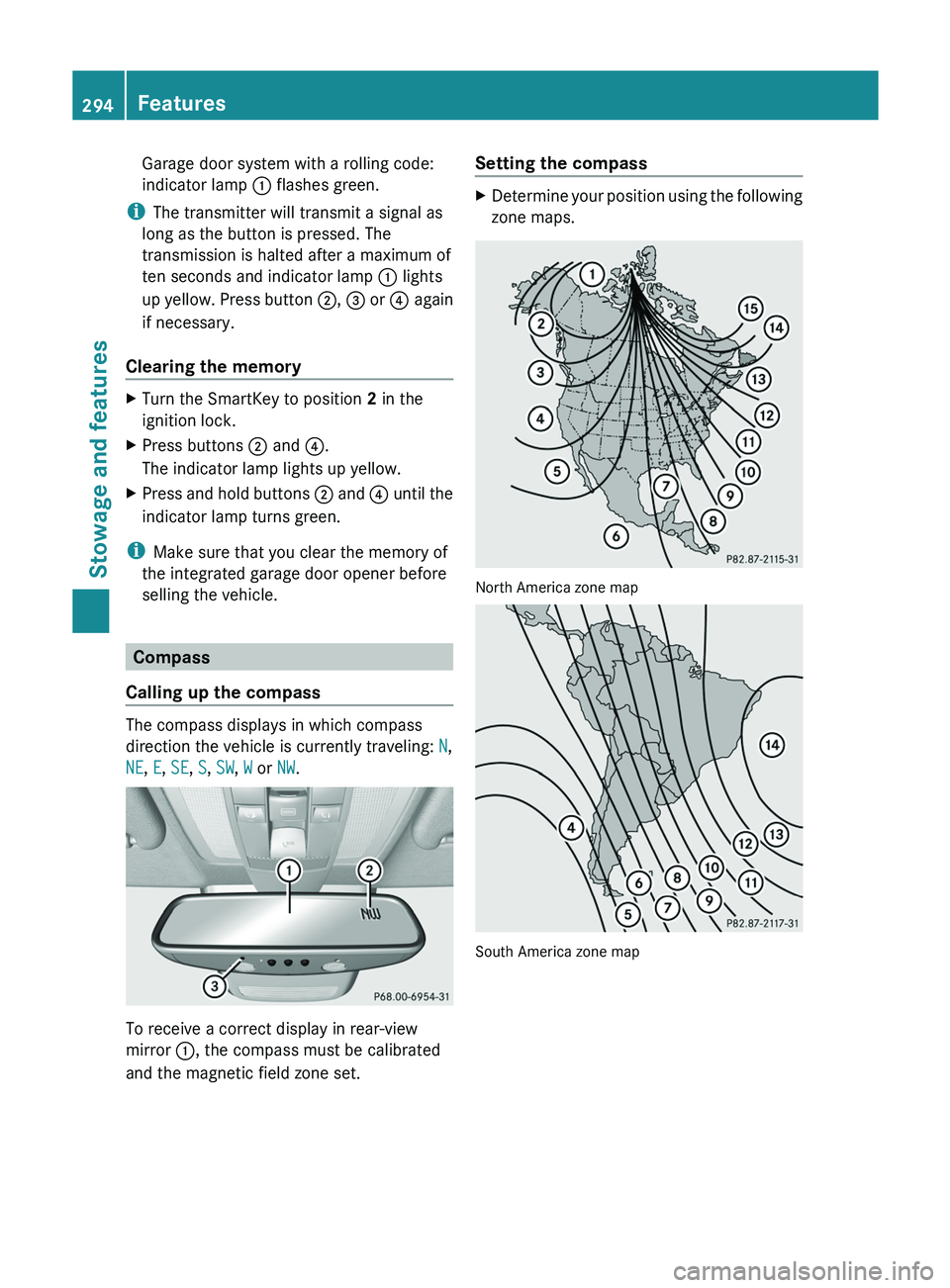
To receive a correct display in rear-view
mirror 0043, the compass must be calibrated
and the magnetic field zone set. Setting the compass X
Determine your position using the following
zone maps. North America zone map
South America zone map294
Features
Stowage and features
Page 309 of 380

Cleaning the exterior lighting
!
Only use cleaning agents or cleaning
cloths which are suitable for plastic light
lenses. Unsuitable cleaning agents or
cleaning cloths could scratch or damage
the plastic light lenses.
X Clean the plastic lenses of the exterior
lighting using a wet sponge and a mild
cleaning agent, e.g. Mercedes-Benz car
shampoo. Or clean the exterior lighting
with cleaning cloths.
Cleaning the mirror turn signals !
Only use cleaning agents or cleaning
cloths that are suitable for plastic lenses.
Unsuitable cleaning agents or cleaning
cloths could scratch or damage
the plastic
lenses of the mirror turn signals.
X Clean the plastic lenses of the mirror turn
signals using a wet sponge and a mild
cleaning agent, e.g. Mercedes-Benz car
shampoo. Cleaning cloths may be used as
well.
Cleaning the sensors !
If you clean the sensors with a power
washer, make sure that you keep a
distance of at least 11.8
in (30 cm) between
the vehicle and the power washer nozzle.
Information about the correct distance is
available from the equipment
manufacturer. X
Clean sensors 0043 of the driving systems
with water, car shampoo and a soft cloth.
Cleaning the rear view camera !
Do not clean the camera
lens and the area
around the rear view camera with a power
washer. X
Use clear water and a soft cloth to clean
camera lens 0043.
Cleaning the exhaust pipes !
Do not clean the exhaust pipe with acid-
based cleaning agents such as sanitary
cleansers or wheel cleaners.
Impurities combined with the effects of road
grit and corrosive environmental factors
may
cause flash rust to form on the surface. You
can restore the original shine of the exhaust Care
307
Maintenance and care Z