2013 MERCEDES-BENZ GLK-Class window
[x] Cancel search: windowPage 137 of 378

X
Press the 0004button.
The indicator lamp in the 0007button goes
out. Airflow and air distribution are set to
automatic mode.
or
X Turn temperature control 0002or001F
clockwise or counter-clockwise
(Y page 127), (Y page 130).
or
X Press the 0017or0016 button. MAX COOL maximum cooling
The MAX COOL function is only available in
vehicles for the USA.
MAX COOL is only operational when the
engine is running.
When you activate MAX COOL, climate
control switches to the following functions:
R maximum cooling
R maximum airflow
R air-recirculation mode on
X To activate: press the0001button.
The indicator lamp in the button lights up.
X To activate: press the0001button again.
The indicator lamp goes out. The previously
selected settings are restored. Defrosting the windows
Windows fogged up on the inside X
Activate the 0005cooling with air
dehumidification function.
X Activate automatic mode 0004.
X Adjust the side air vents so that the warmed
air is directed to the side windows.
X If the windows continue to fog up, activate
the "windshield defrosting" function
(Y page 134).
i You should only select this setting until
the windshield is clear again. Windows fogged up on the outside X
Activate the windshield wipers.
X Press the 0015button repeatedly until the
0018 or0019 symbol appears in the
display.
X Adjust the side air ventss o that no air is
directed to the side windows. Rear window defroster
Activating/deactivating The rear window defroster has a high current
draw. You should therefore switch it off as
soon as the rear window is clear. Otherwise,
the rear window defroster switches off
automatically after several minutes.
If the battery voltage is too low, the rear
window defroster may switch off.
X
Turn the SmartKey to position 2in the
ignition lock (Y page 141).
X Press the 000Bbutton.
The indicator lamp in the 000Bbutton lights
up or goes out. Operating the climate control systems
135Climate control
Page 138 of 378

Problems with the rear window defroster
Problem Possible causes/consequences and
0001 Solutions
The rear window
defroster has
deactivated
prematurely or cannot
be activated. The battery has not been sufficiently charged.
X
Switch off any consumers that are not required, e.g. reading
lamps, interior lighting or the seat heating.
When the battery is sufficiently charged, the rear window
defroster can be activated again. Activating/deactivating air-
recirculation mode
If you switch on air-recirculation mode, the
windows can fog up more quickly, in
particular at low temperatures. Only use air-
recirculation mode briefly to prevent the
windows from fogging up.
You can deactivate the flow of fresh air if
unpleasant odors are enteringt he vehicle
from outside. The air already inside the
vehicle will then be recirculated.
The operation of air-recirculation mode is the
same for all control panels.
X Turn the SmartKey to position 2in the
ignition lock (Y page 141).
X To activate: press the0011button.
The indicator lamp in the 0011button lights
up.
i In the event of high pollution levels 12
or at
high outside temperatures, air-
recirculation mode is automatically
activated. When air-recirculation mode is
activated automatically, the indicator lamp
in the 0011button is not lit.
Outside air is added after about
30 minutes.
X To deactivate: press the0011button.
The indicator lamp in the 0011button goes
out. i
Air-recirculation mode deactivates
automatically:
R after approximately five minutes at
outside temperatures below
approximately 41 ‡ (5 †)
R after approximately five minutes if
cooling with air dehumidification is
deactivated
R after approximately 30 minutes at
outside temperatures above
approximately 41 ‡(5 †)if the "Cooling
with air dehumidification" function is
activated Activating/deactivating the residual
heat function
The residual heat function is only available in
vehicles for Canada with 3-zone automatic
climate control.
It is possible to make use of the residual heat
of the engine to continue heating the vehicle
for approximately 30 minutes after the engine
has been switched off .The heating time
depends on the temperature that has been
set.
i The blower will run at a low speed
regardless of the airflow setting.
i If you activate the residual heat function
at high temperatures, only the ventilation
will be activated. The blower runs at
medium speed.
12 3-zone automatic climate control only. 136
Operating the climate control systemsClimate control
Page 139 of 378

X
Turn the SmartKey to position 0in the
ignition lock (Y page 141) or remove it.
X To activate: press the0002button.
The indicator lamp in the 0002button lights
up.
i If the residual heat function is activated,
the windows may fog up on the inside.
X To deactivate: press the0002button.
The indicator lamp in the 0002button goes
out.
i Residual heat is deactivated
automatically:
R after approximately 30 minutes
R when the ignition is switched on
R if the battery voltage drops
R when the auxiliary heating is activated Setting the air vents
Important safety notes
G
WARNING
Very hot or very cold air can flow from the air
vents. This could result in burns or frostbite in
the immediate vicinity of the air vents. There
is a risk of injury.
Make sure that all vehicle occupants always
maintain a sufficient distance to the air
outlets. If necessary, redirect the airflow to
another area of the vehicle interior.
In order to ensure the direct flow of fresh air
through the air vents into the vehicle interior,
please observe the following notes:
R keep the air inlet between the windshield
and the hood free of blockages, such as ice,
snow or leaves.
R never cover the air vents or air intake grilles
in the vehicle interior.
i For virtually draft-free ventilation, adjust
the sliders of the air vents to the center
position. Setting the center air vents
X
To open the center air vent: turn the
adjuster in one of center air vents 0002
counter-clockwise.
X To close the center air vent: turn the
adjuster in one of center air vents 0002
clockwise until it engages. Setting the side air vents
0002
Side window defroster vent
0003 Side air vent
X To open aside air vent: turn the adjuster
in side air vent 0003counter-clockwise.
X To close aside air vent: turn the adjuster
in side air vent 0003clockwise until it
engages. Setting the glove box air vent
When automatic climate control is activated,
the glove box can be ventilated, for instance Setting the air vents
137Climate control Z
Page 168 of 378

Driving on wet roads
Hydroplaning If water has accumulated to a certain depth
on the road surface, there is a danger of
hydroplaning occurring, eve
nif:
R you drive at low speeds.
R the tires have adequate tread depth.
For this reason, in the event of heavy rain or
in conditions in which hydroplaning may
occur, you must drive in the following
manner:
R lower you rspeed.
R avoid ruts.
R brake carefully.
Driving on flooded roads !
Do not drive through flooded areas.
Check the depth of any water before driving
through it. Drive slowly through standing
water. Otherwise, water may enter the
vehicle interior or the engine compartment.
This can damage the electronic
components in the engin eorthe automatic
transmission. Water can also be drawn in
by the engine's air suction nozzles and this
can cause engine damage.
Prevent water from entering the vehicle
interior or the engine compartment. If you
must drive through standing water, bear in
mind that:
R the maximum permissible depth in still
water is 12 in (30 cm)
R you should drive no faster than at walking
pace Winter driving
Important safety notes G
WARNING
If you shift down on a slippery road surface in
an attempt to increase the engine's braking
effect, the drive wheels could lose their grip. There is an increased danger of skidding and
accidents.
Do not shift down for additional engine
braking on a slippery road surface.
G
DANGER
If the exhaust pipe is blocked or adequate
ventilation is not possible, poisonous gases
such as carbon monoxide (CO) may enter the
vehicle. This is the case, e.g. if the vehicle
becomes trapped in snow. There is a risk of
fatal injury.
If you leave the engine or the auxiliary heating
running, make sure the exhaust pipe and area
around the vehicle are clear of snow. To
ensure an adequate supply of fresh air, open
a window on the side of the vehicle that is not
facing into the wind.
Have your vehicle winterproofed at a qualified
specialist workshop at the onset of winter.
Observe the notes in the "Winter operation"
section (Y page 330).
Driving with summer tires Observe the notes in the "Winter operation"
section (Y
page 330).
Slippery road surfaces G
WARNING
If you shift down on a slippery road surface in
an attempt to increase the engine's braking
effect, the drive wheels could lose their grip.
There is an increased danger of skidding and
accidents.
Do not shift down for additional engine
braking on a slippery road surface.
Drive particularly carefully on slippery road
surfaces. Avoid sudden acceleration, steering
and braking maneuvers. Do not use the cruise
control or DISTRONIC PLUS.
If the vehicle threatens to skid or cannot be
stopped when moving at low speed:
X Shift the transmission to position N.166
Driving tipsDriving and parking
Page 214 of 378

when driving up or downhill, restric
tthe
shift range. Select shift range 4, 3, 2,or1.
Al ower gear and lower speed reduce the
risk of engine failure.
R When driving downhill, shift to a lower gear
to utilize the engine's braking effect.
Avoid continuous brake application as this
may overheat the vehicle brakes and, if
installed, the trailer brakes.
R If the coolant temperature increases
dramatically while the air-conditioning
system is switched on, switch off the air-
conditioning system.
Coolant heat can additionally be dissipated
by opening the windows and by setting the
blower fan and the interior temperature to
maximum.
R When overtaking, pay particular attention
to the extended length of your vehicle/
trailer combination.
Due to the length of the vehicle/trailer
combination, you require additional road
space in relation to the vehicle you are
overtaking, before you can change back to
the original lane. Decoupling
atrailer G
WARNING
If you uncouple a trailer with the overrun
brake engaged, you could trap your hand
between the vehicle and the trailer drawbar.
There is a risk of injury.
Do not uncouple a trailer if the overru nbrake
is engaged.
! Do not disconnect a trailer with an
engaged overru nbrake. Otherwise, your
vehicle could be damaged by the
rebounding of the overru nbrake.
X Make sure that the automatic transmission
is set to position P.
X Apply the vehicle's parking brake. X
Close all doors and the tailgate.
X Apply the trailer's parking brake.
X Remove the trailer cable and decouple the
trailer. Permissible trailer loads and drawbar
loads
Weight specifications The gross trailer weight is calculated by
adding the weight of the trailer to the weight
of the load and equipment on the trailer.
Missing values were not available at the time
of going to print.
The maximu
mpermissible trailer drawbar
noseweight is the maximum weight with
which the trailer drawbar can be loaded.
Missing values were not available at the time
of going to print.
Loading atrailer R
When loading the trailer, make sure that
neithe rthe permissible gross weight of the
trailer nor the gross vehicle weight is
exceeded. The permissible gross vehicle
weight is indicated on the identification
plate on the B-pillar on the driver's side of
the vehicle.
You can find the maximum permissible
values on the type plates of your vehicle
and the trailer. When calculating how much
weight the vehicle and trailer may carry,
pay attention to the respective lowest
values.
R The trailer drawbarl oad on the ball coupling
must be added to the rear axle load to avoid
exceeding the permissible gross axle
weight. The permissible gross vehicle
weight is indicated on the identification
plate on the B-pillar on the driver's side of
the vehicle.
i Mercedes-Benz recommends atrailer
load where the trailer drawbar noseweight 212
Towing
atrailerDriving an d parking
Page 221 of 378

Text field
0002shows the selected menu or
submenu as well as display messages.
i You can set the time using the audio
system or COMAND, see the separate
operating instructions.
The following messages may appear in the
multifunction display:
CRUISE Cruise control (Y
page 169)
0001 Rear window wiper (Y page 121)
0004 Adaptive Highbeam Assist
(Ypage 114)
0003 ATTENTION ASSIST (Y page 197)
000E ECO start/stop function
(Ypage 144)
0001 Lane Keeping Assist (Y page 200) or
Active Lane Keeping Assist
(Y page 205)
0001 HOLD function (Y page 179)
0001 PRE-SAFE ®
Brake (Y page 69) Menus and submenus
Menu overview
Operating the on-board computer
(Y page 217).
Depending on the equipment installed in the
vehicle, you can call up the following menus:
R Trip menu (Y
page 219)
R Navi menu (navigation instructions)
(Y page 221)
R Audio menu (Y
page 222)
R Tel menu (telephone) (Y
page 223)
R DriveAssist menu (assistance)
(Y page 224)
R Serv menu (Y
page 226)
R Sett. menu (settings) (Y
page 226)
The Audio ,
Navi and
Tel menus differ slightly
in vehicles with an audio system and in
vehicles with COMAND .The examples given
in this Operator's Manual apply to vehicles
equipped with COMAND. Trip menu
Standard display X
Press and hold the 0007button on the
steering wheel until the Trip menu with
trip odometer 0002and odometer 0003is
shown.
Trip computer "From Start" or "From
Reset" Example: trip computer "From Start"
0002
Distance
0003 Time
0021 Average speed
0020 Average fuel consumption
X Press the 0002or0005 button on the
steering wheel to select the Trip menu.
X Press the 0003or0004 button to select
From Start or
From Reset .
The values in the From Start submenu are
calculated from the start of a journey,
whereas the values in the From Reset submenu are calculated from the last time the
submenu was reset (Y
page 220).
The From Start trip computer is
automatically reset if:
R the ignition has been switched off for more
than four hours.
R 999 hours have been exceeded.
R 9999 miles have been exceeded. Menus and submenus
219On-board computer and displays Z
Page 238 of 378
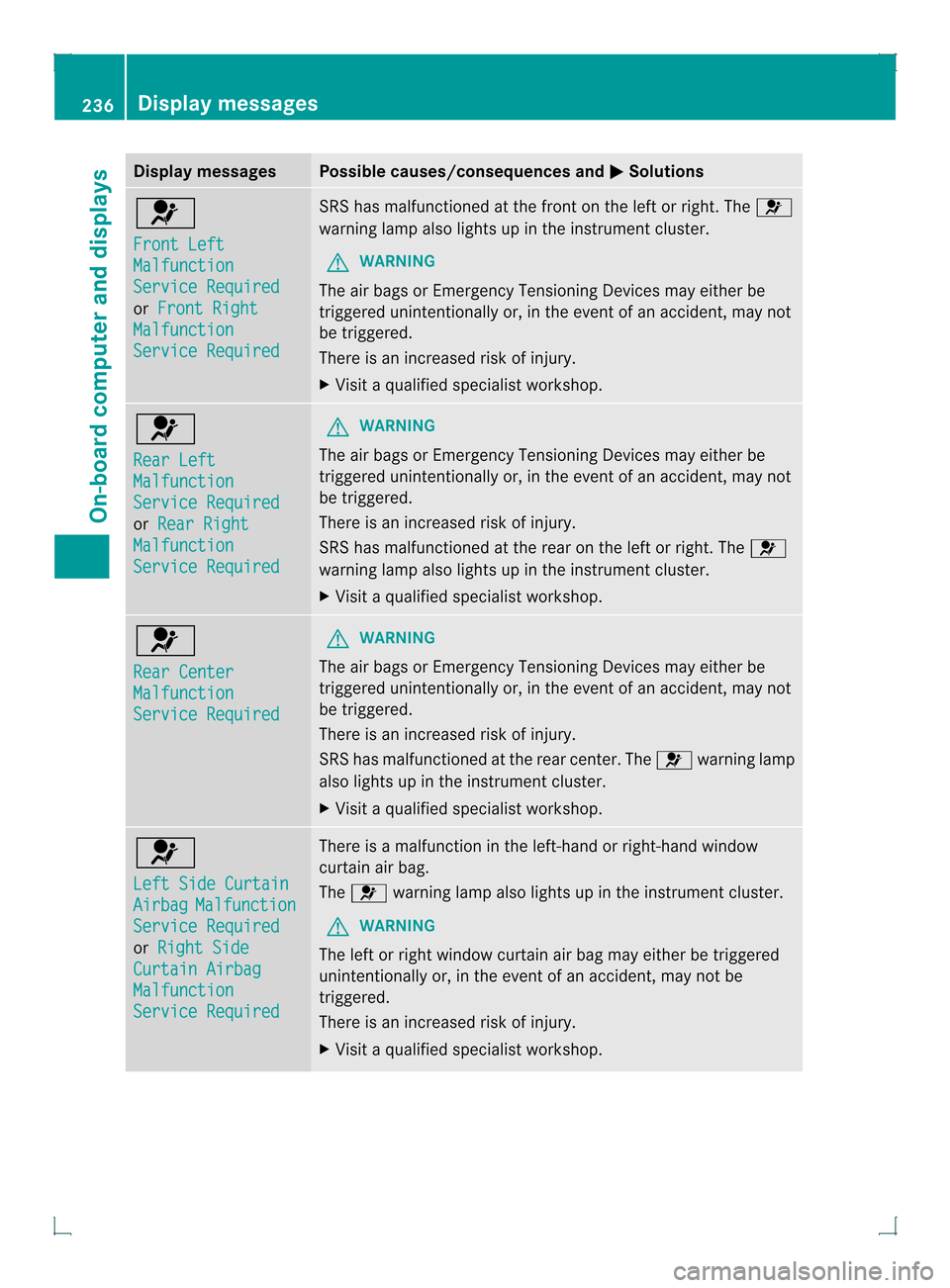
Display messages Possible causes/consequences and
0001 Solutions
0020
Front Left
Malfunction
Service Required
or
Front Right Malfunction
Service Required SRS has malfunctioned at the front on the left or right. The
0020
warning lamp also lights up in the instrumen tcluster.
G WARNING
The air bags or Emergency Tensioning Devices may either be
triggered unintentionally or, in the event of an accident, may not
be triggered.
There is an increased risk of injury.
X Visit a qualified specialist workshop. 0020
Rear Left
Malfunction
Service Required
or
Rear Right Malfunction
Service Required G
WARNING
The air bags or Emergency Tensioning Devices may either be
triggered unintentionally or, in the event of an accident, may not
be triggered.
There is an increased risk of injury.
SRS has malfunctione dat the rear on the left or right. The 0020
warning lamp also lights up in the instrument cluster.
X Visi taqualified specialist workshop. 0020
Rear Center
Malfunction
Service Required G
WARNING
The air bags or Emergency Tensioning Devices may either be
triggered unintentionally or, in the event of an accident, may not
be triggered.
There is an increased risk of injury.
SRS has malfunctioned at the rear center. The 0020warning lamp
also lights up in the instrument cluster.
X Visit a qualified specialist workshop. 0020
Left Side Curtain
Airbag Malfunction
Service Required
or
Right Side Curtain Airbag
Malfunction
Service Required There is a malfunction in the left-hand or right-hand window
curtain air bag.
The
0020 warning lamp also lights up in the instrument cluster.
G WARNING
The left or right window curtain air bag may either be triggered
unintentionally or, in the event of an accident, may not be
triggered.
There is an increased risk of injury.
X Visit a qualified specialist workshop. 236
Display messagesOn-board computer and displays
Page 276 of 378

0002
Cargo tie down rings in the rear-
compartmen tfootwell (Canada only)
Bag hook G
WARNING
The bag hooks cannot restrain heavy objects
or items of luggage. Objects or items of
luggage could be flung around and thereby hit
vehicle occupants when braking or abruptly
changing directions. There is a risk of injury.
Only hang light objects on the bag hooks.
Never hang hard, sharp-edged or fragile
objects on the bag hooks.
! The bag hook can bear a maximum load
of 11lbs (5kg) and should not be used to
secure a load.
There is one bag hook on the left side wall in
the cargo compartment and there are two
hooks on the right and left of the lower D-pillar
trim. Cargo compartment cover
Important safety notes G
WARNING
On its own, the cargo compartment cover
cannot secure or restrain heavy objects,
items of luggage and heavy loads. You could
be hit by an unsecured load during sudden
changes in direction, braking or in the event
of an accident. There is an increased risk of
injury or even fatal injury.
Always store objects so that they cannot be
flung around. Secure objects, luggage or
loads against slipping or tipping over, e.g. by
using tie downs, even if you are using the
cargo compartment cover.
! When loading the vehicle, make sure that
you do not stack the load in the cargo
compartment higher than the lower edge of
the side windows. Do not place heavy
objects on top of the cargo compartment
cover.
The cargo compartment cover is located
behind the rear bench seat backrest.
i You can fold up the solid section of the
cargo compartment cover approximately
45° to facilitate loading the cargo
compartment.
Extending/retracting the cargo
compartment cover 274
Stowage areasStowage and features