2013 MERCEDES-BENZ E-Class SEDAN indicator
[x] Cancel search: indicatorPage 227 of 420

Useful information ............................
226
Important safety notes ....................226
Displays and operation .................... 227
Menus and submenus ...................... 230
Display messages ............................. 246
Indicator
and warning lamps in the
instrument cluster ............................275 225
On-board computer and displays
Page 228 of 420

Useful information
i This Operator's Manual describes all
models and all standard and optional
equipment of your vehicle available at the
time of publication of the Operator's
Manual. Country-specific differences are
possible.
Please note that your vehicle may
not be equipped with all features
described. This also applies to safety-
related systems and functions.
i Read the information on qualified
specialist workshops: ( Y page 25).Important safety notes
G
WARNING
The driver's concentration must always be
directed primarily at road traffic.
For your safety and the safety of others,
selecting features through the multifunction
steering wheel should only be done by the
driver
when traffic and road conditions permit
it to be done safely.
Bear in mind that at a speed of only 30 mph
(approximately 50 km/h), the vehicle covers
a distance of 44 feet (approximately 14 m) per
second. G
WARNING
No messages will be displayed if either the
instrument cluster or the multifunction
display is inoperative.
As a result, you will not be able to see
information about your driving conditions,
such as
R speed
R outside temperature
R warning/indicator lamps
R malfunction/warning messages
R failure of any systems
Driving characteristics may be impaired. If you must continue to drive, do so with added
caution. Contact an authorized Mercedes-
Benz Center as soon as possible.
G
WARNING
Malfunction and warning messages are only
displayed for certain systems and are
intentionally not very detailed. The
malfunction and warning messages are
simply a reminder with respect to the
operation of certain systems. They do not
replace the owner's and/or driver's
responsibility to maintain the vehicle's
operating safety. Have all required
maintenance services and safety checks
performed
on the vehicle. Bring the vehicle to
an authorized Mercedes-Benz Center to
address the malfunction and warning
messages. G
WARNING
All categories of messages contain important
information which should be taken note of
and, where a malfunction is indicated,
addressed as soon as possible at an
authorized Mercedes-Benz Center.
Failure to repair the condition noted may
cause
damage not covered by the Mercedes-
Benz Limited Warranty, or result in property
damage or personal injury. G
WARNING
HYBRID vehicles: It is imperative that you read
the HYBRID Supplemental Operating
Instructions
included in your vehicle literature
portfolio. You may otherwise not receive all
necessary safety information and warning for
the operation of your vehicle.
For an illustration of the instrument cluster,
see ( Y page 31).226
Important safety notes
On-board computer and displays
Page 230 of 420

Steam from an overheated engine can cause
serious
burns which can occur just by opening
the engine hood. Stay away from the engine
if you see or hear steam coming from it.
Stop the vehicle in a safe location away from
other traffic. Turn off the engine, get out of the
vehicle and do not stand near the vehicle until
the engine has cooled down.
! A display message is shown if the coolant
temperature is too high.
If the coolant temperature is over
248 ‡(120 †), do not continue driving. The
engine will otherwise be damaged.
The coolant temperature gauge is in the
instrument cluster on the right-hand side
(Y page 31).
Under normal operating conditions and with
the specified coolant level, the coolant
temperature may rise to 248 ‡ (120 †). Tachometer
! Do not drive in the overrevving range, as
this could damage the engine.
The
red band in the tachometer indicates the
engine's overrevving range.
The fuel supply is interrupted to protect the
engine when the red band is reached. Outside temperature display
G
WARNING
The outside temperature indicator is not
designed to serve as an ice-warning device
and is therefore unsuitable for that purpose.
Indicated temperatures just above the
freezing
point do not guarantee that the road
surface is free of ice. The road may still be icy,
especially in wooded areas or on bridges.
The outside temperature display is in the
multifunction display ( Y page 230).
Changes in the outside temperature are
displayed after a short delay. Speedometer with segments
The segments in the speedometer indicate
which speed range is available.
R Cruise control activated ( Y page 183):
The segments light up from the stored
speed to the maximum speed.
R DISTRONIC PLUS activated (Y page 185):
One or two segments in the set speed
range light up.
R DISTRONIC
PLUS detects a vehicle in front:
The segments between the speed of the
vehicle in front and the stored speed light
up. Operating the on-board computer
Overview :
Multifunction display
; Right control panel
= Switches on the Voice Control System;
see the separate operating instructions
? Back button
A Left control panel
X To activate the on-board computer:
turn
the SmartKey to position 1 in the ignition
lock. 228
Displays and operation
On-board computer and displays
Page 235 of 420
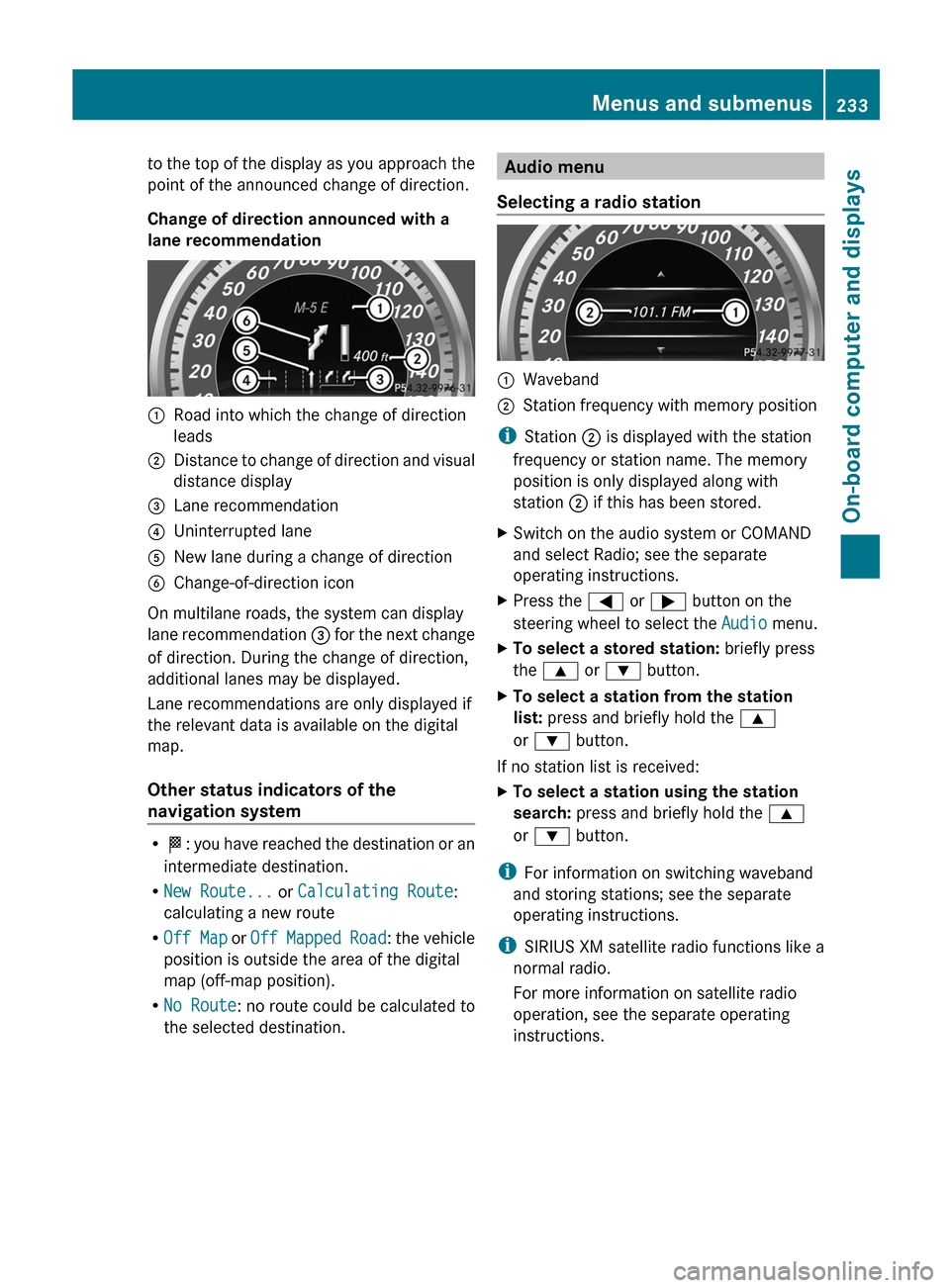
to the top of the display as you approach the
point of the announced change of direction.
Change of direction announced with a
lane recommendation
:
Road into which the change of direction
leads
; Distance to change of direction and visual
distance display
= Lane recommendation
? Uninterrupted lane
A New lane during a change of direction
B Change-of-direction icon
On multilane roads, the system can display
lane recommendation = for the next change
of direction. During the change of direction,
additional lanes may be displayed.
Lane recommendations are only displayed if
the relevant data is available on the digital
map.
Other status indicators of the
navigation system R
O:
you have reached the destination or an
intermediate destination.
R New Route... or Calculating Route:
calculating a new route
R Off Map or Off Mapped Road : the vehicle
position is outside the area of the digital
map (off-map position).
R No Route : no route could be calculated to
the selected destination. Audio menu
Selecting a radio station :
Waveband
; Station frequency with memory position
i Station ; is displayed with the station
frequency or station name. The memory
position is only displayed along with
station ; if this has been stored.
X Switch on the audio system or COMAND
and select Radio; see the separate
operating instructions.
X Press the = or ; button on the
steering wheel to select the Audio menu.
X To select a stored station: briefly press
the 9 or : button.
X To select a station from the station
list: press and briefly hold the 9
or : button.
If no station list is received:
X To select a station using the station
search: press and briefly hold the 9
or : button.
i For information on switching waveband
and storing stations; see the separate
operating instructions.
i SIRIUS XM satellite radio functions like a
normal radio.
For more information on satellite radio
operation, see the separate operating
instructions. Menus and submenus
233
On-board computer and displays Z
Page 244 of 420

X
Press the = or ; button on the
steering wheel to select the Sett. menu.
X Press the : or 9 button to select the
Convenience submenu.
X Press a to confirm.
X Press : or 9 to select the Auto.
Mirror Folding function.
If the Auto. Mirror Folding function is
activated, the vehicle's exterior mirror is
displayed in red in the multifunction
display.
X Press the a button to save the setting. :
To fold the exterior mirrors in or out
If you have switched on the Auto. Mirror
Folding
function and you fold in the exterior
mirrors by pressing button :, the exterior
mirrors will not fold out automatically
(Y page 114).
You can then only fold out the exterior mirrors
using button :.
Restoring the factory settings X
Press the = or ; button on the
steering wheel to select the Sett. menu.
X Press the :
or 9 button to select the
Factory Setting submenu.
X Press a to confirm.
The Reset All Settings? message
appears. X
Press the : or 9 button to select
No or Yes.
X Press a to confirm the selection.
If
you have selected Yes, the multifunction
display shows a confirmation message.
For safety reasons, the Daytime Running
Lights function in the Lights submenu is
only reset if the vehicle is stationary. AMG menu in AMG vehicles
AMG displays :
Digital speedometer
; Gear indicator
= Upshift indicator
? Engine oil temperature
A Coolant temperature
B ECO start/stop function status indicator
(Y page 157)
X Press the = or ; button on the
steering wheel to select the AMG menu.
Upshift indicator UP= indicates that the
engine has reached the overrevving range
when in the manual gearshift program.
Upshift indicator UP= fades out other
messages until you have shifted up.
When the engine oil temperature is below
176 ‡
(80 †) the oil temperature is shown in
blue. Avoid driving at full engine output during
this time. 242
Menus and submenus
On-board computer and displays
Page 254 of 420

Display messages Possible causes/consequences and
M SolutionsFront Passenger
Airbag Enabled
See Operator's
Manual The front-passenger air bag is enabled during the journey, even
though:
R
a child, a small adult or an object weighing less than the
system's weight threshold is located on the front-passenger
seat.
or
R the front-passenger seat is unoccupied.
The system may detect objects or forces applying additional
weight on the seat.
G WARNING
The air bag may deploy unintentionally.
There is an increased risk of injury.
X Pull over and stop the vehicle safely as soon as possible, paying
attention to road and traffic conditions.
X Secure the vehicle against rolling away ( Y page 175).
X Switch the ignition off.
X Open the front-passenger door.
X Remove the child and the child restraint system from the front-
passenger seat.
X Make sure that there are no objects on the seat adding to the
weight.
The system may otherwise detect the additional weight and
interpret the seat occupant's weight as greater than it actually
is.
X Keep the seat unoccupied, close the front-passenger door and
switch on the ignition.
X Observe the ^a indicator lamp in the center console and
the multifunction display and check the following:
Seat unoccupied and ignition switched on:
R the 45
indicator lamp must light up and remain lit. When
the indicator lamp is on, OCS (Occupant Classification System)
has deactivated the front-passenger air bag ( Y page 48).
R the Front Passenger Airbag Enabled See Operator's
Manual or Front Passenger Airbag Disabled See
Operator's Manual display messages must not be shown in
the multifunction display.
X Wait for a period of at least 60 seconds until the necessary
system checks have been completed.
X Make sure that the display messages do not appear in the
multifunction display.252
Display messages
On-board computer and displays
Page 255 of 420

Display messages Possible causes/consequences and
M SolutionsIf these conditions are fulfilled, the front-passenger seat can be
occupied
again. Whether the 45 indicator lamp remains lit
or goes out depends on how OCS classifies the occupant.
If the conditions are not fulfilled, the system is not operating
correctly.
X Visit a qualified specialist workshop immediately.
For further information about the Occupant Classification System,
see ( Y page 48). Front Passenger
Airbag Disabled
See Operator's
Manual The front-passenger air bag is disabled during the journey, even
though:
R
an adult
or
R a person larger than a certain size is occupying the front-
passenger seat.
If additional forces are applied to the seat, the system may
interpret the occupant's weight as lower than it actually is.
G WARNING
The front-passenger air bag does not deploy during an accident.
There is an increased risk of injury.
X Pull over and stop the vehicle safely as soon as possible, paying
attention to road and traffic conditions.
X Secure the vehicle against rolling away ( Y page 175).
X Switch the ignition off.
X Have the occupant get out of the vehicle.
X Keep the seat unoccupied, close the front-passenger door and
switch on the ignition.
X Observe the 45
indicator lamp in the center console and
the multifunction display and check the following:
Seat unoccupied and ignition switched on:
R the 45
indicator lamp must light up and remain lit. When
the indicator lamp is on, OCS has deactivated the front-
passenger air bag ( Y page 48).
R the Front Passenger Airbag Enabled See Operator's
Manual or Front Passenger Airbag Disabled See
Operator's Manual display messages must not be shown in
the multifunction display.
X Wait for a period of at least 60 seconds until the necessary
system checks have been completed.
X Make sure that the display messages do not appear in the
multifunction display. Display messages
253
On-board computer and displays Z
Page 256 of 420

Display messages Possible causes/consequences and
M SolutionsIf these conditions are fulfilled, the front-passenger seat can be
occupied
again. Whether the 45 indicator lamp remains lit
or goes out depends on how OCS classifies the occupant.
If the conditions are not fulfilled, the system is not operating
correctly.
X Visit a qualified specialist workshop immediately.
For further information about the Occupant Classification System,
see ( Y page 48). Lights
i Display messages about LEDs:
This display message will only appear if all LEDs have failed. Display messages Possible causes/consequences and
M Solutionsb
Check Left
Cornering Light
or
Check Right
Cornering light The left or right-hand cornering light is defective.
X
Check whether you are permitted to change the bulb yourself
(Y page 130).
or
X Visit a qualified specialist workshop. b
Check Left Low
Beam or Check
Right Low Beam The left or right-hand low-beam headlamp is defective.
X
Check whether you are permitted to change the bulb yourself
(Y page 130).
or
X Visit a qualified specialist workshop. b
Check Rear Left
Turn Signal or
Check Rear Right
Turn Signal The rear left-hand or rear right-hand turn signal is defective.
X
Check whether you are permitted to replace the bulb yourself
(Y page 130).
or
X Visit a qualified specialist workshop. b
Check Front Left
Turn Signal or
Check Front Right
Turn Signal The front left-hand or front right-hand turn signal is defective.
X
Check whether you are permitted to replace the bulb yourself
(Y page 130).
or
X Visit a qualified specialist workshop.254
Display messages
On-board computer and displays