2013 MERCEDES-BENZ E-Class SEDAN indicator
[x] Cancel search: indicatorPage 283 of 420

Problem Possible causes/consequences and
M Solutions$ (USA only)
J (Canada only)
The red brake system
warning
lamp comes on
while the vehicle is
moving. A warning tone
also sounds. You are driving with the parking brake applied.
X
Release the parking brake.
The warning lamp goes out and the warning tone ceases. 6
The red SRS warning
lamp is lit while the
engine is running.
There is a malfunction in the SRS (Supplemental Restraint
System).
G WARNING
The air bags or Emergency Tensioning Devices may either be
triggered unintentionally or, in the event of an accident, may not
be triggered.
There is an increased risk of injury.
X Drive on carefully.
X Have SRS checked at a qualified specialist workshop
immediately.
For further information about SRS, see (Y page 41). Indicator and warning lamps in the instrument cluster
281
On-board computer and displays Z
Page 284 of 420

Engine
Problem Possible causes/consequences and
M Solutions;
The yellow Check
Engine warning lamp
lights up while the
engine is running.
There may be a malfunction, for example:
R
in the engine management
R in the fuel injection system
R in the exhaust system
R in the ignition system (for vehicles with a gasoline engine)
R in the fuel system
The emission limit values may be exceeded and the engine may
be running in emergency mode.
X Have the vehicle checked as soon as possible at a qualified
specialist workshop.
i In some states, you must immediately visit a qualified
specialist
workshop as soon as the yellow Check Engine warning
lamp lights up. This is due to the legal requirements in effect in
these states. If in doubt, check whether such legal regulations
apply in the state in which you are currently driving. Vehicles with a diesel engine: the fuel tank has been run dry
(Y page 172).
X
Start the engine three to four times after refueling.
If the yellow Check Engine warning lamp goes out, emergency
running mode is canceled. The vehicle need not be checked. 8
The yellow reserve fuel
warning lamp lights up
while the engine is
running.
The fuel level has dropped into the reserve range.
X
Refuel at the nearest gas station. 8
The yellow reserve fuel
warning lamp flashes
while the vehicle is in
motion.
In addition, the ;
Check Engine warning
lamp may light up.
The fuel system pressure is too low. The fuel filler cap is not closed
correctly or the fuel system is leaking.
X
Check that the fuel filler cap is correctly closed.
X If the fuel filler cap is not correctly closed:
close the fuel filler
cap.
X If the fuel filler cap is closed: visit a qualified specialist
workshop. 282
Indicator and warning lamps in the instrument cluster
On-board computer and displays
Page 285 of 420

Problem Possible causes/consequences and
M Solutions?
The red coolant
warning lamp lights up
while the engine is
running
and the coolant
temperature gauge is
at the start of the scale. The temperature sensor for the coolant temperature gauge is
defective.
The
coolant temperature is no longer being monitored. There is a
risk of engine damage if the coolant temperature is too high.
X Pull over and stop the vehicle safely and switch off the engine,
paying
attention to road and traffic conditions. Do not continue
driving under any circumstances.
X Secure the vehicle against rolling away ( Y page 175).
X Consult a qualified specialist workshop. Indicator and warning lamps in the instrument cluster
283
On-board computer and displays Z
Page 286 of 420

Problem Possible causes/consequences and
M Solutions?
The red coolant
warning
lamp comes on
while the engine is
running. The coolant level is too low.
If the coolant level is correct, the airflow to the engine radiator
may be blocked or the electric engine radiator fan may be
malfunctioning.
The coolant is too hot and the engine is no longer being cooled
sufficiently.
X
Observe the additional display messages in the multifunction
display.
X Pull over and stop the vehicle safely and switch off the engine,
paying attention to road and traffic conditions.
X Secure the vehicle against rolling away ( Y page 175).
X Leave the vehicle and keep a safe distance from the vehicle until
the engine has cooled down.
X Check the coolant level and add coolant, observing the warning
notes ( Y page 331).
X If you need to add coolant more often than usual, have the
engine coolant system checked.
X Make sure that the air supply to the engine radiator is not
blocked, e.g. by snow, slush or ice.
X Do not start the engine again until the coolant temperature is
under
248 ‡ (120 †). Otherwise, the engine could be damaged.
X Drive to the nearest qualified specialist workshop.
X Avoid subjecting the engine to heavy loads, e.g. driving in
mountainous terrain, and stop-and-go traffic. ?
The red coolant
warning
lamp comes on
while the engine is
running. A warning tone
also sounds. The coolant temperature has exceeded 248 ‡ (120 †). The
airflow
to the engine radiator may be blocked or the coolant level
may be too low.
G WARNING
The engine is not being cooled sufficiently and may be damaged.
Do
not drive when your engine is overheated. This can cause some
fluids which may have leaked into the engine compartment to
catch fire.
Steam from the overheated engine can also cause serious burns
which can occur just by opening the hood.
There is a risk of injury.
X Observe the additional display messages in the multifunction
display.
X Pull over and stop the vehicle safely and switch off the engine,
paying attention to road and traffic conditions.
X Secure the vehicle against rolling away ( Y page 175).284
Indicator and warning lamps in the instrument cluster
On-board computer and displays
Page 287 of 420
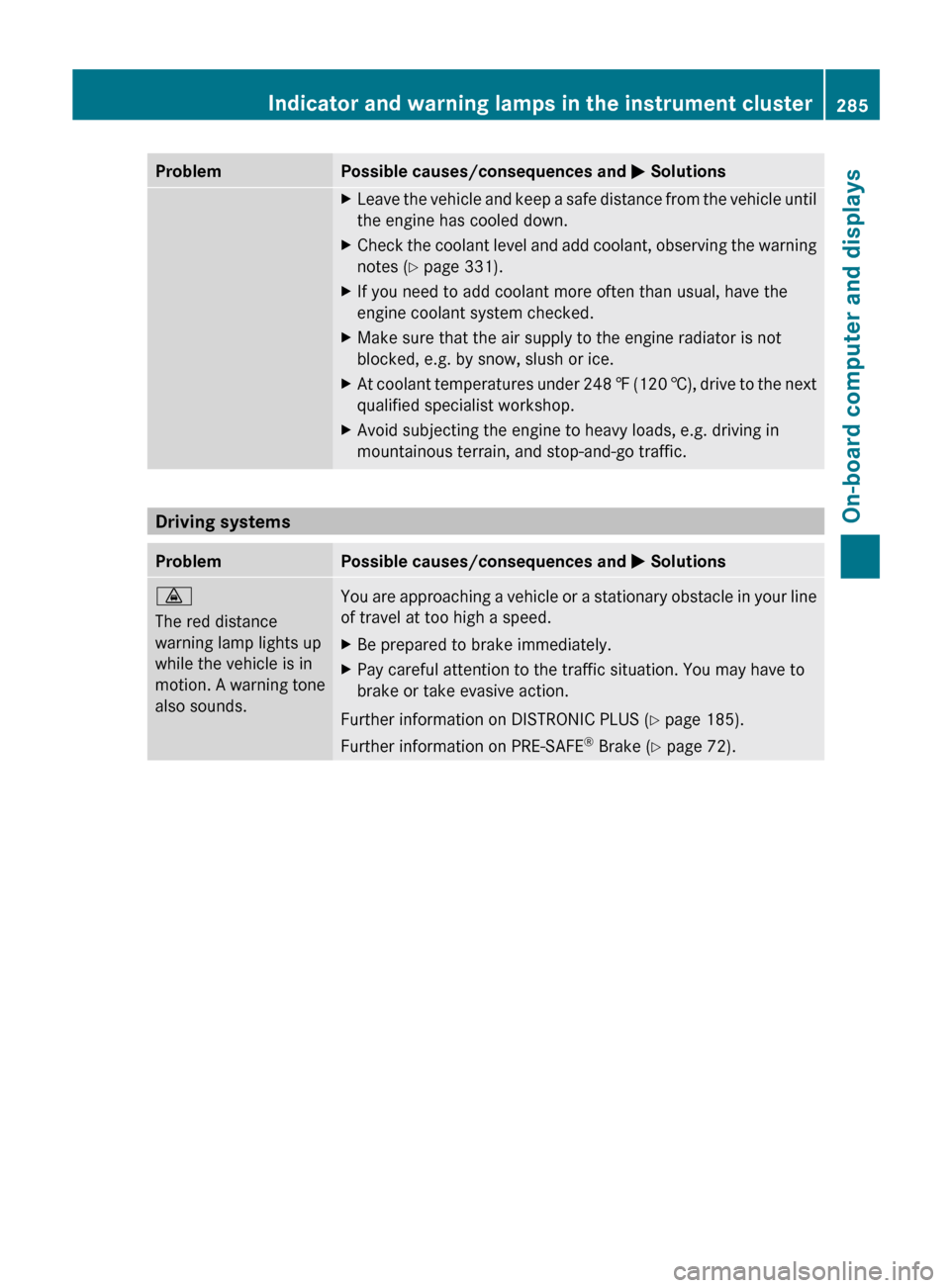
Problem Possible causes/consequences and
M SolutionsX
Leave the vehicle and keep a safe distance from the vehicle until
the engine has cooled down.
X Check the coolant level and add coolant, observing the warning
notes ( Y page 331).
X If you need to add coolant more often than usual, have the
engine coolant system checked.
X Make sure that the air supply to the engine radiator is not
blocked, e.g. by snow, slush or ice.
X At coolant temperatures under 248 ‡ (120 †), drive to the next
qualified specialist workshop.
X Avoid subjecting the engine to heavy loads, e.g. driving in
mountainous terrain, and stop-and-go traffic. Driving systems
Problem Possible causes/consequences and
M Solutions·
The red distance
warning lamp lights up
while the vehicle is in
motion.
A warning tone
also sounds. You are approaching a vehicle or a stationary obstacle in your line
of travel at too high a speed.
X
Be prepared to brake immediately.
X Pay careful attention to the traffic situation. You may have to
brake or take evasive action.
Further information on DISTRONIC PLUS ( Y page 185).
Further information on PRE-SAFE ®
Brake (Y page 72). Indicator and warning lamps in the instrument cluster
285
On-board computer and displays Z
Page 288 of 420

Tires
Problem Possible causes/consequences and
M Solutionsh
USA only:
The
yellow tire pressure
monitor warning lamp
(pressure loss/
malfunction) is lit.
Canada only:
The yellow tire pressure
monitor warning lamp
(pressure loss) is lit. The tire pressure monitor has detected a loss of pressure in at
least one of the tires.
G WARNING
With tire pressures which are too low, there is a risk of the
following hazards:
R they may burst, especially as the load and vehicle speed
increase.
R they
may wear excessively and/or unevenly, which may greatly
impair tire traction.
R the driving characteristics, as well as steering and braking, may
be greatly impaired.
There is a risk of an accident.
X Stop the vehicle without making any sudden steering or braking
maneuvers.
Pay attention to the traffic conditions as you do so.
X Secure the vehicle against rolling away ( Y page 175).
X Observe the additional display messages in the multifunction
display.
X If there is a flat tire, inspect the tires ( Y page 344).
X Check the tire pressure (Y page 370).
X If necessary, correct the tire pressure. h
USA only:
The
yellow tire pressure
monitor warning lamp
(pressure loss/
malfunction) flashes for
approximately one
minute and then
remains lit. The tire pressure monitor is faulty.
G WARNING
The system is possibly unable to recognize or register low tire
pressure.
There is a risk of an accident.
X Observe the additional display messages in the multifunction
display.
X Visit a qualified specialist workshop.286
Indicator and warning lamps in the instrument cluster
On-board computer and displays
Page 300 of 420

X
Make sure that red lock status
indicator ? is no longer visible. The
combined cargo cover and net will
otherwise not be locked in place.
Attaching the combined cargo cover
and net to the rear seat backrest !
If you have attached the combined cargo
cover and net to a rear seat backrest that
is
folded forwards, do not fold the backrest
back. X
Fold the left and right seat backrest
forwards ( Y page 294).
X Insert combined cargo cover and net ;
into two guides : and push it up to the
stop in the direction of the arrow. Cargo net (Wagon)
Important safety notes It is particularly important to use a cargo net
if the vehicle is loaded with small objects
above the level of the backrests. For safety reasons, always use a cargo net when
transporting loads.
Cargo net without cargo compartment
enlargement
X
Pull the cargo net up by tab :
and hook it
into eyelets ;.
Cargo net with cargo compartment
enlargement X
Make sure that the cargo net is attached to
the rear seat backrest (Y page 297).
X Guide the cargo net up by tab :
and hook
it into eyelets ;. Coat hooks on the tailgate
G
WARNING
The tailgate may close if too great a load is
placed on the coat hooks.
You and/or others could be trapped and
injured. 298
Stowage areas
Stowage and features
Page 313 of 420

pull at a cable to disconnect a plug from a
115
V AC power socket. Never use a damaged
connection cable. The 115 V AC power socket
must never be connected to another 115 V
AC power source. Do not use a converter with
an earthed plug for the 115 V AC power
socket. This could cause serious injury to you
and/or other people. G
WARNING
If the 115 V AC power socket is damaged or
pulled
out of the trim, do not use or touch the
115 V AC power socket. The use of a 115 V
AC power socket that has been damaged or
pulled out of the trim could cause serious
injury to you or others. X
Open flap =.
X Switch on the ignition.
X Insert the plug of the electronic device into
115 V power socket :.
Indicator lamp ; lights up.
If
indicator lamp ; does not light up, read
more in the section on malfunctions.
X To turn off: disconnect the plug from
115 V power socket :.
Ensure that you do not pull on the cord.
115 V power socket : provides an
alternating voltage of 115 V so that small
electronic devices can be connected. These
devices, such as games consoles, chargers
and laptops, should not consume more than
a maximum of 150 W altogether. Requirements for operation of these devices:
R
the
plug of the electronic device is plugged
into 115 V power socket :.
R the maximum wattage of the device to be
connected must not exceed 150 W.
R the on-board power supply is within a
permissible voltage range.
R the 12 V sockets in the rear and the cargo
compartment/trunk are operational
(Y page 309).
Possible causes of malfunctions:
R the on-board power supply is not within a
permissible voltage range.
R the temperature of the DC/AC converter is
temporarily too high.
R some small electronic devices have a
constant nominal power of less than
150 W, but a very high switch-on current.
These devices will not work. If you connect
such a device, 115 V power socket : will
not supply it with power.
If indicator lamp ; still does not light up,
contact a qualified specialist workshop. mbrace
Important safety notes !
A license agreement must exist in order
to
activate the mbrace service. Ensure that
your system is activated and ready for use,
and press the ï MB Info call button to
register. If any of the steps mentioned is
not carried out, the system may not be
activated.
If you have questions about the activation,
contact one of the following telephone
assistance services:
R USA: Mercedes-Benz Customer
Assistance Center under
1-800-FOR-MERCedes
(1-800-367-6372) or 1-888-990-9007
R Canada: Customer Service at
1-888-923-8367 Features
311
Stowage and features Z