2013 MERCEDES-BENZ CLA COUPE open bonnet
[x] Cancel search: open bonnetPage 9 of 373
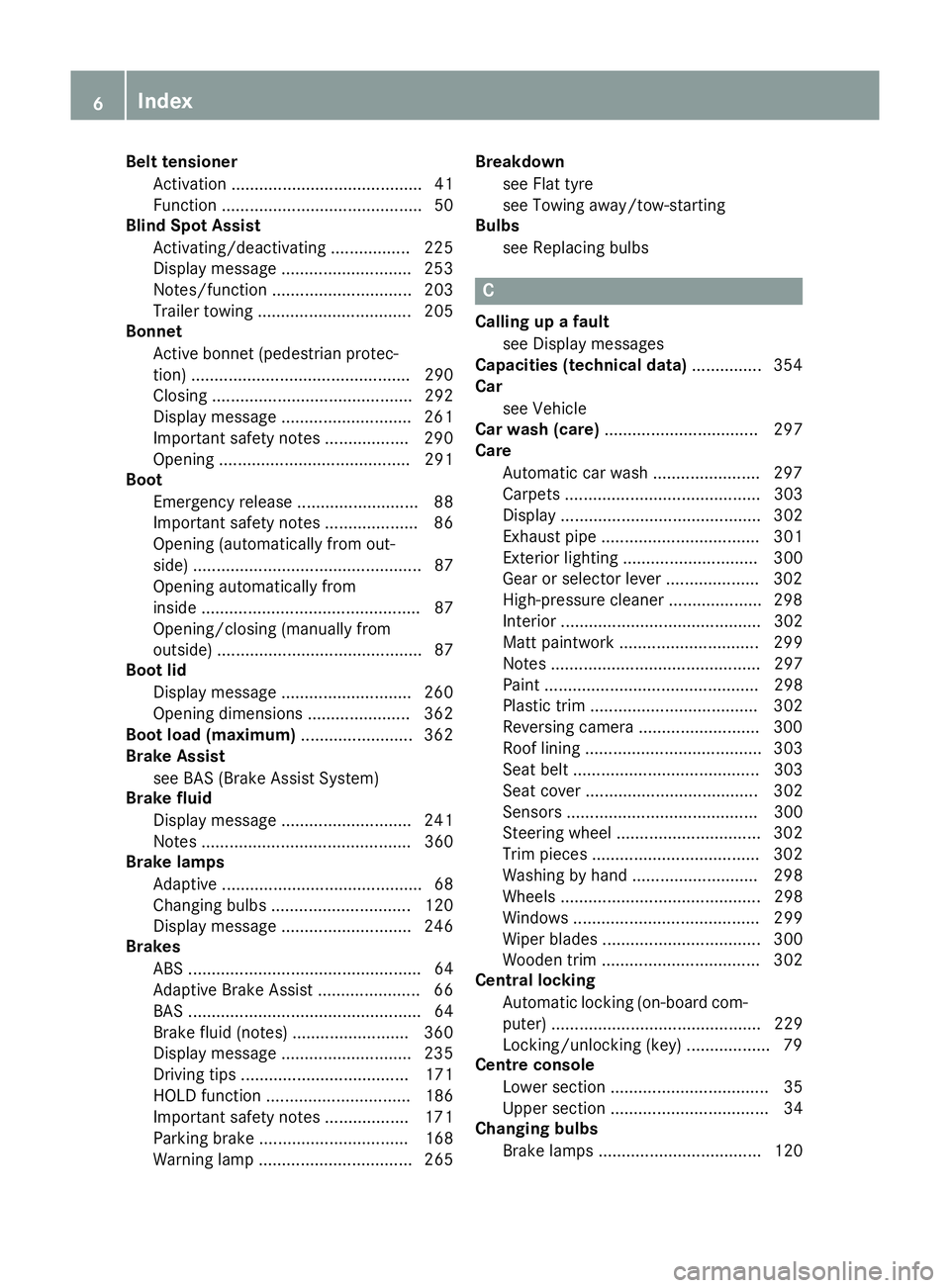
Belt tensioner
Activation ......................................... 41
Function ........................................... 50
Blind Spot Assist
Activating/deactivating ................. 225
Display message ............................ 253
Notes/functio n.............................. 203
Trailer towing ................................. 205
Bonnet
Active bonnet (pedestrian protec-tion) ............................................... 290
Closing ........................................... 292
Display message ............................ 261
Important safety notes .................. 290
Opening ......................................... 291
Boot
Emergency release .......................... 88
Important safety notes .................... 86
Opening (automatically from out-
side) ................................................. 87
Opening automatically from
inside ............................................... 87
Opening/closing (manually from
outside) ............................................ 87
Boot lid
Display message ............................ 260
Opening dimensions ...................... 362
Boot load (maximum) ........................ 362
Brake Assist
see BAS (Brake Assist System)
Brake fluid
Display message ............................ 241
Notes ............................................. 360
Brake lamps
Adaptive ........................................... 68
Changing bulb s.............................. 120
Display message ............................ 246
Brakes
ABS .................................................. 64
Adaptive Brake Assist ...................... 66
BAS .................................................. 64
Brake fluid (notes) ......................... 360
Display message ............................ 235
Driving tips .................................... 171
HOLD function ............................... 186
Important safety notes .................. 171
Parking brake ................................ 168
Warning lamp ................................. 265 Breakdown
see Flat tyre
see Towing away/tow-starting
Bulbs
see Replacing bulbs C
Calling up a fault see Display messages
Capacities (technical data) ............... 354
Car
see Vehicle
Car wash (care) ................................. 297
Care
Automatic car wash ....................... 297
Carpets .......................................... 303
Display ........................................... 302
Exhaust pipe .................................. 301
Exterior lighting ............................. 300
Gear or selector lever .................... 302
High-pressure cleaner .................... 298
Interior ........................................... 302
Matt paintwork .............................. 299
Notes ............................................. 297
Paint .............................................. 298
Plastic trim .................................... 302
Reversing camera .......................... 300
Roof lining ...................................... 303
Seat belt ........................................ 303
Seat cove r..................................... 302
Sensors ......................................... 300
Steering wheel ............................... 302
Trim pieces .................................... 302
Washing by hand ........................... 298
Wheels ........................................... 298
Windows ........................................ 299
Wiper blades .................................. 300
Wooden trim .................................. 302
Central locking
Automatic locking (on-board com-
puter) ............................................. 229
Locking/unlocking (key) .................. 79
Centre console
Lower section .................................. 35
Upper section .................................. 34
Changing bulbs
Brake lamps ................................... 120 6
Index
Page 31 of 373
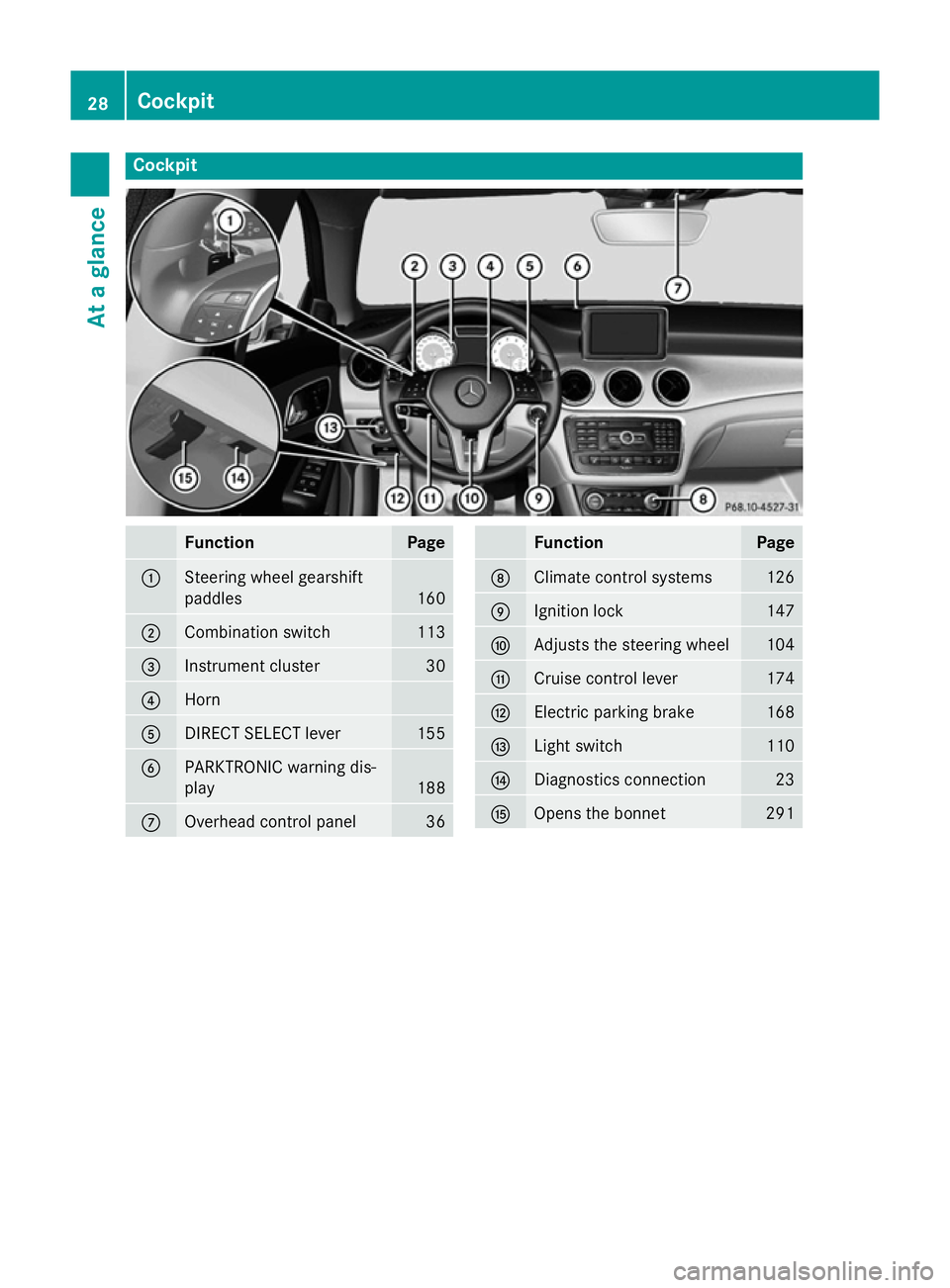
Cockpit
Function Page
:
Steering wheel gearshift
paddles
160
;
Combination switch 113
=
Instrument cluster 30
?
Horn
A
DIRECT SELECT lever 155
B
PARKTRONIC warning dis-
play
188
C
Overhead control panel 36 Function Page
D
Climate control systems 126
E
Ignition lock 147
F
Adjusts the steering wheel 104
G
Cruise control lever 174
H
Electric parking brake 168
I
Light switch 110
J
Diagnostics connection 23
K
Opens the bonnet 29128
CockpitAt a glance
Page 32 of 373
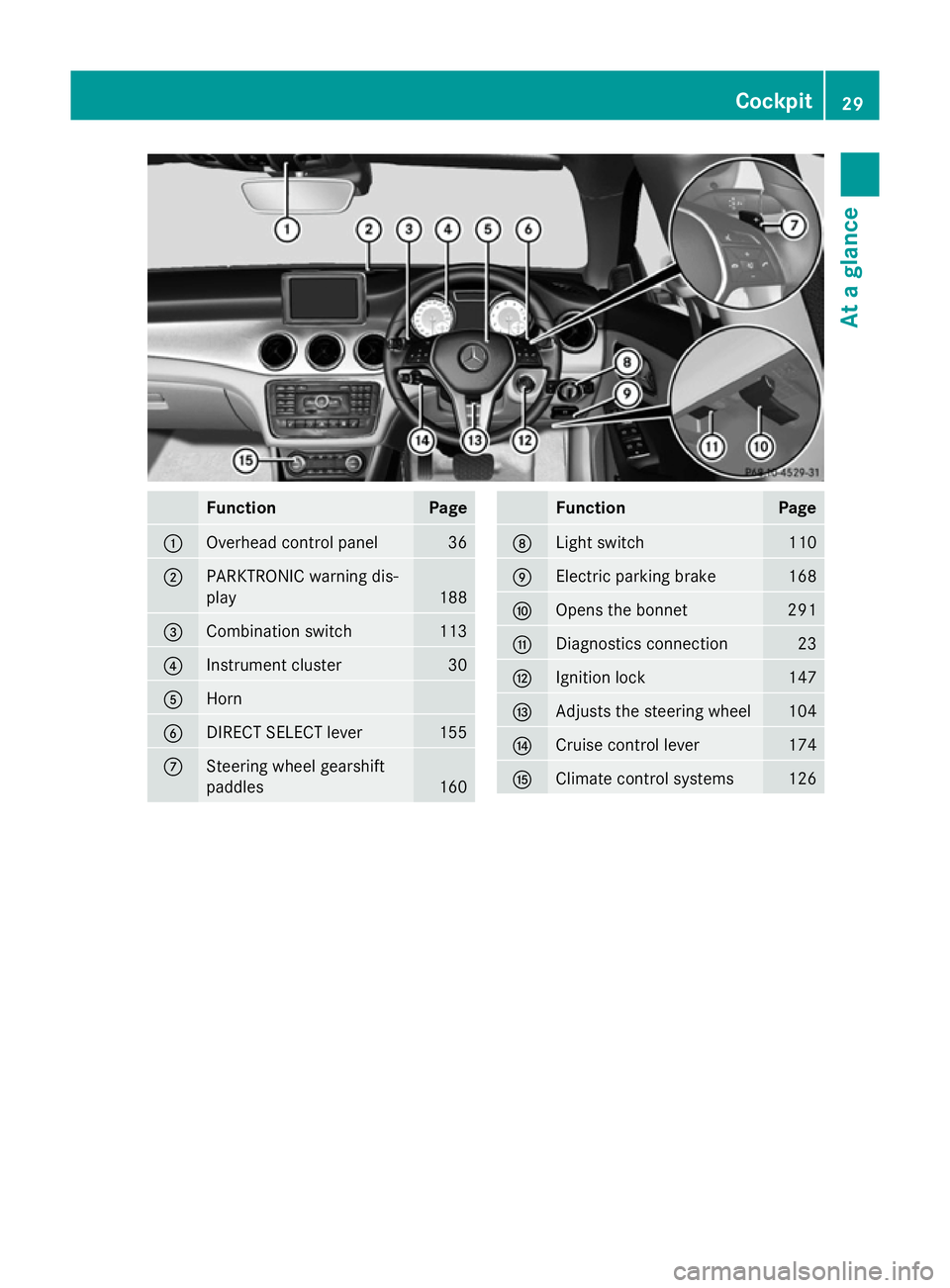
Function Page
:
Overhead control panel 36
;
PARKTRONIC warning dis-
play 188
=
Combination switch 113
?
Instrument cluster 30
A
Horn
B
DIRECT SELECT lever 155
C
Steering wheel gearshift
paddles
160 Function Page
D
Light switch 110
E
Electric parking brake 168
F
Opens the bonnet 291
G
Diagnostics connection 23
H
Ignition lock 147
I
Adjusts the steering wheel 104
J
Cruise control lever 174
K
Climate control systems 126Cockpit
29At a glance
Page 76 of 373
i
The immobiliser is always deactivated
when you start the engine. ATA (Anti-Theft Alarm system)
X
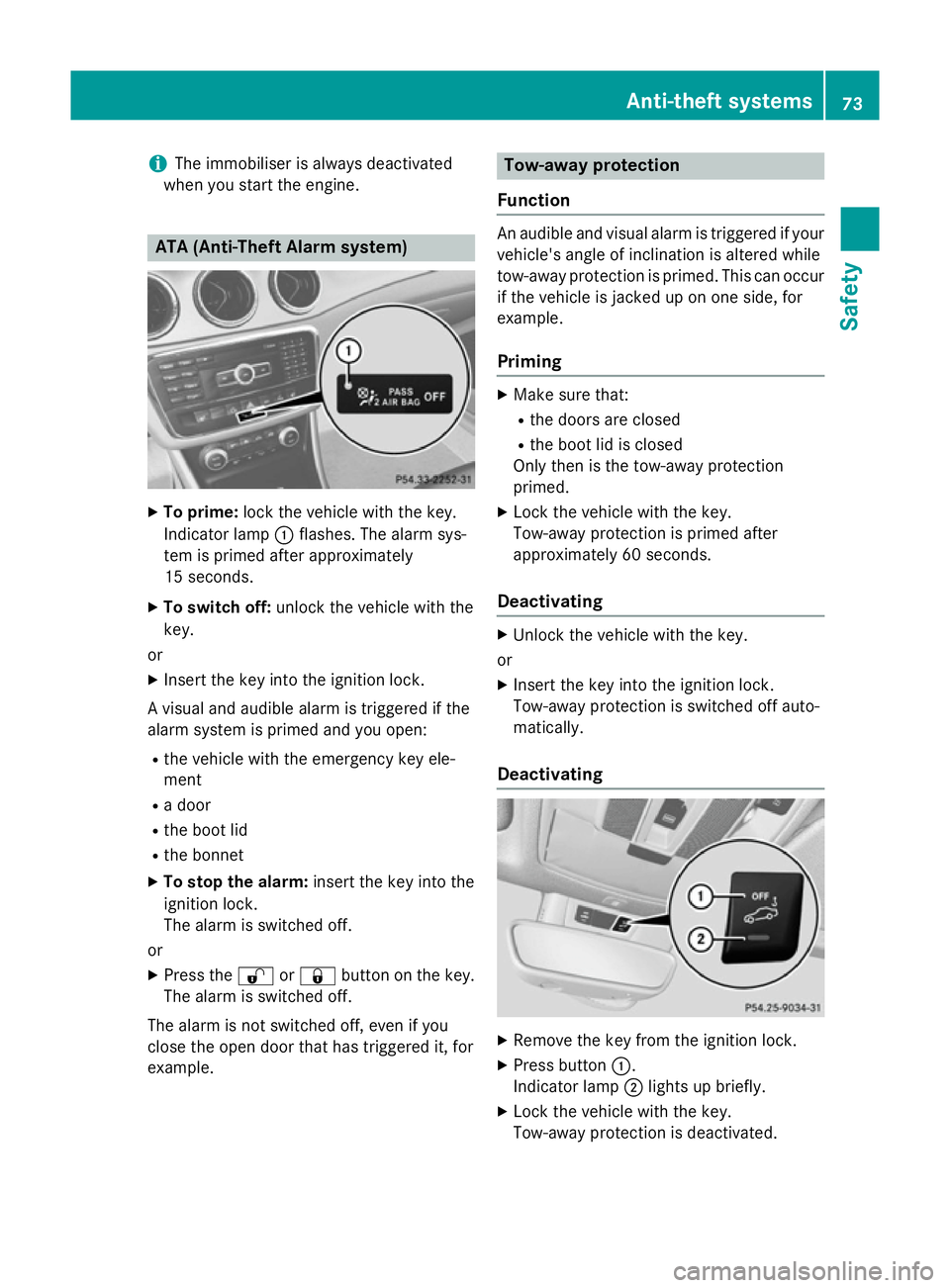
To prime: lock the vehicle with the key.
Indicator lamp :flashes. The alarm sys-
tem is primed after approximately
15 seconds.
X To switch off: unlock the vehicle with the
key.
or
X Insert the key into the ignition lock.
A visual and audible alarm is triggered if the
alarm system is primed and you open:
R the vehicle with the emergency key ele-
ment
R a door
R the boot lid
R the bonnet
X To stop the alarm: insert the key into the
ignition lock.
The alarm is switched off.
or
X Press the %or& button on the key.
The alarm is switched off.
The alarm is not switched off, even if you
close the open door that has triggered it, for
example. Tow-away protection
Function An audible and visual alarm is triggered if your
vehicle's angle of inclination is altered while
tow-away protection is primed. This can occur
if the vehicle is jacked up on one side, for
example.
Priming X
Make sure that:
R the doors are closed
R the boot lid is closed
Only then is the tow-away protection
primed.
X Lock the vehicle with the key.
Tow-away protection is primed after
approximately 60 seconds.
Deactivating X
Unlock the vehicle with the key.
or X Insert the key into the ignition lock.
Tow-away protection is switched off auto-
matically.
Deactivating X
Remove the key from the ignition lock.
X Press button :.
Indicator lamp ;lights up briefly.
X Lock the vehicle with the key.
Tow-away protection is deactivated. Anti-theft systems
73Safety Z
Page 122 of 373
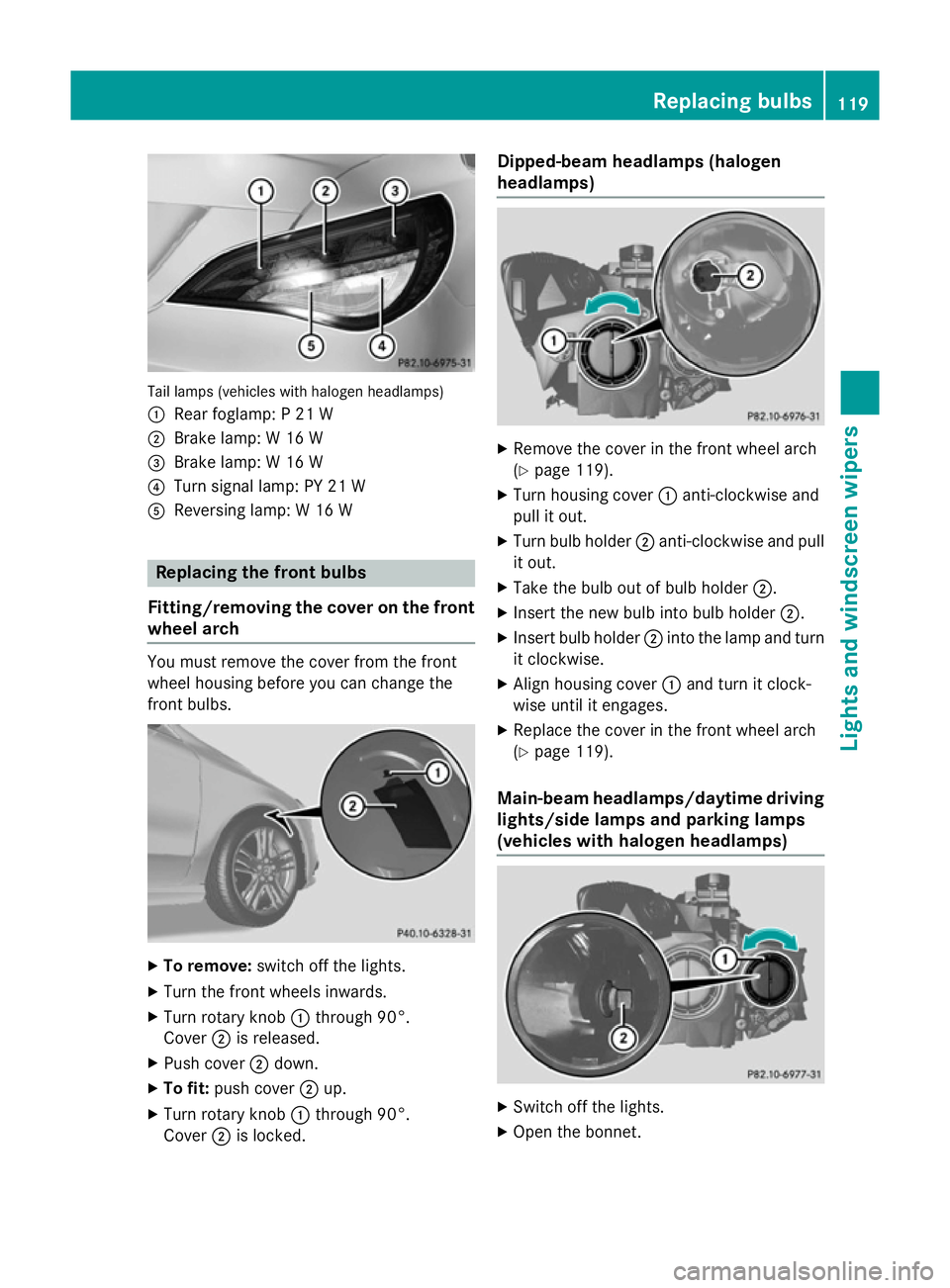
Tail lamps (vehicles with halogen headlamps)
: Rear foglamp: P 21 W
; Brake lamp: W 16 W
= Brake lamp: W 16 W
? Turn signal lamp: PY 21 W
A Reversing lamp: W 16 W Replacing the front bulbs
Fitting/removing the cover on the front wheel arch You must remove the cover from the front
wheel housing before you can change the
front bulbs. X
To remove: switch off the lights.
X Turn the front wheels inwards.
X Turn rotary knob :through 90°.
Cover ;is released.
X Push cover ;down.
X To fit: push cover ;up.
X Turn rotary knob :through 90°.
Cover ;is locked. Dipped-beam headlamps (halogen
headlamps) X
Remove the cover in the front wheel arch
(Y page 119).
X Turn housing cover :anti-clockwise and
pull it out.
X Turn bulb holder ;anti-clockwise and pull
it out.
X Take the bulb out of bulb holder ;.
X Insert the new bulb into bulb holder ;.
X Insert bulb holder ;into the lamp and turn
it clockwise.
X Align housing cover :and turn it clock-
wise until it engages.
X Replace the cover in the front wheel arch
(Y page 119).
Main-beam headlamps/daytime driving lights/side lamps and parking lamps
(vehicles with halogen headlamps) X
Switch off the lights.
X Open the bonnet. Replacing bulbs
119Lights and windscreen wipers Z
Page 123 of 373
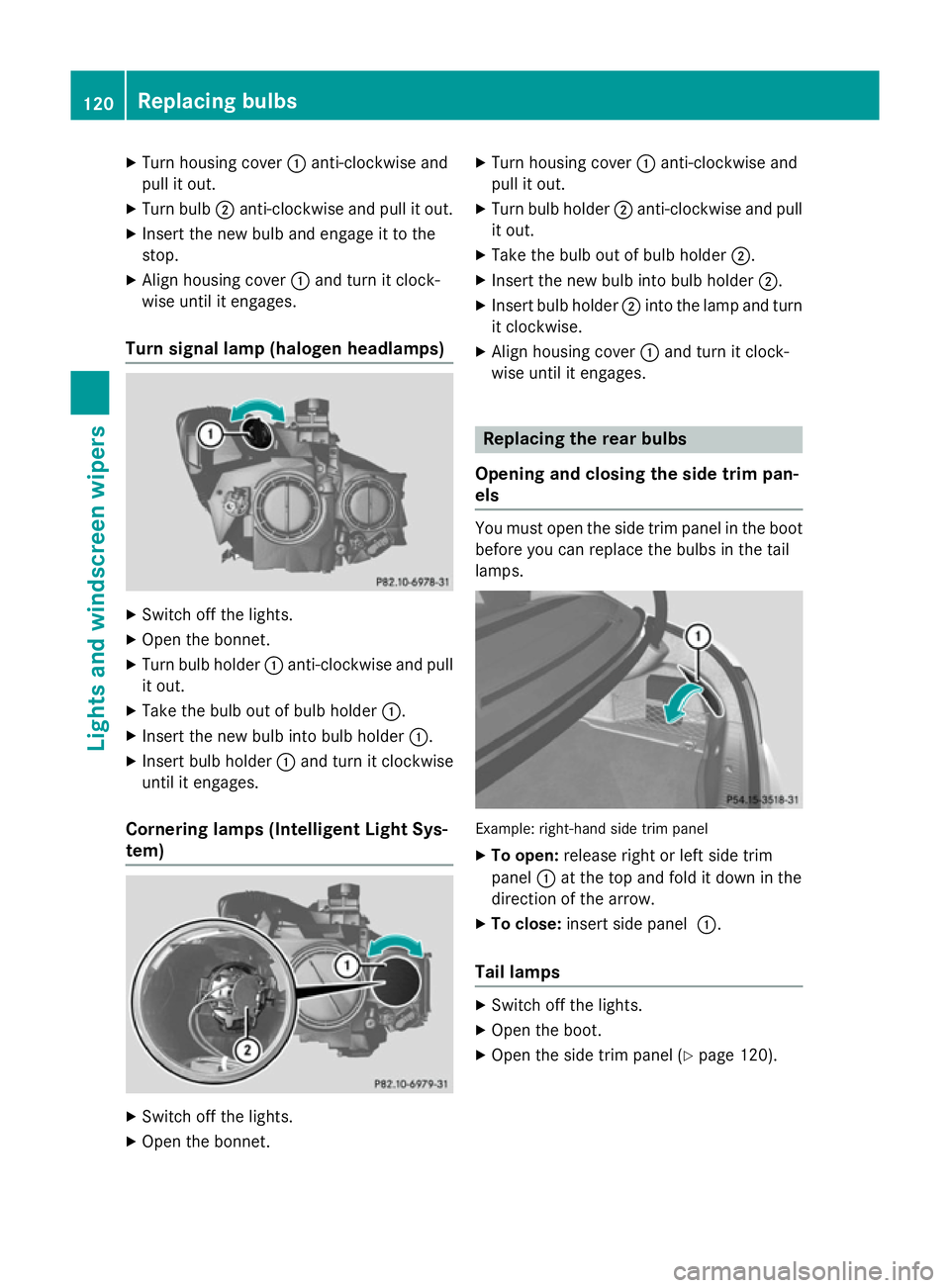
X
Turn housing cover :anti-clockwise and
pull it out.
X Turn bulb ;anti-clockwise and pull it out.
X Insert the new bulb and engage it to the
stop.
X Align housing cover :and turn it clock-
wise until it engages.
Turn signal lamp (halogen headlamps) X
Switch off the lights.
X Open the bonnet.
X Turn bulb holder :anti-clockwise and pull
it out.
X Take the bulb out of bulb holder :.
X Insert the new bulb into bulb holder :.
X Insert bulb holder :and turn it clockwise
until it engages.
Cornering lamps (Intelligent Light Sys-
tem) X
Switch off the lights.
X Open the bonnet. X
Turn housing cover :anti-clockwise and
pull it out.
X Turn bulb holder ;anti-clockwise and pull
it out.
X Take the bulb out of bulb holder ;.
X Insert the new bulb into bulb holder ;.
X Insert bulb holder ;into the lamp and turn
it clockwise.
X Align housing cover :and turn it clock-
wise until it engages. Replacing the rear bulbs
Opening and closing the side trim pan-
els You must open the side trim panel in the boot
before you can replace the bulbs in the tail
lamps. Example: right-hand side trim panel
X To open: release right or left side trim
panel :at the top and fold it down in the
direction of the arrow.
X To close: insert side panel :.
Tail lamps X
Switch off the lights.
X Open the boot.
X Open the side trim panel (Y page 120).120
Replacing bulbsLights and windscreen wipers
Page 125 of 373
!
Vehicles with a rain sensor: if the wind-
screen becomes dirty in dry weather con-
ditions, the windscreen wipers may be acti- vated inadvertently. This could damage the
windscreen wiper blades or scratch the
windscreen.
For this reason, you should always switch
off the windscreen wipers in dry weather.
Vehicles with a rain sensor: in theÄor
Å position, the appropriate wiping fre-
quency is automatically set according to the
intensity of the rain. In the Åposition, the
rain sensor is more sensitive than in the Ä
position, causing the windscreen wipers to
wipe more frequently.
If the wiper blades are worn, the windscreen
will no longer be wiped properly. This could
prevent you from observing the traffic condi-
tions. Replacing the wiper blades
Important safety notes G
WARNING
If the windscreen wipers begin to move while
you are changing the wiper blades, you can be trapped by the wiper arm. There is a risk of
injury.
Always switch off the windscreen wipers and
ignition before changing the wiper blades.
! To avoid damaging the windscreen wiper
blades, make sure that you touch only the
wiper arm of the windscreen wiper.
! Never open the bonnet if a windscreen
wiper arm has been folded away from the
windscreen.
Never fold a windscreen wiper arm without
a wiper blade back onto the windscreen.
Hold the windscreen wiper arm firmly when you change the wiper blade. If you release
the windscreen wiper arm without a wiper
blade and it falls onto the windscreen, the windscreen may be damaged by the force
of the impact.
Mercedes-Benz recommends that you have
the wiper blades changed at a qualified
specialist workshop.
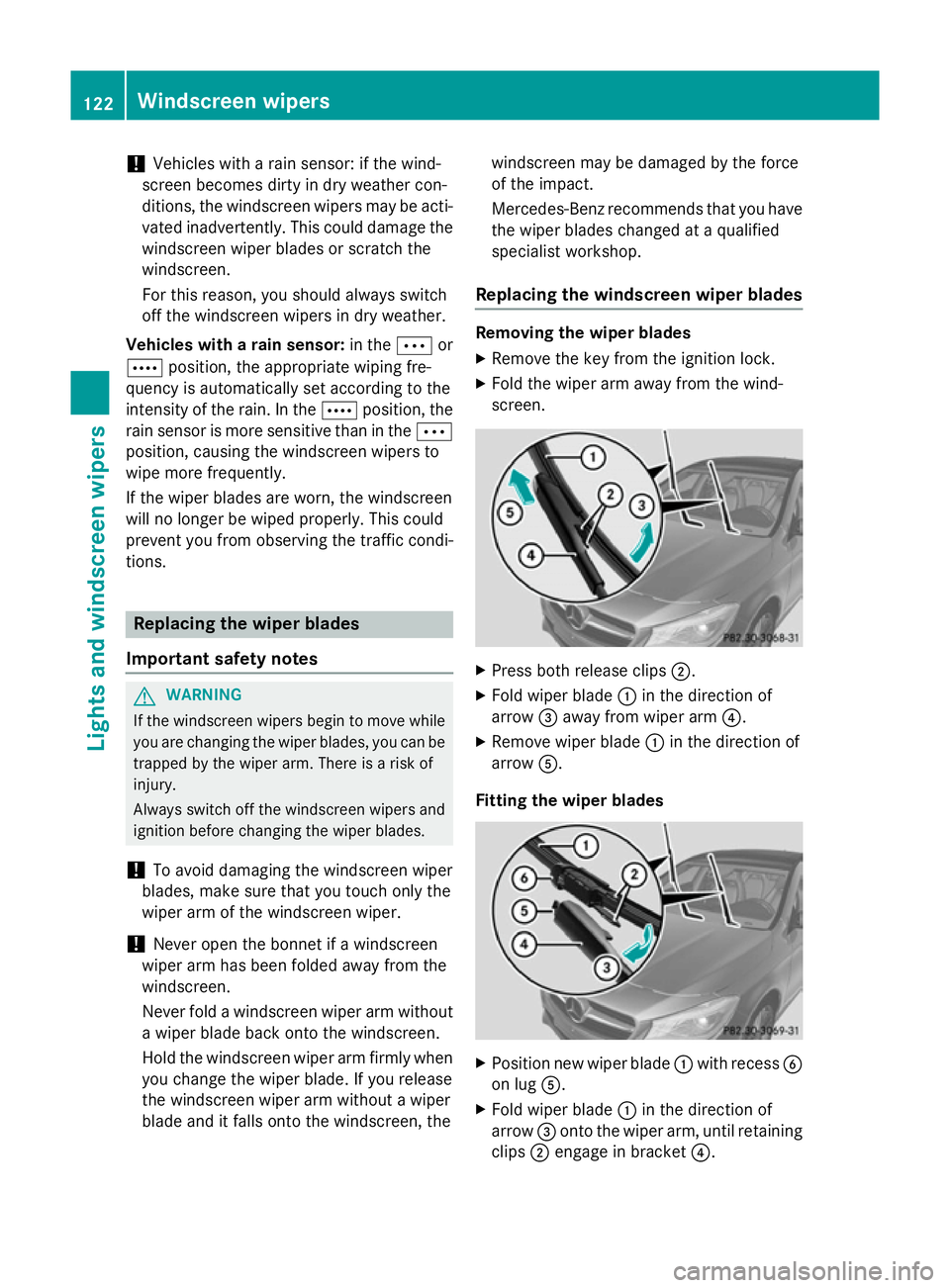
Replacing the windscreen wiper blades Removing the wiper blades
X Remove the key from the ignition lock.
X Fold the wiper arm away from the wind-
screen. X
Press both release clips ;.
X Fold wiper blade :in the direction of
arrow =away from wiper arm ?.
X Remove wiper blade :in the direction of
arrow A.
Fitting the wiper blades X
Position new wiper blade :with recess B
on lug A.
X Fold wiper blade :in the direction of
arrow =onto the wiper arm, until retaining
clips ;engage in bracket ?.122
Windscreen wipersLights and windscreen wipers
Page 146 of 373
Display messages
Possible causes/consequences and
M
MSolutions The auxiliary heating cannot be switched on or has switched itself
off.
There is too little fuel in the fuel tank.
X Refuel at the nearest filling station.
X Make another attempt to switch on the auxiliary heating using
the remote control. The auxiliary heating cannot be switched on or has switched itself
off.
The auxiliary heating is faulty.
X Have the auxiliary heating checked at a qualified specialist
workshop. Adjusting the air vents
Important safety notes
G
WARNING
Very hot or very cold air can flow from the air vents. This could result in burns or frostbite in the immediate vicinity of the air vents. There
is a risk of injury.
Make sure that all vehicle occupants always
maintain a sufficient distance to the air out-
lets. If necessary, redirect the airflow to
another area of the vehicle interior.
In order to ensure the direct flow of fresh air
through the air vents into the vehicle interior,
please observe the following notes:
R keep the air inlet between the windscreen
and the bonnet free of blockages, such as
ice, snow or leaves.
R never cover the vents or ventilation grilles
in the vehicle interior.
i Move the adjusters for the air vents ver-
tically or horizontally, to set the direction of the airflow.
i Optimal climate control function is ach-
ieved by opening the air vents fully and set-
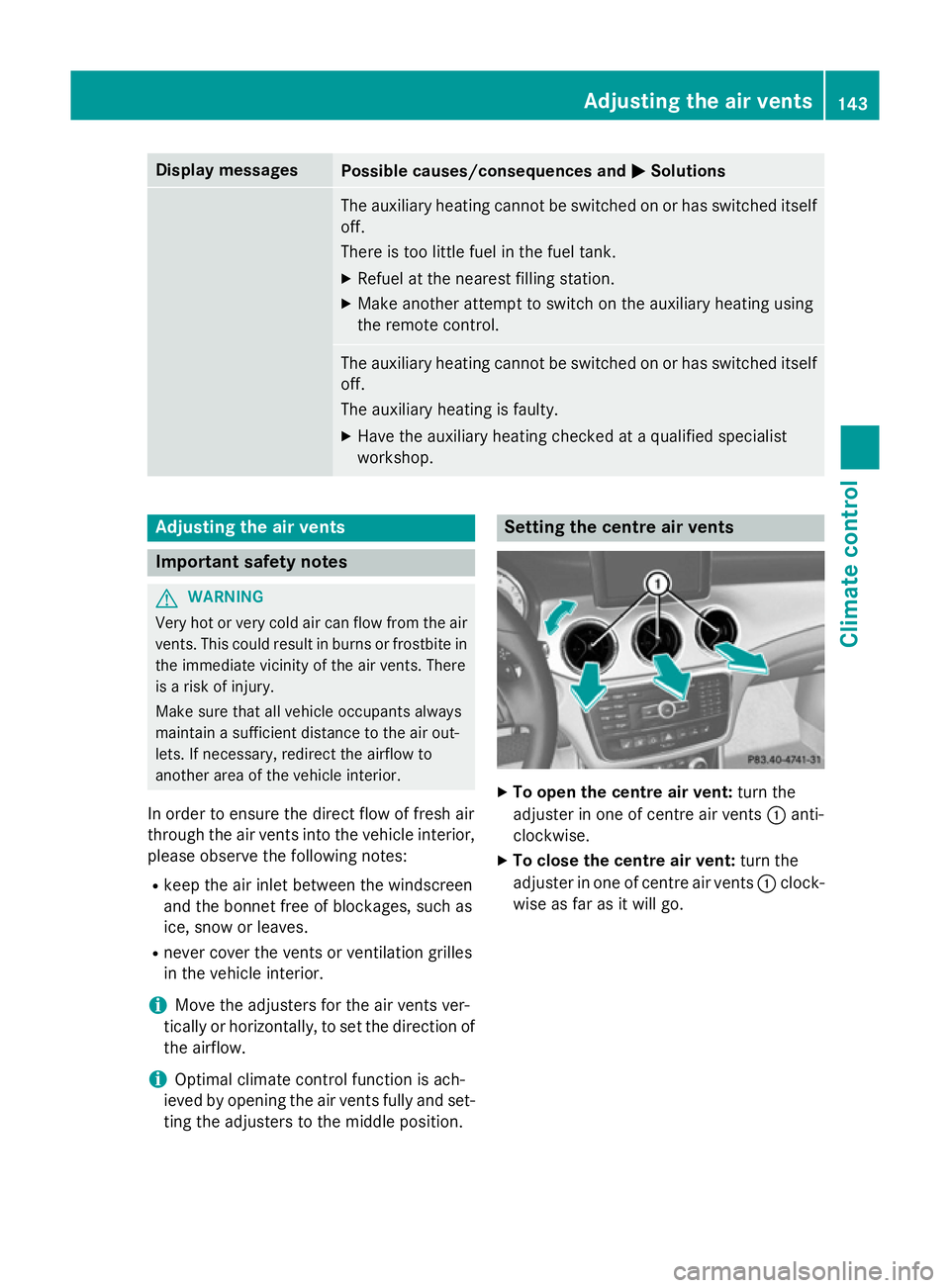
ting the adjusters to the middle position. Setting the centre air vents
X
To open the centre air vent: turn the
adjuster in one of centre air vents :anti-
clockwise.
X To close the centre air vent: turn the
adjuster in one of centre air vents :clock-
wise as far as it will go. Adjusting the air vents
143Climate control Z