2013 MERCEDES-BENZ CLA-CLASS phone
[x] Cancel search: phonePage 78 of 352
Useful information
i This Owner's Manual describes all mod-
els, series and optional equipment for your
vehicle that were available at the time of
going to press. National variations are pos-
sible. Note that your vehicle may not be
equipped with all of the functions descri-
bed. This is also the case for systems and
functions relevant to safety.
i Read the information on qualified special-
ist workshops: ( Y page 24).
Key
Important safety notes
GWARNING
If children are left unsupervised in the vehicle,
they could:
R open the doors, thus endangering other
people or road users.
R get out and disrupt traffic.
R operate the vehicle's equipment.
Additionally, children could set the vehicle in
motion if, for example, they:
R release the parking brake.
R shift the automatic transmission out of
parking position P.
R shift the manual transmission into neutral.
R start the engine.
There is a risk of an accident and injury.
When leaving the vehicle, always take the key
with you and lock the vehicle. Never leave
children or animals unattended in the vehicle.
Always keep the key out of reach of children.
GWARNING
If persons (particularly children) are exposed
to heat or cold for a prolonged period, there
is a risk of serious or even fatal injuries. Never
leave persons (particularly children) unatten-
ded in the vehicle.
GWARNING
If you attach heavy or large objects to the key,
the key could be unintentionally turned in the
ignition lock. This could cause the engine to
be switched off. There is a risk of an accident.
Do not attach any heavy or large objects to
the key. Remove any bulky keyrings before
inserting the key into the ignition lock.
! Keep the key away from strong magnetic
fields. Otherwise, the remote control func-
tion could be affected.
Strong magnetic fields can occur in the
vicinity of powerful electrical installations.
Do not keep the key:
R with electronic devices, e.g. a mobile
phone or another key
R with metallic objects, e.g. coins or metal
film
R inside metallic objects, e.g. a metal case
United Kingdom only:
GWARNING
When the double locks are activated, the
doors can no longer be opened from the
inside. People in the vehicle can no longer get
out, e.g. in hazardous situations. There is a
risk of injury.
Therefore, do not leave any people unsuper-
vised in the vehicle, particularly children, eld-
erly people or people in need of special assis-
tance. Do not activate the double lock when
people are in the vehicle.
If the vehicle has been locked with the key,
then the double lock function is activated as
standard. It is then not possible to open the
doors from inside the vehicle. You can deac-
tivate the double lock function by deactivat-
ing the interior motion sensor ( Y page 72).
The doors can then be opened from the inside
after the vehicle has been locked from the
outside. You can open the rear doors from
inside the vehicle if they are not secured by
the child-proof locks ( Y page 63). The anti-
theft alarm system is triggered if the door is
76KeyOpening and closing
ProCarManuals.com
Page 198 of 352
Rif you have adopted a sporty driving style
with high cornering speeds or high rates of
acceleration
R if you are predominantly driving slower
than 80 km/h or faster than 180 km/h
R if you are currently using COMAND Online
or making a telephone call with COMAND
Online
R if the time has been set incorrectly
R in active driving situations, such as when
you change lanes or change your speed
Warning and display messages in the
multifunction displayXActivate ATTENTION ASSIST using the on-
board computer ( Y page 218).
The À symbol appears in the assistance
display ( Y page 217).
If ATTENTION ASSIST is active, it will not
warn you until at least 20 minutes after
your journey has begun. You then hear an
intermittent warning tone twice and the
Attention Assist: Take a break!
message appears in the multifunction dis-
play.XIf necessary, take a break.XPress the a button to confirm the mes-
sage.
On long journeys, take regular breaks in good
time to allow yourself to rest properly. If you
do not take a break, you will be warned again
after 15 minutes at the earliest. This will only
happen if ATTENTION ASSIST still detects
typical indicators of fatigue or increasing lap-
ses in concentration.
ATTENTION ASSIST is reset and starts
assessing your tiredness again when you con-
tinue your journey if:
R you switch off the engine
R you take off your seat belt and open the
driver's door, e.g. for a change of drivers or
to take a break
Speed Limit Assist
General notes
Speed Limit Assist shows you detected speed
limits in the multifunction display. Data from
the navigation system is also used for this
purpose. If a traffic sign indicating a speed
limit or the end of a speed limit is detected,
it is shown in the multifunction display. If
Speed Limit Assist does not detect any traffic
signs, the speed limit from the digital road
map is taken and shown in the display.
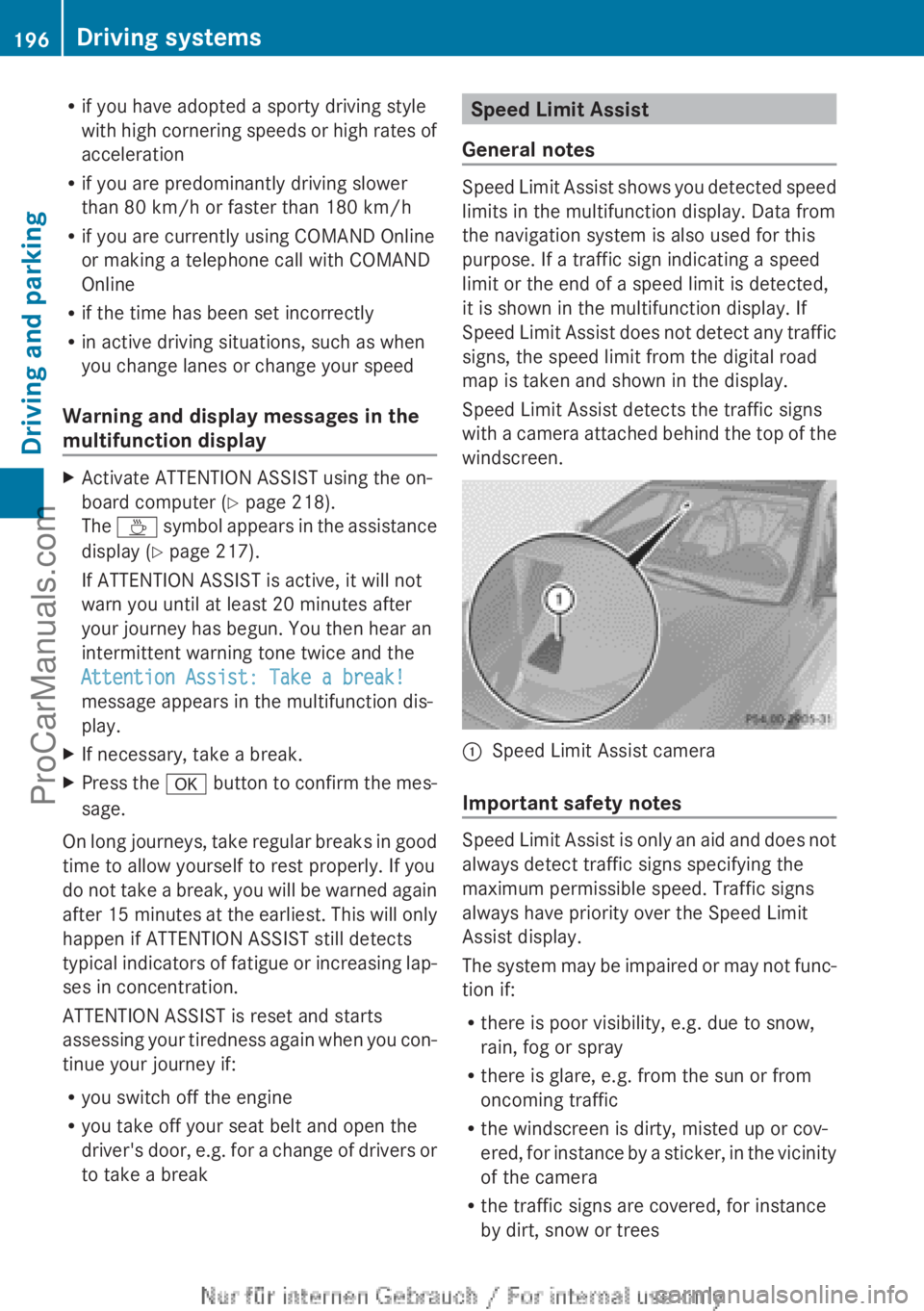
Speed Limit Assist detects the traffic signs
with a camera attached behind the top of the
windscreen.
:Speed Limit Assist camera
Important safety notes
Speed Limit Assist is only an aid and does not
always detect traffic signs specifying the
maximum permissible speed. Traffic signs
always have priority over the Speed Limit
Assist display.
The system may be impaired or may not func-
tion if:
R there is poor visibility, e.g. due to snow,
rain, fog or spray
R there is glare, e.g. from the sun or from
oncoming traffic
R the windscreen is dirty, misted up or cov-
ered, for instance by a sticker, in the vicinity
of the camera
R the traffic signs are covered, for instance
by dirt, snow or trees
196Driving systemsDriving and parking
ProCarManuals.com
Page 212 of 352
Left control panel=
;R Calls up the menu and menu bar9
:Press briefly:
R Scrolls through lists
R Selects a submenu or function
R In the Audio menu: selects a
stored station, an audio track or
a video scene
R In the Tel(telephone) menu:
switches to the phone book and
selects a name or telephone
number9
:Press and hold:
R In the Audio menu: selects the
previous/next station or selects
an audio track or a video scene
using rapid scrolling
R In the Tel (Telephone) menu,
starts rapid scrolling through the
phone bookaR Confirms selection/display mes-
sage
R In the Tel (telephone) menu:
switches to the telephone book
and starts dialling the selected
number
R In the Audio menu: stops the
station search function at the
desired station
Right control panel
~R Rejects or ends a call
R Exits telephone book/redial
memory6R Makes or accepts a call
R Switches to the redial memoryW
XR Adjusts the volume8RMute
Back button
%Press briefly:
R Back
R Switches off LINGUATRONIC;
see the separate operating
instructions
R Hides display messages/calls
up the last Trip menu function
used
R Exits the telephone book/redial
memory%Press and hold:
R Calls up the standard display in
the Trip menu
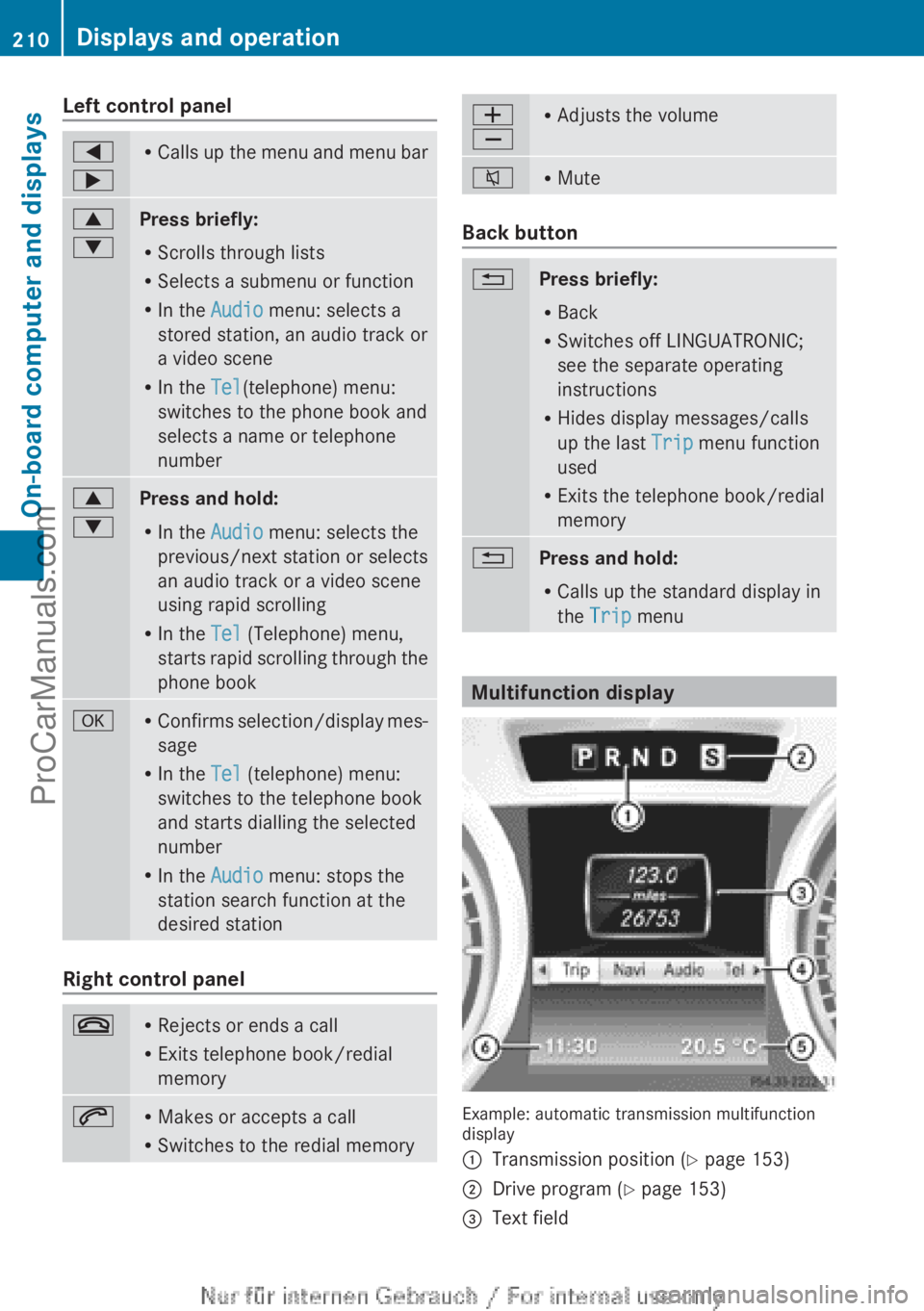
Multifunction display
Example: automatic transmission multifunction
display
:Transmission position ( Y page 153);Drive program ( Y page 153)=Text field210Displays and operationOn-board computer and displays
ProCarManuals.com
Page 213 of 352
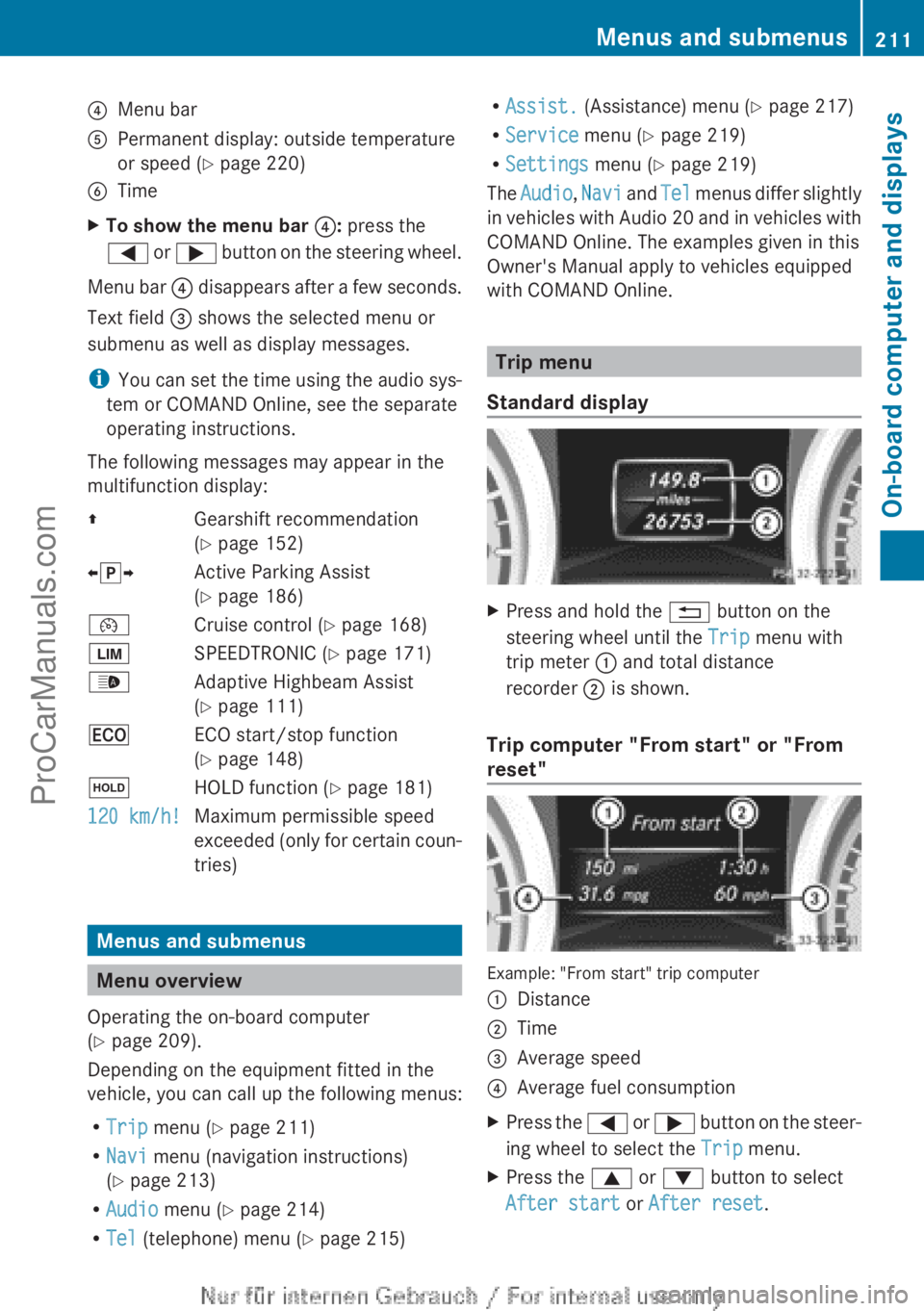
?Menu barAPermanent display: outside temperature
or speed ( Y page 220)BTimeXTo show the menu bar ?: press the
= or ; button on the steering wheel.
Menu bar ? disappears after a few seconds.
Text field = shows the selected menu or
submenu as well as display messages.
i You can set the time using the audio sys-
tem or COMAND Online, see the separate
operating instructions.
The following messages may appear in the
multifunction display:
ZGearshift recommendation
( Y page 152)Xj YActive Parking Assist
( Y page 186)¯Cruise control ( Y page 168)ÈSPEEDTRONIC ( Y page 171)_Adaptive Highbeam Assist
( Y page 111)¤ECO start/stop function
( Y page 148)ëHOLD function ( Y page 181)120 km/h!Maximum permissible speed
exceeded (only for certain coun-
tries)
Menus and submenus
Menu overview
Operating the on-board computer
( Y page 209).
Depending on the equipment fitted in the
vehicle, you can call up the following menus:
R Trip menu ( Y page 211)
R Navi menu (navigation instructions)
( Y page 213)
R Audio menu ( Y page 214)
R Tel (telephone) menu ( Y page 215)
R
Assist. (Assistance) menu ( Y page 217)
R Service menu (Y page 219)
R Settings menu (Y page 219)
The Audio , Navi and Tel menus differ slightly
in vehicles with Audio 20 and in vehicles with
COMAND Online. The examples given in this
Owner's Manual apply to vehicles equipped
with COMAND Online.
Trip menu
Standard display
XPress and hold the % button on the
steering wheel until the Trip menu with
trip meter : and total distance
recorder ; is shown.
Trip computer "From start" or "From
reset"
Example: "From start" trip computer
:Distance;Time=Average speed?Average fuel consumptionXPress the = or ; button on the steer-
ing wheel to select the Trip menu.XPress the 9 or : button to select
After start or After reset .Menus and submenus211On-board computer and displaysZProCarManuals.com
Page 217 of 352

Audio player or audio media operation
Example: CD changer display
:Current CD in the CD changer;Current track
Audio data from various audio devices or
media can be played, depending on the equip-
ment fitted in the vehicle.
XSwitch on the audio system or COMAND
Online and select audio CD, audio DVD or
MP3 mode; see the separate operating
instructions.XPress the = or ; button on the steer-
ing wheel to select the Audio menu.XTo select the next/previous track:
briefly press the 9 or : button.XTo select a track from the track list
(rapid scrolling): press and hold the
9 or : button until desired
track ; has been reached.
If you press and hold the 9 or : but-
ton, the rapid scrolling speed is increased.
Not all audio devices or media support this
function.
If track information is stored on the audio
device or medium, the multifunction display
will show the number and title of the track.
The current track does not appear in audio
AUX mode ( Auxiliary audio mode: external
audio source connected).
Video DVD operation
Example: DVD changer display
:Current DVD in the DVD changer;Current sceneXSwitch on COMAND Online and select
video DVD, see the separate operating
instructions.XPress the = or ; button on the steer-
ing wheel to select the Audio menu.XTo select the next or previous scene:
briefly press the 9 or : button.XTo select a scene from the scene list
(rapid scrolling): press and hold the
9 or : button until desired
scene ; has been reached.
Telephone menu
Introduction
GWARNING
Operating the integrated information systems
and communications equipment in the vehicle
while driving will distract you from traffic con-
ditions. You could then lose control of the
vehicle. There is a risk of an accident.
Only operate these devices if road traffic con-
ditions permit. If you are unsure about the
surrounding conditions, pull over to a safe
location and make entries only while the vehi-
cle is stationary.
When telephoning, you must observe the
legal requirements for the country in which
you are currently driving.
Menus and submenus215On-board computer and displaysZProCarManuals.com
Page 218 of 352
XSwitch on your mobile phone and audio
system or COMAND Online, see the sepa-
rate operating instructions.XPlace a mobile phone in the mobile phone
bracket ( Y page 278), or establish a Blue-
tooth ®
connection with the audio system
or COMAND Online (see the separate oper-
ating instructions).XPress the = or ; button on the steer-
ing wheel to select the Tel menu.
You will see one of the following display mes-
sages in the multifunction display:
R Please enter PIN: the mobile phone has
been placed in the mobile phone bracket
and the PIN has not been entered.
When you enter your PIN via the mobile
phone, LINGUATRONIC, the audio system
or COMAND Online, the mobile phone
searches for a network.
R Telephone ready or the name of the net-
work provider: the mobile phone has found
a network and is ready to receive.
R Telephone No service : there is no net-
work available or the mobile phone is
searching for a network.
i You can obtain further information about
suitable mobile phones and connecting
mobile phones via Bluetooth ®
:
R from any Mercedes Benz Service Centre
R on the Internet at: http://
www.mercedes-benz.com/connect
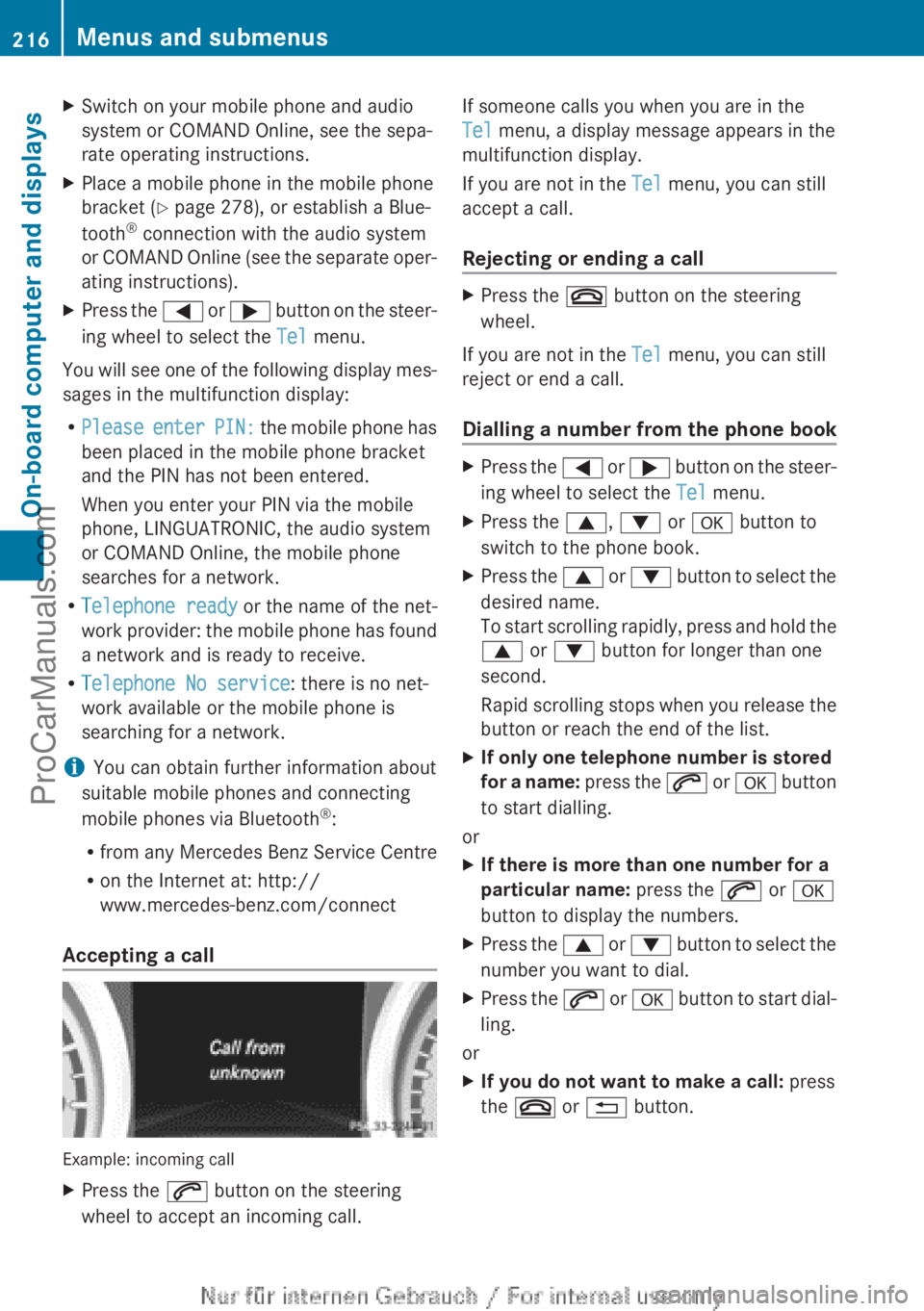
Accepting a call
Example: incoming call
XPress the 6 button on the steering
wheel to accept an incoming call.If someone calls you when you are in the
Tel menu, a display message appears in the
multifunction display.
If you are not in the Tel menu, you can still
accept a call.
Rejecting or ending a callXPress the ~ button on the steering
wheel.
If you are not in the Tel menu, you can still
reject or end a call.
Dialling a number from the phone book
XPress the = or ; button on the steer-
ing wheel to select the Tel menu.XPress the 9, : or a button to
switch to the phone book.XPress the 9 or : button to select the
desired name.
To start scrolling rapidly, press and hold the
9 or : button for longer than one
second.
Rapid scrolling stops when you release the
button or reach the end of the list.XIf only one telephone number is stored
for a name: press the 6 or a button
to start dialling.
or
XIf there is more than one number for a
particular name: press the 6 or a
button to display the numbers.XPress the 9 or : button to select the
number you want to dial.XPress the 6 or a button to start dial-
ling.
or
XIf you do not want to make a call: press
the ~ or % button.216Menus and submenusOn-board computer and displays
ProCarManuals.com
Page 256 of 352
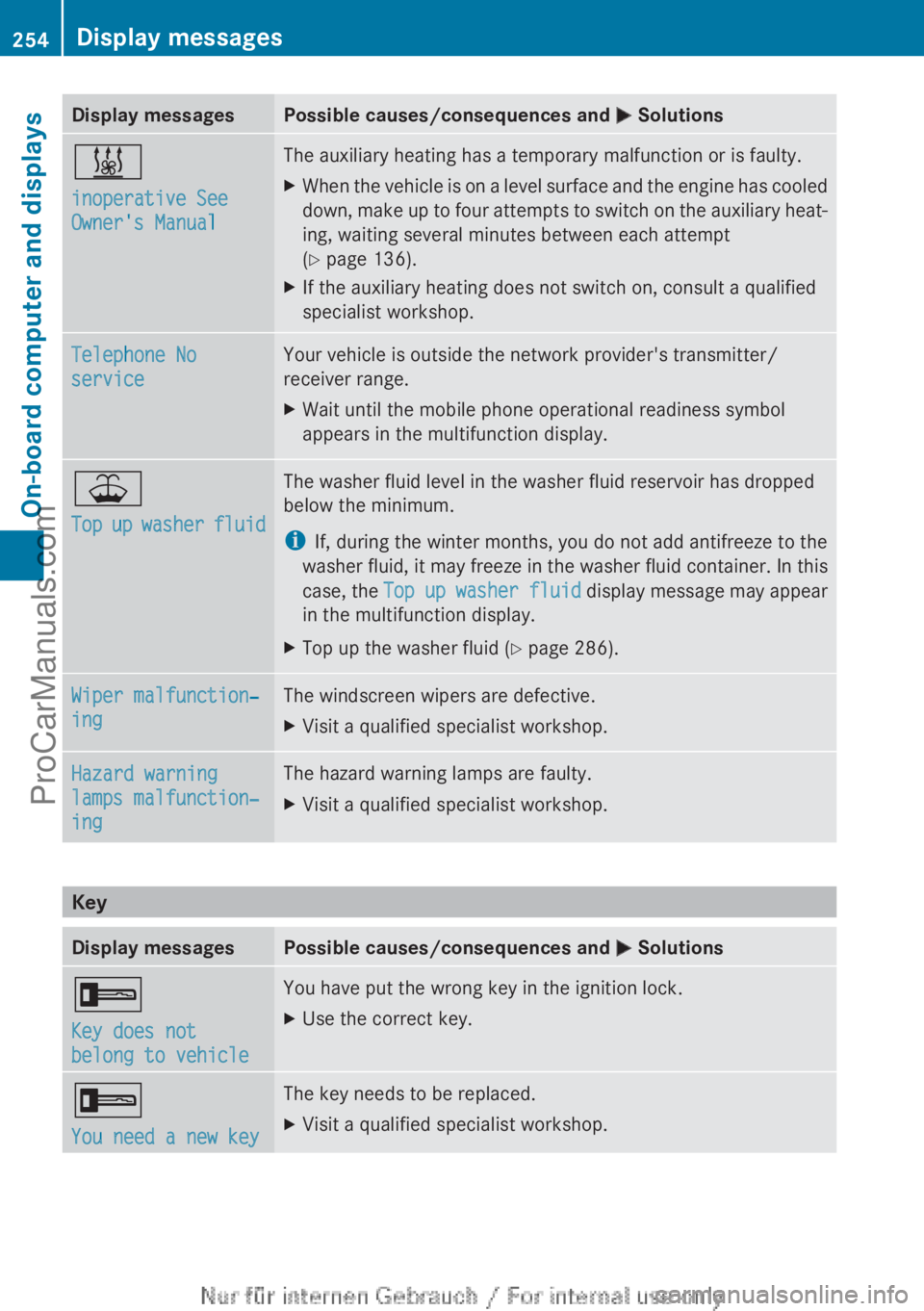
Display messagesPossible causes/consequences and M Solutions&
inoperative See
Owner's ManualThe auxiliary heating has a temporary malfunction or is faulty.XWhen the vehicle is on a level surface and the engine has cooled
down, make up to four attempts to switch on the auxiliary heat-
ing, waiting several minutes between each attempt
( Y page 136).XIf the auxiliary heating does not switch on, consult a qualified
specialist workshop.Telephone No
serviceYour vehicle is outside the network provider's transmitter/
receiver range.XWait until the mobile phone operational readiness symbol
appears in the multifunction display.¥
Top up washer fluidThe washer fluid level in the washer fluid reservoir has dropped
below the minimum.
i If, during the winter months, you do not add antifreeze to the
washer fluid, it may freeze in the washer fluid container. In this
case, the Top up washer fluid display message may appear
in the multifunction display.XTop up the washer fluid ( Y page 286).Wiper malfunction‐
ingThe windscreen wipers are defective.XVisit a qualified specialist workshop.Hazard warning
lamps malfunction‐
ingThe hazard warning lamps are faulty.XVisit a qualified specialist workshop.
Key
Display messagesPossible causes/consequences and M Solutions+
Key does not
belong to vehicleYou have put the wrong key in the ignition lock.XUse the correct key.+
You need a new keyThe key needs to be replaced.XVisit a qualified specialist workshop.254Display messagesOn-board computer and displays
ProCarManuals.com
Page 272 of 352

Stowage compartment/telephone com-
partment under the armrestXTo open: on vehicles with moveable armr-
ests, make sure that the armrest is in the
rearmost position.XPress button : and fold the armrest up.
i
Depending on the vehicle's equipment, a
USB port and an AUX-IN jack or a Media
Interface are installed in the stowage com-
partment. A Media Interface is a universal
interface for portable audio equipment, e.g.
for an iPod ®
or MP3 player (see the sepa-
rate Audio or COMAND Online operating
instructions).
Stowage compartment under the driver's
and front-passenger seat
GWARNING
If you exceed the maximum permitted load of
the stowage compartment, the cover is
unable to restrain the objects. Objects may
be thrown out of the stowage compartment
and hit vehicle occupants as a result. There is
a risk of injury, particularly in the event of
sudden braking or a sudden change in direc-
tion.
Always observe the maximum load of the
stowage compartment. Stow and secure
heavy objects in the boot.
The maximum permissible load of the stow-
age compartment is 1.2 kg.
XTo open: pull handle : up and fold
cover ; forwards.
i
On vehicles with a fire extinguisher
instead of a stowage compartment, the fire
extinguisher is installed under the driver's
seat.
Rear stowage compartments
Stowage compartment in the rear centre
console
XTo open: pull down the top of stowage
compartment : by the edge of the handle.
i
Depending on the vehicle's equipment,
there may be an open stowage space above
the stowage compartment.
270Stowage areasStowing and features
ProCarManuals.com