Page 65 of 474

LOCKING AND UNLOCKING
You can use the power door lock
control or the remote control to lock
and unlock your vehicle.
Power Door Locks
The power door lock control is on the
driver and front passenger door
panels.
Unlock
A
LockB
Door Lock Indicator
An LED on each door window trim will
light when you lock the door. It will
remain lit for up to 10 minutes after
you switch off the ignition. Switch Inhibitor
When you electronically lock your
vehicle, the power door lock switch
and interior trunk release switch will
no longer operate after 20 seconds.
You must unlock your vehicle with the
remote control or keyless keypad, or
switch the ignition on, to restore
function to these switches. You can
switch this feature on or off in the
information display. See General
Information (page 100).
Rear Door Unlocking and Opening
Pull the interior door release handle
twice to unlock and open the rear
door. The first pull unlocks the door
and the second pull will unlatch the
door.
Remote Control
You can use the remote control at any
time. The luggage compartment
release button only works when your
vehicle speed is less than 5 mph (8
km/h).
Unlocking the Doors (Two-Stage
Unlock) Press the button to unlock
the driver door.
Press the button again within
three seconds to unlock all doors. The
turn signals will flash.
62
LocksE138628 E138629
Page 68 of 474

The autolock feature repeats when:
•
you open then close any door while
the ignition is on and your vehicle
speed is 9 mph (15 km/h) or lower,
and
• your vehicle then attains a speed
greater than 12 mph (20 km/h).
Autounlock Feature
The autounlock feature will unlock all
the doors when:
• the ignition is on, all the doors are
closed, and your vehicle has been
in motion at a speed greater than
12 mph (20 km/h);
• your vehicle comes to a stop and
you switch the ignition off or to
accessory; and
• you open the driver door within 10
minutes of switching the ignition
off or to accessory.
Note: The doors will not autounlock if
you electronically lock your vehicle
after you switch the ignition off and
before you open the driver door.
Enabling or Disabling
Note: You can enable or disable the
autolock and autounlock features
independently of each other.
You can enable or disable these
features in the information display or
your authorized dealer can do it for
you. See General Information (page
100). Illuminated Entry
The interior lamps and select exterior
lamps will illuminate when you unlock
the doors with the remote entry
system.
The illuminated entry system will turn
off the lights if:
•
the ignition is on,
• you press the remote control lock
button, or
• after 25 seconds of illumination.
The lights will not turn off if:
• you turn them on with the dimmer
control, or
• any door is open.
Illuminated Exit
The interior lamps and select exterior
lamps will illuminate when all doors
are closed and you switch the ignition
off.
The lamps will turn off if all the doors
remain closed and:
• 25 seconds elapse
• you press the
START/STOP
button.
Battery Saver
If you leave the courtesy lamps, dome
lamps or headlamps on, the battery
saver will shut them off 10 minutes
after you switch the ignition off.
65
Locks
Page 71 of 474
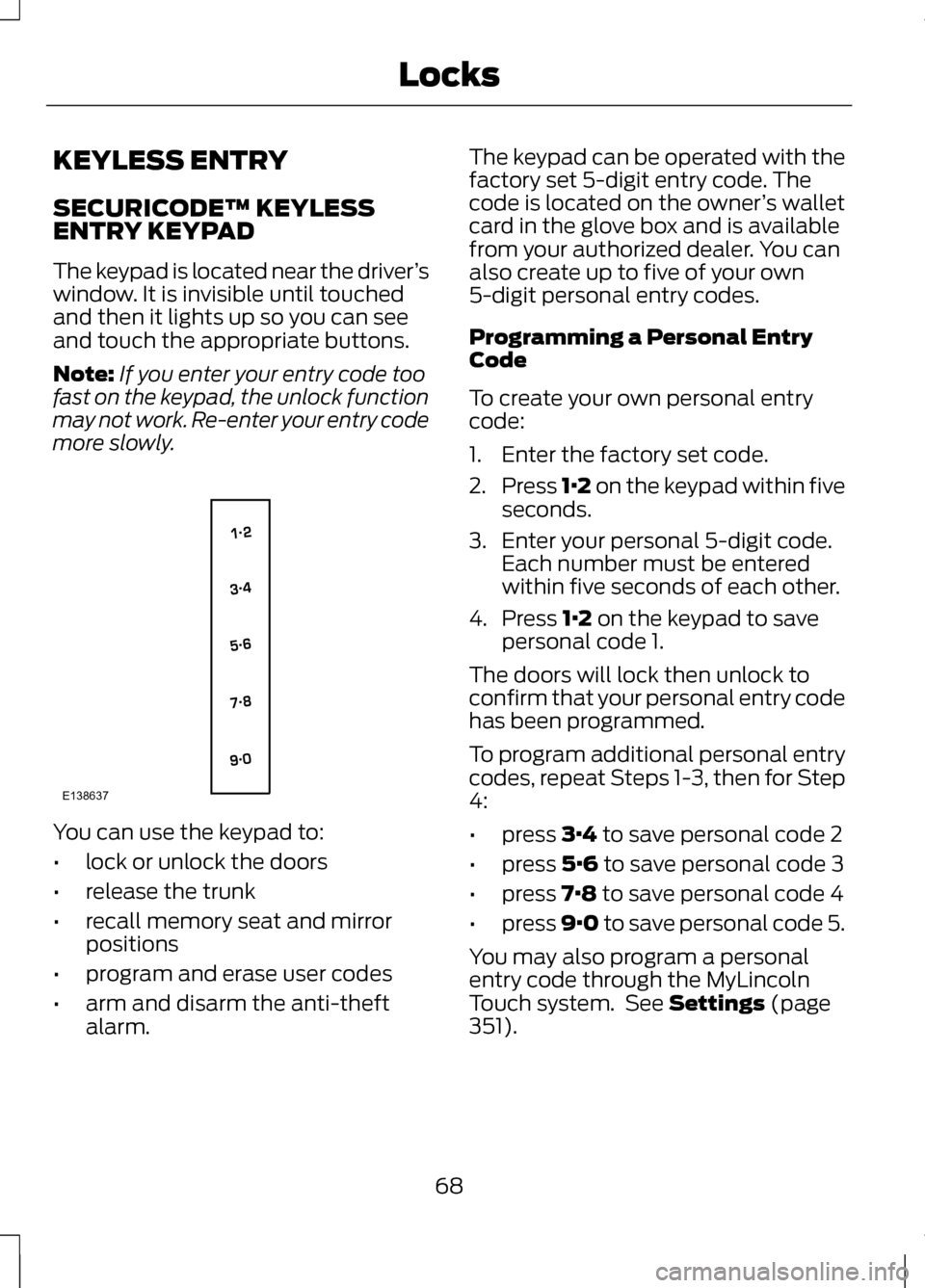
KEYLESS ENTRY
SECURICODE™ KEYLESS
ENTRY KEYPAD
The keypad is located near the driver
’s
window. It is invisible until touched
and then it lights up so you can see
and touch the appropriate buttons.
Note: If you enter your entry code too
fast on the keypad, the unlock function
may not work. Re-enter your entry code
more slowly. You can use the keypad to:
•
lock or unlock the doors
• release the trunk
• recall memory seat and mirror
positions
• program and erase user codes
• arm and disarm the anti-theft
alarm. The keypad can be operated with the
factory set 5-digit entry code. The
code is located on the owner
’s wallet
card in the glove box and is available
from your authorized dealer. You can
also create up to five of your own
5-digit personal entry codes.
Programming a Personal Entry
Code
To create your own personal entry
code:
1. Enter the factory set code.
2. Press 1·2 on the keypad within five
seconds.
3. Enter your personal 5-digit code. Each number must be entered
within five seconds of each other.
4. Press 1·2 on the keypad to save
personal code 1.
The doors will lock then unlock to
confirm that your personal entry code
has been programmed.
To program additional personal entry
codes, repeat Steps 1-3, then for Step
4:
• press
3·4 to save personal code 2
• press
5·6 to save personal code 3
• press
7·8 to save personal code 4
• press
9·0 to save personal code 5.
You may also program a personal
entry code through the MyLincoln
Touch system. See
Settings (page
351).
68
LocksE138637
Page 74 of 474
The handle is located inside the
luggage compartment either on the
luggage compartment door (lid) or
near the tail lamps. It is composed of
a material that will glow for hours in
darkness following brief exposure to
ambient light.
Pull the handle and push up on the
luggage compartment door (lid) to
open from within the luggage
compartment.
71
LocksE144403
Page 85 of 474
LIGHTING CONTROL
OffA
Parking lamps, instrument
panel lamps, license plate
lamps and tail lamps
B
Headlamps
C
High Beams Push the lever forward to switch the
high beams on.
Push the lever forward again or pull
the lever toward you to switch the
high beams off. Headlamp Flasher
Pull the lever toward you slightly and
release it to flash the headlamps.
AUTOLAMPS (IF EQUIPPED)
Note: It may be necessary to switch
your headlamps on manually in severe
weather conditions. The headlamps will switch on and off
automatically in low light situations
or during inclement weather.
82
LightingE142449 E130140 E142450 E142451
Page 86 of 474

The headlamps will remain on for a
period of time after you switch the
ignition off. You can adjust the time
delay using the information display
controls. See Information Displays
(page ?).
Note: If you switch autolamps on in
conjunction with autowipers, low beam
headlamps will illuminate
automatically when the rain sensor
activates the windshield wipers
continuously.
INSTRUMENT LIGHTING
DIMMER
Note: If you disconnect and connect
the battery, or fully discharge and
charge the battery, the illuminated
components will switch to the
maximum setting. Press repeatedly or press
and hold to dim.
A
Press repeatedly or press
and hold to brighten.
B HEADLAMP EXIT DELAY
After you switch the ignition off, you
can switch the headlamps on by
pulling the direction indicator lever
toward you. You will hear a short tone.
The headlamps will switch off
automatically after three minutes with
any door open or 30 seconds after the
last door has been closed. You can
cancel this feature by pulling the
direction indicator toward you again
or switching the ignition on.
DAYTIME RUNNING LAMPS
(IF EQUIPPED)
WARNING
Always remember to switch your
headlamps on in low light
situations or during inclement
weather. The system does not
activate the tail lamps and may not
provide adequate lighting during these
conditions. Failure to activate your
headlamps under these conditions
may result in a collision. The system switches the signature
lamps on in day light conditions.
To switch the system on, switch the
ignition on, and switch the lighting
control to the off, autolamp, or
parking lamp position.
83
LightingAB
A
E142452
Page 87 of 474

AUTOMATIC HIGH BEAM
CONTROL (IF EQUIPPED)
The system will automatically turn on
your high beams if it is dark enough
and no other traffic is present. When
it detects an approaching vehicle ’s
headlights, a preceding vehicle ’s tail
lamps or street lighting, the system
will turn off the high beams before
they distract other drivers. The low
beams remain on.
Note: If it appears that automatic
control of the high beams is not
functioning properly, check the
windshield in front of the camera for
blockage. A clear view of the road is
required for proper system operation.
Any windshield damage in the area of
the camera field-of-view should be
repaired.
Note: If a blockage is detected (e.g.
bird dropping, bug splatter, snow, or
ice) and no changes are observed, the
system will go into low beam mode
until the blockage is cleared. A
message may also appear in the
instrument cluster display noting the
front camera is blocked. Note:
Typical road dust, dirt and water
spots will not affect the automatic high
beam system ’s performance. However,
in cold or inclement weather
conditions, the automatic high beam
system's availability may be decreased.
If you want to change the beam state
independently of the system, you may
turn the high beams ON or OFF using
the multifunction switch lever.
Automatic control will resume when
conditions are correct.
Note: Modification of the vehicle ride
height (e.g. using much larger tires)
may degrade feature performance.
A camera sensor is centrally mounted
behind the windshield of the vehicle,
and monitors conditions continuously
to decide when to switch the high
beams off and on.
Once the system is active, the high
beams will switch on if:
• The ambient light level is low
enough that high beams are
needed.
• There is no traffic in front of the
vehicle.
• The vehicle speed is greater than
25 mph (40 km/h)
.
The high beams will switch off if:
• An approaching vehicle's
headlights or a preceding vehicle's
tail lamps are detected.
• Vehicle speed falls below
16 mph
(25 km/h).
• The ambient light level is high
enough that high beams are not
required.
84
Lighting
Page 88 of 474

•
Severe rain, snow, or fog is
detected.
• The camera is blocked.
Activating the System
Switch on the system using the
information display and autolamps.
See Information Displays (page ?).
See Autolamps (page 82). Turn the lighting control to the
autolamps position.
Manually Overriding the
System
Use the lever to switch between the
high beams and the low beams. Note:
This is a temporary override and
the system will return to automatic
operation after a short period.
To permanently deactivate the
system, use the information display
menu or turn the lighting control
switch from autolamps to headlamps.
DIRECTION INDICATORS Push the lever up or down to use the
direction indicators.
Note:
Tap the lever up or down to
make the direction indicators flash
three times to indicate a lane change.
INTERIOR LAMPS
The lamps will switch on when one of
the following conditions have been
met:
• You open any door.
• You press a remote control button.
• You touch switch A on the front
interior lamp.
85
LightingE142451 E130140 E130141

