2013 LINCOLN MKZ ECO mode
[x] Cancel search: ECO modePage 147 of 474
For questions or comments, please
contact HomeLink at
www.homelink.com or
1-800-355-3515.
Erasing the Function Button Codes
Note:
You cannot erase individual
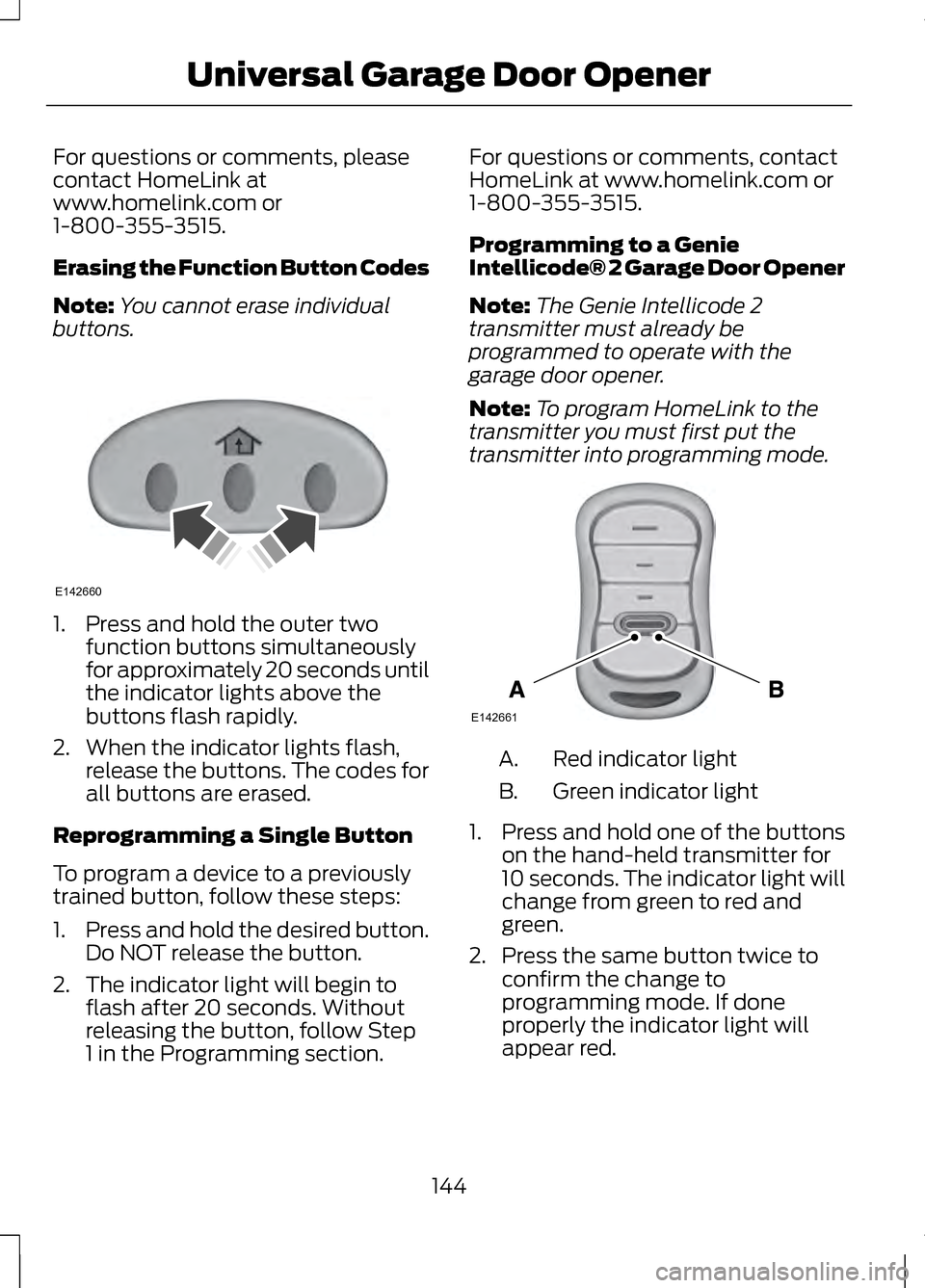
buttons. 1. Press and hold the outer two
function buttons simultaneously
for approximately 20 seconds until
the indicator lights above the
buttons flash rapidly.
2. When the indicator lights flash, release the buttons. The codes for
all buttons are erased.
Reprogramming a Single Button
To program a device to a previously
trained button, follow these steps:
1. Press and hold the desired button.
Do NOT release the button.
2. The indicator light will begin to flash after 20 seconds. Without
releasing the button, follow Step
1 in the Programming section. For questions or comments, contact
HomeLink at www.homelink.com or
1-800-355-3515.
Programming to a Genie
Intellicode® 2 Garage Door Opener
Note:
The Genie Intellicode 2
transmitter must already be
programmed to operate with the
garage door opener.
Note: To program HomeLink to the
transmitter you must first put the
transmitter into programming mode. Red indicator light
A.
Green indicator light
B.
1. Press and hold one of the buttons
on the hand-held transmitter for
10 seconds. The indicator light will
change from green to red and
green.
2. Press the same button twice to confirm the change to
programming mode. If done
properly the indicator light will
appear red.
144
Universal Garage Door OpenerE142660 E142661
Page 148 of 474

3. Hold the transmitter within 1–
3
inches (2 –8 centimeter) of the
button on the visor you want to
program.
4. Press and hold both the programmed Genie button on the
hand-held transmitter and the
button you want to program. The
indicator light on the visor will flash
rapidly when the programming is
successful.
Note: The Genie transmitter will
transmit for up to 30 seconds. If
HomeLink does not program within 30
seconds the Genie transmitter will need
to be pressed again. If the Genie
transmitter indicator light displays
green and red, release the button until
the indicator light turns off before
pressing the button again.
Once HomeLink has been
programmed successfully, the Genie
transmitter must be changed out of
program mode. To do this:
1. Press and hold the previously programmed Genie button on the
hand-held transmitter for 10
seconds. The indicator light will
change from red to red and green.
2. Press the same button twice to confirm the change. If done
correctly the indicator light will
turn green.
Programming HomeLink to the
Genie Intellicode Garage Door
Opener Motor
Note: You may need a ladder to
access the garage door opener motor. 1.
Press and hold the program button
on the garage door opener motor
until both blue indicator lights turn
on.
2. Release the program button. Only the smaller round indicator light
should be on.
3. Press and release the program button. The larger purple indicator
light will flash.
Note: The next two steps must be
completed in 30 seconds.
4. Press and release the Genie Intellicode 2 hand-held
transmitter ’s previously
programmed button. Both
indicator lights on the garage door
opener motor unit should now
flash purple.
5. Press and hold the previously programmed button on the visor
for 2 seconds. Repeat this step up
to 3 times until the garage door
moves.
Programming is now complete.
145
Universal Garage Door OpenerE142662
Page 149 of 474

Clearing a HomeLink Device
To erase programming from the three
HomeLink buttons press and hold the
two outer HomeLink buttons until the
indicator light begins to flash. The
indicator light will begin flashing in 10
to 20 seconds, at which time both
buttons should be released.
Programming has now been erased,
and the indicator light should blink
slowly to indicate the device is in train
mode when any of the three
HomeLink buttons are pressed.
FCC and RSS-210 Industry Canada
Compliance
This device complies with Part 15 of
the FCC Rules and with RSS-210 of
Industry Canada. Operation is subject
to the following two conditions: (1)
this device may not cause harmful
interference, and (2) this device must
accept any interference received,
including interference that may cause
undesired operation.
Changes or modifications to your
device not expressly approved by the
party responsible for compliance can
void the user
’s authority to operate
the equipment.
146
Universal Garage Door Opener
Page 153 of 474

GENERAL INFORMATION
If you disconnect the battery, your
vehicle may exhibit some unusual
driving characteristics for
approximately 5 miles (8 kilometers)
after you reconnect it. This is because
the engine management system must
realign itself with the engine. You can
disregard any unusual driving
characteristics during this period.
WARNINGS
Extended idling at high engine
speeds can produce very high
temperatures in the engine and
exhaust system, creating the risk of
fire or other damage. Do not park, idle or drive your
vehicle on dry grass or other dry
ground cover. The emission system
heats up the engine compartment and
exhaust system, creating the risk of
fire. Do not start the engine in a
closed garage or in other
enclosed areas. Exhaust fumes can
be toxic. Always open the garage door
before you start the engine. If you smell exhaust fumes inside
your vehicle, have your vehicle
checked by your authorized dealer
immediately. Do not drive your vehicle
if you smell exhaust fumes. The powertrain control system meets
all Canadian interference-causing
equipment standard requirements
regulating the impulse electrical field
or radio noise. When you start the engine, avoid
pressing the accelerator pedal before
and during operation. Only use the
accelerator pedal when you have
difficulty starting the engine.
KEYLESS STARTING
WARNING
The keyless starting system may
not function if the key is close to
metal objects or electronic devices
such as mobile phones. Note:
A valid key must be located
inside your vehicle to switch the ignition
on and start the engine.
Switching the Ignition On
(Accessory Mode) Press the START button once. It is
located on the instrument panel near
the steering wheel. All electrical
circuits and accessories are
operational and the warning lamps
and indicators illuminate.
Starting Your Vehicle
Carry out the following steps to start
your vehicle:
1. Fully press the brake pedal.
150
Starting and Stopping the EngineE146431
Page 170 of 474

The message Stay in Neutral mode
engaged will appear in the
information display screen when the
vehicle has entered Stay in Neutral
mode.
Note: During this mode the
N button
will flash continuously and the
instrument cluster will display N as the
selected gear.
Exiting Stay in Neutral mode
To disable Stay in Neutral mode put
the vehicle in another gear. See the
Putting the Vehicle in Gear
for
instructions on how to do this.
Entering a Carwash
Note: Always put the vehicle in Stay
in Neutral mode when entering an
automatic car wash. Failure to do this
could result in vehicle damage that
may not be covered by warranty.
D (Drive)
The normal driving position for the
best fuel economy.
S (Sport)
Putting the vehicle in
S (Sport): •
Provides additional engine braking
and extends lower gear operation
to enhance performance for uphill
climbs, hilly terrain or mountainous
areas. This will increase engine
RPM during engine braking.
• Provides additional lower gear
operation through the automatic
transmission shift strategy.
• Gears are selected more quickly
and at higher engine speeds.
SelectShift Automatic®
Transmission
Your SelectShift automatic
transmission gives you the ability to
manually change gears if you'd like.
Paddle Shifters
The paddle shifters allow you to shift
gears quickly, without taking your
hands off the steering wheel.
Temporary manual control is provided
when pulling the paddles with the
vehicle in the
D (Drive). The system
will determine when temporary
manual control is no longer desired
and reverts back to automatic control.
Extensive manual control can be
achieved by pressing the
S (Sport)
button. The system will stay in manual
control until the vehicle is put in
another gear.
• Pull the right paddle (+) to upshift.
• Pull the left paddle (
–) to
downshift.
167
Transmission
Page 174 of 474

USING ALL-WHEEL DRIVE
All-wheel drive uses all four wheels
to power the vehicle. This increases
traction, enabling you to drive over
terrain and road conditions that a
conventional two-wheel drive vehicle
cannot. The AWD system is active all
the time and requires no input from
the operator.
Note:
Your AWD vehicle is not
intended for off-road use. The AWD
feature gives your vehicle some limited
off-road capabilities in which driving
surfaces are relatively level,
obstruction-free and otherwise similar
to normal on-road driving conditions.
Operating your vehicle under other than
those conditions could subject the
vehicle to excessive stress which might
result in damage which is not covered
under your warranty.
Note: A warning message will be
displayed in the information display
when an AWD system fault is present
See Information Messages (page 105).
An AWD system fault will cause the
AWD system to default to front-wheel
drive only mode. When this warning
message is displayed, have your vehicle
serviced at an authorized dealer Note:
A warning message will be
displayed in the information display if
the AWD system has overheated See
Information Messages (page 105).
This condition may occur if the vehicle
was operated in extreme conditions
with excessive wheel slip, such as deep
sand. To resume normal AWD function
as soon as possible, stop the vehicle in
a safe location and stop the engine for
at least 10 minutes. After the engine
has been restarted and the AWD
system has adequately cooled, the
warning message will turn off and
normal AWD function will return.
Do not use a spare tire of a different
size other than the tire provided. If the
mini-spare tire is installed, the AWD
system may disable automatically
and enter front-wheel drive only mode
to protect driveline components. This
condition will be indicated by a
warning in the information display
See
Information Messages (page
105). If there is a warning message in
the information display from using the
spare tire, this indicator should turn
off after reinstalling the repaired or
replaced normal road tire and cycling
the ignition off and on. It is
recommended to reinstall the repaired
or replaced road tire as soon as
possible. Major dissimilar tire sizes
between the front and rear axles
could cause the AWD system to stop
functioning and default to front-wheel
drive or damage the AWD system.
171
All-Wheel Drive
(If Equipped)
Page 215 of 474
Why does the vehicle not come back into the middle of the lane always, as
expected, in the Aid or Aid + Alert mode?
High cross winds
Large road crown
Rough roads, grooves, shoulder drop-offs
Heavy uneven loading of the vehicle or improper tire inflation pressure
If the tires have been exchanged (including snow tires), or the suspension has
been modified
BLIND SPOT MONITOR
Blind Spot Information System
(BLIS®) with Cross Traffic
Alert (If Equipped) WARNING
To help avoid injuries, NEVER use
the BLIS as a replacement for
using the interior and exterior mirrors
and looking over your shoulder before
changing lanes. BLIS is not a
replacement for careful driving and
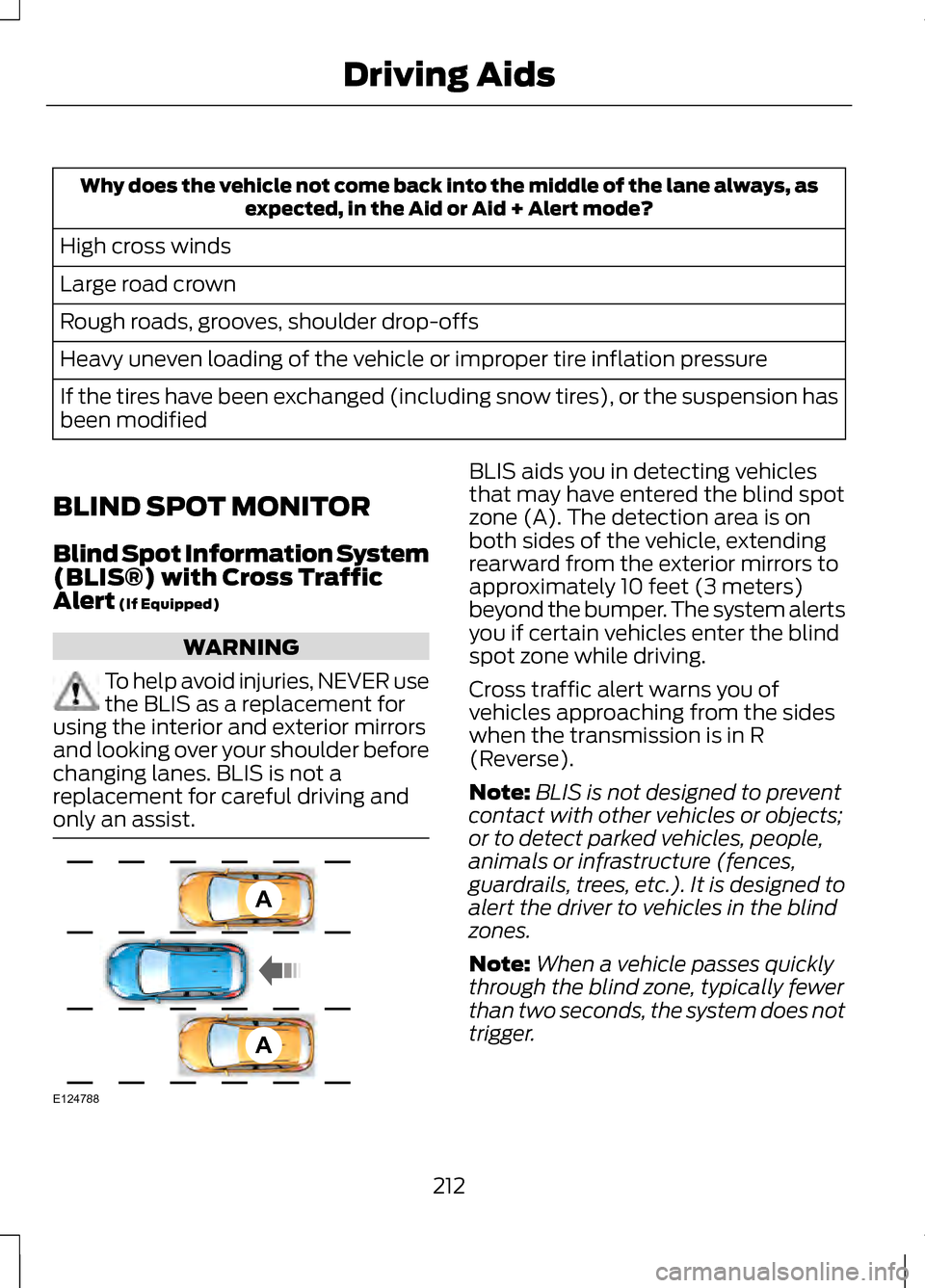
only an assist. BLIS aids you in detecting vehicles
that may have entered the blind spot
zone (A). The detection area is on
both sides of the vehicle, extending
rearward from the exterior mirrors to
approximately 10 feet (3 meters)
beyond the bumper. The system alerts
you if certain vehicles enter the blind
spot zone while driving.
Cross traffic alert warns you of
vehicles approaching from the sides
when the transmission is in R
(Reverse).
Note:
BLIS is not designed to prevent
contact with other vehicles or objects;
or to detect parked vehicles, people,
animals or infrastructure (fences,
guardrails, trees, etc.). It is designed to
alert the driver to vehicles in the blind
zones.
Note: When a vehicle passes quickly
through the blind zone, typically fewer
than two seconds, the system does not
trigger.
212
Driving AidsA
A
E124788
Page 235 of 474

We recommend using a wheel lift and
dollies or flatbed equipment. Do not
tow with a slingbelt. Ford Motor
Company has not approved a
slingbelt towing procedure. If towed
incorrectly, or by any other means,
vehicle damage may occur.
Ford Motor Company produces a
towing manual for all authorized tow
truck operators. Have your tow truck
operator refer to this manual for
proper hook-up and towing
procedures for your vehicle.
It is acceptable to tow a front-wheel
drive (FWD) vehicle from the front if
using proper wheel lift equipment to
raise the front wheels off the ground.
The rear wheels can remain on the
ground when towed in this fashion.
FWD vehicles can also be towed from
the rear using wheel lift equipment;
however, the front wheels must be
placed on a dolly to prevent damage
to the transmission.
It is required to tow an all-wheel drive
(AWD) vehicle with a wheel lift and
dollies or flatbed equipment, with all
the wheels off the ground, to prevent
damage to the transmission, AWD
system or vehicle.
TOWING THE VEHICLE ON
FOUR WHEELS
Emergency Towing
You can flat-tow (all wheels on the
ground, regardless of the
powertrain/transmission
configuration) your disabled vehicle
(without access to wheel dollies,
car-hauling trailer, or flatbed transport
vehicle) under the following
conditions:
•
Your vehicle is facing forward so
you tow it in a forward direction.
• You place the transmission in
position N. If you cannot place the
transmission in position N, you
may need to override it. See
Transmission
(page 165).
• Maximum speed is 35 mph (56
km/h).
• Maximum distance is 50 miles (80
kilometers).
Recreational Towing
Note: Put your climate control system
in recirculated air mode to prevent
exhaust fumes from entering the
vehicle. See
Climate Control (page
126).
Follow these guidelines if you have a
need for recreational (RV) towing. An
example of recreational towing would
be towing your vehicle behind a
motorhome. These guidelines are to
make sure you do not damage the
transmission during towing.
232
Towing