2013 LINCOLN MKZ radio
[x] Cancel search: radioPage 127 of 474

Note:
The MyLincoln Touch ™ system
controls most of the audio features.
See Entertainment (page 361). CD slot:
Insert a CD.
A
Eject:
Eject a CD.
B
TUNE +/-:
In radio mode, select a frequency band and press one of
the TUNE buttons. The system stops at the first station it finds in that
direction. In SIRIUS mode, select the previous or next channel. If a
specific category is selected, (Jazz, Rock, News, etc.), use the TUNE
buttons find to the previous or next channel in the selected category.
C
Volume:
Swipe your finger across bar to adjust the volume level on
your system.
D
Power:
Switch the audio system on and off by pressing the button.
E
Seek/Fast Forward/Reverse:
Press to go to the previous or next
track or available radio station. Press and hold to either reverse or fast
forward through the current track or to quickly reverse or advance
through the radio band in individual increments.
F
124
Audio SystemE146318
Page 145 of 474
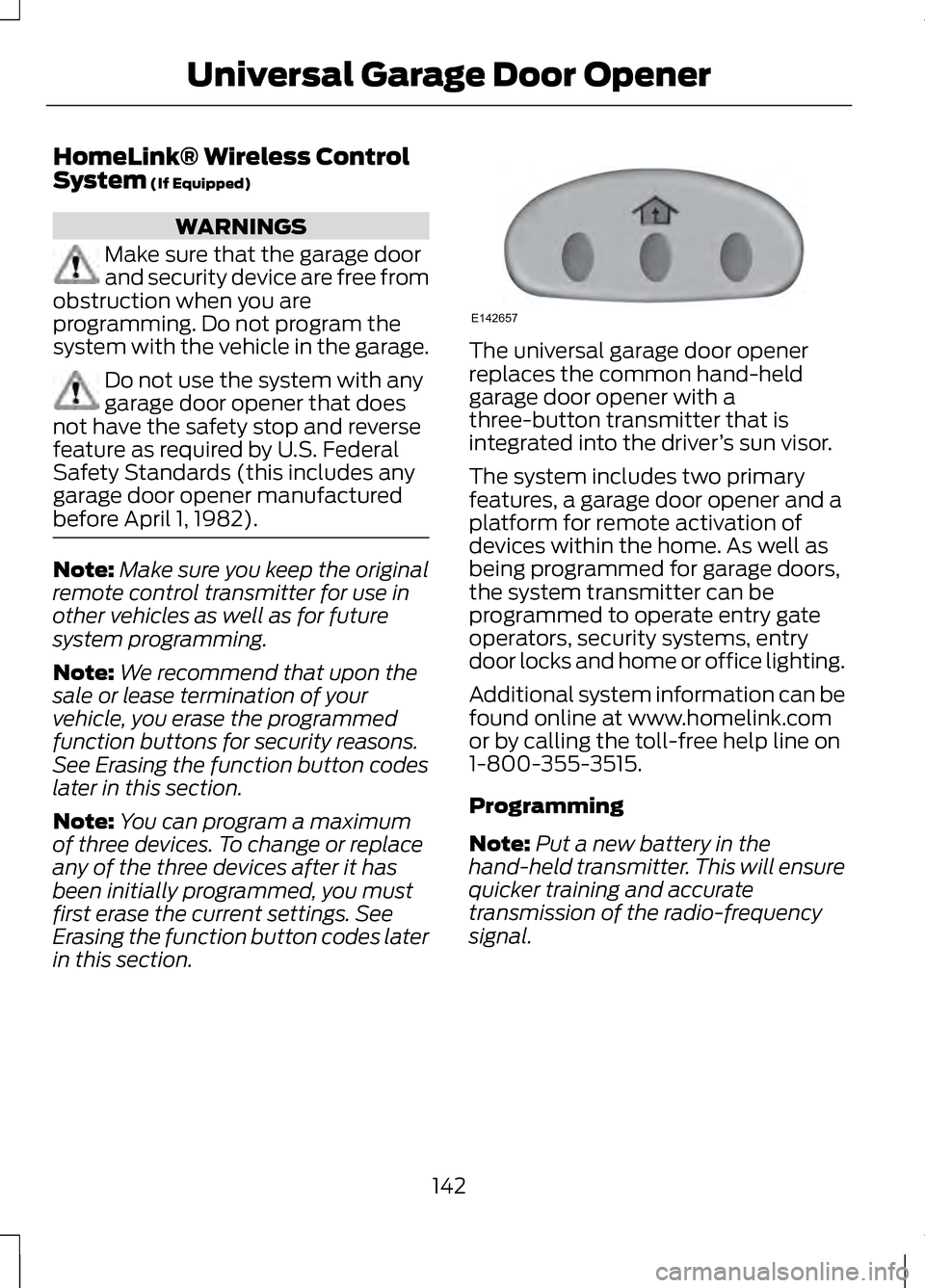
HomeLink® Wireless Control
System (If Equipped)
WARNINGS
Make sure that the garage door
and security device are free from
obstruction when you are
programming. Do not program the
system with the vehicle in the garage. Do not use the system with any
garage door opener that does
not have the safety stop and reverse
feature as required by U.S. Federal
Safety Standards (this includes any
garage door opener manufactured
before April 1, 1982). Note:
Make sure you keep the original
remote control transmitter for use in
other vehicles as well as for future
system programming.
Note: We recommend that upon the
sale or lease termination of your
vehicle, you erase the programmed
function buttons for security reasons.
See Erasing the function button codes
later in this section.
Note: You can program a maximum
of three devices. To change or replace
any of the three devices after it has
been initially programmed, you must
first erase the current settings. See
Erasing the function button codes later
in this section. The universal garage door opener
replaces the common hand-held
garage door opener with a
three-button transmitter that is
integrated into the driver
’s sun visor.
The system includes two primary
features, a garage door opener and a
platform for remote activation of
devices within the home. As well as
being programmed for garage doors,
the system transmitter can be
programmed to operate entry gate
operators, security systems, entry
door locks and home or office lighting.
Additional system information can be
found online at www.homelink.com
or by calling the toll-free help line on
1-800-355-3515.
Programming
Note: Put a new battery in the
hand-held transmitter. This will ensure
quicker training and accurate
transmission of the radio-frequency
signal.
142
Universal Garage Door OpenerE142657
Page 146 of 474

Note:
During programming, the
hand-held transmitter may stop
transmitting. If this occurs press and
hold the function button on the visor
while you press and release the
hand-held transmitter every two
seconds. The indicator light will flash
slowly and then rapidly once the radio
frequency signal is accepted. 1. Switch the ignition on.
2. Hold the garage door hand-held
transmitter 1– 3 inches (2–8
centimeters) away from the
button you want to program.
3. Press and hold both the button on
the visor you want to program and
the hand-held transmitter button
until the indicator light on the visor
changes from flashing slowly to
rapidly, then release.
4. Press and hold the function button
you programmed for 5 seconds,
then release. You may need to do
this twice to activate the door. If
your garage door does not operate,
observe the indicator light.
If the indicator light stays on,
programming is complete. Press and
release the programmed button to
activate the door. If the indicator light on the visor
flashes rapidly for two seconds then
turns to a constant light, follow the
steps below.
Note:
You may need a ladder to reach
the unit and you may need to remove
the cover or lamp lens. 1. Press the learn button on the
garage door opener motor.
Note: You will have 30 seconds to
complete the next step.
2. Return to your vehicle. 3.
Press and hold the function button
you want to program on the visor
for 2 seconds, then release. Repeat
this step. Depending on the brand
of garage door opener you may
need to repeat this sequence a
third time.
To program additional buttons repeat
steps one through four.
143
Universal Garage Door OpenerE142658 E142659 E142658
Page 153 of 474

GENERAL INFORMATION
If you disconnect the battery, your
vehicle may exhibit some unusual
driving characteristics for
approximately 5 miles (8 kilometers)
after you reconnect it. This is because
the engine management system must
realign itself with the engine. You can
disregard any unusual driving
characteristics during this period.
WARNINGS
Extended idling at high engine
speeds can produce very high
temperatures in the engine and
exhaust system, creating the risk of
fire or other damage. Do not park, idle or drive your
vehicle on dry grass or other dry
ground cover. The emission system
heats up the engine compartment and
exhaust system, creating the risk of
fire. Do not start the engine in a
closed garage or in other
enclosed areas. Exhaust fumes can
be toxic. Always open the garage door
before you start the engine. If you smell exhaust fumes inside
your vehicle, have your vehicle
checked by your authorized dealer
immediately. Do not drive your vehicle
if you smell exhaust fumes. The powertrain control system meets
all Canadian interference-causing
equipment standard requirements
regulating the impulse electrical field
or radio noise. When you start the engine, avoid
pressing the accelerator pedal before
and during operation. Only use the
accelerator pedal when you have
difficulty starting the engine.
KEYLESS STARTING
WARNING
The keyless starting system may
not function if the key is close to
metal objects or electronic devices
such as mobile phones. Note:
A valid key must be located
inside your vehicle to switch the ignition
on and start the engine.
Switching the Ignition On
(Accessory Mode) Press the START button once. It is
located on the instrument panel near
the steering wheel. All electrical
circuits and accessories are
operational and the warning lamps
and indicators illuminate.
Starting Your Vehicle
Carry out the following steps to start
your vehicle:
1. Fully press the brake pedal.
150
Starting and Stopping the EngineE146431
Page 187 of 474

PARKING AID (IF EQUIPPED)
WARNINGS
To help avoid personal injury,
please read and understand the
limitations of the system as contained
in this section. Sensing is only an aid
for some (generally large and fixed)
objects when moving in reverse on a
flat surface at parking speeds. Traffic
control systems, inclement weather,
air brakes, and external motors and
fans may also affect the function of
the sensing system; this may include
reduced performance or a false
activation. To help avoid personal injury,
always use caution when in R
(Reverse) and when using the sensing
system. This system is not designed to
prevent contact with small or
moving objects. The system is
designed to provide a warning to
assist the driver in detecting large
stationary objects to avoid damaging
the vehicle. The system may not
detect smaller objects, particularly
those close to the ground. Certain add-on devices such as
large trailer hitches, bike or
surfboard racks and any device that
may block the normal detection zone
of the system, may create false beeps. Note:
Keep the sensors, located on the
bumper or fascia, free from snow, ice
and large accumulations of dirt. If the
sensors are covered, the system ’s
accuracy can be affected. Do not clean
the sensors with sharp objects.
Note: If your vehicle sustains damage
to the bumper or fascia, leaving it
misaligned or bent, the sensing zone
may be altered causing inaccurate
measurement of obstacles or false
alarms.
Note: If your vehicle is equipped with
MyKey®, it is possible to prevent
turning the sensing system off. See
MyKey®
(page 58).
The sensing system warns the driver
of obstacles within a certain range of
the bumper area. The system turns on
automatically whenever the ignition
is switched on.
When receiving a detection warning,
the radio volume is reduced to a
predetermined level. After the warning
goes away, the radio volume returns
to the previous level.
The system can be switched off
through the information display menu
or from the pop-up message that
appears once the transmission is
shifted into
R. See General
Information (page 100).
If a fault is present in the system, a
warning message appears in the
information display and does not
allow the driver to switch the faulted
system on. See
Information
Messages (page 105).
184
Parking Aids
Page 189 of 474

Coverage area of up to 27
inches (70 centimeters) from
the front of the vehicle and
about 6–
14 inches (15– 35
centimeters) to the side of
the front end of the vehicle.
Refer to the reverse sensing
section for details on
coverage area.
A
The system sounds an audible
warning when obstacles are near
either bumper in the following
manner:
• Objects detected by the front
sensors are indicated by a
high-pitched tone from the front
radio speakers.
• Objects detected by the rear
sensors are indicated by a lower
pitched tone from the rear radio
speakers. •
The sensing system reports the
obstacle which is closest to the
front or rear of the vehicle. For
example, if an obstacle is 24
inches (60 centimeters) from the
front of the vehicle and, at the
same time, an obstacle is only 16
inches (40 centimeters) from the
rear of the vehicle, the lower
pitched tone sounds.
• An alternating warning sounds
from the front and rear if there are
objects at both bumpers that are
closer than 10 inches (25
centimeters).
For specific information on the reverse
sensing portion of the system, refer to
that section.
ACTIVE PARK ASSIST (IF
EQUIPPED) WARNING
This system is designed to be a
supplementary park aid. It may
not work in all conditions and is not
intended to replace the driver ’s
attention and judgment. The driver is
responsible for avoiding hazards and
maintaining a safe distance and
speed, even when the system is in use. Note:
The driver is always responsible
for controlling the vehicle, supervising
the system and intervening if required.
Note: The sensors may not detect
objects in heavy rain or other conditions
that cause disruptive reflections.
186
Parking AidsE130382
A
Page 197 of 474

Selectable settings for this feature are
OFF, Level 1, Level 2 or Level 3. Press
the up and down arrows to change
the view. The selection level appears
between the buttons (i.e. Level 1). The
default setting for the manual zoom
is OFF.
Rear Camera Delay
When shifting the transmission out of
R (Reverse) and into any gear other
than P (Park), the camera image
remains in the display until the vehicle
speed reaches 5 mph (8 km/h). This
occurs when the rear camera delay
feature is on, or until a radio button is
selected.
Selectable settings for this feature are
ON and OFF. The default setting for
the rear camera delay is OFF.
194
Parking Aids
Page 264 of 474

Protected components
Fuse amp rating
Fuse or relay
number
Passenger airbag disabled indicator,
Transmission range
5A
2
19
Adaptive headlamps
5A 2
20
Humidity and in-car temperature, Rear
climate seats
5A
2
21
Occupant classification sensor
5A 2
22
Delayed accessory (power inverter
logic, moonroof logic)
10A
1
23
Central lock/unlock
30A 1
24
Driver's door (window, mirror)
30A 1
25
Front passenger's door (window,
mirror)
30A
1
26
Moonroof
30A 1
27
THX amplifier
20A 1
28
Rear driver side door (window)
30A 1
29
Rear passenger side door (window)
30A 1
30
Not used (spare)
15A 1
31
GPS, Voice control, Display, Adaptive
cruise control, Radio frequency
receiver
10A
1
32
Radio, Active noise control
20A 1
33
Run/start bus (fuse #19, 20, 21, 22, 35,
36, 37, circuit breaker)
30A
1
34
Restraints control module
5A 1
35
261
Fuses