Page 351 of 474

Voice Settings Using Voice Commands
"Phone candidate lists off""Media candidate lists on"
"Media candidate lists off" "Help"
Using Voice Commands with the
Touchscreen Options
Your voice system has a dual mode
feature which allows you to switch
between using voice commands and
making on-screen selections. This is
most often available when using
navigation.
On-screen buttons are outlined in blue
to indicate the selections that are part
of the dual mode feature. For
example, if while you are in a voice
session rather than saying the
command "Enter street name" to
change the field, you can press Street
and the voice session does not end.
Instead, the voice system changes to
the Street field and asks you to say
the street name. The buttons not
outlined in blue cannot be used as
voice commands; if they are touched
during a voice session, the voice
session is canceled. For example, you can choose from the
following on the Navigation home
screen:
•
My Home
• Favorites
• Previous Destinations
• Point of Interest (POI)
• Emergency
• Street Address
• Intersection
• Cancel Route.
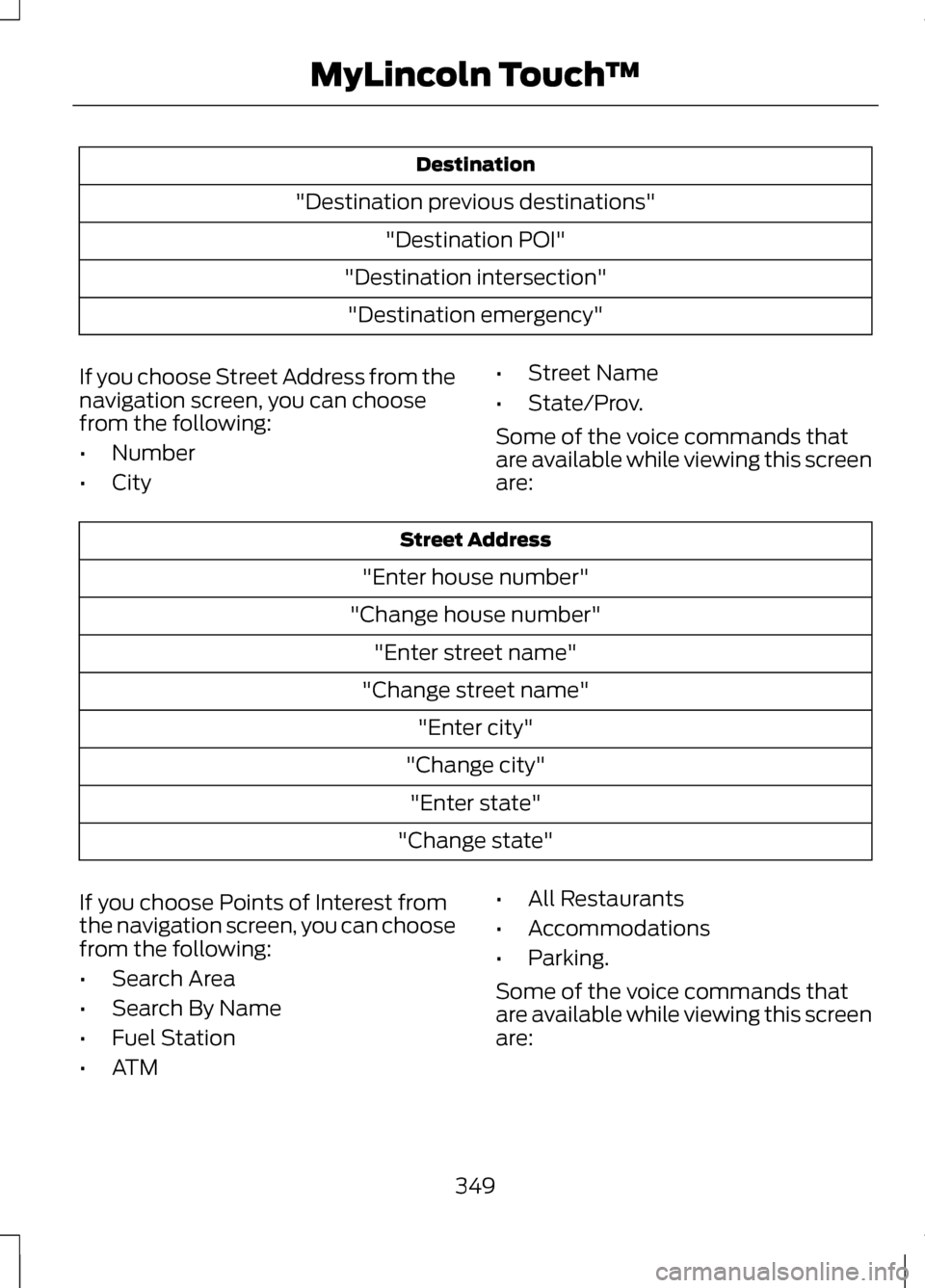
Some of the voice commands that
are available while viewing this screen
are: Destination
"Destination my home"
"Destination street address" "Destination favorites"
348
MyLincoln Touch
™
Page 352 of 474
Destination
"Destination previous destinations" "Destination POI"
"Destination intersection" "Destination emergency"
If you choose Street Address from the
navigation screen, you can choose
from the following:
• Number
• City •
Street Name
• State/Prov.
Some of the voice commands that
are available while viewing this screen
are: Street Address
"Enter house number"
"Change house number" "Enter street name"
"Change street name" "Enter city"
"Change city" "Enter state"
"Change state"
If you choose Points of Interest from
the navigation screen, you can choose
from the following:
• Search Area
• Search By Name
• Fuel Station
• ATM •
All Restaurants
• Accommodations
• Parking.
Some of the voice commands that
are available while viewing this screen
are:
349
MyLincoln Touch
™
Page 353 of 474
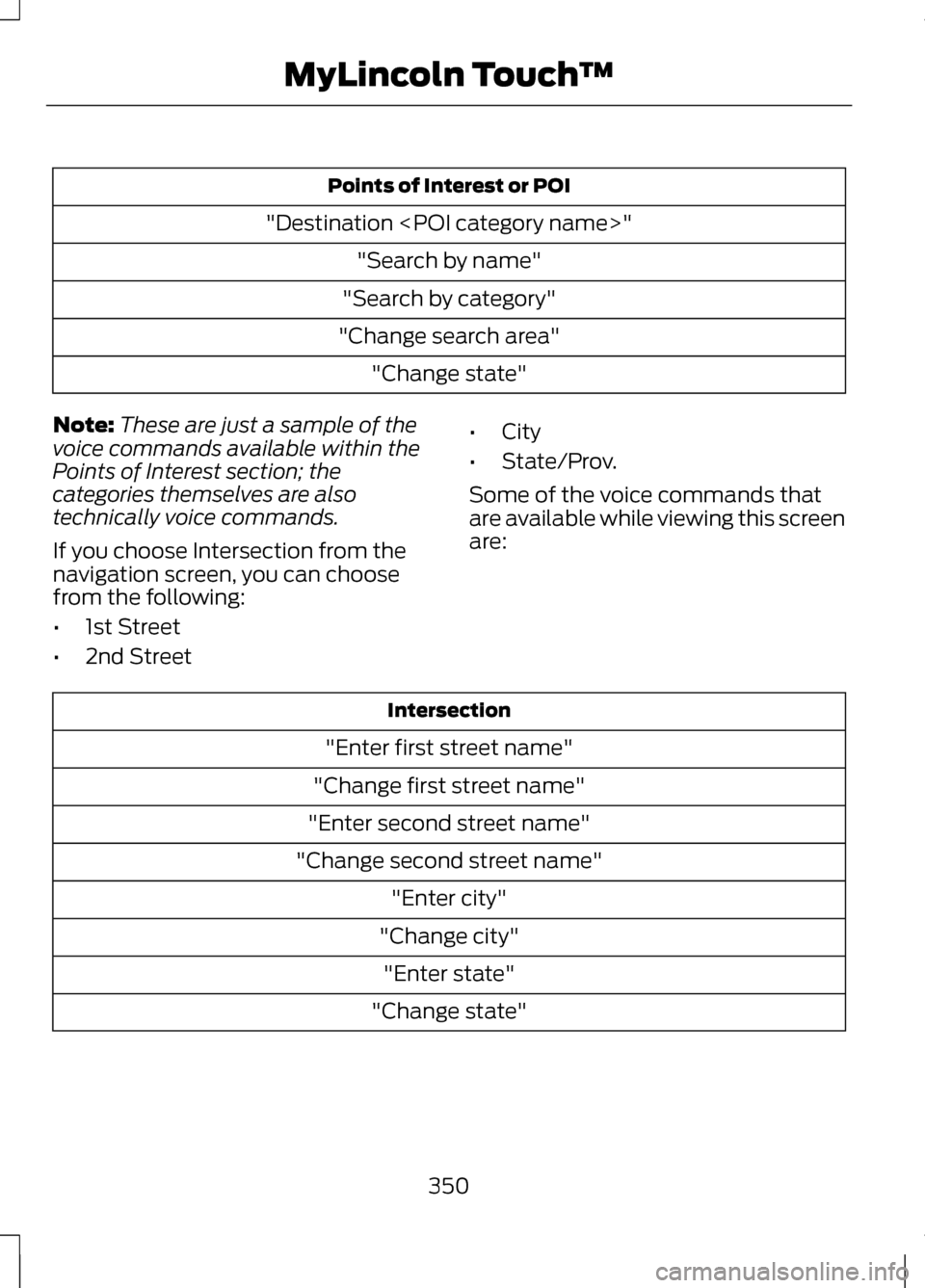
Points of Interest or POI
"Destination " "Search by name"
"Search by category"
"Change search area" "Change state"
Note: These are just a sample of the
voice commands available within the
Points of Interest section; the
categories themselves are also
technically voice commands.
If you choose Intersection from the
navigation screen, you can choose
from the following:
• 1st Street
• 2nd Street •
City
• State/Prov.
Some of the voice commands that
are available while viewing this screen
are: Intersection
"Enter first street name"
"Change first street name"
"Enter second street name"
"Change second street name" "Enter city"
"Change city" "Enter state"
"Change state"
350
MyLincoln Touch
™
Page 356 of 474

1. Press the Settings icon > Vehicle
> Ambient Lighting.
2. Touch the desired color.
3. Use the scroll bar to increase or decrease the intensity.
To turn the feature on or off, press the
power button.
Vehicle Health Report (If
Equipped)
Turn Automatic Reminders on and off
and set the mileage interval at which
you would like to receive the reports.
Press the ? for more information on
these selections.
When done making your selections,
press Run Vehicle Health Report Now
if you want your report.
Door Keypad Code (If Equipped)
To change the keypad code for your
keyless entry keypad system:
1. Press the Settings icon > Vehicle > Door Keypad Code.
2. Enter your current factory code, then, when prompted, enter your
new code.
Rear View Camera (If Equipped)
This menu allows you to access
settings for your rear view camera. Press the Settings icon > Vehicle >
Rear View Camera, then select from
the following settings:
•
Rear Camera Delay
• Visual Park Aid Alert
• Guidelines.
Enable Valet Mode
Note: If you are locked out and need
to reset the PIN, you can enter 3681
and the system unlocks.
Valet mode allows you to lock the
system so that none of your
information on the system can be
accessed until it is unlocked with the
correct PIN.
1. Press the Settings icon > Vehicle > Enable Valet Mode.
2. When prompted, enter a four-digit
PIN.
After you press Continue the system
is locked until the correct PIN is
entered again.
Settings
Access and adjust system settings,
voice features, as well as phone,
navigation and wireless settings.
Some of these settings can also be
accessed with regard to their specific
modes (i.e., phone and media).
System
Press the Settings icon > Settings >
System, then select from the
following:
353
MyLincoln Touch
™
Page 359 of 474

Media Player
With this feature on, the system automatically
switches to the media source upon initial connection
and you can listen to music which has already been
randomly indexed during the indexing process. With
this feature off, the system does not automatically
switch to the inserted media source.
Autoplay
Select to connect, disconnect, add or delete a
device. You can also set a device as your favorite so
that the system automatically attempts to connect
to that device at every ignition cycle.
Bluetooth Devices
Allows you to view the version level of the Gracenote
Database.
Gracenote® Database
Info
With this feature on, metadata information is pulled
from the Gracenote Database for your music files.
This overrides information from your device. This
feature defaults to off.
Gracenote® Mgmt
With this feature on, cover art is pulled from the
Gracenote Database for your music files. This over-
rides any art from your device. This feature defaults
to Media Player.
Cover Art Priority
Navigation
Press the Settings icon > Settings >
Navigation, then select from the
following: Navigation
Turn breadcrumbs on and off.
Map Preferences
Have the system display your turn list top to bottom
or bottom to top.
Turn the Parking POI notification on and off.
356
MyLincoln Touch
™
Page 360 of 474

Navigation
Have the system display the shortest route, fastest
route or most ecological route.
Route Preferences
Have the system avoid freeways.
Have the system avoid tollroads.
Have the system avoid ferries or car trains.
Have the system use HOV (high-occupancy vehicle)
lanes.
Have the system use guidance prompts.
Navigation Preferences
Have the system automatically fill-in State/Province
information.
Have the system display areas where road work
occurs.
Traffic Preferences
Have the system display incident map icons on the
map.
Have the system display areas where difficult driving
conditions may occur.
Have the system display areas with snow and ice
on the road may occur.
Have the system display any smog alerts.
Have the system display weather warnings.
Have the system display where there may be
reduced visibility.
Have the system turn on your radio for traffic
announcements.
Enter specific areas that would like to avoid on
planned navigation routes.
Avoid Areas
357
MyLincoln Touch
™
Page 363 of 474

Wi-Fi
Instead of using Wi-Fi, your system can also use a
USB mobile broadband connection to access the
internet. (You must activate your mobile broadband
device on your PC prior to connecting it to the
system.) This screen allows you to set up what is
your typical area for your USB mobile broadband
connection. (USB mobile broadband settings may
not be displayed if the device is already activated.)
You can select the following: Country, Carrier, Phone
Number, User Name and Password.
USB Mobile Broadband
Shows you what device is currently paired with the
system as well as giving you your typical Bluetooth
options to connect, disconnect, set as favorite,
delete and add device. Bluetooth is a registered
trademark of the Bluetooth SIG.
Bluetooth Settings
Choose your connection methods and change them
as needed. You can select to Change Order and
have the system either always attempt to connect
using a USB mobile broadband or using Wi-Fi.
Prioritize Connection
Methods The
Wi-Fi
CERTIFIED Logo is a certification mark
of the Wi-Fi Alliance. Help
Press the Settings icon > Help, then
select from the following:Help
View the vehicle's current location, if your vehicle is
equipped with navigation. If your vehicle is not
equipped with navigation, nothing is displayed.
Where Am I?
Touchscreen system serial number
System Information
Your vehicle identification number (VIN)
360
MyLincoln Touch
™E142626
Page 364 of 474

Help
Touchscreen system software version
Navigation system version (if applicable)
Map database version (if equipped with navigation)
Sirius satellite radio ESN (if activated)
Gracenote® Database Information and Library
version
View the licenses for any software and applications
installed on your system.
Software Licenses
Certain features are disabled when your vehicle is
moving.
Driving Restrictions
Turn 911 Assist on and off. See Information (page
392).
911 Assist
In Case of Emergency (ICE) Quick Dial: This
feature allows you to save up to two numbers as
ICE contacts for quick access in the event of an
emergency. Select
Edit to access your phonebook
and then select the desired contacts. The numbers
then appear as options on this screen for the ICE 1
and ICE 2 buttons. The ICE contacts you select are
presented to you at the completion of the 911 Assist
call process for quick access.
View categorized lists of voice commands.
Voice Command List
To access Help using the voice
commands, press the voice button,
then, after the tone, say "Help". The
system provides voice commands
that can be used in the current mode. ENTERTAINMENT
Your system offers many media
options. You can access these options
using the touchscreen or voice
commands.
361
MyLincoln Touch
™