2013 LINCOLN MKT turn signal
[x] Cancel search: turn signalPage 312 of 494

CHANGING A BULB
Lamp assembly condensation
Exterior lamps are vented to accommodate normal changes in pressure.
Condensation can be a natural by-product of this design. When moist air
enters the lamp assembly through the vents, there is a possibility that
condensation can occur when the temperature is cold. When normal
condensation occurs, a thin film of mist can form on the interior of the
lens. The thin mist eventually clears and exits through the vents during
normal operation. Clearing time may take as long as 48 hours under dry
weather conditions.
Examples of acceptable condensation are:
•Presence of thin mist (no streaks, drip marks or droplets)
•Fine mist covers less than 50% of the lens
Examples of unacceptable moisture (usually caused by a lamp water
leak) are:
•Water puddle inside the lamp
•Large water droplets, drip marks or streaks present on the interior of
the lens
Take your vehicle to a dealer for service if any of the above conditions of
unacceptable moisture are present.
Replacing HID headlamp bulbs
The headlamps on your vehicle use a “high intensity discharge” source.
These lamps operate at a high voltage. When the bulb is burned out, the
bulb and starter capsule assembly must be replaced by your authorized
dealer.
Replacing front parking lamp/turn signal bulbs
For bulb replacement, see your authorized dealer.
312Maintenance
2013 MKT(mkt)
Owners Guide gf, 1st Printing
USA(fus)
Page 314 of 494

Replacing license plate lamp bulbs
1. Make sure the headlamp switch is in the off position.
2. Remove the two screws and the
license plate lamp assembly from the
liftgate.
3. Carefully pull the bulb straight out
from the lamp assembly.
Install new bulb(s) in reverse order.
BULB SPECIFICATION CHART
Replacement bulbs are specified in the chart below. Headlamp bulbs
must be marked with an authorized “D.O.T.” for North America and an
“E” for Europe to ensure lamp performance, light brightness and pattern
and safe visibility. The correct bulbs will not damage the lamp assembly
or void the lamp assembly warranty and will provide quality bulb burn
time.
Function Number of BulbsTrade
Number
*Headlamp 2 D3S (HID)
*Front sidemarker lamp N/A LED
*Front parking lamp N/A LED
*Front turn lamp 2 PY24W SV+
Fog lamp 2 H11
*Tail/brake/turn signal
lampN/A LED
*Rear sidemarker N/A LED
*Backup lamp N/A LED
License plate lamp 2 C5WL
*High-mount brake lamp N/A LED
*First row dome/map lamp 2 1600XB
314Maintenance
2013 MKT(mkt)
Owners Guide gf, 1st Printing
USA(fus)
Page 411 of 494
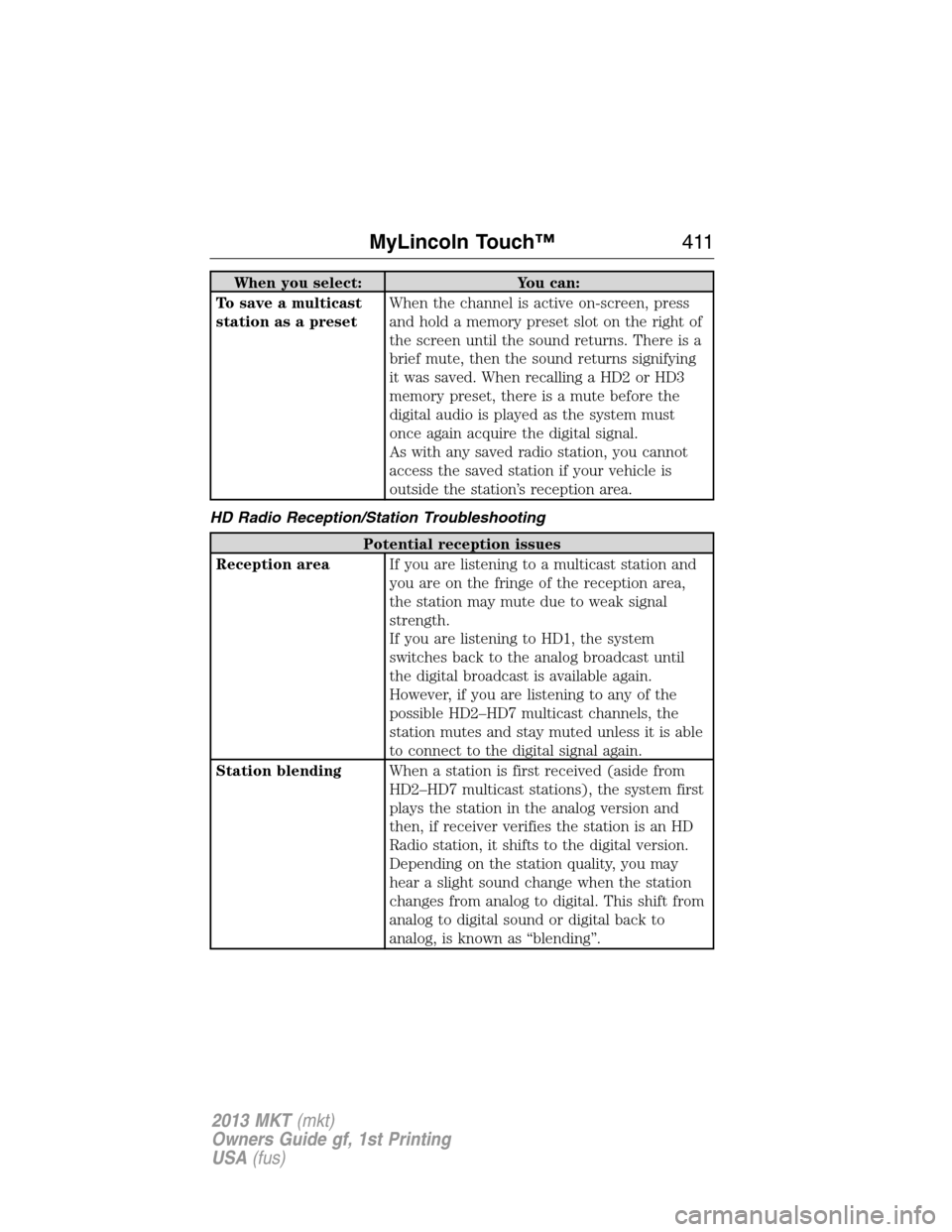
When you select: You can:
To save a multicast
station as a presetWhen the channel is active on-screen, press
and hold a memory preset slot on the right of
the screen until the sound returns. There is a
brief mute, then the sound returns signifying
it was saved. When recalling a HD2 or HD3
memory preset, there is a mute before the
digital audio is played as the system must
once again acquire the digital signal.
As with any saved radio station, you cannot
access the saved station if your vehicle is
outside the station’s reception area.
HD Radio Reception/Station Troubleshooting
Potential reception issues
Reception areaIf you are listening to a multicast station and
you are on the fringe of the reception area,
the station may mute due to weak signal
strength.
If you are listening to HD1, the system
switches back to the analog broadcast until
the digital broadcast is available again.
However, if you are listening to any of the
possible HD2–HD7 multicast channels, the
station mutes and stay muted unless it is able
to connect to the digital signal again.
Station blendingWhen a station is first received (aside from
HD2–HD7 multicast stations), the system first
plays the station in the analog version and
then, if receiver verifies the station is an HD
Radio station, it shifts to the digital version.
Depending on the station quality, you may
hear a slight sound change when the station
changes from analog to digital. This shift from
analog to digital sound or digital back to
analog, is known as “blending”.
MyLincoln Touch™411
2013 MKT(mkt)
Owners Guide gf, 1st Printing
USA(fus)
Page 420 of 494

SIRIUS troubleshooting tips
Radio Display Condition Possible Action
Unsubscribed Channel Subscription not
available for this
channel.Contact SIRIUS at
1–888–539–7474 to
subscribe to the
channel, or tune to
another channel.
No Signal Loss of signal from the
SIRIUS satellite or
SIRIUS tower to the
vehicle antenna.The signal is currently
being blocked. When
you move into an open
area, the signal should
return.
Updating Update of channel
programming in
progress.No action required.
The process may take
up to three minutes.
Call SIRIUS
1–888–539–7474Satellite service has
been deactivated by
SIRIUS Satellite Radio.Call SIRIUS at
1–888–539–7474 to
reactivate or resolve
subscription issues.
No Channels Available All the channels in the
selected category are
skipped or locked.Using the channel
guide, unlock or
unskip the channels.
Subscription Updated SIRIUS has updated
the channels available
for your vehicle.No action required.
420MyLincoln Touch™
2013 MKT(mkt)
Owners Guide gf, 1st Printing
USA(fus)
Page 452 of 494

Wireless & Internet
Your system is equipped with Wireless & Internet features and settings.
To access, press Menu > Settings > Wireless and Internet. From this
screen, you can select your:
•Wi-Fi settings
•Bluetooth settings
•USB mobile broadband
•Prioritize connection methods
Wi-Fi
Your system has a Wi-Fi feature which creates a wireless network within
your vehicle, thereby allowing other devices (i.e. personal computers or
phones) in your vehicle to speak to each other, share files, play games,
etc. Using this Wi-Fi feature, everyone in your vehicle can also gain
access the internet if:
•You have a USB mobile broadband connection inside the vehicle
•Your phone supports PAN (personal area networking)
•You are parked outside of a wireless hotspot
To access, press Menu > Settings > Wireless and Internet > Wi-Fi
settings, then select from the following options:
If you select: You can:
Wi-Fi Network
(Client) Mode On/OffTurn the Wi-Fi feature on or off in your
vehicle. Make sure that On is selected for
connectivity purposes.
Choose a Wireless
NetworkUse a previously stored wireless network. You
can categorize by alphabetical listing, Priority
and Signal Strength. You can also choose to
search for a network, connect to a network,
disconnect from a network, receive more
information, prioritize a network or delete a
network.
Search for Wireless
NetworksView a list of wireless networks.
452MyLincoln Touch™
2013 MKT(mkt)
Owners Guide gf, 1st Printing
USA(fus)
Page 466 of 494
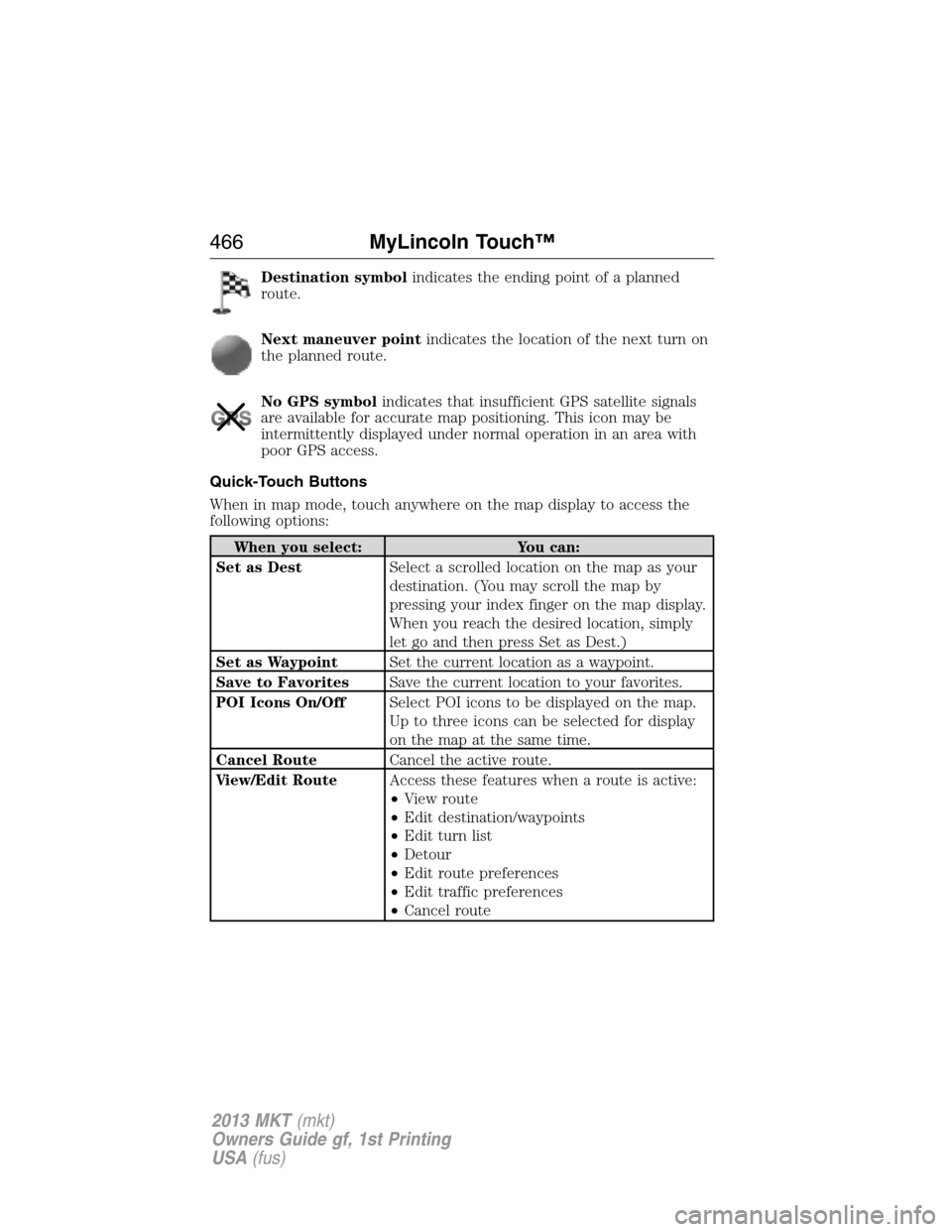
Destination symbolindicates the ending point of a planned
route.
Next maneuver pointindicates the location of the next turn on
the planned route.
No GPS symbolindicates that insufficient GPS satellite signals
are available for accurate map positioning. This icon may be
intermittently displayed under normal operation in an area with
poor GPS access.
Quick-Touch Buttons
When in map mode, touch anywhere on the map display to access the
following options:
When you select: You can:
Set as DestSelect a scrolled location on the map as your
destination. (You may scroll the map by
pressing your index finger on the map display.
When you reach the desired location, simply
let go and then press Set as Dest.)
Set as WaypointSet the current location as a waypoint.
Save to FavoritesSave the current location to your favorites.
POI Icons On/OffSelect POI icons to be displayed on the map.
Up to three icons can be selected for display
on the map at the same time.
Cancel RouteCancel the active route.
View/Edit RouteAccess these features when a route is active:
•View route
•Edit destination/waypoints
•Edit turn list
•Detour
•Edit route preferences
•Edit traffic preferences
•Cancel route
466MyLincoln Touch™
2013 MKT(mkt)
Owners Guide gf, 1st Printing
USA(fus)
Page 476 of 494

access a function of the system requiring prolonged attention. Even
occasional short scans to the screen may be hazardous if your attention
has been diverted away from your driving task at a critical time.
Volume Setting
Do not raise the volume excessively. Keep the volume at a level where
you can still hear outside traffic and emergency signals while driving.
Driving while unable to hear these sounds could cause an accident.
Use of Speech Recognition Functions
Speech recognition software is inherently a statistical process which is
subject to errors. It is your responsibility to monitor any speech
recognition functions included in the system and address any errors.
Navigation Features
Any navigation features included in the system are intended to provide
turn by turn instructions to get you to a desired destination. Please make
certain all persons using this system carefully read and follow
instructions and safety information fully.
Distraction Hazard
Any navigation features may require manual (non-verbal) setup.
Attempting to perform such set-up or insert data while driving can
seriously distract your attention and could cause an accident or other
serious consequences. Stop the vehicle in a safe and legal manner before
attempting these operations.
Let Your Judgment Prevail
Any navigation features are provided only as an aid. Make your driving
decisions based on your observations of local conditions and existing
traffic regulations. Any such feature is not a substitute for your personal
judgment. Any route suggestions made by this system should never
replace any local traffic regulations or your personal judgment or
knowledge of safe driving practices.
Route Safety
Do not follow the route suggestions if doing so would result in an unsafe
or illegal maneuver, if you would be placed in an unsafe situation, or if
you would be directed into an area that you consider unsafe. The driver
is ultimately responsible for the safe operation of the vehicle and
therefore, must evaluate whether it is safe to follow the suggested
directions.
Potential Map Inaccuracy
Maps used by this system may be inaccurate because of changes in
roads, traffic controls or driving conditions. Always use good judgment
and common sense when following the suggested routes.
476Appendices
2013 MKT(mkt)
Owners Guide gf, 1st Printing
USA(fus)
Page 494 of 494

T
Temperature control (see
Climate control) ................ 136, 455
Text messaging ......................... 432
Third-row power fold seat ....... 161
Tilt steering wheel ...................... 85
Tires ................................... 327, 348
alignment ................................ 341
care .......................................... 327
changing .......................... 348, 350
checking the pressure ............ 337
inflating ................................... 335
label ......................................... 334
replacing .................................. 339
rotating .................................... 342
safety practices ....................... 341
sidewall information ............... 329
snow tires and chains ............ 343
spare tire ................................. 348
terminology ............................. 328
tire grades ............................... 328
treadwear ........................ 327, 337
Touchscreen features
(climate) .................................... 455
Towing ....................... 251, 256–257
recreational towing ................. 257
Trailer Brake
Controller-Integrated .............. 254
trailer towing .......................... 251
wrecker .................................... 256
Traction control ........................ 202
Traffic preferences ................... 462
Trailer Brake
Controller-Integrated ................ 254
Trailer sway control .................. 251Transaxle
fluid, refill capacities .............. 359
lubricant specifications .......... 359
Transmission
brake-shift interlock (BSI) .... 193
fluid, checking and adding
(automatic) ..................... 299–300
Turn signal .................................. 97
U
USB port ............................ 135, 422
V
Vehicle health report ................ 445
Vehicle Identification Number
(VIN) .......................................... 363
Vehicle loading .......................... 244
Ventilating your vehicle ........... 177
Voice recognition ...................... 399
W
Warning lights (see Lights) ..... 108
Washer fluid .............................. 304
Water, Driving through ............. 260
Wi-Fi .......................................... 452
Windows
power ....................................... 100
rear wiper/washer ..................... 91
Windshield washer fluid and
wipers .......................................... 90
checking and adding fluid ..... 304
replacing wiper blades ... 307–308
Wrecker towing ......................... 256
494Index
2013 MKT(mkt)
Owners Guide gf, 1st Printing
USA(fus)