Page 76 of 453

SECURILOCK�PASSIVE ANTI-THEFT SYSTEM
Note:The system is not compatible with non-Ford aftermarket remote
start systems. Use of these systems may result in vehicle starting
problems and a loss of security protection.
Note:Metallic objects, electronic devices or a second coded key on the
same key chain may cause vehicle starting issues if they are too close to
the key when starting the engine. Prevent these objects from touching
the coded key while starting the engine. Switch the ignition off, move all
objects on the key chain away from the coded key and restart the engine
if a problem occurs.
Note:Do not leave a duplicate coded key in the vehicle. Always take
your keys and lock all doors when leaving the vehicle.
The system is an engine immobilization system. It is designed to help
prevent the engine from being started unless a coded key programmed to
your vehicle is used. Using the wrong key may prevent the engine from
starting. A message may appear in the information display.
If you are unable to start the engine with a correctly coded key, a
malfunction has happened and a message may appear in the information
display.
Automatic Arming
The vehicle is armed immediately after switching the ignition off.
Automatic Disarming
Switching the ignition on with a coded key disarms the vehicle.
Replacement Keys
Note:Your vehicle comes equipped with two intelligent access keys.
The intelligent access key functions as a programmed key that operates
the driver door lock and activates the intelligent access with push button
start systems, as well as a remote control.
If your intelligent access key is lost or stolen and you don’t have an extra
coded key, you will need to have your vehicle towed to an authorized
dealer. The key codes need to be erased from your vehicle and new
coded keys will need to be programmed.
Store an extra programmed key away from the vehicle in a safe place to
help prevent any inconveniences. See your authorized dealer to purchase
additional spare or replacement keys.
76Security
2013 MKS(mks)
Owners Guide gf, 1st Printing
USA(fus)
Page 84 of 453

WINDSHIELD WIPERS
Note:Fully defrost the windshield in icy conditions before turning on
the windshield wipers.
Rotate the end of the control away
from you to increase the speed of
the wipers. Rotate toward you to
decrease the speed of the wipers.
RAIN-SENSING WIPERS
Note:Wet road conditions may result in inconsistent or unexpected
wiping or smearing. Lower the sensitivity, switch to normal or high-speed
wiping or turn the wipers off to reduce smearing.
Note:Turn off the wipers before entering a car wash.
Use the rotary control to adjust the
sensitivity to one of the interval
moisture settings. The wipers will
not cycle until moisture is detected
on the windshield. The wiper speed
will vary based on the amount of
moisture detected on the windshield
and the sensitivity setting. The
wipers will continue to wipe as long as moisture is detected.
Keep the outside of the windshield clean, especially the area around the
interior mirror where the sensor is located, or sensor performance may
be affected.
WINDSHIELD WASHERS
Note:Do not operate the wipers on a dry windshield. This may scratch
the glass, damage the wiper blades or cause the wiper motor to burn out.
Always use the windshield washer before wiping a dry windshield.
Note:Do not operate the washer when the washer reservoir is empty.
This may cause the washer pump to overheat.
84Wipers and Washers
2013 MKS(mks)
Owners Guide gf, 1st Printing
USA(fus)
Page 86 of 453
LIGHTING CONTROL
A. Off
B. Parking lamps, instrument panel
lamps, license plate lamps and tail
lamps
C. Headlamps
High Beams
•Push the lever toward the
instrument panel to activate.
•Push the lever toward the
instrument panel again or pull the
lever towards you to deactivate.
Headlamp Flasher
Pull toward you slightly to activate
and release to deactivate.
A
AB
C
86Lighting
2013 MKS(mks)
Owners Guide gf, 1st Printing
USA(fus)
Page 90 of 453
Activating the system
Switch the system on within the information display. SeeInformation
displays.
Turn the lighting control to the
autolamps position.
Manually overriding the system
When the automatic control has
activated high beams, pushing or
pulling the stalk will provide a
temporary override to low beam.
To permanently deactivate the system use the information display menu
or turn the lighting control switch from autolamps to headlamps.
FRONT FOG LAMPS
The fog lamps can be turned on
when the lighting control is pulled
toward you and in the headlamps,
parking lamps or autolamps
positions.
The fog lamps will not operate when
the high beams are active.
A
A
90Lighting
2013 MKS(mks)
Owners Guide gf, 1st Printing
USA(fus)
Page 95 of 453

EXTERIOR MIRRORS
Power Exterior Mirrors
WARNING:Do not adjust the mirror while the vehicle is in
motion.
A. Left mirror
B. Adjustment control
C. Right mirror
To adjust your mirrors:
1. Press the button to select the mirror you want to adjust. An indicator
light on the button will illuminate.
2. Use the adjustment control to adjust the position of the mirror.
3. Press the mirror button again to deselect the mirror. The indicator
light will turn off.
Fold-Away Exterior Mirrors
Push the mirror toward the door window glass. Make sure that you fully
engage the mirror in its support when returning it to its original position.
Heated Exterior Mirror
Note:Do not remove ice from the mirrors with a scraper or attempt to
readjust the mirror glass if it is frozen in place. These actions could
cause damage to the glass and mirrors.
Note:Do not clean the housing or glass of any mirror with harsh
abrasives, fuel or other petroleum-based cleaning products.
Both mirrors are heated automatically to remove ice, mist and fog when
the rear window defrost is activated.
Memory Mirrors
Mirror positions can be saved and recalled through the memory function.
Refer to theSeatschapter.
Windows and Mirrors95
2013 MKS(mks)
Owners Guide gf, 1st Printing
USA(fus)
Page 97 of 453

INTERIOR MIRROR
WARNING:Do not adjust the mirror when your vehicle is
moving.
Note:Do not clean the housing or glass of any mirror with harsh
abrasives, fuel or other petroleum or ammonia based cleaning products.
You can adjust the interior mirror to your preference. Some mirrors also
have a second pivot point. This lets you move the mirror head up or
down and from side to side.
Auto-Dimming Mirror
Note:Do not block the sensors on the front and back of the mirror.
Mirror performance may be affected. A rear center passenger or raised
rear center head restraint may also block light from reaching the sensor.
The mirror will dim automatically to reduce glare when bright lights are
detected from behind your vehicle. It will automatically return to normal
reflection when you select reverse gear to make sure you have a clear
view when backing up.
SUN VISORS
Slide-On-Rod
Rotate the visor toward the side
window and extend it rearward for
extra sunlight coverage.
Retract the visor before moving it
back toward the windshield and
storing it.
Windows and Mirrors97
2013 MKS(mks)
Owners Guide gf, 1st Printing
USA(fus)
Page 110 of 453
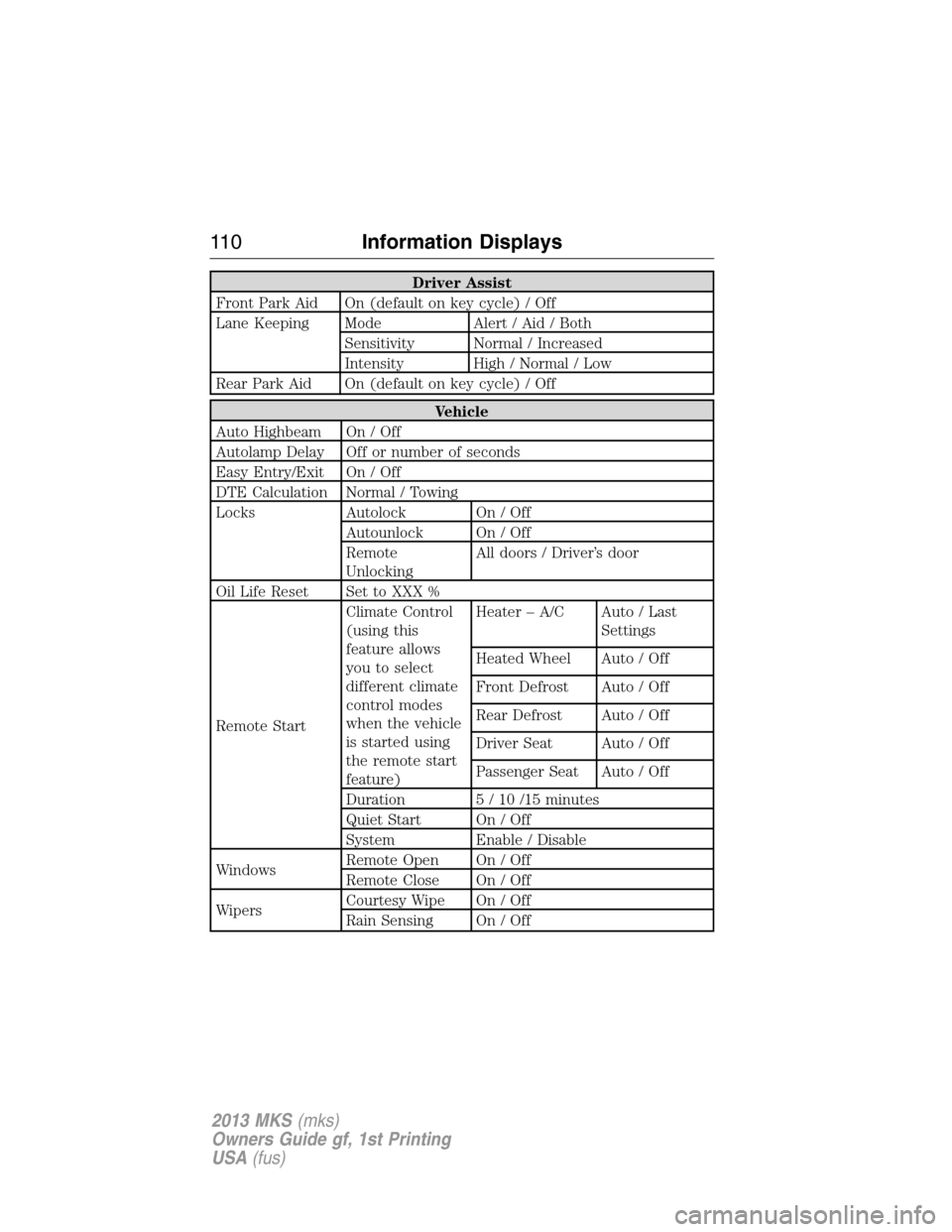
Driver Assist
Front Park Aid On (default on key cycle) / Off
Lane Keeping Mode Alert / Aid / Both
Sensitivity Normal / Increased
Intensity High / Normal / Low
Rear Park Aid On (default on key cycle) / Off
Vehicle
Auto Highbeam On / Off
Autolamp Delay Off or number of seconds
Easy Entry/Exit On / Off
DTE Calculation Normal / Towing
Locks Autolock On / Off
Autounlock On / Off
Remote
UnlockingAll doors / Driver’s door
Oil Life Reset Set to XXX %
Remote StartClimate Control
(using this
feature allows
you to select
different climate
control modes
when the vehicle
is started using
the remote start
feature)Heater – A/C Auto / Last
Settings
Heated Wheel Auto / Off
Front Defrost Auto / Off
Rear Defrost Auto / Off
Driver Seat Auto / Off
Passenger Seat Auto / Off
Duration 5 / 10 /15 minutes
Quiet Start On / Off
System Enable / Disable
WindowsRemote Open On / Off
Remote Close On / Off
WipersCourtesy Wipe On / Off
Rain Sensing On / Off
11 0Information Displays
2013 MKS(mks)
Owners Guide gf, 1st Printing
USA(fus)
Page 121 of 453

GENERAL AUDIO INFORMATION
Radio Frequencies and Reception Factors
AM and FM frequencies are established by the Federal Communications
Commission (FCC) and the Canadian Radio and Telecommunications
Commission (CRTC). Those frequencies are:
AM: 530, 540–1700, 1710 kHz
FM: 87.9–107.7, 107.9 MHz
Radio reception factors
Distance/StrengthThe further you travel from an FM station,
the weaker the signal and the weaker the
reception.
TerrainHills, mountains, tall buildings, bridges,
tunnels, freeway overpasses, parking garages,
dense tree foliage and thunderstorms can
interfere with your reception.
Station overloadWhen you pass a ground-based broadcast
repeating tower, a stronger signal may
overtake a weaker one and result the audio
system muting.
CD/CD Player Information
Note:CD units are designed to play commercially pressed 4.75 in
(12 cm) audio compact discs only. Due to technical incompatibility,
certain recordable and re-recordable compact discs may not function
correctly when used in Ford CD players.
Note:CDs with homemade paper (adhesive) labels should not be
inserted into the CD player as the label may peel and cause the CD to
become jammed. It is recommended that homemade CDs be identified
with permanent felt tip marker rather than adhesive labels. Ballpoint
pens may damage CDs. Please contact your authorized dealer for further
information.
Note:Do not use any irregularly shaped discs or discs with a scratch
protection film attached.
Audio System121
2013 MKS(mks)
Owners Guide gf, 1st Printing
USA(fus)

