Page 350 of 628
3365-3. Using the audio system
IS300h_EE(OM53B95E)
To display the audio menu screen, move the controller to the left while on
an audio top screen.
FM or AM radio
Seek a station of the nearest
frequency (stops when a sta-
tion is found) (manual mode)
Change FM radio settings
(P. 333)
Change DAB settings (P.
333)
DAB
Adjust the playback offset
time on time shift mode
Cancel time shift operation
Select an ensemble (manual
mode)
Select a service (manual
mode)
Change FM radio settings
(P. 333)
Change DAB settings (P.
333)
Audio menu screen operation
You can change the settings and control functions for each audio source.
Audio menu screen
1
2
3
1
2
3
4
5
6
Page 351 of 628
3375-3. Using the audio system
5
Lexus Display Audio system
IS300h_EE(OM53B95E)
CD, MP3/WMA/AAC disc, USB, Bluetooth® or iPod
Play or pause a track/file/song
Select a track/file/song
Select a folder/album (MP3/
WMA/AAC disc or USB)
Select and hold: Fast-forward
or reverse a track/file/song
Select a repeat mode. (P.
338)
Select a random/shuffle play
mode. (P. 338)
Select the full screen mode.
(USB video or iPod video
mode)
Change USB settings (USB)
(P. 334)
Change iPod settings (iPod)
(P. 334)
Connect a Bluetooth
® device (Bluetooth®) (P. 360)
Change the cover art settings (P. 335) (CD or MP3/WMA/AAC
disc)
AUX or A/V
Select the full screen mode (A/
V)
Change A/V settings (A/V)
(P. 335)
1
2
3
4
5
6
7
8
9
10
11
1
2
Page 352 of 628
3385-3. Using the audio system
IS300h_EE(OM53B95E)
Repeat play
ModeActionTarget audio source
File/track/song repeat All media
Folder repeat MP3/WMA/AAC disc, USB
Album repeat USB, Bluetooth
®
Random/shuffle playback
ModeActionTarget audio source
Random/shuffle play of the disc/
folder/albumAll media
Random play of all folders MP3/WMA/AAC disc, USB
Random/shuffle play of all
albumsUSB, iPod, Bluetooth
®
Page 353 of 628
339
5
Lexus Display Audio system
IS300h_EE(OM53B95E)5-4. Using the radio
Pressing the “RADIO” button displays the radio top screen from any
screen of the selected source.
Menu screen
P. 3 3 6
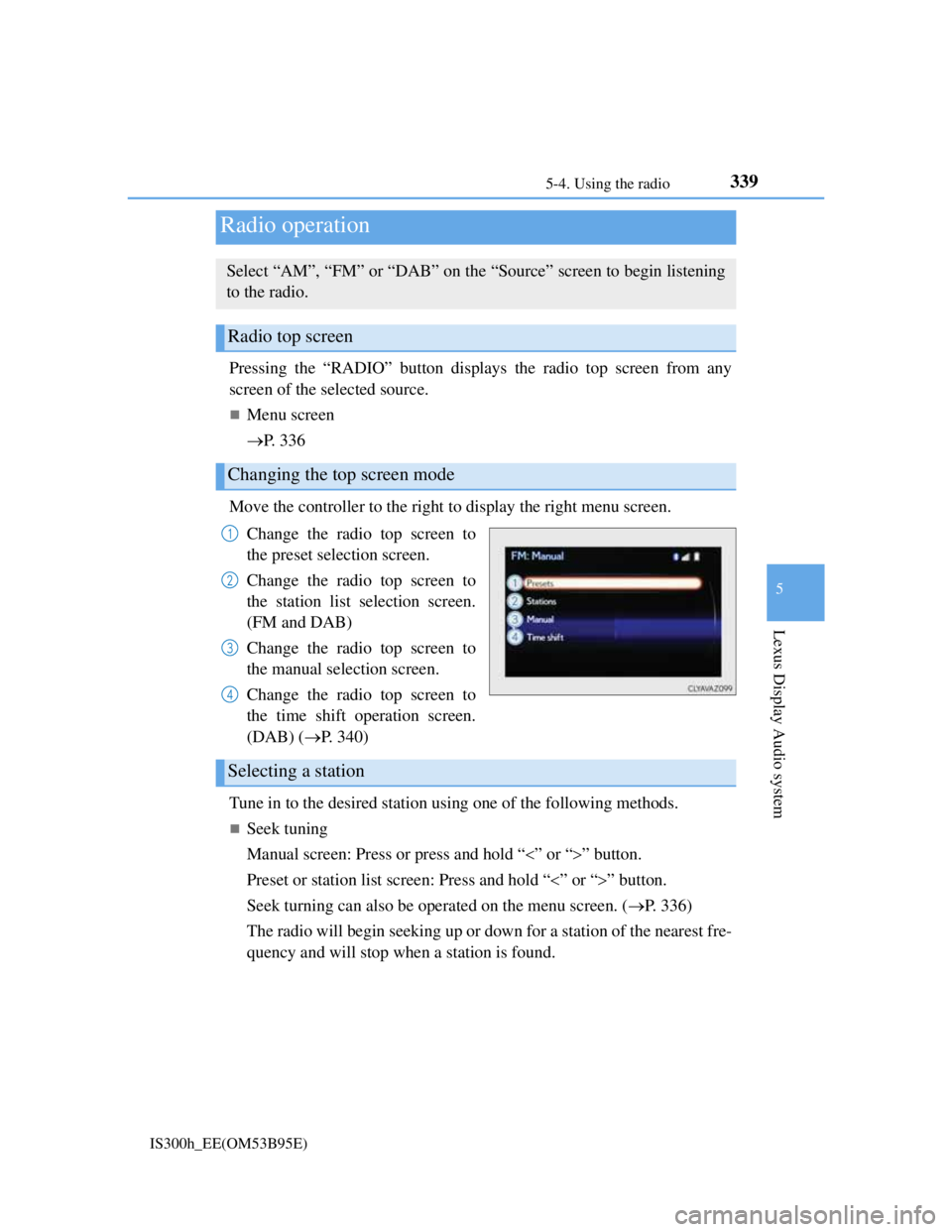
Move the controller to the right to display the right menu screen.
Change the radio top screen to
the preset selection screen.
Change the radio top screen to
the station list selection screen.
(FM and DAB)
Change the radio top screen to
the manual selection screen.
Change the radio top screen to
the time shift operation screen.
(DAB) (P. 340)
Tune in to the desired station using one of the following methods.
Seek tuning
Manual screen: Press or press and hold “” or “” button.
Preset or station list screen: Press and hold “” or “” button.
Seek turning can also be operated on the menu screen. (P. 336)
The radio will begin seeking up or down for a station of the nearest fre-
quency and will stop when a station is found.
Radio operation
Select “AM”, “FM” or “DAB” on the “Source” screen to begin listening
to the radio.
Radio top screen
Changing the top screen mode
1
2
3
4
Selecting a station
Page 354 of 628
3405-4. Using the radio
IS300h_EE(OM53B95E)
Manual tuning (manual screen)
Turn the right side knob (left-hand drive vehicle) or left side knob
(right-hand drive vehicle) on the audio panel or turn the controller.
Station list (preset or station list screen)
Select the desired station by pressing “<” or “>”, turn the right side
knob (left-hand drive vehicle) or left side knob (right-hand drive vehi-
cle) on the audio panel or controller.
Radio stations can be preset.
Search for desired stations.
Turn the controller to select one of the preset stations and then press
the controller until you hear a beep while on the preset selection
screen.
The broadcast you are currently listening to can be re-listened to at any
time.
Move the controller to the right and then select “Time shift”.
Turn the right side knob (left-hand drive vehicle) or left side knob
(right-hand drive vehicle) on the audio panel to set the desired offset.
An offset playback time can also be set on the menu screen. (P. 3 3 6 )
To cancel the time shift operation while in time shift mode, move the control-
ler to the left and select “Time shift off”. If the time shift display is left show-
ing “-0' 00”” for 6 seconds without any operation, the time shift operation will
be canceled.
Reception sensitivity
Maintaining perfect radio reception at all times is difficult due to the continu-
ally changing position of the antenna, differences in signal strength and sur-
rounding objects, such as trains, transmitters, etc.
The radio antenna is mounted inside the rear window. To maintain clear radio
reception, do not attach metallic window tinting or other metallic objects to the
antenna wire mounted inside the rear window.
Traffic announcement operation
When traffic announcement is set to on, “TP” will appear on the screen and the
radio will begin seeking a TP station. If the radio seeks out a TP station, the pro-
gram name will appear on the screen. If a traffic announcement station is
received, the radio will be switched to the traffic information program automati-
cally. When the program ends, the initial operation will resume.
Setting station presets (preset screen)
Time shift operation (DAB)
1
2
1
2
Page 355 of 628
341
5
Lexus Display Audio system
IS300h_EE(OM53B95E)5-5. Playing an audio CD and MP3/WMA/AAC discs
Pressing the “MEDIA” button displays the audio disc top screen from any
screen of the selected source.
Menu screen
P. 3 3 6
Selecting a track/file
Press the “” or “” button, turn the right side knob (left-hand drive
vehicle) or left side knob (right-hand drive vehicle) on the audio panel
to select the desired track/file number.
To fast-forward or rewind, press and hold the “” or “” button.
Selecting the track by the list (CD)
Move the controller to the right and then select the desired track.
Selecting a folder (MP3/WMA/AAC disc)
Move the controller to the right and then select “Folders”.
Select the desired folder. Then select a file to begin using the
selected folder.
Selecting a file by the selected folder (MP3/WMA/AAC disc)
Move the controller to the right and then select “Files”.
Select the desired file.
CD player operation
Insert a disc, press the “MEDIA” button or select “DISC” on the
“Source” screen with a disc inserted to begin listening to a disc.
Audio disc top screen
1
2
1
2
Page 356 of 628
3425-5. Playing an audio CD and MP3/WMA/AAC discs
IS300h_EE(OM53B95E)
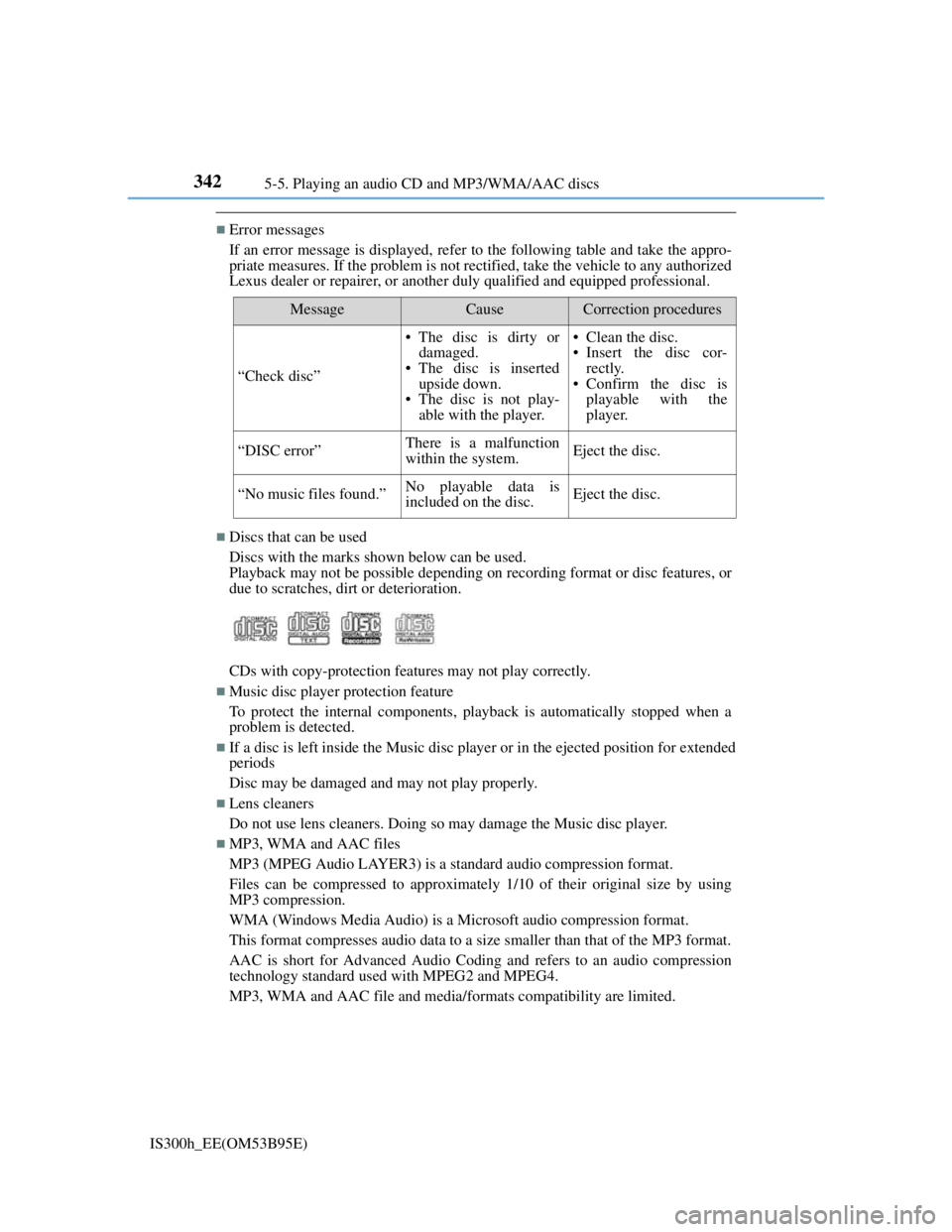
Error messages
If an error message is displayed, refer to the following table and take the appro-
priate measures. If the problem is not rectified, take the vehicle to any authorized
Lexus dealer or repairer, or another duly qualified and equipped professional.
Discs that can be used
Discs with the marks shown below can be used.
Playback may not be possible depending on recording format or disc features, or
due to scratches, dirt or deterioration.
CDs with copy-protection features may not play correctly.
Music disc player protection feature
To protect the internal components, playback is automatically stopped when a
problem is detected.
If a disc is left inside the Music disc player or in the ejected position for extended
periods
Disc may be damaged and may not play properly.
Lens cleaners
Do not use lens cleaners. Doing so may damage the Music disc player.
MP3, WMA and AAC files
MP3 (MPEG Audio LAYER3) is a standard audio compression format.
Files can be compressed to approximately 1/10 of their original size by using
MP3 compression.
WMA (Windows Media Audio) is a Microsoft audio compression format.
This format compresses audio data to a size smaller than that of the MP3 format.
AAC is short for Advanced Audio Coding and refers to an audio compression
technology standard used with MPEG2 and MPEG4.
MP3, WMA and AAC file and media/formats compatibility are limited.
MessageCauseCorrection procedures
“Check disc”
• The disc is dirty or
damaged.
• The disc is inserted
upside down.
• The disc is not play-
able with the player.• Clean the disc.
• Insert the disc cor-
rectly.
• Confirm the disc is
playable with the
player.
“DISC error”There is a malfunction
within the system.Eject the disc.
“No music files found.”No playable data is
included on the disc.Eject the disc.
Page 357 of 628

3435-5. Playing an audio CD and MP3/WMA/AAC discs
5
Lexus Display Audio system
IS300h_EE(OM53B95E)
MP3 file compatibility
• Compatible standards
MP3 (MPEG1 LAYER3, MPEG2 LSF LAYER3)
• Compatible sampling frequencies
MPEG1 LAYER3: 32, 44.1, 48 (kHz)
MPEG2 LSF LAYER3: 16, 22.05, 24 (kHz)
• Compatible bit rates (compatible with VBR)
MPEG1 LAYER3: 32-320 (kbps)
MPEG2 LSF LAYER3: 8-160 (kbps)
• Compatible channel modes: stereo, joint stereo, dual channel and monaural
WMA file compatibility
• Compatible standards
WMA Ver. 7, 8, 9 (only compatible with Windows Media Audio Standard)
• Compatible sampling frequencies
32, 44.1, 48 (kHz)
• Compatible bit rates (only compatible with 2-channel playback)
Ver. 7, 8: CBR 48-192 (kbps)
Ver. 9: CBR 48-320 (kbps)
AAC file compatibility
• Compatible standards
MPEG4/AAC-LC
• Compatible sampling frequencies
11.025/12/16/22.05/24/32/44.1/48 (kHz)
• Compatible bit rates
16-320 (kbps)
• Compatible channel modes: 1 ch and 2 ch
Compatible media
Media that can be used for MP3, WMA and AAC playback are CD-Rs and
CD- RWs.
Playback in some instances may not be possible if the CD-R or CD-RW is not
finalized. Playback may not be possible or the audio may jump if the disc is
scratched or marked with fingerprints.
Compatible disc formats
The following disc formats can be used.
• Disc formats: CD-ROM Mode 1 and Mode 2
CD-ROM XA Mode 2, Form 1 and Form 2
• File formats: ISO9660 Level 1, Level 2, (Romeo, Joliet)
UDF (2.01 or lower)
MP3, WMA and AAC files written in any format other than those listed
above may not play correctly, and their file names and folder names may not
be displayed correctly.
Items related to standards and limitations are as follows.
• Maximum directory hierarchy: 8 levels (including the root)
• Maximum length of folder names/file names: 32 characters
• Maximum number of folders: 192 (including the root)
• Maximum number of files per disc: 255


