Page 274 of 628
2724-5. Using the driving support systems
IS300h_EE(OM53B95E)
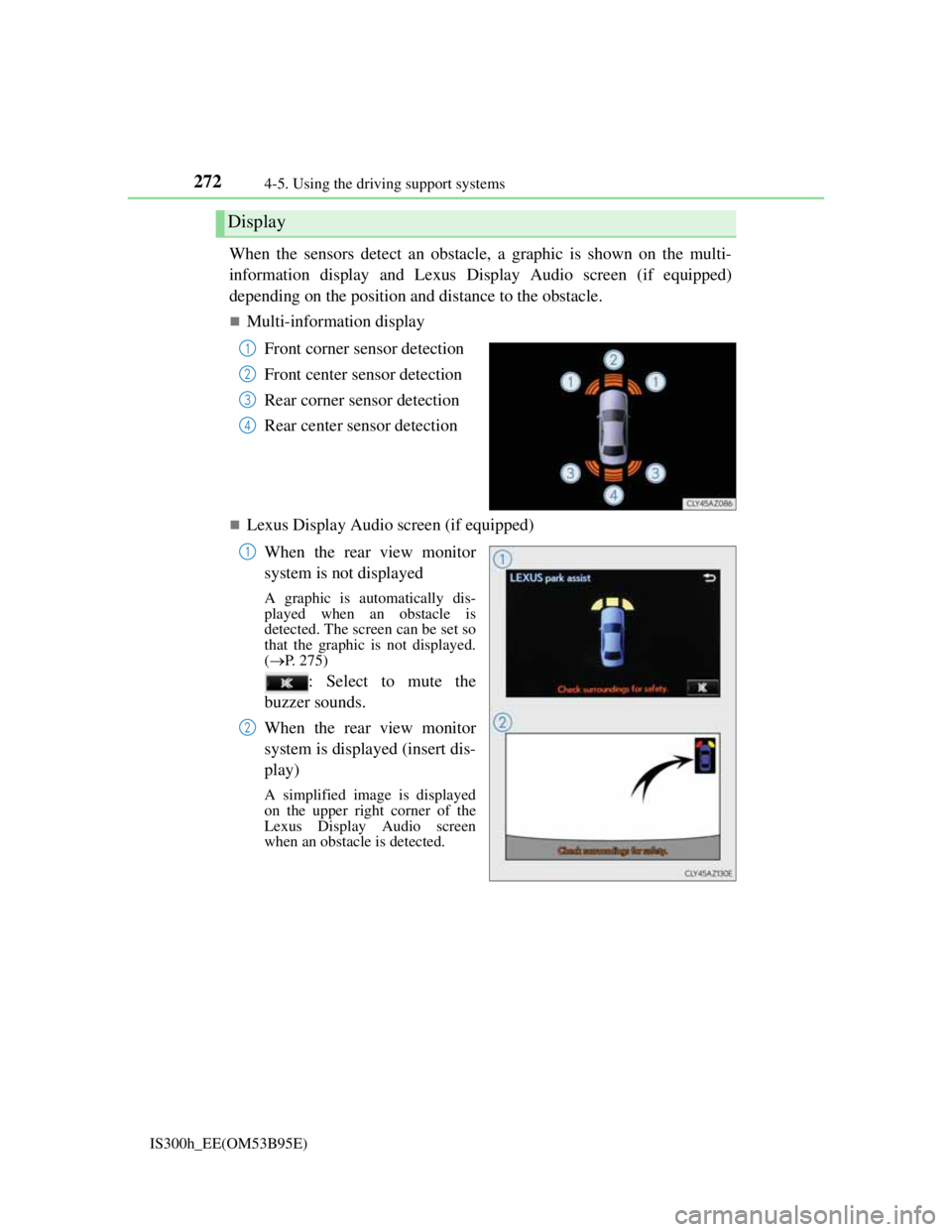
When the sensors detect an obstacle, a graphic is shown on the multi-
information display and Lexus Display Audio screen (if equipped)
depending on the position and distance to the obstacle.
Multi-information display
Front corner sensor detection
Front center sensor detection
Rear corner sensor detection
Rear center sensor detection
Lexus Display Audio screen (if equipped)
When the rear view monitor
system is not displayed
A graphic is automatically dis-
played when an obstacle is
detected. The screen can be set so
that the graphic is not displayed.
(P. 275)
: Select to mute the
buzzer sounds.
When the rear view monitor
system is displayed (insert dis-
play)
A simplified image is displayed
on the upper right corner of the
Lexus Display Audio screen
when an obstacle is detected.
Display
1
2
3
4
1
2
Page 275 of 628

2734-5. Using the driving support systems
4
Driving
IS300h_EE(OM53B95E)
Multi-information display and Lexus Display Audio screen (if
equipped)
Sensors that detect an obstacle will illuminate continuously or blink.
*1: Multi-information display
*2: Lexus Display Audio screen
Sensor detection display, obstacle distance
Display
Insert display
(Lexus Dis-
play Audio
screen only)Approximate distance to obstacle
Front corner sensor/
front center sensorRear corner sensor/
rear center sensor
(continuous)(blinking
slowly)
Front center sensor
only:
100 cm (3.3 ft.) to 50
cm (1.6 ft.)Rear center sensor
only:
150 cm (4.9 ft.) to 60
cm (2.0 ft.)
(continuous)(blinking)
50 cm (1.6 ft.) to 40
cm (1.3 ft.)60 cm (2.0 ft.) to 45
cm (1.5 ft.)
(continuous)(blinking rap-
idly)
40 cm (1.3 ft.) to 30
cm (1.0 ft.)
Rear corner sensor:
45 cm (1.5 ft.) to 30
cm (1.0 ft.)
Rear center sensor:
45 cm (1.5 ft.) to 35
cm (1.1 ft.)
(blinking*1 or
continuous
*2)
(continuous)
Less than 30 cm (1.0
ft.)
Rear corner sensor:
Less than 30 cm (1.0
ft.)
Rear center sensor:
Less than 35 cm (1.1
ft.)
Page 277 of 628

2754-5. Using the driving support systems
4
Driving
IS300h_EE(OM53B95E)
You can change the warning beep volume and Lexus Display Audio
screen operating conditions.
Press the “MENU” button on the Lexus Display Audio controller. (P.
318)
Select “Setup” on the “Menu” screen.
Select “Vehicle” on the “Setup” screen.
Select “LEXUS park assist” on the “Vehicle settings” screen.
Select the desired button.
The alert volume can be
adjusted.
On or off can be selected for
Lexus parking assist-sensor
display.
Front or rear center sensors
display and tone indication can
be set.
The Lexus parking assist-sensor can be operated when
Front center sensors:
• The power switch is in ON mode.
• The shift lever is in a position other than P or R.
• The vehicle speed is less than about 10 km/h (6 mph).
Front corner sensors:
• The power switch is in ON mode.
• The shift lever is in a position other than P.
• The vehicle speed is less than about 10 km/h (6 mph).
(At any speed when the shift lever is in R)
Rear corner and rear center sensors:
• The power switch is in ON mode.
• The shift lever is in R.
Lexus parking assist-sensor display
When an obstacle is detected while the rear view monitor system is in use, the
warning indicator will appear in the top right of the screen even if the display set-
ting has been set to off.
Setting up Lexus parking assist-sensor
1
2
3
4
5
1
2
3
Page 278 of 628

2764-5. Using the driving support systems
IS300h_EE(OM53B95E)
Sensor detection information
The sensor’s detection areas are limited to the areas around the vehicle’s front
corner and rear bumpers.
Certain vehicle conditions and the surrounding environment may affect the
ability of the sensor to correctly detect obstacles. Particular instances where this
may occur are listed below.
• There is dirt, snow or ice on the sensor. (Wiping the sensors will resolve this
problem.)
• The sensor is frozen. (Thawing the area will resolve this problem.)
In especially cold weather, if a sensor is frozen the screen may show an
abnormal display, or obstacles may not be detected.
• The sensor is covered in any way.
• The vehicle is leaning considerably to one side.
• On an extremely bumpy road, on an incline, on gravel, or on grass.
• The vicinity of the vehicle is noisy due to vehicle horns, motorcycle engines,
air brakes of large vehicles, or other loud noises producing ultrasonic waves.
• There is another vehicle equipped with parking assist sensors in the vicinity.
• The sensor is coated with a sheet of spray or heavy rain.
• The vehicle is equipped with a fender pole or wireless antenna.
• Towing eyelets are installed.
• The bumper or sensor receives a strong impact.
• The vehicle is approaching a tall or curved curb.
• In harsh sunlight or intense cold weather.
• The area directly under the bumpers is not detected.
• If obstacles draw too close to the sensor.
• A non-genuine Lexus suspension (lowered suspension etc.) is installed.
• People may not be detected if they are wearing certain types of clothing.
In addition to the examples above, there are instances in which, because of their
shape, signs and other objects may be judged by the sensor to be closer than they
are.
The shape of the obstacle may prevent the sensor from detecting it. Pay particu-
lar attention to the following obstacles:
• Wires, fences, ropes, etc.
• Cotton, snow and other materials that absorb sound waves
• Sharply-angled objects
• Low obstacles
• Tall obstacles with upper sections projecting outwards in the direction of
your vehicle
The following situations may occur during use.
• Depending on the shape of the obstacle and other factors, the detection dis-
tance may shorten, or detection may be impossible.
• Obstacles may not be detected if they are too close to the sensor.
• There will be a short delay between obstacle detection and display. Even at
slow speeds, there is a possibility that the obstacle will come within the sen-
sor’s detection areas before the display is shown and the warning beep
sounds.
• Thin posts or objects lower than the sensor may not be detected when
approached, even if they have been detected once.
• It might be difficult to hear beeps due to the volume of the audio system or
air flow noise of the air conditioning system.
Page 312 of 628
3104-5. Using the driving support systems
IS300h_EE(OM53B95E)
The outside rear view mirror indicators visibility
When under strong sunlight, the outside rear view mirror indicator may be diffi-
cult to see.
Rear Crossing Traffic Alert buzzer hearing
Rear Crossing Traffic Alert function may be difficult to hear over loud noises
such as high audio volume.
When there is a malfunction in the Blind Spot Monitor
If a system malfunction is detected due to any of the following reasons, warning
messages will be displayed: (P. 518, 519)
There is a malfunction with the sensors
The sensors have become dirty
The outside temperature is extremely high or low
The sensor voltage has become abnormal
Certification for the Blind Spot Monitor
For vehicles sold in Russia
type approval number : POCC DE.ML05.H01144
For vehicles sold in Ukraine
type approval number : UA1.155.0029691-12
Page 327 of 628
314
IS300h_EE(OM53B95E)
5-1. Basic Operations
Lexus Display Audio
System ............................ 316
Steering wheel audio
switches .......................... 322
USB/AUX ports................ 323
5-2. Setup
Setup menu ....................... 324
General settings ................ 325
Voice settings .................... 328
Display settings................. 329
5-3. Using the audio system
Selecting the audio
source.............................. 330
Optimal use of the
audio system ................... 331
Audio settings ................... 332
Audio menu screen
operation ......................... 336
5-4. Using the radio
Radio operation................. 339
Page 328 of 628

315
5
Lexus Display
Audio system
IS300h_EE(OM53B95E)
5-5. Playing an audio CD and
MP3/WMA/AAC discs
CD player operation .......... 341
5-6. Using an external device
Listening to an iPod .......... 348
Using USB memory
device .............................. 351
Using the AUX port .......... 356
5-7. Connecting Bluetooth
®
Steps for using
Bluetooth® devices ......... 357
Registering a Bluetooth
®
device .............................. 359
Selecting a Bluetooth
®
device .............................. 360
Connecting a Bluetooth
®
audio player .................... 361
Connecting a Bluetooth
®
phone............................... 362
Displaying a Bluetooth
®
device details .................. 363
Detailed Bluetooth
®
settings ............................ 3645-8. Bluetooth
® Audio
Listening to Bluetooth
®
Audio .............................. 365
5-9. Bluetooth
® Phone
Using a Bluetooth
®
Phone .............................. 367
Making a call .................... 369
Receiving a call ................ 372
Speaking on the phone...... 373
Using a Bluetooth
®
phone messages .............. 375
Using the steering wheel
switches .......................... 378
Bluetooth
® phone
settings ............................ 379
5-10. Phonebook
Contact settings................. 381
Messaging setting ............. 384
5-11. Bluetooth
®
Bluetooth®....................... 385
5-12. Other function
“Information” screen ........ 390
MirrorLink..................... 391
USB photo ........................ 393
Speech command system .. 395
Page 329 of 628
316
IS300h_EE(OM53B95E)5-1. Basic Operations
Lexus Display Audio System
: If equipped
Use the following buttons to start listening to the audio system.
Display Audio operation buttons
Eject a disc.
Seek up or down for a radio station, or to access a desired track or file.
Except radio and A/V mode: Pause or resume playing a track.
Radio and A/V mode: Turn mute on/off
Select a radio station band, track or file.
Disc slot
Display the media top screen.
Display the radio top screen.
Press to turn the audio system on/off, and turn to adjust the volume.1
2
3
4
5
6
7
8