2013 Lexus IS300h reset
[x] Cancel search: resetPage 353 of 628
339
5
Lexus Display Audio system
IS300h_EE(OM53B95E)5-4. Using the radio
Pressing the “RADIO” button displays the radio top screen from any
screen of the selected source.
Menu screen
P. 3 3 6
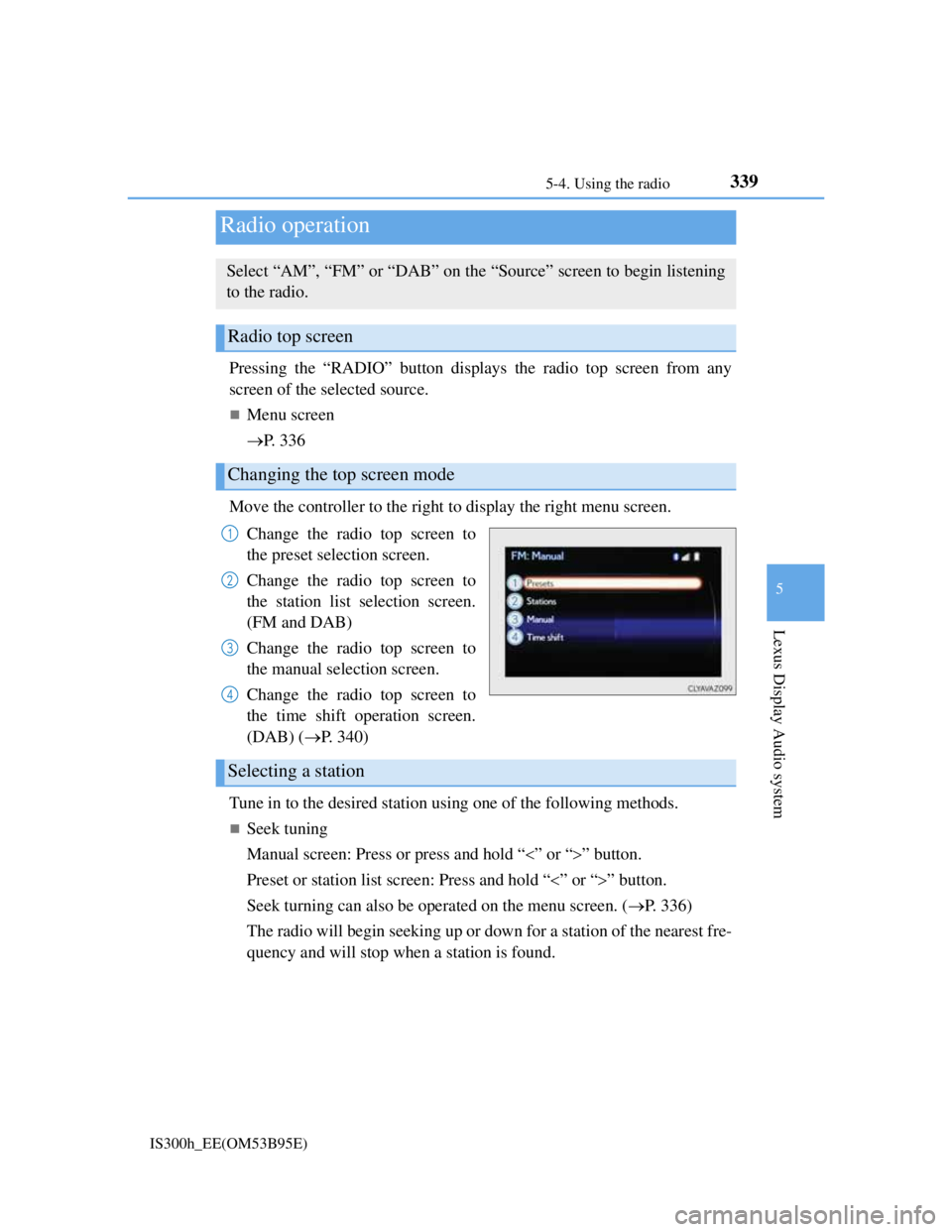
Move the controller to the right to display the right menu screen.
Change the radio top screen to
the preset selection screen.
Change the radio top screen to
the station list selection screen.
(FM and DAB)
Change the radio top screen to
the manual selection screen.
Change the radio top screen to
the time shift operation screen.
(DAB) (P. 340)
Tune in to the desired station using one of the following methods.
Seek tuning
Manual screen: Press or press and hold “” or “” button.
Preset or station list screen: Press and hold “” or “” button.
Seek turning can also be operated on the menu screen. (P. 336)
The radio will begin seeking up or down for a station of the nearest fre-
quency and will stop when a station is found.
Radio operation
Select “AM”, “FM” or “DAB” on the “Source” screen to begin listening
to the radio.
Radio top screen
Changing the top screen mode
1
2
3
4
Selecting a station
Page 354 of 628
3405-4. Using the radio
IS300h_EE(OM53B95E)
Manual tuning (manual screen)
Turn the right side knob (left-hand drive vehicle) or left side knob
(right-hand drive vehicle) on the audio panel or turn the controller.
Station list (preset or station list screen)
Select the desired station by pressing “<” or “>”, turn the right side
knob (left-hand drive vehicle) or left side knob (right-hand drive vehi-
cle) on the audio panel or controller.
Radio stations can be preset.
Search for desired stations.
Turn the controller to select one of the preset stations and then press
the controller until you hear a beep while on the preset selection
screen.
The broadcast you are currently listening to can be re-listened to at any
time.
Move the controller to the right and then select “Time shift”.
Turn the right side knob (left-hand drive vehicle) or left side knob
(right-hand drive vehicle) on the audio panel to set the desired offset.
An offset playback time can also be set on the menu screen. (P. 3 3 6 )
To cancel the time shift operation while in time shift mode, move the control-
ler to the left and select “Time shift off”. If the time shift display is left show-
ing “-0' 00”” for 6 seconds without any operation, the time shift operation will
be canceled.
Reception sensitivity
Maintaining perfect radio reception at all times is difficult due to the continu-
ally changing position of the antenna, differences in signal strength and sur-
rounding objects, such as trains, transmitters, etc.
The radio antenna is mounted inside the rear window. To maintain clear radio
reception, do not attach metallic window tinting or other metallic objects to the
antenna wire mounted inside the rear window.
Traffic announcement operation
When traffic announcement is set to on, “TP” will appear on the screen and the
radio will begin seeking a TP station. If the radio seeks out a TP station, the pro-
gram name will appear on the screen. If a traffic announcement station is
received, the radio will be switched to the traffic information program automati-
cally. When the program ends, the initial operation will resume.
Setting station presets (preset screen)
Time shift operation (DAB)
1
2
1
2
Page 364 of 628

3505-6. Using an external device
IS300h_EE(OM53B95E)
iPod problems
To resolve most problems encountered when using your iPod, disconnect your
iPod from the vehicle iPod connection and reset it. For instructions on how to
reset your iPod, refer to your iPod Owner's Manual.
Compatible models
The following iPod®, iPod nano®, iPod classic®, iPod touch® and iPhone®
devices can be used with this system.
Made for
• iPod touch (5th generation)
• iPod touch (4th generation)
• iPod touch (3rd generation)
• iPod touch (2nd generation)
• iPod touch (1st generation)
• iPod classic
• iPod with video
• iPod nano (7th generation)
• iPod nano (6th generation)
• iPod nano (5th generation)
• iPod nano (4th generation)
• iPod nano (3rd generation)
• iPod nano (2nd generation)
• iPod nano (1st generation)
• iPhone 5
• iPhone 4S
• iPhone 4
• iPhone 3GS
• iPhone 3G
• iPhone
Depending on differences between models or software versions etc., some mod-
els might be incompatible with this system.
To use the video mode
To operate the video functions such as iPod video, a 4-pole AUX cable is neces-
sary. However, depending on the cable specifications, the video function may not
work properly. For more information consult any authorized Lexus dealer or
repairer, or another duly qualified and equipped professional.
NOTICE
If the console box lid cannot be fully closed
Depending on the size and shape of the iPod that is connected to the system, the
auxiliary box lid may not close fully. In this case, do not forcibly close the lid
as this may damage the iPod or the terminals, etc.
To prevent damage to the iPod or its terminals
Do not leave the iPod in the vehicle. The temperature inside the vehicle may
become high, resulting in damage to the iPod.
Do not push down on or apply unnecessary pressure to the iPod while it is
connected.
Do not insert foreign objects into the port.
Page 456 of 628

4427-3. Do-it-yourself maintenance
IS300h_EE(OM53B95E)
Engine oil consumption
A certain amount of engine oil will be consumed while driving. In the following
situations, oil consumption may increase, and engine oil may need to be refilled
in between oil maintenance intervals.
When the engine is new, for example directly after purchasing the vehicle or
after replacing the engine
If low quality oil or oil of an inappropriate viscosity is used
When driving at high engine speeds or with a heavy load, when towing, or
when driving while accelerating or decelerating frequently
When leaving the engine idling for a long time, or when driving frequently
through heavy traffic
After changing the engine oil (if equipped)
The engine oil maintenance data should be reset. Perform the following proce-
dures:
While the hybrid system is operating, switch the multi-information display to
the “Settings” screen. (P. 118)
Select “Maintenance System” on the “Settings” screen.
Select “Yes” on the “Maintenance System” screen.
A message will be displayed when the
reset procedure has been completed.
1
2
3
Page 466 of 628

4527-3. Do-it-yourself maintenance
IS300h_EE(OM53B95E)
How to initialize the tire pressure warning system
Park the vehicle in a safe place and turn the power switch off.
Initialization cannot be performed while the vehicle is moving.
Adjust the tire inflation pressure to the specified cold tire inflation
pressure level. (P. 570)
Make sure to adjust the tire pressure to the specified cold tire inflation pres-
sure level. The tire pressure warning system will operate based on this pres-
sure level.
Turn the power switch to ON mode.
Press and hold the tire pressure
warning reset switch until the
tire pressure warning light
blinks slowly 3 times.
Wait for a few minutes with the power switch in ON mode and then
turn the power switch off.
Registering ID codes
The tire pressure warning valve and transmitter is equipped with a
unique ID code. When replacing a tire pressure warning valve and
transmitter, it is necessary to register the ID code. Have the ID code
registered by any authorized Lexus dealer or repairer, or another duly
qualified and equipped professional.
1
2
3
4
5
Page 468 of 628

4547-3. Do-it-yourself maintenance
IS300h_EE(OM53B95E)
Situations in which the tire pressure warning system may not operate properly
In the following cases, the tire pressure warning system may not operate prop-
erly.
• If non-genuine Lexus wheels are used.
• A tire has been replaced with a tire that is not an OE (Original Equipment)
tire.
• A tire has been replaced with a tire that is not of the specified size.
• Tire chains etc. are equipped.
• Lock nuts are equipped.
• An auxiliary-supported run-flat tire is equipped.
• If a window tint that affects the radio wave signals is installed.
• If there is a lot of snow or ice on the vehicle, particularly around the wheels
or wheel housings.
• If the tire inflation pressure is extremely higher than the specified level.
• If tires not equipped with tire pressure warning valves and transmitters are
used.
• If the ID code on the tire pressure warning valves and transmitters is not reg-
istered in the tire pressure warning computer.
Performance may be affected in the following situations.
• Near a TV tower, electric power plant, gas station, radio station, large dis-
play, airport or other facility that generates strong radio waves or electrical
noise
• When carrying a portable radio, cellular phone, cordless phone or other
wireless communication device
When the vehicle is parked, the time taken for the warning to start or go off
could be extended.
When tire inflation pressure declines rapidly for example when a tire has burst,
the warning may not function.
The initialization operation
Make sure to carry out initialization after adjusting the tire inflation pressure.
Also, make sure the tires are cold before carrying out initialization or tire infla-
tion pressure adjustment.
If you have accidentally turned the power switch off during initialization, it is
not necessary to press the reset switch again as initialization will restart auto-
matically when the power switch has been turned to ON mode for the next time.
If you accidentally press the reset switch when initialization is not necessary,
adjust the tire inflation pressure to the specified level when the tires are cold,
and conduct initialization again.
Warning performance of the tire pressure warning system
The warning of the tire pressure warning system will change in accordance with
the conditions under which it was initialized. For this reason, the system may
give a warning even if the tire pressure does not reach a low enough level, or if
the pressure is higher than the pressure that was adjusted to when the system was
initialized.
Page 469 of 628

4557-3. Do-it-yourself maintenance
7
Maintenance and care
IS300h_EE(OM53B95E)
When initialization of the tire pressure warning system has failed
Initialization can be completed in a few minutes. However, in the following
cases, the settings have not been recorded and the system will not operate prop-
erly. If repeated attempts to record tire inflation pressure settings are unsuccess-
ful, have the vehicle inspected by any authorized Lexus dealer or repairer, or
another duly qualified and equipped professional.
When operating the tire pressure warning reset switch, the tire pressure warning
light does not blink 3 times.
After carrying out the initialization procedure, the tire pressure warning light
blinks for 1 minute then stays on after driving for 20 minutes.
Page 472 of 628

4587-3. Do-it-yourself maintenance
IS300h_EE(OM53B95E)
CAUTION
When inspecting or replacing tires
Observe the following precautions to prevent accidents.
Failure to do so may cause damage to parts of the drivetrain as well as danger-
ous handling characteristics, which may lead to an accident resulting in death
or serious injury.
Do not mix tires of different makes, models or tread patterns.
Also, do not mix tires of remarkably different treadwear.
Do not use tire sizes other than those recommended by Lexus.
Do not mix differently constructed tires (radial, bias-belted or bias-ply tires).
Do not mix summer, all season and snow tires.
Do not use tires that have been used on another vehicle.
Do not use tires if you do not know how they were used previously.
Vehicles with an emergency tire puncture repair kit: Do not tow anything if a
tire that has been repaired using the emergency tire puncture repair kit is
installed. The load on the tire may cause unexpected damage to the tire.
When initializing the tire pressure warning system
Do not operate the tire pressure warning reset switch without first adjusting the
tire inflation pressure to the specified level. Otherwise, the tire pressure warn-
ing light may not come on even if the tire inflation pressure is low, or it may
come on when the tire inflation pressure is actually normal.