Page 121 of 628
1202. Instrument cluster
IS300h_EE(OM53B95E)
Rev indicator (F SPORT models)
Select to set the rev indicator on/
off.
When set to on, the tachometer
will show a ring-shaped indicator
in red when the engine reaches a
set speed.
Selectable engine speed range:
2000 r/min to 6000 r/min
Rev peak (F SPORT models)
Select to set the rev peak on/off.
When set to on and the engine
speed reaches or exceeds 4000 r/
min, an afterimage of the tachom-
eter will be displayed at the high-
est engine speed for
approximately 0.5 seconds.
Initialization
Select to reset the meter display settings. (P. 576)
Suspension of the settings display
In the following situations, the settings display using the meter control switches
will be suspended.
When a warning message appears on the multi-information display
When the vehicle begins to move
Liquid crystal display
P. 1 1 5
Page 126 of 628
1252. Instrument cluster
2
Instrument cluster
IS300h_EE(OM53B95E)These images are examples only.
Trip information
Navigation system
Press the “MENU” button on the Remote Touch, and then select “Car”
on the “Menu” screen.
If the “Energy monitor” or “Past record” screen is displayed, select “Trip
information”.
Resetting the consumption
data
Fuel consumption in the past
15 minutes
Regenerated energy in the past
15 minutes
One symbol indicates 30 Wh.
Up to 5 symbols are shown.
Displays the average vehicle
speed since the hybrid system
was started.
Displays the elapsed time since the hybrid system was started.
Cruising range (P. 128)
Hybrid battery (traction battery) status
Fuel consumption
Navigation system
screenLexus Display Audio
screenMulti-information dis-
play
LowFullLowFullLowFull
1
2
3
4
5
6
Page 128 of 628

1272. Instrument cluster
2
Instrument cluster
IS300h_EE(OM53B95E)
Past record
Navigation system
Press the “MENU” button on the Remote Touch, and then select “Car”
on the “Menu” screen.
If the “Energy monitor” or “Trip information” screen is displayed, select
“Past record”.
Resetting the past record data
Best recorded fuel consump-
tion
Average fuel consumption
Previous fuel consumption
record
Updating the average fuel con-
sumption data
Lexus Display Audio system
Press the “MENU” button on the Lexus Display Audio controller, and
then select “Car” on the “MENU” screen.
If the “Past record” screen does not appear, move the controller to the right
and select “Past record”.
Previous fuel consumption
record
Average fuel consumption
Best recorded fuel consump-
tion
The average fuel consumption history is divided by color into past
averages and the average fuel consumption since the last updated. Use
the displayed average fuel consumption as a reference.
The image is an example only.
1
2
3
4
5
1
2
3
Page 129 of 628
1282. Instrument cluster
IS300h_EE(OM53B95E)
Updating the past record data
Navigation system
Update the average fuel consumption by selecting “Update” to measure the cur-
rent fuel consumption again.
Lexus Display Audio system
Update the average fuel consumption by moving the controller to the left and
select “Update” to measure the current fuel consumption again.
Resetting the data
Navigation system
The fuel consumption data can be deleted by selecting “Clear”.
Lexus Display Audio system
The fuel consumption data can be deleted by moving the controller to the left and
select “Clear”.
Cruising range
Displays the estimated maximum distance that can be driven with the quantity of
fuel remaining.
This distance is computed based on your average fuel consumption.
As a result, the actual distance that can be driven may differ from that displayed.
Page 170 of 628
1683-3. Adjusting the seats
IS300h_EE(OM53B95E)
Check that the shift lever is in P.
Turn the power switch to ON mode.
Adjust the driver’s seat, steering wheel, and outside rear view mirrors
to the desired positions.
While pressing the “SET” button,
or within 3 seconds after the
“SET” button is pressed, press
button “1”, “2” or “3” until a
buzzer sounds.
If the selected button has already
been preset, the previously recorded
position will be overwritten.
Driving position memory
: If equipped
Your preferred driving position (the position of the driver’s seat, steering
wheel and outside rear view mirrors) can be memorized and recalled by
pressing a button. It is also possible to set this function to activate auto-
matically when the doors are unlocked.
Three different driving positions can be entered into memory.
Entering a position to memory
1
2
3
4
Page 249 of 628

2474-5. Using the driving support systems
4
Driving
IS300h_EE(OM53B95E)
Cruise control can be set when
The shift lever is in D or range 4 or higher of S has been selected.
Range 4 or higher of D has been selected by using the paddle shift.
Vehicle speed is above approximately 40 km/h (25 mph).
Accelerating after setting the vehicle speed
The vehicle can be accelerated normally. After acceleration, the set speed
resumes.
Even without canceling the cruise control, the set speed can be increased by
first accelerating the vehicle to the desired speed and then pushing the lever
down to set the new speed.
Automatic cruise control cancelation
Cruise control will stop maintaining the vehicle speed in any of the following sit-
uations.
Actual vehicle speed falls more than approximately 16 km/h (10 mph) below
the preset vehicle speed.
At this time, the memorized set speed is not retained.
Actual vehicle speed is below approximately 40 km/h (25 mph).
VSC is activated.
TRC is activated for a period of time.
When the VSC or TRC system is turned off by pressing the VSC OFF switch.
If the warning message for the cruise control is shown on the multi-information
display
Press the “ON/OFF” button once to deactivate the system, and then press the but-
ton again to reactivate the system.
If the cruise control speed cannot be set or if the cruise control cancels immedi-
ately after being activated, there may be a malfunction in the cruise control sys-
tem. Have the vehicle inspected by any authorized Lexus dealer or repairer, or
another duly qualified and equipped professional.
Page 340 of 628
3275-2. Setup
5
Lexus Display Audio system
IS300h_EE(OM53B95E)
“Setup” “General” “Delete personal data”
Select “Delete”.
Check carefully beforehand, as data cannot be retrieved once deleted.
The following personal data will be deleted or changed to its default
settings.
• Phonebook data
• Voice tag
• Call history data
• Favorite data
•Bluetooth
® devices data
• Phone sound settings
• Detailed Bluetooth
® settings
• Audio/video setting
• Preset switch data
• Last used radio station
• Customized image data
• FM info setting
• iPod tagging information
• Software update history
• Software update detail information
• Phone display setting
• Contact/call history setting
• Messaging setting
NOTICE
If the console box lid cannot be fully closed
P. 3 5 5
To prevent damage to the USB memory device or its terminals
P. 3 5 5
Deleting personal data
1
2
Page 347 of 628
3335-3. Using the audio system
5
Lexus Display Audio system
IS300h_EE(OM53B95E)
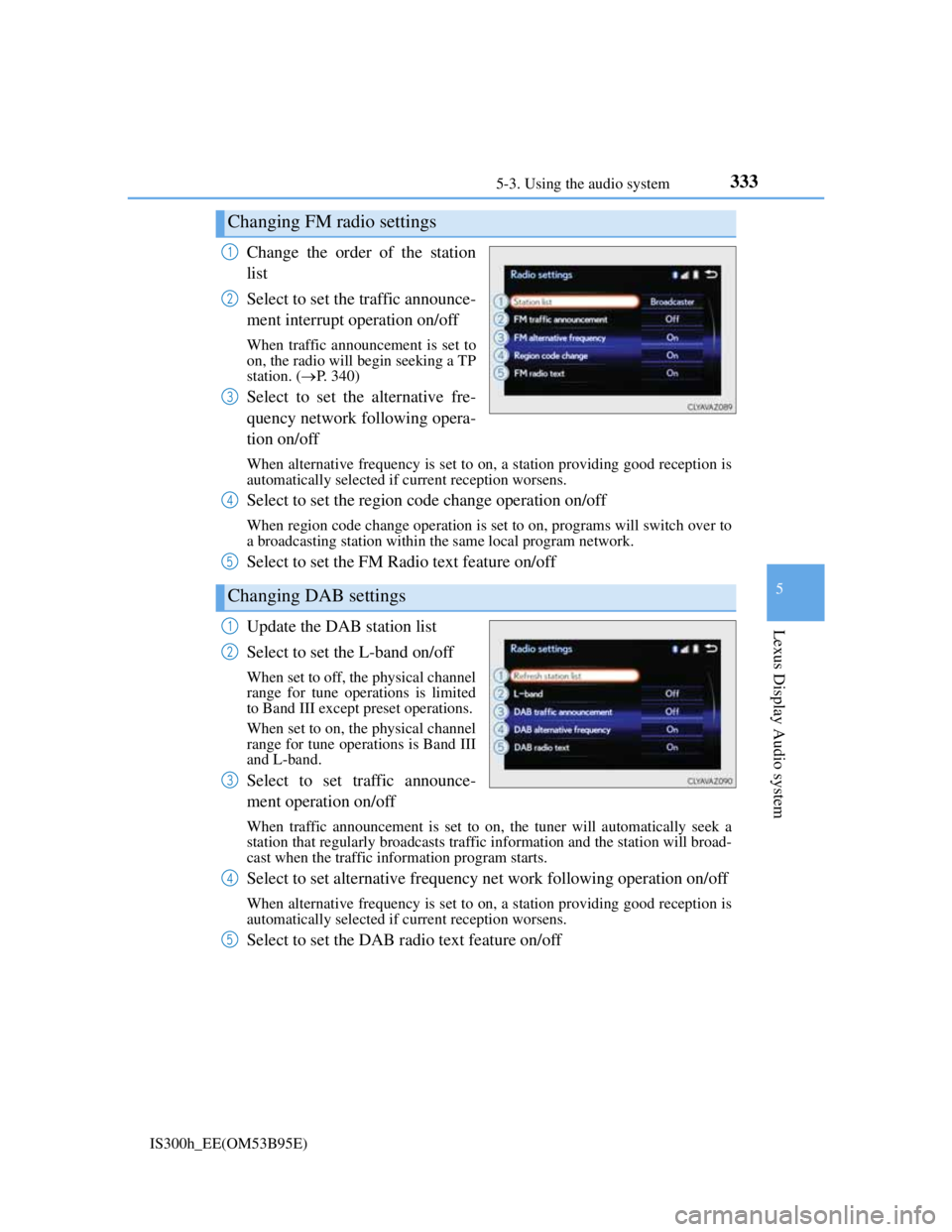
Change the order of the station
list
Select to set the traffic announce-
ment interrupt operation on/off
When traffic announcement is set to
on, the radio will begin seeking a TP
station. (P. 340)
Select to set the alternative fre-
quency network following opera-
tion on/off
When alternative frequency is set to on, a station providing good reception is
automatically selected if current reception worsens.
Select to set the region code change operation on/off
When region code change operation is set to on, programs will switch over to
a broadcasting station within the same local program network.
Select to set the FM Radio text feature on/off
Update the DAB station list
Select to set the L-band on/off
When set to off, the physical channel
range for tune operations is limited
to Band III except preset operations.
When set to on, the physical channel
range for tune operations is Band III
and L-band.
Select to set traffic announce-
ment operation on/off
When traffic announcement is set to on, the tuner will automatically seek a
station that regularly broadcasts traffic information and the station will broad-
cast when the traffic information program starts.
Select to set alternative frequency net work following operation on/off
When alternative frequency is set to on, a station providing good reception is
automatically selected if current reception worsens.
Select to set the DAB radio text feature on/off
Changing FM radio settings
1
2
3
Changing DAB settings
4
5
1
2
3
4
5


