Page 387 of 1014

3764-5. Using the driving support system
GS450h_300h_OM_OM30D53E_(EE)
Leaving the vehicle stopped, turn the steering wheel all the
way to the left.
Be sure to turn the steering wheel only when the vehicle is stopped.
When the screen changes, keep the steering wheel in its cur-
rent position and back up.
When backing up, be careful not to hit any obstacles with the right front
corner of your vehicle. Back the vehicle up slowly.
When the vehicle is parallel with the road or the shoulder,
straighten the steering wheel.
Check your surroundings visually and with the mirrors, then
back up using the distance guide lines as a reference, and stop.
When the vehicle is approximately in the desired parking location, the
parallel parking assist is complete.
Parallel parking assist mode information
• There is a possibility that parallel parking guidance may not
be given when backing up at a very slow speed.
• If the trunk is opened during parallel parking guidance, the
parallel parking assist will be interrupted and canceled. Stop
the vehicle, shift the shift lever out of the R position, and
restart the operation from the step
.
Canceling parallel parking assist
Select .
Vehicles with Lexus parking assist-sensor
If Lexus parking assist-sensor detects an object while you
attempt to park in a parking space on the left, the black and
yellow vertical pole could be obscured by Lexus parking
assist-sensor display. In this event, turn Lexus parking assist-
sensor switch off (P. 349), and operate the vehicle while
checking the safety of the surrounding area direct visually and
with mirror. After the operation, turn the switch on.
8
9
10
1
Page 400 of 1014

3894-5. Using the driving support system
4
Driving
GS450h_300h_OM_OM30D53E_(EE)
CAUTION
In low temperatures, the screen may darken or the image may become
faint. The image could distort when the vehicle is moving, or you may
become unable to see the image on the screen. Be sure to check direct
visually and with mirror all around the vehicle before proceeding.
If the tire sizes are changed, the position of the guide lines displayed on
the screen may change.
The camera uses a special lens. The distances between objects and pedes-
trians that appear in the image displayed on the screen will differ from the
actual distances. (P. 381)
When using the perpendicular parking assist screen
Estimated course line display mode: If the steering wheel is straight and the
vehicle width extension guide lines and the estimated course lines are not in
alignment, have the vehicle inspected by any authorized Lexus dealer or
repairer, or another duly qualified and equipped professional.
When using the parallel parking assist screen
Do not use the system if the display is incorrect due to an uneven (curvy/
hilly) road or a non-straight road.
Make sure to operate the steering wheel only when the vehicle is stopped.
Be sure to check that there are no obstacles inside the blue outline.
If there are any obstacles inside the blue outline, do not use the parallel
parking assist.
When positioning the blue outline over the parking space, be sure to posi-
tion it so that the extended blue line may not cross the tire of the vehicle
parked in front of the empty space.
Page 430 of 1014

4194-5. Using the driving support system
4
Driving
GS450h_300h_OM_OM30D53E_(EE)
BSM main switch
Pressing the switch turns the system on or off. When the switch is set to
on, the switch’s indicator illuminates and the buzzer sounds. Common
switch for Blind Spot Monitor function and Rear Crossing Traffic Alert
function.
Outside rear view mirror indicators
Blind Spot Monitor function:
When a vehicle is detected in the blind spot, the outside rear view mirror
indicator comes on while the turn signal lever is not operated and the out-
side rear view mirror indicator flashes while the turn signal lever is oper-
ated.
Rear Crossing Traffic Alert function:
When a vehicle approaching from the right or left rear of the vehicle is
detected, the outside rear view mirror indicators flash.
Rear Crossing Traffic Alert buzzer (Rear Crossing Traffic Alert
function only)
When a vehicle approaching from the right or left rear of the vehicle is
detected, a buzzer sounds from behind the rear seat.
1
2
3
Page 431 of 1014
4204-5. Using the driving support system
GS450h_300h_OM_OM30D53E_(EE)
The outside rear view mirror indicators visibility
When under strong sunlight, the outside rear view mirror indicator may be
difficult to see.
Rear Crossing Traffic Alert buzzer hearing
Rear Crossing Traffic Alert function may be difficult to hear over loud noises
such as high audio volume.
When there is a malfunction in the Blind Spot Monitor
If a system malfunction is detected due to any of the following reasons,
warning messages will be displayed: (P. 845, 855)
There is a malfunction with the sensors
The sensors have become dirty
The outside temperature is extremely high or low
The sensor voltage has become abnormal
Certification for the Blind Spot Monitor
For vehicles sold in Russia
type approval number: POCC DE.ML05.H01144
For vehicles sold in Ukraine
type approval number: 1O094.000966-13
Page 435 of 1014
4244-5. Using the driving support system
GS450h_300h_OM_OM30D53E_(EE)
The Blind Spot Monitor function uses radar sensors to detect vehi-
cles that are traveling in an adjacent lane in the area that is not
reflected in the outside rear view mirror (the blind spot), and
advises the driver of the vehicle’s existence via the outside rear
view mirror indicator.
The areas that vehicles can be detected in are outlined below.
The range of the detection area
extends to:
Approximately 3.5 m (11.5 ft.)
from the side of the vehicle
The first 0.5 m (1.6 ft.) from the
side of the vehicle is not in the
detection area
Approximately 3 m (9.8 ft.)
from the rear bumper
Approximately 1 m (3.3 ft.)
forward of the rear bumper
The Blind Spot Monitor function
The Blind Spot Monitor function detection areas
1
2
3
Page 438 of 1014
4274-5. Using the driving support system
4
Driving
GS450h_300h_OM_OM30D53E_(EE)
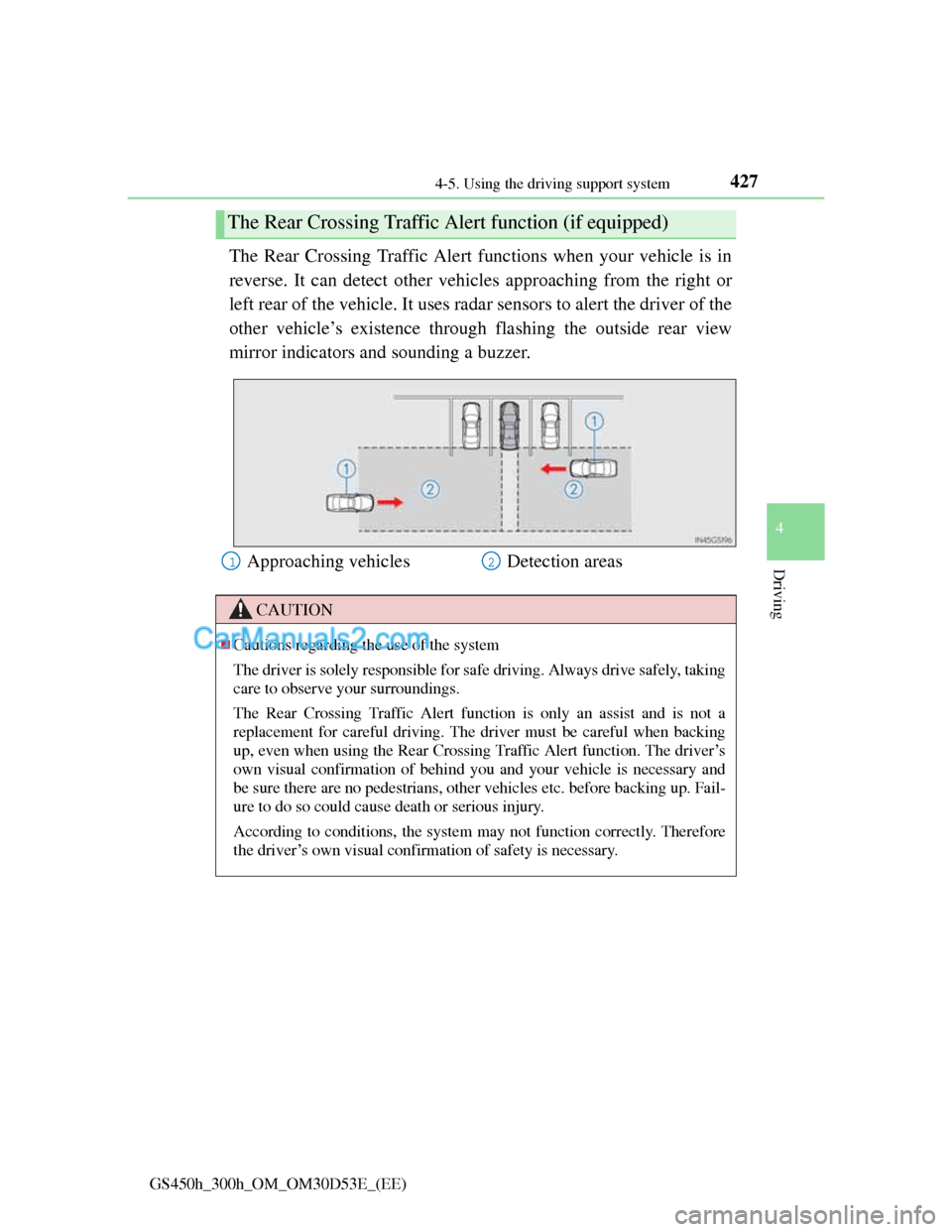
The Rear Crossing Traffic Alert functions when your vehicle is in
reverse. It can detect other vehicles approaching from the right or
left rear of the vehicle. It uses radar sensors to alert the driver of the
other vehicle’s existence through flashing the outside rear view
mirror indicators and sounding a buzzer.
The Rear Crossing Traffic Alert function (if equipped)
Approaching vehicles Detection areas
CAUTION
Cautions regarding the use of the system
The driver is solely responsible for safe driving. Always drive safely, taking
care to observe your surroundings.
The Rear Crossing Traffic Alert function is only an assist and is not a
replacement for careful driving. The driver must be careful when backing
up, even when using the Rear Crossing Traffic Alert function. The driver’s
own visual confirmation of behind you and your vehicle is necessary and
be sure there are no pedestrians, other vehicles etc. before backing up. Fail-
ure to do so could cause death or serious injury.
According to conditions, the system may not function correctly. Therefore
the driver’s own visual confirmation of safety is necessary.
12
Page 457 of 1014
440
GS450h_300h_OM_OM30D53E_(EE)5-1. Remote Touch screen
Remote Touch ................... 442
Remote Touch screen ........ 444
Set up screen ..................... 452
Speech command system .. 470
5-2. Using the air conditioning
system and defogger
Front automatic
air conditioning system ... 478
Rear
air conditioning system ... 494
Rear window and outside
rear view mirror
defoggers......................... 499
Windshield wiper de-icer .. 5005-3. Using the audio system
Audio system type ............ 501
Using the radio.................. 526
Using the CD/DVD
player .............................. 534
Playing an audio CD and
MP3/WMA discs ............ 536
Playing DVD video .......... 542
CD/DVD player and DVD
video disc information .... 555
Listening to
Bluetooth
® audio ............ 565
Listening to
a USB memory ............... 577
Listening to an iPod .......... 588
Optimal use of
the audio/video system ... 599
Using the AUX port.......... 601
Using the rear seat
audio controls ................. 603
Using the steering wheel
audio switches ................ 608
Page 458 of 1014
441
5Interior features
GS450h_300h_OM_OM30D53E_(EE)5-4. Using the hands-free phone
system (for cellular phone)
Hands-free system
(for cellular phone) ......... 611
Using a Bluetooth
®
phone............................... 625
Setting the hands-free system
(for cellular phone) ......... 645
Setting the Bluetooth
®...... 671
5-5. Using the interior lights
Interior lights list ............... 684
• Interior light .................. 685
• Personal lights............... 685
5-6. Using the storage features
List of storage features ...... 687
• Glove box ..................... 689
• Console box .................. 690
• Cup holders ................... 691
• Auxiliary boxes............. 693
Trunk features ................... 6945-7. Other interior features
Sun visors and
vanity mirrors ................. 697
Clock................................. 698
Ashtrays ............................ 699
Power outlets .................... 700
Heated steering wheel....... 702
Seat heaters/
seat ventilators ................ 704
Armrest ..............................711
Rear sunshade/
rear door sunshades ........ 712
Coat hooks ........................ 715
Assist grips ....................... 716
Utility hook ....................... 717

