Page 515 of 910
514
ES350 300h_OM_OM33A01U_(U)
5-4. Using the audio system
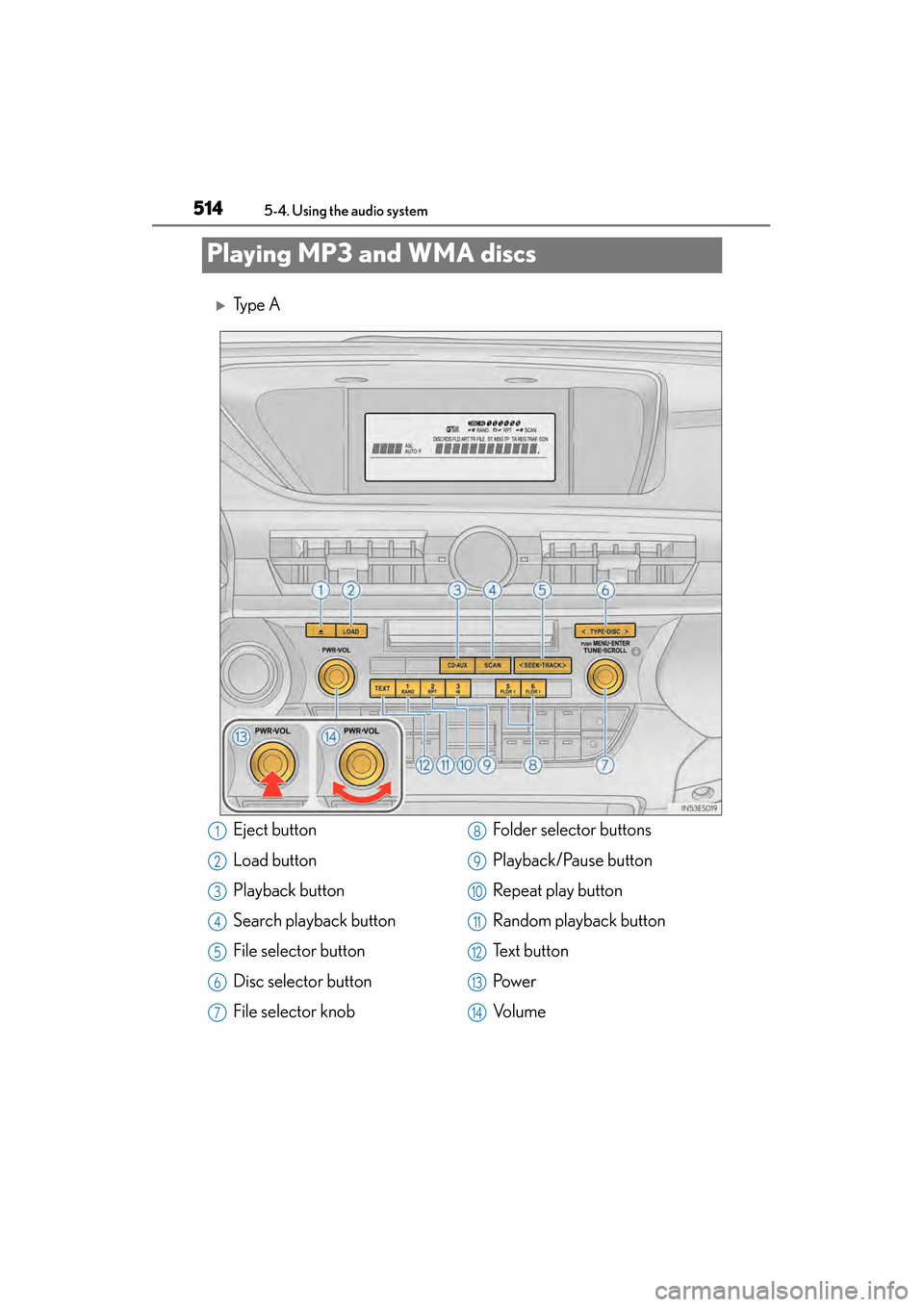
Playing MP3 and WMA discs
XTy p e A
Eject button
Load button
Playback button
Search playback button
File selector button
Disc selector button
File selector knobFolder selector buttons
Playback/Pause button
Repeat play button
Random playback button
Te x t b u t t o n
Pow e r
Vo l u m e1
2
3
4
5
6
7
8
9
10
11
12
13
14
Page 516 of 910
ES350 300h_OM_OM33A01U_(U)
5155-4. Using the audio system
5
Interior features
XTy p e B
Eject button
Load button
Playback button
File selector button
Disc selector button
File selector knob
Folder selector buttonsPlayback/Pause button
Repeat play button
Random playback button
Te x t b u t t o n
Pow e r
Vo l u m e1
2
3
4
5
6
7
8
9
10
11
12
13
Page 517 of 910
516
ES350 300h_OM_OM33A01U_(U)
5-4. Using the audio system
→P. 507, 508
→ P. 509
■Selecting a folder one at a time
Press or to select the desired folder.
■Returning to the first folder
Press and hold until you hear a beep.
■Scanning the first file of all the folders (type A)
Press and hold until you hear a beep.
The first ten seconds of the first file in each folder will be played.
When the desired folder is reached, press again.
To fast-forward or reverse, press and hold “ >” or “< ” on until
you hear a beep.
Loading and ejecting MP3 and WMA discs
Selecting MP3 and WMA discs
Selecting and scanning a folder
Fast-forwarding and reversing files
1
2
Page 518 of 910
ES350 300h_OM_OM33A01U_(U)
5175-4. Using the audio system
5
Interior features
■Selecting a file
Turn or press “>” or “ <” on to select the desired file.
■Scanning the files in a folder (type A)
Press .
The first ten seconds of each file will be played.
To cancel, press again.
When the desired file is reached, press again.
To play or pause a file, press .
■Playing files from a folder in random order
Press .
To cancel, press again.
■Playing all the files from a disc in random order
Press and hold until you hear a beep.
To cancel, press again.
Selecting and scanning files
Playing and pausing files
Random playback
Page 520 of 910

ES350 300h_OM_OM33A01U_(U)
5195-4. Using the audio system
5
Interior features
■CD player protection feature
→P. 5 1 1
■Display
→P. 5 1 1
■When “ERROR”, “WAIT” or “NO MUSIC” is shown on the display
“ERROR”:This indicates a problem either in the CD or inside the player. The CD
may be dirty, damaged, or inserted up-side down.
“WAIT”:This indicates that operation is stopped due to a high temperature inside the
player. Wait for a while and then press or . If the CD still cannot be
played back, contact your Lexus dealer.
“NO MUSIC”: This indicates that an MP3/WMA file is not included in the CD.
■Discs that can be used
→P. 5 1 1
■Lens cleaners
→P. 5 1 1
■If discs are left inside the CD player or in the ejected position for extended periods
of time
→ P. 5 1 1
■MP3 and WMA files
MP3 (MPEG Audio LAYER 3) is a standard audio compression format.
Files can be compressed to approximately 1 /10 of their original size by using MP3
compression.
WMA (Windows Media Audio) is a Microsoft audio compression format.
This format compresses audio data to a size smaller than that of the MP3 format.
There is a limit to the MP3 and WMA file standards that can be used and to the
media/formats on which the files are recorded.
●MP3 file compatibility
• Compatible standards
MP3 (MPEG1 LAYER3, MPEG2 LSF LAYER3)
• Compatible sampling frequencies MPEG1 LAYER3: 32, 44.1, 48 (kHz)
MPEG2 LSF LAYER3: 16, 22.05, 24 (kHz)
• Compatible bit rates (compatible with VBR) MPEG1 LAYER3: 64, 80, 96, 112, 128, 160, 192, 224, 256, 320 (kbps)
MPEG2 LSF LAYER3: 64, 80, 96, 112, 128, 144, 160 (kbps)
• Compatible channel modes: stereo, joint stereo, dual channel and monaural
Page 521 of 910

520
ES350 300h_OM_OM33A01U_(U)
5-4. Using the audio system
●WMA file compatibility
• Compatible standardsWMA Ver. 7, 8, 9
• Compatible sampling frequencies 32, 44.1, 48 (kHz)
• Compatible bit rates (only compatible with 2-channel playback) Ver. 7, 8: CBR 48, 64, 80, 96, 128, 160, 192 (kbps)
Ver. 9: CBR 48, 64, 80, 96, 128, 160, 192, 256, 320 (kbps)
●Compatible media
Media that can be used for MP3 and WMA playback are CD-Rs and CD-RWs.
Playback in some instances may not be possible if the CD-R or CD-RW is not
finalized. Playback may not be possible or the audio may jump if the disc is
scratched or marked with fingerprints.
●Compatible disc formats
The following disc formats can be used:
• Disc formats: CD-ROM Mode 1 and Mode 2CD-ROM XA Mode 2, Form 1 and Form 2
• File formats: ISO9660 Level 1, Level 2, (Romeo, Joliet) MP3 and WMA files written in any format other than those listed above may not
play correctly, and their file names and folder names may not be displayed cor-
rectly.
Items related to standards and limitations are as follows:
• Maximum directory hierarchy: 8 levels (including the root)
• Maximum length of folder names/file names: 32 characters
• Maximum number of folders: 192 (including the root)
• Maximum number of files per disc: 255
●File names
The only files that can be recognized as MP3/WMA and played are those with
the extension .mp3 or .wma.
●Discs containing multi-session recordings
As the audio system is compatible with multi-sessions, it is possible to play discs
that contain MP3 and WMA files. However, only the first session can be played.
●ID3 and WMA tags
ID3 tags can be added to MP3 files, making it possible to record the track title,
artist name, etc.
The system is compatible with ID3 Ver. 1.0, 1.1, and Ver. 2.2, 2.3 ID3 tags. (The
number of characters is based on ID3 Ver. 1.0 and 1.1.)
WMA tags can be added to WMA files, making it possible to record the track title
and artist name in the same way as with ID3 tags.
Page 522 of 910

ES350 300h_OM_OM33A01U_(U)
5215-4. Using the audio system
5
Interior features
●MP3 and WMA playback
When a disc containing MP3 or WMA files is inserted, all files on the disc are first
checked. Once the file check is finished, the first MP3 or WMA file is played. To
make the file check finish more quickly, we recommend you do not write in any
files other than MP3 or WMA files or create any unnecessary folders.
Discs that contain a mixture of music data and MP3 or WMA format data cannot
be played.
●Extensions
If the file extensions .mp3 and .wma are used for files other than MP3 and WMA
files, they will be mistakenly recognized and played as MP3 and WMA files. This
may result in large amounts of interference and damage to the speakers.
●Playback
• To play MP3 files with steady sound quality, we recommend a fixed bit rate of atleast 128 kbps and a sampling frequency of 44.1 kHz.
• CD-R or CD-RW playback may not be possible in some instances, depending on the characteristics of the disc.
• There is a wide variety of freeware and other encoding software for MP3 and WMA files on the market, and depending on the status of the encoding and the
file format, poor sound quality or noise at the start of playback may result. In
some cases, playback may not be possible at all.
• When files other than MP3 or WMA files are recorded on a disc, it may take more time to recognize the disc and in some cases, playback may not be possi-
ble at all.
• Microsoft, Windows, and Windows Media are registered trademarks of Microsoft Corporation in the U.S.A. and other countries.
NOTICE
■CDs and adapters that cannot be used
→ P. 5 1 2
■CD player precautions
→P. 5 1 3
Page 529 of 910

528
ES350 300h_OM_OM33A01U_(U)
5-4. Using the audio system
Press to enter iPod menu mode.
Pressing changes sound modes. ( →P. 562)
■About iPod
●“Made for iPod” and “Made for iPhone” mean that an electronic accessory has
been designed to connect specifically to iPod, or iPhone, respectively, and has
been certified by the developer to meet Apple performance standards.
●Apple is not responsible for the operation of this device or its compliance with
safety and regulatory standards. Please note that the use of this accessory with
iPod or iPhone may affect wireless performance.
●iPhone, iPod, iPod classic, iPod nano and iPod touch are trademarks of Apple Inc.,
registered in the U.S. and other countries.
■iPod functions
●When an iPod is connected and the audio source is changed to iPod mode, the
iPod will resume play from the same point in which it was last used.
●Depending on the iPod that is connected to the system, certain functions may not
be available. If a function is unavailable due to a malfunction (as opposed to a sys-
tem specification), disconnecting the device and reconnecting it once again may
resolve the problem.
●While connected to the system, the iPod cannot be operated with its own controls.
It is necessary to use the controls of the vehicle’s audio system instead.
●When the battery level of an iPod is very low, the iPod may not operate. If so, charge
the iPod before use.
●Supported models ( →P. 5 3 0 )
Adjusting sound quality and volume balance
1
2