Page 133 of 485
Features of your vehicle
54
4
Fuel Gauge
This gauge indicates the approxi- mate amount of fuel remaining in thefuel tank.
✽✽
NOTICE
The fuel tank capacity is given in chapter 8.
The fuel gauge is supplemented by a low fuel warning light, which
will illuminate when the fuel tank
is nearly empty.
On inclines or curves, the fuel gauge pointer may fluctuate or the
low fuel warning light may come
on earlier than usual due to the
movement of fuel in the tank.WARNING - Fuel Gauge
Running out of fuel can expose
vehicle occupants to danger.
You must stop and obtain addi-
tional fuel as soon as possibleafter the warning light comes
on or when the gauge indicator
comes close to the “E (Empty)”
level.
CAUTION
Avoid driving with a extremely low fuel level. Running out offuel could cause the engine tomisfire damaging the catalytic converter.
OKH042058
■■ Type A
■■Type B
Page 137 of 485
Features of your vehicle
58
4
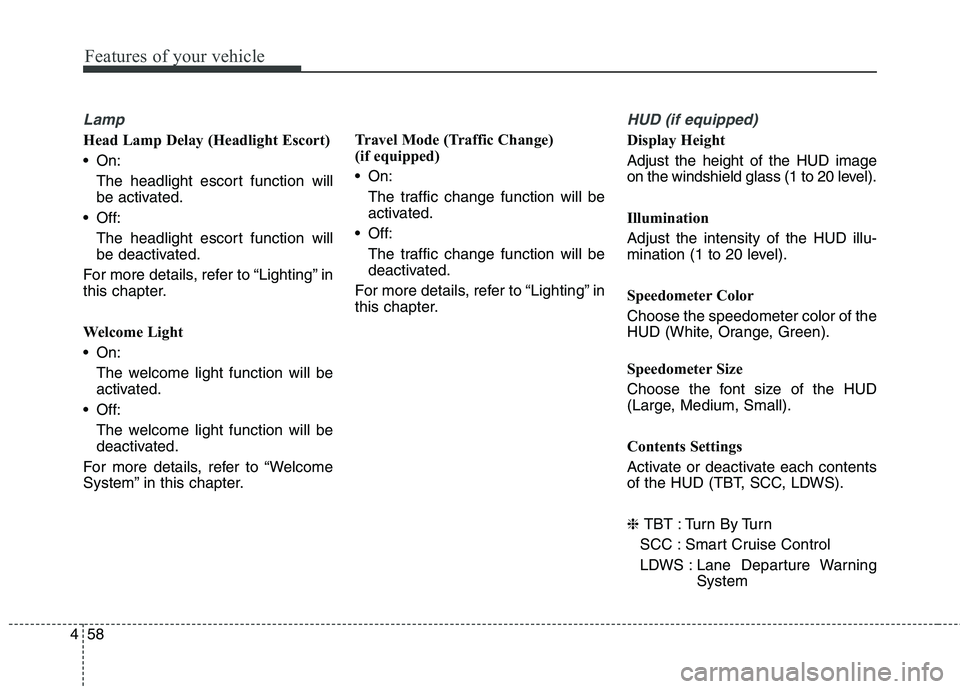
Lamp
Head Lamp Delay (Headlight Escort)
On:
The headlight escort function will
be activated.
Off:
The headlight escort function will
be deactivated.
For more details, refer to “Lighting” in
this chapter.
Welcome Light
On: The welcome light function will be
activated.
Off:
The welcome light function will be
deactivated.
For more details, refer to “Welcome
System” in this chapter. Travel Mode (Traffic Change)
(if equipped)
On:
The traffic change function will be
activated.
Off: The traffic change function will be
deactivated.
For more details, refer to “Lighting” in
this chapter.
HUD (if equipped)
Display Height Adjust the height of the HUD image
on the windshield glass (1 to 20 level).
Illumination Adjust the intensity of the HUD illu-
mination (1 to 20 level).
Speedometer Color Choose the speedometer color of the
HUD (White, Orange, Green).
Speedometer Size
Choose the font size of the HUD
(Large, Medium, Small).
Contents Settings
Activate or deactivate each contents
of the HUD (TBT, SCC, LDWS). ❈ TBT : Turn By Turn
SCC : Smart Cruise Control
LDWS : Lane Departure Warning System
Page 138 of 485

459
Features of your vehicle
Settings
One Touch Turn Lamp
Off:The one touch turn lamp function
will be deactivated.
3, 5, 7 Flashing :
The lane change signals will blink
3, 5, or 7 times when the turn sig-
nal lever is moved slight.
For more details, refer to “Lighting” in
this chapter.
Seat Easy Access
On: The driver’s seat will automatically
move forward or rearward for the
driver to enter or exit the vehicle
comfortably.
Off:
The seat easy access function will
be deactivated.
For more details, refer to “Seat” inchapter 3. Steering Easy Access
On:
The steering wheel will automati-
cally move forward or rearward for
the driver to enter or exit the vehi-
cle comfortably.
Off:
The steering easy access function
will be deactivated.
For more details, refer to “Steering
Wheel” in this chapter.
Welcome Sound
On: The welcome sound operates
when the instrument cluster is
turned on.
Off:
The welcome sound function will
be deactivated. AVG Fuel Eco Reset
Auto Reset:
The average fuel economy will reset automatically when refueling.
Manual Reset:
The average fuel economy will not
reset automatically whenever refu-eling.
For more details, refer to “Trip
Computer” in this chapter.
AVSM (if equipped)
On: The AVSM system will be activat- ed.
Off: The AVSM system will be deacti-
vated.
For more details, refer to “Advanced
Vehicle Safety Management (AVSM)
System” in chapter 5. ❈ AVSM: Advanced Vehicle Safety Management
Page 140 of 485
461
Features of your vehicle
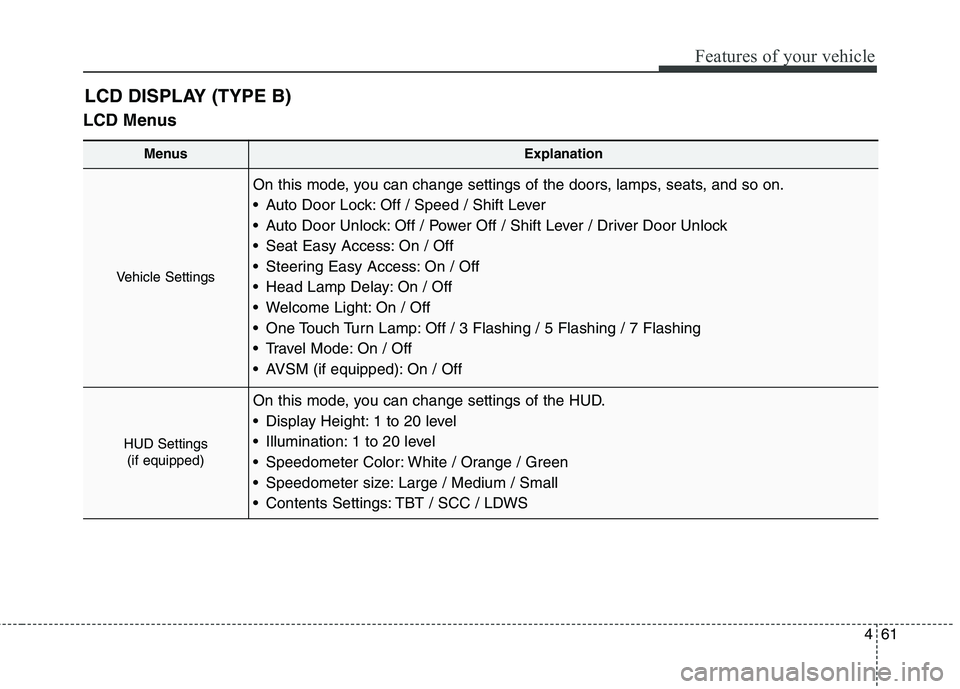
LCD MenusLCD DISPLAY (TYPE B)
MenusExplanation
Vehicle Settings
On this mode, you can change settings of the doors, lamps, seats, and so on.
Auto Door Lock: Off / Speed / Shift Lever
Auto Door Unlock: Off / Power Off / Shift Lever / Driver Door Unlock
Seat Easy Access: On / Off
Steering Easy Access: On / Off
Head Lamp Delay: On / Off
Welcome Light: On / Off
One Touch Turn Lamp: Off / 3 Flashing / 5 Flashing / 7 Flashing
Travel Mode: On / Off
AVSM (if equipped): On / Off
HUD Settings
(if equipped)
On this mode, you can change settings of the HUD.
Display Height: 1 to 20 level
Illumination: 1 to 20 level
Speedometer Color: White / Orange / Green
Speedometer size: Large / Medium / Small
Contents Settings: TBT / SCC / LDWS
Page 143 of 485

Features of your vehicle
64
4
Seat Easy Access
On:
The driver’s seat will automatically
move forward or rearward for the
driver to enter or exit the vehicle
comfortably.
Off: The seat easy access function will
be deactivated.
For more details, refer to “Seat” inchapter 3.
Steering Easy Access
On: The steering wheel will automati-
cally move forward or rearward for
the driver to enter or exit the vehi-
cle comfortably.
Off: The steering easy access function
will be deactivated.
For more details, refer to “Steering
Wheel” in this chapter. Head Lamp Delay (Headlight Escort)
On:
The headlight escort escort func-
tion will be activated.
Off:
The headlight escort function will
be deactivated.
For more details, refer to “Lighting” in
this chapter.
Welcome Light
On: The welcome light function will be
activated.
Off: The welcome light function will be
deactivated.
For more details, refer to “Welcome
System” in this chapter. One Touch Turn Lamp
Off:
The one touch turn lamp function
will be deactivated.
3, 5, 7 Flashing : The lane change signals will blink
3, 5, or 7 times when the turn sig-
nal lever is moved slight.
For more details, refer to “Lighting” in
this chapter.
Travel Mode (Traffic Change)
(if equipped)
On: The traffic change function will be
activated.
Off: The traffic change function will be
deactivated.
For more details, refer to “Lighting” in
this chapter.
Page 150 of 485
471
Features of your vehicle
Press start button with smart key
This warning message illuminatesif you press the Engine Start/Stop
Button while the warning message
“Key not detected” is illuminating.
At this time, the immobilizer indica- tor light blinks.
Check fuse "BRAKE SWITCH"
This warning message illuminatesif the brake switch fuse is discon- nected.
It means that you should replace the fuse with a new one. If that is
not possible, you can start the
engine by pressing the Engine
Start/Stop Button for 10 seconds in
the ACC position.
Shift to "P" or "N" to start engine
This warning message illuminatesif you try to start the engine with
the shift lever not in the P (Park) or
N (Neutral) position.
✽✽ NOTICE
You can start the engine with the
shift lever in the N (Neutral) position.
But, for your safety, we recommend
that you start the engine with the
shift lever in the P (Park) position.
OKH042931OKH042932OKH042933
■ Type A ■Type B ■
Type A ■Type B ■Type A ■Type B
Page 159 of 485
Features of your vehicle
80
4
Warning lights
✽✽
NOTICE - Warning lights
Make sure that all warning lights
are OFF after starting the engine. If
any light is still ON, this indicates a
situation that needs attention.
Air bag Warning Light
This warning light illuminates:
Once you set the ignition switch or Engine Start/Stop Button to the ON position.
- It illuminates for approximately 6seconds and then goes off.
When there is a malfunction with the SRS.
In this case, we recommend that
you have the vehicle inspected by
an authorized Kia dealer.
Seat Belt Warning Light
This warning light informs the driver
that the seat belt is not fastened.
For more details, refer to the “Seat
Belts” in chapter 3.
WARNING AND INDICATOR LIGHTS
Page 160 of 485

481
Features of your vehicle
Parking Brake & BrakeFluid Warning Light
This warning light illuminates:
Once you set the ignition switch or Engine Start/Stop Button to the ON position.
- It illuminates for approximately 3seconds
- It remains on if the parking brake is applied.
When the parking brake is applied.
When the brake fluid level in the reservoir is low.
- If the warning light illuminateswith the parking brake released, it
indicates the brake fluid level in
reservoir is low. If the brake fluid level in the reservoir
is low:
1. Drive carefully to the nearest safe
location and stop your vehicle.
2. With the engine stopped, check the brake fluid level immediately
and add fluid as required (For
more details, refer to “Brake Fluid”
in chapter 7). Then check all brake
components for fluid leaks. If any
leak on the brake system is still
found, the warning light remains
on, or the brakes do not operate
properly, do not drive the vehicle.
In this case, we recommend that
you have the vehicle towed to an
authorized Kia dealer and inspect-ed. Dual-diagonal braking system
Your vehicle is equipped with dual-
diagonal braking systems. This
means you still have braking on two
wheels even if one of the dual sys-
tems should fail. With only one of the dual systems
working, more than normal pedal
travel and greater pedal pressure are
required to stop the vehicle.
Also, the vehicle will not stop in as
short a distance with only a portion
of the brake system working.
If the brakes fail while you are driv-
ing, shift to a lower gear for addition-
al engine braking and stop the vehi-
cle as soon as it is safe to do so.