Page 155 of 485

Features of your vehicle
76
4
Tripmeter
The tripmeter is the total driving
distance since the last tripmeter reset.
- Distance range: 0.0 ~ 9999.9 km
To reset the tripmeter, press the RESET button on the steering
wheel for more than 1 second
when the tripmeter is displayed.
❈ For the RESET button, refer to "LCD
Display Control" in this chapter. Average Vehicle Speed
The average vehicle speed is cal-
culated by the total driving dis-
tance and driving time since the
last average vehicle speed reset.
- Speed range: 0 ~ 999 km/h or MPH
To reset the average vehicle speed, press the RESET button on the
steering wheel for more than 1 sec-
ond when the average vehicle
speed is displayed.
❈ For the RESET button, refer to "LCD
Display Control" in this chapter.✽✽
NOTICE
The average vehicle speed is not displayed if the driving distance
has been less than 50 meters (0.03
miles) or the driving time has been
less than 10 seconds since the
Engine Start/Stop button was
turned to ON.
Even if the vehicle is not in motion, the average vehicle speed keeps
going while the engine is running.
OKH042903OKH042904
■Type A ■Type B
■Type A ■Type B
Page 156 of 485
477
Features of your vehicle
Elapsed Time
The elapsed time is the total driv-ing time since the last elapsed time reset.
- Time range (hh:mm): 00:00 ~ 99:59
To reset the elapsed time, press the RESET button on the steering
wheel for more than 1 second when
the elapsed time is displayed.
❈ For the RESET button, refer to "LCD
Display Control" in this chapter.✽✽
NOTICE
Even if the vehicle is not in motion,
the elapsed time keeps going while
the engine is running.Distance To Empty
The distance to empty is the esti- mated distance the vehicle can be
driven with the remaining fuel.
- Distance range: 50 ~ 990 km or30 ~ 990 mi.
If the estimated distance is below 50 km (30 mi.), the trip computer will
display “---” as distance to empty.
OKH042905OKH042906
■Type A ■Type B
■Type A ■Type B
Page 157 of 485

Features of your vehicle
78
4
✽✽
NOTICE
If the vehicle is not on level ground or the battery power has been
interrupted, the distance to empty
function may not operate correctly.
The distance to empty may differ from the actual driving distance as
it is an estimate of the available
driving distance.
The trip computer may not regis- ter additional fuel if less than 6
liters (1.6 gallons) of fuel are
added to the vehicle.
The fuel economy and distance to empty may vary significantly based
on driving conditions, driving
habits, and condition of the vehicle.Average Fuel Economy
The average fuel economy is calcu-lated by the total driving distance and fuel consumption since the last
average fuel economy reset.
- Fuel economy range: 0.0 ~ 99.9L/100km or MPG
The average fuel economy can be reset both manually and automati-
cally. Manual reset
To clear the average fuel economy
manually, press the RESET button on
the steering wheel for more than 1 sec-
ond when the average fuel economy is
displayed. ❈
For the RESET button, refer to "LCD
Display Control" in this chapter.
OKH042907
■Type A ■Type B
Page 185 of 485
Features of your vehicle
106
4
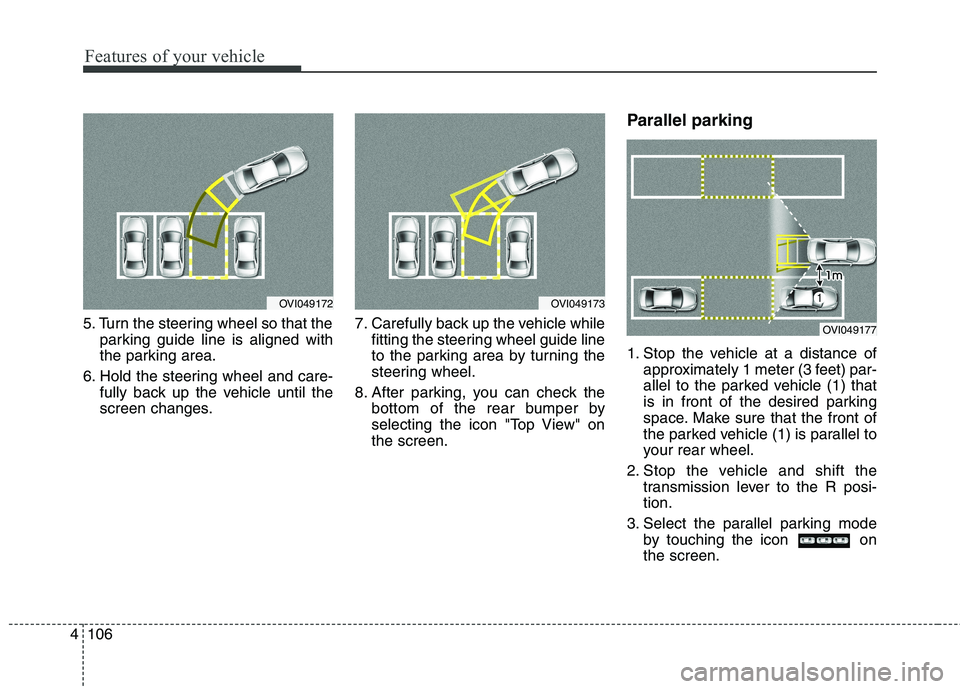
5. Turn the steering wheel so that the
parking guide line is aligned with
the parking area.
6. Hold the steering wheel and care- fully back up the vehicle until the
screen changes. 7. Carefully back up the vehicle while
fitting the steering wheel guide line
to the parking area by turning the
steering wheel.
8. After parking, you can check the bottom of the rear bumper by
selecting the icon "Top View" onthe screen. Parallel parking
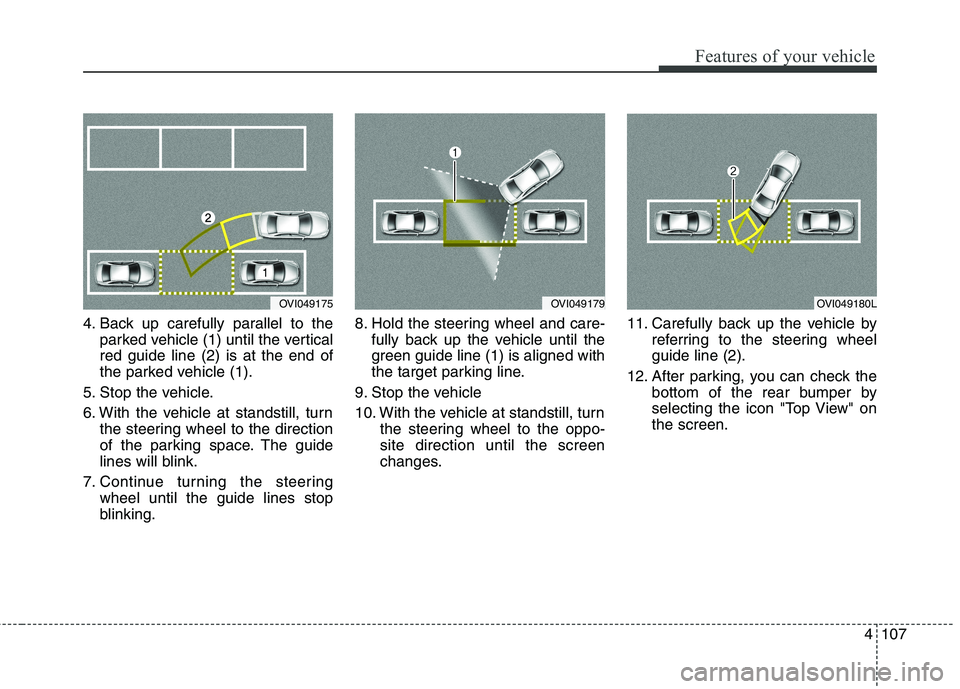
1. Stop the vehicle at a distance of
approximately 1 meter (3 feet) par-
allel to the parked vehicle (1) that
is in front of the desired parking
space. Make sure that the front of
the parked vehicle (1) is parallel to
your rear wheel.
2. Stop the vehicle and shift the transmission lever to the R posi-tion.
3. Select the parallel parking mode by touching the icon onthe screen.
OVI049173OVI049172
OVI049177
Page 186 of 485
4107
Features of your vehicle
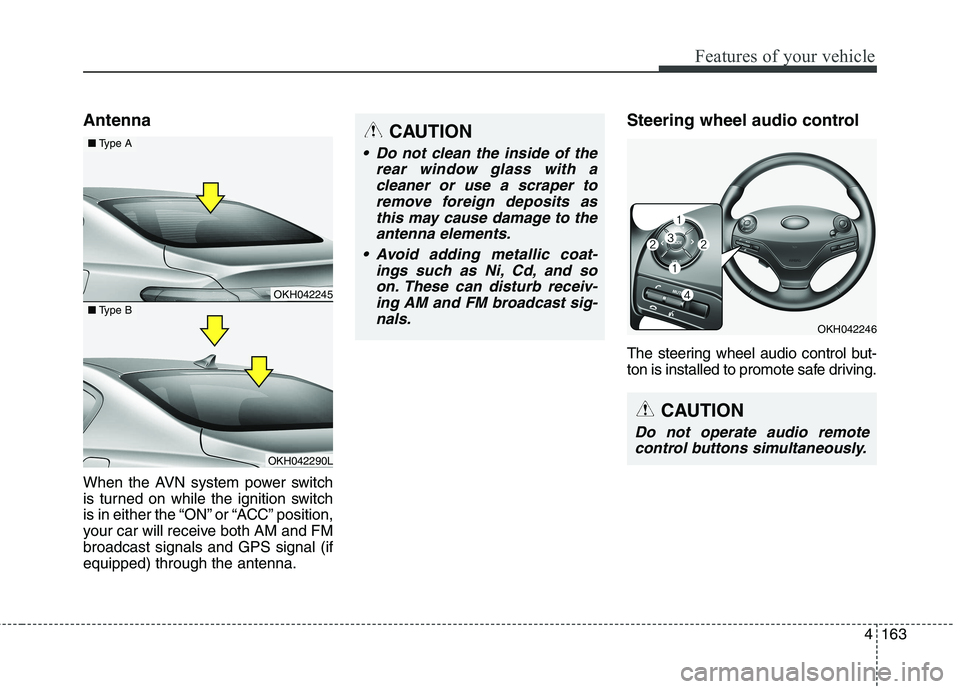
4. Back up carefully parallel to theparked vehicle (1) until the vertical red guide line (2) is at the end of
the parked vehicle (1).
5. Stop the vehicle.
6. With the vehicle at standstill, turn the steering wheel to the direction
of the parking space. The guide
lines will blink.
7. Continue turning the steering wheel until the guide lines stop
blinking. 8. Hold the steering wheel and care-
fully back up the vehicle until the
green guide line (1) is aligned with
the target parking line.
9. Stop the vehicle
10. With the vehicle at standstill, turn the steering wheel to the oppo- site direction until the screen
changes. 11. Carefully back up the vehicle by
referring to the steering wheelguide line (2).
12. After parking, you can check the bottom of the rear bumper by
selecting the icon "Top View" onthe screen.
OVI049175OVI049179OVI049180L
Page 190 of 485

4111
Features of your vehicle
Traffic change (for Europe)
Use this function when you visit a
country with opposite traffic direction.
If the traffic change is activated when
you visit a country with opposite traf-fic direction, it will decrease the daz-
zle on oncoming vehicle drivers.
Follow the below procedure.
1. Select “User Settings” by pressingthe mode button ( ) on the steer- ing wheel.
2. Select “Lamp” by pressing the move button ( ) and select but-
ton ( ) on the steering wheel.
3. Select “Travel Mode” by pressing the move button ( ) and select
button ( ) on the
steering wheel.
4. change function.
Select "Off" to deacticate the traf- fic change function.✽✽ NOTICE
If the engine is turned off with the
traffic change function activated,
and the engine turned on again, a
message "Headlamp beam pattern
set to opposite side range has been
reduced" will appear. It is to notify
the driver the function is activated.Lighting control
The light switch has a Headlight and
a Parking light position.
To operate the lights, turn the knob at
the end of the control lever to one of
the following positions: (1) OFF position
(2) Auto light / AFLS position
(3) Parking light position(4) Headlight position
OKH042189
Page 242 of 485
4163
Features of your vehicle
Antenna
When the AVN system power switch
is turned on while the ignition switch
is in either the “ON” or “ACC” position,
your car will receive both AM and FMbroadcast signals and GPS signal (ifequipped) through the antenna.Steering wheel audio control
The steering wheel audio control but-
ton is installed to promote safe driving.
OKH042246
CAUTION
Do not clean the inside of the
rear window glass with acleaner or use a scraper toremove foreign deposits asthis may cause damage to the antenna elements.
Avoid adding metallic coat- ings such as Ni, Cd, and soon. These can disturb receiv-ing AM and FM broadcast sig- nals.
CAUTION
Do not operate audio remotecontrol buttons simultaneously.
OKH042245
OKH042290L
■ Type A
■Type B
Page 248 of 485

55
Driving your vehicle
WARNING- Driving
under the influence of alcohol or drugs
Drinking and driving is danger-
ous. Drunk driving is the num-
ber one contributor to the high-
way death toll each year. Even asmall amount of alcohol will
affect your reflexes, percep-
tions and judgement. Driving while under the influ-
ence of drugs is as dangerous
or more dangerous than drivingdrunk.
You are much more likely to
have a serious accident if you
drink or take drugs and drive.
If you are drinking or taking
drugs, don’t drive. Do not ridewith a driver who has beendrinking or taking drugs.Choose a designated driver orcall a cab.WARNING
When you intend to park or stop the vehicle with the
engine on, be careful not todepress the accelerator pedal
for a long period of time. It
may overheat the engine or
exhaust system and cause
fire.
When you make a sudden stop or turn the steering
wheel rapidly, loose objects
may drop on the floor and it
could interfere with the opera-
tion of the foot pedals, possi-
bly causing an accident. Keep
all things in the vehicle safelystored.
If you do not focus on driving, it may cause an accident. Becareful when operating what
may disturb driving such as
audio or heater. It is theresponsibility of the driver to
always drive safely.WARNING
Always check the surrounding
areas near your vehicle for peo-
ple, especially children, before
putting a vehicle into D (Drive)
or R (Reverse).