2013 KIA CEED warning lights
[x] Cancel search: warning lightsPage 745 of 1168

Features of your vehicle
82
4
Electronic brake force distribution(EBD) systemwarning light
If two warning lights illuminate at the
same time whilst driving, your vehicle’s
ABS and EBD system may have mal-functioned.
In this case, your ABS and regular brake
system may not work normally. We rec-
ommend that the system be checked by
an authorised Kia dealer.
✽✽
NOTICE
If the ABS warning light or EBD warn- ing light is on and stays on, the
speedometer or odometer/tripmeter
may not work. Also, the EPS warninglight may illuminate and the steering
effort may increase or decrease. In this
case, we recommend that the system be
checked by an authorised Kia dealer.
ESC (Electronic Stability Control) indicator(if equipped)
The ESC indicator will illuminate when
the ignition switch is turned ON, but
should go off after approximately 3 sec-
onds. When the ESC is on, it monitors
the driving conditions. Under normal driv-
ing conditions, the ESC indicator will
remain off. When a slippery or low trac-tion condition is encountered, the ESC
will operate, and the ESC indicator will
blink to indicate the ESC is operating. But, if the ESC system malfunctions the
indicator illuminates and stays on. We
recommend that the system be checked
by an authorised Kia dealer.
ESC OFF indicator (if equipped)
The ESC OFF indicator will illuminate
when the ignition switch is turned ON,
but should go off after approximately 3
seconds. To switch to ESC OFF mode,
press the ESC OFF button. The ESCOFF indicator will illuminate indicating
the ESC is deactivated.
WARNING
If both ABS and Brake warning lights are on and stay on, your vehi-cle’s brake system will not worknormally. So you may experiencean unexpected and dangerous situ-ation during sudden braking. In thiscase, avoid high speed driving andabrupt braking. We recommend that the system be checked by an authorised Kia dealer.
JD RHD 4a(~168).QXP 7/21/2012 12:09 PM Page 82
Page 746 of 1168

483
Features of your vehicle
Auto stop indicator(if equipped)
This indicator will illuminate when the engine enters the Idle Stop mode of theISG (Idle Stop and Go) system.
When the automatic starting occurrs, the auto stop indicator on the cluster will
blink for 5 seconds.
For more details, refer to the ISG (Idle Stop and Go) system in section 5.
For vehicles equipped with instrument
cluster type B, the indicator illuminates
on the LCD display.
✽✽ NOTICE
When the engine automatically starts by
the ISG system, some warning lights
(ABS, ESC, ESC OFF, EPS or Parking
brake warning light) may turn on for afew seconds. This happens because of low batteryvoltage. It does not mean the system ismalfunctioning.
Cruise indicator (if equipped)
CRUISE indicator
The indicator illuminates when the cruise
control system is enabled.
The cruise indicator in the instrument
cluster is illuminated when the cruise
control ON-OFF button on the steer-ing wheel is pushed.
The indicator goes off when the cruise
control ON-OFF button is pushed
again. For more information about the
use of cruise control, refer to “Cruise
control system” in section 5. Cruise SET indicator
The indicator illuminates when the cruise
control switch (SET- or RES+) is ON.
The cruise SET indicator in the instru-
ment cluster illuminats when the cruise
control switch (SET- or RES+) is pushed.
The cruise SET indicator does not illumi-
nate when the cruise control cancel but-ton O is pushed or the system is disen-gaged.
Charging system warning light
This warning light indicates a malfunction
of either the generator or electricalcharging system.
If the warning light comes on whilst the
vehicle is in motion:
1. Drive to the nearest safe location.
2. With the engine off, check the genera- tor drive belt for looseness or break-
age.
3. If the belt is adjusted properly, a prob- lem exists somewhere in the electrical
charging system. We recommend that
the system be checked by an autho-
rised Kia dealer.
SET
JD RHD 4a(~168).QXP 7/21/2012 12:09 PM Page 83
Page 750 of 1168

487
Features of your vehicle
Engine coolant tempera-ture warning light(if equipped)
The warning light illuminates if the tem-
perature of the engine coolant is above120±3°C (248±5.4°F).
Do not continue driving with an overheat-
ed engine. If your vehicle overheats, refer
to “Overheating” in section 6.
✽✽ NOTICE
If the engine coolant temperature warn- ing light illuminates, it indicates over-heating that may damage the engine.
Glow indicator (Diesel engine)
The indicator light illuminates when the
ignition switch is placed at the ON posi-
tion. The engine can be started after the
preheat indicator light goes off. The illu-
minating time varies with the water tem-
perature, air temperature and batterycondition.
✽✽ NOTICE
If the engine does not start within 10
seconds after the preheating is complet-
ed, turn the ignition key once more to
the LOCK/OFF position for 10 seconds,
and then to the ON position, in order to
preheat again.
Fuel filter warning light (Diesel engine)
This warning light illuminates for 3 sec-
onds after the ignition switch is set to the
ON position and then it will go out. If it
lights up whilst the engine is running, it
indicates that water has accumulated
inside the fuel filter. If this happens,
remove the water from the fuel filter.
For more details, refer to “Fuel filter” in section 7.
CAUTION
If the preheat indicator light contin-ues to illuminate or flash on and off after the engine has warmed up orwhilst driving, we recommend that
the system be checked by an autho- rised Kia dealer.
CAUTION
When the fuel filter warning lightilluminates, engine power (vehiclespeed & idle speed) may decrease. If you keep driving with the warning
light on, you can damage your vehi-cle's engine parts and injection sys- tem of the Common Rail. If thisoccurs, we recommend that the
system be checked by an autho-rised Kia dealer.
JD RHD 4a(~168).QXP 7/21/2012 12:10 PM Page 87
Page 772 of 1168

4 109
Features of your vehicle
REARVIEW CAMERA (IF EQUIPPED)
❈ The actual rear view in the vehicle may dif-
fer from the illustration.
The rearview camera will activate when
the back-up light is ON with the ignition
switch ON and the shift lever in the R
(Reverse) position. This system is a supplemental system
that shows behind the vehicle through
the navigation monitor whilst backing-up. ❈
For more detailed informations, refer
to supplement for navigation system. The hazard warning flasher should be
used whenever you find it necessary to
stop the vehicle in a hazardous location.
When you must make such an emer-
gency stop, always pull off the road as far
as possible.
The hazard warning lights are turned on
by pushing in the hazard switch. Both
turn signal lights will blink. The hazard
warning lights will operate even though
the key is not in the ignition switch.
To turn the hazard warning lights off,
push the switch again.
OJD042089R
HAZARD WARNING FLASHER
WARNING
This system is a supplementary function only. It is the responsibil-
ity of the driver to always check
the inside/outside rearview mirror
and the area behind the vehicle
before and whilst backing upbecause there is a dead zone that
can't see through the camera.
Always keep the camera lens clean. If lens is covered with for-
eign matter, the camera may not
operate normally.
OJD042086
OJD042088R
RRRReeeeaaaarrrr vvvviiiieeeewwww ddddiiiissssppppllllaaaayyyy
JD RHD 4a(~168).QXP 7/21/2012 12:12 PM Page 109
Page 776 of 1168

4 113
Features of your vehicle
High - beam operation
1. Turn the light switch to the headlightposition.
2. Push the lever away from you. The high-beam indicator will light when
the headlight high beams are switched on.
To prevent the battery from being dis- charged, do not leave the lights on fora prolonged time whilst the engine is
not running.Flashing headlights
Pull the lever towards you. It will return to
the normal position when released. The
headlight switch does not need to be on
to use this flashing feature.
WARNING
Do not use high beam when there
are other vehicles. Using highbeam could obstruct the other dri-ver's vision.
OED040801OED040802
JD RHD 4a(~168).QXP 7/21/2012 12:12 PM Page 113
Page 779 of 1168

Features of your vehicle
116
4
Headlight levelling device (if equipped)
Manual type
To adjust the headlight beam level
according to the number of the passen-
gers and the loading weight in the lug-
gage area, turn the beam levelling
switch. The higher the number of the switch is
positioned, the lower the headlight beam
level. Always keep the headlight beam at
the proper levelling position, or head-
lights may dazzle other road users.
Listed below are the examples of proper
switch settings. For loading conditions
other than those listed below, adjust the
switch position so that the beam level
may be the nearest as the conditionobtained according to the list.
Automatic type
It automatically adjusts the headlight
beam level according to the number of
passengers and loading weight in theluggage area.
And it offers proper headlight beam
under various conditions.
OJD042049R
Loading condition Switch position
Driver only 0
Driver + Front passenger 0 Full passengers
(including driver) 1
Full passengers (including
driver) + Maximum permis-
sible loading 2
Driver + Maximum permis-
sible loading 3
WARNING
If it does not work properly even
though your car is inclined back-
ward according to passenger's
posture, or the headlight beam is
irradiated to the high or low posi-
tion, we recommend that the sys-
tem be inspected by an authorised
Kia dealer. Do not attempt to inspect or
replace the wiring yourself.
JD RHD 4a(~168).QXP 7/21/2012 12:12 PM Page 116
Page 785 of 1168
Features of your vehicle
122
4
Interior lamp AUTO cut
When all entrances are closed, if you
lock the vehicle by using the transmit-
ter or the smart key, all interior lamp
will be off after a few seconds.
If you do not operate anything in the vehicle after turning off the engine, the
lights will turn off after 20 minutes. Map lamp
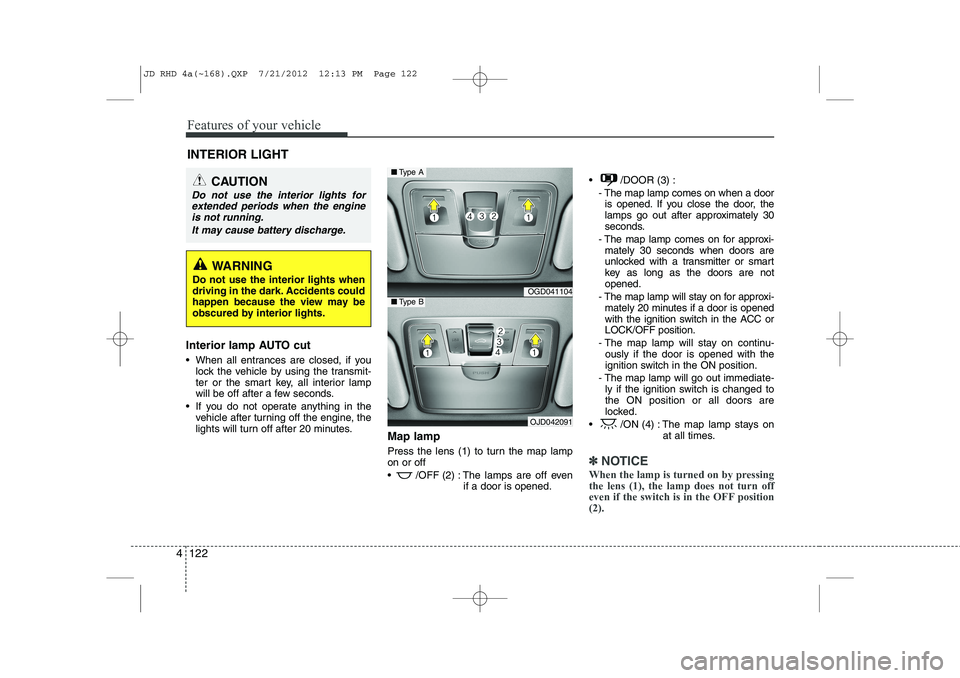
Press the lens (1) to turn the map lamp on or off
/OFF (2) : The lamps are off even
if a door is opened. /DOOR (3) :
- The map lamp comes on when a dooris opened. If you close the door, the
lamps go out after approximately 30
seconds.
- The map lamp comes on for approxi- mately 30 seconds when doors are
unlocked with a transmitter or smart
key as long as the doors are notopened.
- The map lamp will stay on for approxi- mately 20 minutes if a door is opened
with the ignition switch in the ACC orLOCK/OFF position.
- The map lamp will stay on continu- ously if the door is opened with the
ignition switch in the ON position.
- The map lamp will go out immediate- ly if the ignition switch is changed tothe ON position or all doors are
locked.
/ON (4) : The map lamp stays on at all times.
✽✽NOTICE
When the lamp is turned on by pressing the lens (1), the lamp does not turn off
even if the switch is in the OFF position(2).
INTERIOR LIGHT
CAUTION
Do not use the interior lights for extended periods when the engine
is not running.
It may cause battery discharge.
WARNING
Do not use the interior lights when
driving in the dark. Accidents could
happen because the view may be
obscured by interior lights.
OGD041104
OJD042091
■ Type A
■Type B
JD RHD 4a(~168).QXP 7/21/2012 12:13 PM Page 122
Page 929 of 1168
Driving your vehicle
4
5
Before entering vehicle
• Be sure that all windows, outside mir-
ror(s), and outside lights are clean.
Check the condition of the tyres.
Check under the vehicle for any sign of leaks.
Be sure there are no obstacles behind you if you intend to back up. Necessary inspections
Fluid levels, such as engine oil, engine
coolant, brake fluid, and washer fluid
should be checked on a regular basis,
with the exact interval depending on the
fluid. Further details are provided in sec-
tion 7, “Maintenance”.
Before starting
Close and lock all doors.
Position the seat so that all controls are
easily reached.
Adjust the inside and outside rearview mirrors.
Be sure that all lights work.
Check all gauges.
Check the operation of warning lights when the ignition switch is turned to the ON position.
Release the parking brake and make sure the brake warning light goes out.
For safe operation, be sure you are famil-
iar with your vehicle and its equipment.
BEFORE DRIVING
WARNING
All passengers must be properly
belted whenever the vehicle is mov-
ing. Refer to “Seat belts” in section
3 for more information on their
proper use.
WARNING
Always check the surrounding areas
near your vehicle for people, espe-
cially children, before putting a vehi-
cle into “D (Drive)” or “R (Reverse)”.
WARNING
Driving whilst distracted can result
in a loss of vehicle control, that
may lead to an accident, severe
personal injury, and death. The dri-
ver’s primary responsibility is in
the safe and legal operation of a
vehicle, and use of any handheld
devices, other equipment, or vehi-
cle systems which take the driver’s
eyes, attention and focus away
from the safe operation of a vehicle
or which are not permissible by law
should never be used during oper-
ation of the vehicle.
JD RHD 5.QXP 7/21/2012 1:11 PM Page 4