2013 KIA CEED warning
[x] Cancel search: warningPage 823 of 1168
Features of your vehicle
160
4
This symbol indicates the position of the front holders
(wagon).
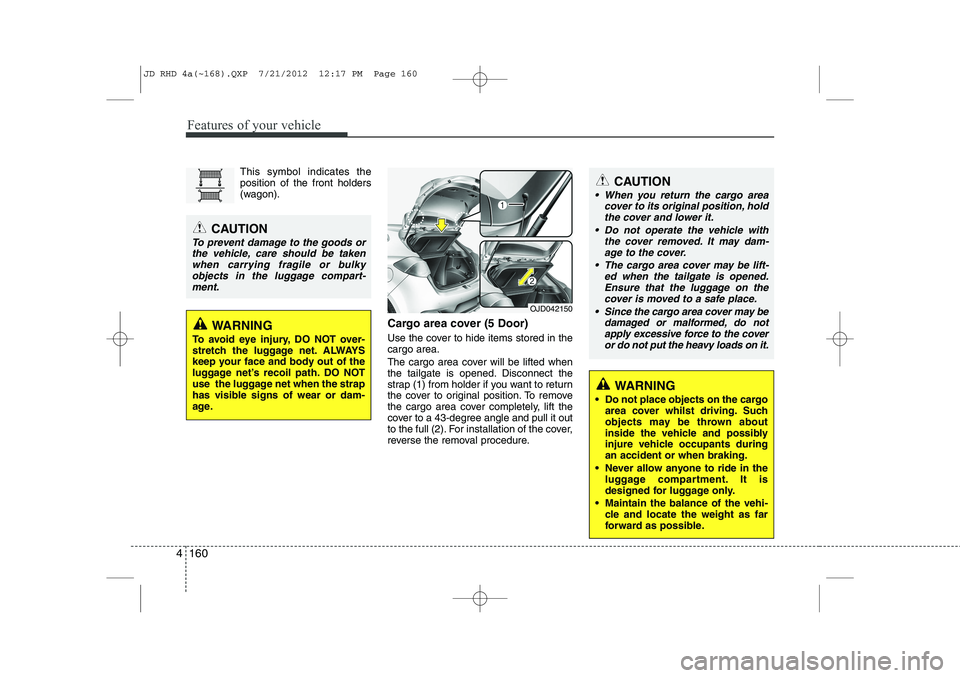
Cargo area cover (5 Door)
Use the cover to hide items stored in the cargo area.
The cargo area cover will be lifted when
the tailgate is opened. Disconnect the
strap (1) from holder if you want to return
the cover to original position. To remove
the cargo area cover completely, lift the
cover to a 43-degree angle and pull it out
to the full (2). For installation of the cover,
reverse the removal procedure.CAUTION
When you return the cargo areacover to its original position, hold
the cover and lower it.
Do not operate the vehicle with the cover removed. It may dam-age to the cover.
The cargo area cover may be lift- ed when the tailgate is opened.Ensure that the luggage on thecover is moved to a safe place.
Since the cargo area cover may be damaged or malformed, do not
apply excessive force to the cover or do not put the heavy loads on it.
OJD042150
CAUTION
To prevent damage to the goods or
the vehicle, care should be taken when carrying fragile or bulkyobjects in the luggage compart-
ment.
WARNING
To avoid eye injury, DO NOT over-
stretch the luggage net. ALWAYS
keep your face and body out of the
luggage net’s recoil path. DO NOT
use the luggage net when the strap
has visible signs of wear or dam-
age.
WARNING
Do not place objects on the cargo area cover whilst driving. Such
objects may be thrown about
inside the vehicle and possibly
injure vehicle occupants duringan accident or when braking.
Never allow anyone to ride in the luggage compartment. It is
designed for luggage only.
Maintain the balance of the vehi- cle and locate the weight as far
forward as possible.
JD RHD 4a(~168).QXP 7/21/2012 12:17 PM Page 160
Page 825 of 1168
Features of your vehicle
162
4
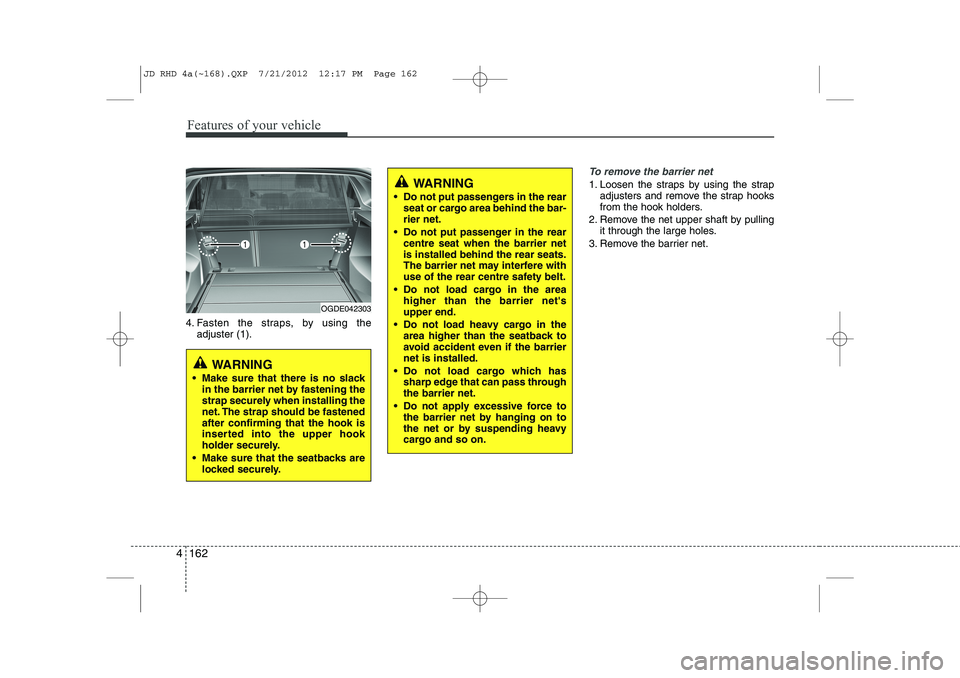
4. Fasten the straps, by using the
adjuster (1).
To remove the barrier net
1. Loosen the straps by using the strap adjusters and remove the strap hooks
from the hook holders.
2. Remove the net upper shaft by pulling it through the large holes.
3. Remove the barrier net.
OGDE042303
WARNING
Make sure that there is no slack in the barrier net by fastening the
strap securely when installing the
net. The strap should be fastenedafter confirming that the hook is
inserted into the upper hook
holder securely.
Make sure that the seatbacks are locked securely.
WARNING
Do not put passengers in the rear seat or cargo area behind the bar- rier net.
Do not put passenger in the rear centre seat when the barrier netis installed behind the rear seats.
The barrier net may interfere with
use of the rear centre safety belt.
Do not load cargo in the area higher than the barrier net'supper end.
Do not load heavy cargo in the area higher than the seatback to
avoid accident even if the barriernet is installed.
Do not load cargo which has sharp edge that can pass throughthe barrier net.
Do not apply excessive force to the barrier net by hanging on to
the net or by suspending heavy
cargo and so on.
JD RHD 4a(~168).QXP 7/21/2012 12:17 PM Page 162
Page 827 of 1168
Features of your vehicle
164
4
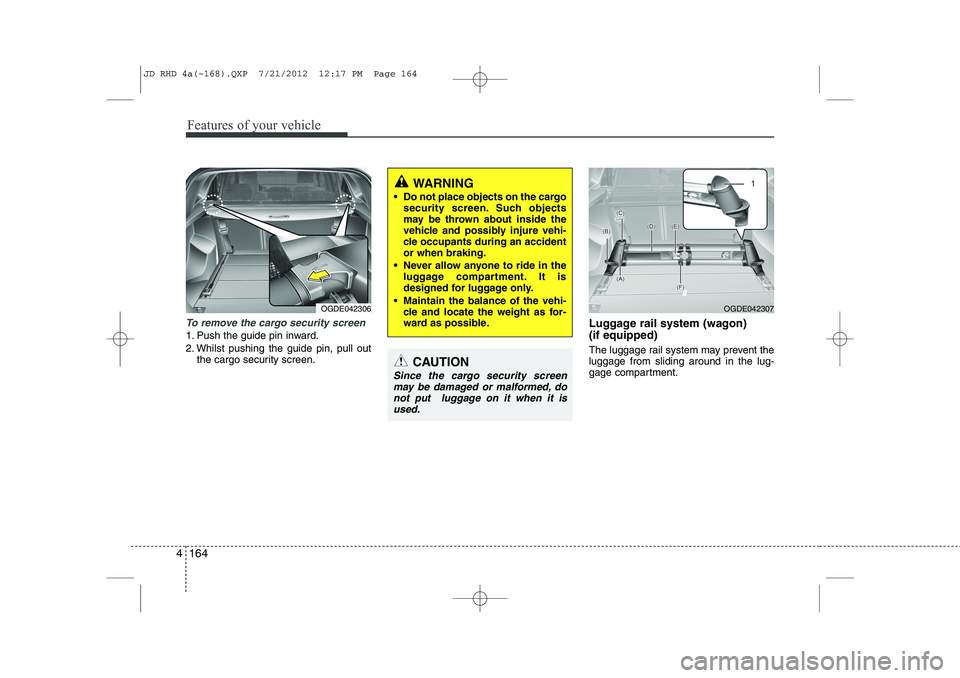
To remove the cargo security screen
1. Push the guide pin inward.
2. Whilst pushing the guide pin, pull out
the cargo security screen. Luggage rail system (wagon) (if equipped)
The luggage rail system may prevent the luggage from sliding around in the lug-
gage compartment.
WARNING
Do not place objects on the cargo security screen. Such objects
may be thrown about inside the
vehicle and possibly injure vehi-
cle occupants during an accidentor when braking.
Never allow anyone to ride in the luggage compartment. It is
designed for luggage only.
Maintain the balance of the vehi- cle and locate the weight as for-
ward as possible.
CAUTION
Since the cargo security screen
may be damaged or malformed, do
not put luggage on it when it isused.
OGDE042306OGDE042307
JD RHD 4a(~168).QXP 7/21/2012 12:17 PM Page 164
Page 829 of 1168
Features of your vehicle
166
4
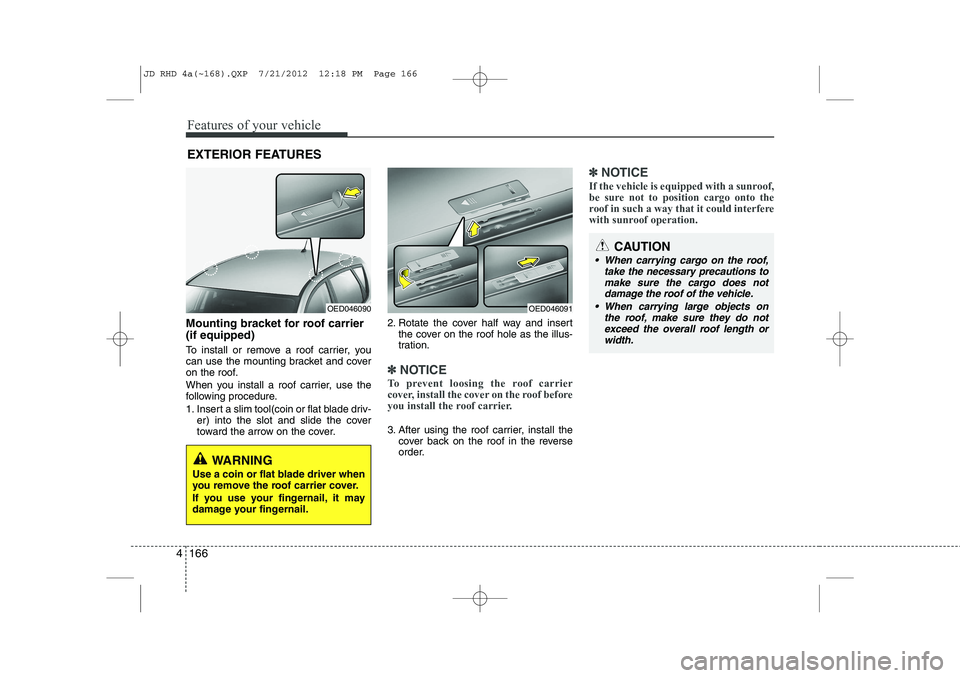
Mounting bracket for roof carrier (if equipped)
To install or remove a roof carrier, you
can use the mounting bracket and cover
on the roof.
When you install a roof carrier, use the
following procedure.
1. Insert a slim tool(coin or flat blade driv-
er) into the slot and slide the cover
toward the arrow on the cover. 2. Rotate the cover half way and insert
the cover on the roof hole as the illus-
tration.
✽✽ NOTICE
To prevent loosing the roof carrier
cover, install the cover on the roof before
you install the roof carrier.
3. After using the roof carrier, install the cover back on the roof in the reverse
order.
✽✽ NOTICE
If the vehicle is equipped with a sunroof,
be sure not to position cargo onto the
roof in such a way that it could interfere
with sunroof operation.
EXTERIOR FEATURES
OED046090OED046091
WARNING
Use a coin or flat blade driver when
you remove the roof carrier cover.
If you use your fingernail, it may
damage your fingernail.
CAUTION
When carrying cargo on the roof, take the necessary precautions to
make sure the cargo does notdamage the roof of the vehicle.
When carrying large objects on the roof, make sure they do not
exceed the overall roof length orwidth.
JD RHD 4a(~168).QXP 7/21/2012 12:18 PM Page 166
Page 831 of 1168
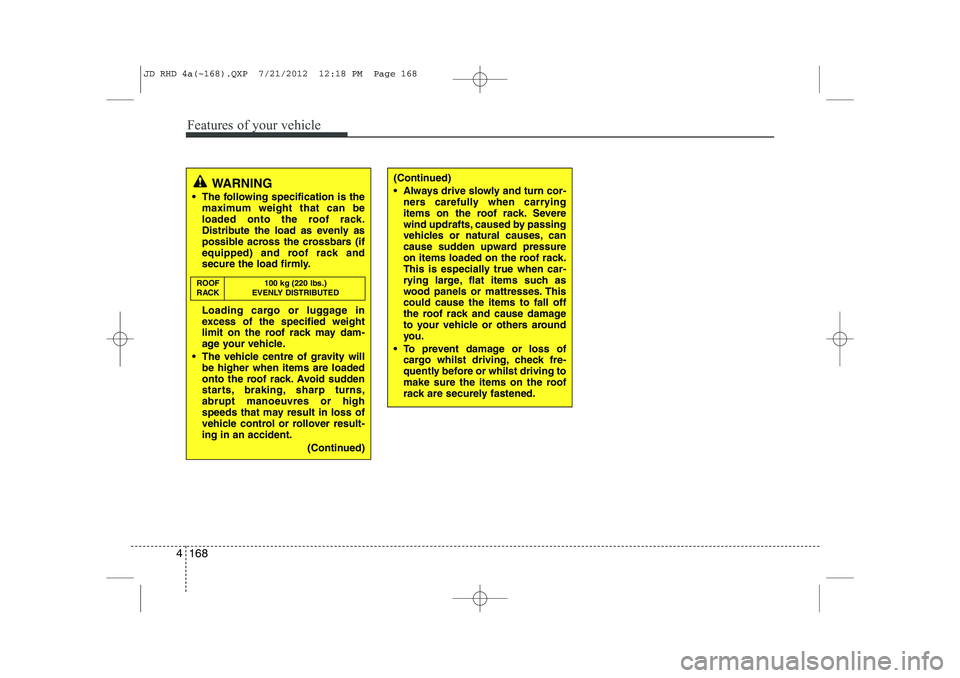
Features of your vehicle
168
4
(Continued)
Always drive slowly and turn cor-
ners carefully when carrying
items on the roof rack. Severe
wind updrafts, caused by passing
vehicles or natural causes, can
cause sudden upward pressure
on items loaded on the roof rack.
This is especially true when car-
rying large, flat items such as
wood panels or mattresses. Thiscould cause the items to fall off
the roof rack and cause damage
to your vehicle or others around
you.
To prevent damage or loss of cargo whilst driving, check fre-
quently before or whilst driving to
make sure the items on the roof
rack are securely fastened.WARNING
The following specification is the maximum weight that can be
loaded onto the roof rack.
Distribute the load as evenly as
possible across the crossbars (if
equipped) and roof rack and
secure the load firmly.
Loading cargo or luggage in
excess of the specified weight
limit on the roof rack may dam-
age your vehicle.
The vehicle centre of gravity will be higher when items are loaded
onto the roof rack. Avoid sudden
starts, braking, sharp turns,abrupt manoeuvres or high
speeds that may result in loss of
vehicle control or rollover result-ing in an accident.
(Continued)
ROOF 100 kg (220 lbs.)
RACK EVENLY DISTRIBUTED
JD RHD 4a(~168).QXP 7/21/2012 12:18 PM Page 168
Page 835 of 1168
Features of your vehicle
172
4
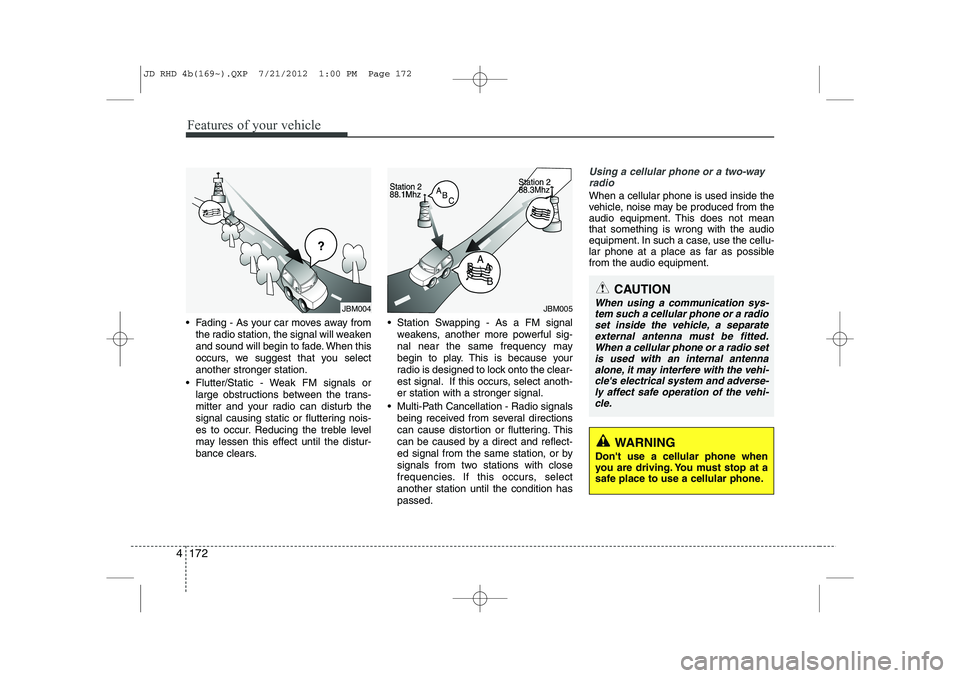
Fading - As your car moves away from
the radio station, the signal will weaken
and sound will begin to fade. When this
occurs, we suggest that you selectanother stronger station.
Flutter/Static - Weak FM signals or large obstructions between the trans-
mitter and your radio can disturb the
signal causing static or fluttering nois-
es to occur. Reducing the treble level
may lessen this effect until the distur-
bance clears. Station Swapping - As a FM signal
weakens, another more powerful sig-
nal near the same frequency may
begin to play. This is because your
radio is designed to lock onto the clear-
est signal. If this occurs, select anoth-er station with a stronger signal.
Multi-Path Cancellation - Radio signals being received from several directions
can cause distortion or fluttering. This
can be caused by a direct and reflect-
ed signal from the same station, or by
signals from two stations with close
frequencies. If this occurs, selectanother station until the condition haspassed.
Using a cellular phone or a two-wayradio
When a cellular phone is used inside the
vehicle, noise may be produced from the
audio equipment. This does not meanthat something is wrong with the audio
equipment. In such a case, use the cellu-
lar phone at a place as far as possiblefrom the audio equipment.
JBM004JBM005
CAUTION
When using a communication sys-
tem such a cellular phone or a radio set inside the vehicle, a separateexternal antenna must be fitted.
When a cellular phone or a radio setis used with an internal antenna alone, it may interfere with the vehi-cle's electrical system and adverse-
ly affect safe operation of the vehi- cle.
WARNING
Don't use a cellular phone when
you are driving. You must stop at a
safe place to use a cellular phone.
JD RHD 4b(169~).QXP 7/21/2012 1:00 PM Page 172
Page 836 of 1168
4 173
Features of your vehicle
CAUTION
Operating the device whilst driv-ing could lead to accidents due to
a lack of attention to external sur- roundings. First park the vehiclebefore operating the device.
Adjust the volume to levels that allow the driver to hear soundsfrom outside of the vehicle. Driving in a state where external sounds cannot be heard may lead
to accidents.
Pay attention to the volume set- ting when turning the device on.A sudden output of extreme vol-
ume upon turning the device oncould lead to hearing impairment. (Adjust the volume to a suitablelevels before turning off the
device.)
If you want to change the position of device installation, pleaseinquire with your place of pur-chase or service maintenance
centre. Technical expertise isrequired to install or disassemble the device.
(Continued)
WARNING
Do not stare at the screen whilstdriving. Staring at the screen for
prolonged periods of time couldlead to traffic accidents.
Do not disassemble, assemble, or modify the audio system. Such
acts could result in accidents, fire, or electric shock.
Using the phone whilst driving may lead to a lack of attention of trafficconditions and increase the likeli-
bonnet of accidents. Use the phone feature after parking thevehicle.
Heed caution not to spill water or introduce foreign objects into thedevice. Such acts could lead tosmoke, fire, or product malfunc-tion.
Please refrain from use if the screen is blank or no sound canbe heard as these signs may indi-cate product malfunction.Continued use in such conditions
could lead to accidents(fires,electric shock) or product mal-functions.
(Continued)
(Continued) Do not touch the antenna during thunder or lightening as suchacts may lead to lightninginduced electric shock.
Do not stop or park in parking- restricted areas to operate theproduct. Such acts could lead to traffic accidents.
Use the system with the vehicle ignition turned on. Prolonged usewith the ignition turned off could result in battery discharge.
JD RHD 4b(169~).QXP 7/21/2012 1:00 PM Page 173
Page 871 of 1168

Features of your vehicle
208
4
No phone paired. Empty phone paired.
Pair a phone?
No connected phone.No connected phone. Connect a
phone?
Phone book is empty.Phone book is empty
Available only when This is a warning, Do not enter
the MENU about BT Setup.
When vehicle is moving
Listening... Listen to instruction of audio
Phone book DownloadDownloading phone book from
phone paired to audio
Auto Download After pairing phone, audio sys- tem automatically download
phone book
Audio Streaming
After pairing phone, audio system
can support
Bluetooth®Wireless
Technology streaming mode
Outgoing Volume Set outoging volume "0 ~ 5"
Bluetooth System OffTurn off Bluetooth®Wireless
TechnologySystem
Bluetooth System ONTurn on Bluetooth®Wireless
TechnologySystem
Device :
Bluetooth®Wireless
Technologydevice name
Passkey Passkey for pairing a phone
Pairing complete Pair a
Bluetooth®Wireless
Technologyphone to the audio
Pairing failed Audio & Phone connection have
failed
Already 5 devices All 5 phones have already been paired. Delete a previously
paired phone to pair new phone
Connection completeAudio & Phone connection have
succeed
Connection failed. Audio & Phone connection have
failed
Priority changed Changed priority about the reg-
istered phones
Overwrite previous Overwrite previous phone book
information
Phone does not supportPhone does not support Phone
book download
No connected There are phone in the
connection list
Phone does not supportBut it was actually not connect-
ed BT pairing
Downloading stoppedDownloading stopped
paired. Delete a paired phone?
Phone book download
Bluetooth
audio
vehicle is stationary
Download?
Connect a phone?
Pair a phone?
phone book?Retry?
Bluetoothdevice
JD RHD 4b(169~).QXP 7/21/2012 1:00 PM Page 208