Page 717 of 1168

Features of your vehicle
54
4
Elapsed time
This mode indicates the total time trav-
eled since the last driving time reset.
Even if the vehicle is not in motion, the
driving time keeps going whilst the
engine is running.
The meter’s working range is from 0:00~99:59.
Pressing the button for more than 1
second, when the driving time is being
displayed, clears the driving time to zero(0:00).
Engine coolant temperature gauge
This gauge shows the temperature of the
engine coolant when the ignition switchis ON.
Do not continue driving with an overheat-
ed engine. If your vehicle overheats, refer
to “If the engine overheats” in section 6.
CAUTION
If the gauge pointer moves beyond
the normal range area toward the
“130°C”, it indicates overheatingthat may damage the engine.
WARNING
Never remove the radiator cap
when the engine is hot. The enginecoolant is under pressure and
could cause severe burns. Wait
until the engine is cool before
adding coolant to the reservoir.
OJD042057OJD042058
JD RHD 4a(~168).QXP 7/21/2012 12:07 PM Page 54
Page 722 of 1168
459
Features of your vehicle
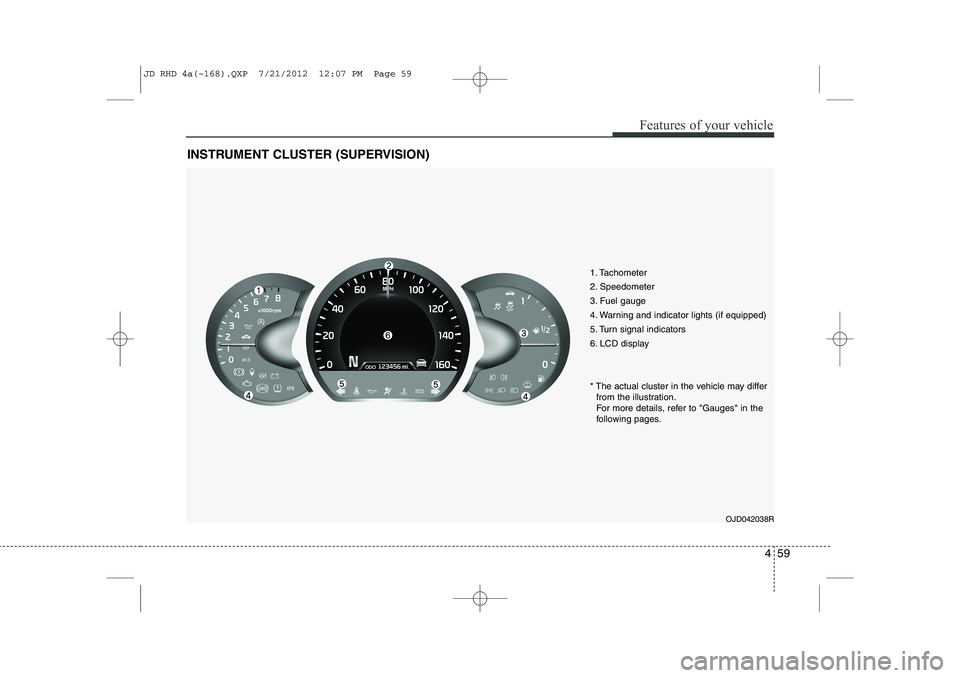
INSTRUMENT CLUSTER (SUPERVISION)
1. Tachometer
2. Speedometer
3. Fuel gauge
4. Warning and indicator lights (if equipped)
5. Turn signal indicators
6. LCD displayOJD042038R
* The actual cluster in the vehicle may differ
from the illustration.
For more details, refer to "Gauges" in the
following pages.
JD RHD 4a(~168).QXP 7/21/2012 12:07 PM Page 59
Page 725 of 1168
Features of your vehicle
62
4
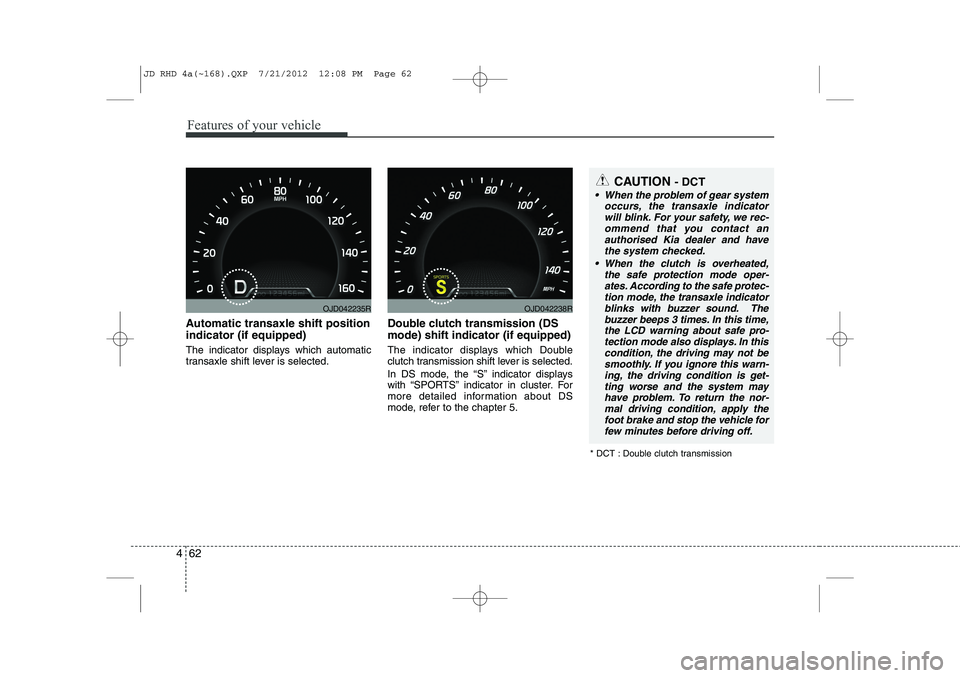
Automatic transaxle shift position indicator (if equipped)
The indicator displays which automatic
transaxle shift lever is selected. Double clutch transmission (DS mode) shift indicator (if equipped)
The indicator displays which Double
clutch transmission shift lever is selected.
In DS mode, the “S” indicator displays
with “SPORTS” indicator in cluster. For
more detailed information about DS
mode, refer to the chapter 5.
OJD042235ROJD042238R
CAUTION
- DCT
When the problem of gear system
occurs, the transaxle indicator
will blink. For your safety, we rec- ommend that you contact anauthorised Kia dealer and havethe system checked.
When the clutch is overheated, the safe protection mode oper-ates. According to the safe protec- tion mode, the transaxle indicator
blinks with buzzer sound. The buzzer beeps 3 times. In this time,the LCD warning about safe pro- tection mode also displays. In this
condition, the driving may not be smoothly. If you ignore this warn-ing, the driving condition is get-
ting worse and the system mayhave problem. To return the nor- mal driving condition, apply thefoot brake and stop the vehicle for
few minutes before driving off.
* DCT : Double clutch transmission
JD RHD 4a(~168).QXP 7/21/2012 12:08 PM Page 62
Page 727 of 1168
Features of your vehicle
64
4
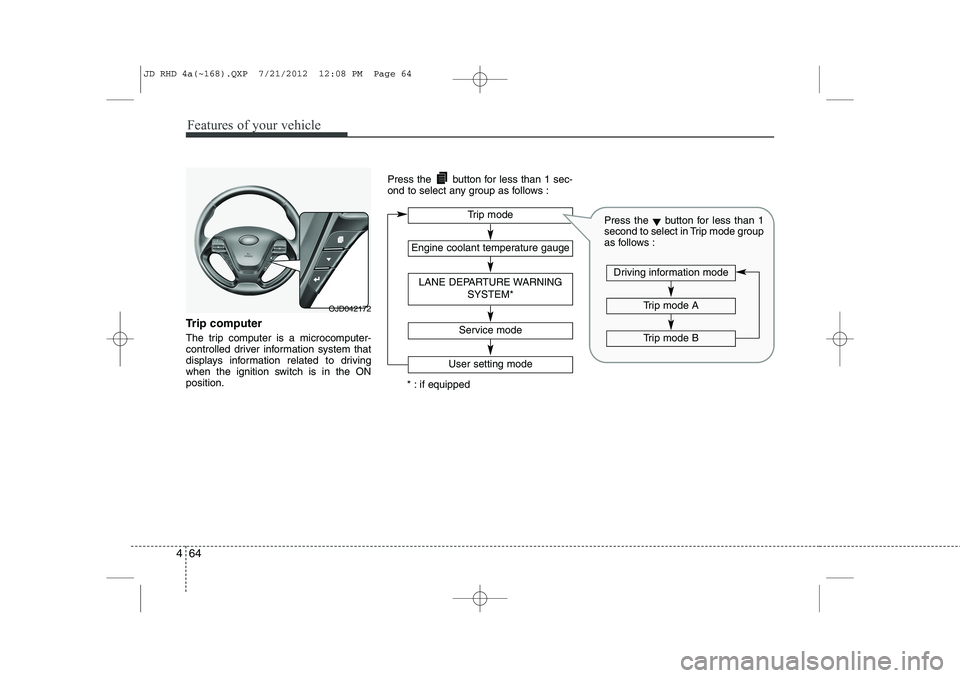
Trip computer
The trip computer is a microcomputer-
controlled driver information system that
displays information related to driving
when the ignition switch is in the ONposition. Press the button for less than 1 sec-
ond to select any group as follows :
OJD042172
Engine coolant temperature gauge
User setting mode
Service mode
LANE DEPARTURE WARNING
SYSTEM*
Trip mode
* : if equipped
Trip mode A
Trip mode B
Driving information mode
Press the▼button for less than 1
second to select in Trip mode group
as follows :
JD RHD 4a(~168).QXP 7/21/2012 12:08 PM Page 64
Page 730 of 1168
467
Features of your vehicle
Engine coolant temperature gauge
This gauge shows the temperature of the
engine coolant when the ignition switchis ON.
Do not continue driving with an overheat-
ed engine. If your vehicle overheats, refer
to “If the engine overheats” in section 6.
Lane Departure Warning System(LDWS) Mode (if equipped)
This mode displays the state of the Lane
Departure Warning System (LDWS).
For more details, refer to “Lane departure
warning system” in section 5.
CAUTION
If the gauge pointer moves beyondthe normal range area toward the
“130°C” position, it indicates over-heating that may damage the engine.
WARNING
Never remove the radiator cap
when the engine is hot. The enginecoolant is under pressure and
could cause severe burns. Wait
until the engine is cool before
adding coolant to the reservoir.
OJD042176ROJD042180
JD RHD 4a(~168).QXP 7/21/2012 12:08 PM Page 67
Page 734 of 1168
471
Features of your vehicle
LCD display information
Sunroof open
If driver removes the ignition key (Smart
key : turns off the engine) and opens the
driver-side door when the sunroof is not
fully closed, warning message will appear
on the LCD display. Also, the warning
chime sounds for approximately 7 sec-
onds.
Illumination intensity
The illumination intensity of the instru-
ment panel is shown when adjusting it
with the illumination control switch.
For more details, refer to “Instrument
panel illumination” in section 4.
Turn on fuse switch (mode switch)
The notice appears to inform the driver to
turn on the fuse switch in the instrument
panel under the steering wheel.
For more details, refer to “Fuses” in sec- tion 7.
OJD042078/OJD042215
■
Normal vision
■SupervisionOJD042079/OJD042214
■
Normal vision
■SupervisionOJD042240/OJD042188
■
Normal vision
■Supervision
JD RHD 4a(~168).QXP 7/21/2012 12:08 PM Page 71
Page 735 of 1168

Features of your vehicle
72
4
Parking assist warning (if equipped)
Displays the area an obstacle is detected
whilst moving forward or rearward.
For more details, refer to “Parking assist
system” in section 4.
Align steering wheel (if equipped)
If you start the engine when the steering
wheel is turned 90 degrees to the left (or
right) after a couple of seconds, “Align
steering wheel” illuminates on the LCD
display for 5 seconds.
Turn the steering wheel to the right (or left)
and make it turned to the left (or right) less
than 30 degrees.
For vehicle’s equipped with smart
key system
Key is not in vehicle
If the smart key is not in the vehicle and
if any door is opened or closed with the
engine start/stop button in the ACC, ON,
or START position, the warning illumi-
nates on the LCD display. Also, the chime
sounds for 5 seconds when the smart
key is not in the vehicle and the door isclosed.
Always have the smart key with you.
OJD042163/OJD042196
■
Normal vision
■SupervisionOJD042164/OJD042211
■
Normal vision
■SupervisionOJD042073/OJD042205
■
Normal vision
■Supervision
JD RHD 4a(~168).QXP 7/21/2012 12:09 PM Page 72
Page 736 of 1168

473
Features of your vehicle
Key is not detected
If the smart key is not in the vehicle or is
not detected and you press the engine
start/stop button, the warning illuminates
on the LCD display for 10 seconds. Also,
the immobiliser indicator blinks for 10
seconds.Press start with smart key
If you press the engine start/stop button
whilst the warning “Key is not detected”
illuminates the warning “Press the start
button with smart key” illuminates for 10
seconds on the LCD display. Also, the
immobiliser indicator blinks for 10 sec-
onds.Low key battery
If the engine start/stop button changes to
the OFF position when the smart key in
the vehicle discharges, the warning illu-
minates on the LCD display for about 10
seconds. Also, the warning chime
sounds once.
Replace the battery with a new one.
OJD042072/OJD042204
■
Normal vision
■SupervisionOJD042075/OJD042207
■
Normal vision
■SupervisionOJD042066/OJD042198
■
Normal vision
■Supervision
JD RHD 4a(~168).QXP 7/21/2012 12:09 PM Page 73