2013 KIA CEED Side light
[x] Cancel search: Side lightPage 211 of 1168

Features of your vehicle
132
4
Air conditioning (if equipped)
Press the A/C button to turn the air con- ditioning system on (indicator light will
illuminate). Press the button again to turn
the air conditioning system off. System operation
Ventilation
1. Set the mode to the position.
2. Set the air intake control to the outside
(fresh) air position.
3. Set the temperature control to the desired position.
4. Set the fan speed control to the desired speed.
Heating
1. Set the mode to the position.
2. Set the air intake control to the outside(fresh) air position.
3. Set the temperature control to the desired position.
4. Set the fan speed control to the desired speed.
5. If dehumidified heating is desired, turn the air conditioning system on.
If the windshield fogs up, set the mode to the position. Operation Tips
To keep dust or unpleasant fumes from
entering the vehicle through the venti-
lation system, temporarily set the air
intake control to the recirculated air
position. Be sure to return the control
to the fresh air position when the irrita-
tion has passed to keep fresh air in the
vehicle. This will help keep the driver
alert and comfortable.
Air for the heating/cooling system is drawn in through the grilles just ahead
of the windshield. Care should be
taken that these are not blocked by
leaves, snow, ice or other obstructions.
To prevent interior fog on the wind- shield, set the air intake control to the
fresh air position and fan speed to the
desired position, turn on the air condi-tioning system, and adjust the temper-
ature control to desired temperature.OJD042103
JD eng 4a(~168).qxp 7/17/2012 10:24 AM Page 132
Page 213 of 1168

Features of your vehicle
134
4
Air conditioning system operation tips
If the vehicle has been parked in direct
sunlight during hot weather, open the
windows for a short time to let the hot
air inside the vehicle escape.
Use air conditioning to reduce humidi- ty and moisture inside the vehicle on
rainy or humid days.
During air conditioning system opera- tion, you may occasionally notice aslight change in engine speed as the
air conditioning compressor cycles.
This is a normal system operation
characteristic.
Use the air conditioning system every month only for a few minutes to ensure
maximum system performance. When using the air conditioning sys-
tem, you may notice clear water drip-
ping (or even puddling) on the ground
under the passenger side of the vehi-
cle. This is a normal system operation
characteristic.
Operating the air conditioning system in the recirculated air position provides
maximum cooling, however, continual
operation in this mode may cause the
air inside the vehicle to become stale.
During cooling operation, you may occasionally notice a misty air flow
because of rapid cooling and humid air
intake. This is a normal system opera-
tion characteristic. Climate control air filter The climate control air filter installed
behind the glove box filters the dust or
other pollutants that come into the vehi-cle from the outside through the heating
and air conditioning system. If dust or
other pollutants accumulate in the filter
over a period of time, the air flow from the
air vents may decrease, resulting in
moisture accumulation on the inside of
the windshield even when the outside
(fresh) air position is selected. If this hap-
pens, we recommend that the climate
control air filter be replaced by an author-
ized Kia dealer.
1LDA5047
Outside air
Recirculatedair
Climate control air filter Blower
Evaporatorcore Heater core
JD eng 4a(~168).qxp 7/17/2012 10:24 AM Page 134
Page 222 of 1168

4 143
Features of your vehicle
Fan speed control
The fan speed can be set to the desired
speed by pressing the fan speed control
button.
To change the fan speed, press the upper
button ( ) for higher speed, or press
the lower button ( ) for lower speed.
Pressing the OFF button turns off the
fan.
Air conditioning (if equipped)
Press the A/C button to turn the air con- ditioning system on (indicator light willilluminate).
Press the button again to turn the air
conditioning system off.
OJD042114OJD042115
WARNING
The continuous use of recirculat- ed air in the climate control sys-
tem may increase humidity inside
the vehicle, causing the glass to
fog and obscuring visibility.
Do not sleep in a vehicle with the air conditioning or heating sys-
tem on. It may cause serious
harm or death due to a drop in the
oxygen level and/or body temper-
ature.
The continuous use of recirculat- ed air in the climate control sys-
tem can produce drowsiness or
sleepiness, which may result in a
loss of vehicle control. Set the air
intake control to the outside
(fresh) air position as much as
possible while driving.
JD eng 4a(~168).qxp 7/17/2012 10:25 AM Page 143
Page 225 of 1168

Features of your vehicle
146
4
Air conditioning system operation tips
If the vehicle has been parked in direct
sunlight during hot weather, open the
windows for a short time to let the hot
air inside the vehicle escape.
Use air conditioning to reduce humidi- ty and moisture inside the vehicle on
rainy or humid days.
During air conditioning system opera- tion, you may occasionally notice aslight change in engine speed as the
air conditioning compressor cycles.
This is a normal system operation
characteristic.
Use the air conditioning system every month only for a few minutes to ensure
maximum system performance. When using the air conditioning sys-
tem, you may notice clear water drip-
ping (or even puddling) on the ground
under the passenger side of the vehi-
cle. This is a normal system operation
characteristic.
Operating the air conditioning system in the recirculated air position provides
maximum cooling, however, continual
operation in this mode may cause the
air inside the vehicle to become stale.
During cooling operation, you may occasionally notice a misty air flow
because of rapid cooling and humid air
intake. This is a normal system opera-
tion characteristic. Climate control air filter The climate control air filter installed
behind the glove box filters the dust or
other pollutants that come into the vehi-cle from the outside through the heating
and air conditioning system. If dust or
other pollutants accumulate in the filter
over a period of time, the air flow from the
air vents may decrease, resulting in
moisture accumulation on the inside of
the windshield even when the outside
(fresh) air position is selected. If this hap-
pens, we recommend that the climate
control air filter be replaced by an author-
ized Kia dealer.
1LDA5047
Outside air
Recirculatedair
Climate control air filter Blower
Evaporatorcore Heater core
JD eng 4a(~168).qxp 7/17/2012 10:25 AM Page 146
Page 235 of 1168
Features of your vehicle
156
4
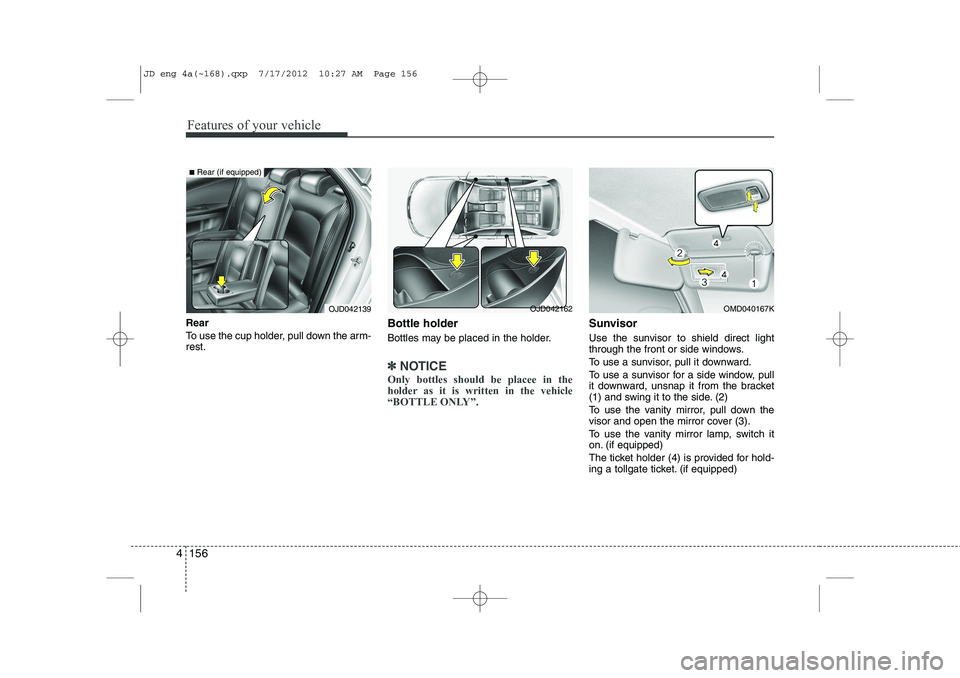
Rear
To use the cup holder, pull down the arm- rest. Bottle holder
Bottles may be placed in the holder.
✽✽
NOTICE
Only bottles should be placee in the
holder as it is written in the vehicle
“BOTTLE ONLY”.
Sunvisor
Use the sunvisor to shield direct light
through the front or side windows.
To use a sunvisor, pull it downward.
To use a sunvisor for a side window, pull
it downward, unsnap it from the bracket
(1) and swing it to the side. (2)
To use the vanity mirror, pull down the
visor and open the mirror cover (3).
To use the vanity mirror lamp, switch it
on. (if equipped)
The ticket holder (4) is provided for hold-
ing a tollgate ticket. (if equipped)
OMD040167KOJD042139
■ Rear (if equipped)
OJD042162
JD eng 4a(~168).qxp 7/17/2012 10:27 AM Page 156
Page 252 of 1168

4 173
Features of your vehicle
CAUTION
Operating the device while driv-ing could lead to accidents due to
a lack of attention to external sur- roundings. First park the vehiclebefore operating the device.
Adjust the volume to levels that allow the driver to hear soundsfrom outside of the vehicle. Driving in a state where external sounds cannot be heard may lead
to accidents.
Pay attention to the volume set- ting when turning the device on.A sudden output of extreme vol-
ume upon turning the device oncould lead to hearing impairment. (Adjust the volume to a suitablelevels before turning off the
device.)
If you want to change the position of device installation, pleaseinquire with your place of pur-chase or service maintenance
center. Technical expertise isrequired to install or disassemble the device.
(Continued)
WARNING
Do not stare at the screen whiledriving. Staring at the screen for
prolonged periods of time couldlead to traffic accidents.
Do not disassemble, assemble, or modify the audio system. Such
acts could result in accidents, fire, or electric shock.
Using the phone while driving may lead to a lack of attention of trafficconditions and increase the likeli-
hood of accidents. Use the phone feature after parking thevehicle.
Heed caution not to spill water or introduce foreign objects into thedevice. Such acts could lead tosmoke, fire, or product malfunc-tion.
Please refrain from use if the screen is blank or no sound canbe heard as these signs may indi-cate product malfunction.Continued use in such conditions
could lead to accidents(fires,electric shock) or product mal-functions.
(Continued)
(Continued) Do not touch the antenna during thunder or lightening as suchacts may lead to lightninginduced electric shock.
Do not stop or park in parking- restricted areas to operate theproduct. Such acts could lead to traffic accidents.
Use the system with the vehicle ignition turned on. Prolonged usewith the ignition turned off could result in battery discharge.
JD eng 4b(169~).qxp 7/19/2012 3:45 PM Page 173
Page 345 of 1168
Driving your vehicle
4
5
Before entering vehicle
• Be sure that all windows, outside mir-
ror(s), and outside lights are clean.
Check the condition of the tires.
Check under the vehicle for any sign of leaks.
Be sure there are no obstacles behind you if you intend to back up. Necessary inspections
Fluid levels, such as engine oil, engine
coolant, brake fluid, and washer fluid
should be checked on a regular basis,
with the exact interval depending on the
fluid. Further details are provided in sec-
tion 7, “Maintenance”.
Before starting
Close and lock all doors.
Position the seat so that all controls are
easily reached.
Adjust the inside and outside rearview mirrors.
Be sure that all lights work.
Check all gauges.
Check the operation of warning lights when the ignition switch is turned to the ON position.
Release the parking brake and make sure the brake warning light goes out.
For safe operation, be sure you are famil-
iar with your vehicle and its equipment.
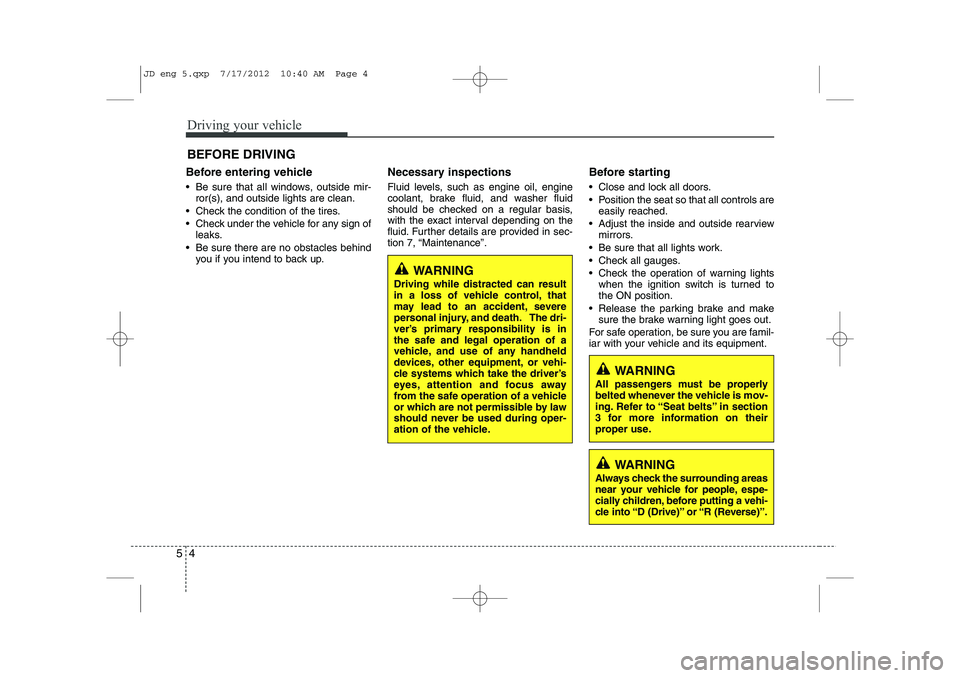
BEFORE DRIVING
WARNING
All passengers must be properly
belted whenever the vehicle is mov-
ing. Refer to “Seat belts” in section
3 for more information on their
proper use.
WARNING
Always check the surrounding areas
near your vehicle for people, espe-
cially children, before putting a vehi-
cle into “D (Drive)” or “R (Reverse)”.
WARNING
Driving while distracted can result
in a loss of vehicle control, that
may lead to an accident, severe
personal injury, and death. The dri-
ver’s primary responsibility is in
the safe and legal operation of a
vehicle, and use of any handheld
devices, other equipment, or vehi-
cle systems which take the driver’s
eyes, attention and focus away
from the safe operation of a vehicle
or which are not permissible by law
should never be used during oper-
ation of the vehicle.
JD eng 5.qxp 7/17/2012 10:40 AM Page 4
Page 374 of 1168
533
Driving your vehicle
Power brakes
Your vehicle has power-assisted brakes
that adjust automatically through normal
usage.
In the event that the power-assisted
brakes lose power because of a stalled
engine or some other reason, you can
still stop your vehicle by applying greater
force to the brake pedal than you nor-
mally would. The stopping distance, how-
ever, will be longer.
When the engine is not running, the
reserve brake power is partially depleted
each time the brake pedal is applied. Do
not pump the brake pedal when the
power assist has been interrupted.
Pump the brake pedal only when neces-
sary to maintain steering control on slip-
pery surfaces.BRAKE SYSTEM (Continued)
Always, confirm the position of
the brake and accelerator pedal
before driving. If you don't checkthe position of the accelerator
and brake pedal before driving,
you may depress the accelerator
instead of the brake pedal. It maycause a serious accident.WARNING - Brakes
Do not drive with your foot rest- ing on the brake pedal. This will create abnormal high brake tem-
peratures, excessive brake lining
and pad wear, and increasedstopping distances.
When descending a long or steep hill, shift to a lower gear and
avoid continuous application of
the brakes. Continuous brakeapplication will cause the brakes
to overheat and could result in a
temporary loss of braking per-
formance.
Wet brakes may impair the vehi- cle’s ability to sefely slow down;
the vehicle may also pull to oneside when the brakes are applied.
Applying the brakes lightly will
indicate whether they have been
affected in this way. Always test
your brakes in this fashion after
driving through deep water. To
dry the brakes, apply them lightly
while maintaining a safe forward
speed until brake performancereturns to normal.
(Continued)
JD eng 5.qxp 7/17/2012 10:42 AM Page 33