Page 646 of 1168

Safety system of your vehicle
46
3
The air bag modules are located both in
the centre of the steering wheel and in
the front passenger's panel above the
glove box. When the SRSCM detects a
sufficiently severe impact to the front of
the vehicle, it will automatically deploy
the front air bags. Upon deployment, tear seams molded
directly into the pad covers will separate
under pressure from the expansion of the
air bags. Further opening of the covers
then allows full inflation of the air bags.
A fully inflated air bag, in combination
with a properly worn seat belt, slows the
driver's or the passenger's forward
motion, reducing the risk of head and
chest injury. After complete inflation, the air bag
immediately starts deflating, enabling the
driver to maintain forward visibility and
the ability to steer or operate other con-
trols.
B240B02L/HB240B03L/H
Driver’s front air bag (2) Driver’s front air bag (3)B240B01L/H
Driver’s front air bag (1)
JD RHD 3.QXP 7/21/2012 1:07 PM Page 46
Page 667 of 1168
Features of your vehicle
4
4
Record your key number
The key code number is stamped on the barcode tag attached to the
key set. Should you lose
your keys, we recom-
mend that you contact an authorised Kia
dealer. Remove the bar code tag and
store it in a safe place. Also, record the
code number and keep it in a safe and
handy place, but not in the vehicle. Key operations
• Used to start the engine.
Used to lock and unlock the doors.
Immobiliser system
Your vehicle may be equipped with an electronic engine immobiliser system to
reduce the risk of unauthorised vehicle
use.
Your immobiliser system is comprised of
a small transponder in the key and elec-
tronic devices inside the vehicle.
Vehicles without smart key system
With the immobiliser system, whenever
you insert your ignition key into the igni-
tion switch and turn it to ON, it checks
and determines and verifies if the ignition
key is valid or not.
If the key is valid, the engine will start.
If the key is invalid, the engine will not
start.
To deactivate the immobiliser system:
Insert the ignition key into the key cylin-
der and turn it to the ON position.
To activate the immobiliser system:
Turn the ignition key to the OFF position.
The immobiliser system activates auto-
matically. Without a valid ignition key for
your vehicle, the engine will not start.
KEYS
WARNING
- Ignition key
Leaving children unattended in a
vehicle with the ignition key is dan-
gerous even if the key is not in the
ignition. Children copy adults and
they could place the key in the igni-
tion. The ignition key would enable
children to operate power windows
or other controls, or even make the
vehicle move, which could result in
serious bodily injury or even death.
Never leave the keys in your vehicle
with unsupervised children.
WARNING
We recommend that you use parts
for replacement from an authorised
Kia dealer. If an aftermarket key is
used, the ignition switch may not
return to ON after START. If this
happens, the starter will continue
to operate causing damage to the
starter motor and possible fire due
to excessive current in the wiring.
JD RHD 4a(~168).QXP 7/21/2012 12:03 PM Page 4
Page 668 of 1168
45
Features of your vehicle
Vehicles with smart key system
Whenever the engine start/stop button is changed to the ON position, the immo-
biliser system checks and verifies if the
key is valid or not.
If the key is valid, the engine will start.
If the key is invalid, the engine will not
start.
To deactivate the immobiliser system
Change the engine start/stop button to the ON position.
To activate the immobiliser system
Change the engine start/stop button to
the OFF position. The immobiliser sys-
tem activates automatically. Without a
valid smart key for your vehicle, the
engine will not start.
✽✽NOTICE
When starting the engine, do not use the
key with other immobiliser keys around.Otherwise the engine may not start or
may stop soon after it starts. Keep each
key separate in order to avoid a startingmalfuntioin. ✽
✽
NOTICE
If you need additional keys or lose your
keys, we recommend that you consult an
authorised Kia dealer.
CAUTION
The transponder in your ignition key is an important part of the
immobiliser system. It is designed to give years of trouble-free service,however you should avoid expo- sure to moisture, static electricity
and rough handling. Immobiliser system malfunction could occur.
CAUTION
Do not change, alter or adjust theimmobiliser system because it could cause the immobiliser sys-tem to malfunction. We recommend
that the system be serviced by anauthorised Kia dealer.
Malfunctions caused by improperalterations, adjustments or modifi- cations to the immobiliser system
are not covered by your vehicle manufacturer warranty.
WARNING
In order to prevent theft of your vehi-
cle, do not leave spare keys any-
where in your vehicle. Your immo-
biliser password is a customer
unique password and should be
kept confidential. Do not leave this
number anywhere in your vehicle.
CAUTION
Do not put metal accessories near the ignition switch.
The engine may not start becausethe metal accessories may interrupt the transponder signal from nor-mally transmitting.
JD RHD 4a(~168).QXP 7/21/2012 12:03 PM Page 5
Page 669 of 1168
Features of your vehicle
6
4
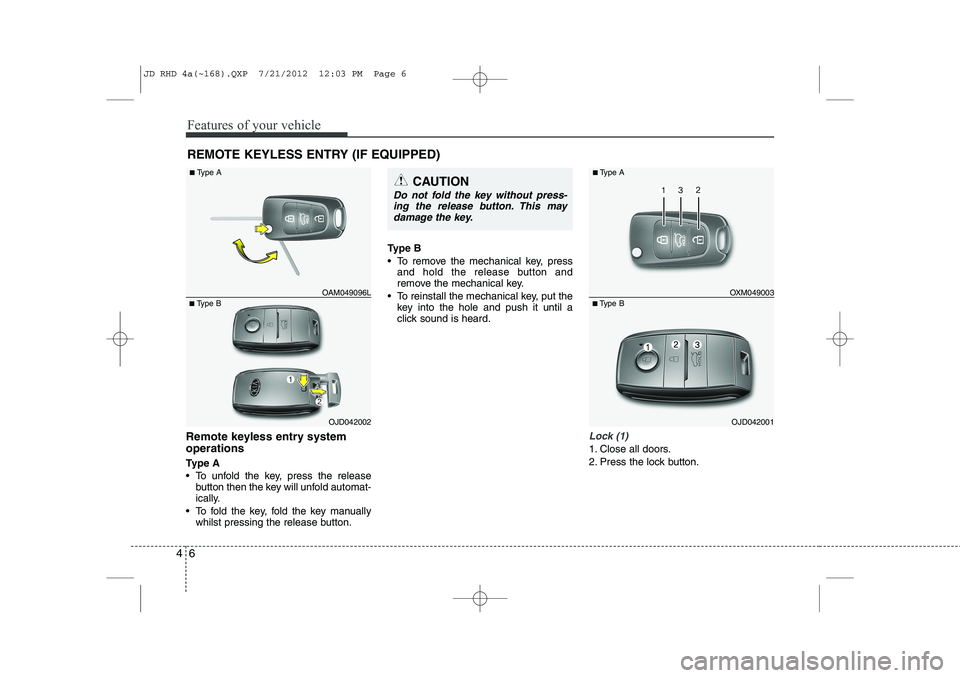
Remote keyless entry system operations
Ty p e A
To unfold the key, press the release
button then the key will unfold automat-
ically.
To fold the key, fold the key manually whilst pressing the release button. Type B
To remove the mechanical key, press
and hold the release button and
remove the mechanical key.
To reinstall the mechanical key, put the key into the hole and push it until a
click sound is heard.Lock (1)
1. Close all doors.
2. Press the lock button.
REMOTE KEYLESS ENTRY (IF EQUIPPED)
OJD042002
■
Type B OAM049096L
■
Type A
CAUTION
Do not fold the key without press-
ing the release button. This may
damage the key.
OJD042001
■
Type B OXM049003
■
Type A
JD RHD 4a(~168).QXP 7/21/2012 12:03 PM Page 6
Page 670 of 1168
47
Features of your vehicle
3. The hazard warning light will blinkonce to indicate that all doors are
locked (the engine bonnet and tailgate
must be closed). Also, the outside
rearview mirror will automatically fold if
the outside rearview mirror folding
switch (Type B) is in the AUTO posi-tion (if equipped).
✽✽ NOTICE
The doors will not lock if any door is opened.
Unlock (2)
1. Press the unlock button.
2. The hazard warning lights will blink twice to indicate that all doors are
unlocked. Also, the outside rearview
mirror will automatically unfold if the
outside rearview mirror folding switch
(Type B) is in the AUTO position (ifequipped).
✽✽ NOTICE
After unlocking all doors, the doors will
lock and the outside rearview mirror
will unfold if the outside rearview mir-
ror folding switch (Type B) is in the
AUTO position (if equipped) unless a
door is opened within 30 seconds.
Tailgate unlock (3)
1. Press the tailgate unlock button for more than 1 second.
2. The hazard warning light will blink twice to indicate the tailgate is
unlocked.
✽✽ NOTICE
Page 674 of 1168
411
Features of your vehicle
SMART KEY (IF EQUIPPED)
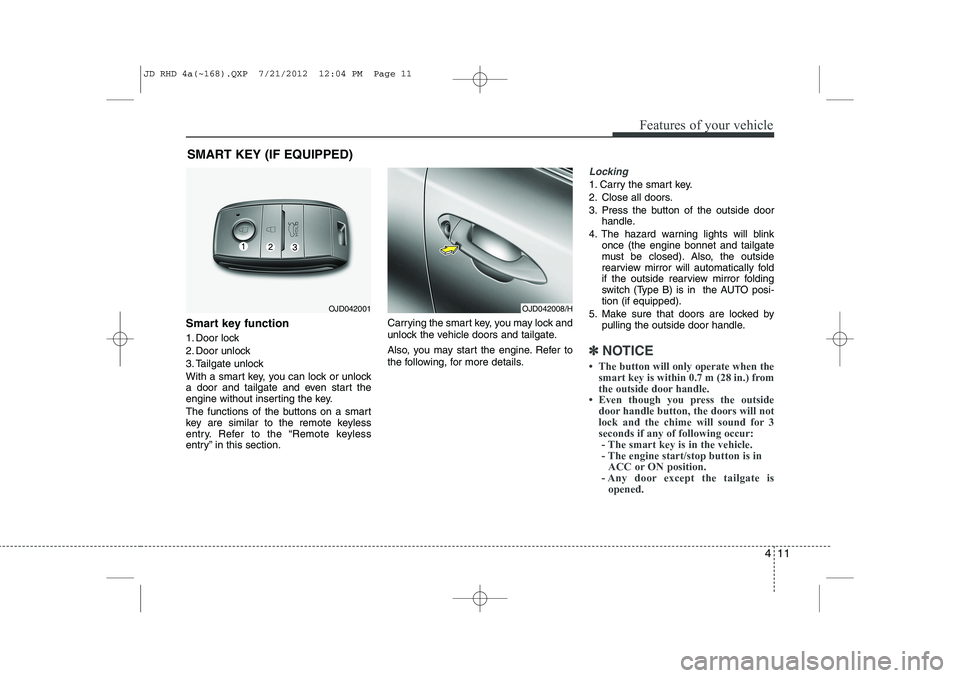
Smart key function
1. Door lock
2. Door unlock
3. Tailgate unlock
With a smart key, you can lock or unlock
a door and tailgate and even start the
engine without inserting the key.
The functions of the buttons on a smart
key are similar to the remote keyless
entry. Refer to the “Remote keyless
entry” in this section. Carrying the smart key, you may lock and
unlock the vehicle doors and tailgate.
Also, you may start the engine. Refer to
the following, for more details.
Locking
1. Carry the smart key.
2. Close all doors.
3. Press the button of the outside door
handle.
4. The hazard warning lights will blink once (the engine bonnet and tailgate
must be closed). Also, the outside
rearview mirror will automatically fold
if the outside rearview mirror folding
switch (Type B) is in the AUTO posi-tion (if equipped).
5. Make sure that doors are locked by pulling the outside door handle.
✽✽ NOTICE
Page 675 of 1168
Features of your vehicle
12
4
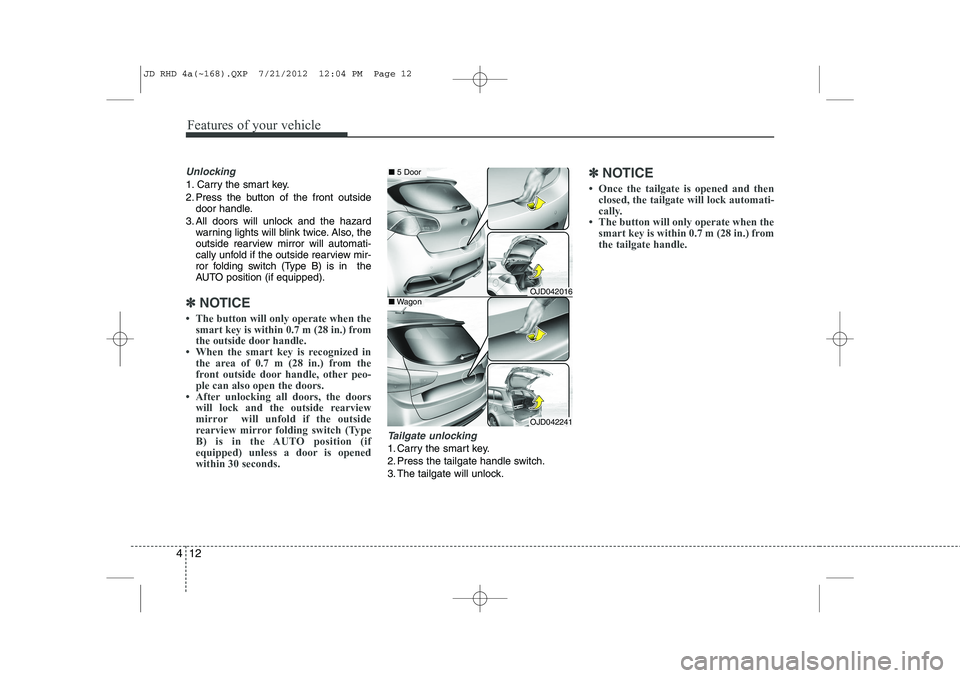
Unlocking
1. Carry the smart key.
2. Press the button of the front outside
door handle.
3. All doors will unlock and the hazard warning lights will blink twice. Also, the
outside rearview mirror will automati-
cally unfold if the outside rearview mir-
ror folding switch (Type B) is in the
AUTO position (if equipped).
✽✽ NOTICE
Page 683 of 1168

Features of your vehicle
20
4
Deadlocks (if equipped)
Some vehicles are equipped with a
deadlock system. Deadlocks preventopening of a door from either inside or
outside the vehicle once the deadlocks
have been activated providing an addi-
tional measure of vehicle security.
To lock the vehicle using the deadlock
function, the doors must be locked by
using the transmitter or smart key. To
unlock the vehicle, the transmitter or
smart key must be used again. Door lock/unlock features
Impact sensing door unlock system
All doors will automatically unlock when
an impact causes the air bags to deploy.
Speed sensing door lock system
(if equipped)
All doors will automatically lock after the
vehicle speed exceeds 15 km/h.
Engine off door unlock system
(if equipped)
All doors will automatically unlock: Without smart key system
When the key is removed from the igni-
tion switch. With smart key system
When the engine start/stop button is in the OFF position.
Shift lever door lock/unlock system
All doors will automatically lock when the shift lever is moved out of P (Park).
All doors will automatically unlock when the shift lever is moved into P
(Park).
You can activate or deactivate the auto
door lock/unlock features in the vehicle.
Refer to "User setting" in this section.
WARNING
Do not lock the doors with the
transmitter or the smart key with
anybody left in the vehicle. The pas-
senger in the vehicle cannot unlock
the doors with the door lock button.
For example, if the door is locked
with the transmitter, the passenger
in the vehicle cannot unlock the
door without the transmitter.
JD RHD 4a(~168).QXP 7/21/2012 12:04 PM Page 20