Page 795 of 1168

Features of your vehicle
132
4
Air conditioning (if equipped)
Press the A/C button to turn the air con- ditioning system on (indicator light will
illuminate). Press the button again to turn
the air conditioning system off. System operation
Ventilation
1. Set the mode to the position.
2. Set the air intake control to the outside
(fresh) air position.
3. Set the temperature control to the desired position.
4. Set the fan speed control to the desired speed.
Heating
1. Set the mode to the position.
2. Set the air intake control to the outside(fresh) air position.
3. Set the temperature control to the desired position.
4. Set the fan speed control to the desired speed.
5. If dehumidified heating is desired, turn the air conditioning system on.
If the windscreen fogs up, set the mode to the position. Operation Tips
To keep dust or unpleasant fumes from
entering the vehicle through the venti-
lation system, temporarily set the air
intake control to the recirculated air
position. Be sure to return the control
to the fresh air position when the irrita-
tion has passed to keep fresh air in the
vehicle. This will help keep the driver
alert and comfortable.
Air for the heating/cooling system is drawn in through the grilles just ahead
of the windscreen. Care should be
taken that these are not blocked by
leaves, snow, ice or other obstructions.
To prevent interior fog on the wind- screen, set the air intake control to the
fresh air position and fan speed to the
desired position, turn on the air condi-tioning system, and adjust the temper-
ature control to desired temperature.OJD042103
JD RHD 4a(~168).QXP 7/21/2012 12:14 PM Page 132
Page 807 of 1168

Features of your vehicle
144
4
OFF mode
Press the OFF button to turn off the air
climate control system. However, you can
still operate the air intake buttons as long
as the ignition switch is in the ON posi-tion. System operation
Ventilation
1. Set the mode to the position.
2. Set the air intake control to the outside
(fresh) air position.
3. Set the temperature control to the desired position.
4. Set the fan speed control to the desired speed.
Heating
1. Set the mode to the position.
2. Set the air intake control to the outside(fresh) air position.
3. Set the temperature control to the desired position.
4. Set the fan speed control to the desired speed.
5. If dehumidified heating is desired, turn the air conditioning system on.
If the windscreen fogs up, set the mode to the or
position. Operation Tips
To keep dust or unpleasant fumes from
entering the vehicle through the venti-
lation system, temporarily set the air
intake control to the recirculated air
position. Be sure to return the control
to the fresh air position when the irrita-
tion has passed to keep fresh air in the
vehicle. This will help keep the driver
alert and comfortable.
Air for the heating/cooling system is drawn in through the grilles just ahead
of the windscreen. Care should be
taken that these are not blocked by
leaves, snow, ice or other obstructions.
To prevent interior fog on the wind- screen, set the air intake control to the
fresh air position and fan speed to the
desired position, turn on the air condi-tioning system, and adjust the temper-
ature control to desired temperature.OJD042118R
JD RHD 4a(~168).QXP 7/21/2012 12:15 PM Page 144
Page 815 of 1168

Features of your vehicle
152
4
Glove box
To open the glove box, push the button
and the glove box will automatically
open. Close the glove box after use. Cool box (if equipped)
You can keep beverage cans or other
items cool in the glove box.
1. Turn on the air conditioning. The tem-
perature of the cool box will change
according to the temperature of airconditioning.
2. Turn the knob to the open position.
3. When the cool box is not used, turn the knob to the close position.
✽✽ NOTICE
If some items in the cool box block the vent, the cooling effectiveness of the cool
box is reduced.
OJD042133R
WARNING
Do not put perishable food in the
cool box because it may not main-
tain the necessary consistent tem-
perature to keep the food fresh.
OJD042132/H
WARNING
To reduce the risk of injury in an
accident or sudden stop, always
keep the glove box door closedwhilst driving.
CAUTION
Do not keep food in the glove box for a long time.
CCCClllloooosssseeee
OOOOppppeeeennnn
JD RHD 4a(~168).QXP 7/21/2012 12:16 PM Page 152
Page 816 of 1168

4 153
Features of your vehicle
Sunglass holder
To open the sunglass holder, press the
cover and the holder will slowly open.
Place your sunglasses in the compart-
ment door with the lenses facing out.
Push to close.Luggage tray (wagon)
You can place a first aid kit, a reflector tri-
angle (front tray), tools, etc. in the box for
easy access.
Grasp the handle on the top of thecover and lift it. Luggage side tray (if equipped)
The luggage side tray can be used for
storing small items.
To open the cover, pull up the handle
and lift the cover.
OGD041139
WARNING
Do not keep objects except sun- glasses inside the sunglass holder.
Such objects can be thrown from the
holder in the event of a sudden stop
or an accident, possibly injuring the
passengers in the vehicle.
Do not open the sunglasses holder whilst the vehicle is moving. The rear
view mirror of the vehicle can be
blocked by an open sunglass holder.OGDE042314
OGDE042313OJD042153
OGDE042310
■5 Door
■Wagon
JD RHD 4a(~168).QXP 7/21/2012 12:16 PM Page 153
Page 825 of 1168
Features of your vehicle
162
4
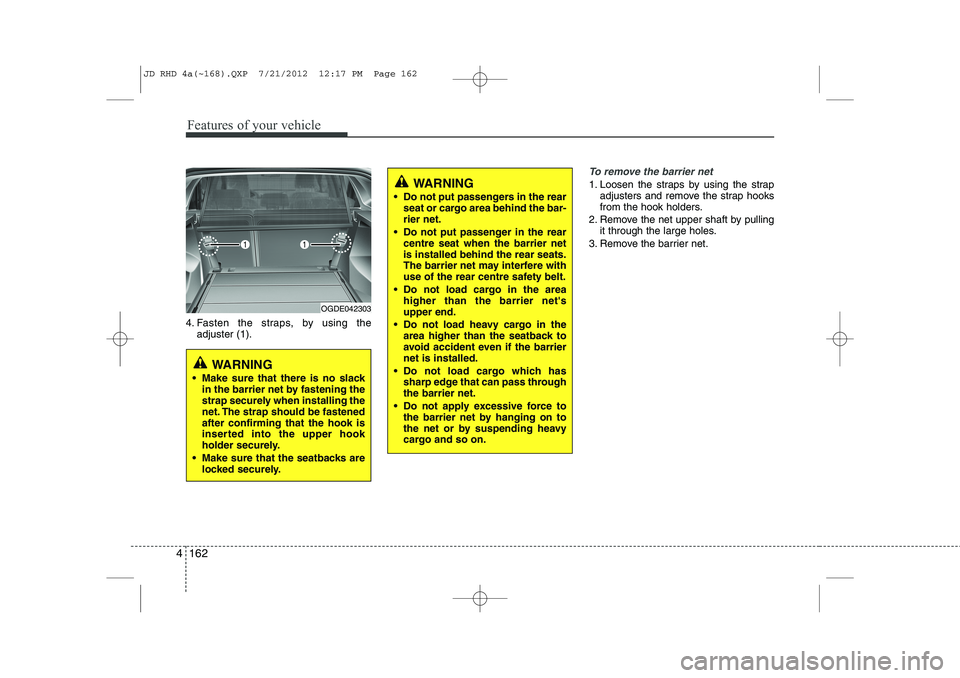
4. Fasten the straps, by using the
adjuster (1).
To remove the barrier net
1. Loosen the straps by using the strap adjusters and remove the strap hooks
from the hook holders.
2. Remove the net upper shaft by pulling it through the large holes.
3. Remove the barrier net.
OGDE042303
WARNING
Make sure that there is no slack in the barrier net by fastening the
strap securely when installing the
net. The strap should be fastenedafter confirming that the hook is
inserted into the upper hook
holder securely.
Make sure that the seatbacks are locked securely.
WARNING
Do not put passengers in the rear seat or cargo area behind the bar- rier net.
Do not put passenger in the rear centre seat when the barrier netis installed behind the rear seats.
The barrier net may interfere with
use of the rear centre safety belt.
Do not load cargo in the area higher than the barrier net'supper end.
Do not load heavy cargo in the area higher than the seatback to
avoid accident even if the barriernet is installed.
Do not load cargo which has sharp edge that can pass throughthe barrier net.
Do not apply excessive force to the barrier net by hanging on to
the net or by suspending heavy
cargo and so on.
JD RHD 4a(~168).QXP 7/21/2012 12:17 PM Page 162
Page 828 of 1168
4 165
Features of your vehicle
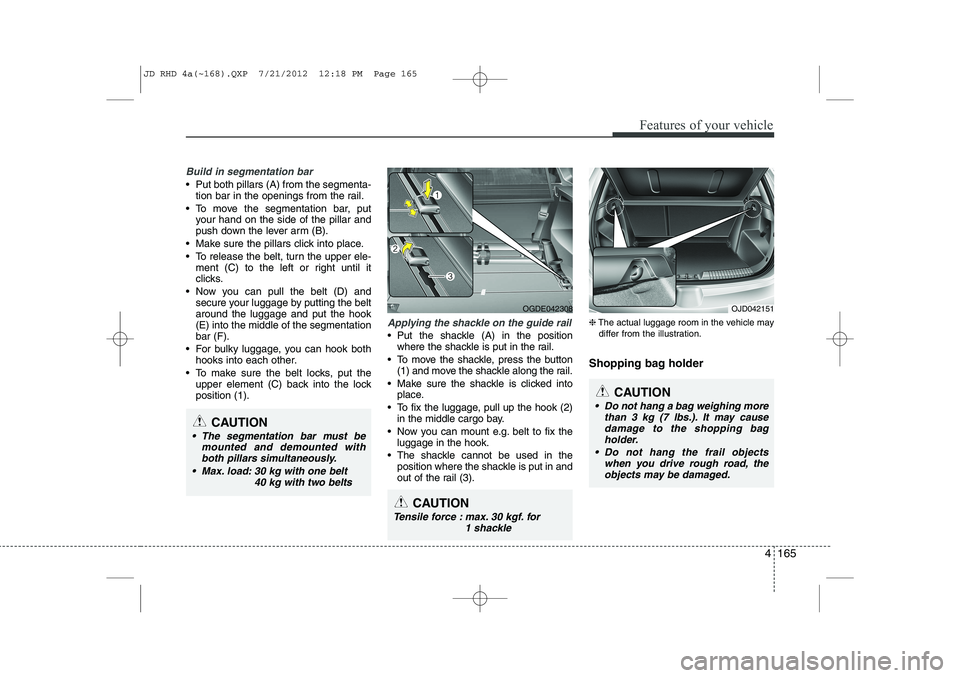
Build in segmentation bar
Put both pillars (A) from the segmenta-tion bar in the openings from the rail.
To move the segmentation bar, put your hand on the side of the pillar and
push down the lever arm (B).
Make sure the pillars click into place.
To release the belt, turn the upper ele- ment (C) to the left or right until it
clicks.
Now you can pull the belt (D) and secure your luggage by putting the beltaround the luggage and put the hook(E) into the middle of the segmentationbar (F).
For bulky luggage, you can hook both hooks into each other.
To make sure the belt locks, put the upper element (C) back into the lockposition (1).
Applying the shackle on the guide rail
Put the shackle (A) in the positionwhere the shackle is put in the rail.
To move the shackle, press the button (1) and move the shackle along the rail.
Make sure the shackle is clicked into place.
To fix the luggage, pull up the hook (2) in the middle cargo bay.
Now you can mount e.g. belt to fix the luggage in the hook.
The shackle cannot be used in the position where the shackle is put in and
out of the rail (3). ❈
The actual luggage room in the vehicle may
differ from the illustration.
Shopping bag holder
CAUTION
The segmentation bar must be mounted and demounted withboth pillars simultaneously.
Max. load: 30 kg with one belt 40 kg with two belts
OGDE042308
CAUTION
Do not hang a bag weighing morethan 3 kg (7 lbs.). It may causedamage to the shopping bag
holder.
Do not hang the frail objects when you drive rough road, theobjects may be damaged.
OJD042151
CAUTION
Tensile force : max. 30 kgf. for 1 shackle
JD RHD 4a(~168).QXP 7/21/2012 12:18 PM Page 165
Page 832 of 1168
4 169
Features of your vehicle
✽✽NOTICE
If you install an aftermarket HID head
lamp, your vehicle’s audio and electron-ic device may malfunction.
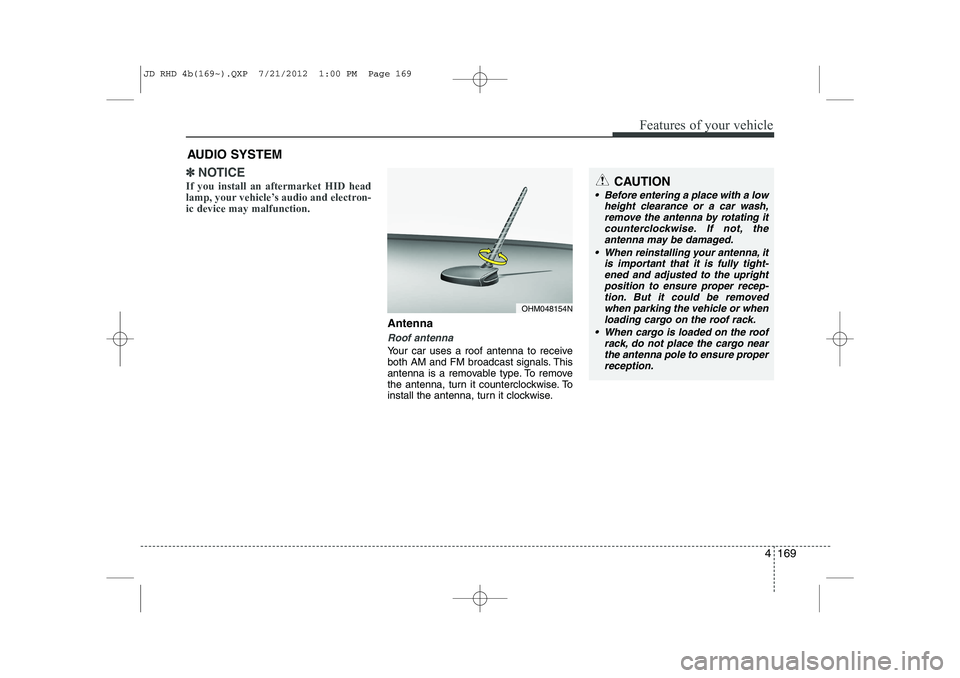
Antenna
Roof antenna
Your car uses a roof antenna to receive
both AM and FM broadcast signals. This
antenna is a removable type. To remove
the antenna, turn it counterclockwise. To
install the antenna, turn it clockwise.
AUDIO SYSTEM
CAUTION
• Before entering a place with a low
height clearance or a car wash,
remove the antenna by rotating itcounterclockwise. If not, theantenna may be damaged.
When reinstalling your antenna, it is important that it is fully tight-ened and adjusted to the upright position to ensure proper recep-tion. But it could be removed
when parking the vehicle or whenloading cargo on the roof rack.
When cargo is loaded on the roof rack, do not place the cargo near
the antenna pole to ensure proper reception.
OHM048154N
JD RHD 4b(169~).QXP 7/21/2012 1:00 PM Page 169
Page 835 of 1168
Features of your vehicle
172
4
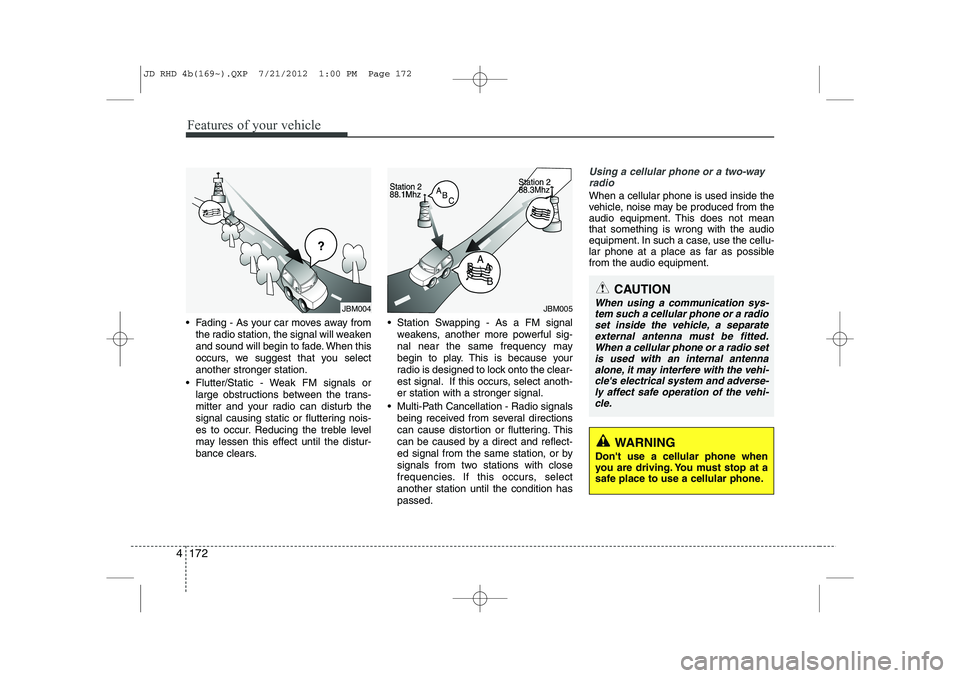
Fading - As your car moves away from
the radio station, the signal will weaken
and sound will begin to fade. When this
occurs, we suggest that you selectanother stronger station.
Flutter/Static - Weak FM signals or large obstructions between the trans-
mitter and your radio can disturb the
signal causing static or fluttering nois-
es to occur. Reducing the treble level
may lessen this effect until the distur-
bance clears. Station Swapping - As a FM signal
weakens, another more powerful sig-
nal near the same frequency may
begin to play. This is because your
radio is designed to lock onto the clear-
est signal. If this occurs, select anoth-er station with a stronger signal.
Multi-Path Cancellation - Radio signals being received from several directions
can cause distortion or fluttering. This
can be caused by a direct and reflect-
ed signal from the same station, or by
signals from two stations with close
frequencies. If this occurs, selectanother station until the condition haspassed.
Using a cellular phone or a two-wayradio
When a cellular phone is used inside the
vehicle, noise may be produced from the
audio equipment. This does not meanthat something is wrong with the audio
equipment. In such a case, use the cellu-
lar phone at a place as far as possiblefrom the audio equipment.
JBM004JBM005
CAUTION
When using a communication sys-
tem such a cellular phone or a radio set inside the vehicle, a separateexternal antenna must be fitted.
When a cellular phone or a radio setis used with an internal antenna alone, it may interfere with the vehi-cle's electrical system and adverse-
ly affect safe operation of the vehi- cle.
WARNING
Don't use a cellular phone when
you are driving. You must stop at a
safe place to use a cellular phone.
JD RHD 4b(169~).QXP 7/21/2012 1:00 PM Page 172