Page 196 of 410
4 115
Features of your vehicle
SYSTEM CONTROLLERS AND
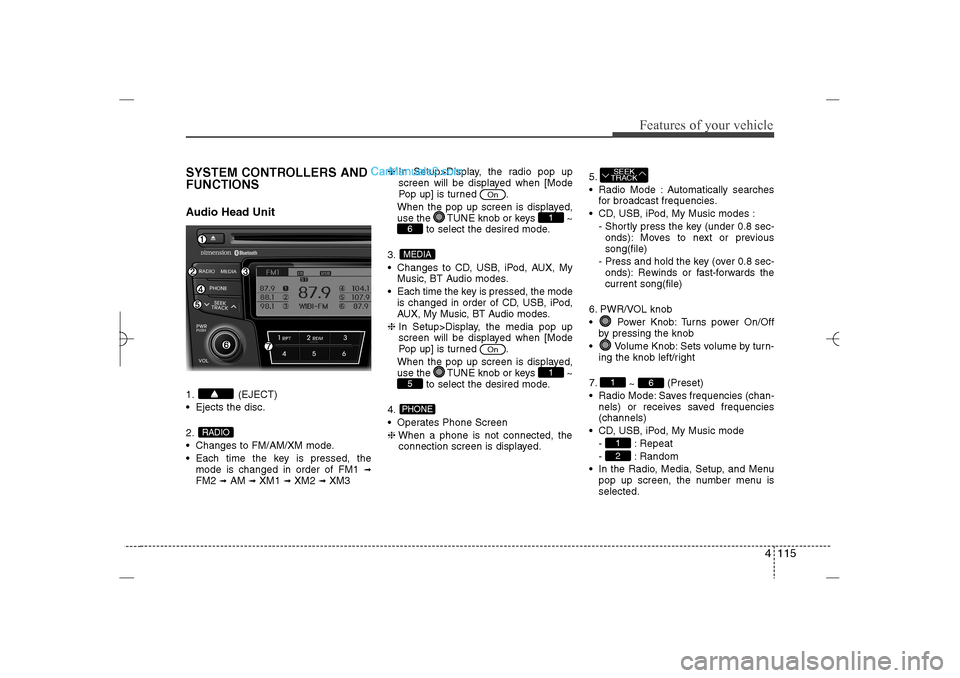
FUNCTIONSAudio Head Unit1. (EJECT)
Ejects the disc.
2.
Changes to FM/AM/XM mode.
Each time the key is pressed, the
mode is changed in order of FM1
➟
FM2
➟AM
➟XM1
➟XM2
➟XM3❈In Setup>Display, the radio pop up
screen will be displayed when [Mode
Pop up] is turned .
When the pop up screen is displayed,
use the TUNE knob or keys ~
to select the desired mode.
3.
Changes to CD, USB, iPod, AUX, My
Music, BT Audio modes.
Each time the key is pressed, the mode
is changed in order of CD, USB, iPod,
AUX, My Music, BT Audio modes.
❈In Setup>Display, the media pop up
screen will be displayed when [Mode
Pop up] is turned .
When the pop up screen is displayed,
use the TUNE knob or keys ~
to select the desired mode.
4.
Operates Phone Screen
❈When a phone is not connected, the
connection screen is displayed.5.
Radio Mode : Automatically searches
for broadcast frequencies.
CD, USB, iPod, My Music modes :
- Shortly press the key (under 0.8 sec-
onds): Moves to next or previous
song(file)
- Press and hold the key (over 0.8 sec-
onds): Rewinds or fast-forwards the
current song(file)
6. PWR/VOL knob
Power Knob: Turns power On/Off
by pressing the knob
Volume Knob: Sets volume by turn-
ing the knob left/right
7.
~ (Preset)
Radio Mode: Saves frequencies (chan-
nels) or receives saved frequencies
(channels)
CD, USB, iPod, My Music mode
- : Repeat
- : Random
In the Radio, Media, Setup, and Menu
pop up screen, the number menu is
selected.
21
6
1SEEK
TRACK
PHONE5
1
On
MEDIA6
1
On
RADIO
YF HMA 4b-112~(Audio).qxp 3/5/2012 4:24 PM Page 115
Page 198 of 410
4 117
Features of your vehicle
DISPLAY SETTINGSPress the key Select [Display]
through TUNE knob or key
Select menu through TUNE knob
Mode Pop up[Mode Pop up] Changes
/
selection mode
During On state, press the or
key to display the mode
change pop up screen.Text Scroll[Text Scroll] Set /
: Maintains scroll
: Scrolls only one (1) time.Media DisplayWhen playing an MP3 file, select the
desired display info from ‘Folder/File’ or
‘Album/Artist/Song’.
OffOn
Off
On
MEDIA
RADIO
Off
On
1
SETUP
YF HMA 4b-112~(Audio).qxp 3/5/2012 4:24 PM Page 117
Page 216 of 410
4 135
Features of your vehicle
BASIC METHOD OF USE :
Audio CD / MP3 CD / USB /
iPod / My MusicPress the key to change the mod
mode in order of CD
➟USB(iPod)
➟AUX
➟My Music
➟BT Audio.
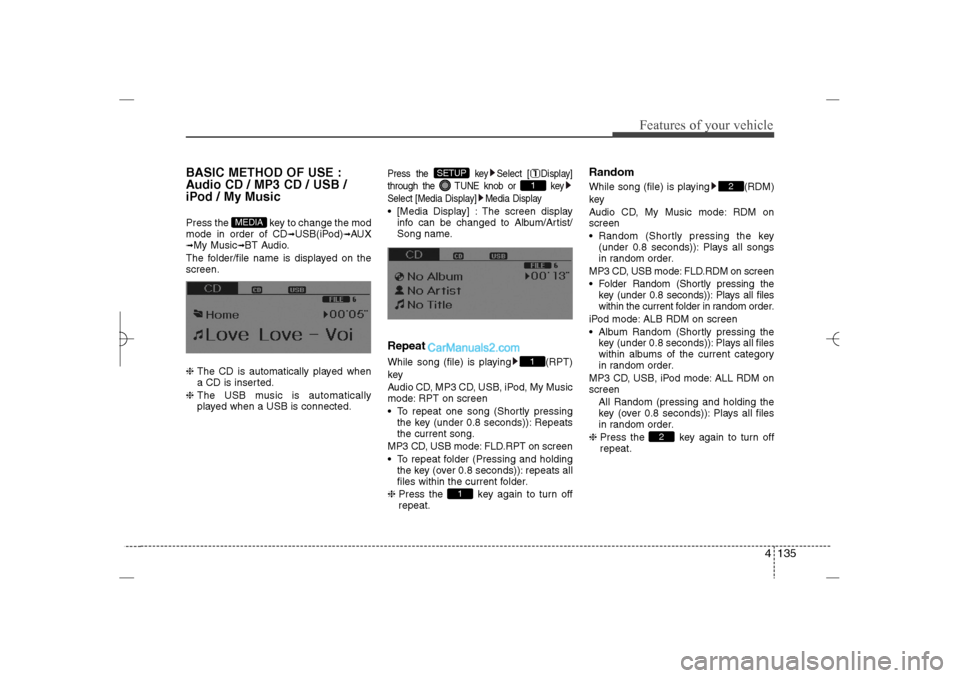
The folder/file name is displayed on the
screen.
❈ The CD is automatically played when
a CD is inserted.
❈ The USB music is automatically
played when a USB is connected.
Press the key Select [ Display]
through the TUNE knob or key
Select [Media Display] Media Display [Media Display] : The screen display
info can be changed to Album/Artist/
Song name.RepeatWhile song (file) is playing (RPT)
key
Audio CD, MP3 CD, USB, iPod, My Music
mode: RPT on screen
To repeat one song (Shortly pressing
the key (under 0.8 seconds)): Repeats
the current song.
MP3 CD, USB mode: FLD.RPT on screen
To repeat folder (Pressing and holding
the key (over 0.8 seconds)): repeats all
files within the current folder.
❈ Press the key again to turn off
repeat.
RandomWhile song (file) is playing (RDM)
key
Audio CD, My Music mode: RDM on
screen
Random (Shortly pressing the key
(under 0.8 seconds)): Plays all songs
in random order.
MP3 CD, USB mode: FLD.RDM on screen
Folder Random (Shortly pressing the
key (under 0.8 seconds)): Plays all files
within the current folder in random order.
iPod mode: ALB RDM on screen
Album Random (Shortly pressing the
key (under 0.8 seconds)): Plays all files
within albums of the current category
in random order.
MP3 CD, USB, iPod mode: ALL RDM on
screen
All Random (pressing and holding the
key (over 0.8 seconds)): Plays all files
in random order.
❈ Press the key again to turn off
repeat.
2
2
1
11
SETUP
MEDIA
YF HMA 4b-112~(Audio).qxp 3/5/2012 4:24 PM Page 135
Page 219 of 410
![Hyundai Sonata 2013 Owners Manual Features of your vehicle138 4MENU : MP3 CD / USBPress the CD MP3 mode key to
set the Repeat, Folder Random, Folder
Repeat, All Random, Information, and
Copy features.RepeatPress the key Set [ RPT]
t](/manual-img/35/16808/w960_16808-218.png "Hyundai Sonata 2013 Owners Manual Features of your vehicle138 4MENU : MP3 CD / USBPress the CD MP3 mode key to
set the Repeat, Folder Random, Folder
Repeat, All Random, Information, and
Copy features.RepeatPress the key Set [ RPT]
t")
Features of your vehicle138 4MENU : MP3 CD / USBPress the CD MP3 mode key to
set the Repeat, Folder Random, Folder
Repeat, All Random, Information, and
Copy features.RepeatPress the key Set [ RPT]
through the
TUNE
knob or key to
repeat the current song.
❈ Press RPT again to turn off.
Folder RandomPress the key Set [ F.RDM]
through the
TUNE
knob or key to
randomly play songs within the current
folder.
❈ Press F.RDM again to turn off.
Folder RepeatPress the key Set [ F.RPT]
through the
TUNE
knob or key to
repeat songs within the current folder.
❈ Press F.RPT again to turn off.
All RandomPress the key Set [ A.RDM]
through the
TUNE
knob or key to
randomly play all songs within the CD.
❈ Press A.RDM again to turn off.
InformationPress the key Set [ Info]
through the
TUNE
knob or key to
display information of the current song.
❈ Press the key to turn off info
display.
CopyPress the key Set [ Copy]
through the
TUNE
knob or key.
This is used to copy the current song
into My Music. You can play the copied
Music in My Music mode.
❈ If another key is pressed while copying
is in progress, a pop up asking you
whether to cancel copying is dis-
played.
❈ If another media is connected or
inserted (USB, CD, iPod, AUX) while
copying is in progress, copying is can-
celed.
❈ Music will not be played while copying
is in progress.
6
MENU
MENU
5
MENU
4
MENU
3
MENU
2
MENU
1
MENU
MENU
YF HMA 4b-112~(Audio).qxp 3/5/2012 4:24 PM Page 138
Page 221 of 410
![Hyundai Sonata 2013 Owners Manual Features of your vehicle140 4InformationPress the key Set [ Info]
through the
TUNE
knob or key.
Displays information of the current song.
❈ Press the key to turn off info
display.
DeletePress th](/manual-img/35/16808/w960_16808-220.png "Hyundai Sonata 2013 Owners Manual Features of your vehicle140 4InformationPress the key Set [ Info]
through the
TUNE
knob or key.
Displays information of the current song.
❈ Press the key to turn off info
display.
DeletePress th")
Features of your vehicle140 4InformationPress the key Set [ Info]
through the
TUNE
knob or key.
Displays information of the current song.
❈ Press the key to turn off info
display.
DeletePress the key Set [ Delete]
through the TUNEknob or key. Deletes currently playing file
In the play screen, pressing delete will
delete the currently playing song.
Deletes file from list➀
Select the file you wish to delete by
using the TUNE knob.
➁
Press the key and select the
delete menu to delete the selected file.
Delete AllPress the key Set [ Del.All]
through the TUNEknob or key.Deletes all songs of My Music.Delete SelectionPress the key Set [ Del.Sel]
through the TUNEknob or key.Songs within My Music are selected and
deleted.➀
Select the songs you wish to delete
from the list.
➁
After selecting, press the key
and select the delete menu.
AUXAUX is used to play external MEDIA cur-
rently connected with the AUX terminal.
AUX mode will automatically start when
an external device is connected to the
AUX terminal.
If an external device is connected, you
can also press the key to change
to AUX mode.
❈AUX mode cannot be started unless
there is an external device connected
to the AUX terminal.
MEDIA
MENU6
MENU
5
MENU
MENU
4
MENUMENU
3
MENU
YF HMA 4b-112~(Audio).qxp 3/5/2012 4:24 PM Page 140
![Hyundai Sonata 2013 Owners Manual 4 117
Features of your vehicle
DISPLAY SETTINGSPress the key Select [Display]
through TUNE knob or key
Select menu through TUNE knob
Mode Pop up[Mode Pop up] Changes
/
selection mode
During On](/manual-img/35/16808/w960_16808-197.png "Hyundai Sonata 2013 Owners Manual 4 117
Features of your vehicle
DISPLAY SETTINGSPress the key Select [Display]
through TUNE knob or key
Select menu through TUNE knob
Mode Pop up[Mode Pop up] Changes
/
selection mode
During On")