2013 Hyundai Sonata tail
[x] Cancel search: tailPage 194 of 410

4 113
Features of your vehicle
Steering wheel audio control
(if equipped) The steering wheel may incorporate
audio control buttons.
1. VOLUME (VOL+/-) Push the lever upward (+) to increase the
volume.
Push the lever downward (-) to decrease
the volume.2. PRESET/SEEK ( / )The SEEK/PRESET button has different
functions based on the system mode.
For the following functions the button
should be pressed for 0.8 second or
more.
RADIO mode
It will function as the AUTO SEEK select
button.
CD/USB/ iPod mode
It will function as the FF/REW button.
If the SEEK/PRESET button is pressed
for less than 0.8 second, it will work as
follows in each mode.RADIO mode
It will function as the PRESET STATION
buttons.
CD/USB/ iPod mode
It will function as TRACK UP/DOWN
button.
3. MODEPress the button to change audio source.
- FM(1~2)
➟AM
➟SAT(1~3)
➟CD
➟USB
AUX(iPod) FM...
Detailed information for audio control
buttons are described in the following
pages in this section.
CAUTION
Do not operate audio remote con-
trol buttons simultaneously.
1
32
YF_HANDLE
YF HMA 4b-112~(Audio).qxp 3/5/2012 4:24 PM Page 113
Page 205 of 410
![Hyundai Sonata 2013 Owners Manual Features of your vehicle124 4SYSTEM SETTINGSPress the key Select [System]
through tune knob or key Select
menu through TUNE knob
Memory InformationDisplays currently used memory and
total system me](/manual-img/35/16808/w960_16808-204.png "Hyundai Sonata 2013 Owners Manual Features of your vehicle124 4SYSTEM SETTINGSPress the key Select [System]
through tune knob or key Select
menu through TUNE knob
Memory InformationDisplays currently used memory and
total system me")
Features of your vehicle124 4SYSTEM SETTINGSPress the key Select [System]
through tune knob or key Select
menu through TUNE knob
Memory InformationDisplays currently used memory and
total system memory.
Select [Memory Information] OK
The currently used memory is displayed
on the left side while the total system
memory is displayed on the right side.Prompt FeedbackThis feature is used to change voice
command feedback between Normal and
Expert modes.
Select [Prompt Feedback] Set through
TUNE
knob
Normal : This mode is for beginner
users and provides detailed instruc-
tions during voice command operation.
Expert : This mode is for expert users
and omits some information during
voice command operation. (When using
Expert mode, guidance instructions can
be heard through the [Help] or [Menu]
commands.
LanguageThis menu is used to set the display and
voice recognition language.Select [Language] Set through TUNE
knob❈The system will reboot after the lan-
guage is changed.
❈Language support by region
- English, Francais, Espanol
4
SETUP
YF HMA 4b-112~(Audio).qxp 3/5/2012 4:24 PM Page 124
Page 209 of 410
![Hyundai Sonata 2013 Owners Manual Features of your vehicle128 4MENUWithin
key
are the A.Store (Auto
Store) and Info functions.A.Store
Press the key Set [A.Store]
through TUNE knob or keySaves broadcasts with superior recep-
tion](/manual-img/35/16808/w960_16808-208.png "Hyundai Sonata 2013 Owners Manual Features of your vehicle128 4MENUWithin
key
are the A.Store (Auto
Store) and Info functions.A.Store
Press the key Set [A.Store]
through TUNE knob or keySaves broadcasts with superior recep-
tion")
Features of your vehicle128 4MENUWithin
key
are the A.Store (Auto
Store) and Info functions.A.Store
Press the key Set [A.Store]
through TUNE knob or keySaves broadcasts with superior recep-
tion to ~ keys. If no frequen-
cies are received, then the most recently
received frequency will be broadcast.
Info (Information)Press the key Set [Info] through
TUNE knob or keyDisplays details on the HD Radio.
❈The Info menu is displayed on when
receiving HD Radio.
2
MENU
6
1
1
MENU
MENU
YF HMA 4b-112~(Audio).qxp 3/5/2012 4:24 PM Page 128
Page 210 of 410
4 129
Features of your vehicle
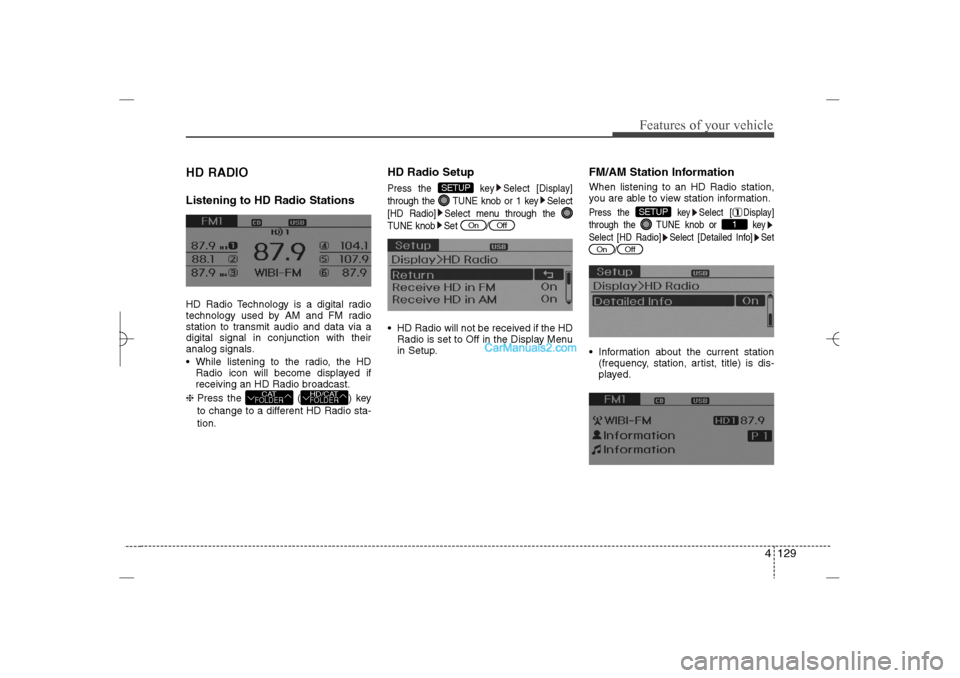
HD RADIOListening to HD Radio StationsHD Radio Technology is a digital radio
technology used by AM and FM radio
station to transmit audio and data via a
digital signal in conjunction with their
analog signals.
While listening to the radio, the HD
Radio icon will become displayed if
receiving an HD Radio broadcast.
❈ Press the ( ) key
to change to a different HD Radio sta-
tion.
HD Radio SetupPress the key Select [Display]
through the TUNE knob or 1 key Select
[HD Radio] Select menu through the
TUNE knob Set / HD Radio will not be received if the HD
Radio is set to Off in the Display Menu
in Setup.
FM/AM Station InformationWhen listening to an HD Radio station,
you are able to view station information.Press the key Select [ Display]
through the TUNE knob or key
Select [HD Radio] Select [Detailed Info] Set
/ Information about the current station
(frequency, station, artist, title) is dis-
played.
Off
On
1
SETUP
Off
On
SETUP
HD/CATFOLDER
CATFOLDER
YF HMA 4b-112~(Audio).qxp 3/5/2012 4:24 PM Page 129
Page 245 of 410

53
Driving your vehicle
Before entering vehicle• Be sure that all windows, outside mir-
ror(s), and outside lights are clean.
Check the condition of the tires.
Check under the vehicle for any sign of
leaks.
Be sure there are no obstacles behind
you if you intend to back up.Necessary inspections Fluid levels, such as engine oil, engine
coolant, brake fluid, and washer fluid
should be checked on a regular basis,
with the exact interval depending on the
fluid. Further details are provided in sec-
tion 7, “Maintenance”.
Before starting Close and lock all doors.
Position the seat so that all controls are
easily reached.
Adjust the inside and outside rearview
mirrors.
Be sure that all lights work.
Check all gauges.
Check the operation of warning lights
when the ignition switch is turned to
the ON position.
Release the parking brake and make
sure the brake warning light goes out.
For safe operation, be sure you are famil-
iar with your vehicle and its equipment.
BEFORE DRIVING
WARNING
Driving while distracted can result in
a loss of vehicle control, that may
lead to an accident, severe personal
injury, and death. The driver's pri-
mary responsibility is in the safe and
legal operation of a vehicle, and use
of any handheld devices, other
equipment, or vehicle systems which
take the driver's eyes, attention and
focus away from the safe operation
of a vehicle or which are not permis-
sible by law should never be used
during operation of the vehicle.
CALIFORNIA PROPOSI-
TION 65 WARNING
Engine exhaust and a wide variety
of automobile components and
parts, including components found
in the interior furnishings in a vehi-
cle, contain or emit chemicals
known to the State of California to
cause cancer and birth defects and
reproductive harm. In addition, cer-
tain fluids contained in vehicles
and certain products of component
wear contain or emit chemicals
known to the State of California to
cause cancer and birth defects or
other reproductive harm.
WARNING
All passengers must be properly
belted whenever the vehicle is mov-
ing. Refer to “Seat belts” in section
3 for more information on their
proper use.
YF HMA 5.qxp 1/16/2012 6:22 PM Page 3
Page 278 of 410

Driving your vehicle36 5Your vehicle's fuel economy depends
mainly on your style of driving, where you
drive and when you drive.
Each of these factors affects how many
miles (kilometers) you can get from a gal-
lon (liter) of fuel. To operate your vehicle
as economically as possible, use the fol-
lowing driving suggestions to help save
money in both fuel and repairs:
Drive smoothly. Accelerate at a moder-
ate rate. Don't make "jack-rabbit" starts
or full-throttle shifts and maintain a
steady cruising speed. Don't race
between stoplights. Try to adjust your
speed to that of the other traffic so you
don't have to change speeds unneces-
sarily. Avoid heavy traffic whenever
possible. Always maintain a safe dis-
tance from other vehicles so you can
avoid unnecessary braking. This also
reduces brake wear.
Drive at a moderate speed. The faster
you drive, the more fuel your car uses.
Driving at a moderate speed, especial-
ly on the highway, is one of the most
effective ways to reduce fuel consump-
tion. Don't "ride" the brake pedal. This can
increase fuel consumption and also
increase wear on these components.
In addition, driving with your foot rest-
ing on the brake pedal may cause the
brakes to overheat, which reduces
their effectiveness and may lead to
more serious consequences.
Take care of your tires. Keep them
inflated to the recommended pressure.
Incorrect inflation, either too much or
too little, results in unnecessary tire
wear. Check the tire pressures at least
once a month.
Be sure that the wheels are aligned
correctly. Improper alignment can
result from hitting curbs or driving too
fast over irregular surfaces. Poor align-
ment causes faster tire wear and may
also result in other problems as well as
greater fuel consumption. Keep your car in good condition. For
better fuel economy and reduced
maintenance costs, maintain your car
in accordance with the maintenance
schedule in section 7. If you drive your
car in severe conditions, more frequent
maintenance is required (see section 7
for details).
Keep your car clean. For maximum
service, your vehicle should be kept
clean and free of corrosive materials. It
is especially important that mud, dirt,
ice, etc. not be allowed to accumulate
on the underside of the car. This extra
weight can result in increased fuel con-
sumption and also contribute to corro-
sion.
Travel lightly. Don't carry unnecessary
weight in your car. Weight reduces fuel
economy.
Don't let the engine idle longer than
necessary. If you are waiting (and not
in traffic), turn off your engine and
restart only when you're ready to go.ECONOMICAL OPERATION
YF HMA 5.qxp 1/16/2012 6:24 PM Page 36
Page 319 of 410
Maintenance4 7MAINTENANCE SERVICESYou should exercise the utmost care to
prevent damage to your vehicle and
injury to yourself whenever performing
any maintenance or inspection proce-
dures.
Should you have any doubts concerning
the inspection or servicing of your vehi-
cle, we strongly recommend that you
have an authorized HYUNDAI dealer
perform this work.
An authorized HYUNDAI dealer has fac-
tory-trained technicians and genuine
HYUNDAI parts to service your vehicle
properly. For expert advice and quality
service, see an authorized HYUNDAI
dealer.
Inadequate, incomplete or insufficient
servicing may result in operational prob-
lems with your vehicle that could lead to
vehicle damage, an accident, or person-
al injury.
Owner’s responsibility ✽ ✽
NOTICEMaintenance Service and Record
Retention are the owner's responsibility. You should retain documents that show
proper maintenance has been performed
on your vehicle in accordance with the
scheduled maintenance service charts
shown on the following pages. You need
this information to establish your compli-
ance with the servicing and maintenance
requirements of your vehicle warranties.
Detailed warranty information is provided
in your Owner’s Handbook & Warranty
Information booklet.
Repairs and adjustments required as a
result of improper maintenance or a lack
of required maintenance are not covered.
We recommend you have your vehicle
maintained and repaired by an author-
ized HYUNDAI dealer. An authorized
HYUNDAI dealer meets HYUNDAI’s high
service quality standards and receives
technical support from HYUNDAI in
order to provide you with a high level of
service satisfaction.
Owner maintenance precautions Improper or incomplete service may
result in problems. This section gives
instructions only for the maintenance
items that are easy to perform.
As explained earlier in this section, sev-
eral procedures can be done only by an
authorized HYUNDAI dealer with special
tools.✽ ✽
NOTICEImproper owner maintenance during
the warranty period may affect warran-
ty coverage. For details, read the sepa-
rate Owner’s Handbook & Warranty
Information booklet provided with the
vehicle. If you're unsure about any serv-
icing or maintenance procedure, have it
done by an authorized HYUNDAI deal-
er.
YF HMA 7.qxp 1/16/2012 6:18 PM Page 4
Page 324 of 410

79
Maintenance
NORMAL MAINTENANCE SCHEDULE (CONT.)
37,500 miles (60,000 km) or 30 months
❑Inspect air cleaner filter❑Inspect vacuum hose❑Inspect manual transaxle fluid (if equipped)❑Replace engine oil and filter (2.4 GDI) *
3
(37,500 miles (60,000 km) or 60 months)❑Add fuel additive *
4 (37,500 miles (60,000 km) or 60 months)
*1Fuel filter & Fuel tank air filter are considered to be maintenance free but peri-
odic inspection is recommended for this maintenance schedule depends on
fuel quality. If there are some important safety matters like fuel flow restric-
tion, surging, loss of power, hard starting problem etc, replace the fuel filter
immediately regardless of maintenance schedule and consult an authorized
HYUNDAI dealer for details.
*3Engine oil (2.0 TGDI)At first, replace at 3,000 miles (5,000 km) or 6 months,
after that, every 5,000 miles (8,000 km) or 6 months.
*4If TOP TIER Detergent Gasoline is not available, one bottle of additive is rec-
ommended. Additives are available from your authorized HYUNDAI dealer
along with information on how to use them. Do not mix other additives.
❈Inspect : Inspect and if necessary, adjust, correct, clean or replace.
30,000 miles (48,000 km) or 24 months
❑Inspect vacuum hose❑Inspect air conditioning refrigerant❑Inspect brake hoses and lines❑Inspect drive shafts and boots❑Inspect exhaust pipe and muffler❑Inspect front brake disc/pads, calipers❑Inspect rear brake disc/pads❑Inspect steering gear box, linkage & boots/lower arm ball joint,
upper arm ball joint❑Inspect suspension mounting bolts❑Inspect brake/clutch (if equipped) fluid ❑Inspect fuel filter *
1
❑Inspect fuel lines, fuel hoses and connections❑Inspect fuel tank air filter (if equipped) *
1
❑Inspect parking brake❑Inspect vapor hose and fuel filler cap❑Replace climate control air filter (for evaporator and blower unit)❑Replace air cleaner filter❑Replace engine oil and filter (2.4 GDI) *
3
(30,000 miles (48,000 km) or 48 months)❑Add fuel additive *
4 (30,000 miles (48,000 km) or 48 months)
YF HMA 7.qxp 1/16/2012 6:18 PM Page 9