Page 205 of 718

Features of your vehicle
108 4
✽NOTICE
1. The warning may not sound
sequentially depending on the
speed and shapes of the objects
detected.
2. The parking assist system may
malfunction if the vehicle bumper
height or sensor installation has
been modified. Any non-factory
installed equipment or accessories
may also interfere with the sensor
performance.
3. Sensor may not recognize objects
less than 30 cm from the sensor,
or it may sense an incorrect dis-
tance. Use with caution.
4. When the sensor is frozen or
stained with snow or water, the
sensor may be inoperative until
the stains are removed using a
soft cloth.
5. Do not push, scratch or strike the
sensor with any hard objects that
could damage the surface of the
sensor. Sensor damage could
occur.
✽NOTICE
This system can only sense objects
within the range and location of the
sensors, it can not detect objects in
other areas where sensors are not
installed. Also, small or slim objects,
or objects located between sensors
may not be detected. Always visual-
ly check in front and behind the
vehicle when driving. Be sure to
inform any drivers in the vehicle
that may be unfamiliar with the sys-
tem regarding the systems capabili-
ties and limitations.
Self-diagnosis
When you shift the gear to the R
(Reverse) position and if one or more
of the below occurs you may have a
malfunction in the rear parking assist
system.
• You don't hear an audible warning
sound or if the buzzer sounds inter-
mittently.
If this occurs, we recommend that
the system be checked by an author-
ized HYUNDAI dealer.
WARNING
Pay close attention when the vehi-
cle is driven close to objects on
the road, particularly pedestrians,
and especially children. Be aware
that some objects may not be
detected by the sensors, due to
the objects distance, size or mate-
rial, all of which can limit the effec-
tiveness of the sensor. Always
perform a visual inspection to
make sure the vehicle is clear of
all obstructions before moving
the vehicle in any direction.
WARNING
Your new vehicle warranty does
not cover any accidents or dam-
age to the vehicle or injuries to
its occupants related to a park-
ing assist system. Always drive
safely and cautiously.
(blinks)
• is displayed. (if equipped)
Page 206 of 718

4109
Features of your vehicle
The Smart Parking Assist System
helps drivers park their vehicle by
using sensors to measure parallel
parking spaces, control the steering
wheel to semi-automatically park the
car and provide instruction on the
LCD display to help through parking.
✽NOTICE
• The vehicle will not stop for pedes-
trians or objects that may be in its
path, so the driver must monitor
the maneuver.
• Use the system only in parking lots
and places used for parking.
• The system does not work if there is
no car parked in front of the park-
ing space you are planning to park
or if it is a diagonal parking space.
• After parking your vehicle using the
system, the vehicle may not be
parked at the exact spot you have
wished. For example, the space
between your vehicle and wall may
not be the distance you have desired.
• Deactivate the system and park
your vehicle manually, when the sit-
uation requires parking manually.
• The Parking Assist System's front
and rear warning sound activates
when the Smart Parking Assist
System is activated.
• After searching for a parking
space is completed, the Smart
Parking Assist System will be can-
celed if the Parking Assist System
is cancelled by pressing the button
to the OFF position.
SMART PARKING ASSIST SYSTEM (SPAS) (IF EQUIPPED)
OLM041270
WARNING
• The Smart Parking Assist
System should only be con-
sidered as a supplementary
function. The driver must
check the front and rear view
for objects. The operational
function of the Smart Parking
Assist System can be affected
by many factors and condi-
tions of the surroundings, so
the responsibility rests always
with the driver.
• The system may not operate
normally if the vehicle needs
wheel alignment adjustment.
We recommend that the sys-
tem be checked by an author-
ized HYUNDAI dealer.
• If you use a different tire or
wheel size rather than the size
recommended by the HYUNDAI
dealer, the system may not
work properly. Always use the
same size tire and wheel.
Page 210 of 718
4113
Features of your vehicle
How the system works
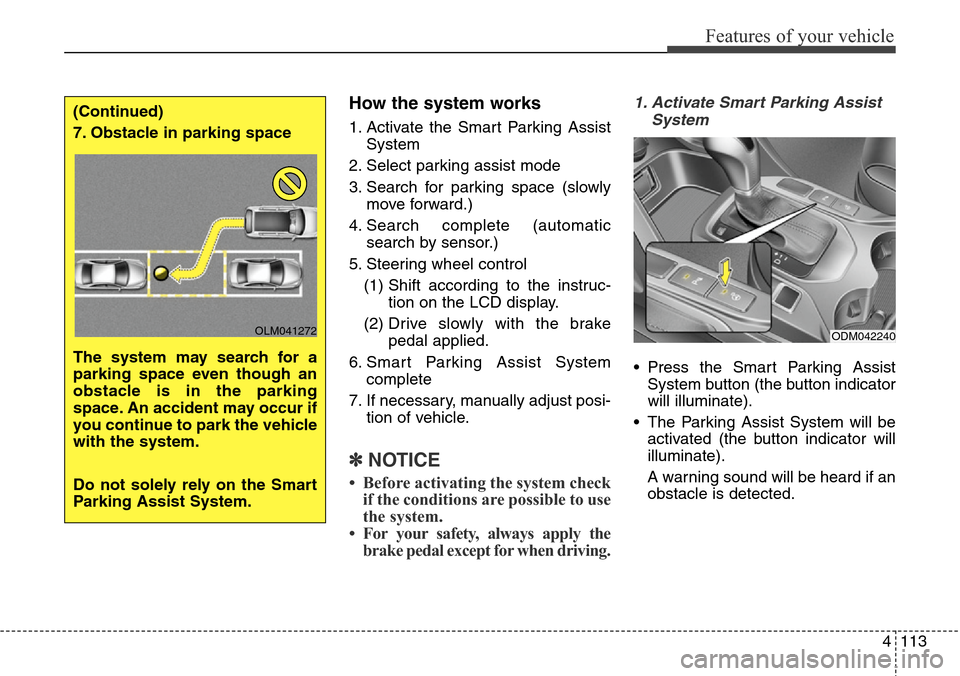
1. Activate the Smart Parking Assist
System
2. Select parking assist mode
3. Search for parking space (slowly
move forward.)
4. Search complete (automatic
search by sensor.)
5. Steering wheel control
(1) Shift according to the instruc-
tion on the LCD display.
(2) Drive slowly with the brake
pedal applied.
6. Smart Parking Assist System
complete
7. If necessary, manually adjust posi-
tion of vehicle.
✽NOTICE
• Before activating the system check
if the conditions are possible to use
the system.
• For your safety, always apply the
brake pedal except for when driving.
1. Activate Smart Parking Assist
System
• Press the Smart Parking Assist
System button (the button indicator
will illuminate).
• The Parking Assist System will be
activated (the button indicator will
illuminate).
A warning sound will be heard if an
obstacle is detected.
(Continued)
7. Obstacle in parking space
The system may search for a
parking space even though an
obstacle is in the parking
space. An accident may occur if
you continue to park the vehicle
with the system.
Do not solely rely on the Smart
Parking Assist System.
OLM041272ODM042240
Page 216 of 718
4119
Features of your vehicle
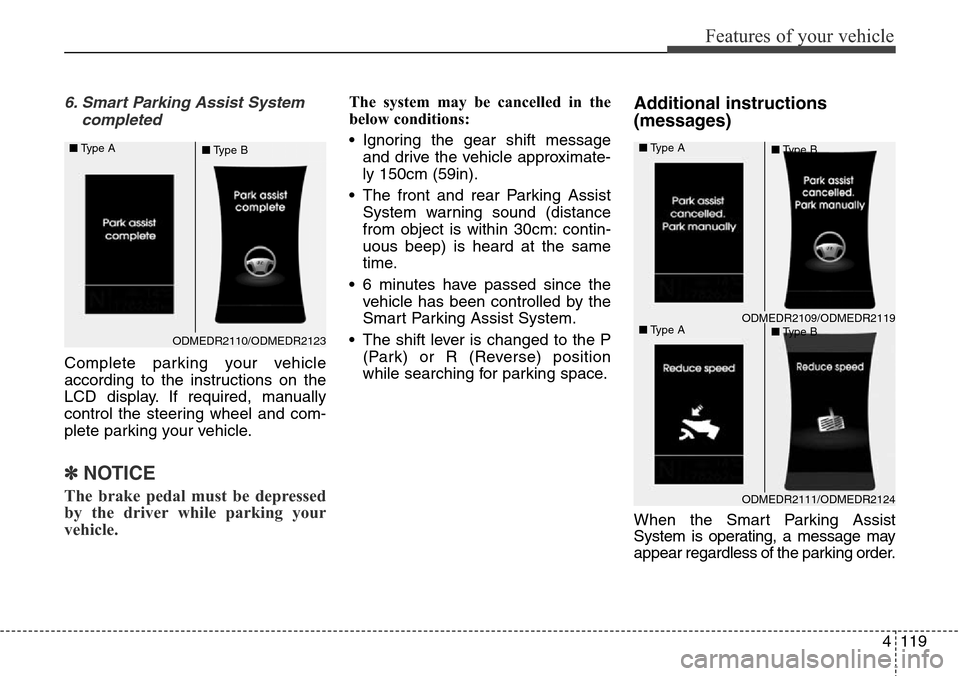
6. Smart Parking Assist System
completed
Complete parking your vehicle
according to the instructions on the
LCD display. If required, manually
control the steering wheel and com-
plete parking your vehicle.
✽NOTICE
The brake pedal must be depressed
by the driver while parking your
vehicle.
The system may be cancelled in the
below conditions:
• Ignoring the gear shift message
and drive the vehicle approximate-
ly 150cm (59in).
• The front and rear Parking Assist
System warning sound (distance
from object is within 30cm: contin-
uous beep) is heard at the same
time.
• 6 minutes have passed since the
vehicle has been controlled by the
Smart Parking Assist System.
• The shift lever is changed to the P
(Park) or R (Reverse) position
while searching for parking space.Additional instructions
(messages)
When the Smart Parking Assist
System is operating, a message may
appear regardless of the parking order.
ODMEDR2110/ODMEDR2123 ■Type A
■Type B
ODMEDR2111/ODMEDR2124
ODMEDR2109/ODMEDR2119 ■Type A
■Type A■Type B
■Type B
Page 218 of 718
4121
Features of your vehicle
The rearview camera will activate
when the back-up light is ON with the
ignition switch ON and the shift lever
in the R (Reverse) position.
✽NOTICE
The warning "Warning ! Check sur-
roundings for safety" will appear on
the rearview display when the
rearview camera is activated.
REARVIEW CAMERA (IF EQUIPPED)
WARNING
• This system is a supplemen-
tary function only. It is the
responsibility of the driver to
always check the inside/out-
side rearview mirror and the
area behind the vehicle before
and while backing up because
there is a dead zone that cannot
be seen through the camera.
• Always keep the camera lens
clean. If the lens is covered
with foreign matter, the cam-
era may not operate normally.
ODM042238
ODM042239
Page 252 of 718
4155
Features of your vehicle
AUTOMATIC CLIMATE CONTROL SYSTEM (IF EQUIPPED)
ONCNCL2006/ONCNCL2009/ONCNCL2002
1. Front windshield defrost button
2. Rear window defrost button
3. Display
4. Air conditioning button*
5. Mode selection button
6. Dual temperature control selection button
7. Driver's temperature control button
8. Front fan speed control knob
9. AUTO (automatic control) button
10. Front blower OFF button
11. Air intake control button* or recirculated
air position button*
12. 3
rdrow climate control ON/OFF button
(controlled from the front)
13. Passenger's temperature control button
14. 3
rdrow fan speed control knob
15. 3
rdrow blower ON/OFF button
16. 3
rdrow mode selection button
17. 3
rdrow temperature control knob
18. Climate control information screen
selection button*
* if equipped
■Front climate control (Type A)■Front climate control (Type B)
■■3rdrow climate control (for Type A and B)
Page 253 of 718
Features of your vehicle
156 4
ODMECL2010/OANNMM2002
1. Front windshield defroster button
2. Rear window defrost button
3. Display
4. Air conditioning button*
5. Mode selection button
6. Dual temperature control selection button
7. Driver's temperature control button
8. Front fan speed control knob
9. AUTO (automatic control) button
10. Blower OFF button
11. Air intake control button* or recirculated
air position button*
12. Passenger's temperature control button
13. Climate control information screen
selection button
* if equipped
■Front climate control (Type C)
■■Front climate control (Type D)
Page 258 of 718

4161
Features of your vehicle
When the driver side temperature is
set to the highest (HIGH) or lowest
(LOW) temperature, the DUAL mode
deactivates for maximum heating or
cooling.Adjusting the driver and passenger
side temperature equally
1. Press the DUAL button again to
deactivate DUAL mode. The pas-
senger side temperature will be
set to the same temperature as
the driver side.
2. Operate the driver side tempera-
ture control button. The driver and
passenger side temperature will
be adjusted equally.
Temperature conversion
You can switch the temperature
mode between Centigrade to
Fahrenheit as follows:
While pressing the OFF button,
press the AUTO button for 3 seconds
or more.
The display will change from
Centigrade to Fahrenheit, or from
Fahrenheit to Centigrade.Air intake control
The air intake control is used to
select the outside (fresh) air position
or recirculated air position.
To change the air intake control posi-
tion, press the control button.
ODMECL2004 ■Type A
■Type B


