Page 152 of 718

455
Features of your vehicle
2. Press and hold the button for more
than 3 but less than 6 seconds.
The current zone number will
appear in the display.3. Press the button until the new zone
number appears in the display.
After you stop pressing the button
in, the display will show a compass
direction within a few seconds.
B520C03JM
Asia
B520C04JM
South America
CAUTION
1.Do not install the ski rack,
antenna, etc. which are
attached to the vehicle by
means of a magnet. They affect
the operation of the compass.
2.If the compass deviates from
the correct indication soon
after repeated adjustment, we
recommend that you have the
compass checked at an
authorized HYUNDAI dealer.
3.The compass may not indicate
the correct compass point in
tunnels or while driving up or
down a steep hill.
(The compass returns to the
correct compass point when
the vehicle moves to an area
where the geomagnetism is
stabilized.)
4.When cleaning the mirror, use
a paper towel or similar materi-
al dampened with glass clean-
er. Do not spray glass cleaner
directly on the mirror as that
may cause the liquid cleaner to
enter the mirror housing.
Page 157 of 718
Features of your vehicle
60 4
INSTRUMENT CLUSTER
1. Tachometer
2. Speedometer
3. Engine coolant temperature gauge
4. Fuel gauge
5. LCD display
6. Warning and indicator lights (if equipped)
7. Turn signal indicator lights
ODMEMM2346/ODMEMM2054
■Type A
- Gasoline engine
❈The actual cluster in the vehicle may differ
from the illustration.
For more details, refer to the "Gauges" in
this chapter.
- Diesel engine
Page 158 of 718
461
Features of your vehicle
1. Tachometer
2. Speedometer
3. Engine coolant temperature gauge
4. Fuel gauge
5. LCD display
6. Warning and indicator lights (if equipped)
7. Turn signal indicator lights
ODMEMM2347/ODMEMM2055
■Type B
- Gasoline engine
❈The actual cluster in the vehicle may differ
from the illustration.
For more details, refer to the "Gauges" in
this chapter.
- Diesel engine
Page 159 of 718
Features of your vehicle
62 4
Instrument Cluster Control
Adjusting Instrument Cluster
Illumination (if equipped)
The brightness of the instrument
panel illumination is changed by
moving the illumination control knob
right or left when the ignition switch
or Engine Start/Stop button is ON, or
the tale lights are turned on.• The brightness has 20 levels : 1
(MIN) ~ 20 (MAX)
• If you hold the illumination control
knob on the right end (+) or left end
(-), the brightness will be changed
continuously.
• If the brightness reaches to the
maximum or minimum level, an
alarm will sound.
LCD Display Control
The LCD display modes can be
changed by using the control buttons
on the steering wheel.
(1) : MODE button for changing
modes
(2) : MOVE button for changing
items
(3) : SELECT/RESET button for
setting or resetting the
selected item
❈For the LCD modes, refer to “LCD
Display” in this chapter.
ODMEDI2001/ODMEDI2029 ■Type A
■Type B
ODM042056
ODM042224
Page 164 of 718

467
Features of your vehicle
Outside Temperature Gauge
This gauge indicates the current out-
side air temperatures by 1°C (1°F).
- Temperature range : -40°C ~ 60°C
(-40°F ~ 140°F)
The outside temperature on the dis-
play may not change immediately
like a general thermometer to pre-
vent the driver from being inattentive.
The temperature unit (from °C to °F
or from °F to °C) can be changed by
using the “User Settings” mode of the
LCD display.
❈For more details, refer to “LCD
Display” in this chapter.
Icy Road Warning Light
(if equipped)
This warning light is to warn the driv-
er the road may be icy.
When the following conditions occur,
the warning light (including Outside
Temperature Gauge) blinks 10 times
and then illuminates, and also warn-
ing chime sounds 3 times.
- The temperature on the Outside
Temperature Gauge is below
approximately 4°C (39.2°F)
- The ignition switch or Engine
Start/Stop button is ON
✽NOTICE
If the icy road warning light appears
while driving, you should drive
more attentively and safely refrain-
ing from over-speeding, rapid accel-
eration, sudden braking or sharp
turning, etc.
ODMEDI2905/OVF041089 ■Type A
■Type B
ODMEDI2906/OVF041090 ■Type A
■Type B
Page 165 of 718
Features of your vehicle
68 4
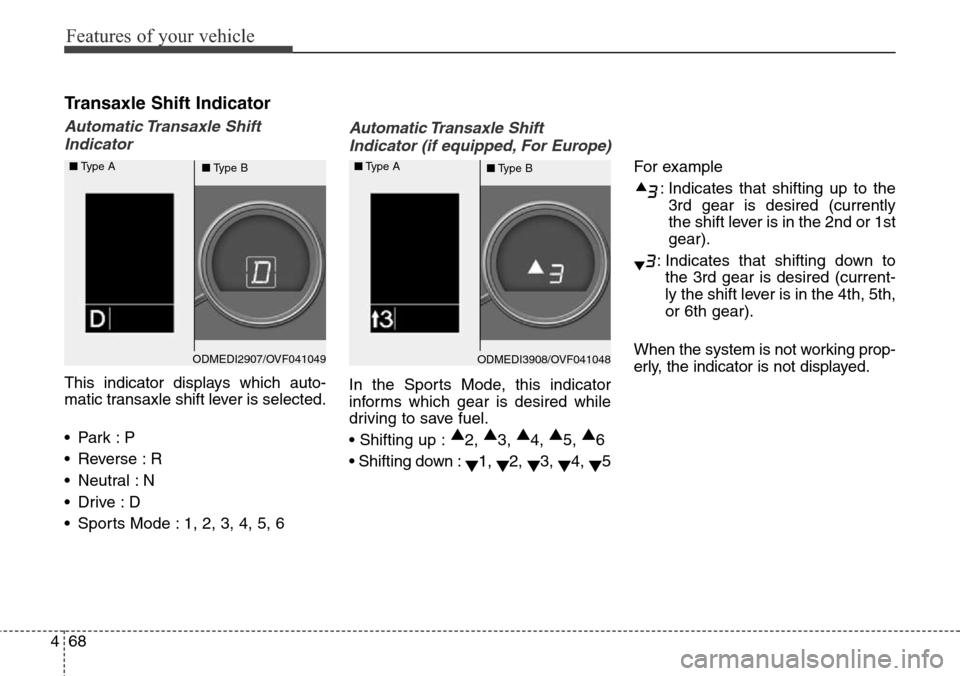
Transaxle Shift Indicator
Automatic Transaxle Shift
Indicator
This indicator displays which auto-
matic transaxle shift lever is selected.
•Park :P
• Reverse : R
• Neutral : N
•Drive :D
• Sports Mode : 1, 2, 3, 4, 5, 6
Automatic Transaxle Shift
Indicator (if equipped, For Europe)
In the Sports Mode, this indicator
informs which gear is desired while
driving to save fuel.
• Shifting up :▲
2, ▲
3, ▲
4, ▲
5, ▲
6
• Shifting down :
▼1,
▼2,
▼3,
▼4,
▼5For example
: Indicates that shifting up to the
3rd gear is desired (currently
the shift lever is in the 2nd or 1st
gear).
: Indicates that shifting down to
the 3rd gear is desired (current-
ly the shift lever is in the 4th, 5th,
or 6th gear).
When the system is not working prop-
erly, the indicator is not displayed.
ODMEDI2907/OVF041049 ■Type A
■Type BODMEDI3908/OVF041048 ■Type A
■Type B
Page 166 of 718
469
Features of your vehicle
LCD Modes
LCD DISPLAY
Modes SymbolExplanationType AType B
Trip Computer
This mode displays driving information like the tripmeter,
fuel economy, and so on.
For more details, refer to “Trip Computer” in this chapter.
ServiceThis mode informs of service interval (mileage or days) and
warning messages related to TPMS, washer fluid.
User SettingsOn this mode, you can change settings of the doors, lamps,
and so on.
LDWS
(if equipped)-
This mode displays the state of the Lane Departure Warning
System (LDWS).
For more details, refer to “Lane Departure Warning System
(LDWS)” in chapter 5.
A/V
(if equipped)-This mode displays the state of the A/V system.
Tu r n B y Tu r n
(if equipped)-This mode displays the state of the navigation.
oror
❈For controlling the LCD modes, refer to "LCD Display Control" in this chapter.
or
Page 167 of 718

Features of your vehicle
70 4
Service Mode
Service Interval
Service in
It calculates and displays when you
need a scheduled maintenance
service (mileage or days).
If the remaining mileage or time
reaches 1,500 km (900 mi.) or 30
days, "Service in" message is dis-
played for several seconds each time
you set the ignition switch or Engine
Start/Stop Button to the ON position.Service required
If you do not have your vehicle serv-
iced according to the already inputted
service interval, “Service required”
message is displayed for several sec-
onds each time you set the ignition
switch or Engine Start/Stop Button to
the ON position. (The mileage and
time changes to "---")To reset the service interval to the
mileage and days you inputted before:
- Activate the reset mode by pressing
the SELECT/RESET button for
more than 5 seconds, then press the
SELECT/RESET button again
for more than 1 second (Europe).
- Press the SELECT/RESET button
for more than 1 second (Except
Europe).
ODMEDI2067/ODMEDI2071 ■Type A
■Type BODMEDI2066/ODMEDI2070 ■Type A
■Type B