2013 Hyundai Genesis switch
[x] Cancel search: switchPage 124 of 429

445
Features of your vehicle
FCC ID: NZLZTVHL3
IC: 4112A-ZTVHL3
This device complies with Part 15 of
the FCC Rules.
Operation is subject to the following two
conditions:
1. this device may not cause harmfulinterference, and
2. This device must accept any interfer- ence received, including interference
that may cause undesired operation.
NVS
®is a registered trademark and Z-
Nav™ is a trademark of the Gentex
Corporation, Zeeland, Michigan.
HomeLink
®is a registered trademark
owned by Johnson Controls,
Incorporated, Milwaukee, Wisconsin.
D140200AUN-EU
Outside rearview mirror
Be sure to adjust mirror angles before
driving.
Your vehicle is equipped with both left-
hand and right-hand outside rearview
mirrors. The mirrors can be adjusted
remotely with the remote switch. The mir-
ror heads can be folded back to prevent
damage during an automatic car wash or
when passing in a narrow street.
WARNING
The transceiver has been tested
and complies with FCC and
Industry Canada rules. Changes or
modifications not expressly
approved by the party responsible
for compliance could void the
user's authority to operate the
device.
WARNING - Rearview mir-
rors
The right outside rearview mirror is convex. Objects seen in the
mirror are closer than they
appear.
Use your interior rearview mirror or direct observation to deter-
mine the actual distance of fol-
lowing vehicles when changing
lanes.
CAUTION
Do not scrape ice off the mirrorface; this may damage the surfaceof the glass. If ice should restrict movement of the mirror, do notforce the mirror for adjustment. Toremove ice, use a deicer spray, or a sponge or soft cloth with warmwater.
CAUTION
If the mirror is jammed with ice, do not adjust the mirror by force. Usean approved spray de-icer (not radi- ator antifreeze) to release thefrozen mechanism or move the vehicle to a warm place and allowthe ice to melt.
WARNING
Do not adjust or fold the outside
rearview mirrors while the vehicle
is moving. This could result in loss
of control, and an accident which
could cause death, serious injury
or property damage.
Page 125 of 429

Features of your vehicle
46
4
D140201ABH
Remote control
The electric remote control mirror switch
allows you to adjust the position of the
left and right outside rearview mirrors. To
adjust the position of either mirror, move
the lever (1) to right or left to select the
right side mirror or the left side mirror,
then press a corresponding point ( ) on
the mirror adjustment control to position
the selected mirror up, down, left or right.
After adjustment, put the lever into neu-
tral position to prevent the inadvertent
adjustment.
Electric chromic mirror (ECM)
(if equipped)
The electric chromic mirror automatically
controls the glare from the headlights of
the car behind you in nighttime or low
light driving conditions. The sensor
mounted in the mirror senses the light
level around the vehicle, and automati-
cally controls the headlight glare from
vehicles behind you.
When the engine is running, the glare is
automatically controlled by the sensor
mounted in the rearview mirror.
Whenever the shift lever is shifted into R
(Reverse), the mirror will automatically
go to the brightest setting in order to
improve the drivers view behind the vehi-
cle. If the ECM of inside rear view mirror
operates, it will be working.
OBH048042
CAUTION
The mirrors stop moving when they reach the maximum adjust-ing angles, but the motor contin-ues to operate while the switch isdepressed. Do not depress the switch longer than necessary, themotor may be damaged.
Do not attempt to adjust the out- side rearview mirror by hand.Doing so may damage the parts.
CAUTION
When cleaning the mirror, use apaper towel or similar materialdampened with glass cleaner. Do not spray glass cleaner directly onthe mirror as that may cause the liq- uid cleaner to enter the mirror hous-ing.
Page 126 of 429

447
Features of your vehicle
D140202ABH
Folding the outside rearview mirror
Electric Type (if equipped)
To fold the outside rearview mirror,
depress the button.
To unfold it, depress the button again.The ignition switch must be in the ON
position for the electric outside rearview
mirrors to fold.
The electric folding outside rearview mir-
ror can be operated for approximately 30
seconds after the ignition key is removed
or turned to the LOCK position.D140202AEN
Manual Type (if equipped)
To fold the outside rearview mirror, grasp
the housing of the mirror and then fold it
toward the rear of the vehicle.
OBH048204N
OBH048043
CAUTION
In case of the electric type of out-
side rearview mirror, don’t fold it byhand. It could cause the failure ofthe motor.
Page 130 of 429

451
Features of your vehicle
D150203AUN
Engine temperature gauge
This gauge shows the temperature of the
engine coolant when the ignition switch
is ON.
Do not continue driving with an overheat-
ed engine. If your vehicle overheats, refer
to “If the engine overheats” in section 6.
OBH041051
CAUTION
If the gauge pointer moves beyondthe normal range area toward the“H” position, it indicates overheat-ing that may damage the engine.
CAUTION
Do not operate the engine within the tachometer's RED ZONE.
This may cause severe engine dam-age.WARNING
Never remove the radiator cap
when the engine is hot. The engine
coolant is under pressure and
could cause severe burns. Wait
until the engine is cool before
adding coolant to the reservoir.
Page 131 of 429
Features of your vehicle
52
4
D150204BBH
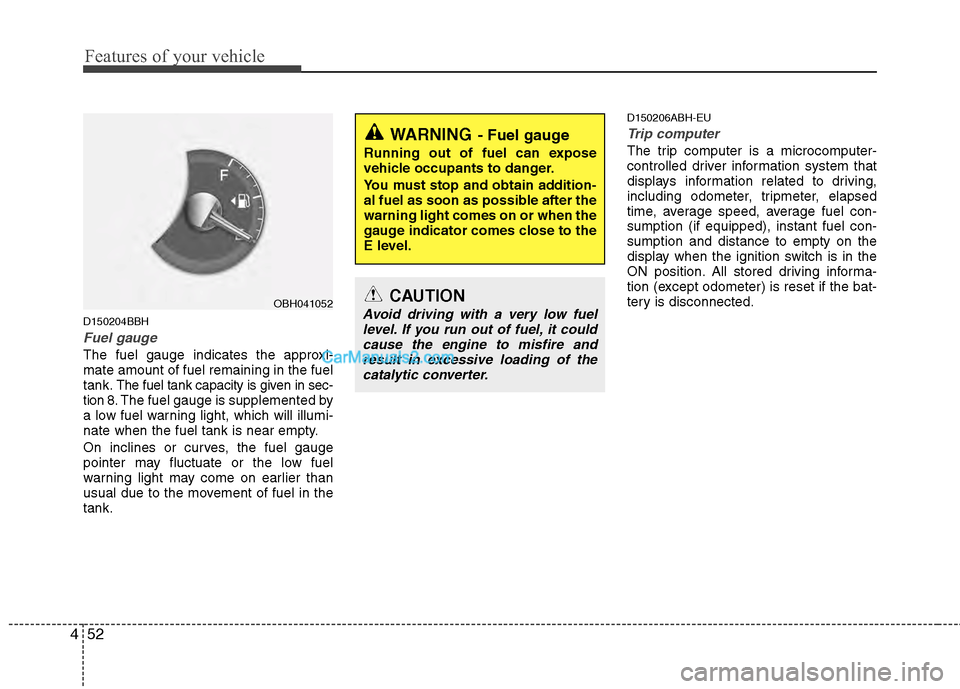
Fuel gauge
The fuel gauge indicates the approxi-
mate amount of fuel remaining in the fuel
tank.
The fuel tank capacity is given in sec-
tion 8.The fuel gauge is supplemented by
a low fuel warning light, which will illumi-
nate when the fuel tank is near empty.
On inclines or curves, the fuel gauge
pointer may fluctuate or the low fuel
warning light may come on earlier than
usual due to the movement of fuel in the
tank.
D150206ABH-EU
Trip computer
The trip computer is a microcomputer-
controlled driver information system that
displays information related to driving,
including odometer, tripmeter, elapsed
time, average speed, average fuel con-
sumption (if equipped), instant fuel con-
sumption and distance to empty on the
display when the ignition switch is in the
ON position. All stored driving informa-
tion (except odometer) is reset if the bat-
tery is disconnected.WARNING- Fuel gauge
Running out of fuel can expose
vehicle occupants to danger.
You must stop and obtain addition-
al fuel as soon as possible after the
warning light comes on or when the
gauge indicator comes close to the
E level.
CAUTION
Avoid driving with a very low fuel level. If you run out of fuel, it could cause the engine to misfire andresult in excessive loading of the catalytic converter.OBH041052
Page 134 of 429

455
Features of your vehicle
Average speed (MPH or km/h)
This mode calculates the average speed
of the vehicle since the last average
speed reset.
Even if the vehicle is not in motion, the
average speed is calculated while the
engine is running.
Pressing the RESET button for more
than 1 second, when the average speed
is being displayed, clears the average
speed to zero (---). If the ignition switch is
turned to OFF for more than 2 hours, it
will be reset automatically.Elapsed time
This mode indicates the total time trav-
eled since the last driving time reset.
Even if the vehicle is not in motion, the
driving time is calculated while the
engine is running.
The meter’s working range is from
0:00~99:59.
Pressing the RESET button for more
than 1 second, when the driving time is
being displayed, clears the driving time to
zero (0:00). If the ignition switch is turned
to OFF for more than 2 hours, it will be
reset automatically.Average fuel consumption (if equipped)
(MPG or
l/100 km)
This mode calculates the average fuel
consumption from the total fuel used and
the distance since the last average con-
sumption reset. The total fuel used is cal-
culated from the fuel consumption input.
For an accurate calculation, begin driving
the vehicle for several miles.
Pressing the RESET button for more than
1 second, when the average fuel con-
sumption is being displayed, clears the
average fuel consumption to zero (----).
If the vehicle speed exceeds 1.6 MPH (1
km/h) after refueled more than 1.6 gal-
lons (6 l ), the average fuel consumption
will be cleared to zero (---).
OBH042059N
Type I Type
II
OBH042060L
Type I Type
II
OBH042333N
Type I Type
II
Page 136 of 429

457
Features of your vehicle
AV information (if equipped)
This mode displays the state of the AV
(RADIO, CD, USB, AUX etc.).Turn by turn navigation (if equipped)
This mode displays the information of the
navigation.
D150300AEN
Warnings and indicators
All warning lights are checked by turning
the ignition switch ON (do not start the
engine). Any light that does not illuminate
should be checked by an authorized
HYUNDAI dealer.
After starting the engine, check to make
sure that all warning lights are off. If any
are still on, this indicates a situation that
needs attention. When releasing the
parking brake, the brake system warning
light should go off. The fuel warning light
will stay on if the fuel level is low.
OBH042353LOBH042350L
Page 137 of 429

Features of your vehicle
58
4
ECO indicator
(if equipped)
The ECO indicator light helps that you to
drive economically.
It is displayed if you drive fuel efficiently
to help you improve fuel efficiency.
The ECO indicator (green) will turn on when you are driving fuel efficiently in
the ECO Driving ON mode.
If you don't want the indicator dis-
played, you can turn the ECO Driving
ON mode to OFF mode by pressing the
DISP button (or the RESET button).
As per ECO Driving ON/OFF mode
operation, refer to the previous page.
The fuel-efficiency can be changed by the driver's driving habits and road
conditions.
The ECO indicator will not display if the condition doesn't meet economical
driving such as P (Park), N (Neutral), R
(Reverse) or sports mode.
While the instant fuel consumption mode is displayed on the LCD screen,
the ECO indicator turns off (if equipped).
D150302ABH
Air bag warning light
This warning light will illuminate for
approximately 6 seconds each time you
turn the ignition switch to the ON posi-
tion.
This light also comes on when the
Supplemental Restraint System (SRS) is
not working properly. If the SRS air bag
warning light does not come on, or
continuously remains on after operating
for about 6 seconds when you turned the
ignition switch to the ON position or start-
ed the engine, or if it comes on while
driving, have the SRS inspected by an
authorized HYUNDAI dealer.
D150303AEN
Anti-lock brake system(ABS) warning light
This light illuminates if the ignition switch
is turned ON and goes off in approxi-
mately 3 seconds if the system is operat-
ing normally.
If the ABS warning light remains on,
comes on while driving, or does not
come on when the ignition switch is
turned to the ON position, this indicates
that there may be a malfunction with the
ABS.
If this occurs, have your vehicle checked
by an authorized HYUNDAI dealer as
soon as possible. The normal braking
system will still be operational, but with-
out the assistance of the anti-lock brake
system.
ECOWARNING
Do not watch the indicator while
driving. This will distract you and
may cause an accident that results
in severe personal injury.